
Instagram Reels Video Best Practices for B2B: Step-by-Step Guide
Most B2B Reels fail in the first three seconds. The idea may be sound, but the opening is slow, the captions are missing, or the video tries to say four things at once. These Instagram Reels video best practices for B2B follow the same ten steps we use when we produce short videos for SaaS companies, AI startups, funded startups, venture firms, and executives. Each step ends with something you can apply to your next Reel.
Quick Answer
Pick one viewer and one idea, open with the answer or the problem, add captions, keep the edit tight, export vertically at 1080 by 1920, and review watch time and shares after each batch.
Snapshot
What Instagram Says About Ranking
Instagram's head, Adam Mosseri, has said that watch time, likes, and sends are the top signals for ranking. According to Social Media Today's report, likes carry slightly more weight for connected content, and sends slightly more weight for unconnected content. Mosseri's advice was to watch average watch time, likes per reach, and send per reach in your insights.
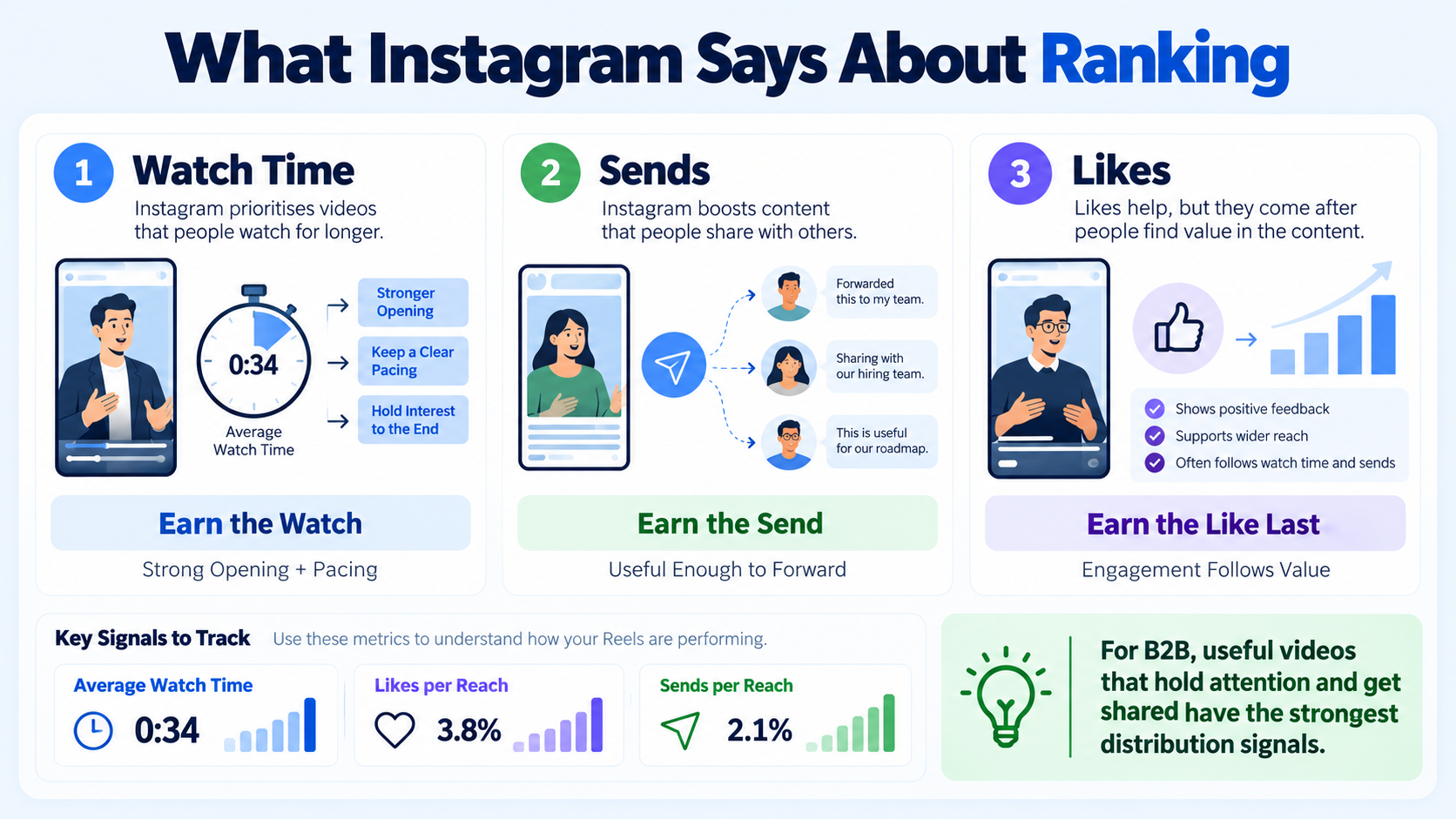
For B2B, I translate that into three production rules:
- Earn the watch. The opening and the pace decide whether viewers stay.
- Earn the send. People forward Reels that are useful to a colleague, such as a clear framework or a sharp answer to a common question.
- Earn the like last. Likes follow when the first two are in place.
Our explainer on the Instagram Reels algorithm and reach goes into the mechanics, and our overview of Instagram Reels strategy for B2B brands covers planning.
Step 1: Set a Goal and Name the Viewer
A Reel is not a mini ad. It is a short answer to a question someone in your market already has. Before you record, write down:
- Viewer: a role, such as "head of marketing at a Series B software company."
- Question: what are they trying to figure out?
- Outcome: do you want a follow, a share, a profile visit, or a click?
Different goals need different Reels, as the table shows.
Step 2: Choose a Reel Format Your Team Can Sustain
If you already record podcasts or webinars, the fastest way to build a Reels pipeline is to repurpose podcasts into Instagram Reels and turn long-form content into Reels posts.
Step 3: Write the Hook First
The hook is the first sentence or visual. Mosseri's emphasis on watch time means the opening matters more than anything that follows. Write it before you plan visuals.
Avoid greetings, logo animations, and long intros. For more structure, see our hook writing framework and the guide to writing hooks that stop the scroll.
Step 4: Script a Simple Structure
A short Reel needs a short structure. I use this four-part pattern:
- Hook: the problem or the answer.
- Reason: why it matters to this viewer.
- Proof or example: one specific illustration.
- Next step: follow, send, or visit a link.
Keep the script conversational. Most people read their scripts too fast, so leave gaps for emphasis. Our short-form video scripting template can be reused for each batch.
Step 5: Frame for Vertical
The standard export for Reels is 9:16 at 1080 by 1920 pixels, according to ContentStudio's 2026 spec guide. Other ratios are accepted, but they may be resized or padded. Check the current guidance in the app before you publish, since platform specifications change.
Instagram extended Reels to three minutes in January 2025, according to Lindsey Gamble's report on Mosseri's announcement. Our Reels format and spec guide lists the full set of recommended settings.
Framing guidance:
- Keep the speaker's face in the upper-middle of the frame.
- Leave margins at the top and bottom, because on-screen interface elements cover parts of the picture.
- Place captions in the middle-lower area, away from the buttons.
- Preview in the app before publishing.
Step 6: Add Captions
Many people watch without sound, especially in work settings. Captions also improve comprehension and make the message easier to follow.
- Use large, high-contrast text.
- Keep two lines or fewer on screen at a time.
- Highlight key words sparingly.
- Check names, product terms, and numbers for accuracy.
See our guide on captions and subtitles that lift retention and the discussion of captions vs subtitles for B2B video.
Step 7: Edit for Pace and Sound
Retention is an editing problem as much as a content problem. Remove pauses, tighten sentences, and change the visual every few seconds where it helps. Do not add effects that do not support the point.
Learn more in our guides on pacing and cuts for high-retention short video and using B-roll in talking-head video.
Step 8: Match the Length to the Idea
Longer is allowed, but not automatically better. I would use these as starting points, then adjust with your own data.
These are my working ranges, not Instagram rules. Our discussion of how long a B2B short-form video should be explains how to test length.
Step 9: Write the Caption and Cover
Step 10: Publish, Cross-Post, and Review
Post on a schedule you can keep. Our guide on Instagram Reels posting cadence can help you choose a rhythm. Then cross-post carefully. Reuse the same core video on LinkedIn, YouTube Shorts, and TikTok, but check captions and safe areas for each platform. Our notes on cross-posting video without killing reach cover the details.
Review after each batch:
Attribution will be imperfect. Use several signals, and ask new contacts where they found you. Do not treat correlation as proof of causation.
A 30-Day Batch Plan You Can Copy
Knowing the steps is easier than applying them every week. This is the plan I suggest to teams starting from zero. It is a working template, not an Instagram requirement, and you should adjust it to your own capacity.
Three habits keep the plan alive:
- Batch the recording. One session with a few outfits or backdrops is cheaper than recording each Reel alone.
- Use a checklist. Teams that apply Instagram Reels video best practices for B2B as a checklist, not a memory exercise, ship more consistently.
- Review on a fixed day. Look at watch time and send it once a week, not every hour.
If you find the plan heavy, that is normal. Most teams struggle with the recording and editing load, not the ideas.
Common Mistakes
Most of the problems I see when teams apply Instagram Reels video best practices for B2B come down to the following:
- Opening with a logo, a greeting, or a slow lead-in.
- Packing several ideas into one Reel.
- Forgetting captions or placing them too low.
- Using trending audio that fights with speech.
- Posting in bursts and then disappearing.
- Measuring only likes and followers.
Read our guide on Instagram growth mistakes for B2B brands for more.
Who Should Produce Your Reels
Komet Media provides short-form video editing and an Instagram growth service that covers everything from scratch—including research, scripting, recording, editing, posting, and cross-posting for B2B SaaS, AI startups, and tech teams. For paid amplification, see our Instagram marketing and Instagram ads support. Typical retainers run around $2,500 to $5,000, depending on scope, volume, production difficulty, turnaround, and distribution needs. That is a working range, not a fixed package.
Conclusion
The best Reels are narrow, clear, and consistent. Start with one viewer and one idea, write the hook before you film, caption everything, and review the numbers that matter. Instagram Reels video best practices for B2B are simple to state and hard to sustain, which is why a production routine matters more than inspiration. Editing creates the asset. Distribution and consistency give it a chance to produce business value. If you want to talk through a Reels plan, you can book a call.
FAQ
What are Instagram Reels video best practices for B2B?
They are production and publishing habits that fit a business audience: a clear viewer, a strong opening, captions, tight editing, vertical framing, one call to action, and review of watch time and shares.
How much does Reels production cost for a B2B team?
Cost depends on volume, production difficulty, and whether you want strategy and posting included. Komet Media's typical working range is around $2,500 to $5,000 for retainers. Freelancers and in-house hires price differently, so compare what each includes.
How long should a B2B Reel be?
Start with 15 to 60 seconds for most ideas, then test longer cuts when the topic needs them. Instagram allows Reels up to three minutes, but length should follow the idea. Among Instagram Reels video best practices for B2B, matching length to the idea matters more than hitting a number.
How often should we post Reels?
Choose a pace the team can sustain. Many managed programs aim for several Reels a week. Consistency matters more than volume.
How long does it take to see results?
Plan for at least a few months. The first weeks are for production and testing, and later weeks show which hooks and topics work. Applying Instagram Reels video best practices for B2B early shortens that testing phase, but it does not remove it.
Should we use a freelancer or an agency?
A freelancer suits edits when your team handles strategy and posting. An agency suits teams that want research, scripts, editing, posting, and cross-posting handled together.
Do B2B companies really need Reels?
Not every company does. Reels fit teams that want founder visibility, employer-brand presence, or a lighter way to share expertise. Many teams pair Reels with LinkedIn. See our comparison of Reels vs Shorts vs TikTok for B2B.
Does Komet Media produce Reels for B2B brands?
Yes. We produce Reels from scratch and distribute them for B2B SaaS, AI startups, funded tech teams, venture and private equity firms, and executives, either as editing support or as a full end-to-end growth service.

