
Using B-Roll to Make Talking-Head Video Engaging: Step-by-Step Guide
A talking-head video can lose viewers even when the speaker is strong. The frame stops changing while the argument keeps moving. Using B-roll to make talking-head video engaging fixes that by giving each important claim something to look at. For founders, VC partners, and B2B SaaS, AI, and tech startups & teams, the expertise is usually strong and the visuals are static. This guide explains what B-roll is, where teams go wrong, and the steps we follow to add it.
Quick Answer
Edit the talking-head footage first. Then add short, relevant cutaways where a claim needs proof, a cut needs hiding, or attention may dip. Keep the audio continuous and check retention data afterward.
Why Talking-Head Video Needs B-Roll
B-roll is supporting footage that plays over or between your main footage, which editors call A-roll. In a talking-head video, A-roll is the person speaking to camera. B-roll is everything else you cut to: screen recordings, product shots, office footage, charts, and motion graphics. Adobe's B-roll guide lists the practical jobs editors give it: setting a scene, smoothing a transition, and covering a cough or unwanted frame without discarding the whole take.
In my experience, b-roll does three jobs in business video:
- It hides edit points. When you remove a pause or a stumble, the speaker appears to jump on screen. That visible skip is called a jump cut, and a cutaway placed over it keeps the audio clean and the picture smooth.
- It proves or illustrates a claim. If a founder says onboarding is simpler, showing the onboarding screen does more than repeating the sentence in a caption.
- It resets attention. A change of image or scale gives the eye a new reason to stay.
The third job is where retention data becomes useful. YouTube's help documentation says audience sizes typically decrease over the length of a video. Its retention report also marks dips, where viewers skipped or stopped watching, and an intro figure showing who was still watching after 30 seconds.
Wistia offers a wider view. Its analysis of more than 13 million videos found that videos under one minute average a 52% engagement rate, meaning viewers typically watch about half. Wistia also notes that most viewers drop off around the halfway point. That data covers all industries and video types, and it measures how much of a video was watched, not whether b-roll was used.
I want to be direct about the limits. None of these sources isolates b-roll as a variable. Treat the link between b-roll and retention as an editing judgment you test on your own videos, not as a proven lift.
Where Teams Go Wrong With B-Roll
Most problems with using B-roll to make talking-head video engaging come from adding footage before deciding what it is for. One mistake I see repeatedly is a team finishing the edit and then hunting for something to lay over it.
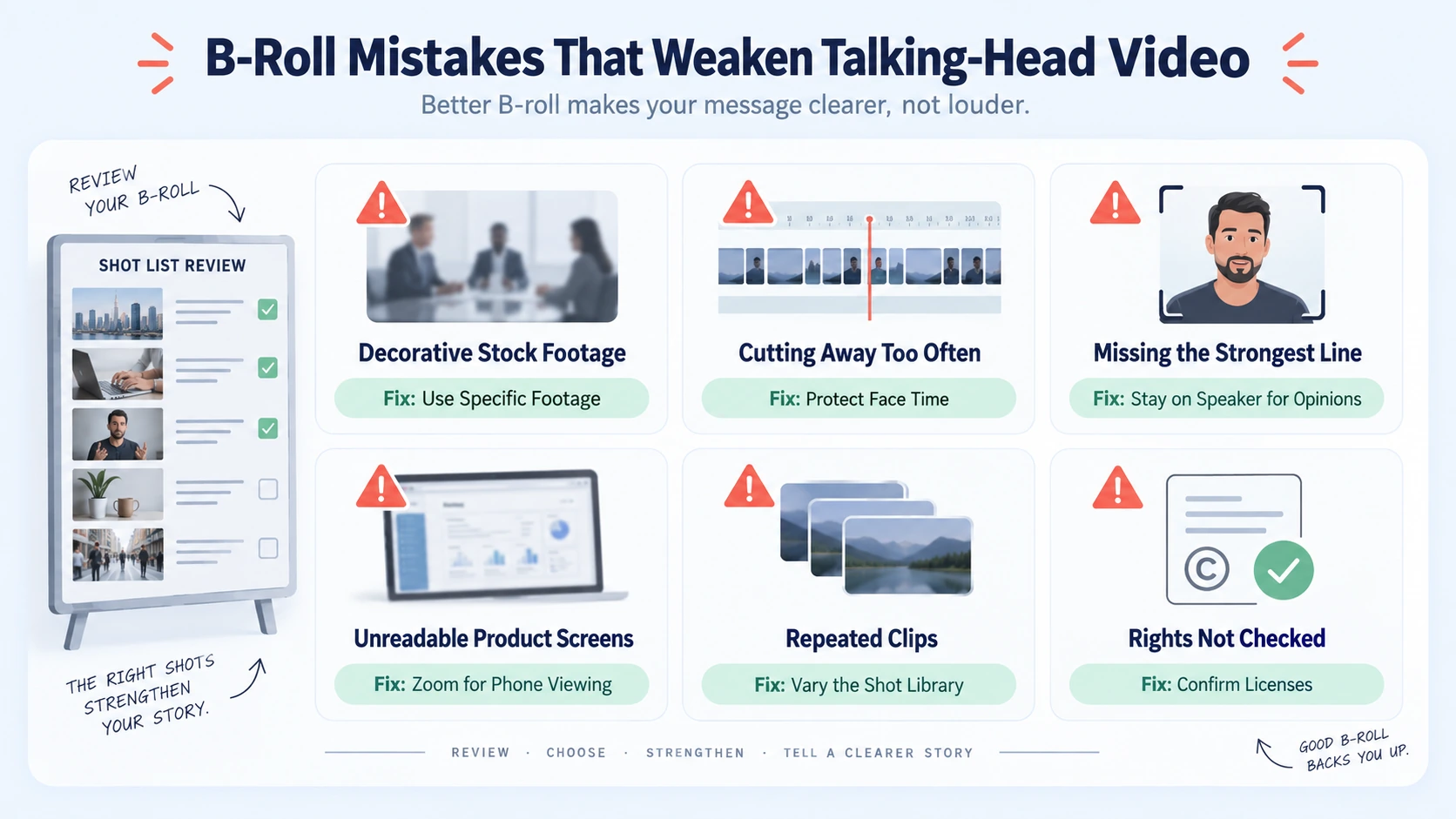
Common patterns include:
- Decorative footage: a generic stock clip of people in a meeting under a sentence about reducing churn. It fills the frame but says nothing.
- Covering everything: when every sentence has a cutaway, the speaker's face disappears. For founder-led content, face time is part of how viewers form trust, so I protect it for the lines that carry an opinion.
- Cutting away at the wrong moment: leaving the speaker exactly when they deliver the strongest line.
- Unreadable footage: dashboards and interface recordings that look fine on a monitor and turn into a blur on a phone.
- Repeated clips: the same office exterior in every video makes a series feel templated.
- Ignoring rights: using stock, client logos, or footage of people without checking the license or permission.
There is also an approval problem that slows many teams. Reviewers often judge b-roll one shot at a time, so a clip gets rejected for looking plain even though it does its job in sequence. We share a shot list with the reason for each cutaway before the first cut, so feedback stays about purpose and not taste.
Almost every one of these problems traces back to skipping the planning step. That is why the workflow below starts before any footage is placed.
Using B-Roll to Make Talking-Head Video Engaging: The Step-by-Step Workflow
A typical version of this workflow has eight steps. Small teams can shorten some of them, and I say which ones after the list.
- Lock the talking-head edit first. Cut for meaning and pace before you think about visuals. Remove repeated points, filler, and long pauses. If you add b-roll first, you will rework it every time the audio changes.
- Mark the visual gaps. Watch the cut with sound and mark four kinds of moment: claims that can be shown, abstract terms that need a picture, edit points that jump, and stretches where the same frame has sat too long. A transcript with timestamps makes this faster. I look for nouns and verbs that can be shown.
- Assign a job to each gap. Decide whether the shot should prove, illustrate, give context, cover a cut, or reset attention. The table in the next section helps with this.
- Build a shot list. Adobe's guide recommends a shot list and, for talking-head content, advises noting which images pair with the dialogue. List each gap, the line it supports, and where the footage will come from.
- Source the footage. In order of preference: footage you already own, such as product recordings, events, and team moments; short pickup shots recorded for this video; motion graphics for ideas with no natural picture; and licensed stock as a last resort. In our workflow, sourcing is usually where the time goes, not placing.
- Place and time each cutaway. Start it just after the speaker begins the claim and return to the face before the sentence ends. Keep the clip up long enough to be understood, because a chart that flashes past is worse than no chart. As a starting point, I keep most cutaways between two and four seconds and adjust from there. That is an editing habit, not a benchmark.
- Protect the audio and add captions. Keep the speaker's voice unbroken under every cutaway. Add captions after the b-roll is placed so caption text does not collide with text inside the footage. Our captions and subtitles tutorial covers styling in more detail.
- Check on a phone, then export by platform. Watch the final cut at phone size with the sound off. Then export separate versions for each channel.
Two steps should never be skipped: locking the audio edit and marking the gaps. If you only do one thing when using B-roll to make talking-head video engaging, do step 2, because it turns b-roll from decoration into a decision. A small team can compress steps 4 and 5 into a short list of footage it already owns. I would also keep the phone check in step 8, since most legibility problems only show up at small sizes.
A short illustration
A SaaS founder records a 45-second clip about why implementations stall. The clip has four gaps.
Notice that the speaker stays on screen for the opening hook and the closing line. The b-roll covers the middle, where the argument needs support.
Choosing the Right B-Roll for Each Job and Audience
The table matches each job to the footage that usually serves it.
The same approach looks different to the audience. For venture capital and private equity firms, including those in New York, restraint usually works best: charts, market maps, event footage, and clean text treatments that match the seriousness of the subject. Portfolio company logos should appear only with permission.
For B2B SaaS, AI, and tech startups & teams, whether in San Francisco or elsewhere, product footage is the most credible b-roll because it shows the thing being discussed. Where the product is abstract, a simple diagram often beats a busy animation. Our short-form video editing and video production work for these teams leans on product screens, original content creation, and clear graphics for that reason.
For founders and CEOs, workspace footage, whiteboard moments, and customer interactions add human context. In every case, using B-roll to make talking-head video engaging works when the footage is specific to the sentence it supports.
How the Approach Changes by Platform
Platforms reward different things, so the same cut rarely works everywhere. These are the differences I plan for.
- LinkedIn. In its 2026 State of Video Report, Wistia surveyed more than 900 professionals across industries and found that about 8 in 10 teams name LinkedIn their primary place to share video. That is a cross-industry figure, not a B2B-only one. I design every LinkedIn cut so it still makes sense muted: captions carry the words and b-roll carries the proof.
- Instagram Reels. Instagram's ranking explainer lists how likely someone is to watch a reel all the way through among its most important predictions for Reels. Platform ranking changes over time, so check current guidance. For Reels I keep cutaways tight, frame for vertical, and keep key content away from the edges where the app interface sits.
- YouTube Shorts and long-form. YouTube's retention report gives you dips, spikes, and a 30-second intro figure per video. In long-form, I use b-roll to mark the start of a new point so viewers can see where the argument has moved.
- Website and sales use. Clips used on a page or sent by a sales team should show the product the way a buyer will see it, so use current interface footage and retire old versions.
Reviewing Results and Deciding What to Delegate
Judging whether using B-roll to make talking-head video engaging worked takes more than one view count. I would follow this order:
- Open the retention view. Where a platform offers watch-time or retention analytics, use it. YouTube's report can also compare your video with your 10 latest videos of similar length.
- Look at dips and spikes. YouTube says dips mark skipped or abandoned moments. Spikes mark moments that were rewatched or shared, which can signal interest or a section that was unclear. Check what was on screen at each point.
- Change one variable at a time. Re-cut a similar video with different b-roll and compare. Changing hook, length, and b-roll together tells you nothing. Our retention editing guide covers pacing choices that sit alongside this.
- Match metrics to purpose. For awareness, look at reach, views, and watch time. For engagement, look at saves, shares, and comments. For commercial impact, look at website visits, demo requests, sales conversations, and whether sales teams actually use the clip.
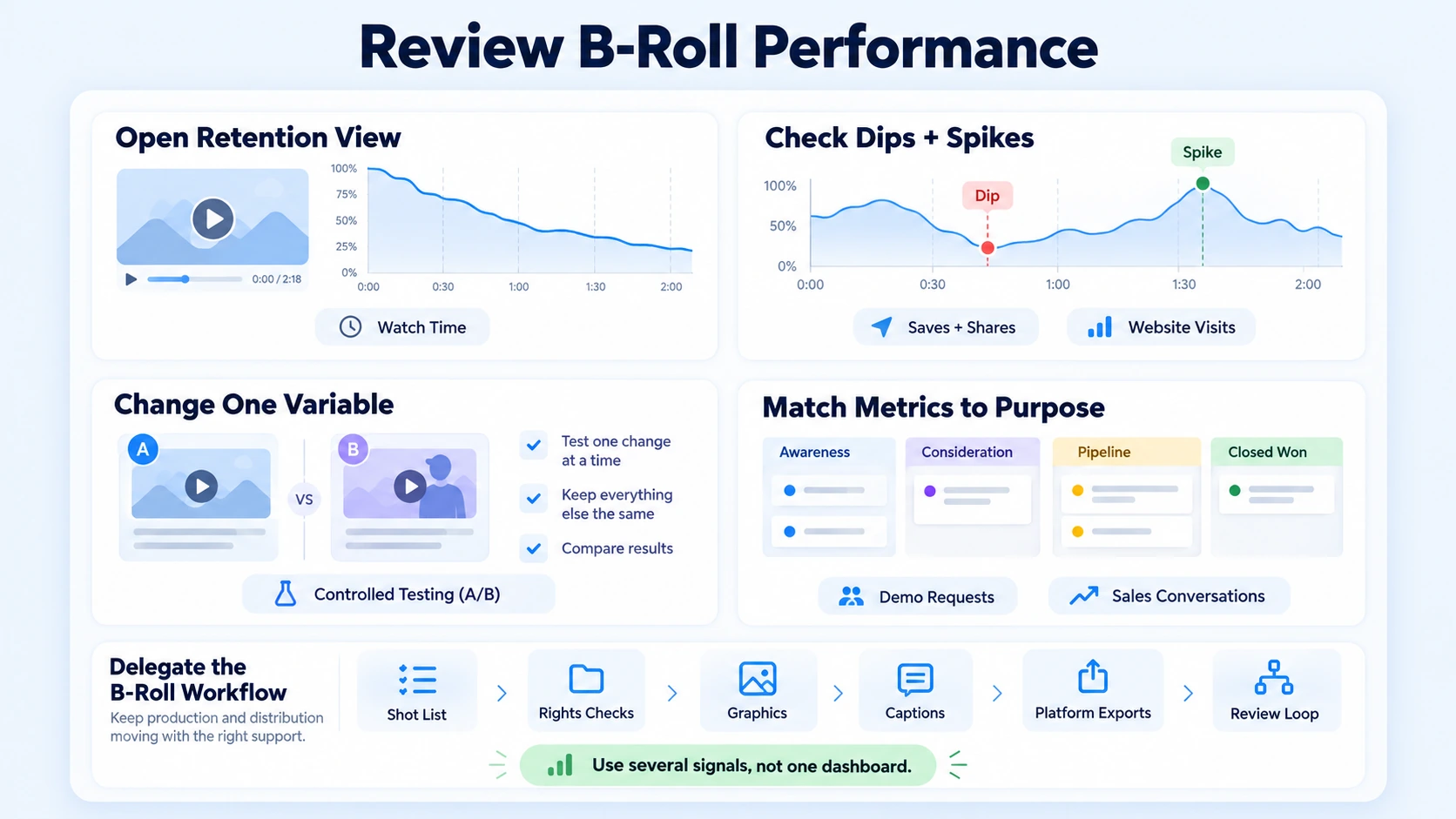
Attribution will be imperfect, so use several signals rather than one dashboard. Wistia's report found that fewer than half of surveyed marketers connect their video platform to their CRM or email tool, which means many teams cannot yet see what happens after a view.
If you delegate this work, a capable partner should handle the full chain: strategy and content creation from scratch, planning b-roll from the transcript, sourcing and rights checks, graphics, caption safe zones, platform exports, and a review loop that feeds lessons into the next recording. Wistia's 2026 report describes blended teams, where in-house staff and outside partners share the work, as becoming the norm. What matters is that someone owns each step.
Conclusion
B-roll works when it has a job. The editor decides which claim needs proof, which cut needs hiding, and which stretch needs a reset, and every other second stays on the speaker. That discipline separates using B-roll to make talking-head video engaging from decorating a video. Whether you are producing videos from scratch or repurposing existing assets, strategic editing creates the asset, and the review loop is what makes the next one better.
FAQ
What does using B-roll to make talking-head video engaging mean?
It means adding supporting footage, such as screen recordings, product shots, graphics, or context clips, over parts of a speaker-to-camera video. The goal is to prove claims, hide edits, and give viewers something new to see while the original audio keeps running. It supports the speaker and does not replace them.
How much b-roll does a talking-head video need?
I do not know of a verified ratio, so I would not chase one. Start with the gaps from step 2: claims that can be shown, jump cuts, and long static stretches. A short founder clip with one clear point may need very little. A two-minute technical explanation may need much more.
Where can I find b-roll for a B2B video?
Start with what you own: product screen recordings, event footage, team moments, and customer clips you have permission to use. Then record short pickup shots, build graphics, or license stock. Check license terms and get permission for identifiable people, client logos, and venues before publishing.
How long should each b-roll clip be, and how long does the edit take?
Most of my cutaways run two to four seconds, but that is a habit and not a rule. Legibility decides: a chart needs enough time to be read. Edit time depends mostly on the footage source. If the footage exists, placement is a small part of the edit. If it must be shot, licensed, or animated, that work sets the schedule.
Does b-roll improve retention?
Retention matters to both platforms and viewers, but I have not found a credible source that isolates b-roll as the cause of better retention. Instagram names watching a reel all the way through as a key prediction, and YouTube gives creators dip and spike data. Use those tools to test whether your b-roll choices help.
What affects the cost of b-roll editing?
Cost depends on the number of videos, how much footage must be sourced or created, motion graphics, caption styling, revision rounds, and turnaround time. Publishing and distribution support can add scope. Ask any provider whether a quote covers only editing or a larger content service, because the two are not comparable.
Should I use a freelancer, an agency, or an in-house editor?
A freelancer or in-house editor can handle a steady, simple workflow well, especially when footage and direction are already in place. An agency fits teams that also need end-to-end content creation from scratch, strategy, packaging, distribution, and dependable volume without hiring. The right choice depends on how much of the chain your team wants to own.
Does Komet Media handle b-roll for talking-head videos?
Yes. We handle end-to-end video creation from scratch as well as repurposing and b-roll editing as part of our short-form video editing and long-form work, including strategy, shot lists, motion graphics, captions, and platform exports. We work best with B2B SaaS, AI, and tech startups & teams, venture and private equity firms, founders, and executives who tie video to business goals. Our recurring work typically ranges from about $2,500 to $5,000, depending on scope, volume, production difficulty, turnaround, and distribution needs. It is not a fixed public package. You can book a call to discuss your setup.

