
Repurpose a Podcast into Instagram Reels: Step-by-Step Guide
Most B2B founders and marketing teams are sitting on a library of recorded podcasts that stop working the moment the episode drops. If you know how to repurpose a podcast into Instagram Reels, that same 45-minute conversation turns into 8–12 short clips, each one capable of reaching a cold audience that has never heard of your brand. This guide covers the exact process I use at Komet Media to turn podcast recordings into Reels that educate buyers and move the pipeline.
TL;DR
- Pull the 3–5 strongest soundbites from each episode and trim them to 45–60 seconds for maximum Reels performance.
- Transcribe in Descript, then finish and style each clip in CapCut.
- Burn in captions and add a hook overlay in the first 3 seconds, non-negotiable.
- Post within 24 hours of episode launch to capture cross-platform traffic.
Why Repurposing Podcast Audio into Instagram Reels Is High Leverage in 2026
Before jumping into tools and steps, the business case deserves a clear look, because this is not a content-volume play. It is a distribution efficiency play. Video podcasts repurposed into Reels, Shorts, or TikToks receive 4.6x more total impressions than full-length episodes alone. That multiplier comes from the Instagram algorithm surfacing short clips to users who have never followed you. Instagram Reels reaches over 2 billion monthly users and now accounts for 50% of all time spent on Instagram.
For B2B teams, the real win is buyer education at scale. A founder explaining a product insight in a 50-second clip does the same trust-building work as a demo call, but it plays in someone's feed while they are scrolling on a Tuesday morning. 58% of podcast discovery now comes from short-form video, meaning Reels are no longer just a brand awareness play, they are a primary discovery channel.
Creators who post teaser clips within 24 hours of publishing the full episode see a 39% increase in cross-platform traffic. Timing matters as much as production quality. The algorithm has also shifted in a way that rewards this exact format. DM sends are the number-two ranking signal heading into 2026, and the December 2025 algorithm update increased the weight of sends relative to likes.
Educational clips from podcast content, sharp insights, contrarian takes, founder thinking, are far more likely to be forwarded via DMs than lifestyle content, which gives B2B brands a structural advantage on Reels. Podcasts that post clips on TikTok, YouTube Shorts, or Instagram Reels see an average growth rate of 65% in audience reach. For funded SaaS teams where pipeline is the primary metric, that reach translates directly into demo requests and inbound awareness. This is the core value of a systematic content repurposing strategy.
How to Find the Best Soundbites from a Podcast to Use as Instagram Reels
Clip selection is where most teams fail. They pull the first interesting moment they find and wonder why it underperforms. Selecting the right 45 seconds from a 45-minute episode is a skill, and it follows a specific logic. The best Reels clips share three traits: they open with a tension or a counterintuitive statement, they deliver one clear idea, and they end with a natural close that does not feel cut off. Anything that requires context from earlier in the episode is disqualifying, a Reels viewer has no context.
Here is the clip selection framework I use when working through a podcast transcript:
- Scan for pattern interrupts: Moments where the guest says "actually, the opposite is true" or "most people get this wrong" are gold. They create immediate curiosity.
- Flag standalone insights: Any 30–90 second section where one complete idea is stated, supported, and concluded. No setup required.
- Mark emotional peaks: Raised voice, laughter, or a strong pause usually signals the listener's favorite moment. These are the sections that get shared via DMs.
- Identify "save-worthy" data: Saves are a particularly strong algorithmic signal, indicating content value beyond passive consumption. Creators who design Reels with save-worthy information, tutorials, or lists consistently outperform entertainment-only content in reach. Any clip where the speaker states a specific number, framework, or named process qualifies.
- Cut anything with "as I mentioned earlier": These moments kill reach on cold audiences.
Episodes that include guest highlights or quotable moments get 31% more saves on Instagram and TikTok. This is why interview episodes tend to outperform solo-host episodes in repurposed Reels; the guest's specific experience or data point lands harder than a host's opinion.
Aim for 3–5 clips per episode. Any more and you dilute your own content calendar. Any fewer and you leave distribution efficiency on the table. Run this audit directly inside your podcast transcription workflow so clip selection happens at the same time as the transcript review.
What Tools Do You Need to Repurpose a Podcast into Instagram Reels?
You do not need an expensive stack. You need the right two or three tools and a clear handoff between them.
Descript's core advantage is transcript-based editing: you edit video by editing the auto-transcribed text, so deleting a sentence from the transcript removes it from the video timeline, making rough cuts incredibly fast for podcasts and interviews. CapCut is a visual-first video editor built for short-form content and social publishing, combining traditional video editing with AI effects and trendy templates. It includes preset aspect ratios (9:16 for TikTok/Reels, 1:1 for Instagram feed, 16:9 for YouTube) and direct platform export settings.
Many creators edit audio and structure in Descript, then add effects and social-ready formats in CapCut before publishing, a hybrid workflow that saves time and maximizes reach. For teams that want to move faster without managing the stack themselves, our short-form video editing service handles this entire tool chain for you, from clip selection to formatted output.
Step-by-Step Guide to Converting Podcast Content into Reels
Here is the exact workflow. Each step has a clear input and output so your team can build this into a repeatable content calendar process.
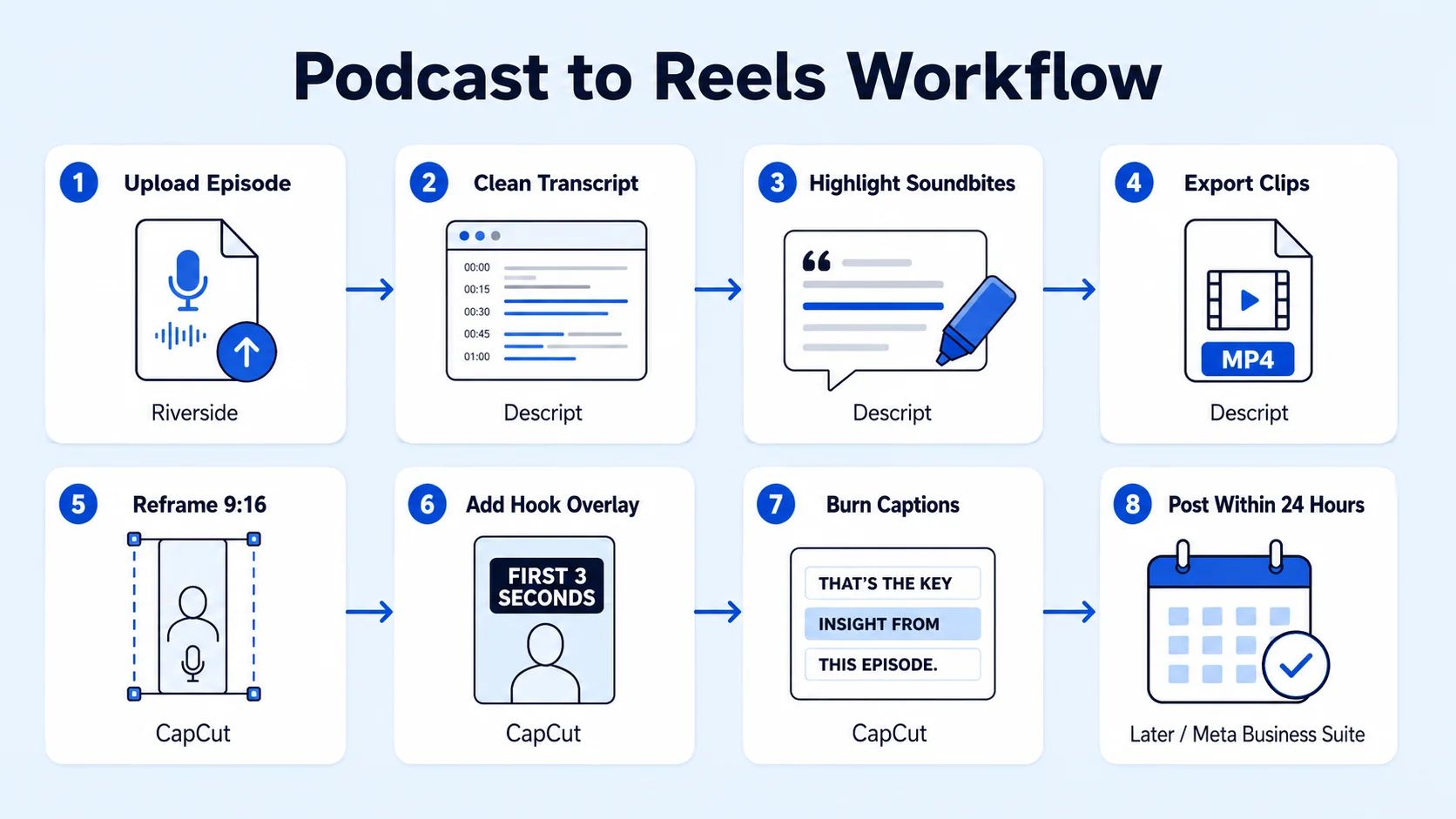
- Upload your episode to Descript: Import the raw audio or video file. Descript auto-transcribes it, typically within a few minutes. Clean up the transcript by removing filler words, Descript handles "um" and "uh" automatically using its Studio Sound feature.
- Highlight your selected soundbites in the transcript: Use the five-point clip selection criteria from the section above. Each highlight should map to a 30–90 second window in the transcript.
- Export individual clips: Create a separate composition in Descript for each clip. Trim to the exact soundbite, with a clean in-point and out-point. Export as MP4.
- Import into CapCut and reframe to 9:16: Reels dimensions are 1080 × 1920 pixels (9:16). CapCut's auto-reframe tool handles this in one click for talking-head footage. For audio-only content, you will build an audiogram using a waveform animation over a branded background.
- Write and overlay the hook: The first 3 seconds carry the entire clip. Reels lose viewers quickly if the first few seconds do not grab attention, and most drop-offs happen within the first 3–5 seconds. Your hook should be a text overlay stating the tension or insight, not the episode title.
- Burn in captions: Use CapCut's auto-caption feature. Review for accuracy, then style to match your brand, large, centered, high-contrast text performs best for B2B content watched on mobile.
- Add B-roll or static graphic overlays (optional): For product-related clips, screen recordings or branded slides reinforce the message and increase watch time. Podcasts with on-screen visuals like memes, charts, or screenshots have 28% higher retention past the halfway mark.
- Export and post within 24 hours of the episode going live: Connect your content calendar so each episode automatically queues 3–5 clips for posting across the following week.
How Long Should Instagram Reels Be When Repurposing Podcast Content?
Length is one of the most misunderstood variables in short-form video production. The platform has changed significantly. In January 2025, Instagram head Adam Mosseri announced support for Reels up to three minutes, while adding that the platform is "still focused on short form video over long form." By 2026 the technical ceiling stretched further, with uploads accepted up to 15 minutes.
But technical limits are not performance benchmarks. Here is what the data actually shows for podcast clips: The 2026 sweet spot is roughly 45–60 seconds. In a large 2026 analysis of business Reels, that band pulled both the highest engagement and the highest median views, close to double the views of clips under 30 seconds or over 3 minutes.
For B2B podcast clips specifically, apply this length guide:
Retention decides ranking, not duration. A 20-second Reel watched to the end beats a 90-second one abandoned at second 12, every time. Stay under 3 minutes to reach new people, anything longer gets shown mostly to your existing followers, not to Explore or the Reels tab. For founder-led growth and inbound demand generation, that discovery distribution is exactly what you are optimizing for.
How to Make Instagram Reels from Podcast Recordings Without Showing Your Face
This is one of the most common questions I get from B2B teams: what if the podcast is audio-only, or the guest is unwilling to appear on camera? The answer is audiograms and b-roll layering, and both formats perform well when executed cleanly.
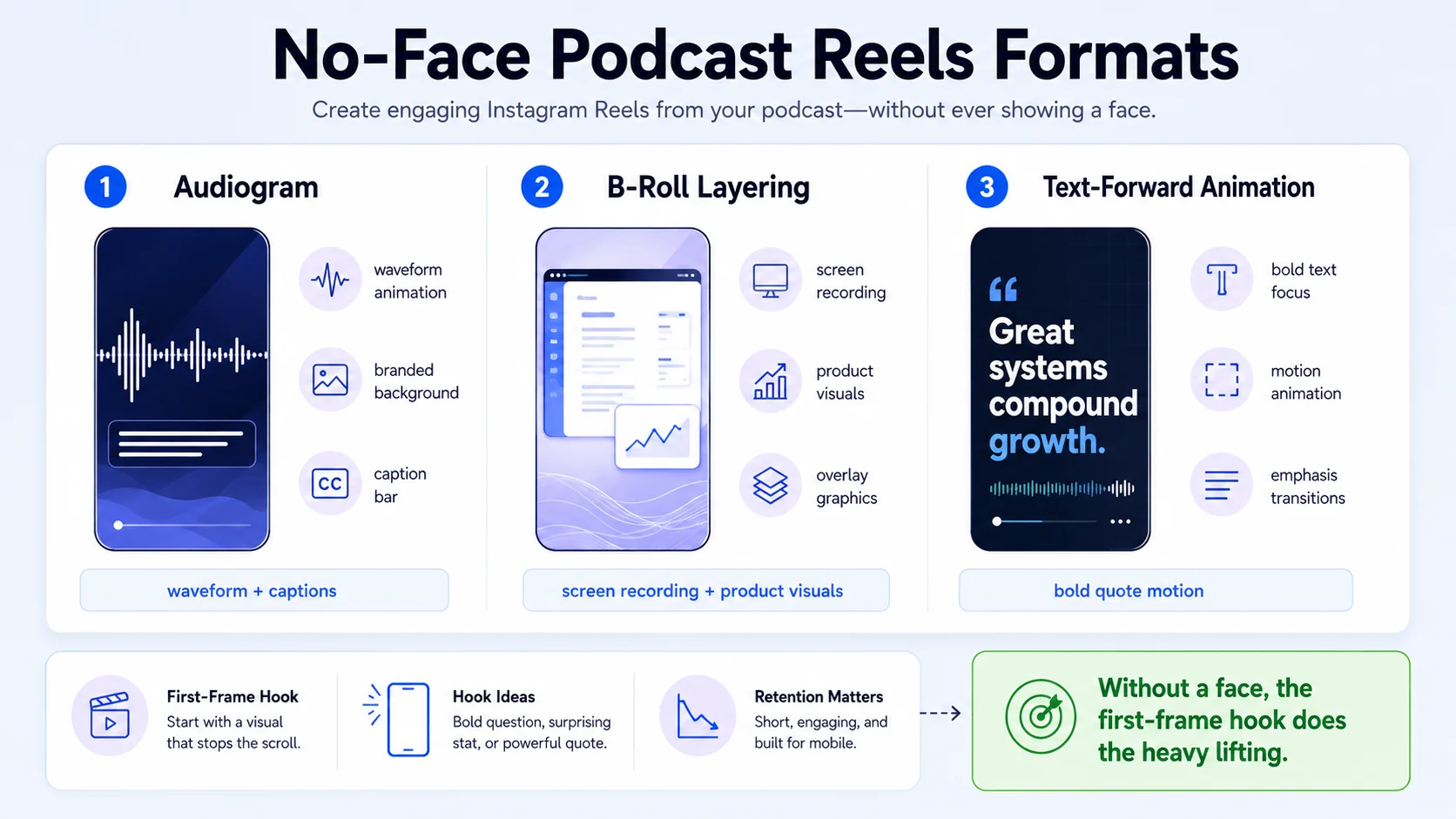
Audiogram format: An audiogram is a vertical video with a waveform animation, static or branded background, a speaker label, and captions. Canva and Descript both produce audiograms natively. The waveform provides the visual motion the algorithm expects; the captions carry the content. This is a legitimate format for audio-first podcast content.
B-roll layering format: Take the audio clip and overlay relevant b-roll footage, screen recordings, product walkthroughs, stock footage, or branded slide animations, so the viewer always has something to look at even without a talking head. Podcasts with on-screen visuals like memes, charts, or screenshots have 28% higher retention past the halfway mark.
Text-forward format: Some of the highest-performing B2B clips on Reels are pure text animations, bold statements pulled verbatim from the podcast, animated line by line over a clean background. No face, no waveform. This format excels for contrarian takes and standalone statistics. The hook overlay matters even more without a talking head.
Creators who start with a bold hook, whether text overlays, strong movement, or a surprising opening, see significantly higher completion rates. Without a human face on screen, your hook text and first-frame visual do 100% of the retention work. Spend 30% of your production time on that first second alone.
For SaaS and funded tech teams building founder-led content without video infrastructure, our podcast marketing and short-form video workflows are built precisely for this constraint. The format is not a limitation, it is an asset when executed with brand consistency.
Conclusion
To repurpose a podcast into Instagram Reels effectively in 2026, the process comes down to four repeatable actions:
- Select: Identify 3–5 soundbites per episode using the pattern-interrupt and standalone-insight criteria.
- Edit: Use Descript for transcript-based trimming and CapCut for vertical formatting, captions, and hooks.
- Optimise: Target 45–60 seconds for most clips, burn in captions, and write a hook overlay that works for cold audiences.
- Publish: Post within 24 hours of episode launch and track DM sends, saves, and watch time as your primary signals.
If you want a team to handle the clip selection, editing, and formatting while you focus on recording, see how Komet Media works.
Frequently Asked Questions
Q1: Can I use podcast clips directly on Instagram or do I need to edit them first?
You must edit them first. Raw podcast audio is horizontal, unformatted, and has no captions. Instagram Reels requires 9:16 vertical format, captions for mobile viewers, and a hook in the first 3 seconds to prevent drop-off. Uploading an unedited clip will result in poor reach and low completion rates.
Q2: How many Reels can I get from a single podcast episode?
A standard 30–60 minute episode typically yields 3–5 strong Reels clips. Some interview episodes with multiple guest insights can produce 7–8. Resist the temptation to over-clip: quality of soundbite selection drives performance more than volume of clips posted.
Q3: What is the best free tool to repurpose podcast episodes into Instagram Reels?
CapCut has the strongest free tier for end-to-end Reels production, it handles auto-captions, 9:16 reframing, templates, and direct export. Pair it with Descript's free plan (1 hour of transcription) for the transcript editing step. Both tools together cover the full workflow at zero cost.
Q4: How do I add captions to podcast clips for Instagram Reels automatically?
Both Descript and CapCut generate auto-captions from your audio. In CapCut, import your clip, tap "Captions," and select "Auto Captions", it transcribes and places styled text on screen in under a minute. Review for accuracy, then adjust font size and placement to fit your brand.
Q5: Does repurposing podcast content hurt my original episode's performance?
No. Clips act as trailers that drive listeners to the full episode. Posting podcast clips on Reels within 24 hours of the episode going live creates a traffic loop: the Reel reaches a cold audience, some percentage of viewers seek out the full episode, and episode downloads increase. The clip and the full episode serve different jobs.
Q6: Do I need to show my face to repurpose a podcast into Instagram Reels?
No. Audiograms (waveform animation over a branded background), b-roll video layering, and text-forward animation formats all perform well without a visible host. The key requirement is motion in the first frame and captions throughout, face-optional content performs comparably to talking-head clips when the hook and audio quality are strong.

