
🪄 AI Summary
Heading 1
Heading 2
Heading 3
Heading 4
Heading 5
Heading 6
Lorem ipsum dolor sit amet, consectetur adipiscing elit, sed do eiusmod tempor incididunt ut labore et dolore magna aliqua. Ut enim ad minim veniam, quis nostrud exercitation ullamco laboris nisi ut aliquip ex ea commodo consequat. Duis aute irure dolor in reprehenderit in voluptate velit esse cillum dolore eu fugiat nulla pariatur.
Block quote
Ordered list
- Item 1
- Item 2
- Item 3
Unordered list
- Item A
- Item B
- Item C
Bold text
Emphasis
Superscript
Subscript
If your product demo, webinar replay, or founder video is getting uploaded without a clear text strategy, you're making a choice that costs you watch time, pipeline, and compliance standing. Captions vs subtitles: what B2B video needs is a question that sounds semantic but has a real operational answer. The two serve different audiences, travel in different file formats, and carry different legal weight. Getting them mixed up means your videos either miss buyers or miss regulatory floors. Here's exactly how to tell them apart and deploy the right one.
TL;DR
- Captions (closed or open) are for accessibility: they include speaker IDs, sound effects, and dialogue for deaf and hard-of-hearing viewers.
- Subtitles translate dialogue into another language and assume the viewer can hear.
- Most B2B marketing videos need captions; multilingual videos need both.
- Caption usage has skyrocketed 572% since 2021, according to Wistia's 2025 State of Video Report , making this a strategic decision, not a production footnote.
What's the Difference Between Captions and Subtitles for Business Videos?
These two terms get conflated constantly, but they solve different problems. Closed captions are a textual representation of the audio within a media file. They make video accessible to deaf and hard-of-hearing viewers by providing a time-to-text track as a supplement to, or substitute for, the audio. Unlike a plain transcript, caption files include non-speech elements like speaker IDs and sound effects that are critical to understanding the content.
Subtitles, by contrast, are for hearing viewers who don't understand the language of the audio. Their purpose is to translate spoken content into the viewer's language. Unlike captions, subtitles do not include non-speech elements like sounds or speaker identifications.
A third format that B2B teams often encounter is SDH subtitles (Subtitles for the Deaf and Hard of Hearing). These function like captions but are delivered as subtitle tracks rather than a dedicated caption channel, and are common on streaming platforms and Vimeo for Business.
On the technical side, both formats rely on the same underlying file types. SRT file format (SubRip) is the most universally supported and works on LinkedIn, Wistia, and most video platforms. WebVTT format (Web Video Text Tracks) is the web-native standard preferred by HTML5 players and Vimeo for Business. Burned-in text, also called open captions, is permanently overlaid into the video file itself and cannot be toggled off.
The CEA-608 standard governs caption encoding for broadcast, while WCAG 2.1 compliance governs web-hosted video. For most B2B SaaS teams, WCAG 2.1 is the operative standard.
Captions vs Subtitles: Which Does Your B2B Video Actually Need?
The answer depends on your video's purpose, audience location, and distribution channel.
Use captions when:
- Your video is hosted on your website, Wistia, or LinkedIn
- Your audience includes deaf and hard-of-hearing viewers
- You are legally required to meet WCAG 2.1 or ADA standards
- Your buyers are watching in silent environments (offices, commutes, shared workspaces)
- The content includes non-dialogue audio that affects meaning (product demo clicks, UI sounds, speaker switches)
Use subtitles when:
- Your video targets non-English-speaking markets
- You are running multilingual localisation for global sales campaigns
- You want to repurpose a single hero video for multiple regional audiences
Use both when:
- You're distributing a product demo, webinar replay, or podcast episode to a global B2B audience
The distinction matters for buyer trust. A SaaS product demo that captions a spoken feature walkthrough keeps every prospect in the room, whether they're a developer watching on mute at their desk or a procurement lead reviewing with sound on. Cognitive load theory research supports this: reading and watching simultaneously improves comprehension and retention over audio-only viewing.
A fundamental shift has occurred in viewing habits: as many as 70% of Americans now watch content with subtitles enabled, and research indicates that subtitled videos can boost viewership by up to 40%, making captioning essential for content performance across platforms. For most B2B video marketing use cases, closed captions are the right default.
Are Captions Required for Enterprise Video Content? (ADA and WCAG 2.1 Compliance)
This is where the captions vs subtitles: what B2B video needs question stops being theoretical. ADA video compliance refers to making video content accessible to people with disabilities, following the WCAG 2.1 Level AA standard, the standard the DOJ formally adopted for state and local government web content in its Title II web rule. Digital accessibility lawsuits were tracking 37% higher in 2025 than the previous year.
Private companies are not exempt from pressure: while ADA Title II specifically targets state and local government, the DOJ has signaled that Title III, which covers private entities like businesses, nonprofits, and private universities, is next.
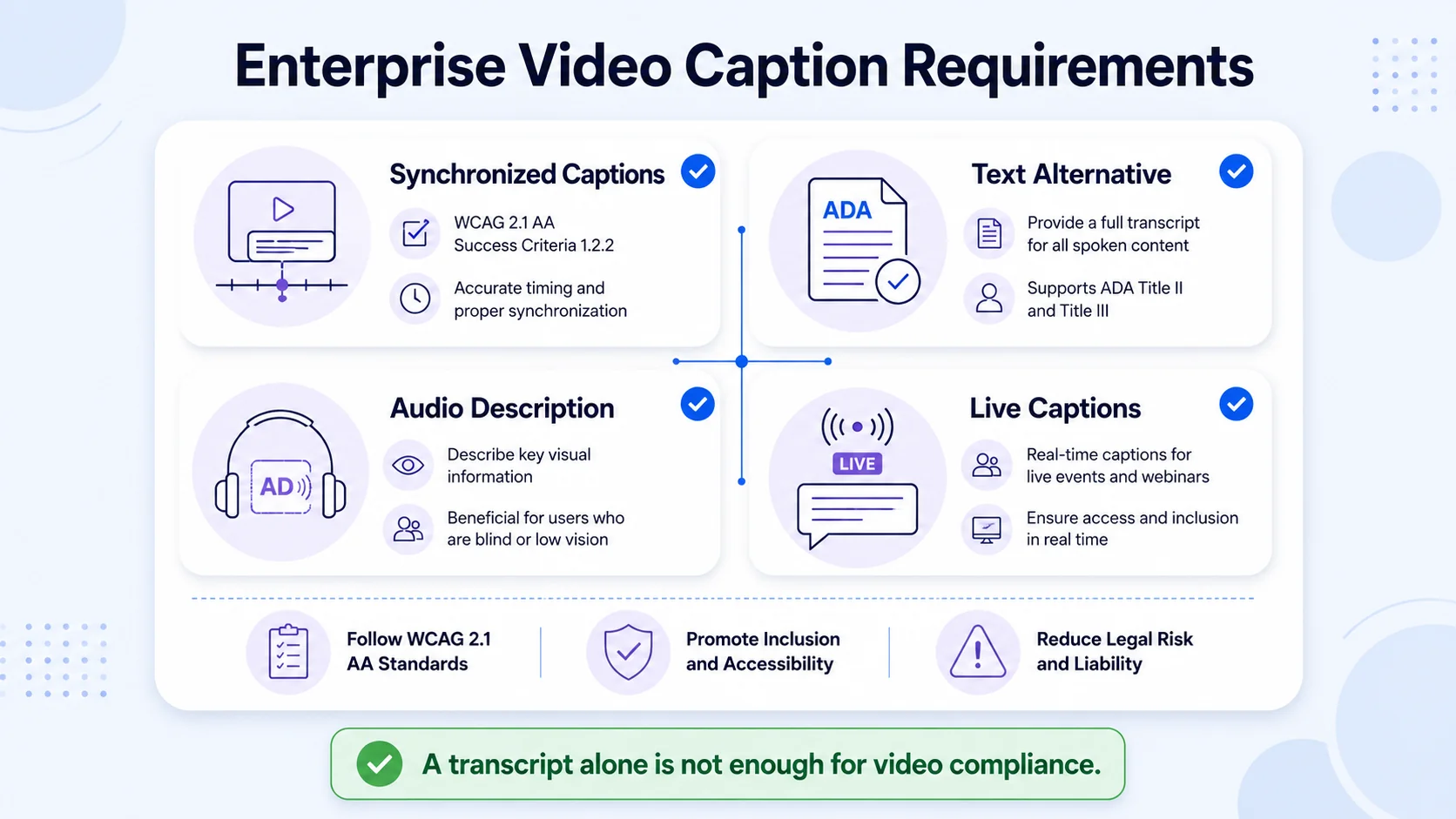
For enterprises, the WCAG 2.1 Level AA requirements for pre-recorded video are specific:
- Captions (WCAG 1.2.2): All pre-recorded videos must have accurate, synchronized captions.
- Transcripts (WCAG 1.2.1): Audio-only content requires a text alternative.
- Audio Descriptions (WCAG 1.2.5): Videos with visual information not conveyed in audio need an audio description track.
- Live Captions (WCAG 1.2.4): Live-streamed webinars and events must include real-time captions.
Hard compliance note:
A transcript sitting on a webpage next to your video is not enough. WCAG requires synchronized captions, meaning text appearing on screen in time with the spoken words. Subtitles alone do not satisfy the WCAG 1.2.2 requirement. Non-compliance penalties can range from $55,000 to $110,000 per violation. For any B2B team that runs webinars or publishes video content publicly, captions are a legal baseline, not a nice-to-have.
Do B2B Webinars and Corporate Training Videos Need Captions?
Yes, and the standard applies to both pre-recorded and live content. Live video events, including webinars, live-streamed sessions, and public meetings, need real-time captions. This applies to new content going forward. For corporate training videos specifically, captions, transcripts, and audio descriptions are required to provide equal opportunity in programs and services, and even internal content like training videos for staff or instructional materials must meet these standards.
The compliance question also intersects with the European Accessibility Act: effective from June 2025, the European Accessibility Act requires accessible digital services across EU member states. If your SaaS platform targets European enterprise buyers, accessibility compliance is now a commercial requirement, not just a legal one.
What does this mean in practice for B2B video production workflows?
- Caption all pre-recorded demos, webinar replays, and product explainers before publishing.
- Use real-time captioning for live events and webinars.
- Add audio descriptions for any video where on-screen visuals (charts, UI flows, slides) carry information not spoken in the audio.
- Export caption files in SRT or WebVTT format and attach them as toggle-on tracks. Do not rely solely on burned-in text for compliance.
Automatic speech recognition tools provide a usable first draft, but auto-captions have an error rate of roughly 10-15% depending on audio quality, and the DOJ has indicated that captions need to be "accurate" and "synchronized." Always run a human review pass on technical content, product names, and industry jargon.
Captions vs Subtitles for LinkedIn Video Ads: Which Performs Better?
For LinkedIn specifically, this is not a debate. Captions win, every time. LinkedIn's desktop and mobile apps autoplay videos on mute by default, which means the first three seconds of your video need to communicate value without sound. Captions solve this problem by delivering your message visually. 85% of LinkedIn videos are watched without sound. Videos optimized for silent viewing with text overlays or captions see a 21% boost in engagement, and videos with subtitles retain viewers 32% longer than non-captioned videos.
For LinkedIn video ads specifically, captions vs subtitles: what B2B video needs comes down to your buyer's location and language. If your campaign targets English-speaking buyers, closed captions or burned-in open captions are the right choice. For multilingual campaigns, pair captions with translated subtitles to maximize reach without producing separate videos. Captioned video best practices: use high-contrast colors (white text with black outline), position captions in the lower third, keep font size large enough for mobile viewing, and synchronize precisely with audio. LinkedIn videos play on mute by default. The platform allows you to upload an SRT file for captions along with your video, or you can burn subtitles into the video itself.
For founder-led content and short-form video clips, open captions (burned-in text) perform well because they guarantee the text displays regardless of viewer settings. For product demos and longer-form thought leadership hosted on LinkedIn, an SRT file gives viewers the choice to toggle captions on or off, which respects user preference while maintaining accessibility. Users are 2.7× more likely to scroll past videos without captions. On a platform where your buyers are in decision-making mode, that scroll is a lost pipeline opportunity.
Best Captioning Tools for B2B Video Production Teams in 2026
The tool you choose should match your workflow: speed, accuracy, compliance, or repurposing capacity.
For transcript-led editing, Descript is the better fit. For compliance-oriented caption work, Rev is the safer choice. Rev's human transcription is commonly described as "up to 99%" accuracy on cleaner recordings, though for critical content, human transcription or human review is the recommended path. For B2B SaaS teams producing webinar clips, demo highlights, and founder content at volume, the most effective workflow combines tools:
- Record source content (webinar, podcast, product demo).
- Generate an automatic transcript via Descript or Rev.com using automatic speech recognition.
- Human-edit for product names, jargon, and speaker accuracy.
- Export as SRT file format for hosted video (Wistia, LinkedIn, Vimeo for Business).
- Export burned-in open captions for social cuts and LinkedIn ads.
- Archive WebVTT format files alongside video assets for future multilingual localisation.
This two-track output system (SRT for platforms, burned-in for social) handles every distribution channel without duplicating production effort, which is exactly the kind of systematic approach we build into repurposing workflows at Komet Media.
Conclusion
Getting captions vs subtitles: what B2B video needs right is not a production detail. It's a revenue and compliance decision.
- Captions serve accessibility, meet WCAG 2.1 and ADA requirements, and perform better on silent-autoplay platforms like LinkedIn.
- Subtitles serve translation and multilingual localisation for global audiences.
- Most B2B videos need captions by default; global campaigns need both.
- 80% of consumers say they're more likely to watch a video to the end when captions are available.
- Deliver SRT or WebVTT files for hosted video and burned-in open captions for social cuts. Do not rely on auto-captions alone for compliance.
If your team is producing webinars, founder videos, product demos, or podcast clips without a structured caption workflow, every video is underperforming. Komet Media builds these systems so your content works for every buyer, in every context, from the moment it ships.
Frequently Asked Questions
Q1: What is the difference between open and closed captions for corporate video?
Closed captions are delivered as a separate file (SRT or WebVTT) that viewers can toggle on or off through the player. Open captions are burned directly into the video file and are always visible. For corporate video, closed captions are preferred for compliance because they give viewers control and can be updated without re-exporting the video.
Q2: Do B2B webinars need captions for ADA compliance?
Yes. Live audio content in synchronized media must include captions under WCAG 1.2.4. This applies to live webinars and recorded replays. Any B2B team hosting public-facing webinars should treat real-time captioning as a baseline requirement, not an optional upgrade.
Q3: Can subtitles replace captions for internal company training videos?
No. Subtitles are not considered an appropriate accommodation for deaf and hard-of-hearing viewers. Internal training videos must include proper captions that contain speaker IDs and non-speech audio cues to meet WCAG and ADA standards for employee accessibility.
Q4: What file format should B2B video teams use for captions?
Use SRT file format for widest platform compatibility (LinkedIn, Vimeo for Business, YouTube, Wistia). Use WebVTT format for web-hosted video in HTML5 players, as it supports styling and positioning. For social ads and short-form content, burned-in open captions remove dependency on platform caption support entirely.
Q5: How accurate do captions need to be to meet WCAG 2.1 standards?
The DOJ requires captions to be "accurate" and "synchronized" but does not specify a numeric threshold. In practice, evaluation criteria should include accuracy above 90%, multilingual capability, and accessibility alignment. For technical B2B content with product names and industry jargon, human review of auto-generated captions is strongly recommended.
Q6: What captioning approach works best for LinkedIn video ads?
Use open captions for social videos where you want the text burned into the video. Use closed captions in SRT or VTT format for LMS, streaming, and accessibility workflows where viewers may need control. For LinkedIn ads specifically, burned-in captions guarantee your message lands regardless of whether the viewer has captions enabled on their device.


