
Pacing and Cuts for High-Retention Short Video: Step-by-Step Guide
Most short videos die before the three-second mark. Not because the idea is weak, but because the edit is. I'm Rajan Soni, founder of Komet Media, and this is the exact framework I use when editing short-form video for B2B SaaS and AI startup teams (whether working from existing recordings or creating content from scratch). If you want watch time, pipeline attention, and buyer trust from short video, your pacing and editing decisions are the mechanism. This pacing and cuts for high-retention short video: step-by-step guide tells you precisely what to do, in order.
TL;DR
- 50–60% of viewers drop off within the first three seconds, your hook is the most important edit in the file.
- Pattern interrupts every 3–5 seconds , including B-roll, text overlays, and camera changes, are the primary retention mechanism.
- Cut to the rhythm of speech, not to a fixed timer, but never let a static shot run past four seconds.
- Read your retention graph after every publish and fix the cliff before you make the next video.
Why Viewers Drop Off in the First 3 Seconds of Short Videos
This is the most misunderstood moment in short-form video. Creators assume the hook is a line of copy. It isn't. It's a structural editing decision. When 30–50% of viewers drop between second 1 and second 3, the retention graph shows what creators call a "cliff," and the algorithm reads it as low-value content regardless of how good the rest of the video is. That cliff is a death sentence for distribution. The YouTube Shorts algorithm, the Reels algorithm, and TikTok's ranking system all deprioritize videos the moment that slope appears.
Cognitive load theory provides the most useful explanatory framework for why certain video openings immediately lose viewers. The actionable reframe: the first three seconds should be zero-extraneous-load. Every element on screen and in audio should be doing a single job, which is signaling to the viewer what specific value they will receive if they stay. What kills the first three seconds in B2B video specifically:
- Opening with a logo card or branded intro bumper
- Starting with "Hey, quick question for you..." before any visual information
- A static talking head with no text, no B-roll, and no caption active
- Audio-only hooks with a blank or slow-loading visual frame
The opening frame of a Short is the hook, not an introduction to the hook. Creators who consistently lift average view duration do it by cutting pre-rolls, skipping "hey guys" lines, and opening on the most visually loaded frame of the video.
For SaaS teams specifically, that means cutting to the product screen, the data point, the surprising claim, or the founder's mid-sentence moment, not to a title card. The retention graph reward is immediate and measurable. The first frame is not a warm-up. It is the hook. Start mid-sentence, mid-action, or mid-argument.
How to Pace Short-Form Videos for Maximum Retention
Pacing is the rhythm between cuts, and it needs to match your platform and your content type, not an arbitrary rule. The optimal video length for TikTok is 21–34 seconds for maximum completion rate, but 31–60 seconds often generates more total watch time and algorithmic rewards when retention stays above 60%. That nuance matters for B2B teams: longer videos can win if the pacing is engineered correctly.
Aim for a cut or visual change every 1.5–3 seconds to maintain momentum and prevent viewer fatigue. This doesn't mean chaotic editing, it means purposeful transitions like jump cuts, B-roll inserts, text overlays, or zoom effects that guide attention and sustain interest. Static shots longer than 4 seconds become danger zones where viewers are most likely to scroll away. Here is how I calibrate pacing by video length:
Match your cut frequency to your content type, with faster pacing for entertainment and slightly longer holds for educational material. For B2B product explainers and founder clips, I lean toward the slower end of each range, the cognitive load of a product idea needs a beat to land before the next cut fires.
Deliver value in the first 10 seconds to build trust, then use mid-video retention hooks at 15 and 30 seconds to combat natural attention decay. In Premiere Pro or CapCut, mark those timestamps before you begin cutting, treat them as required checkpoints in the timeline, not optional moments.
Best Cut Techniques for Reels, TikTok, and YouTube Shorts
Pacing and cuts for high-retention short video are built on a small toolkit of techniques. Here is how each one works and when to use it in B2B content.
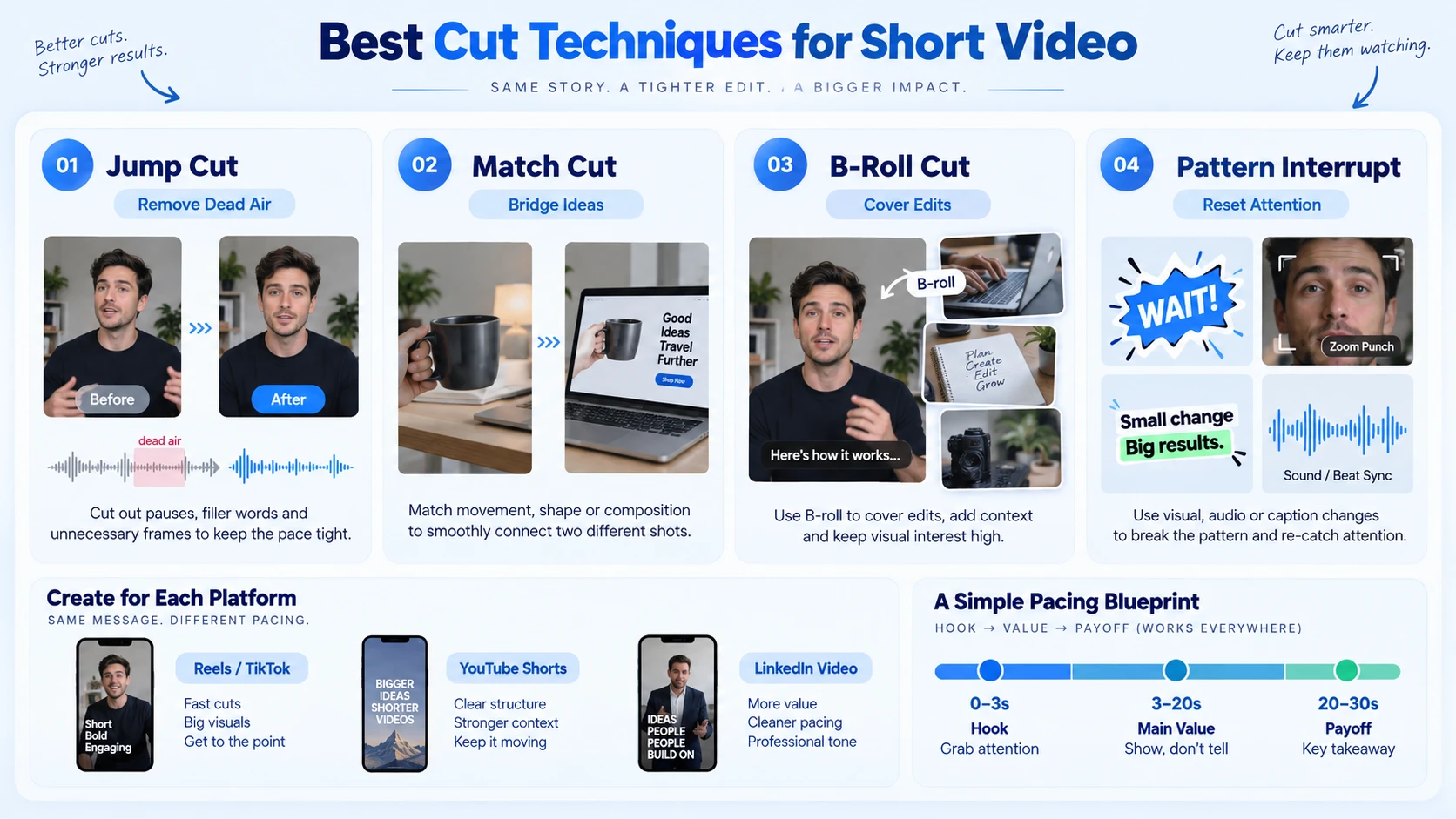
Jump Cut: A jump cut is when a single shot is broken with a cut that makes the subject appear to jump instantly forward in time. Whereas most editing techniques are designed to "hide" the edit, a jump cut is a stylistic choice that makes the edit completely visible. In short-form video, this is the default. Use it to remove pauses, dead air, filler words, and slow transitions between points. In Descript, you can cut every silence above 0.5 seconds automatically, it's the fastest path to a tight talking-head clip.
Match Cut: A match cut transitions between different scenes and subjects, relying on "visual association" for smoothness and carrying narrative metaphors. For SaaS content, this means cutting from a founder saying "the problem is X" directly to a screen recording showing X, the visual logic creates continuity without needing a full explanation.
B-Roll Cut: The best way to fix a jump cut is to cover the cut point with B-roll footage, shots of your subject, the environment, or relevant visuals that play over the audio. This is the workhorse of professional short-form video. It hides edits, adds visual storytelling depth, and keeps cognitive load low.
Pattern Interrupt: Not a single cut technique, but an editorial strategy. Use pattern interrupts, jump cuts, zooms, captions, or sound effects every 2–3 seconds. In Premiere Pro, sync these to the waveform editing track so your visual interrupts land on beat. The platform-specific mix that works for B2B short video:
- TikTok / Reels: Heavy jump cuts + B-roll coverage + caption bursts as pattern interrupts
- YouTube Shorts: Match cuts for demo flows + B-roll to show product context + mid-point hook
- LinkedIn Video: Slightly slower pace, match cuts over screen recordings, text overlays for key stats
Jump Cuts vs. Match Cuts: Which One Should You Use?
Both techniques serve retention, but they serve it differently. Choosing wrong is one of the most common pacing mistakes I see in B2B video.
Match cuts and jump cuts are both transitions between shots, and that's where the similarities end. Both are deliberate editorial choices, and both can be used to advance time in a story. But their intent, effect, and execution are fundamentally opposite.
For a 60-second B2B product video, my typical approach is: jump cuts throughout the talking-head sections (cleaned via waveform editing in Descript), match cuts at the two or three structural pivots where the narrative shifts from problem to solution to outcome, and B-roll coverage layered over both to keep the visual storytelling active. The result is a video that feels effortless to watch because the scene transition logic is invisible.
The mistake most teams make is using only jump cuts throughout. That works for casual content. For buyer-facing video where you need product trust and clear positioning, match cuts at the narrative turns are what hold the structure together.
Editing Mistakes That Kill Short Video Retention
This is where most short-form video fails, not in the idea, but in the execution decisions that happen after the first cut. YouTube Shorts operate in a high-volume, fast-feedback environment. The algorithm tests every Short with a small batch of viewers first, then decides whether to expand distribution based on how those viewers respond. If your Short fails the initial test, it does not get a second chance. Every editing mistake therefore compounds.
The mistakes I see most often, and their fixes:
- Slow or absent hook: Starting with a logo, an intro card, or a "welcome back" line. Fix: open on the most visually loaded frame in your entire clip. Cut the first two seconds tighter than you think you should.
- Padding to hit a target runtime: The mistake beginners make is either padding Shorts with filler to hit a longer runtime or cutting them so short that the content feels incomplete. Both hurt retention.
- Over-transitions: Every transition looks cool during editing, then it all blurs together on a phone. Wall-of-text overlays also tank retention. Pick one transition family and use it consistently.
- Wrong aspect ratio: A 16:9 webinar reposted as a square Instagram clip with tiny text won't perform. For content repurposing, re-frame every platform version natively, don't auto-crop.
- No captions: Videos with text overlays retain 80% more viewers than those without , and the majority of short-form views happen without sound. Burn captions into the file in CapCut or Descript, not just as an auto-generated overlay you haven't reviewed.
- Ignoring the retention graph: The retention graph is your content's heartbeat. It shows exactly where people lose interest. If you see a steep drop at 3 seconds, your hook is weak. Pull it after every video. Fix the cliff, then publish the next one.
For B2B video editing at scale, the retention graph review is non-negotiable. It's the only signal that tells you whether your pacing decisions are actually working.
How to Structure Cuts and Pacing: The Full Step-by-Step Process
This is the operational sequence I use for every short video we produce at Komet Media for SaaS and AI startup teams, whether building content from scratch or repurposing existing recordings. It applies whether you're editing in Premiere Pro, CapCut, or Descript.
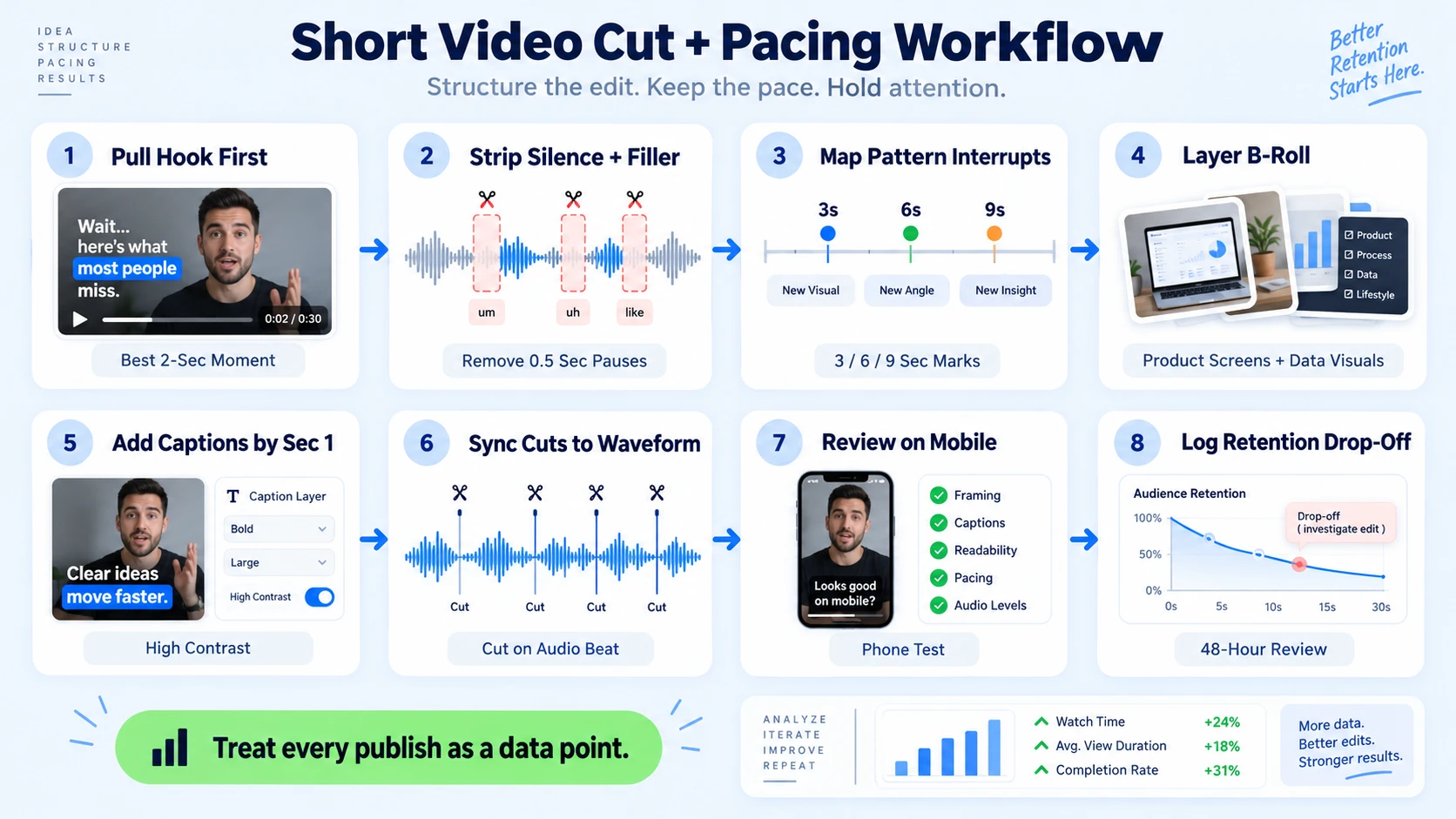
- Pull the hook first: Before anything else, find the single most arresting 2-second moment in your raw footage. This becomes frame one. Not the setup, the moment.
- Strip all silence and filler: In Descript or Premiere Pro, remove every pause over 0.5 seconds and every filler word. This alone cuts most talking-head footage by 20–30% and tightens pacing automatically.
- Map your pattern interrupts: On the timeline, mark seconds 3, 6, 9, 12, and so on. Each mark needs a visual change, a B-roll cut, a zoom punch, a caption burst, or an angle shift. Cut pacing to 1.5–2 seconds per visual change, front-load the payoff in the first half, and end on a frame that makes a loop visually satisfying.
- Layer B-roll for narrative coverage: Cover all jump cuts with relevant B-roll footage. For SaaS content, this means product screen recordings, UI walkthroughs, and supporting data visuals.
- Add captions by second 1: Burn captions in from the first frame. Use high-contrast styling, white text, dark background, sentence-level breaks rather than word-by-word karaoke.
- Sync cuts to the waveform: In Premiere Pro, make cuts land on audio beats. Visual cuts that fight the audio rhythm feel jarring and add cognitive load.
- Review in the TikTok Creator Studio or YouTube Studio on mobile: Watch the full video on a phone at arm's length. If you feel the urge to scroll, your audience will too.
- Publish, pull the retention graph at 48 hours, and log the drop-off point. Document what you changed for the next video. Treat every publish as a data point in your content cadence, not a finished product.
For teams starting without existing content, Komet Media handles the full production workflow from scratch (concepting, scripting, recording guidance, and editing). For teams repurposing webinars or podcasts into short clips, steps 1 and 2 are where most of the leverage lives, the raw material is already dense with value, but the pacing needs to be rebuilt for vertical, short-form consumption.
Conclusion
Pacing and cuts are not aesthetic decisions, they are conversion decisions. Every second you keep a buyer watching is a second of pipeline-building attention.
- When 30–50% of viewers drop in the first 3 seconds, the algorithm reads it as low-value content, fix the hook before anything else.
- Cut every 1.5–4 seconds depending on format; use jump cuts for compression, match cuts for narrative pivots, B-roll for coverage.
- Captions from frame one, no padding, no logo openers, no over-transitions.
- Read the retention graph after every publish. It tells you exactly where your pacing failed.
If your team wants a short-form video editing partner that builds this system for you, from raw footage to platform-optimized clips, talk to us at Komet Media.
Frequently Asked Questions
Q1: What is the ideal cut frequency for a 60-second short video?
Edit for visual variety with cuts every 2–4 seconds to maintain attention and prevent viewer fatigue throughout your Short. For educational B2B content, 3–4 seconds per visual hold is the practical floor, faster risks losing the idea before it lands.
Q2: Why do viewers drop off in the first 3 seconds of short videos?
Your hook is not competing with the previous video the viewer watched. It is competing with the reflexive decision to scroll that they have made hundreds of times today. A slow visual start, a logo card, or a setup line gives the brain permission to swipe.
Q3: What is the difference between a jump cut and a match cut?
A jump cut compresses time within the same scene and subject, it's abrupt by design, used to remove dead air. A match cut transitions between different scenes and subjects, relying on "visual association" for smoothness and carrying narrative metaphors. Use both in the same video for different purposes.
Q4: What retention benchmarks should I target for short videos in 2026?
For Shorts under 20 seconds, aim for 90–100% completion. For Shorts between 30–60 seconds, 75–85% is strong. For 1–3 minute Shorts, 65–75% is solid. Anything above these thresholds puts you in a stronger distribution bracket.
Q5: What editing tools are best for pacing and cuts in short-form video?
Premiere Pro handles precision waveform editing and match cuts best for professional workflows. CapCut offers fast auto-captions and zoom punch tools optimized for Reels and TikTok. Descript is the fastest tool for stripping silences and filler from talking-head footage, essential for founder and demo clips. Use all three depending on the output format.
Q6: How does pacing affect the YouTube Shorts and Reels algorithm?
The algorithm tries to predict which videos a viewer will enjoy, and the strongest signal it has for that prediction is how long previous viewers watched. A video that holds 60% of its audience through to the end is one the algorithm has confidence in. A video that loses 70% of its viewers in the first 30 seconds is one the algorithm stops recommending. Pacing is the mechanism that controls both outcomes.

