
To repurpose an earnings update into a founder video, start with what has already been shared publicly, pick one message that matters to the audience, and explain it in plain language to camera. An earnings update, or a quarterly update for a private company, is dense. A founder video turns it into a human story without adding new claims. The work is as much about what you leave out as what you say. This guide gives a step-by-step workflow with tables for planning.
Quick Answer to Repurposing Earnings Updates
Decide what is already public and approved, choose one message, write a short plain-language script, have counsel or finance review it, record, edit with captions, and publish with a link to the full update.
A Note on Disclosure Rules for Founder Videos
Public companies have rules about what may be said and when, and private companies often have investor agreements that limit what can be shared. A video must not reveal anything that has not been released through the proper channel. I am not a lawyer, and these are practical steps, not legal advice. Have your counsel and finance lead review every script.
The Founder Video Workflow at a Glance
| Step | Action | Output |
|---|---|---|
| 1 | Define what is public and approved | A list of usable facts |
| 2 | Choose the audience and one message | A one-sentence message |
| 3 | Write the script | A short, plain-language script |
| 4 | Review with counsel and finance | Written approval |
| 5 | Record | Clean footage |
| 6 | Edit with captions and simple graphics | A finished video |
| 7 | Publish with context | Posts and a link to the full update |
| 8 | Review results | A short results log |
Why a Founder Video Helps Repurpose Earnings
| Strength | Why it helps |
|---|---|
| A human voice | People relate to a person more than a table |
| Plain language | Makes a dense update easier to understand |
| One message | Focuses attention on what matters most |
| Reuse | A short video can be shared by the team |
| Consistency | Builds a regular rhythm of communication |
See the LinkedIn video playbook for founders and CEOs and founder POV video series on LinkedIn.
Who This Founder Video Guide Is For
| Reader | Situation | Where to start |
|---|---|---|
| Founder or CEO | Wants to explain results plainly | Steps 2 to 4 |
| Investor relations or finance lead | Supports the video | Steps 1 and 4 |
| Comms or marketing lead | Produces the video | Steps 3 to 7 |
| Chief of staff | Coordinates reviews | Steps 1, 4, 7 |
Each reader can use the same plan to repurpose an earnings update into a founder video.
Step 1: Define What Earnings Data Is Public and Approved
| Item | Question to ask |
|---|---|
| Figures | Have they been published? Where? |
| Commentary | Is the wording approved? |
| Forward-looking statements | Do they need a standard disclaimer? |
| Customer names | Do you have permission? |
| Third parties | Are there confidentiality terms? |
Make a one-page list of facts that may be used, with their source. Do not add anything to the video that is not on the list.
Anyone who wants to repurpose an earnings update into a founder video should start from the disclosure list, not from the script. The list defines the boundary, and everything else follows from it.
Step 2: Choose the Target Audience and One Core Message
| Audience | What they want | Message example (hypothetical) |
|---|---|---|
| Customers | Confidence the company is stable and improving | "Here is what we are building next and why." |
| Candidates | A sense of direction | "Here is what the team focused on this quarter." |
| Partners | Clarity on priorities | "Here is where we are investing." |
| Investors | A plain view of progress | "Here is what moved, and what did not." |
Choose one audience and one message. A video that tries to cover the whole update will lose people.
Step 3: Write the Founder Video Script
- Open with the point, not a greeting.
- Use only approved facts.
- Explain, do not defend. Be calm and direct.
- Include one honest trade-off or lesson.
- Close with a pointer to the full update.
| Script part | Guidance |
|---|---|
| Hook | One sentence on the main message |
| Context | Two or three approved facts |
| Meaning | What it means for the audience |
| Lesson | One honest observation |
| Close | Where to read the full update |
An illustrative script
This is a hypothetical 45-second founder video. It is not a real company update.
| Time | Spoken line (illustrative) | On screen |
|---|---|---|
| 0 to 5 seconds | "The most important thing from our quarterly update is simple." | Founder to camera |
| 5 to 20 seconds | "We spent the quarter making onboarding faster, and customers told us it mattered." | Key phrase captioned |
| 20 to 35 seconds | "Some things took longer than we planned. We are changing how we plan." | Caption on key phrase |
| 35 to 45 seconds | "The full update is linked below." | Closing caption |
See pre-production checklist for founder videos and short-form video scripting template.
Step 4: Review Script with Counsel and Finance Leads
| Reviewer | What they check |
|---|---|
| Counsel | Disclosure, forward-looking language, confidentiality |
| Finance lead | Every figure and how it is described |
| Comms lead | Tone and clarity |
| Founder | That it sounds like you |
Agree a review window before recording, and do not record until the script is approved.
To repurpose an earnings update into a founder video calmly, rehearse with the approved script once, then record from bullet notes so the delivery sounds natural.
Step 5: Record Your Founder Video
| Decision | Guidance |
|---|---|
| Setting | Quiet, simple, consistent with past videos |
| Delivery | Speak to one person, not a crowd |
| Takes | Record two or three, and keep the calmest |
| Notes | Use bullet notes rather than reading word for word |
| Audio | Check it before you start |
Step 6: Edit with Captions and Simple Graphics
| Element | Guidance |
|---|---|
| Length | 45 to 90 seconds |
| Captions | Always on |
| Graphics | Show a figure only if it is approved and exactly as published |
| Disclaimers | Add any required standard text |
| Branding | Light and consistent |
See adding captions and subtitles that lift retention and motion graphics that reinforce your message.
Step 7: Publish the Video with Context
| Channel | Role |
|---|---|
| The founder's post with the video | |
| Company site | An embed on the update page |
| A link in the update email | |
| Internal channels | A version for the team, if appropriate |
| Instagram Reels | A shorter cut, only if the content suits |
Publish only after the full update is public. Do not release the video before it.
Step 8: Review Founder Video Results
| Goal | Metrics | Note |
|---|---|---|
| Attention | Views, watch time, completion | Compare with other founder videos |
| Interest | Shares, comments | Look at the tone of comments |
| Traffic | Clicks to the full update | Use tracked links |
| Feedback | Questions from customers or candidates | Use them for the next update |
See video KPIs B2B teams should track.
Plain-Language Swaps for Video Scripts
Dense updates are full of phrases that sound distant on camera. Swap them for what you mean, without changing the facts.
| Dense phrase | Plainer version (hypothetical) |
|---|---|
| "We saw continued momentum in the quarter" | "More customers kept using it" |
| "We prioritised operational efficiency" | "We made onboarding faster" |
| "Headwinds in the segment" | "This part was harder than we expected" |
| "We are investing in the roadmap" | "Here is what we are building next" |
Check every swap with your reviewers, because a plainer phrase can change the meaning.
A regular rhythm helps teams that repurpose an earnings update into a founder video each quarter: a fixed review window, a standard disclaimer, and the same reviewers every time.
Common Founder Video Mistakes to Avoid
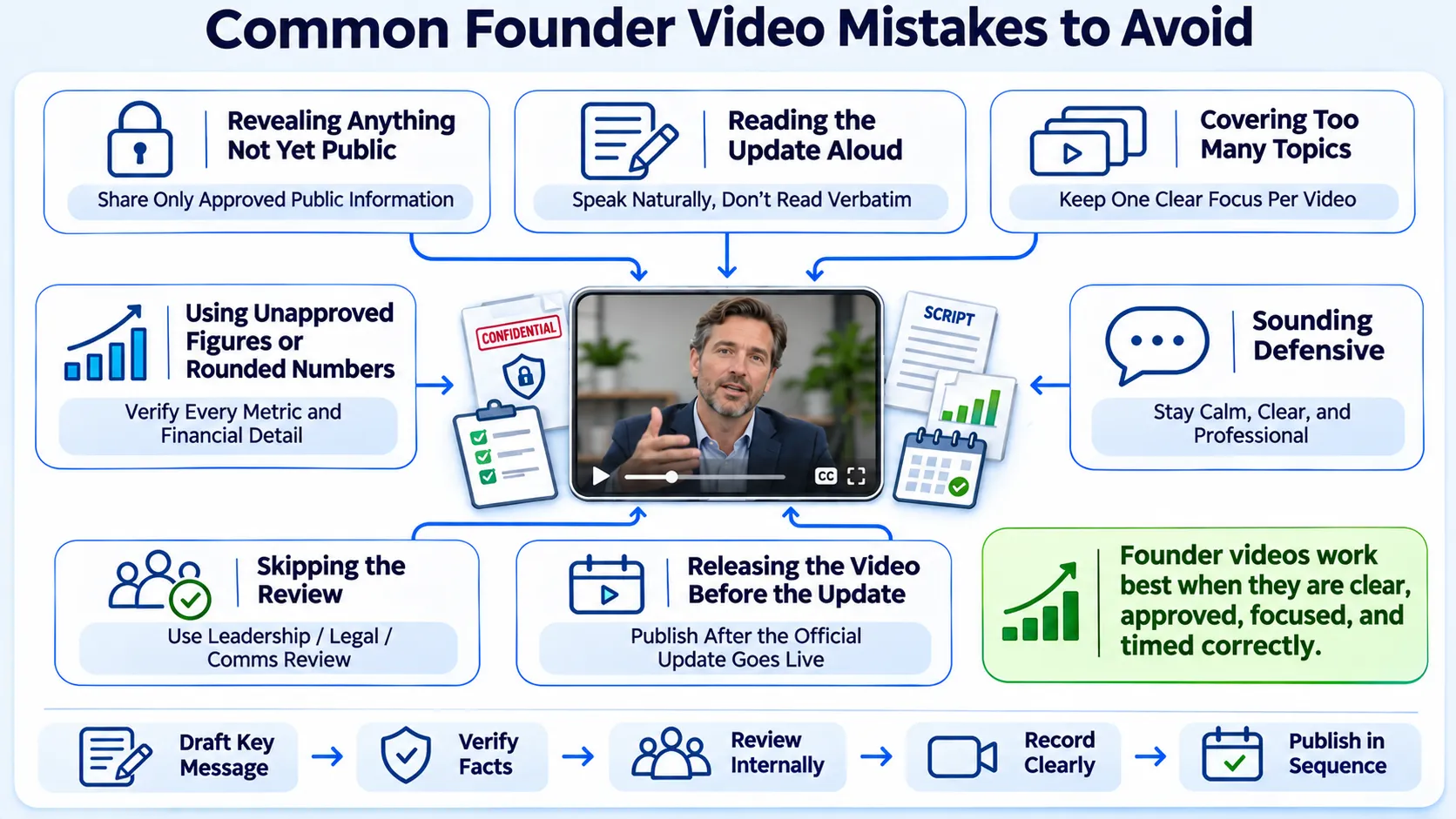
- Revealing anything not yet public.
- Reading the update aloud.
- Covering too many topics.
- Using unapproved figures or rounded numbers.
- Sounding defensive.
- Skipping the review.
- Releasing the video before the update.
Who Does the Video Production Work
| Option | Strength | Trade-off |
|---|---|---|
| In-house | Knows the material | Limited time and editing skill |
| Freelancer | Flexible edits | You manage reviews and distribution |
| Partner | Editing and distribution together | Needs a clear brief and approved script |
See freelance editor vs agency and our LinkedIn video editing for founders service. Komet Media's typical retainers run around $2,500 to $5,000, depending on scope, volume, production difficulty, turnaround, and distribution needs. That is a working range, not a fixed package. Production or editing creates the asset. Distribution gives the asset a chance to produce business value.
Run through this list each time you repurpose an earnings update into a founder video.
A Short Checklist for Founder Videos
- A list of public facts exists.
- One message is chosen.
- The script is approved by counsel and finance.
- Captions are on.
- The video is published after the update.
- Results are logged, which completes the loop.
Conclusion
To repurpose an earnings update into a founder video, stay inside what is public, pick one message, and speak plainly. The review step matters more than the editing. If you want to talk through a plan, you can book a call.
Frequently Asked Questions (FAQ)
How do you repurpose an earnings update into a founder video?
Define what is public and approved, choose one message, write a plain script, get review from counsel and finance, record, edit with captions, and publish after the update.
How much does it cost?
It depends on scope. Komet Media's typical retainers run around $2,500 to $5,000, depending on scope, volume, production difficulty, turnaround, and distribution needs. That is a working range, not a fixed package. See B2B video editing pricing models.
How does the process work?
Define the facts, choose a message, script, review, record, edit, publish, and review results.
How long does it take?
Editing is usually quick. The review step usually sets the schedule.
What deliverables should I expect?
Typically a captioned founder video in one or two cuts. Scope varies by plan.
Should I use a freelancer or an agency?
A freelancer suits a single video. An agency suits teams that publish regular founder videos and want distribution handled together.
Can I use this for a private company's investor update?
Yes, if your investor agreements allow it. Check the terms and share only what is cleared.
Does Komet Media create founder videos?
Yes. We produce, edit, and distribute founder-led video. See founder LinkedIn video examples worth studying.
Written by
Founder & Director of Video - Komet Media
Rajan is the founder and Director of Video at Komet Media, where he builds video content systems that help B2B businesses grow visibility and trust. With 8+ years across video editing, short-form content, Instagram growth, and podcast production, he helps brands drive reach, engagement, and authority.
He writes regularly on short-form video strategy, Instagram growth, podcast repurposing, and building consistent video systems for founders and B2B teams.

