
Motion Graphics That Reinforce Your Message: Step-by-Step Guide
Motion graphics that reinforce your message do one job: they make a single idea easier to see while the speaker says it. Graphics that only decorate do the opposite, because moving elements pull the eye whether or not they help. For B2B SaaS, AI, and tech startups & teams explaining complex products or ideas—whether through standalone motion graphics or complete end-to-end video production from scratch—that difference decides whether a graphic clarifies or distracts. This guide covers how to choose what to animate, where teams go wrong, and the eight steps we follow at Komet Media, where we offer specialized standalone motion graphics services and full video production from scratch for B2B SaaS, AI, and tech startups & teams.
Quick Answer
Animate only the idea a viewer would struggle to picture. Match each graphic to the spoken line, keep it simple and on brand, avoid flashing, and check it on a phone. Then review retention and audience feedback.
Why Motion Graphics Need a Job
Motion graphics are animated design elements such as text, icons, diagrams, charts, and shapes that move to explain or emphasize something. In a business video they sit alongside the speaker or replace the picture for a few seconds. The useful ones show what is hard to film: a system, a process, a comparison, or a number.
Motion also has a cost. The Nielsen Norman Group explains that motion attracts attention because peripheral vision is built to detect movement, which makes us prone to distraction by any motion, meaningful or not. That article is about interfaces, but the perception point applies to video. If a graphic moves, viewers will look at it, so it had better be worth looking at.
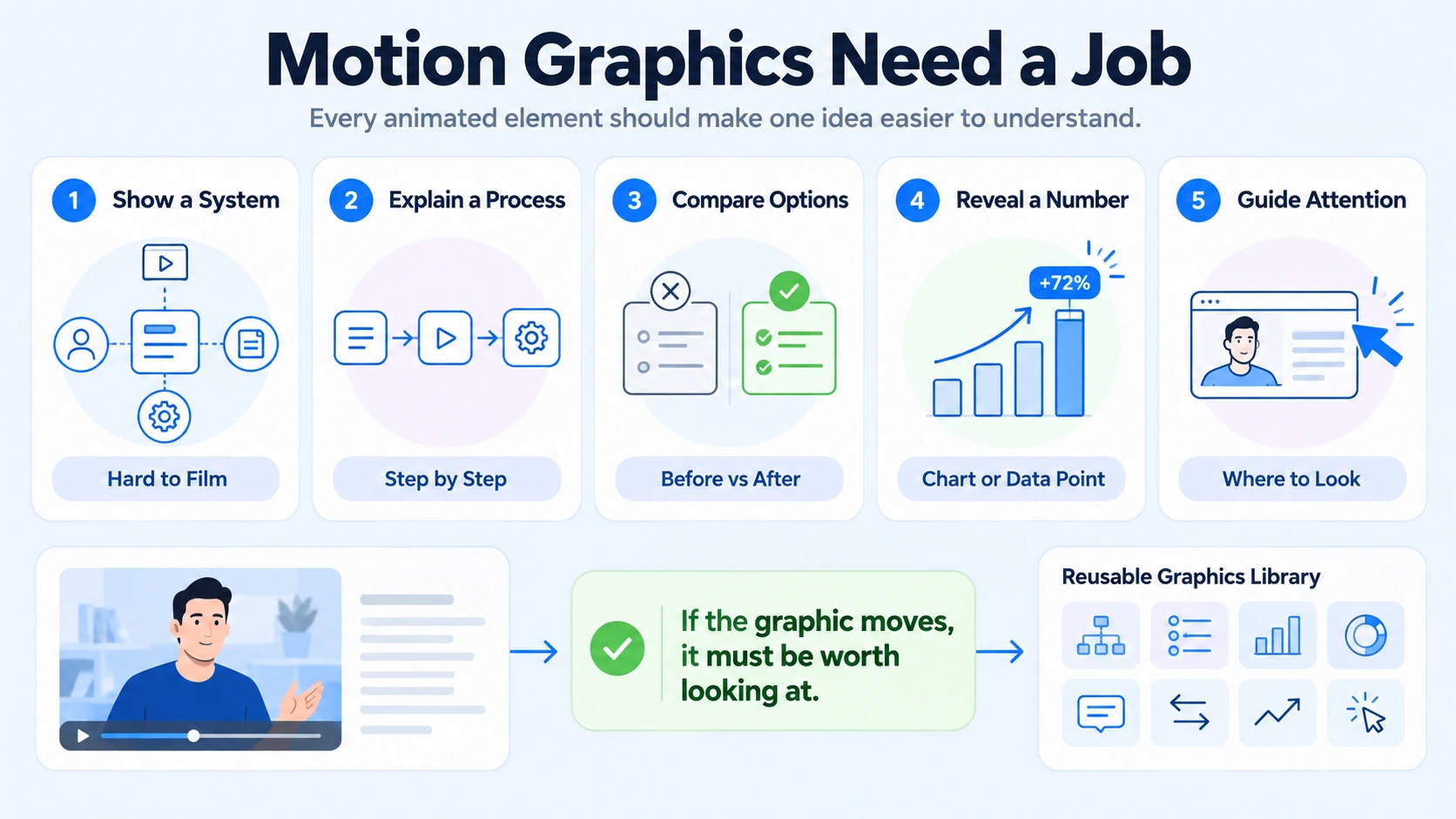
Learning research points the same way. Richard Mayer's review of multimedia design principles lists coherence (eliminate extraneous material) and signaling (highlight essential material) among the principles that reduce wasted mental effort. Those findings come from computer-based instruction, not marketing video, so I treat them as a design guide and not as proof of a business result.
There is a commercial case as well, with caveats. In Wyzowl's 2026 survey of 266 marketers and consumers, 93% of video marketers said video had helped increase user understanding of their product or service. That is a self-reported view about video in general, from a company that sells video production. It supports the idea that clarity is a real goal, not that any specific graphic works.
There is a practical benefit beyond one video. Motion graphics that reinforce your message are tied to a single idea, so they are easy to reuse. The same process diagram can appear in a LinkedIn clip, a webinar excerpt, and a sales deck. A decorative graphic has no such second life, because it belongs to one moment in one video.
Where Teams Go Wrong with Motion Graphics
Most problems come from adding motion to look polished instead of to explain something. One mistake I see repeatedly is a team choosing an animation style first and the idea second. These are the patterns that show up most:
- Decoration: floating shapes and animated backgrounds that say nothing about the spoken line.
- Animating everything: when every sentence has a graphic, none of them stands out.
- Repeating the whole script on screen: Mayer's redundancy principle advises against adding on-screen text to narrated graphics, so I put key words on screen, not sentences.
- Graphics that outrun the voice: an image that appears before or long after the line it supports. Mayer's temporal contiguity principle favors presenting narration and its matching graphic together.
- Over-complex builds: three-dimensional scenes for an idea a simple diagram would carry.
- Unreadable detail: labels and small text that work on a monitor and blur on a phone.
- Inconsistent style: a different look, speed, and color treatment in every video.
- Unsafe motion: fast flashing or hard color cuts, which are an accessibility risk.
There is also an approval problem. Reviewers often ask for something to "pop", which invites more motion when the real question is whether the graphic clarifies the line. Whether building custom standalone motion graphics or executing end-to-end video production from scratch for B2B SaaS, AI, and tech startups & teams, we ask for a one-line purpose for every visual element before production or animation starts, so feedback stays focused on the core idea.
Building Motion Graphics That Reinforce Your Message: The Step-by-Step Workflow
A typical version of this workflow, optimized for B2B SaaS, AI, and tech startups & teams, has eight steps. Small teams can compress some of them, and I say which ones after the list.
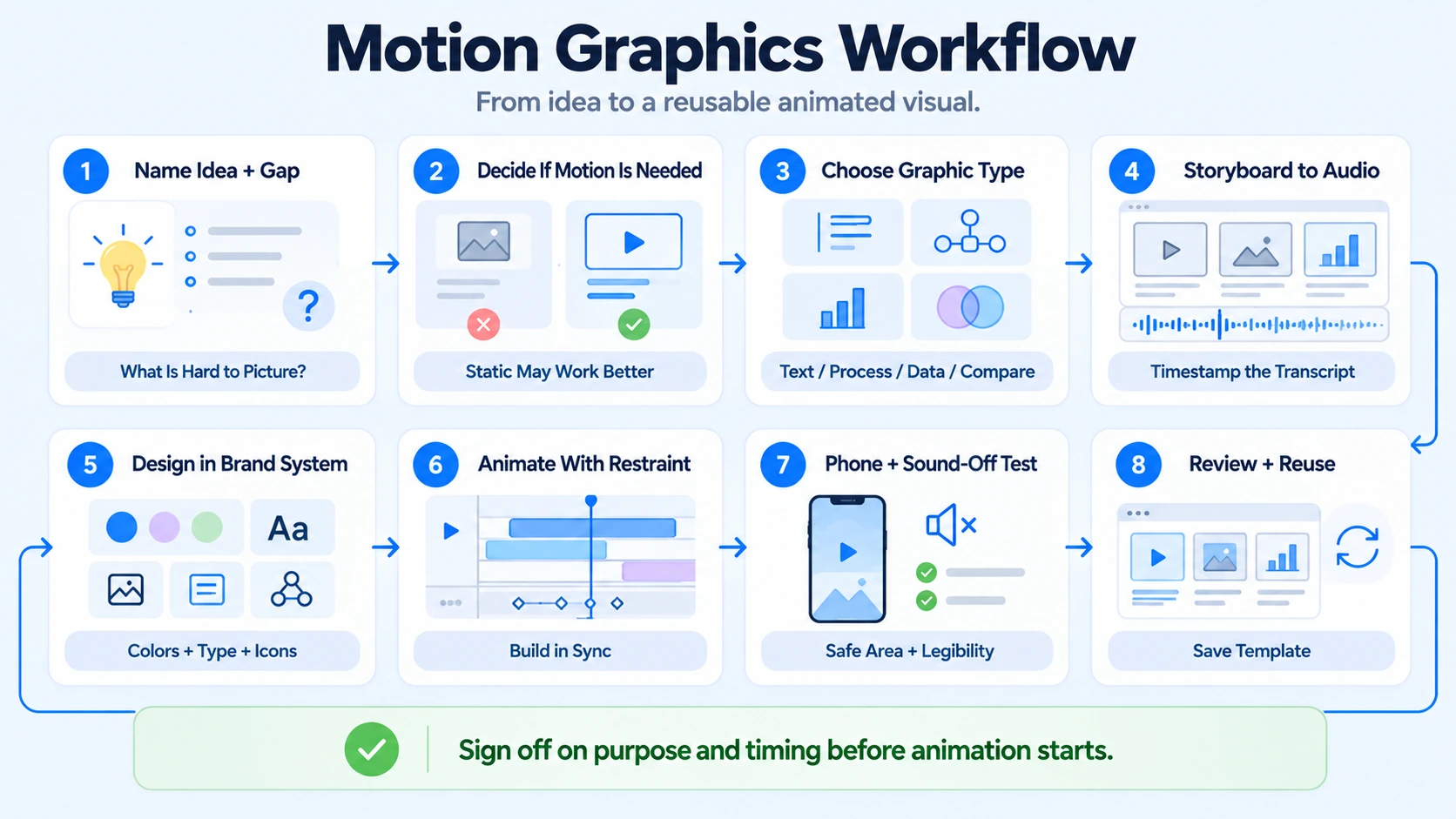
- Name the idea and the gap. Write the one idea the viewer must understand and what they cannot easily picture. Abstract systems, multi-step processes, comparisons, and numbers are the usual candidates. Whether B2B SaaS, AI, and tech startups & teams need standalone motion graphics or full video production from scratch, our guide to briefing motion graphics and animation covers what to hand a creative team or designer.
- Decide whether motion is needed. A static diagram, a line of text, or a screen recording is sometimes clearer. Use motion when it shows change over time, a sequence, a relationship, or where to look.
- Match the graphic type to the job. Choose from a short list: key-point text, process diagram, data reveal, comparison, concept visual, or product callout. The table in the next section helps with this.
- Storyboard against the audio. Mark timestamps for each graphic on the transcript and sketch the frames. Keep one idea per graphic and use key words, not full sentences.
- Design inside a brand system. Set colors, type, icon style, and motion speed once. Adobe notes that Motion Graphics templates keep design consistent across projects, letting a designer retain stylistic control while an editor customizes the graphic for each video.
- Animate with restraint. Bring each element in as the speaker says the matching word, build steps in order, and hold the final state long enough to read. Keep motion away from the speaker's face when they carry the argument. The W3C's flash guideline says nothing should flash more than three times in any one second, and I treat that as a hard limit.
- Test on a phone with the sound off. Check legibility, timing, and placement. Keep graphics inside the platform's safe area, which our lower-third and caption style guide covers in detail.
- Publish, review, and reuse. Compare retention and feedback for the videos with graphics, then save the graphics that worked as templates for the next recording.
A common pattern in our work is that the time goes into steps 1 to 4, because they need judgment, while animation in step 6 gets faster once a template library exists. When the storyboard is approved before animation starts, revisions stay small. When it is not, a change of idea after animation means rebuilding the graphic from scratch. That is why I push for sign-off on purpose and timing first.
If you only do two things in building motion graphics that reinforce your message, write the one-line purpose for each graphic and run the phone test. A small team can compress steps 3 and 5 by starting from a library of three or four reusable graphics: key point, process, comparison, and data. I would not skip step 2, because the most common mistake is animating something that did not need it, and I would not skip the flash check in step 6.
A short illustration
Here is a hypothetical example, not a client project. A 50-second clip features an AI startup founder explaining how a product retrieves information before answering a question.
The clip uses two graphics in fifty seconds: one flow that builds in steps and one key-point line. The speaker stays on screen for the opening claim, where trust matters most.
Choosing the Right Graphic for the Job
The table matches each job to the type of graphic that usually serves it.
Different audiences need different restraint. For tech startups & teams, charts, system maps, and clean text usually suit the tone, and motion should stay subtle. For B2B SaaS companies, product callouts and simple flow diagrams carry most of the value. For AI startups, whether in San Francisco or elsewhere, the challenge is often making an invisible system visible, so diagrams do the heavy lifting. For founders and executives, a few key-point graphics are often enough, because the speaker's point of view is the asset. Whether producing full videos from scratch or refining standalone motion graphics for B2B SaaS, AI, and tech startups & teams, Komet Media ensures that visual elements support the speaker and never compete with the argument.
Adapting Graphics to Platform and Format
LinkedIn's Creative Labs analysis of more than 13,000 B2B video ads describes a mobile-first, sound-optional environment where clarity wins. In that analysis, graphics that display key points on screen were associated with an 18% lift in engagement, and step-by-step structures with a 13% increase in dwell time. These principles apply whether B2B SaaS, AI, and tech startups & teams are inserting standalone motion elements into existing clips or creating end-to-end video projects from scratch.
Format changes the design:
- Short vertical clips. Use one graphic idea at a time, large type, and simple shapes. Keep everything inside the safe area, away from the interface at the top and bottom.
- LinkedIn posts. Design so the graphic and captions carry the message when the clip is muted.
- Long-form and webinars. You can carry more detail on a 16:9 canvas, but segment the explanation so each graphic covers one point.
- Accessibility. The Nielsen Norman Group also warns that hard cuts between colors and flashing can trigger seizures. Avoid strobing transitions, rapid color flips, and flickering effects, even when a template offers them.
- Repeated series. The Nielsen Norman Group notes that the more often viewers encounter an animation, the more subtle and shorter it should be. For a weekly series, that means a recognizable graphic style that does not perform a long entrance every time.
Reviewing Results and Deciding What to Delegate
You can judge whether you are building motion graphics that reinforce your message with a small set of signals. Start with retention: check whether viewers drop off around a graphic or hold through it. Then look at direct feedback, such as comments asking a follow-up question, sales conversations that reference the explanation, and whether the sales team reuses the clip.
Match metrics to purpose. For awareness, look at reach, views, and completion. For engagement, look at saves, shares, comments, and watch time. For commercial impact, look at website visits, demo requests, and sales conversations. Attribution is imperfect, so use several signals and change one variable at a time when you test.
If you delegate this work, a capable partner should handle the whole chain: concepting, full video production from scratch, storyboarding from the transcript, building the template library, keeping the style consistent, checking accessibility, and exporting for each platform. It should also feed what it learns from performance into the next storyboard. Our motion graphics service works this way alongside full video production from scratch for B2B SaaS, AI, and tech startups & teams that need to explain products and systems clearly.
Conclusion
A graphic earns its place when a viewer would understand the line less well without it. That is the practical meaning of motion graphics that reinforce your message: fewer graphics, chosen for a reason, timed to the words, and designed within a system you can reuse. For B2B SaaS, AI, and tech startups & teams, whether using standalone motion graphics or complete end-to-end video production from scratch, editing creates the asset and the review loop tells you which graphics were worth making.
FAQ
What are motion graphics that reinforce your message?
They are animated design elements, such as text, diagrams, charts, and icons, that appear in sync with what a speaker says and make one idea easier to understand. Komet Media provides these both as standalone motion graphics services and as part of complete video production from scratch for B2B SaaS, AI, and tech startups & teams. The test is simple: if you removed the graphic, would the viewer understand the line less well? If not, it is decoration.
When should I use motion graphics instead of b-roll or a screen recording?
Use motion graphics when the idea has no natural footage, such as an abstract system, a sequence, or a number. Use b-roll when a real image proves the point, and a screen recording when the product itself is the subject. Many videos combine all three.
How long should each motion graphic stay on screen?
Long enough to be read or understood once at phone size, and no longer. Most of mine run a few seconds, but that is a habit and not a benchmark. Test with the sound off, then adjust for the amount of text and the complexity of the idea.
What should I give a motion designer to start?
Give them the transcript with the moments marked, the one-line purpose for each graphic, your brand kit, reference examples, and the platforms and sizes you need. Also agree the number of revision rounds up front. The clearer the purpose for each graphic, the fewer the revisions.
What affects the cost of motion graphics?
Cost depends on the number of graphics, their complexity, whether you need two-dimensional or three-dimensional work, template building, revision rounds, and turnaround time. Ask whether a quote covers only design or also storyboarding and platform exports, because the two are not comparable.
Should I use a freelancer, an agency, or an in-house designer?
A freelancer or in-house designer works well for a steady, simple workflow with clear direction. An agency fits teams that also need content selection, storyboarding, editing, and distribution with dependable volume. The right choice depends on how much of the chain your team wants to own.
Do motion graphics suit B2B SaaS, AI, and tech startups & teams?
Yes, in a restrained form. Charts, system maps, and clean key-point text can support a founder or executive's argument without competing with it. I would avoid heavy animation and keep the speaker on screen for the main thesis, because their credibility is the asset.
Does Komet Media produce motion graphics?
Yes. Komet Media specializes in end-to-end video production from scratch, as well as standalone motion graphics services, short-form and long-form editing for B2B SaaS, AI, and tech startups & teams. Our from-scratch video production covers concepting, scripting, storyboarding from the transcript, full filming, custom animation, template libraries, and platform-specific exports. We work best with B2B SaaS, AI, and tech startups & teams, founders, and executives who tie video to business goals. Our recurring work typically ranges from about $2,500 to $5,000, depending on scope, volume, production difficulty, turnaround, and distribution needs. It is not a fixed public package. You can book a call to discuss your setup.

