
Repurpose a Panel Discussion into Clips: Step-by-Step Guide
To repurpose a panel discussion into clips, find the moments where one idea lands clearly, then cut each into a short, captioned video that works without the rest of the session. (Note: If you do not have pre-recorded material, Komet Media also offers full video production and editing services from scratch.) Panels are loose by nature: introductions, tangents, and several voices. The value sits in a few exchanges. This guide covers webinars, hosted panels, and virtual sessions, with a step-by-step workflow and tables for planning.
Quick Answer to Repurposing Panels
Get speaker permission, watch the full panel and mark clear moments, edit each into a 30 to 60 second captioned clip, add speaker context, and post with a link to the full session.
The Panel Clipping Workflow at a Glance
| Step | Action | Output |
|---|---|---|
| 1 | Confirm speaker permissions | Written approvals |
| 2 | Prepare the source file | The best audio and video |
| 3 | Transcribe and mark moments | A shortlist of 8 to 12 |
| 4 | Score and select | Four to six final clips |
| 5 | Edit single- and multi-speaker clips | Cropped, captioned cuts |
| 6 | Add context | Names, titles, topic labels |
| 7 | Adapt for each platform | LinkedIn, Reels, Shorts, YouTube |
| 8 | Post and review | A schedule and results log |
Why Panel Discussions Are Worth Repurposing into Clips
| Panel strength | How it helps as clips |
|---|---|
| Several experts | Many viewpoints to quote |
| Natural disagreement | Debate and contrarian clips |
| Audience questions | Ready-made question and answer clips |
| Credible co-speakers | Borrowed authority for your brand |
| A reason to exist | A topic that is already framed |
See our tutorial on repurposing a conference panel into Shorts if the panel was at an event, and repurposing a roundtable into clip highlights for smaller group sessions.
Who This Panel Repurposing Guide Is For
| Reader | Situation | Where to start |
|---|---|---|
| Marketing lead | Hosted a panel webinar | Steps 1 to 4 |
| Founder or executive | Spoke on someone else's panel | Steps 1, 3, 4 |
| Event or community lead | Has recordings from many sessions | Steps 2 to 8 |
| Agency or editor | Cutting for a client | Steps 5 to 7 |
Each reader can use the same plan to repurpose a panel discussion into clips.
Step 1: Confirm speaker permissions
- Check who owns the recording: the organiser, the platform, or you.
- Get written permission from every speaker whose face or voice appears.
- Ask the organiser whether event branding or sponsor marks may appear.
- Agree on approvals: which clips need a speaker's sign-off.
- Agree on removal: how a speaker can ask for a clip to come down.
These are practical steps, not legal advice.
| Permission | What to confirm |
|---|---|
| Recording and reuse | Speakers agreed to clips being published |
| Name and title | How each speaker wants to be credited |
| Company marks | Whether logos may appear |
| Paid use | Whether clips may be used in ads |
| Removal | The process and timing |
Anyone who plans to repurpose a panel discussion into clips should first check how the panel was framed. A panel with a clear question and a strong moderator usually gives cleaner clips than a loose conversation.
Step 1: Confirm Speaker Permissions for Panel Clips
| Source | Note |
|---|---|
| Webinar platform recording | Often compressed, so request the highest quality |
| Multi-track recording | Best for separating speakers |
| Event recording | Ask the organiser for the full-resolution file |
| Audio only | Fine for audio-led clips with captions |
Keep the original untouched, and work on copies. See setting up your source footage for faster editing.
Step 2: Prepare the Source Panel Video File
| Moment type | What to look for |
|---|---|
| Clear opinion | A speaker states a view with a reason |
| Disagreement | Two speakers see a point differently |
| Audience question | A question and a direct answer |
| Story | A short example that teaches |
| One-liner | A quotable sentence |
Mark 8 to 12 moments with timestamps, and note which speaker is talking.
Step 3: Transcribe and Mark Key Panel Moments
| Criterion | Question | Score 1 to 3 |
|---|---|---|
| Stand-alone | Does it make sense without context? | |
| Specific | Does it contain a concrete point? | |
| Relevant | Does it match your audience? | |
| Clean audio | Can you hear it clearly? | |
| Permission | Is the speaker approved? |
Select four to six clips with the highest totals. Mix types: an opinion, a debate, and an answer.
To repurpose a panel discussion into clips well, edit for the viewer who never saw the session. Every clip should show who is speaking and what the question was.
Step 4: Score and Select the Best Panel Clips
| Clip type | Editing approach |
|---|---|
| Single speaker | Crop to the speaker, captions, a short hook |
| Two speakers | Cut between them, with names on screen |
| Debate | Keep the exchange short, and show both views fairly |
| Audience question | Show the question as text, then the answer |
Handling multi-speaker moments
- Trim any lead-in that needs context.
- Make sure each speaker's point is not distorted by cuts.
- Add names the first time each person speaks.
- Keep the debate fair. Do not cut so that one person looks foolish.
- Add captions with speaker labels if voices overlap.
See pacing and cuts for high-retention short video and adding captions and subtitles that lift retention.
Step 5: Edit Single- and Multi-Speaker Panel Clips
| Element | Example (hypothetical) |
|---|---|
| Topic label | "Hiring in a slow market" |
| Speaker credits | Name, title, company |
| Event or series | "From our spring panel" |
| Next step | "Full session linked below" |
Step 6: Add Context to Video Clips
| Platform | Format | Note |
|---|---|---|
| Square or vertical, with captions | Add a short framing post | |
| Instagram Reels | Vertical | Strong first line |
| YouTube Shorts | Vertical | Link to the full session in the description |
| YouTube | The full session | A home for the original |
| Newsletter | A link to the best clip | Short note |
See repurposing a webinar into LinkedIn clips and editing webinars into highlight reels.
Step 7: Adapt Panel Clips for Each Social Platform
| Goal | Metrics | Note |
|---|---|---|
| Attention | Views, watch time, completion | Compare similar clips |
| Interest | Shares, saves, comments | Shares show usefulness |
| Audience | Followers and profile visits | Relevant roles matter most |
| Traffic | Clicks to the full session | Use tracked links |
| Speaker response | Speakers sharing the clip | Extends reach |
See video KPIs B2B teams should track.
Step 8: Post Clips and Review Performance
This is a hypothetical example, not a client story. Imagine a 50-minute webinar panel on hiring with three speakers.
| Item | Plan |
|---|---|
| Source | One webinar recording |
| Shortlist | Ten marked moments |
| Final clips | Five clips: two opinions, one debate, two answers |
| Platforms | LinkedIn and Reels, with the full session on YouTube |
| Rhythm | One clip every few days for two weeks |
| Review | Which clip type draws the most shares |
An Illustrative Panel Clip Plan
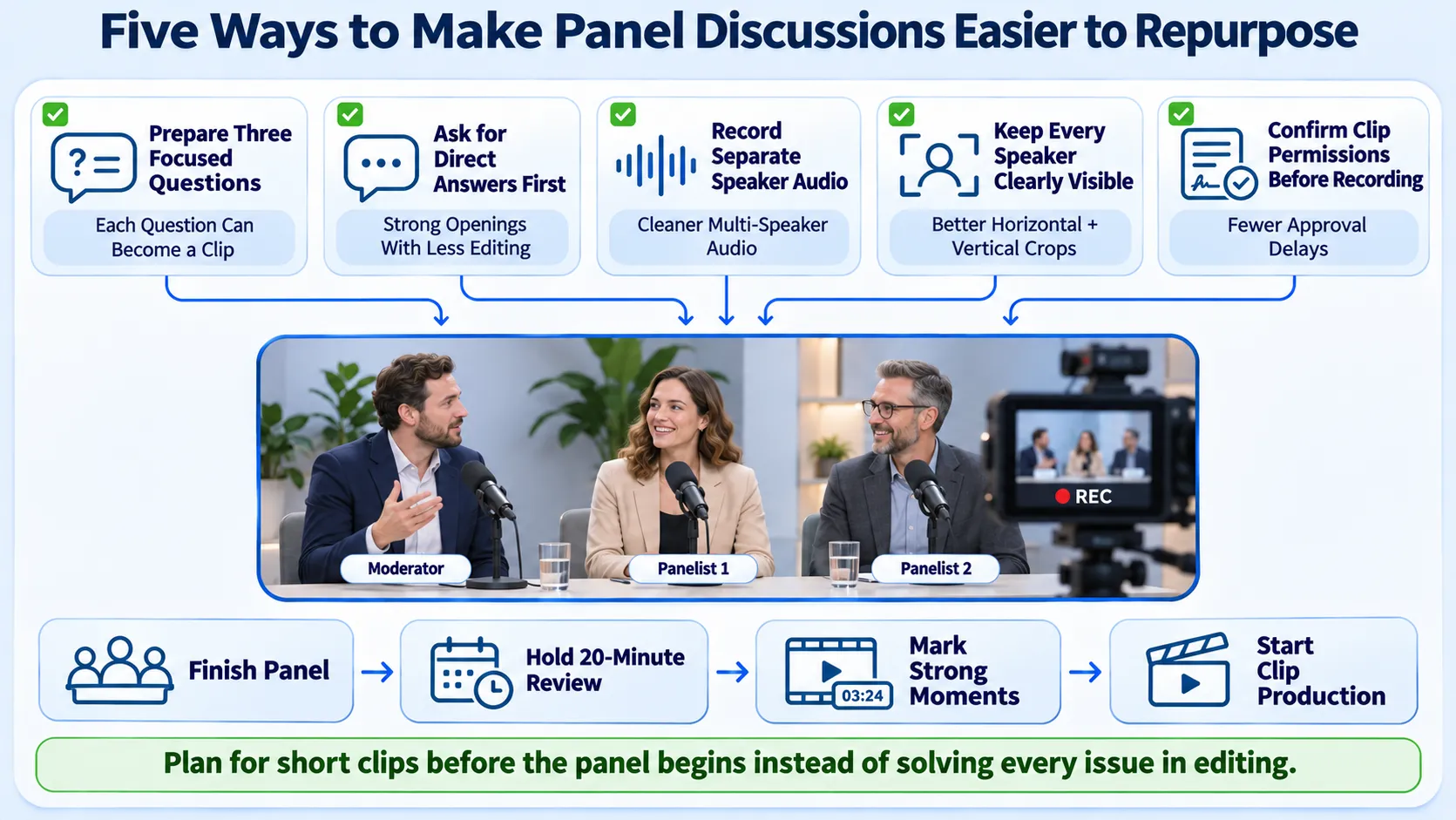
If you host panels, a few choices make them easier to cut later.
| Choice | Why it helps |
|---|---|
| Give the moderator three sharp questions | Each answer becomes a clip |
| Ask speakers to give a direct answer first | Clean openings |
| Record each speaker's audio separately, if possible | Easier mixing and cleanup |
| Seat or frame speakers so faces are visible | Better crops |
| Agree clip permissions before the session | No scramble afterwards |
A steady habit helps teams that repurpose a panel discussion into clips regularly: after every panel, hold a 20-minute review to mark moments while the discussion is fresh.
Plan Future Panel Discussions for Easy Clipping
- Publishing without speaker permission.
- Cutting a debate unfairly.
- Using clips that need heavy context.
- Skipping speaker names.
- Forgetting captions.
- Burying the link to the full session.
- Posting everything in one day.
Common Mistakes When Clipping Panel Videos
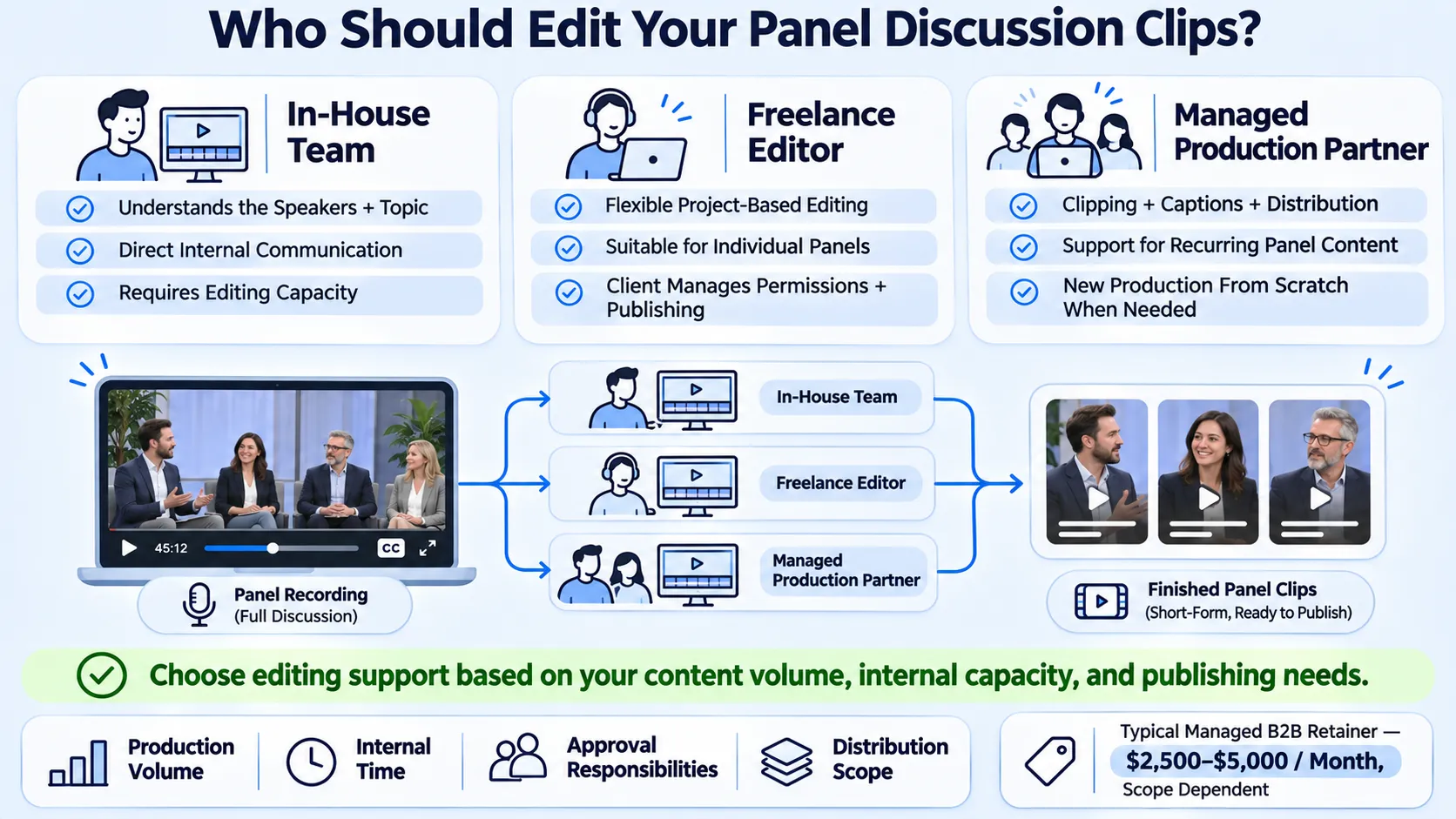
| Option | Strength | Trade-off |
|---|---|---|
| In-house | Knows the speakers and topic | Needs editing time |
| Freelancer | Flexible edits | You manage permissions and distribution |
| Partner (e.g. Komet Media) | End-to-end production from scratch, editing, and distribution together | Needs a clear brief and approvals |
See freelance editor vs agency and our short-form video editing service. Komet Media provides complete video production and editing services from scratch in addition to repurposing existing recordings. Typical retainers run around $2,500 to $5,000, depending on scope, volume, production difficulty, turnaround, and distribution needs. That is a working range, not a fixed package. Editing creates the asset. Distribution gives the asset a chance to produce business value.
When you repurpose a panel discussion into clips, keep a log of speaker approvals next to the clip files.
Who Handles Panel Video Editing
- Speaker permissions are in writing.
- The best source file is saved.
- Moments are marked and scored.
- Names and captions are on every clip.
- The full session is linked.
- Results are logged, which completes the loop.
A Short Checklist for Repurposing Panel Videos
To repurpose a panel discussion into clips, protect the speakers first, then find the few moments that stand alone and cut them cleanly. If you want to talk through a plan, you can book a call.
Conclusion
How do you repurpose a panel discussion into clips?
Get speaker permission, mark clear moments in the transcript, select four to six, edit with captions and names, add context, post on a few platforms, and review.
How much does it cost?
It depends on scope. Komet Media's typical retainers run around $2,500 to $5,000, depending on scope, volume, production difficulty, turnaround, and distribution needs. That is a working range, not a fixed package. See B2B video editing pricing models.
How does the process work?
Confirm permissions, prepare the source, mark moments, select, edit, add context, adapt for platforms, and review.
How long does it take?
The edit depends on the number of clips. Speaker approvals often take longer than the editing itself.
What deliverables should I expect?
Typically four to six captioned clips in vertical and square cuts. Scope varies by plan.
Should I use a freelancer or an agency?
A freelancer suits a single panel. An agency suits teams that run panels regularly and want distribution handled together.
Is every panel worth repurposing?
No. Panels with clear opinions and good audio are the best candidates. Loose, off-topic panels may yield few clips.
Does Komet Media repurpose panel discussions?
Yes. We offer video production and editing services from scratch as well as repurposing panels, webinars, and podcasts into short clips. See repurposing a fireside chat into Reels.

