
Repurpose a Roundtable into Clip Highlights: Step-by-Step Guide
Whether you already recorded a strong roundtable or need help producing one from scratch, turning a full session into clip highlights is essential for B2B SaaS, AI, and tech startups. If you have an existing recording sitting in a Google Drive folder unwatched, or want to record a new session with full end-to-end production support, this guide gives you the exact workflow to pull 8–12 social-ready clips from a single recording without guessing which moments matter.
TL;DR
- Pull a transcript first, this is your clip map, not a nice-to-have.
- Target moments that are self-contained, opinionated, or counterintuitive.
- Edit each clip to 30–90 seconds, vertical format, with burned-in captions.
- Distribute across LinkedIn, YouTube Shorts, and your sales enablement library in batches, not all at once.
Why B2B Teams Can't Afford to Skip This Step
Most B2B SaaS, AI, and tech startups produce roundtables, panels, and virtual events once, post the full recording, then move on. That's leaving serious pipeline value unused. 70% of B2B buyers watch video content during their purchase decision process, and the absence of video is a competitive disadvantage by default. A 60-minute roundtable is not one asset. It is a content library waiting to be unlocked.
Forrester's 2025 Buyers' Journey Survey found that the average B2B purchase now involves 13 internal stakeholders and 9 external participants, each consuming content independently. A podcast or webinar repurposed into short clips can reach the CFO, the IT lead, and the end user without requiring a separate content strategy for each.
When you repurpose a roundtable into clip highlights, you are not just saving production time. You are creating buyer education assets that do work across every funnel stage simultaneously. The sales team gets enablement clips. The marketing team gets LinkedIn content. The founder gets thought leadership. All from one recording that already exists.
78% of B2B marketers now use video, and 41% say short-form drives the highest ROI of all video formats, according to the LinkedIn B2B Marketing Benchmark. The teams pulling ahead are the ones treating every long-form session as a clip factory, not a one-time broadcast. This matters even more for panel format content. Roundtables carry built-in social proof, multiple credible voices agreeing or productively disagreeing on a topic. That is raw material that performs. You just have to extract it correctly.
How to Identify Key Highlights in a Long Roundtable Recording
Before you touch an editing tool, you need a transcript. Every other step depends on it.
Run the full video through a transcription tool like Descript or Otter. This gives you an easy way to scan for key soundbites, surprising stats, or emotional beats, and makes the repurposing process significantly faster.
Once you have the transcript, scan it for these signal types:
- Contrarian or counterintuitive statements: Any moment where a panelist says "actually, the opposite is true" or directly challenges a common assumption.
- Data-backed claims: A specific number or finding stated confidently, these clip cleanly and earn credibility.
- Narrative moments: A short story or case example with a clear beginning, middle, and payoff.
- Direct disagreement: When two panelists are in friction, even politely, the tension holds attention.
- Quotable definitions: A panelist who defines a fuzzy industry term sharply in one sentence.
Focus on moments lasting 15 to 90 seconds that deliver complete ideas without requiring additional context from the surrounding conversation, and look for content featuring surprising statements that sparked discussion.
What you are NOT looking for: transitions, introductions, "great point" affirmations, or any moment that only makes sense with prior context. Avoid purely logistical moments and low-energy exchanges with no punchlines or "moments."
Mark every candidate moment with a timestamp and a one-line description of the hook angle. From a 60-minute roundtable, you should have 15–20 candidates. You will cut this down to your best 8–12 for production.
A good clip test: if you need to explain it in the caption, the clip is not ready to edit yet. Rework the in-point until the clip opens on the insight, not the setup.
Roundtable to Short Clips: The Step-by-Step Editing Workflow
With your clip map in hand, here is the production sequence that works for every roundtable we produce or repurpose for B2B SaaS, AI, and tech startups at Komet Media.
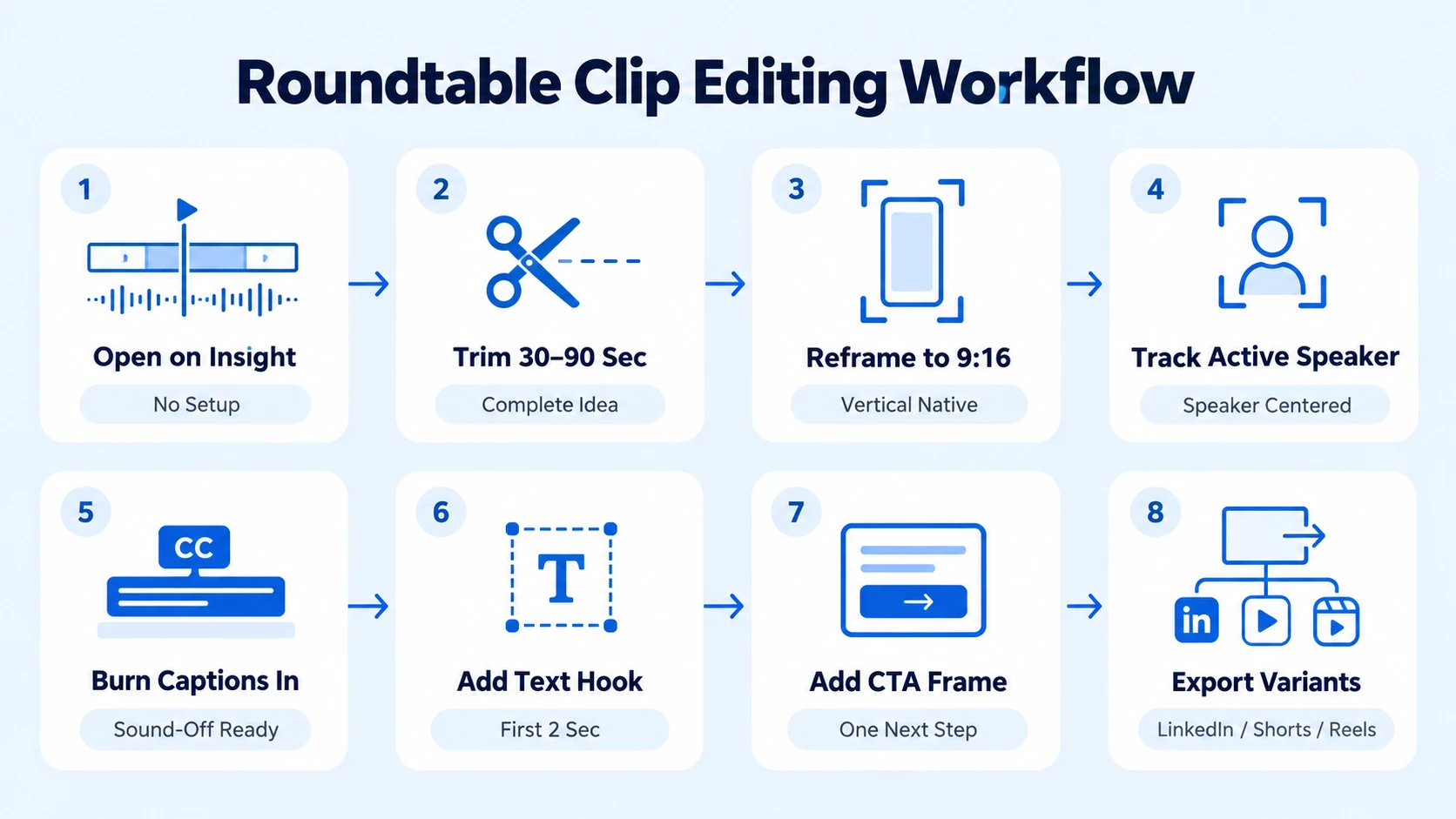
- Set your in-point at the insight, not the setup: Cut any "So, building on what Sarah said…" preamble. The clip opens on the claim or the hook.
- Trim to 30–90 seconds: The sweet spot for engagement sits between 30 seconds and two minutes, enough to hit hard and stick without losing your audience's attention.
- Reframe to vertical (9:16): Export clips in 9:16 vertical format, keep them under 60 seconds where possible, and make sure the visuals are clean and uncluttered. For multi-speaker roundtables, use speaker-tracking reframe so the active speaker is always centered.
- Add burned-in captions: The first 5 seconds of a video determine 80% of viewer retention, and burned-in captions matter because 92% of people watch mobile video with the sound off.
- Write a text hook overlay: Put the core claim on screen in the first 2 seconds as a text card. This is separate from captions, it is a visual headline.
- Add a closing CTA frame: One clear next step. For LinkedIn, "Follow for more" or a direct link to a demo page. For YouTube Shorts, a subscribe card.
- Color-grade for consistency: Even a simple LUT applied across all clips from the same roundtable creates visual cohesion that signals brand quality.
- Export platform variants: LinkedIn and YouTube Shorts both accept 9:16 at 1080x1920. Instagram Reels does too. One master export, three platforms.
Best Tools to Repurpose a Roundtable into Clip Highlights
You do not need an expensive stack. You need the right tool for each layer of the workflow.
The strongest tools for repurposing long-form video include OpusClip for AI-powered automatic clip extraction, Descript for text-based clip editing, and Riverside for all-in-one recording and clip generation. Descript is not an automatic repurposing tool but a text-based video editor, upload the long-form video, view it as a transcript, highlight the sections you want as clips, and export them as individual short-form videos. This is the fastest way to build your clip map and execute production in one tool.
OpusClip analyzes speech patterns, visual changes, emotional peaks, and information density to identify moments with the highest engagement probability, generating 5 to 15 clips per hour of content in 9:16 vertical format with speaker-tracking auto-reframes.
For most B2B video editing workflows at B2B SaaS, AI, and tech startups, the right combination is Descript for manual editorial control on your top-tier clips, and OpusClip to surface additional moments you may have missed in a first pass. AI tools accelerate the process, but a human editorial pass is non-negotiable before anything goes live. Tone, context, and brand accuracy are not things an algorithm verifies.
How to Turn a 60-Minute Roundtable into 10 Short Clips for Social Media
Here is the exact clip-batching framework for a standard 60-minute roundtable.
From a 45–60 minute recording, you should realistically target 12–25 clips batched across multiple weeks, with each clip following one rule: start with the payoff in the first 1–2 seconds, one clip equals one point.
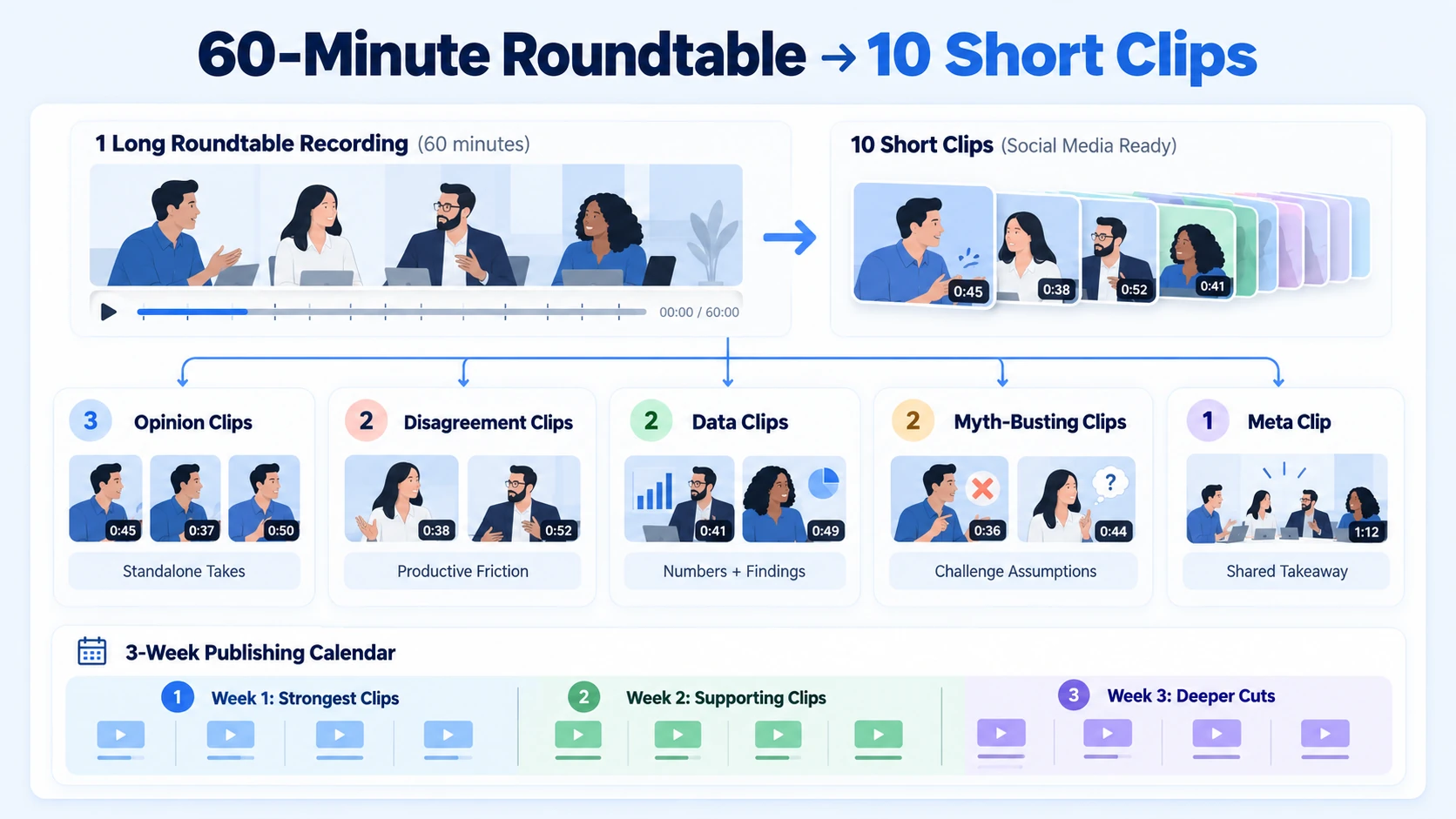
For a practical 10-clip output from a single session, use this distribution model:
- 3 opinion clips: Strong, standalone takes from individual panelists. These drive LinkedIn shares.
- 2 disagreement clips: Moments of productive friction between panelists. High engagement due to tension.
- 2 data clips: Any moment where a panelist cites a real number or finding. These earn trust with buyers.
- 2 "myth-busting" clips: Panelist challenging a common assumption in the space. These travel well on YouTube Shorts.
- 1 meta clip: The "what did we all agree on?" moment, often near the end. Use as a summary teaser to drive full-recording views.
Spread clips from the same source video across days, dumping multiple clips at once can fatigue your audience and make your content feel repetitive. Week 1: top 3–5 strongest clips. Week 2: supporting clips. Week 3: the deeper cuts. This approach fits directly into any content repurposing system for events and panels. The roundtable becomes a 3-week content calendar, not a one-day post.
How to Distribute Roundtable Clips Across Platforms for Maximum Pipeline Impact
Production quality means nothing if distribution is an afterthought. Each platform requires a different packaging decision, not a different clip, but a different wrapper.
LinkedIn video generates 5x more engagement than text posts, and 87% of B2B marketers rate LinkedIn video as effective, with a 40% year-over-year increase in LinkedIn video uploads from 2025 to 2026.
For LinkedIn video marketing, the caption in the post itself matters as much as the clip. Lead with the core insight from the clip as plain text, then let the video reinforce it visually. Buyers who scroll past the video still get the idea from the caption.
For YouTube Shorts optimization, include the roundtable topic keyword in the title, a clear description with timestamps if the clip is from a longer series, and a pinned comment linking to the full recording. This builds topical authority and drives long-form views from short-form discovery.
Sales enablement is the most underused distribution channel for roundtable clips. A 45-second clip of a panelist articulating a problem your product solves is more persuasive in a follow-up email than any written case study. Work with your sales team to tag clips by buyer persona and deal stage. This is where short-form video directly touches the pipeline.
Videos with subtitles see a 28% higher completion rate among B2B audiences, captions are no longer optional since most LinkedIn video is consumed silently on mobile, and videos under 30 seconds show 200% higher completion rates on LinkedIn compared to longer formats.
Conclusion
When you consistently repurpose a roundtable into clip highlights, one recording becomes a multi-week content engine that serves marketing, sales, and brand simultaneously.
- Pull the transcript first, every other decision follows from the clip map you build from it.
- Target self-contained, opinionated, or data-backed moments; skip all setup and transition.
- Edit to 30–90 seconds, vertical format, with burned-in captions on every single clip.
- Distribute in batches by platform, and feed your best clips directly into sales enablement sequences.
Need a team to handle full end-to-end production or the editorial layer for existing recordings? See how Komet Media works with B2B SaaS, AI, and tech startups & teams to produce from-scratch sessions and turn panels, webinars, and podcasts into short-form video libraries.
Frequently Asked Questions
Q1: How many clips can I realistically get from a 60-minute roundtable?
Between 8 and 12 strong clips from a 60-minute session is a realistic, high-quality target. You can surface up to 20 candidate moments, but editorial culling for clarity and hook quality typically lands you in that 8–12 range ready to publish.
Q2: What is the best moment to open a roundtable clip on?
Open on the insight, not the lead-up to it. Cut any preamble where the speaker is referencing a previous point or framing the question. The first sentence of the clip should be the claim, the stat, or the counterintuitive take, not "That's a great question."
Q3: Do I need a professional video editor to repurpose a roundtable into clip highlights?
Not for basic extraction. Tools like Descript and OpusClip can produce draft clips without technical editing skills. However, for full from-scratch production, or for clips going into sales sequences, LinkedIn thought leadership, and paid promotion, a professional production and editorial pass on pacing, captions, and hook framing significantly improves performance.
Q4: Should I post all clips at once or spread them out?
Spread them across 2–4 weeks. Posting all clips at once from the same source video creates audience fatigue and signals low editorial judgment. Batching also extends the life of one recording into a sustained content calendar with compounding reach.
Q5: What aspect ratio should roundtable clips be in?
9:16 vertical for LinkedIn, YouTube Shorts, and Instagram Reels. For email embeds or website use, 16:9 horizontal works. When editing, build your primary cut in 9:16 and crop to 16:9 as needed, the reverse is harder to reframe cleanly.
Q6: How do I use roundtable clips for sales enablement?
Tag each clip by the problem it addresses and the buyer role most likely to care about it. A clip where a panelist describes a scaling challenge maps to a VP of Engineering persona. Drop those clips into deal-stage-specific email sequences, and track click-through rates to measure which clips move the pipeline.

