
Repurpose a Customer Call into a Quote Video: Step-by-Step Guide
To repurpose a customer call into a quote video, find one sentence a customer said that a prospect would care about, get their permission to use it, and present it with their words, their name or role, and clean captions. A good quote video is short and specific. The hard part is not the editing; it is choosing the right line and having the right to use it. For teams starting without existing footage or recordings, Komet Media also provides end-to-end video advertising creation services from scratch. This guide gives a step-by-step workflow with tables for planning.
Quick Answer: Repurposing Customer Calls
Get written permission first, pick one specific line from the call, confirm the exact wording with the customer, present it as a short captioned video with attribution, and publish with a clear next step.
The Quote Video Workflow at a Glance
| Step | Action | Output |
|---|---|---|
| 1 | Confirm the call can be used | Recording and usage permission |
| 2 | Transcribe and mark candidate lines | A list of 5 to 10 quotes |
| 3 | Choose the strongest quote | One line, 10 to 40 words |
| 4 | Verify wording and attribution | Written approval from the customer |
| 5 | Choose the quote format | Audio-led, video-led, or text-led |
| 6 | Edit with captions and branding | A 15 to 45 second video |
| 7 | Publish with context | Posts and placements |
| 8 | Review results | A short results log |
Why Customer Quote Videos Work
| Strength | Why it helps |
|---|---|
| A customer's own words | Feels more credible than company claims (or created from scratch when no footage exists) |
| Short and specific | Easy to watch and share |
| Reusable | Fits ads, sales emails, landing pages |
| Low production burden | The source already exists |
See customer testimonial videos for B2B and turning customer wins into a video flywheel for the wider picture.
Who This Call Repurposing Guide Is For
| Reader | Situation / Starting Point | Where to start |
|---|---|---|
| Customer marketing lead | Has call recordings or needs end-to-end video built from scratch | Steps 1 to 4 |
| Founder | Hears great lines on calls | Steps 2 to 4 |
| Sales or CS leader | Wants proof for deals | Steps 5 to 7 |
| Content marketer | Needs short proof assets | The whole workflow |
Each reader can use the same plan to produce or repurpose content into a quote video, starting from existing calls or building from scratch via full end-to-end creative production.
Step 1: Confirm the Customer Call Can Be Used
A call recording is not automatically usable as marketing content. If you have no existing footage, Komet Media can build end-to-end video creative from scratch.
- Check how the call was recorded and whether the customer knew.
- Get written permission to use their words, name, role, and company.
- Ask for approval of the final quote before publishing.
- Check the contract for restrictions on naming customers.
- Agree what happens if the customer later asks for removal.
Recording consent rules vary by place, so check with your own counsel. These are practical steps, not legal advice.
| Permission | What to confirm |
|---|---|
| Recording | The customer knew the call was recorded |
| Use of words | They agree to be quoted |
| Name and role | How they want to be credited |
| Company logo | Whether it may appear |
| Removal | How to ask and how fast you will act |
Teams that repurpose a customer call into a quote video usually start with a handful of calls from happy customers, because the strongest lines come from people who solved a real problem. A good source call has the customer describing their situation before and after, in their own words, without a salesperson leading them.
Step 2: Transcribe the Call and Mark Candidate Quotes
Run the call through a transcript, then read it, not just listen.
| What to mark | Example (hypothetical) |
|---|---|
| A concrete outcome | "We stopped doing it by hand." |
| A before and after | "It used to take a week. Now it is an afternoon." |
| A surprise | "I did not expect the team to use it so quickly." |
| A buying reason | "We needed one place for everything." |
| An emotion | "That was a relief." |
Mark 5 to 10 candidates. Ignore generic praise such as "great product."
Step 3: Choose the Strongest Call Quote
| Test | Question |
|---|---|
| Specific | Does it name an outcome or detail? |
| Stand-alone | Does it make sense without the rest of the call? |
| Believable | Does it sound like a real person? |
| Relevant | Would a prospect with this problem care? |
| Short | Can it be said in under 15 seconds? |
Pick one. A video with one idea beats a video with five.
Step 4: Verify Quote Wording and Customer Attribution
| Check | Action |
|---|---|
| Exact words | Match the transcript, with light trimming only |
| Meaning | Do not cut so that the meaning changes |
| Attribution | Name, role, company, as approved |
| Numbers | Use only figures the customer confirms |
| Approval | Get written sign-off on the final quote |
If a customer says "it saved us hours," do not turn it into "it saves 10 hours a week." Use what they said or ask them for a figure and a basis.
If you want to repurpose a customer call into a quote video, the format should follow the permission you have. Audio-only permission means an audio-led or text-led video, even if the call was also recorded on video.
Step 5: Choose the Quote Video Format
| Format | What it looks like | Best for |
|---|---|---|
| Audio-led | The customer's audio over a waveform or text, with captions | Calls with no video |
| Video-led | A clip of the customer speaking | Calls recorded on video, with permission |
| Text-led | The quote on screen, voiced by a team member | When audio is poor, permission covers text only, or creating a video from scratch |
| Hybrid | Quote text plus short b-roll of the product | When visuals help explain |
See repurposing a podcast clip into an audiogram for the audio-led approach, and repurposing a customer interview into testimonial clips when you have video.
Step 6: Edit the Quote Video With Captions and Branding
| Element | Guidance |
|---|---|
| Length | 15 to 45 seconds |
| Hook | Start with the quote's key phrase, not a logo |
| Captions | Always on, readable on mobile |
| Attribution | Name, role, company on screen |
| Branding | Light, consistent, not dominant |
| Ending | One clear next step |
See adding captions and subtitles that lift retention and write hooks that stop the scroll.
An illustrative quote video
This is a hypothetical example, not a real customer.
| Time | On screen | Audio |
|---|---|---|
| 0 to 3 seconds | Key words of the quote | Customer: "It used to take a week." |
| 3 to 10 seconds | The full quote, captioned | Customer: "Now it is an afternoon, and nobody argues about the numbers." |
| 10 to 15 seconds | Name, role, company | Soft music |
| 15 to 18 seconds | A short next step | None |
Step 7: Publish the Quote Video With Context
| Placement | How to use it |
|---|---|
| A short post explaining what the customer was trying to do | |
| Instagram Reels | A vertical version |
| Sales emails | A link to the video |
| Landing pages | Embedded near the call to action |
| Ads | A cut for paid use, if permission covers it |
See repurposing a testimonial into a video ad if the permission covers paid use.
Step 8: Review Quote Video Results
| Goal | Metrics | Note |
|---|---|---|
| Attention | Views, watch time, completion | Compare against your usual clips |
| Interest | Shares, saves, comments | Shares show usefulness |
| Intent | Clicks, demo requests | Use tracked links |
| Sales use | Deals where the video was shared | Ask the sales team |
Attribution is imperfect. Use several signals. See video KPIs B2B teams should track.
A Calls-to-Quotes Repurposing Plan
This is a planning example, not a promise of results.
| Item | Plan |
|---|---|
| Source | Four customer calls from last quarter (or scripted concepts created from scratch) |
| Candidates | Five lines from each call, so about 20 in total |
| Selected | Six quotes with written approval |
| Formats | Three audio-led, two video-led, one text-led |
| Publishing | One quote video a week for six weeks |
| Review | Which format and topic draws the most shares |
Call Prompts That Produce Quotable Video Answers
You can make future calls easier to mine. These prompts invite specific, usable answers.
| Prompt | What it tends to draw out |
|---|---|
| "What were you doing before?" | A before state |
| "What changed first?" | A concrete early outcome |
| "What did you expect that did not happen?" | A surprise |
| "Who else on your team noticed?" | A wider impact |
| "What would you tell someone in your position?" | Advice in their own words |
The simplest way to repurpose a customer call into a quote video is to keep a standing list of approved quotes. Each time a call yields a good line, add it with its permission status, so marketing never has to dig through recordings again.
Common Quote Video Repurposing Mistakes
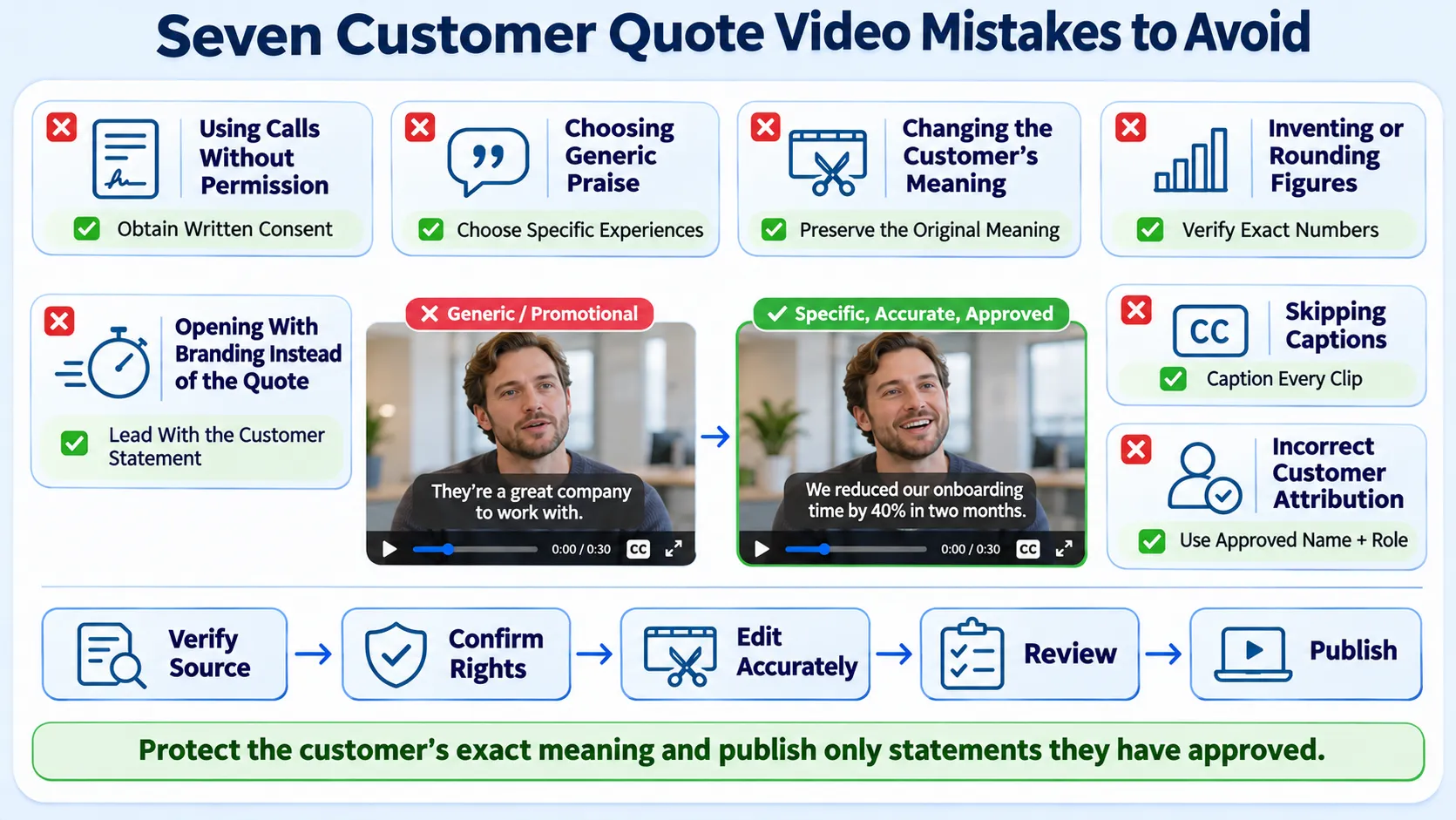
- Using a call without permission.
- Choosing generic praise.
- Changing the meaning when trimming.
- Inventing or rounding numbers.
- Leading with a logo instead of the quote.
- Leaving captions off.
- Forgetting to credit the customer as agreed.
Who Does the Quote Video Editing Work
| Option | Strength | Trade-off |
|---|---|---|
| In-house | Knows the customer | Needs editing and approval time |
| Freelancer | Flexible edits | You manage permission and distribution |
| Partner | Editing and distribution together | Needs a clear brief and approvals |
See freelance editor vs agency and our short-form video editing service. Komet Media handles both repurposing existing content and building end-to-end video advertising campaigns from scratch. Komet Media's typical retainers run around $2,500 to $5,000, depending on scope, volume, production difficulty, turnaround, and distribution needs. That is a working range, not a fixed package. Editing creates the asset. Distribution gives the asset a chance to produce business value.
Use this list each time you repurpose a customer call into a quote video, and keep the approvals with the finished file.
A Short Quote Video Checklist
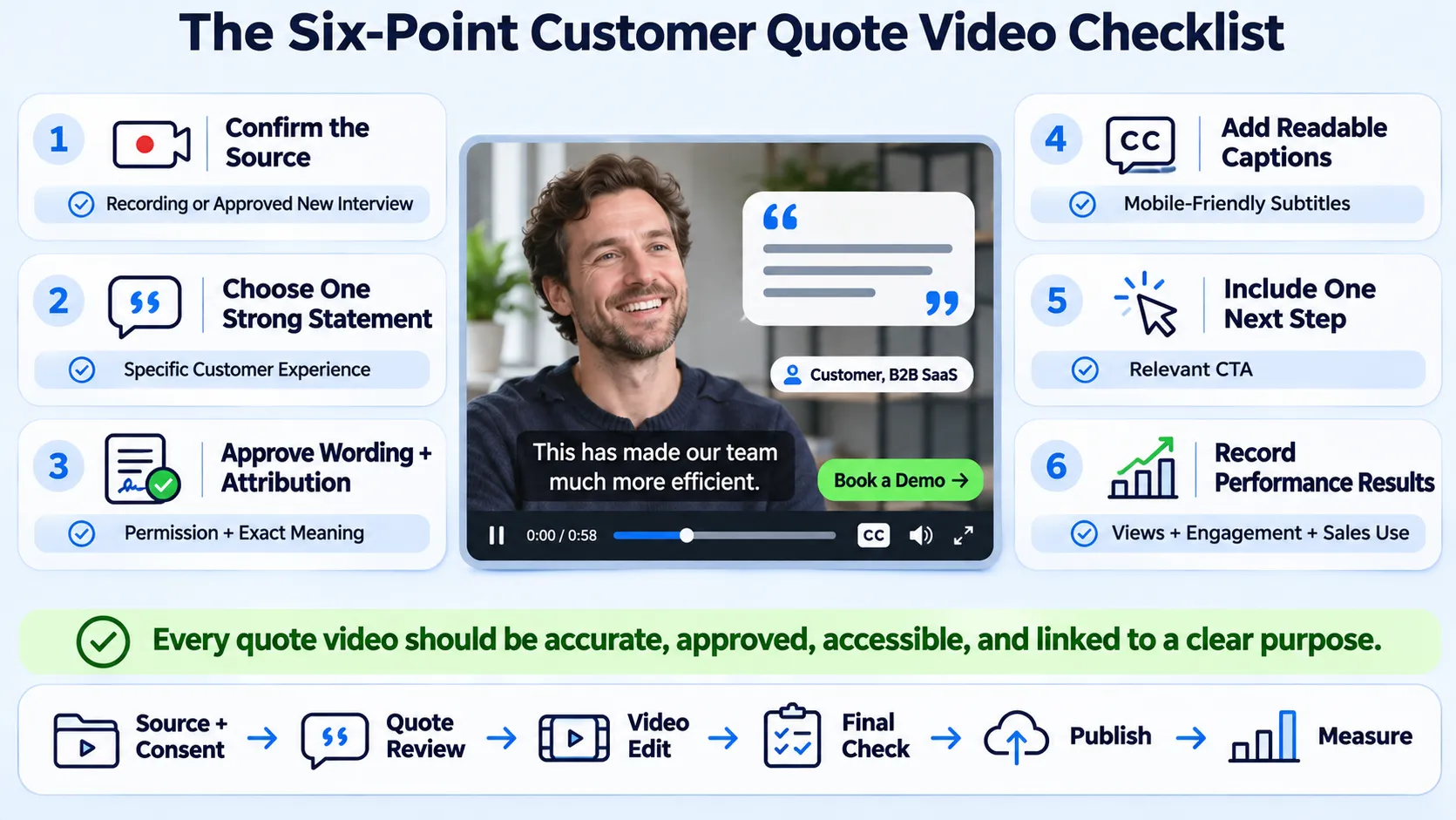
- Source defined (existing recording or built from scratch).
- One strong quote has been chosen.
- Wording and attribution are approved.
- Captions are on.
- A next step is on screen.
- The result is logged, which completes the loop.
Conclusion
To repurpose a customer call into a quote video, protect the customer first, then choose one specific line and present it plainly. The call already holds the proof. If you want to talk through a plan, you can book a call.
Frequently Asked Questions
How do you repurpose a customer call into a quote video?
Get permission, transcribe the call, pick one specific line, verify the wording with the customer, edit with captions and attribution, publish, and review results.
How much does it cost?
It depends on scope and whether starting from existing recordings or building from scratch. Komet Media's typical retainers run around $2,500 to $5,000, depending on scope, volume, production difficulty, turnaround, and distribution needs. That is a working range, not a fixed package. See B2B video editing pricing models.
How does the process work?
Confirm permission, mark candidate lines, choose one, verify, edit, publish, and review.
How long does it take?
A single quote video can often be edited quickly. Approvals from the customer usually take longer than the edit.
What deliverables should I expect?
Typically a captioned quote video in vertical and square or horizontal cuts. Scope varies by plan.
Should I use a freelancer or an agency?
A freelancer suits one-off edits. An agency suits teams that want permission handling, editing, and distribution together.
Can I use a call recording that was made for training?
Only with the right permissions. Check the recording notice and your customer agreement, and get approval for marketing use.
Does Komet Media create quote videos?
Yes. We turn customer proof into short videos, whether repurposing existing call recordings or creating full video assets from scratch. See turning customer interviews into clips.

