
Designing a Video Content Distribution System for Video: Step-by-Step Guide
You can record the best video content in the world and still lose your audience before it loads. A poorly architected video delivery pipeline creates buffering, broken streams, and buyer drop-off. This guide walks through designing a video content distribution system for video from the ground up, covering every layer: CDN architecture, transcoding, adaptive bitrate protocols, and latency optimization. Whether you're running a SaaS product demo library, a founder video strategy, or a full VOD pipeline, this is the infrastructure playbook you need.
TL;DR
- A robust video content distribution system combines an origin server, edge nodes, video transcoding, and adaptive bitrate streaming into one unified delivery pipeline.
- HLS protocol and MPEG-DASH are the two dominant streaming formats; choose based on your device targets and latency requirements.
- Multi-CDN strategy eliminates single points of failure and cuts latency for global audiences.
- The most common mistakes are skipping transcoding ladders, ignoring cache invalidation, and building without bandwidth management from day one.
What Is a Video Content Distribution System and Why Does It Matter?
A video content distribution system is the end-to-end infrastructure that takes video from your origin server and delivers it to the viewer's device with minimum latency and maximum reliability. It is not simply a hosting solution. It is a layered architecture made up of ingest, processing, storage, delivery, and playback components working in concert.
Content delivery networks are used to place content closer to users and to adjust routing paths based on network conditions, which is the foundational logic behind any scalable video delivery infrastructure. Without this, every stream request travels back to your central origin, creating latency spikes that compound with audience size. The market signals confirm the urgency.
The CDN market is valued at USD 26.47 billion in 2025 and is forecast to reach USD 45.13 billion by 2030, reflecting rapid enterprise migration to edge-native architectures and unrelenting 4K/8K video traffic growth. Video content delivery accounts for around 58% of CDN traffic, making it the single largest workload on modern delivery networks.
For B2B SaaS teams specifically, this matters beyond raw infrastructure. Every demo video, product walkthrough, and founder explainer that buffers or fails to load erodes buyer trust at the exact moment you're trying to build it. The video delivery infrastructure becomes a direct extension of your brand's perceived quality.
CDN deployment is increasingly treated as a foundational layer within distributed application environments, not an optional performance upgrade. Teams that treat video delivery as an afterthought pay for it in bounce rates, demo abandonment, and weakened sales enablement. If your video marketing strategy relies on video content doing pipeline work, the distribution layer is non-negotiable.
At its most fundamental level, the system involves four zones: the origin server (where your master files live), the transcoding layer (where format and bitrate variants are created), the CDN edge (where cached segments are served geographically close to viewers), and the playback client (where adaptive bitrate logic runs). Each zone has a distinct job and failure mode.
Core Components Needed for a Video Distribution System
Before you design any architecture, you need a clear inventory of every component involved. Missing one creates a bottleneck that will surface under load.
Content delivery networks have evolved from traditional systems to cloud-based solutions, now offering advanced capabilities such as real-time optimization, predictive caching, edge computing, and integration with AI and analytics tools, which means your component choices in 2026 carry significantly more capability than legacy CDN setups.
The origin server holds the highest-quality master files and should never be exposed to direct public traffic at scale. Edge nodes carry the delivery load. Centralized delivery architectures are often found to be less effective when traffic patterns vary by location, which is precisely why the edge layer is critical.
Load balancing sits between ingest and delivery. Load balancing prevents congestion, ensuring bandwidth is not overwhelmed during peak demand. Cache invalidation, one of the most underestimated components, controls when edge nodes refresh their cached segments after you update content. Poorly configured cache invalidation means viewers receive stale or broken video assets well after you've pushed a fix.
How to Design a Video Content Distribution System: Step-by-Step
This is the full build sequence. Follow it in order since each step depends on the infrastructure decisions made before it.
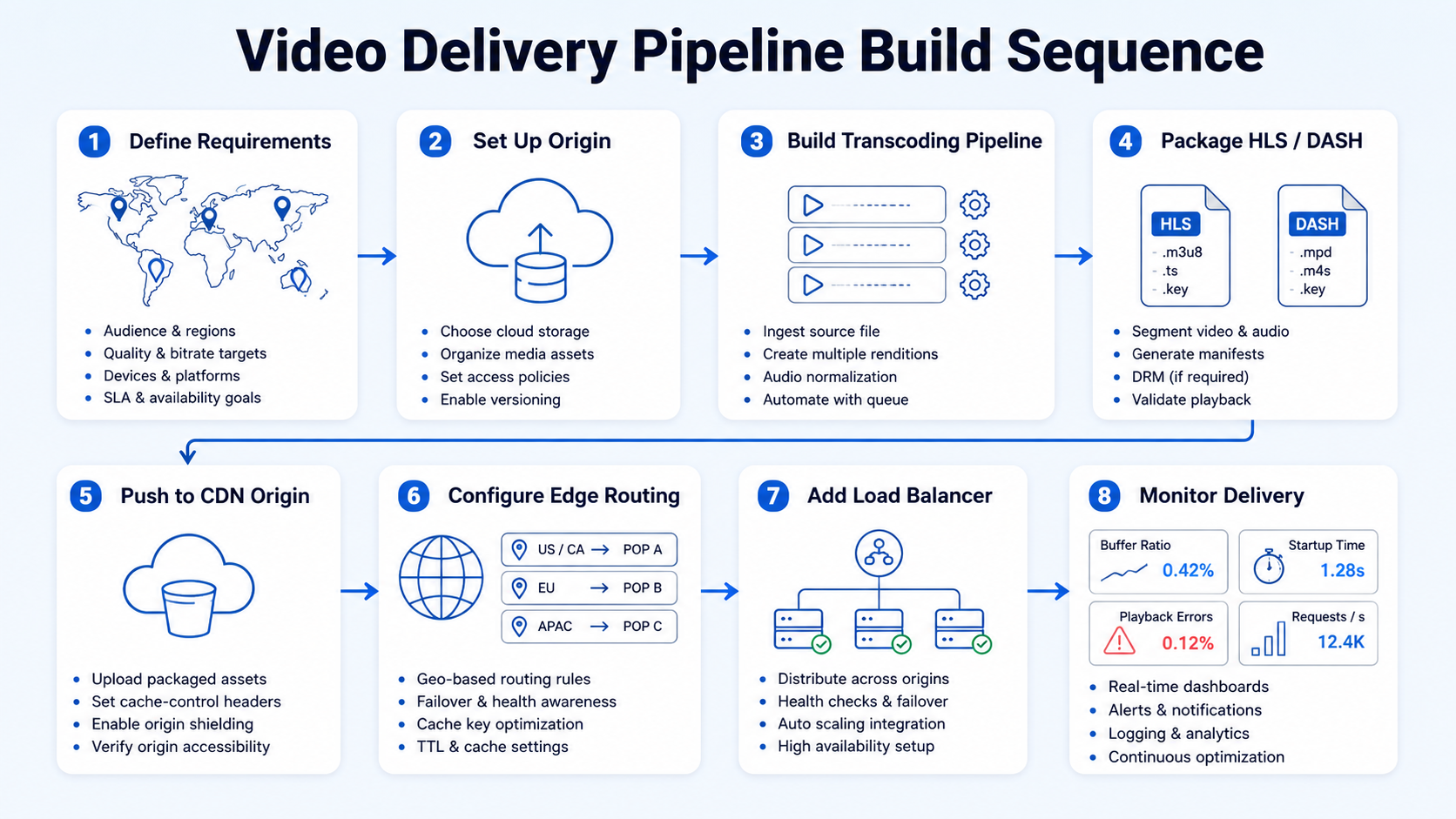
- Define your delivery requirements: Identify your audience geography, concurrent viewer estimates, peak load scenarios, VOD vs. live streaming ratio, and required latency thresholds. These parameters dictate every downstream decision.
- Set up your origin server: Store master video files in a cloud object storage bucket. Configure private access, versioning, and regional replication. This is your single source of truth for all transcoded outputs.
- Build your video transcoding pipeline: Run every uploaded master file through a transcoding engine to produce multiple bitrate/resolution renditions. This is covered in depth in the next section.
- Package outputs into HLS or MPEG-DASH segments: Segment transcoded renditions into small chunks (2–6 seconds) with an accompanying manifest file. This enables adaptive bitrate streaming.
- Push packaged segments to your CDN origin bucket: Configure your CDN to pull from this bucket as its origin. Set appropriate cache-control headers for each asset type.
- Configure CDN edge nodes and routing rules: Select Points of Presence (PoPs) that align with your viewer geography. Set up geo-routing, SSL termination, and token-based access control.
- Implement a load balancer: Route ingest and playback traffic intelligently across servers. Configure health checks so failing nodes are removed from rotation automatically.
- Set up monitoring and alerting: Instrument your pipeline with real-time delivery metrics: buffer ratio, startup time, error rate, and bitrate switches. Set alert thresholds before launch, not after an outage.
The rise of cloud-native services and edge computing is enabling localized content distribution, reducing latency and improving scalability, which means steps 5 and 6 in this sequence carry more capability today than they did even two years ago.
How to Handle Video Transcoding in a Content Distribution System
Video transcoding is where most teams make their first serious architectural mistake. They treat it as a one-time conversion rather than a systematic rendition ladder that serves every viewer condition. Video encoding is the original process of compressing raw footage into a digital format using a codec, while transcoding converts an already encoded video from one format, codec, or bitrate to another. Encoding is used at the start of the workflow; transcoding adapts content for different devices or networks after initial encoding. Your transcoding ladder should produce at minimum the following renditions:
FFmpeg is a free and open-source command-line tool for video transcoding, encoding, and streaming that supports a wide range of video formats and codecs across Windows, Mac, and Linux. For production pipelines, pair FFmpeg with a job queue (Redis + worker processes or a managed service like AWS Elemental) to process uploads asynchronously. Hybrid GPU pipelines, such as cuvid decoding with NVENC encoding, can cut CPU load by 60%, though format compatibility may limit options. For high-volume pipelines processing hundreds of hours per day, GPU-accelerated transcoding is cost-justified. Codec selection matters too.
MPEG-DASH supports a wide range of codecs including H.264, HEVC, VP9, and AV1, allowing for more efficient video compression and delivery. H.264 remains the safest compatibility baseline in 2026, while AV1 delivers roughly 30% better compression at the same quality, making it the right choice for high-volume VOD pipelines where bandwidth management is a cost driver. Always validate transcoded outputs against target devices before deploying to production. A codec that encodes cleanly on desktop may fail silently on older Android or Smart TV players.
HLS vs. MPEG-DASH: Choosing the Right Protocol for Your Pipeline
Protocol selection is one of the highest-leverage decisions in designing a video content distribution system. Get it wrong and you'll be retrofitting your entire packaging pipeline under production pressure. Both MPEG-DASH and HLS run over HTTP, use TCP as their transport protocol, break video into segments with an accompanying index file, and offer adaptive bitrate streaming. The differences come down to latency profile, codec support, and device compatibility.
Low-Latency HLS achieves end-to-end latency of 2–5 seconds at scale, a dramatic improvement over standard HLS. Research shows MPEG-DASH has less frequent and less erroneous restarts, fitting better for inconsistent networks, while HLS responds faster and is recommended for stable, high-throughput applications, especially on Apple devices.
For most B2B SaaS video pipelines: default to HLS with LL-HLS enabled for any live or near-live delivery. Use MPEG-DASH when you need codecs like VP9 or AV1, or when engineering teams need more codec flexibility and choice. For ultra-low latency streaming, Apple's Low-Latency HLS (LL-HLS) allows for near real-time delivery by reducing segment sizes and pre-fetching media parts before they're fully available.
Best Architecture for Video Content Delivery: Multi-CDN Strategy
Single-CDN architectures are a liability in 2026. One CDN alone can no longer handle the scale, unpredictability, and geographic diversity of global streaming audiences, which is why Multi-CDN strategies have become one of the most important shifts in the delivery layer of OTT infrastructure, with platforms now combining multiple CDNs to improve reliability, latency, availability, and regional performance.
A multi-CDN strategy routes each viewer request to the optimal provider at that moment based on geography, current load, and real-time performance data. By combining the reach of multiple CDN providers, your streaming workflow gains access to more Points of Presence, shortening the distance between content and viewer, which minimizes buffering, reduces latency, and ensures consistently high video quality. 43% of enterprises already use multi-CDN models for delivery, a figure that will only grow as real-time switching tools mature.
The practical architecture looks like this:
- Primary CDN: AWS CloudFront or Akamai Technologies handles your highest-traffic regions where their PoP density is strongest.
- Secondary CDN: A complementary provider covers regions where your primary underperforms.
- Traffic orchestration layer: A controller (DNS-based or manifest-based steering) routes each request in real time.
- Failover logic: If primary CDN error rates exceed a threshold, requests automatically reroute to secondary within seconds.
The most immediate benefit of a multi-CDN strategy is eliminating the single point of failure. When traffic is distributed across multiple CDN networks, an outage or degradation at one provider does not take down the entire delivery chain. Cost control is an additional benefit: optimising traffic routing reduces bandwidth costs across providers, and vendor independence eliminates single-point-of-failure and lock-in risk.
Common Mistakes When Designing a Video Delivery Pipeline
Most video delivery failures are architecture mistakes made at design time, not operational incidents. These are the patterns I see most often when teams are building or rebuilding their pipeline.
Skipping the transcoding ladder: Delivering a single high-bitrate file forces every viewer onto that bitrate regardless of their connection. On a mobile connection, this causes immediate buffering. Build at minimum four rendition levels before launch.
Ignoring cache invalidation strategy: Cache invalidation and edge caching are essential security and performance features for CDN services. When you update video content without invalidating edge caches, viewers receive stale segments. Define your TTL (time to live) rules explicitly for manifest files vs. media segments, since manifests need short TTLs while segments can be cached long-term.
Building for average load, not peak load: CDNs help websites handle traffic spikes more effectively by distributing load across multiple servers, ensuring stability even during high-traffic events like a product launch. Design your bandwidth management capacity for 3–5x your expected average. Spikes from a viral clip or a product launch will expose any under-provisioned architecture instantly.
Single-CDN dependency: Covered above, but worth repeating as a specific failure mode. Relying on a single CDN provider comes with limitations, especially when faced with unexpected traffic surges, regional outages, or performance bottlenecks.
Not monitoring adaptive bitrate switching behavior: You can configure ABR perfectly in theory and still ship a broken experience if your player's switching algorithm is too aggressive or too conservative. Instrument bitrate switch events in your analytics and monitor the distribution. Most switches should be transparent; frequent downward switches indicate a delivery or bandwidth problem.
Misconfigured origin shield: Without an origin shield (a mid-tier CDN cache layer in front of your origin server), traffic spikes push directly to origin and can overwhelm it. Every production pipeline needs an origin shield enabled before going live.
Video Distribution System Design Best Practices for Scale
Designing a video content distribution system that scales reliably requires operational discipline beyond the initial architecture choices. These are the practices that separate production-grade pipelines from prototypes.
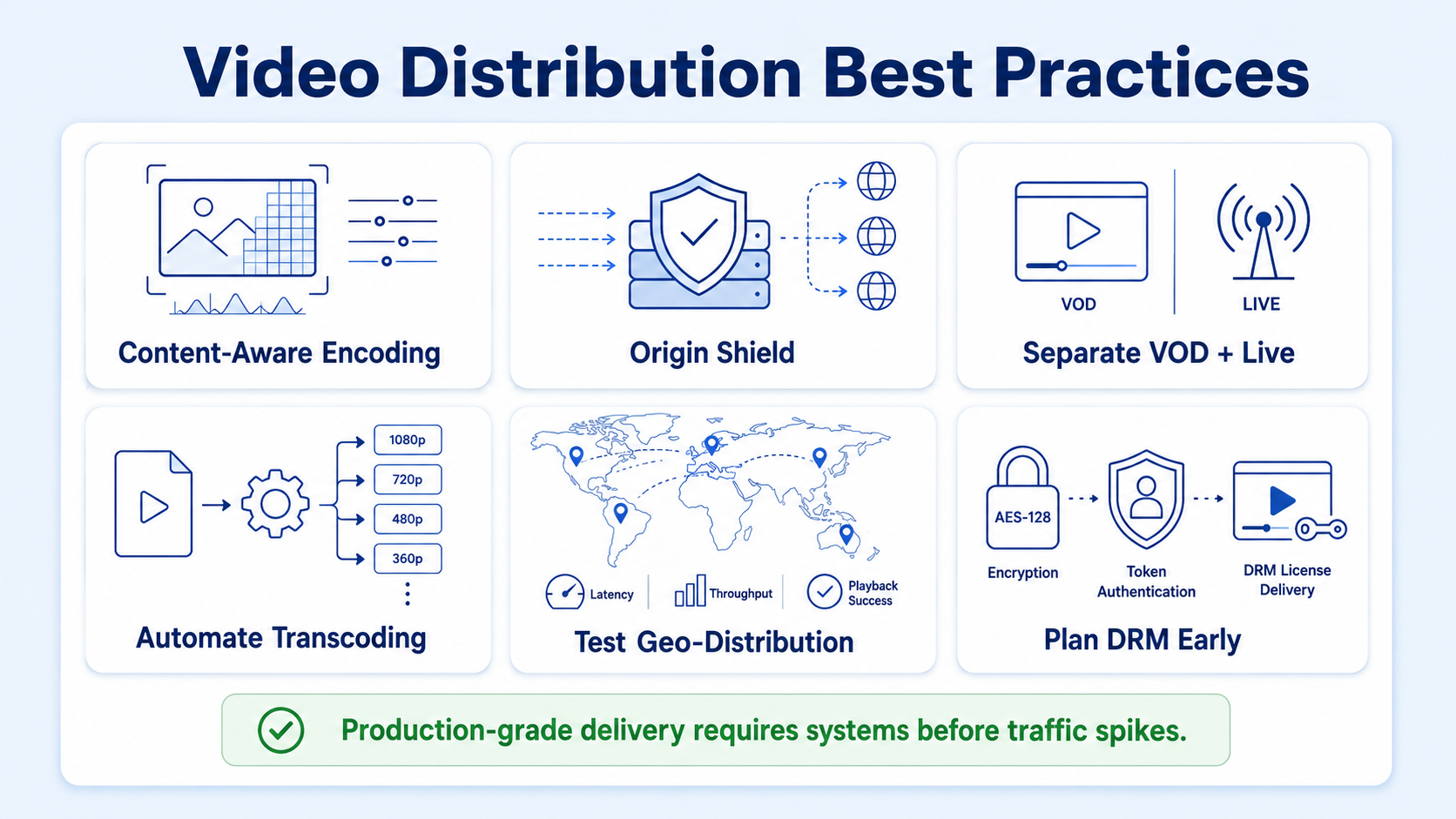
Use content-aware encoding: Rather than encoding every file to the same preset, analyze each source file and allocate bits where they matter, giving complex scenes more bitrate and static sequences less. This delivers better perceived quality at lower bandwidth costs.
Implement origin shield before you need it: CDN solutions optimize content distribution by caching data at edge locations, reducing latency and enhancing the user experience. Adding a shield layer between edge PoPs and your origin server dramatically reduces origin requests and protects against cache-miss storms during large concurrent spikes.
Separate VOD and live streaming infrastructure: VOD pipelines (pre-transcoded, long-cached segments) and live streaming infrastructure (real-time ingest, short TTLs, low-latency packaging) have fundamentally different performance profiles. Running them on the same pipeline means optimizing for neither.
Automate your transcoding jobs: CDN orchestration and automation enable seamless management of content delivery and distribution. Manual transcoding at scale becomes a bottleneck within weeks. Wire upload events to trigger transcoding jobs automatically via message queues.
Test geo-distribution before launch: Request your own content from each major viewer region using a VPN or synthetic monitoring tool. A CDN that performs well in North America may have poor PoP coverage in Southeast Asia or the Middle East.
Plan DRM from day one: Adding DRM (Digital Rights Management) to a pipeline that wasn't designed for it is costly and technically complex. If your video content includes proprietary SaaS demos, investor content, or gated buyer-education material, architect for AES-128 encryption and token authentication before your first file is ingested.
For teams whose distribution challenge is less about infrastructure and more about creating the video assets worth distributing, Komet Media's short-form video editing services help B2B SaaS and funded tech teams turn product knowledge and founder thinking into pipeline-ready video content. The best delivery architecture in the world only matters if the content inside it earns the viewer's attention. You can also explore video editing services or video advertising if your production volume is scaling.
Conclusion
Designing a video content distribution system for video is a multi-layer infrastructure problem, not a single tool decision. Here are the four principles that hold this guide together:
- Start with your transcoding ladder. Every downstream component depends on having the right rendition variants already prepared.
- Choose HLS or MPEG-DASH deliberately. Device coverage, codec flexibility, and latency requirements should drive the protocol choice, not default settings.
- Build multi-CDN from the start. Single-provider architectures create fragility that surfaces at the worst possible moment.
- Instrument before you launch. Monitoring buffer rates, ABR switches, and origin error rates is not optional for production pipelines.
Frequently Asked Questions
Q1: What is the difference between a CDN and a video hosting platform?
A CDN (content delivery network) handles the delivery layer, caching and serving video segments from edge nodes close to the viewer. A video hosting platform manages ingest, transcoding, storage, and playback in a managed environment. Production systems typically use both: a hosting platform for workflow management and a CDN for delivery performance.
Q2: How many CDN edge nodes do I need for a global audience?
This depends on your viewer distribution, not a fixed number. Leading providers like AWS CloudFront and Akamai Technologies operate hundreds of PoPs globally. For a multi-CDN strategy, the goal is coverage in every region where more than 5% of your audience is located, achieved through provider selection rather than node count management.
Q3: What is adaptive bitrate streaming and why does it matter?
Adaptive bitrate streaming is the ability to adjust video quality in the middle of a stream as network conditions change, supported by protocols including MPEG-DASH and HLS. It prevents buffering by automatically switching renditions when bandwidth drops, keeping playback continuous at the best possible quality.
Q4: Can I build a video distribution system without using a CDN?
You can serve video directly from an origin server, but it will not scale. Every concurrent viewer adds load to the origin, and geographic distance creates latency. For any content intended to support pipeline, buyer education, or sales enablement, a CDN-backed delivery system is the minimum viable infrastructure.
Q5: How does cache invalidation work in a video delivery pipeline?
Cache invalidation tells edge nodes to discard their cached copy of a resource and fetch a fresh version from origin. For video, manifest files (.m3u8 or .mpd) should have short TTLs (30–60 seconds) since they update frequently in live scenarios. Media segments can carry long TTLs (hours or days) since they are immutable once written.
Q6: What is the fastest way to reduce video delivery latency?
Three levers have the highest immediate impact: switching from standard HLS to LL-HLS, enabling an origin shield to reduce cache-miss latency, and adopting a multi-CDN strategy that routes each request to the lowest-latency available provider. Routing traffic through the lowest-latency CDN at any given time is the single most impactful real-time lever for latency optimization.

