
Repurposing a Podcast Clip into an Audiogram: Step-by-Step Guide
Most podcast episodes die at the RSS feed. If you record valuable conversations and let them sit untouched, you're leaving pipeline reach on the table. Repurposing a podcast clip into an audiogram turns a single recording into a scroll-stopping short-form asset that educates buyers, builds founder credibility, and drives inbound demand, without producing new content from scratch. This guide gives you the exact workflow we use at Komet Media for B2B teams doing this at scale.
TL;DR
- An audiogram combines audio, a waveform animation, captions, and branding into a shareable video.
- The best clip is 30–90 seconds, leads with a clear insight, and is fully captioned.
- Top tools: Headliner App (easiest), Descript (transcript-first), Canva Video Editor (brand control).
- Repurposing a podcast clip into an audiogram is a systematic process, not a one-off task.
What Is an Audiogram for Podcasts?
An audiogram pairs an audio waveform (or animated soundwave) with static or lightly animated visuals, usually captions, a brand watermark, and a still image of the speaker. The result is a native-feeling video that platforms like LinkedIn, Instagram, and X actually surface in their feeds.
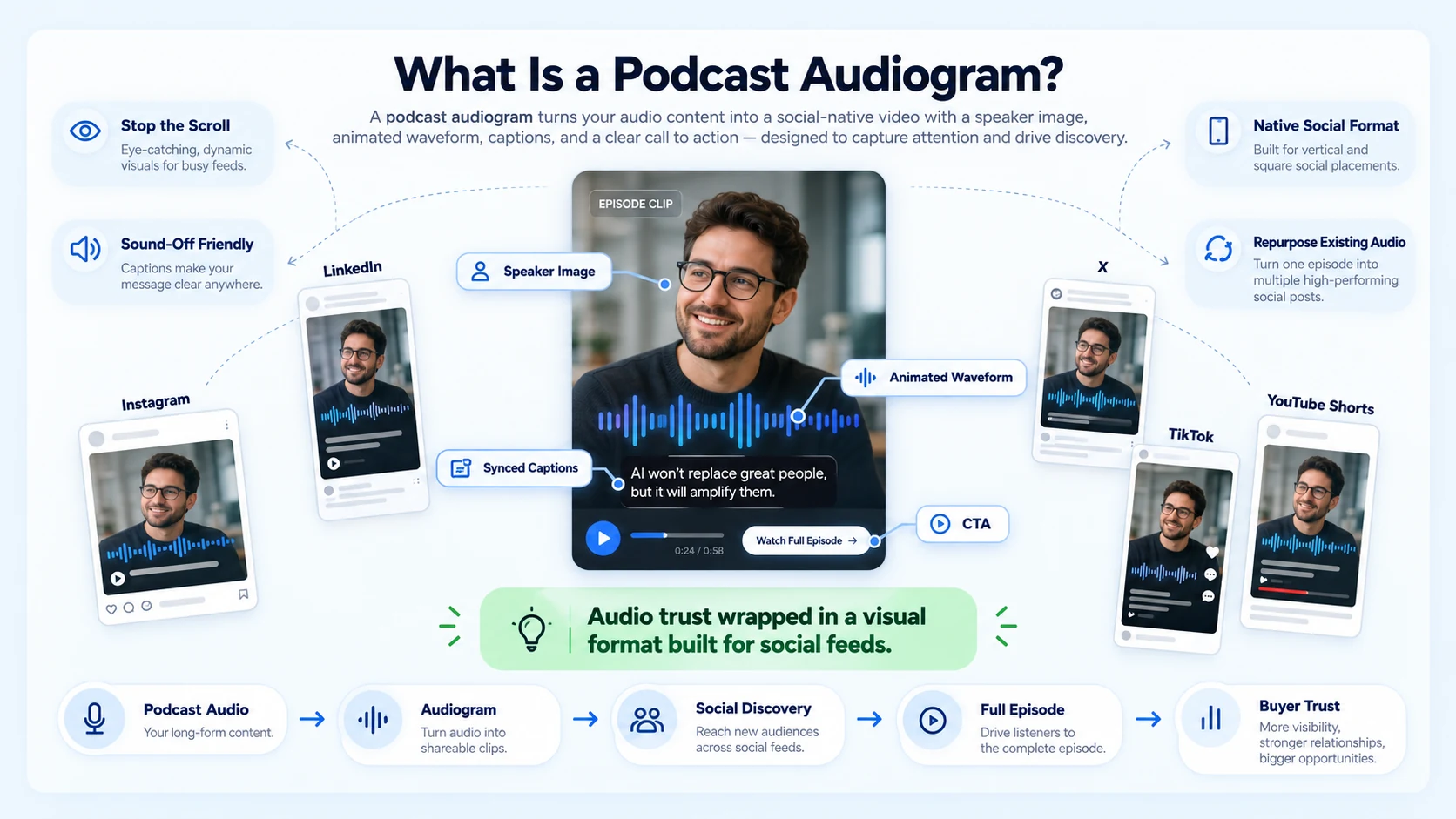
For B2B founders and marketing heads, that distinction matters. Audiograms help audio content compete in visual feeds, a plain podcast clip is easy to miss on Instagram, LinkedIn, X, TikTok, or Shorts, but an audiogram adds motion, captions, branding, and a clearer reason to stop scrolling. 38% of podcast listeners discover new shows through social media, and social algorithms are now a major source of podcast discovery, linking short video clips and audiograms to full episodes.
For funded SaaS and AI startups running founder-led content, that discovery window is where the pipeline starts. 67% of listeners say audio builds stronger trust than video or social content. An audiogram gives you the trust signal of audio wrapped inside a format that social algorithms reward. That combination is the core value of the format for B2B teams investing in buyer education and product trust.
The anatomy of an audiogram is consistent across tools: a background image or branded frame, an animated audio visualizer (waveform), a subtitle overlay synced to speech, and a CTA, either baked into the frame or in the caption copy. Get those four elements right, and the format works on any platform.
How to Choose the Best Clip from a Podcast
Picking the wrong 60 seconds is the most common mistake. A great audiogram clip has a self-contained idea, someone listening cold should understand it without episode context. Here's how to identify clip-worthy moments from a longer episode:
- Scan the transcript first: Load the episode into Descript or Riverside FM and read the auto-generated transcript. Strong moments jump off the page, they read like standalone LinkedIn posts.
- Flag opinion moments: Contrarian takes, counterintuitive data points, and clear founder positions generate significantly more engagement than summaries or housekeeping.
- Look for natural open loops: Clips that end on a question or incomplete thought drive click-throughs to the full episode on Apple Podcasts or Spotify for Podcasters.
- Check clip length: Podcast audiograms are typically short, usually ranging up to 90 seconds in length, so they don't require a big time commitment from consumers. Target 30–75 seconds for LinkedIn and Instagram; 45–60 seconds performs best on Shorts.
- Test the cold-listen rule: Play the clip to someone who hasn't heard the episode. If they ask a follow-up question, it worked. If they're confused, pick a different moment.
For SaaS teams, the highest-performing clips tend to come from sections where a founder explains a product insight, a customer pain point, or a contrarian market take, not from intros, transitions, or sponsor reads. Podcast creators who consistently post three to five clips per episode report 20 to 40 percent faster subscriber growth compared to those who only post full episodes.
Best Tools to Create Podcast Audiograms in 2026
If you are comparing audiogram makers, the fastest way to choose is to decide what kind of workflow you actually need, Headliner is the familiar podcast-promotion-first tool, Descript fits if transcript-based editing matters more than audiogram-specific speed, and Recast Studio leads if you want the fastest path from clip to branded social asset.
Headliner is best for audio-only podcasts with audiogram templates, while Descript offers the best transcript-based selection and caption accuracy. For teams with an existing brand kit and no dedicated editor, Canva Video Editor lets you build a custom audiogram frame and drop in audio manually, slower, but fully on-brand.
Headliner offers a free plan if you need just a few short clips, and you can also make basic audiogram-style videos with Canva, Auphonic, or Wavve, though they may have limits on video length or monthly exports. If you already record on Riverside FM, use its built-in clips feature before exporting. It saves a full import step and keeps the workflow inside one platform.
Repurposing a Podcast Clip into an Audiogram: Step-by-Step Guide
This is the core workflow we run for B2B podcast and short-form video clients. Follow it in sequence.
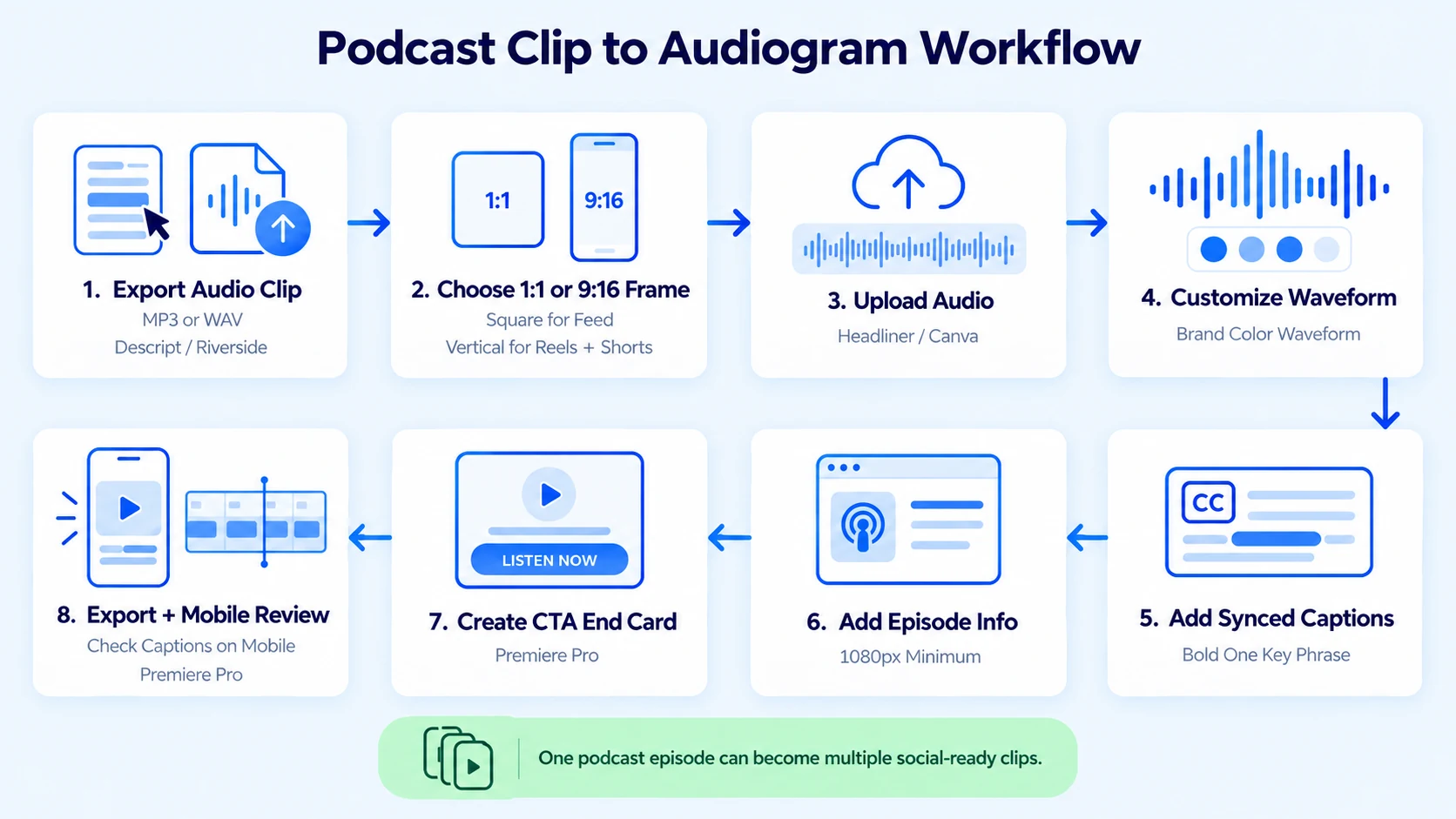
- Export the raw audio clip: In Descript, highlight the transcript section you've chosen, right-click, and export as MP3 or WAV. In Riverside FM, use the clip editor to trim and export directly.
- Set up your audiogram frame: Open Headliner App (or Canva). Choose a square video format (1:1) for LinkedIn and Instagram feed, or 9:16 for Reels and Shorts. Upload your brand background image.
- Upload the audio clip: In Headliner, select "Audiogram" from the dashboard. Upload your MP3. The tool auto-generates a waveform animation synced to the audio.
- Customize the waveform animation: Choose a waveform style (bar, line, circle) that matches your brand. Set the color to your primary brand hex. Keep it centered and readable at small sizes.
- Add the subtitle overlay: Enable auto-transcription in Headliner or paste your Descript transcript. Sync captions to the audio. Up to 85% of social video is watched on mute, so captioning your audiograms is non-negotiable. Bold one key phrase per clip to act as a visual anchor.
- Add your logo and episode info: Place your logo in a corner. Add the episode title or guest name in a small text block. Keep it minimal, the waveform and captions carry the visual load.
- Set a CTA frame: Add a 2–3 second end card that says where to find the full episode (Spotify for Podcasters, Apple Podcasts, or your RSS URL via Anchor FM if you use it).
- Export and review: Export at 1080px minimum. Watch the full clip in-feed on mobile before posting. Check that captions are accurate and the waveform doesn't clip visually.
For teams handling volume, tools like Adobe Premiere Pro with a custom audiogram template let you batch-produce multiple clips from one episode in under an hour per episode.
Audiogram vs. Video Podcast: Which Performs Better on Social Media?
This question comes up every time I talk to a founder running a podcast alongside a SaaS content program. The honest answer: it depends on your asset, your platform, and your production capacity.
Audiograms outperform plain video clips in text-heavy, idea-dense environments like LinkedIn because the subtitle overlay carries the message without requiring someone to watch. The best audiograms for social media are short, captioned, visually clean, and built around one strong moment. If the clip does not hook attention in the first few seconds, match the platform format, and clearly point viewers to the next step, it usually underperforms.
For Instagram Reels and TikTok, talking-head video clips from Riverside FM sessions tend to outperform static audiograms because the platform's algorithm rewards face-on-camera content. The practical answer for most B2B teams: produce audiograms first because they require no video recording, then layer in talking-head clips when you have the production bandwidth.
The rule of thumb: If your podcast is audio-only, audiograms are your only short-form clip option, and they work. If you record video, use both formats and let 30-day performance data tell you where to double down.
Audiogram Distribution: Where and How to Post for Maximum Reach
Creating the audiogram is step one. Distribution is where most B2B content repurposing strategies fail, teams post once and move on. Platform-specific posting strategy:
- LinkedIn: Post the audiogram as a native video (not a YouTube link). Write a 3–5 line caption that gives the insight before asking anyone to listen. Tag the podcast guest.
- Instagram: Post to Reels for reach, Stories for retargeting existing followers. Use the square video format for feed posts.
- X (Twitter): Audiograms perform well here. Podcast creators who utilize audiograms on Twitter and Facebook have seen post engagement 8x higher and 5x higher than the average, respectively.
- YouTube Shorts: Upload the 9:16 version. Add a chapter timestamp link in the description pointing back to the full episode.
- Spotify for Podcasters and Apple Podcasts: Use platform-native video clip tools where available to promote the episode inside the app itself.
Repurposing doesn't stop at posting. Each audiogram can become an email newsletter embed, a sales enablement asset for SDRs to share post-demo, or a website embed on your podcast landing page. A single 45-minute episode can yield 4–6 audiograms across these channels with one systematic editing pass.
For SaaS teams looking to turn webinar and demo recordings into the same type of short-form assets, the workflow maps identically, see how we approach it for webinar repurposing and event content.
Conclusion
Repurposing a podcast clip into an audiogram is one of the highest-leverage moves in a B2B content system. A single recorded conversation becomes multiple buyer-education assets across LinkedIn, Instagram, and YouTube without additional recording time. Key takeaways:
- Pick clips that stand alone, contrarian insights and founder takes outperform summaries.
- Caption every audiogram; most social videos are watched on mute.
- Match format to platform: square for LinkedIn and Instagram feed, 9:16 for Reels and Shorts.
- Distribute to multiple channels per clip, including email and sales enablement.
If you want this done consistently without building an internal editing team, Komet Media's short-form video and podcast repurposing services are built exactly for this.
Frequently Asked Questions
Q1: What is an audiogram, and why do podcasters use it?
An audiogram is a short video combining your podcast audio with an animated waveform, captions, and a branded background. Podcasters use them because raw audio doesn't perform in visual feeds, audiograms give the content a visual wrapper that social platforms surface and users actually stop to watch.
Q2: What app do podcasters use to make audiograms?
The most widely used tools in 2026 are Headliner App (audio-first, easiest to start), Descript (transcript-based editing with built-in clip export), and Canva Video Editor (best for brand-controlled frames). Opus Clip and Riverside FM are strong alternatives for video-recorded podcasts.
Q3: How long should a podcast audiogram be?
Target 30–75 seconds for LinkedIn and Instagram. Up to 90 seconds is workable if the content holds attention. Anything over 90 seconds tends to see drop-off in the feed before the CTA end card. Shorter is almost always better if the insight is complete.
Q4: Do audiograms actually drive engagement or are they a waste of time?
They work when built correctly. Audiogram clips are driving some of the best cost-per-engagement numbers in a brand's entire content mix. The key variables are caption quality, clip selection, and whether the format matches the platform. A poorly chosen clip with no captions will underperform regardless of the tool used.
Q5: Can I make a free audiogram without a watermark?
Most free tiers include a watermark. Headliner's free tier provides 5 videos monthly with watermarks, Descript free allows exports with watermarks, and Canva free includes basic video editing, these free options work for testing and low-volume creation, though serious promotional efforts typically benefit from paid plans.
Q6: How is repurposing a podcast clip into an audiogram different from making a regular video clip?
A standard video clip requires on-camera footage. Repurposing a podcast clip into an audiogram works from audio alone, no video recording needed. This makes it the accessible entry point for founder-led podcasts that record audio-only, and keeps production cost low while still producing shareable, platform-native short-form content.

