
Repurpose a Customer Interview into Testimonial Clips: Step-by-Step Guide
Every B2B SaaS team has sat on recorded customer interviews that never became anything. That's a pipeline sitting unused. When you repurpose a customer interview into testimonial clips, you turn a 45-minute conversation into 6–10 assets that support sales, nurture leads, and build buyer trust across every channel. This guide gives you the exact process I use at Komet Media to extract the highest-signal moments from long-form interviews and ship them as short-form video that actually converts.
TL;DR
- Transcribe first, then scan for three clip types: problem statements, outcome quotes, and trust-building moments.
- Each interview should yield 6–10 assets: social clips, a landing page hero, a sales enablement cut, and email snippets.
- Aim for 30–90 seconds per clip; lead with the outcome, not the question.
- Caption every clip, most B2B videos are watched silently.
Why Repurposing Customer Interviews Is a Pipeline Decision, Not a Creative One
Most SaaS marketing teams treat testimonial videos as brand polish. They're not. They're conversion assets. B2B companies that use testimonial videos on sales pages reported a 2.6x increase in lead quality ratings. Approximately 92% of B2B customers read reviews and watch testimonials before buying, virtually all B2B buyers now incorporate social proof into their vetting process.
The problem isn't that SaaS teams lack customer stories. It's that those stories are locked inside 45-minute Zoom recordings sitting in a Google Drive folder. Most marketing libraries go unused by sales because the content was never adapted into formats that fit a sales conversation, content recycling gives new life to these pieces, turning a testimonial video into a 20-second outreach clip. When you repurpose a customer interview into testimonial clips, you're solving a distribution problem: the right buyer proof, in the right format, at the right moment in the deal.
One of the most effective B2B testimonial strategies is to repurpose content across multiple channels, a single client interview can be transformed into a 90-second hero video for your homepage, 15-second snippets for LinkedIn, or short clips for paid ads and email campaigns.
For SaaS teams managing pipelines, this is the most cost-efficient content move available. The interview is already recorded. The voice of the customer already exists. The only work left is extraction and formatting, and that's where most teams leave money on the table by not having a repeatable system. A single 45-minute customer interview, properly extracted, should generate no fewer than 6 distinct video assets for use across your sales funnel.
Step 1: Transcribe and Tag the Interview for Clip-Worthy Moments
The first step when you want to repurpose a customer interview into testimonial clips is never to watch the raw video and hope you remember the good parts. Start with a full video transcription.
- Upload to a transcription tool: Use Descript, Riverside, or Otter.ai. Descript achieved 94% accuracy on standard interview content and its text-based interface lets you edit the video by editing the transcript directly.
- Read the transcript in full: Don't skim. Mark every line where the customer talks about pain, outcome, or decision criteria.
- Tag three clip categories: Use comments or highlights in the doc.
- Note timestamps: Every tagged moment needs a start/end timestamp for the editor.
The three categories to tag:
- Problem statements: Customer describes life before your product. "We were doing this manually and it was killing us." These are your top-of-funnel clips.
- Outcome quotes: Specific, measurable results. Revenue, time saved, churn reduced. Data beats fluff, numbers, percentage gains, or productivity results stop scrolls because business buyers want proof.
- Trust moments: The customer explains why they chose you over a competitor, or describes the moment doubt disappeared. These are your mid-funnel and late-funnel clips.
To craft a compelling interview-style testimonial, focus on asking open-ended questions that encourage detailed, story-driven responses, and structure the interview to tell a complete story, from the initial problem to the ultimate success.
If the original interview was run this way, your transcript will be dense with usable moments.
What Parts of a Customer Interview Make the Best Testimonial Clips?
Not every marked moment deserves to be a clip. Here's how to filter down to the strongest cuts.
A strong customer testimonial includes the problem before adoption, decision context, why this option was chosen, what changed after rollout, and the business impact, it should mirror how buyers justify decisions internally, not sound like generic praise.
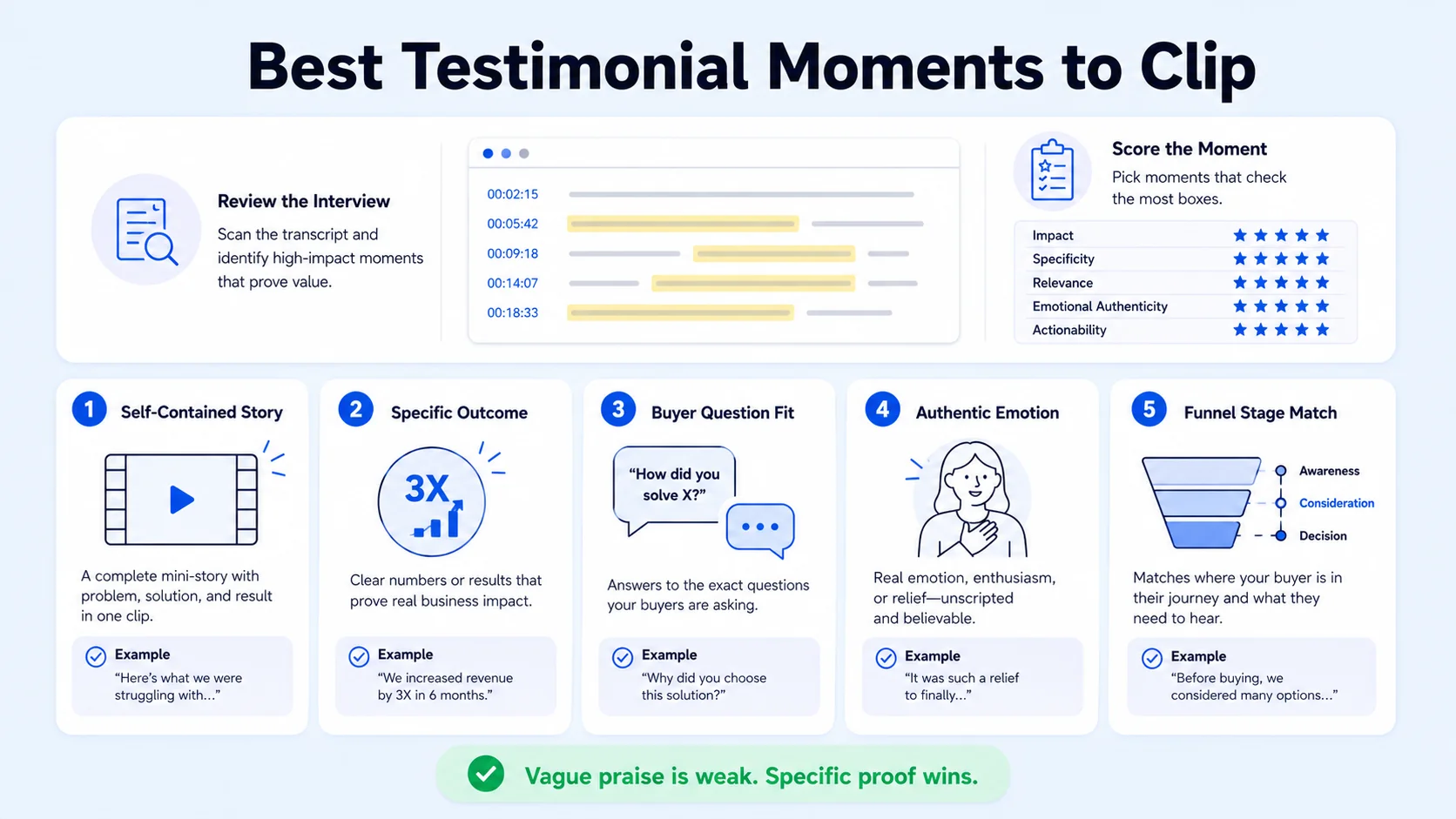
Apply this scoring filter to every tagged moment:
- Is it self-contained? The clip must make sense without context. If a viewer needs to know what came before, cut it.
- Does it name a specific outcome? Vague wins ("it helped a lot") are weak. Specific wins ("we cut onboarding time by three weeks") are strong.
- Does it match a buyer's internal question? Your mid-funnel prospect is asking: "Will this work for a team like mine?" Match the clip to that question.
- Is it emotionally honest? Authenticity matters more than polish, buyers can spot overproduced scripts instantly, and the best testimonials feel real because they are real.
Additionally, look for clips that map to specific funnel stages. A clip about the purchase decision supports late-stage deals. A clip about the problem alone works for awareness content on LinkedIn or YouTube Shorts. Different buyers need different messages, segmenting your testimonial videos according to the sales funnel ensures the right message reaches the right audience and helps your sales and marketing teams reuse content efficiently.
Clips between 30 and 90 seconds perform best for B2B social distribution. For landing pages and sales email, 60–120 seconds works well. Anything over 2 minutes becomes a case study video, not a testimonial clip.
Step 2: Extract and Edit Clips Using the Right Video Editing Software
Once you have tagged timestamps, extraction is a structured editing task. Here's the tool stack that fits different team sizes:
Opus Clip takes long videos and automatically chops them into short viral clips for TikTok, Reels, and Shorts; Descript is a full video and podcast editor where you edit footage by editing text. For interview-heavy content, I recommend Descript for the primary extraction and Opus Clip for generating additional social variants fast.
The editing steps for each clip:
- Set in/out points around your tagged timestamps, cutting any filler before and after the core statement.
- Remove filler words ("um," "like," "you know") using Descript's word-delete feature or manual cuts.
- Reframe to vertical (9:16) for Instagram Reels, TikTok, and YouTube Shorts distribution.
- Add captions: Always include captions, most social videos are watched without sound.
- Add a lower-third: Customer name, title, and company. This is non-negotiable for B2B credibility.
- Export in platform-specific specs: 1080x1920 for vertical social, 1920x1080 for landing pages and email embeds.
Keep B-roll footage usage minimal in testimonial clips. The face and voice carry authority. B-roll works well as a cut-in for product screenshots or dashboard moments that validate the specific claim being made.
Step 3: Build the Full Asset Map from One Interview
One customer interview, properly extracted, should become a structured asset library. One customer interview becomes 5–10 usable assets. Here is how to map every asset from a single recording:
You could repurpose a testimonial in several ways: create short clips to share on social media, pull impactful quotes to post on your homepage or relevant product pages, and draft an email newsletter introducing the customer's story. Map every asset before you open the editor. Editing without a destination list is the fastest way to produce a clip that never gets used.
For our clients at Komet Media's short-form video editing service, this asset map is built before a single cut is made. It keeps every edit purposeful and ensures the clips land in the sales and marketing workflows where they actually create pipeline.
How to Trim a Customer Interview Down to a 60-Second Testimonial Clip
The 60-second cut is the most versatile asset in the set. It works on LinkedIn, in sales email, on landing pages, and as a YouTube Short. Here is the structure that converts:
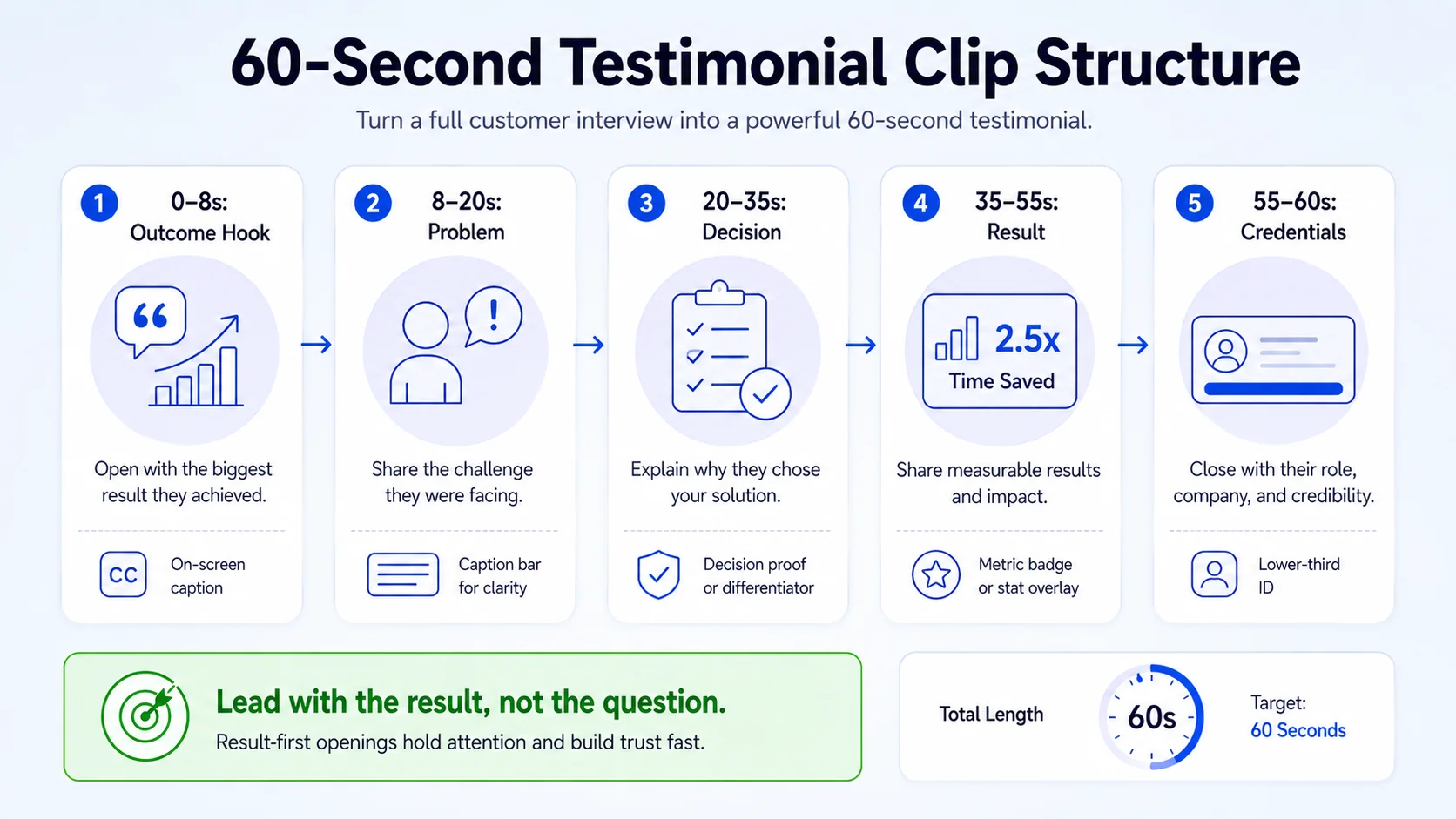
- Open with the outcome (0–8 seconds): Start mid-sentence on the result. "We closed 30% more deals in Q1 because of this." No intro, no name, no company. Hook first.
- Name the problem (8–20 seconds): One sentence on what life looked like before. This creates relatability for prospects in the same situation.
- Explain the decision (20–35 seconds): Why did they choose your product over alternatives? This is your competitive differentiator, spoken by a peer.
- Reinforce the result (35–55 seconds): A second, more specific outcome statement. Numbers, timeframes, team size, anything concrete.
- Close with credibility (55–60 seconds): Name, title, company appear as lower-third as they finish the final sentence.
Start the video with the most impactful result or emotional statement from the customer, this "hook" grabs the viewer's attention within the first few critical seconds. Avoid the common mistake of leading with the customer's bio or company name. That information belongs at the end, after the viewer has already been pulled in by the story.
Focus on customer outcomes, segment videos by buyer stage, and repurpose across channels, use the Challenge-Action-Result framework for credibility in 2026. For distribution on Instagram Reels and YouTube Shorts, this same structure holds. The difference is pacing: cuts should be slightly faster, and captions must be larger and bolder for mobile viewing.
Distributing Testimonial Clips to Maximize Pipeline Impact
Extraction and editing are only half the system. Distribution determines whether the clips actually reach buyers. Here is where each clip type performs best, and how to deploy it in a B2B SaaS context.
Sales enablement (highest ROI): Clips sent directly in SDR sequences or AE follow-ups perform because they arrive at exactly the right moment of consideration. Customer proof points including case studies, testimonials, and authentic customer interviews outperform generic claims. A 30-second clip from a customer in the same industry as your prospect is more persuasive than any case study PDF.
Landing pages: Replacing landing page reviews with video testimonials can increase the conversion rate by 80%. Place the hero testimonial above the fold on your primary demo request page. Industry-specific clips belong on relevant product and service pages.
LinkedIn: Post problem-frame clips as organic content from the founder or marketing team account. These perform as thought leadership while also functioning as social proof.
YouTube Shorts, Instagram Reels, TikTok: User-generated content integration transforms authentic audience-created content into official brand assets, it leverages genuine voices and experiences of customers, lending unparalleled credibility to your marketing materials. Clip formats repurposed for these platforms feed top-of-funnel awareness for SaaS teams building inbound demand.
Email nurture: Embed a thumbnail with a play button linking to a hosted clip. B2B companies using testimonial videos in email saw 7.1% click-through rates, significantly higher than text-only nurture sequences. Finally, consider hosting the full interview as a long-form asset on your podcast or webinar page for buyers who want the complete story before making a decision.
Conclusion
- Transcribing every interview before editing, tagging problem statements, outcome quotes, and trust moments is the core skill.
- One interview should produce 6–10 assets mapped across funnel stages, not just one hero video.
- The 60-second clip is your most versatile format, lead with the outcome, close with credentials.
- One strong testimonial can support sales, content, email, and social for months.
- Distribution is where the ROI lives: sales email, landing pages, LinkedIn, and short-form social platforms each serve a distinct pipeline role.
Want a done-for-you system? Talk to Komet Media about turning your existing customer interviews into a full testimonial clip library.
Frequently Asked Questions
Q1: How long should a testimonial clip be for B2B social media?
30–60 seconds is the sweet spot for LinkedIn, Instagram Reels, and YouTube Shorts. This is long enough to deliver a complete outcome story but short enough to retain a busy buyer's attention. For a sales email or landing page, 60–90 seconds works well.
Q2: Do I need professional video equipment to repurpose a customer interview into testimonial clips?
No. Most customer interviews recorded on Zoom, Riverside, or Google Meet have sufficient video quality for social and sales use. Clean audio matters more than camera quality. Use Descript's Studio Sound feature to reduce background noise before editing.
Q3: What is the best AI tool to repurpose a customer interview into testimonial clips quickly?
OpusClip is best for speed and viral-style clip generation; Submagic is best for caption-heavy short-form content; VEED is best for users who want a broader all-in-one manual editor; Descript is best for transcript-led editing workflows. For B2B testimonial interviews specifically, Descript gives the most editorial control.
Q4: How many clips should I expect from a 45-minute customer interview?
Realistically, 6–10 usable clips. Expect 2–3 problem-frame clips, 2–3 outcome clips, 1–2 decision/trust clips, and 1 full hero cut. Some interviews are more quotable than others, but a well-structured interview with open-ended questions should consistently yield this volume.
Q5: Should I add captions to every testimonial clip?
Yes, without exception. Always add captions, as many viewers watch videos without sound, and use good lighting and clear audio to maintain a professional and trustworthy impression. For LinkedIn and Instagram, captions are especially critical as auto-play is silent by default.
Q6: Where should testimonial clips sit in the sales funnel?
Problem-frame clips work at the top of the funnel for awareness. Outcome and ROI clips belong in mid-funnel nurture and sales follow-up. Decision clips ("why we chose them") are most powerful in late-stage deals when a prospect is evaluating you against a competitor. Map every clip to a stage before you distribute.

