
🪄 AI Summary
Heading 1
Heading 2
Heading 3
Heading 4
Heading 5
Heading 6
Lorem ipsum dolor sit amet, consectetur adipiscing elit, sed do eiusmod tempor incididunt ut labore et dolore magna aliqua. Ut enim ad minim veniam, quis nostrud exercitation ullamco laboris nisi ut aliquip ex ea commodo consequat. Duis aute irure dolor in reprehenderit in voluptate velit esse cillum dolore eu fugiat nulla pariatur.
Block quote
Ordered list
- Item 1
- Item 2
- Item 3
Unordered list
- Item A
- Item B
- Item C
Bold text
Emphasis
Superscript
Subscript
Most B2B SaaS teams have more usable video than they realize. Webinars, demo recordings, podcast episodes, founder interviews, sitting idle in a Drive folder, generating zero pipeline. A video content repurposing audit changes that. It tells you exactly what you have, what's worth repackaging, and where it should go next. This guide walks you through the entire process, step by step, so your existing content library starts working as hard as your paid spend does.
TL;DR
- A video content repurposing audit maps every video asset you own, scores it by performance and relevance, and surfaces repurposing opportunities.
- Use YouTube Analytics, LinkedIn data, and a simple scoring matrix to prioritize what to repurpose first.
- Evergreen pillar content with high watch time and low recency is your best starting point.
- Treat the audit as a repeatable quarterly process, not a one-time exercise.
What Is a Video Content Repurposing Audit?
A video content repurposing audit is a systematic review of your existing video library to identify which assets have untapped reach potential when converted into short-form video, micro-content, or platform-specific clips. It is not a social media audit. It is not a vague content inventory review. It is a structured process with defined inputs (your video catalog), defined evaluation criteria (performance metrics, content relevance, evergreen value), and a defined output: a prioritized repurposing queue.
For B2B SaaS teams specifically, the stakes are real. 78% of B2B marketers currently use video in their programs, and almost half say short-form social video content delivers the highest ROI, according to the 2025 B2B Marketing Benchmark Report from LinkedIn and Ipsos. That means the gap between teams with a repurposing workflow and those without is widening fast.
The audit focuses on three questions:
- What do you have? Every video asset across every platform and storage location.
- What performed? Assets with strong engagement rate, watch time, or pipeline attribution.
- What can become something else? Long-form recordings that contain quotable moments, teachable segments, or founder insights worth atomizing into short-form video clips.
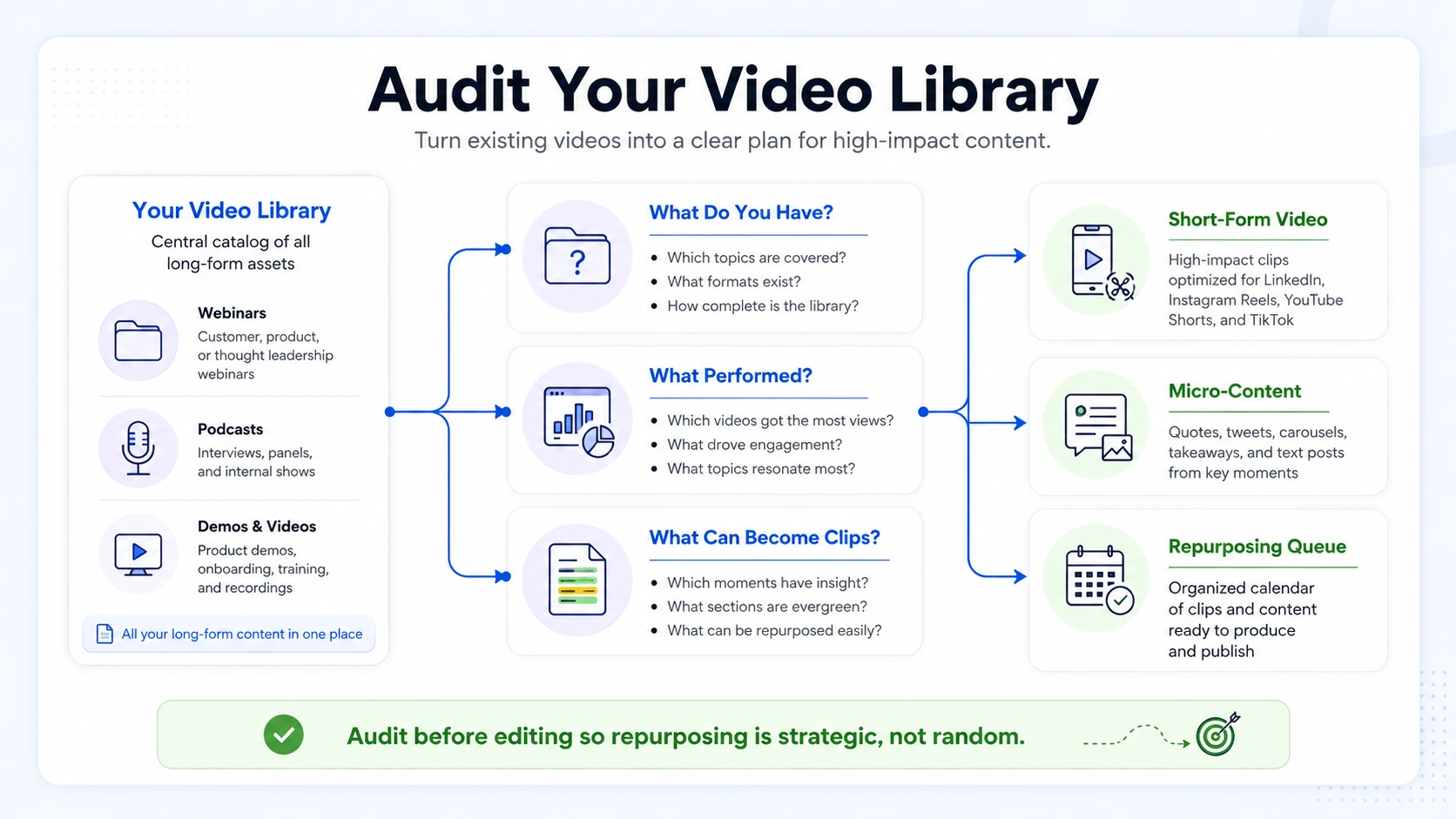
The long-form to micro-content atomization strategy involves breaking down a substantial piece of content, like a podcast, webinar, or in-depth report, into numerous smaller, highly focused assets individually optimized for social media platforms, email newsletters, and other fast-paced channels, with the goal of driving traffic back to the original comprehensive asset. At Komet Media, this is the work we do before a single clip gets edited. The audit is what separates a repurposing system from random content production.
How to Run a Video Content Repurposing Audit Step by Step
- Build your content inventory: Pull every video asset your team has produced. Check YouTube, Vimeo, Google Drive, Loom, Riverside.fm, Descript exports, webinar recordings, and any podcast video files. List each asset in a spreadsheet, Airtable works well here, with columns for title, format, length, platform, publish date, and storage location. Do not filter yet. Capture everything.
- Pull your content performance metrics: For each asset, log the core data points: views, watch time (average and percentage), engagement rate, click-throughs, and any CRM or HubSpot pipeline attribution available. YouTube Analytics is your primary source for owned video. LinkedIn native video data, Wistia, or your MAP will cover the rest.
- Categorize by content type: Label each asset as one of the following, Pillar Content (full-length webinars, podcasts, demos), Supporting Content (explainers, Q&As, walkthroughs), or Ephemeral Content (event recaps, timely announcements). Pillar content is where most repurposing opportunities live.
- Score each asset on three axes: Evergreen value (will this be relevant in 12 months?), performance signal (did it earn above-average watch time or engagement?), and repurposing yield (how many clips, quotes, or angles does it contain?). Use a simple 1-3 scale for each. Total score of 7+ moves to your repurposing queue.
- Map repurposing formats to each asset: For every asset in your queue, list the specific outputs: LinkedIn clips, Instagram Reels, YouTube Shorts, audiograms, quote cards, or TikTok content.
- Assign owners and timelines: Add a responsible editor, a target publish date, and the target platform to each row. This converts your audit from a static document into an active content calendar.
- Set a review cadence: Identify your top-performing evergreen content using analytics tools, look for assets with high traffic but declining engagement or outdated information, and set a recurring schedule, quarterly or bi-annually, to review these key assets.
What Should You Look for When Auditing Video Content to Repurpose?
Not every video deserves a second life. The audit's most valuable output is a clear "yes/no/hold" decision on each asset. Here is what to evaluate:
- Evergreen relevance: Does the content address a problem your buyer still has today? Founder-led videos on product positioning, customer pain points, or category education tend to age well. Timely announcements, quarterly earnings commentary, or event-specific recaps do not.
- Watch time depth: A video with 3,000 views but a 65% average view duration is more valuable than one with 10,000 views and 18% completion. High watch time signals genuine audience interest, and tells you the content has substance worth extracting.
- Hook density: Scan the transcript (use Descript or Riverside.fm for fast transcription) and count moments of insight, contrast, or strong opinion. A 60-minute webinar with eight quotable moments has high repurposing yield. A 45-minute demo with two is low yield.
- Platform gap: Where has this content never appeared? A webinar that performed on your website but never touched LinkedIn, Instagram Reels, or YouTube Shorts has obvious distribution gaps. The audit surfaces those gaps explicitly.
- Buyer stage alignment: Map each asset to a funnel stage. Top-of-funnel content (broad educational, category-level) repurposes best for TikTok and Instagram Reels. Middle-of-funnel content (product-specific, comparison, objection handling) works well on LinkedIn and YouTube Shorts for sales enablement.
Audit rule of thumb: If a video has high watch time, clear evergreen value, and has never appeared in short-form format, it is your highest-priority repurposing candidate, regardless of total view count. HubSpot's 2025 State of Marketing Report found that short-form video outperforms every other content type on ROI, for B2B SaaS, this means LinkedIn video clips, product demos, and customer story snippets are worth the production effort.
What Metrics Matter When Doing a Video Content Repurposing Audit?
Not all content performance metrics are equally useful for repurposing decisions. Here is the full framework, organized by priority:
The three metrics that matter most for prioritization decisions are average view duration percentage, engagement rate, and pipeline attribution. A video with strong engagement rate and any pipeline touch is an immediate repurposing candidate. Short-form video (typically under 60 seconds) is the top-performing content format in 2025, delivering the highest ROI of any content type. That context matters because it tells you the direction: long-form assets that get audited should be moving toward sub-60-second outputs wherever the content allows.
Also track content lifecycle signals. Identify your top-performing evergreen content using analytics tools and look for assets with high traffic but declining engagement or outdated information, these are assets where a clip or remix can extend the content lifecycle without a full reshoot. ROI measurement closes the loop. After repurposing, track the performance of the derived clips separately from the source asset. Did the LinkedIn clip generate profile visits? Did the YouTube Short increase demo requests? Connect those outputs back to your content calendar and your next audit cycle.
How to Identify High-Performing Videos to Repurpose Across Platforms
Identifying which videos repurpose well across platforms requires matching content type to platform behavior, specifically how the TikTok algorithm, Instagram Reels discovery, and LinkedIn native video each reward different signals.

LinkedIn: Rewards educational content from credible voices. Founder-led insights, product positioning clips, and buyer objection responses perform well. Optimal length: 60-90 seconds. Native upload always outperforms a link share.
Instagram Reels: Rewards visual hooks, fast pacing, and relatable framing. B2B SaaS content that leads with a counterintuitive statement or a specific result drives saves and shares. Strong engagement rate in the first 24 hours signals algorithmic push.
YouTube Shorts: Rewards retention. The TikTok algorithm and YouTube Shorts both deprioritize content where viewers drop off in the first 5 seconds. Clips extracted from demos or webinars need a front-loaded hook, the insight or tension stated in the opening line, not built toward it.
TikTok: Still underutilized in B2B. Founder-led content that explains a complex idea simply, without jargon, builds category trust faster here than on any other platform. Repurposed podcast clips and webinar moments work particularly well when the speaker has a clear point of view.
To build your platform repurposing map, run this process during your audit:
- Pull the three highest watch-time assets from your content inventory.
- Identify the strongest 3-5 moments in each (use timestamps from Descript transcripts).
- Map each moment to a platform based on content type and audience stage.
- Log the clip plan in your Airtable board before production begins.
A webinar, podcast episode, customer interview, or leadership presentation can now be converted into multiple short-form video assets using AI-powered editing tools, supporting greater content consistency while maximizing the value of existing resources.
Video Content Repurposing Audit Checklist and Free Template
Use this checklist to run a complete video content repurposing audit. Copy it into Airtable, Notion, or a Google Sheet.
Phase 1: Inventory (Week 1)
- [ ] Pull all video assets from YouTube, LinkedIn, Vimeo, Drive, Loom, Riverside.fm, Descript
- [ ] Log title, format, length, publish date, platform, and storage URL for each
- [ ] Categorize as Pillar, Supporting, or Ephemeral content
- [ ] Identify all assets older than 90 days that have never been repurposed
Phase 2: Performance Scoring (Week 1-2)
- [ ] Pull average view duration (%) from YouTube Analytics for all YouTube assets
- [ ] Pull engagement rate from LinkedIn and Instagram Insights
- [ ] Check HubSpot or CRM for any pipeline attribution tied to each asset
- [ ] Score each asset: Evergreen value (1-3) + Performance signal (1-3) + Repurposing yield (1-3)
- [ ] Flag all assets scoring 7 or higher for the repurposing queue
Phase 3: Gap Analysis and Output Mapping (Week 2)
- [ ] Identify platform gaps (assets that exist on one platform but not others)
- [ ] Map each queued asset to specific output formats (LinkedIn clip, Reel, Short, audiogram)
- [ ] Assign clip timestamps using Descript transcripts
- [ ] Assign editor, target platform, and publish date for each output
Phase 4: Workflow and Calendar (Week 2-3)
- [ ] Add all repurposing outputs to your content calendar
- [ ] Build a repurposing workflow in Airtable with status columns: To Do / In Edit / Review / Published
- [ ] Schedule your next audit cycle (90 days out)
Template note: This checklist is your minimum viable repurposing audit. Run it once manually, then systematize the inventory pull and scoring as a standing quarterly process. If you want support executing this with a dedicated video production system, Komet Media's short-form video editing service is built specifically for B2B teams running this kind of content workflow.
How to Prioritize Which Videos to Repurpose First
Once your audit is complete, you will have a scored list of assets. The prioritization framework below tells you where to start.
Tier 1, Repurpose immediately (score 8-9): High watch time, strong engagement rate, clear evergreen value, never appeared in short-form format. These assets have proven demand and untapped distribution. Start here.
Tier 2, Repurpose next quarter (score 6-7): Good performance signal but lower evergreen value, or strong content with limited original reach. Worth doing, but not urgent. Schedule into your content calendar for the next 60-90 days.
Tier 3, Archive or update (score 3-5): Low watch time, outdated information, or content that addressed a problem your buyer no longer has. Archive these assets. Do not spend the production budget on them.
Tier 4, Reshoot, not repurpose (score 1-2): Poor quality, misaligned messaging, or content that never should have been published. Note what went wrong, use that insight to brief better content, and move on.
For SaaS teams specifically, prioritize in this order:
- Webinar recordings with high Q&A sections (dense insight, real buyer questions)
- Founder interviews or thought leadership podcasts with a clear point of view
- Product demos with strong feature walkthroughs (atomize into micro-demos per feature)
- Customer story videos (one testimonial clip per outcome or use case)
- Panel recordings from events or webinars where multiple perspectives create variety
This method is essential for maximizing the ROI of your pillar content, instead of a single promotional push, you create a sustained campaign of valuable, bite-sized insights that appeal to different segments of your audience on their preferred platforms, systematically extending the reach of your core expertise.
Teams running podcast content have the richest asset library to audit. A 20-episode podcast archive is, in practice, 100+ short-form clips waiting for production. The audit tells you which 20 to start with.
Conclusion
A video content repurposing audit is not a creative exercise. It is a strategic infrastructure move that turns your existing library into a pipeline asset.
Key takeaways:
- Run a full inventory before making any repurposing decisions, what you do not catalog, you cannot use.
- Score every asset on evergreen value, performance signal, and repurposing yield; prioritize scores of 7 and above.
- Match each clip to the platform where its content type performs best, using actual watch time and engagement rate data.
- Make the audit a quarterly process, not a one-time event, so your content lifecycle never goes to waste.
If you want help building a repurposing system from the ground up, Komet Media's video content services are built for exactly this. Reach out here.
Frequently Asked Questions
Q1: How long does a video content repurposing audit take?
For most B2B SaaS teams with 20-60 video assets, a complete audit takes 1-2 weeks when done properly. Inventory and performance pulls take 3-4 hours. Scoring and output mapping take another 4-6 hours. The first audit is always the slowest, subsequent quarterly audits run faster with an established template.
Q2: What tools do I need to run a video content repurposing audit?
At minimum: YouTube Analytics (performance data), Descript or Riverside.fm (transcription and clip identification), Airtable or Notion (inventory and workflow tracking), and HubSpot or your CRM (pipeline attribution). Most teams already have access to all of these.
Q3: How many clips should I expect to get from one long-form video?
A well-structured 45-60 minute webinar or podcast episode typically yields 6-12 usable short-form clips. A tightly focused 20-minute interview may yield 3-5. Yield depends on hook density, the number of quotable, standalone insights within the source recording.
Q4: How do I know if my video content is truly evergreen before repurposing it?
Ask: would this clip answer a buyer's question the same way in 12 months? If the content references specific dates, live events, pricing, or news cycles, it is not evergreen. If it addresses a persistent buyer pain point, product category question, or strategic framework, it is evergreen and worth repurposing.
Q5: Should I repurpose low-performing videos to try to revive them?
Not as a default. A low-performing video usually signals either weak content or wrong distribution, neither is solved by clipping it into a Reel. Focus repurposing budget on content that already proved resonance. Reserve low-performers for the "archive or reshoot" tier in your audit scoring.
Q6: How often should I run a video content repurposing audit?
Quarterly is the right cadence for most B2B SaaS teams actively producing content. Teams publishing fewer than four new long-form assets per quarter can run a semi-annual audit without losing meaningful opportunity. The key is consistency: a scheduled audit beats an ad hoc one every time.


