
🪄 AI Summary
Heading 1
Heading 2
Heading 3
Heading 4
Heading 5
Heading 6
Lorem ipsum dolor sit amet, consectetur adipiscing elit, sed do eiusmod tempor incididunt ut labore et dolore magna aliqua. Ut enim ad minim veniam, quis nostrud exercitation ullamco laboris nisi ut aliquip ex ea commodo consequat. Duis aute irure dolor in reprehenderit in voluptate velit esse cillum dolore eu fugiat nulla pariatur.
Block quote
Ordered list
- Item 1
- Item 2
- Item 3
Unordered list
- Item A
- Item B
- Item C
Bold text
Emphasis
Superscript
Subscript
Most B2B SaaS, AI, and tech startup teams understand that video moves buyers. What they get wrong is the editing, pacing that buries the hook, demos that tour features instead of showing outcomes, and content that never gets repurposed past one LinkedIn post. This guide covers everything that matters for video editing for B2B SaaS, from the video types that actually drive the pipeline to the technical decisions that keep buyers watching. If you're a founder, marketing head, or growth team building video into your go-to-market, this is your starting point.
TL;DR
- 70% of B2B buyers watch video content during their purchase decision process.
- Product demo and explainer videos are the highest-ROI formats for SaaS pipeline and buyer education.
- Video length, captions, hooks, and structure all determine whether a buyer stays or bounces.
- Content repurposing turns one webinar or podcast into 10+ short-form assets without a new shoot.
What Kind of Videos Do B2B SaaS Companies Actually Need?
Before editing anything, the format question matters. Different stages of the marketing funnel for B2B SaaS, AI, and tech startups call for different video types, and building a library means knowing which to prioritize first.
B2B SaaS, AI, and tech startup products are often complex. Architecture diagrams and feature lists can overwhelm prospects. Explainer videos break down abstract concepts into clear narratives. For teams without a content library yet, start with an explainer video and one product demo. Everything else scales from there. Product demo videos produce a 46% increase in purchase intent compared to non-video product pages. For SaaS and technology companies, the demo video is often the highest-ROI single asset in the content library.
Customer testimonial videos serve the buying committee. Social proof matters more in B2B than almost anywhere else. Buying committees want risk mitigation, and video testimonials add credibility. In high-ticket SaaS categories, testimonial videos often outperform written assets, especially in the middle of the funnel.
Onboarding tutorial videos and screen recordings hosted on platforms like Wistia or embedded inside HubSpot support customer success post-sale and directly address churn reduction. Motion graphics work well when your product involves data-heavy workflows that are difficult to capture in screen recordings alone. The key is matching the format to the buyer's question at that exact stage, not producing video for its own sake.
How to Edit Marketing Videos for SaaS Products: Core Principles
Video editing for B2B SaaS is a different discipline from consumer video. Buyers are time-poor, skeptical, and consuming content between meetings. Your edit has to respect that. The first 3 seconds decide everything. A strong hook in the first 3 seconds determines whether a buyer keeps watching or scrolls. Open with the problem, not your logo. Cut the intro music ramp. Get to the point. Here are the non-negotiable editing principles for SaaS marketing video:
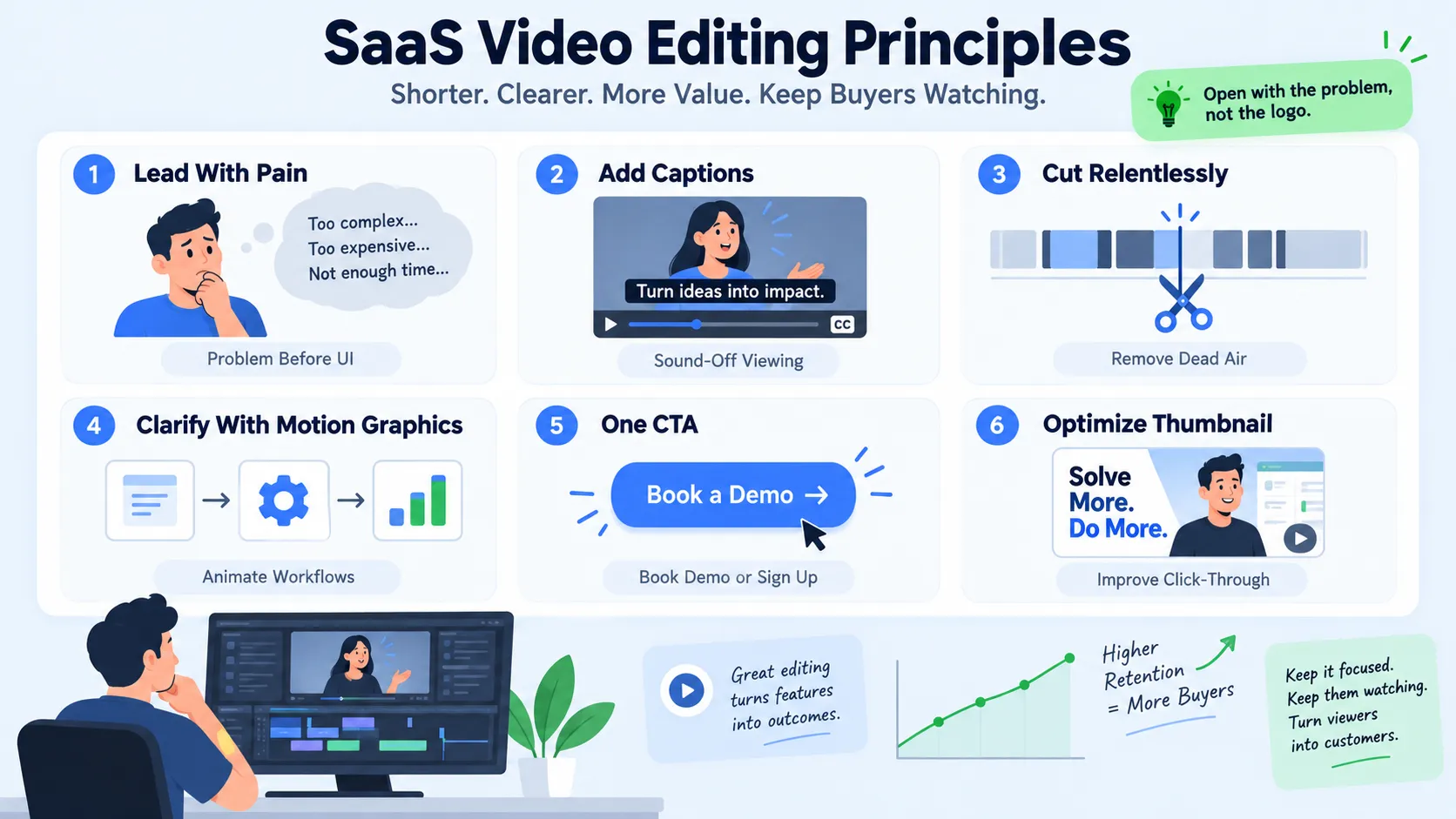
- Lead with pain, not product: Show the problem the buyer has before you show your UI. 68% of SaaS demo videos fail to convert because they focus on features instead of outcomes.
- Add captions: Captions are mandatory, 80% of viewers watch without sound.
- Cut relentlessly: Remove any second that doesn't move the story forward. Dead air, filler phrases, and re-introduced context are the three biggest pacing killers.
- Use motion graphics to clarify, not decorate: Animate workflows, not logos. If a data point explains your value, animate it. If it doesn't, cut it.
- Single CTA at the close: One clear CTA, "Sign up for free" or "Book a demo", without confusing the user at the end.
- Optimize thumbnails for Video SEO: Thumbnails drive click-through on YouTube and LinkedIn; treat them as separate design assets.
For screen recordings made in Loom or similar tools, clean up jump cuts, add zoom-ins on key UI elements, and overlay captions. Raw screen recordings rarely convert. Edited ones built around a specific buyer outcome perform significantly better in sales enablement sequences.
How to Create Product Demo Videos for SaaS That Convert
On average, SaaS websites with product videos have a conversion rate of around 4.8%, while those without videos average around 1.9%, adding a product video can increase conversions by nearly 2.5x. That number is worth the investment in getting demo video production right.
Here is the structure I recommend for every SaaS product demo video:
- Open with the customer problem (0–15 seconds): Name the specific pain. Not "teams struggle with efficiency", name the exact workflow that breaks.
- Introduce the product as the fix (15–30 seconds): One sentence. No feature list.
- Show the "aha" moment (30–90 seconds): The exact point where a user realizes how your product solves their specific problem, this should happen in the first 30 seconds of the core demo.
- Walk through two or three key workflows (90 seconds–3 minutes): Use screen recording with clean captions and zoom-ins. Show outcomes, not menus.
- Add social proof (15 seconds): One customer result. A metric if you have it.
- Close with a single CTA (final 10 seconds): One ask, one link.
For longer demo videos hosted on Wistia or embedded in HubSpot deal sequences, use chapter markers so prospects can jump to the workflow relevant to their role. Different buyer personas within the same buying committee need different entry points into the same product.
Keep your homepage product demo under 90 seconds. Save the full walkthrough for a dedicated demo page or gated asset.
How Long Should a SaaS Video Be? The Length Guide by Format
Length is one of the most contested topics in video editing for B2B SaaS, and the honest answer is: it depends on platform and goal. Data from Vidyard's 2025 Benchmark Report on nearly one million B2B video views shows that videos under one minute achieve a 65% watch-through rate, while 20-minute-plus durations drop to 20%. Seventy-one percent of marketers state that videos between 30 seconds and two minutes are the most effective lengths. Here is the platform-specific guidance:
The average length of B2B marketing videos consumed has decreased from 6 minutes in 2022 to 4 minutes 15 seconds in 2025. Buyers are shortening their attention budgets. Your edit needs to match that reality even when your product is complex.
Video Editing Tips for SaaS Marketing Teams: Repurposing and Workflow
The most efficient video editing for B2B SaaS strategy isn't producing more video, it's extracting more assets from what you already record. Most SaaS teams run webinars, record podcasts, host demos, and produce founder content. Almost none of them systematically repurpose it. Content repurposing from a single long-form asset looks like this:
- One 60-minute webinar becomes 6–8 short clips (30–90 seconds each) for LinkedIn video marketing
- The webinar transcript becomes blog content, email nurture copy, and social captions
- Screen recordings from demo sessions become onboarding snippets
- Podcast episodes become audiogram clips and thought leadership content for LinkedIn
Take your top-performing blog posts and convert them into short LinkedIn clips. Break a webinar into five 60-second highlights. Turn an eBook chapter into a visual explainer. None of this requires a new shoot.
For the editing workflow itself, the process I use with B2B SaaS, AI, and tech startup clients at Komet Media covers two distinct pathways: repurposing existing recordings or building the full video content system from scratch (including niche research, strategy, scripting, and production coordination):
- Research & Strategy / Ingest: For teams without content, start with niche research, ICP analysis, and scriptwriting with hooks. For teams with existing recordings, review transcripts and identify key clips.
- Rough cut: Remove dead air, filler words, and any content that doesn't serve the buyer's question.
- Polish pass: Add captions, apply brand colors to lower thirds, insert motion graphics where needed, and add the CTA card.
- Format export: Produce the asset in all required aspect ratios (16:9 for YouTube, 9:16 for LinkedIn and social, 1:1 for square placements).
Teams that build this repurposing workflow into their short-form video editing process generate significantly more content per dollar spent and maintain consistent demand generation output without a constant production cycle.
Common Mistakes in B2B SaaS Video Production
Even experienced B2B SaaS, AI, and tech startup marketing teams repeat these mistakes. Knowing them is half the fix.
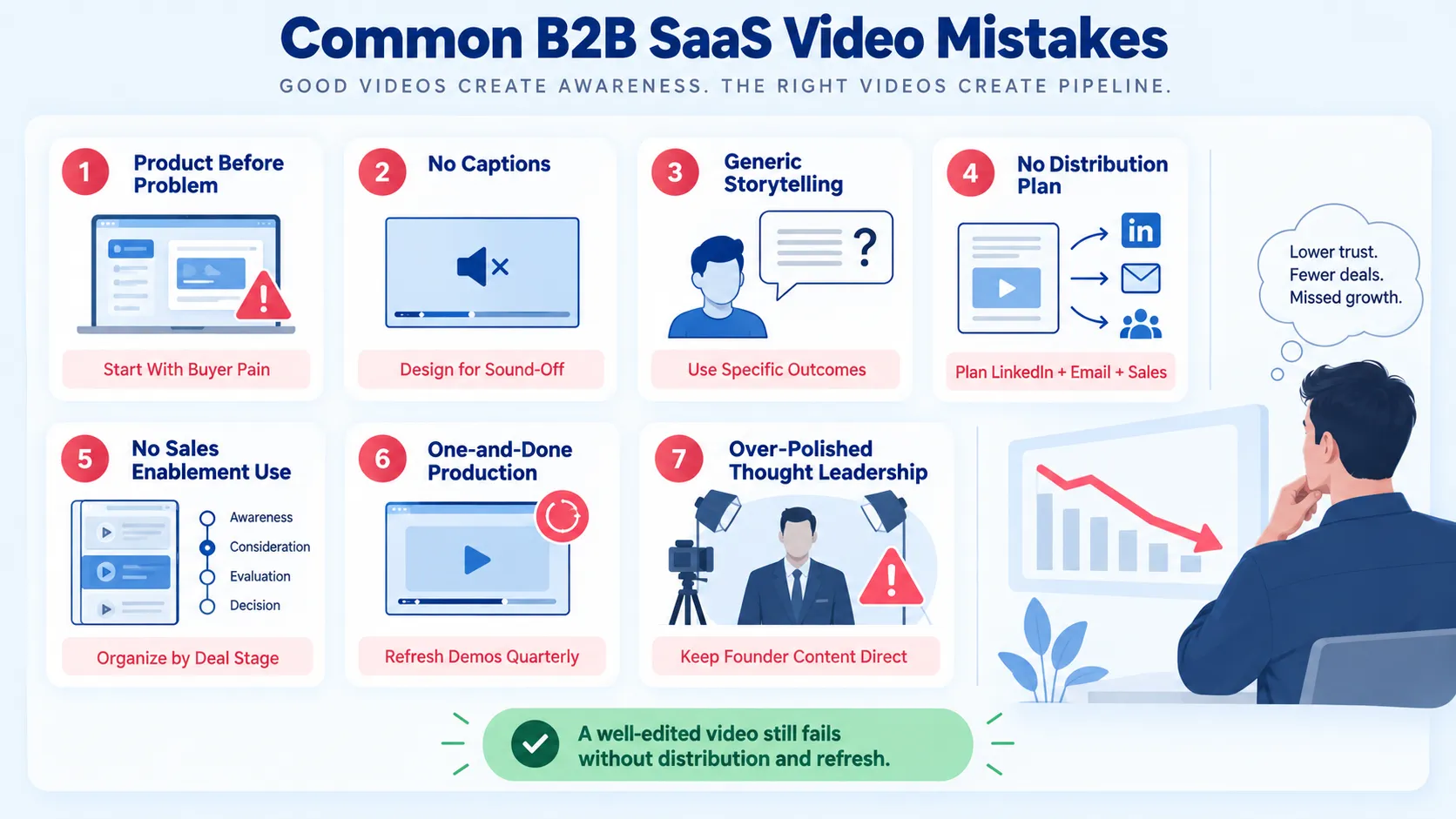
1. Starting with the product, not the problem. Buyers don't watch feature tours. They watch problem solutions. Flip the script structure and watch completion rates climb.
2. Skipping captions. Videos with subtitles see a 28% higher completion rate among B2B audiences compared to videos without subtitles. This is free performance improvement.
3. Generic B2B storytelling. 73% of B2B decision-makers prefer to watch product demo videos rather than read whitepapers or brochures, but they still need specificity. Vague benefit statements ("saves you time") kill trust. Specific outcome statements ("cuts reporting from 4 hours to 20 minutes") build it.
4. No distribution plan. Most B2B companies spend 80% of their effort on production and 20% on distribution. The companies that get the best ROI from video flip this ratio. A well-edited video published without a LinkedIn video marketing strategy, email sequence, or sales enablement integration is a wasted asset.
5. Ignoring sales enablement use cases. According to Vidyard's 2025 benchmarks, sales emails with video get 16% higher open rates and 26% higher reply rates than text-only emails. Your video library should be organized by deal stage and ICP, accessible to the sales team inside HubSpot or your CRM.
6. One-and-done production. SaaS products update constantly. Demo videos become outdated. Build a light refresh cycle into your video editing services workflow, quarterly for demos, annually for brand explainers.
7. Over-polishing thought leadership. Founder-led content and thought leadership content perform better when they feel direct and conversational. Avoid overproduction. A direct, conversational tone will outperform a glossy studio piece, buyers can tell when something is rehearsed.
What Should a B2B SaaS Explainer Video Include?
Explainer videos are the workhorse of the SaaS marketing funnel, but most are built backward. They open with company history or product features instead of the buyer's world.
A high-performing B2B SaaS explainer video includes these elements in this order:
- The buyer's problem (named specifically, not generically)
- Why existing solutions fail (creates contrast and urgency)
- Your product introduced as the category answer (one sentence)
- The mechanism (how it works, shown visually with motion graphics or screen recording)
- A proof point (customer outcome, metric, or recognizable logo)
- A clear CTA (book a demo, start a free trial, or watch a longer walkthrough)
82% of video marketers report that video delivers a positive ROI, and landing pages with embedded video see up to 86% higher conversion rates than those without. An explainer video placed on a product or pricing page does measurable pipeline work.
Keep explainers to 60–90 seconds for top-of-funnel placements. Use motion graphics to visualize abstract SaaS workflows, especially integrations, data flows, and multi-step processes that screen recording can't capture cleanly. Pair each explainer with a Video SEO strategy: upload natively to YouTube with a keyword-optimized title and description, embed on the relevant site page, and distribute clips to LinkedIn as organic thought leadership content.
If you're running video marketing for a funded AI, B2B SaaS, or tech startup, the explainer is often the first asset that earns trust with cold traffic. Invest in it accordingly. For teams scaling this content, our video editing services page covers how Komet Media structures explainer projects for B2B SaaS, AI, and tech startup clients from brief to final delivery.
Conclusion
Video editing for B2B SaaS, AI, and tech startups is a strategic discipline, not a production task. Done right, it builds a pipeline, educates buyers, and compounds across every channel you run.
Key takeaways:
- Match video format to funnel stage, explainers for awareness, demos for intent, testimonials for risk reduction.
- Edit for the buyer's question, not the product feature list.
- Repurpose long-form content (webinars, podcasts, demos) into short-form clips to maximize output per dollar.
- Distribute with intention: LinkedIn video marketing, sales email sequences, and HubSpot embeds all extend your video's reach.
Ready to build a video system for your B2B SaaS, AI, or tech startup team? Start with Komet Media's services.
Frequently Asked Questions
Q1: What is video editing for B2B SaaS, and why does it differ from consumer video editing?
Video editing for B2B SaaS focuses on educating a skeptical, time-poor buying committee rather than entertaining a general audience. The edit must prioritize problem framing, clear product outcomes, captions, and platform-specific formatting, not production flair. Buyer trust is the output, not views.
Q2: How many types of videos does a B2B SaaS company need to start?
Start with two: a 60–90 second explainer video for top-of-funnel awareness and a 2–4 minute product demo video for mid-funnel intent. These two assets address the most common buyer questions and cover the highest-ROI placements, homepage, landing pages, and sales sequences.
Q3: Should I use captions on every SaaS video?
Yes, without exception. Videos with subtitles see a 28% higher completion rate among B2B audiences. Most LinkedIn video is consumed on mobile without sound. Captions are a completion-rate lever that costs nothing to add during editing.
Q4: What tools do SaaS teams use for video editing and hosting?
For recording, Loom is the standard for async demos and sales videos. For hosting and analytics, Wistia provides viewer-level data useful for lead scoring. HubSpot embeds video natively into deal sequences. For editing and full-service production, teams either work in-house with tools like Adobe Premiere or partner with a B2B video growth agency like Komet Media, which builds video systems both from existing libraries and from scratch through strategy, scripting, and managed production.
Q5: How often should SaaS product demo videos be updated?
Plan a light refresh every quarter for demos and annually for brand explainers. SaaS UIs change faster than most video production cycles, and an outdated demo showing the wrong interface actively erodes buyer trust rather than building it.
Q6: Can a SaaS team repurpose existing content instead of producing new video?
Absolutely, and it's often the higher-ROI move first. A single webinar or podcast episode can generate 6–10 short-form clips, social captions, email nurture content, and thought leadership assets for LinkedIn. However, if your team does not have an existing content library, Komet Media also builds and edits content from scratch, handling research, content strategy, scripting, recording prep, and end-to-end production.


