
🪄 AI Summary
Heading 1
Heading 2
Heading 3
Heading 4
Heading 5
Heading 6
Lorem ipsum dolor sit amet, consectetur adipiscing elit, sed do eiusmod tempor incididunt ut labore et dolore magna aliqua. Ut enim ad minim veniam, quis nostrud exercitation ullamco laboris nisi ut aliquip ex ea commodo consequat. Duis aute irure dolor in reprehenderit in voluptate velit esse cillum dolore eu fugiat nulla pariatur.
Block quote
Ordered list
- Item 1
- Item 2
- Item 3
Unordered list
- Item A
- Item B
- Item C
Bold text
Emphasis
Superscript
Subscript
Managing brand consistency across video editors gets harder with every editor you add. One editor develops a feel for your fonts, pacing and tone. Three editors produce three slightly different versions of your brand, and viewers notice even when they cannot say why. This guide shows how to build a brand kit editors can follow, how to write video-specific rules, how to set up a workflow that catches drift early, and how to measure whether your videos still look like they come from one company.
Quick Answer: Brand Consistency Across Video Editors
Managing brand consistency across video editors depends on four things: a video-specific brand kit, rules written as testable statements, one review checklist applied to every delivery, and a shared library of approved examples and templates.
Why Brand Consistency Slips Across Video Editors as You Scale
Consistency usually fails for ordinary reasons, not carelessness.
- Rules live in someone's head. The first editor knows the brand by instinct, and the instincts never get written down.
- Brand guidelines were written for print or web. They say little about captions, pacing, music or motion.
- Multiple platforms. Each platform needs different framing, so editors make judgment calls that are not documented. Wistia's 2026 State of Video report found that 76% of surveyed teams adjust aspect ratio by platform, and that teams repurposing video into clips post most often to LinkedIn (67%), then Instagram (49%), YouTube (41%) and Facebook (34%). That is survey data from Wistia's respondents, but it shows how many versions a single recording tends to produce.
- Turnover and new vendors. A new editor starts with the last file they were sent, not the intent behind it.
- Review is informal. Feedback arrives in chat messages and never becomes a rule.
Consistency is not rigidity. The goal is that a viewer recognizes your videos within seconds, and that the content is credible because it looks and sounds the same whichever editor made it.
Build a Video Identity Kit for Your Editors
Start with a short document that translates brand into video. Keep it to a few pages so people read it.
Visual identity
- Logo placement, size and safe margins, including when not to show it.
- Brand colors with hex codes, and how they are used in text, shapes and highlights.
- Typefaces for titles, lower thirds and captions, with approved sizes.
- Lower-third and title card templates.
- Rules for graphics, icons and charts.
Captions
- Font, size, color, background and position.
- Line length and number of lines.
- Word highlighting rules, if used.
- Spelling conventions for product names, people and acronyms.
Motion and pacing
- Preferred transitions and the ones to avoid.
- Typical cut length for different formats.
- Zoom and reframing rules for talking-head clips.
- Intro and outro length.
Framing
- Safe areas for each platform's interface.
- How to crop a horizontal recording for vertical formats without cutting off faces or captions.
Tone
- Words and claims to avoid.
- How formal or informal the voice should be.
- How to treat humor, hype and statistics.
Include screenshots and short video examples inside the kit. A frame beats a paragraph of description.
Audio Guidelines for Video Editors
Audio is where inconsistency is most noticeable, because viewers forgive an average visual quicker than a jarring sound shift.
- Loudness: Choose a target and measurement method for each platform. For podcast distribution, Spotify says it normalizes to -14 LUFS (ITU 1770), recommends a -14 integrated LUFS target and a true peak at or below -1 dB TP. Short-form social platforms may differ, so confirm each before setting the rule.
- Music: Approved library or tracks, volume relative to speech, and when music is not used.
- Voice treatment: Noise reduction, equalization and compression settings or presets.
- Sound effects: Allowed or not, and for what purpose.
- Licensing: Who confirms music and font licenses.
Write audio rules as measurable statements, such as "music sits below speech throughout", and ask editors to confirm levels on delivery.
Write Brand Rules as Statements You Can Test
Vague guidance produces inconsistent work. Compare:
A reviewer can check the right-hand column without guessing. Where a rule has exceptions, write them in the same place.
Separate the rules into three tiers:
- Must: Brand-critical rules, such as logo use, legal language and product names. A breach blocks delivery.
- Should: Strong defaults, such as pacing and transitions. Editors can deviate with a note.
- May: Creative areas where editors have freedom.
Tiering prevents the review process from drowning in small preferences.
Create a Shared Library for Video Editors
Rules are easier to follow with assets in hand.
- Project templates for each format, such as a Reel, a LinkedIn clip and a long-form episode.
- Title, lower-third and caption presets.
- A folder of approved music and sound effects.
- A reference reel: five to ten finished videos that show the standard.
- A "do not do" file with examples of past mistakes and the fix.
Version-control the library. Record the date of the last update and who approved it. An out-of-date template causes more drift than no template.
Standardize the Workflow for Managing Brand Consistency Across Video Editors
A repeatable workflow keeps multiple editors aligned, because the process catches problems that rules miss.
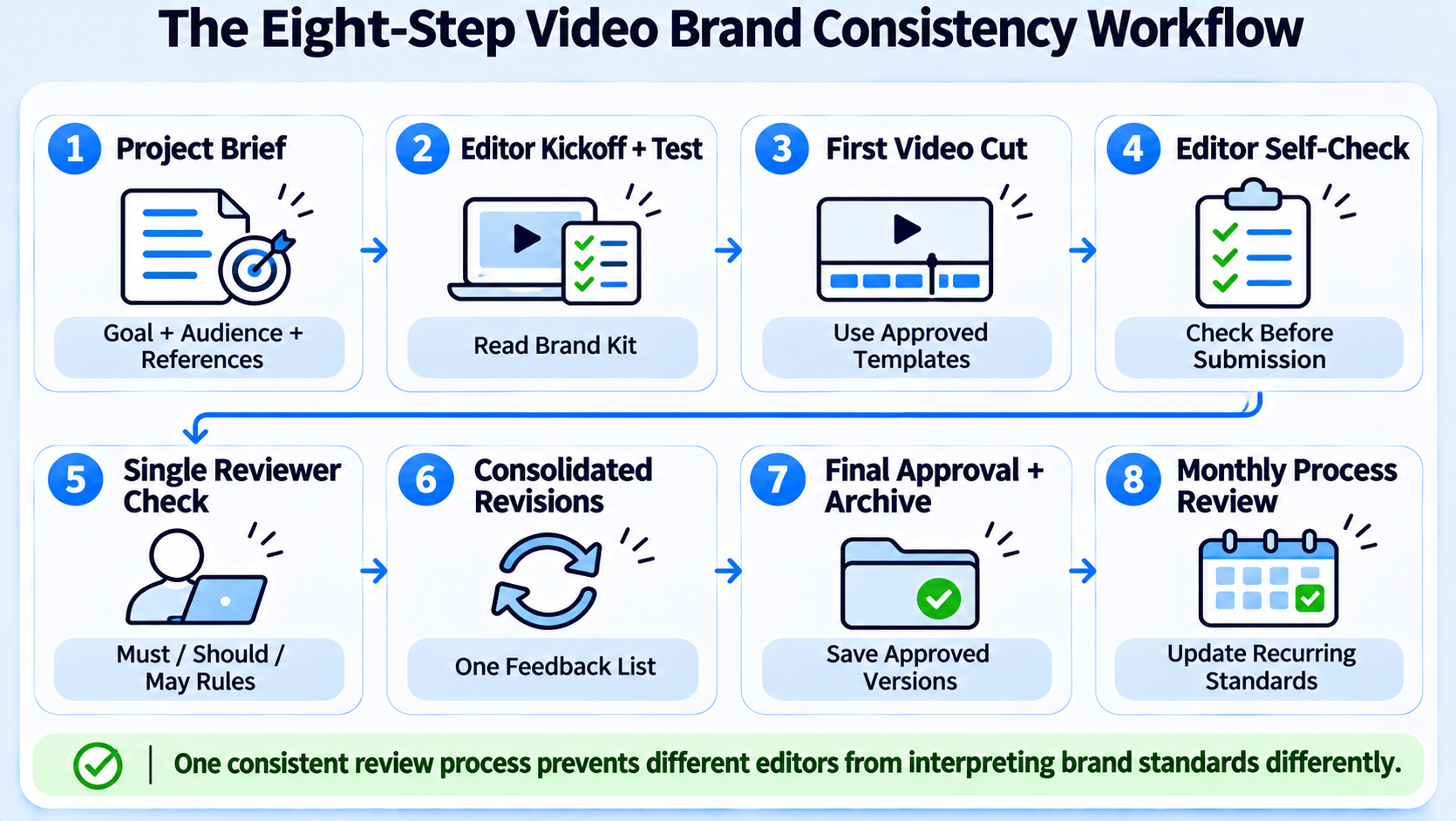
- Brief. Use one template for every project, including goal, audience, platform, source files and reference videos. Our video editing brief template is a starting point.
- Kickoff check. New editors read the kit and complete a short test edit before client-facing work.
- First cut. The editor works from templates and presets.
- Self-check. The editor runs the delivery checklist before sending.
- Review. One reviewer applies the same checklist, marking issues as must, should or may.
- Revisions. Feedback is consolidated into one list. See our guide to running an efficient video revision and feedback loop.
- Approval and archive. Approved files are saved with names and dates. Good examples go into the reference reel.
- Retrospective. Monthly, review the recurring issues and update the kit.
The one-reviewer rule matters. When several people review with different tastes, editors learn to guess instead of follow the standard.
A Video Delivery Checklist for Brand Consistency
Give every editor the same list.
- File format, resolution, frame rate and aspect ratio match the platform.
- Logo, colors and fonts match the kit.
- Captions follow the caption rules and are spelled correctly.
- Product names, people and acronyms match the spelling list.
- Audio levels and music follow the audio rules.
- Pacing and transitions follow the format template.
- Any statistic has a visible or caption source.
- Rights for music, fonts and footage are confirmed.
- File name follows the naming convention.
Platform Adaptation Without Losing the Brand
One recording becomes several versions. Decide what changes by platform and what never changes.
Changes by platform: aspect ratio, length, caption placement, opening hook, call to action.
Never changes: logo treatment, color palette, typefaces, tone, spelling and the main message.
Document two or three examples per platform: the horizontal master, a vertical cut and a square or short cut. Our guide on content atomization explains how one asset feeds several formats.
Working With Freelancers, Agencies, and In-House Video Editors
Managing brand consistency across video editors looks different depending on who the editors are.
- Freelancers: Provide the kit and templates up front, run a test edit and set one reviewer. Turnover is higher, so the kit has to carry the knowledge.
- Agencies: Ask for a named lead editor, a documented process and a say in the kit. A good partner will flag rule conflicts instead of deciding them quietly.
- In-house team: Use shared templates, a weekly review and a single owner of the kit.
- Mixed teams: Assign one person as the brand gatekeeper across all of them.
If you are deciding between models, see our comparison of freelance editors versus agencies for B2B.
Onboard a New Video Editor in One Week
New editors cause the most drift, because they start without context. A short onboarding routine prevents it.
Day 1. Send the kit, the reference reel and the delivery checklist. Explain the three rule tiers and who the reviewer is.
Day 2 to 3. Ask for a test edit from a real but low-risk recording, using your template. Review it against the checklist and give written feedback.
Day 4. Hold a short call. Walk through the feedback, ask what in the kit was unclear and fix the kit, not just the edit.
Day 5. Approve for live work, with a note on which areas still need extra checks for the first month.
Treat the questions new editors ask as free quality control on your documentation. If three editors ask how to crop for vertical, the kit does not answer it clearly enough.
Handling Disagreements and Exceptions Between Editors
Rules need exceptions, and exceptions need a home. When an editor wants to break a "should" rule, ask for a one-line reason in the delivery note. If the exception works, add it to the kit as an approved variation. If it does not, record why. Over time the kit absorbs good ideas and the edit history shows why the rules exist.
When stakeholders disagree about a creative choice, decide by the goal in the brief. Ask which version better serves the audience and platform, not which one people prefer. Where the question is a brand rule, the gatekeeper decides. Where it is a fact, the subject expert decides. Mixing these roles slows approval and confuses editors.
Updating the Video Brand Kit When the Brand Changes
Brands change: a logo refresh, a new product line, a shift in tone. Plan the update before it reaches editors.
- Version the kit and date the change.
- List what changes and what stays.
- Update templates and presets first, then notify editors.
- Set a date after which old assets are not used.
- Review the first batch of videos after the change for leftovers.
Running a transition without these steps leads to a mixed archive in which some videos show the old logo and some the new. Managing brand consistency across video editors includes managing the date line between versions.
Recording Standards Upstream of the Video Editor
Many consistency problems start before the edit. If speakers record in different rooms, with different microphones, framing and lighting, an editor has to hide the difference. Set simple recording standards for founders, guests and customers: a quiet room, a microphone close to the speaker, a plain background, eye-level camera and the same framing for a series. Share them as a one-page guide before each recording. The cleaner the source, the less the edit has to correct, and the more similar your videos look across editors.
Examples of Testable Rules by Element
Here are sample rules for typical video elements. Adapt them to your own brand, and keep the language precise.
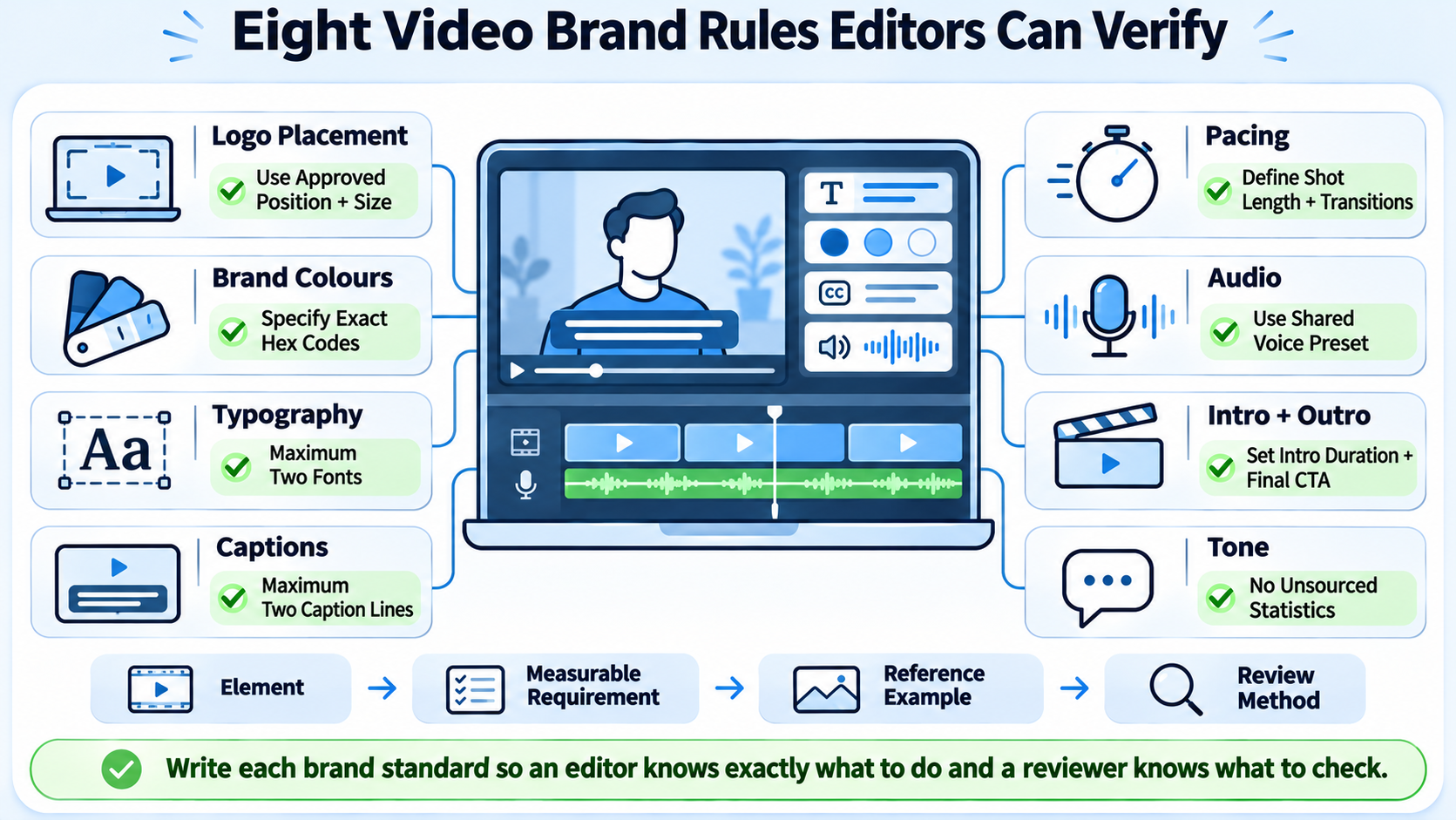
Logo. Appears in the end card only, bottom right, at a stated percentage of frame width. Never over faces. Never animated unless approved.
Color. Caption highlight color uses the brand primary, with the hex code listed. Backgrounds use approved neutrals. No gradients outside the approved list.
Typography. Titles use the brand heading font at a stated size, captions use the body font. No more than two fonts per video.
Captions. Maximum two lines on screen, with a maximum number of characters per line. Names and product terms follow the spelling list. Captions sit above the platform's interface zone.
Pacing. No shot longer than a stated number of seconds unless a speaker is on screen. Transitions limited to cut and a named dissolve.
Audio. Music under speech at a stated relative level. Voice processed with the shared preset. Final loudness meets the stated target for the platform.
Intro and outro. Intro under a stated length. Outro uses the approved template with one call to action.
Tone. No slang, no unsourced statistics, no superlatives. Describe results with what was measured and over what period.
Write each rule in one line, with an image or video example where possible.
Brand Consistency Across Formats
A brand has to survive different formats, and each format needs its own examples.
Short vertical clips. Fast hooks, large captions, tight framing. Define the safe zone and the caption style.
Horizontal long-form. Slower pacing, lower thirds, chapter markers. Define title cards and transitions.
Podcast video. Speaker framing, name labels and episode graphics.
Webinar cutdowns. Slide treatment, speaker overlays and sponsor logos.
Social cut-downs and teasers. Consistent opening frame and end card.
Testimonials and case studies. Customer name format, logo permissions and result graphics.
For each format, store one reference video and one template in the shared library. When a new editor starts, they should be able to open the template and start working in the right style.
Governance: Who Owns the Brand Kit
A kit without an owner decays. Assign roles.
- Kit owner. Usually a brand or marketing lead who approves changes.
- Gatekeeper. Reviews deliveries and enforces must-level rules.
- Editors. Follow the kit and flag conflicts.
- Stakeholders. Provide facts and approvals but do not change style.
Set a change process. Anyone can propose a change. The owner reviews monthly, tests the change on one project and updates the kit with a version number and date. Editors are notified, and old templates are retired.
Common Drift Patterns and Fixes
These patterns recur, and each has a simple fix.
Review a sample of recent videos every month and note which patterns are present. Then update the kit or retrain, rather than correcting each video individually.
Working With an Agency That Creates From Scratch
When a partner creates content from scratch, brand consistency begins earlier, at the concept stage.
- Share the brand kit and tone page before the first brief.
- Review concepts and scripts against the tone rules before production.
- Approve a visual style on one test video.
- Lock templates for titles, captions and end cards.
- Review the first batch carefully and give written feedback.
A partner that writes and produces for you will make many small choices. The more of them are captured in the kit, the less you will need to correct later. Ask any partner to describe the range of work it takes on, from editing to full production.
Measuring Brand Consistency in Video
You can measure consistency without special tools.
- Checklist pass rate: the share of deliveries that pass the review checklist on first submission.
- Revision rounds per project, a rise often signals unclear rules.
- Audit scores: every quarter, sample ten published videos and score them against the kit on a 1 to 5 scale.
- Side-by-side review: line up thumbnails and first frames from different editors. Inconsistencies are easy to spot.
- Viewer and sales feedback: note whether prospects recognize your videos and refer to them.
Pair these with performance data such as views, watch time, saves and shares, but do not assume that consistency alone drives performance. Attribution is imperfect.
Common Mistakes in Video Brand Consistency
- Writing a long brand book nobody opens. Keep the video kit short and visual.
- Changing rules without telling editors. Update the kit and notify everyone.
- Letting every stakeholder review. Use one reviewer plus subject-matter checks for facts.
- Policing preferences. Reserve blocking feedback for must-level rules.
- Skipping the reference reel. Examples teach faster than text.
Conclusion: Brand Consistency Across Video Editors
Managing brand consistency across video editors is a systems problem. Put the brand into a short video kit, write rules viewers and reviewers can test, share templates and examples, and run every delivery through one checklist and one reviewer. Review the kit regularly, measure the pass rate and let the process, not individual memory, carry the standard as you add editors.
FAQs on Brand Consistency Across Video Editors
What does managing brand consistency across video editors mean?
It means ensuring videos made by different editors look, sound and read as if they came from one brand, using shared rules, templates, reviews and examples.
How much does it cost to manage brand consistency?
Cost depends on the number of editors, formats and review effort. Komet Media's typical working range for ongoing B2B retainers is roughly $2,500 to $5,000, with final pricing based on scope.
How long does it take to set up a video brand kit?
For managing brand consistency across video editors, a first version can take a few days to a couple of weeks, depending on how much already exists. Plan to revise it after the first month of use.
What deliverables should I expect from a partner?
Edited videos that follow your kit, captions, platform exports, a delivery checklist per project and regular reviews of recurring issues.
Should I use a freelancer or an agency?
Freelancers suit small volumes with a strong kit. An agency suits teams that want a documented process, a lead editor and cover for absences.
Should I keep editing in house or outsource it?
In-house teams give context and control. Outsourcing adds capacity. Many teams keep the kit and review in house and outsource production.
Does this matter for VC firms, PE firms and SaaS companies?
Yes. Consistent video signals credibility to founders, investors and buyers, especially when content appears on several platforms.
How does Komet Media keep consistency across projects?
Komet Media can work from a client's brand kit and templates, whether it is creating videos from scratch or editing existing footage, apply a delivery checklist and review recurring issues with the client.