
🪄 AI Summary
Heading 1
Heading 2
Heading 3
Heading 4
Heading 5
Heading 6
Lorem ipsum dolor sit amet, consectetur adipiscing elit, sed do eiusmod tempor incididunt ut labore et dolore magna aliqua. Ut enim ad minim veniam, quis nostrud exercitation ullamco laboris nisi ut aliquip ex ea commodo consequat. Duis aute irure dolor in reprehenderit in voluptate velit esse cillum dolore eu fugiat nulla pariatur.
Block quote
Ordered list
- Item 1
- Item 2
- Item 3
Unordered list
- Item A
- Item B
- Item C
Bold text
Emphasis
Superscript
Subscript
If your video editor keeps sending back drafts that miss the point, the problem usually isn't the editor. It's the brief, or the complete absence of one. A solid video editing brief template for B2B teams is the single document that collapses endless revision rounds, aligns stakeholders before a single cut is made, and turns your product knowledge, founder thinking, and demo recordings into polished pipeline assets. Here's everything you need to build one that actually works.
TL;DR
- A video editing brief template for B2B teams must define the goal, audience, messaging hierarchy, format specs, and approval workflow before editing begins.
- Vague briefs produce vague videos. Specific inputs create specific outputs.
- The brief is a pre-production alignment tool, not a post-production note.
- Download, customise, and version-control your template for every content type you produce.
What Should a Video Editing Brief Include for Business Teams?
Most video projects fail before the camera even rolls. Without a well-structured brief, creative teams face budget overruns, production delays, and misaligned expectations.
For B2B SaaS teams, that cost compounds fast, a delayed product demo video can stall an entire outbound sequence.
An effective creative brief should include seven core sections: project and administrative details with clear stakeholder roles, milestones, and deadlines; a strategic foundation outlining business context and objectives; and detailed target audience profiles beyond demographics.
Beyond those, a B2B-specific brief needs a few more layers:
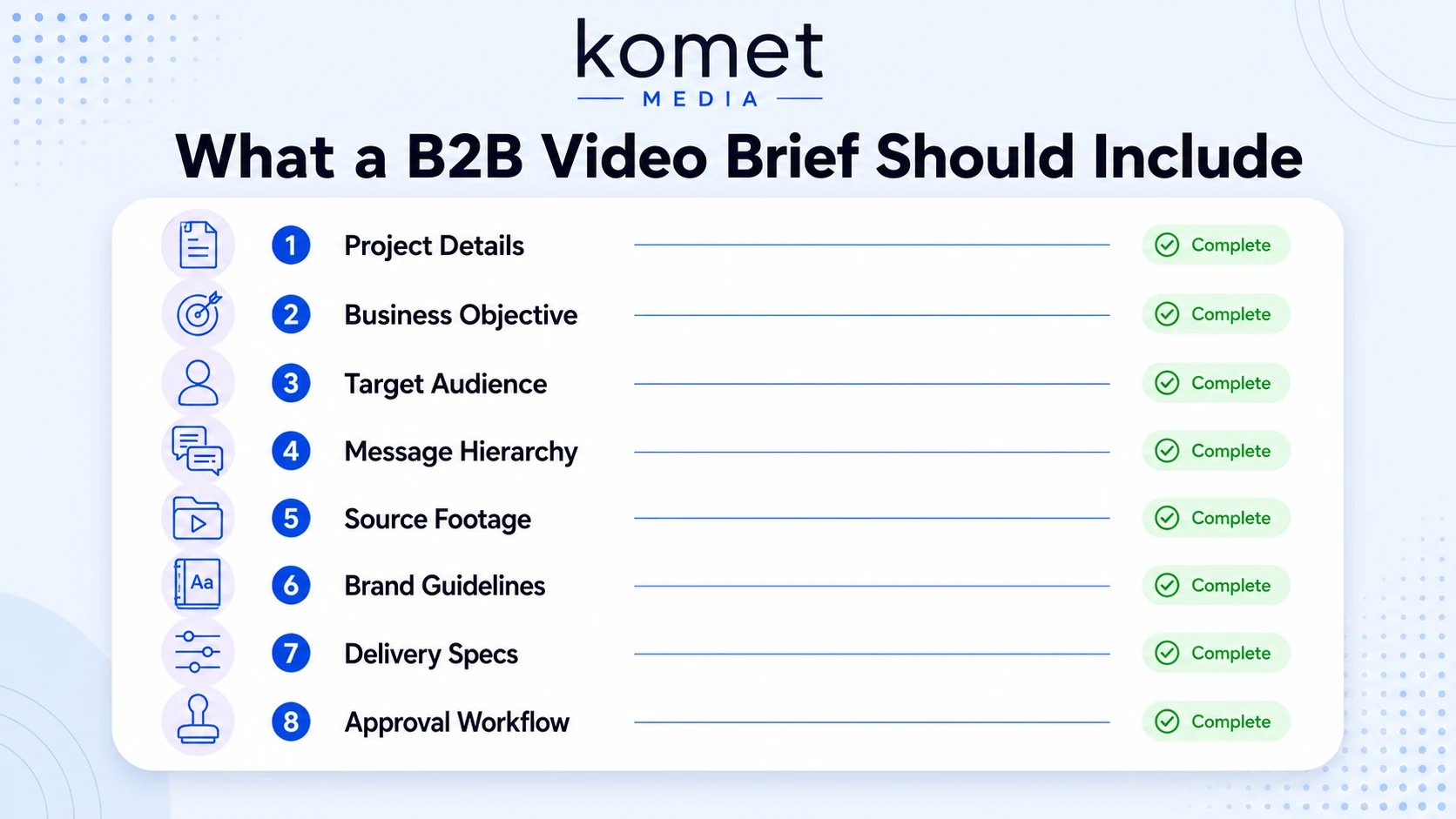
- Project metadata: Video title, content type (webinar clip, demo, founder POV), version number, and due date.
- Business objective: Is this clip for pipeline, demo demand, buyer education, or sales enablement? One video, one objective.
- Target audience persona: Job title, buying stage, and the single question they're trying to answer.
- Messaging hierarchy: Lead message, supporting proof point, and call to action, in that order.
- Source footage details: File names, timestamps of key moments to include, and any segments to cut.
- Brand guidelines reference: Logo placement, colour palette, font stack, and motion graphics specifications.
- Delivery format standards: Aspect ratio (9:16 for LinkedIn, 16:9 for YouTube), resolution, file format, and caption requirements.
- Approval workflow: Who reviews first, who has final sign-off, and how feedback gets submitted (one consolidated doc, not scattered Slack threads).
A creative brief is a document that defines the scope and goals of a project and outlines the key elements. It serves as a roadmap for creative teams, providing clear instructions and guidelines to ensure everyone is on the same page and working towards a common goal.
This is your template's skeleton. Every section exists to remove ambiguity before the editor opens a single timeline.
Video Brief Template vs. Creative Brief: What's the Difference?
B2B marketing teams often use these two terms interchangeably. They're not the same document, and confusing them causes scope creep.
A traditional video brief focuses exclusively on production logistics: who will speak, what they'll say, and how the video will look. It ends when filming wraps. A strategic video brief, on the other hand, extends beyond production to plan for the entire content lifecycle, including how the video will be repurposed into multiple formats, distributed across channels, and measured against business outcomes.
For B2B SaaS teams running a content repurposing strategy, where one webinar becomes ten LinkedIn clips, one podcast episode becomes a sales enablement sequence, the video editing brief template for B2B teams is the operational document your editor works from. The creative brief is the strategic document your CMO approved three weeks earlier. Both live in your video asset management system. Neither replaces the other.
How Do B2B Marketing Teams Brief Video Editors? (Step-by-Step)
Successful B2B video strategies rely on repeatable formats that teams can batch-produce efficiently.
That repeatability starts with a consistent briefing process. Here's how to run it:
- Lock the objective first: Before touching footage, document whether this video supports pipeline (demo CTAs), buyer education (product explainer), or sales enablement (objection-handling clip). One objective per video.
- Identify the source footage: Provide exact file names, Google Drive or frame.io links, and timestamps. "Use the bit around minute 14 where Rajan explains the ROI model" is not a timestamp. "14:22–15:47" is.
- Write the messaging hierarchy: State the lead message in one sentence. Add one supporting point. Define the CTA. Paste all three directly into the brief.
- Specify motion graphics and voiceover requirements: If lower thirds, animated titles, or branded intro/outro are needed, reference the exact template files. If voiceover is required, specify tone, pace, and whether it's founder-led or scripted.
- Define delivery format standards: Aspect ratio, resolution (1080p minimum for LinkedIn), caption style (burned-in vs. SRT), and file format (MP4/H.264 for most platforms).
- Set the approval workflow: Name one primary reviewer and one final approver. All feedback consolidates in a single timestamped document before it goes to the editor.
- Include reference clips: Link two to three "this is the vibe" examples. This is the fastest shortcut to alignment on pacing, tone, and energy.
No length specification is a common failure point. Editors deliver a three-minute video while marketing expects 45 seconds. Pacing feels wrong, revisions multiply, and deadlines extend unnecessarily. Fix: agree on length upfront, 30, 60, or 90 seconds, so editing effort, pacing, and distribution are aligned.
How to Write a Video Editing Brief That Saves Revision Rounds
Revision rounds don't come from bad editors. They come from briefs that leave decisions unmade. Here's the principle I use at Komet Media: if the brief could be interpreted two different ways, it will always be, and always the wrong one.
While creative briefs are essential for successful projects, there are common challenges to avoid. Avoid ambiguity and use precise language to define project objectives, target audience, and deliverables. A brief that lacks sufficient detail can lead to misunderstandings and rework. Ensure that all essential information is included, such as project background, target audience demographics, messaging guidelines, and specific deliverables.
Five specific moves that cut revision rounds by half:
- Include a "do not use" section: List the footage segments, phrases, or visual styles that are off-limits. Negative constraints are just as clarifying as positive ones.
- Use time codes, not descriptions: "The part where she talks about churn" forces your editor to guess. "04:13–04:58" does not.
- Attach reference clips: In social feeds, clarity and pacing matter far more than cinematic production value. The most effective short-form clips hook viewers within the first second or two. Show your editor what "hooked in two seconds" looks like for your audience.
- Specify caption requirements explicitly: Because most platforms autoplay videos without sound, captions are critical. Burn them in, highlight key words for emphasis, and use visual cues like progress bars to nudge viewers toward completion.
- State the distribution channel per deliverable: LinkedIn 9:16, YouTube 16:9, and website embed each require different edits. Put this in the brief, not in a follow-up Slack message.
Revision rounds are a pre-production failure disguised as a post-production problem. Fix them at the brief stage.
The goal: an editor who reads your brief should be able to complete the first cut with zero follow-up questions. That's the standard.
Common Mistakes B2B Teams Make When Briefing Video Editors
Endless revision cycles drain resources. Feedback arrives scattered across email threads and Slack messages. The final product misses the mark, mostly because the mark was never defined.
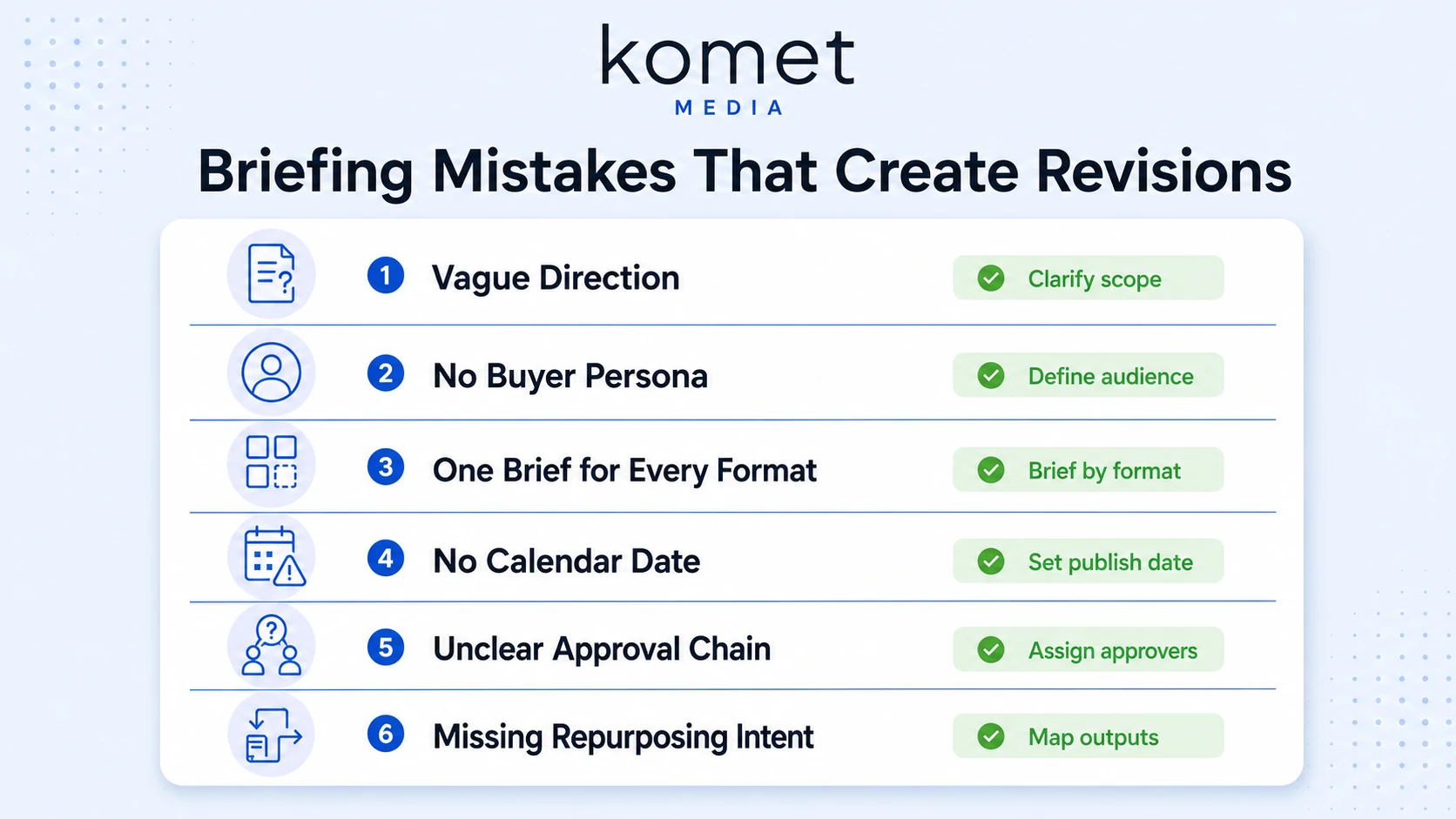
These are the specific mistakes I see most often in B2B SaaS content operations:
- Briefing by outcome instead of input: Saying "make it look professional" gives an editor zero technical direction. Define the fonts, transitions, pacing, and motion graphics explicitly.
- Skipping the audience persona: Videos that address specific buyer pain points see a 41% higher watch-through rate than generic product videos. Your editor needs to know who's watching to make the right cuts.
- One brief for all formats: A LinkedIn clip, a YouTube long-form, and a sales page embed are three different products. They need three separate delivery sections in the brief, even if they share the same source footage.
- No content calendar alignment: A video delivered two days after a campaign launch has half the distribution impact. The brief must include a hard delivery date tied to your content calendar.
- Vague approval chains: When everyone can comment but no one has final authority, the editor rewrites the video four times chasing conflicting opinions. Name one decision-maker.
- Missing brand guidelines reference: Overly rigid templates reduce briefs into checkbox exercises. People paste generic answers without thought, creating busywork instead of clarity. The fix isn't no template, it's a modular one where brand specs are locked but creative direction is flexible.
- Forgetting repurposing intent: One webinar turns into 10 social clips, a blog post, and a personalized email campaign. One product demo produces testimonial snippets, helpful videos, and sales enablement videos.
If your brief doesn't flag the repurposing plan, the editor will optimise for one format only.
Get the Komet Media short-form video editing service to put a production team behind briefs like these.
Best Practices for Writing a Video Editing Brief in 2026
91% of businesses use video as a marketing tool in 2026, the highest figure ever recorded. For B2B marketers specifically, the adoption is even more concentrated, video marketing continues to grow as the primary content format for demand generation, sales enablement, and customer education.
With that level of saturation, operational discipline separates teams who produce consistent pipeline-driving content from those drowning in revision rounds. Here are the current best practices:
- Version-control every brief: Use a naming convention like "ClientNameVideoTypev1_2026-06-18" so editors and approvers always reference the same document. A consistent naming format like "ProjectNamev12025-09-21" ensures clarity and consistent tracking.
- Tie each video to a pipeline stage: Define whether this asset supports awareness, consideration, or decision. Decision-stage videos that focus on ROI and pricing details see a 39% higher engagement rate than generic sales videos. Your brief should reflect that intent through the messaging hierarchy and CTA.
- Build modular brief sections: Lock down project metadata and brand specs. Keep the creative direction section open-ended enough for the editor to make professional judgement calls on pacing and transitions.
- Include LinkedIn-specific formatting guidance: LinkedIn has redesigned its interface to prioritise vertical videos and encourage mobile-first content. For B2B marketers, this shift highlights the importance of incorporating vertical, mobile-friendly formats into their strategies. Your brief's delivery format section must address this explicitly.
- Plan for speed: An "80%-there" version published within 72 hours of a webinar or interview will outperform the flawless cut that ships a month late. Build turnaround expectations into the brief upfront, not at final review.
- Assign a single brief owner: That person is responsible for collecting all stakeholder input before the brief goes to the editor, not after.
Visit Komet Media's video marketing services to explore how we build these workflows for funded B2B teams, or learn more about our video editing services and YouTube video editing if you're scaling to multiple distribution channels.
Example Template: Video Editing Brief
Conclusion
A video editing brief template for B2B teams is not a bureaucratic formality. It's the document that decides whether your editor ships a pipeline asset or a confusing clip that never gets published. Key takeaways:
- Specific briefs produce specific outputs. Vague briefs produce revision rounds.
- Separate the creative brief (strategy) from the video editing brief (production input).
- One brief per video type per distribution channel, versioned and owned by one person.
- Build your template around your content repurposing workflow so every long-form asset feeds a predictable short-form output system.
For B2B SaaS teams ready to systematise this, Komet Media builds the full video production workflow around briefs like these.
Frequently Asked Questions
Q1: How long should a video editing brief be for a B2B short-form clip?
One to two pages maximum for a short-form clip (under 90 seconds). Cover the objective, audience, messaging hierarchy, footage timestamps, delivery specs, and approval chain. Anything longer for a single clip usually means the objective hasn't been narrowed down enough.
Q2: Who should fill out the video editing brief, the marketer or the video producer?
The marketing lead or content manager owns the brief. At Komet Media, the person who knows the pipeline goal fills in the objective, audience, and messaging sections. The video producer or hired video editor fills in the technical delivery specs. Both sign off before editing begins.
Q3: How is a video editing brief different from a script?
A script specifies what is said, word by word. A video editing brief template for B2B teams specifies what the editor does with existing footage: which segments to use, in what order, with what brand elements, for which platform, and approved by whom. You can have a brief without a script (when repurposing footage), but you should never have a script without a brief.
Q4: What delivery format standards should B2B teams specify in their brief?
At minimum: aspect ratio (9:16 for LinkedIn and Instagram Reels, 16:9 for YouTube), resolution (1080p), file format (MP4/H.264), caption format (burned-in for social, SRT file for website embeds), and max file size per platform. Include these in a locked table section of your brief template.
Q5: How does a video editing brief support content repurposing strategy?
When the brief includes a "repurposing intent" section, flagging which clips will become LinkedIn posts, sales enablement assets, or podcast highlight reels, the editor can make cuts with multiple outputs in mind from the start, instead of re-editing the same footage three separate times.
Q6: How many revision rounds should a well-written brief eliminate?
A complete brief with clear timestamps, delivery specs, messaging hierarchy, and a single named approver should reduce revisions to one round for structural feedback and one for final polish. If a brief is generating three or more revision rounds, the brief itself is the problem, not the editor.


