
Retention Editing: Keeping Viewers to the End: Step-by-Step Guide
Retention editing: keeping viewers to the end of a video is mostly the work of removing reasons to leave. A strong hook wins the first few seconds, but many videos lose people in the middle, where the point is slow to arrive. For founders, VC partners, and B2B SaaS, AI, and tech startups & teams, that middle is where the business message usually sits. This guide covers what retention data can and cannot tell you, where teams go wrong, and the eight steps we follow.
Quick Answer
Decide which moment matters most, open on the point, cut everything that delays it, change the visual at real lulls, and end when the point lands. Then read the retention curve and adjust one thing at a time.
What Retention Data Tells You, and What It Does Not
Retention is the share of viewers still watching at each moment of a video. Every video loses viewers over time, so a curve that starts high and slopes down is normal. YouTube's help documentation says videos generally taper off during playback and that audience sizes typically decrease over the length of a video. In practical terms, the editor's job is to move the drop-off later and to protect the one moment that carries the message, not to chase a flat line.
Wistia gives a useful reference point. Its analysis of more than 13 million videos found that videos under one minute average a 52% engagement rate, meaning viewers typically watch about half. Wistia also notes that most viewers drop off around the halfway point, so it advises putting the most important information in the first half. That data covers all industries and video types, and it measures how much of a video was watched, not why people left.
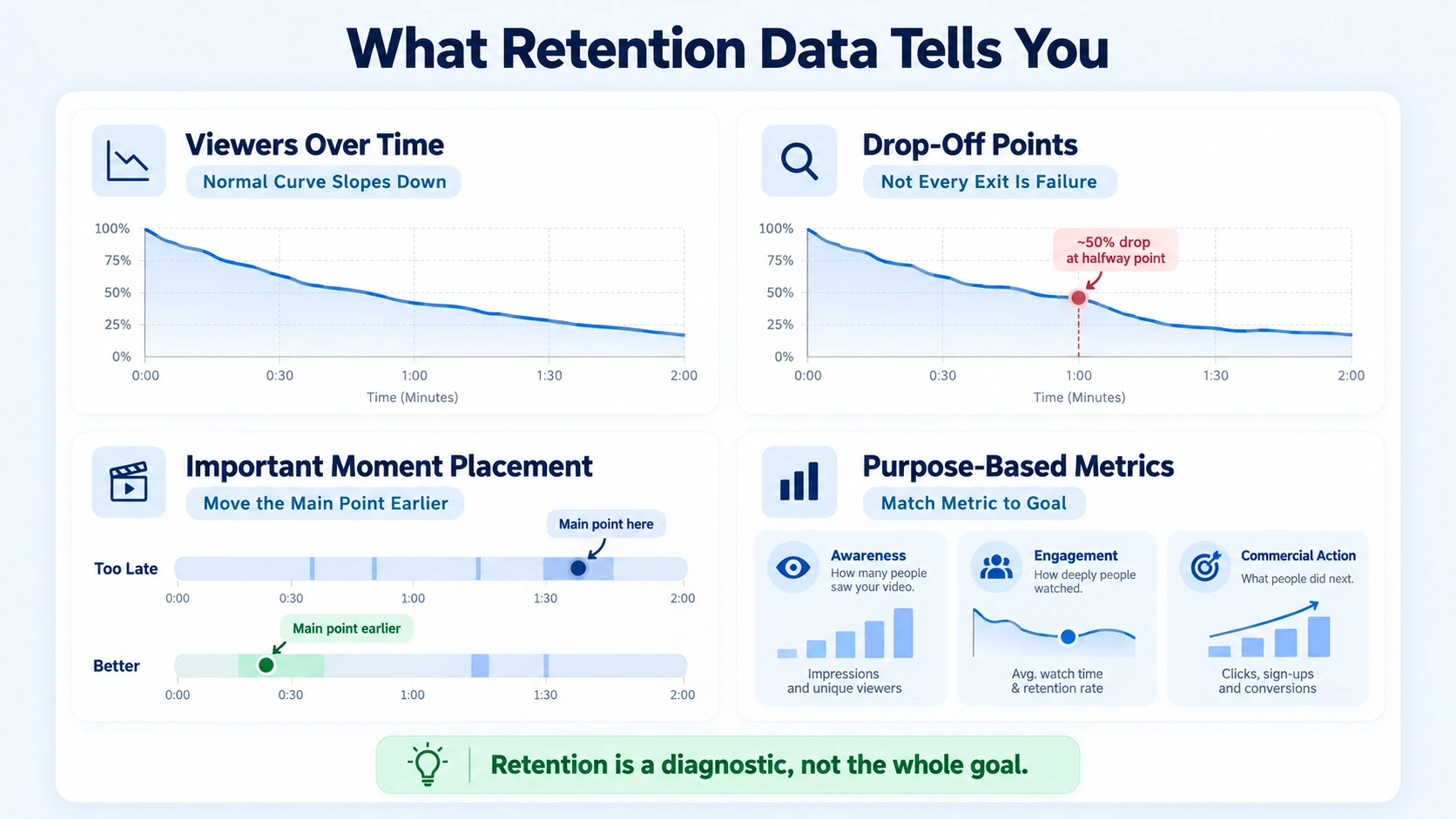
Retention is also not the whole goal. A video that holds viewers to the last second but never states its takeaway has still failed. Match the metric to the purpose of the asset, whether that is awareness, engagement, or a commercial action.
LinkedIn adds a B2B angle. Its Creative Labs analysis of more than 13,000 B2B video ads reports that 73% of video completions and 49% of video engagement on LinkedIn come down to the creative decisions brands make. That is LinkedIn's own finding, drawn from ads on its platform, and it describes elements that correlate with performance. It does not prove that any single edit causes a lift. I read it as a reason to treat editing choices as things to test, not as a promise.
Where Teams Go Wrong with Retention
Teams often reduce retention editing: keeping viewers to the end of a video to a hook problem. The hook matters, but I see the same few mistakes repeatedly:
- Burying the point: the clip opens with greetings and context, and the useful answer arrives near the halfway mark, where Wistia's data suggests many viewers are already leaving.
- Cutting faster instead of cutting better: rapid cuts add motion without adding meaning. A quick edit of a weak point is still a weak point.
- Keeping repeated ideas: speakers often say the same thing twice, and the second version is rarely the stronger one.
- Ignoring visual lulls: a long explanation in a single framing gives the eye nothing new.
- Over-designing: captions, graphics, and b-roll all competing for attention make the clip harder to follow.
- Adding a long outro: once the point has landed, extra seconds give viewers a reason to leave before the call to action.
- Judging by views alone: views measure who started watching. Retention shows what happened after.
There is also a common approval pattern. Reviewers ask to keep "one more" story or example, and each addition pushes the payoff later. We ask reviewers to say what each added sentence does for the viewer. If nobody can answer, it usually comes out.
Retention Editing: Keeping Viewers to the End, Step by Step
A typical version of this workflow has eight steps. Small teams can compress some of them, and I say which ones after the list.
- Name the payoff moment. Before you open the timeline, write one sentence: what should the viewer know or do by the end? For a VC partner clip it may be the clearest statement of a thesis. For a SaaS founder clip it may be a proof point or a demo result. Everything else supports that moment.
- Pick a self-contained segment. Choose a stretch with a beginning, a point, and an end. A clip that needs earlier context loses viewers quickly. Score candidates by clarity and buyer value, not by which moment is loudest.
- Open on the point. Start with the result, the claim, or the tension, then explain. YouTube's guidance is that when top moments arrive late, you should introduce the compelling content earlier. Cut greetings and phrases like "today we are going to talk about." On longer videos, YouTube's intro figure shows what share of viewers were still watching after the first 30 seconds.
- Tighten the middle. Remove filler, repeated points, and dead air. Keep enough natural breath that the speaker still sounds like a person. When an idea appears twice, keep the clearer version. Marking cuts on a transcript makes this much faster.
- Change the frame where attention is likely to sag. Mark stretches where one framing runs long, then use a punch-in, b-roll, or a simple graphic to reset attention. LinkedIn's analysis associated dynamic camera shots with a 13% increase in engagement effectiveness, and graphics that display key points on screen with an 18% lift in engagement. Those are correlations from paid LinkedIn ads. Our guide to using b-roll in talking-head video and our guide to pacing and cuts for short video go deeper on both.
- Let text carry the structure. Captions and on-screen key points help viewers follow the argument. The same LinkedIn report associated bulleted captions with a 30% increase in dwell time and step-by-step structures with a 13% increase. Keep caption styling consistent, and check that caption text does not collide with text inside your footage. Our captions and subtitles tutorial covers styling.
- End when the point lands. Deliver the payoff, then stop. If a call to action is needed, put it on screen while the last line plays instead of adding a separate outro. Longer videos benefit from chapters or a spoken signpost so viewers know where the argument is going.
- Check on a phone, export by platform, then read the curve. Watch at phone size, first with the sound off and then with it on. Export separate versions for each channel. After publishing, compare retention with your own recent videos.
If you only do two things in retention editing: keeping viewers to the end, name the payoff moment and open on the point. Those two steps change the shape of the whole edit. In our workflow, steps 2 and 4 take the most time because they need judgment, while steps 5 and 6 become more mechanical once a caption and graphics style is set. A small team can go lighter on steps 5 and 6 for a strong talking-head clip. I would not skip step 8, because most legibility and pacing problems only show up at phone size.
A short illustration
Here is a hypothetical example, not a client project. A 60-second clip is cut from a longer VC partner interview. The partner explains why founders misjudge how long enterprise sales take.
The final cut is shorter, but the point is that every remaining second serves the payoff moment.
Adapting the Edit to Audience and Platform
For VC and PE firms, retention editing: keeping viewers to the end usually means protecting the argument. A partner's clear thesis is the asset, so I prefer restrained graphics and clean text over heavy motion. For B2B SaaS, AI, and tech startups & teams, product footage and proof points hold attention because they show the thing being discussed. For founders and CEOs, a specific point of view matters more than production polish.
Platforms also measure retention differently, so the same cut rarely works everywhere:
- LinkedIn. In its 2026 State of Video Report, Wistia surveyed more than 900 professionals across industries and found that about 8 in 10 teams name LinkedIn their primary place to share video. That is a cross-industry figure. I make sure the first line and the captions carry the message even when the clip is muted.
- Instagram Reels. Instagram's ranking explainer lists how likely someone is to watch a reel all the way through among its most important predictions for Reels. Ranking changes over time, so check current guidance. I trim Reels harder than LinkedIn cuts because there is less room for slack.
- YouTube Shorts. YouTube added "Shown in feed" and "Viewed vs swiped away" metrics to Shorts analytics. Read them separately from the retention graph. The first tells you about the opening decision, and the second tells you what happened to viewers who stayed.
- YouTube long-form. Wistia found an 11% drop in engagement once videos cross 30 minutes. That is not a rule, but I look hard at anything that runs past that point without a clear reason.
Reading the Curve and Deciding What to Delegate
You can judge retention editing: keeping viewers to the end with a small set of signals, read in a fixed order:
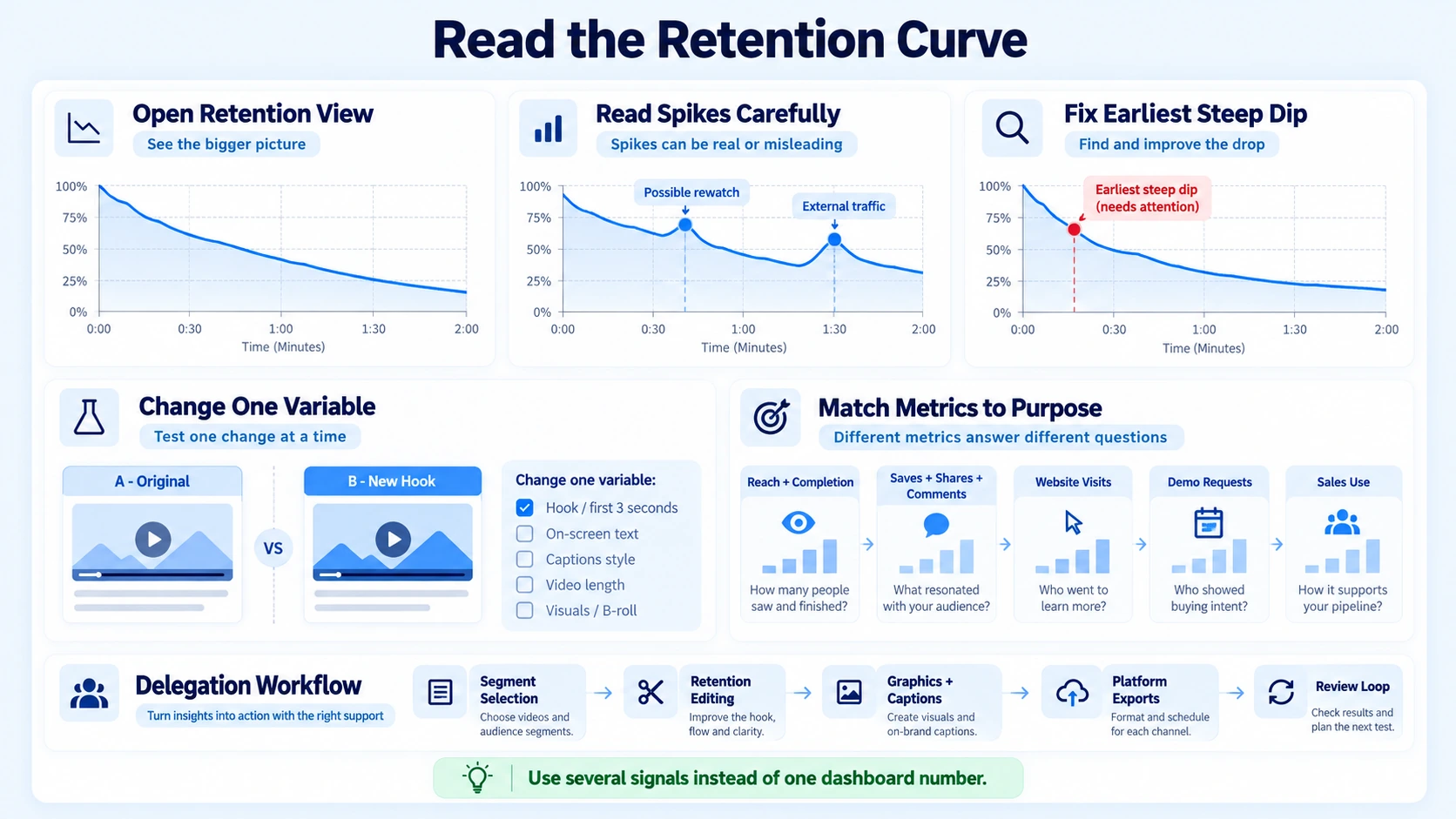
- Open the retention view. On YouTube, a flat line means viewers watched that part from start to finish, gradual declines mean viewers are losing interest over time, and dips mark skipped or abandoned moments. YouTube's highlights need a video of at least 60 seconds with at least 100 views, and you can compare against your 10 latest videos of similar length.
- Read spikes carefully. YouTube says spikes mark moments that were watched, rewatched, or shared, and that a spike can mean interest or a section that was unclear. Check the footage before you decide which.
- Fix the earliest steep dip first. It affects every viewer who would have reached later moments.
- Change one variable at a time. Re-cut a similar video with a different opening or different visuals and compare. Changing hook, length, and graphics together teaches you nothing.
- Match metrics to purpose. For awareness, look at reach, views, and completion. For engagement, look at saves, shares, comments, and watch time. For commercial impact, look at website visits, demo requests, sales conversations, and whether sales teams actually use the clip.
Attribution will be imperfect, so use several signals instead of one dashboard number. Retention is also a diagnostic, not a verdict. A viewer who leaves after getting what they came for is not always a failure, so read drop-offs against the purpose of the video.
If you delegate this work, a capable partner should handle the whole chain: selecting the right moments, editing to the retention curve, graphics and captions, platform exports, and a review loop that feeds lessons into the next recording. Wistia's 2026 report describes blended teams, where in-house staff and outside partners share the work, as becoming the norm. What matters is that someone owns each step.
Conclusion
In my experience, viewers leave less because a video is long and more because the next few seconds promise nothing new. That is the practical meaning of retention editing: keeping viewers to the end. It means deciding what the payoff is, removing what delays it, and giving the eye a reason to stay. Editing creates the asset, and the retention curve tells you how well it worked, so the next recording should reflect what it showed.
FAQ
What is retention editing: keeping viewers to the end?
It is a way of editing video so that each decision serves the viewer's reason to keep watching. That includes creating content from scratch or choosing a self-contained segment from existing footage, opening on the point, cutting filler, changing the visual at lulls, and ending when the payoff lands. It supports the message and does not replace it.
What is a good retention rate for a B2B video?
There is no single number that applies to every video. Wistia's data shows videos under a minute averaging a 52% engagement rate, but that covers all industries and video types. A more useful benchmark is your own recent videos of similar length and purpose. YouTube's typical retention view compares against your latest 10 videos.
How long does retention editing take?
It depends on source quality, video length, and how much graphic work is involved. The judgment steps, choosing the segment and tightening the middle, usually take longer than the mechanical ones. Ask any provider for a turnaround commitment that covers editing, revisions, and platform exports.
Does a shorter video always hold viewers better?
No. A short clip that buries its point still loses people, and a longer video with a clear structure can hold attention. Wistia's data shows viewers of educational videos between one and five minutes typically watch over half. Let the length follow the idea, then check the retention curve.
What deliverables should I expect from retention editing?
At minimum, an edited video with captions and on-screen text, exported for each platform you publish on. Better engagements add a short note on what was cut and why, plus a review of retention data after publishing so the next recording improves.
What affects the cost of retention editing?
Cost depends on the number of videos, their length, source-file quality, graphics and motion work, caption styling, revision rounds, and turnaround time. Distribution support can add scope. Ask whether a quote covers only editing or a larger content service, because the two are not comparable.
Should I use a freelancer, an agency, or an in-house editor?
A freelancer or in-house editor works well for a steady, simple workflow with clear direction. An agency fits teams that also need content selection, packaging, distribution, and dependable volume without hiring. The right choice depends on how much of the chain your team wants to own.
Does Komet Media offer retention editing?
Yes. We build retention decisions into our short-form and long-form editing, including content creation from scratch, segment selection from existing recordings, opening edits, graphics, captions, platform exports, and performance review. We work best with B2B SaaS, AI, and tech startups & teams, venture and private equity firms, founders, and executives who tie video to business goals. Our recurring work typically ranges from about $2,500 to $5,000, depending on scope, volume, production difficulty, turnaround, and distribution needs. It is not a fixed public package. You can book a call to discuss your setup.

