
Building an Editorial Calendar for B2B Video: Step-by-Step Guide
Most B2B teams produce video the wrong way. They record something, publish it, and hope buyers notice. Without a structured editorial calendar for B2B video, your content never compounds. You're constantly starting from scratch instead of building a library that educates buyers, supports pipeline, and positions your brand as the go-to resource in your category. This guide gives you the exact framework to fix that, covering strategy, structure, video types, tools, and the buyer journey alignment that turns content into deals.
TL;DR
- An editorial calendar for B2B video is a system, not a spreadsheet. It maps content to buyer journey stages, pipeline goals, and publishing cadence.
- B2B teams should publish a minimum of 2–4 video assets per week across repurposed and original content.
- Align video types to awareness, consideration, and decision stages, each stage requires different formats.
- Tools like HubSpot, CoSchedule, Notion, and Airtable are the best options for managing a B2B video content calendar at scale.
What Is an Editorial Calendar for B2B Video Marketing?
An editorial calendar for B2B video is a structured planning system that tells your team what video to create, when to publish it, where to distribute it, and which stage of the buyer journey it serves. It is not a content dump. It is an operating framework that aligns video production with pipeline goals.
With 91% of businesses using video as a marketing tool in 2026 and 70% of B2B buyers watching video during their purchase decision process , the question is no longer whether to create video. The question is whether your video production is coordinated enough to move buyers forward at every stage.
A B2B video editorial calendar typically contains these fields:
- Video title and topic: The specific subject being covered
- Content pillar: Which overarching theme or topic cluster the video supports
- Buyer stage: Awareness, consideration, or decision
- Video format: Explainer, demo, testimonial, thought leadership, short-form clip
- Publish date: Locked deadline, not a soft target
- Distribution channels: LinkedIn, YouTube, email, sales enablement deck, website
- Owner: Who scripts, who edits, who approves
- Status: In queue, in production, in review, published, repurposed
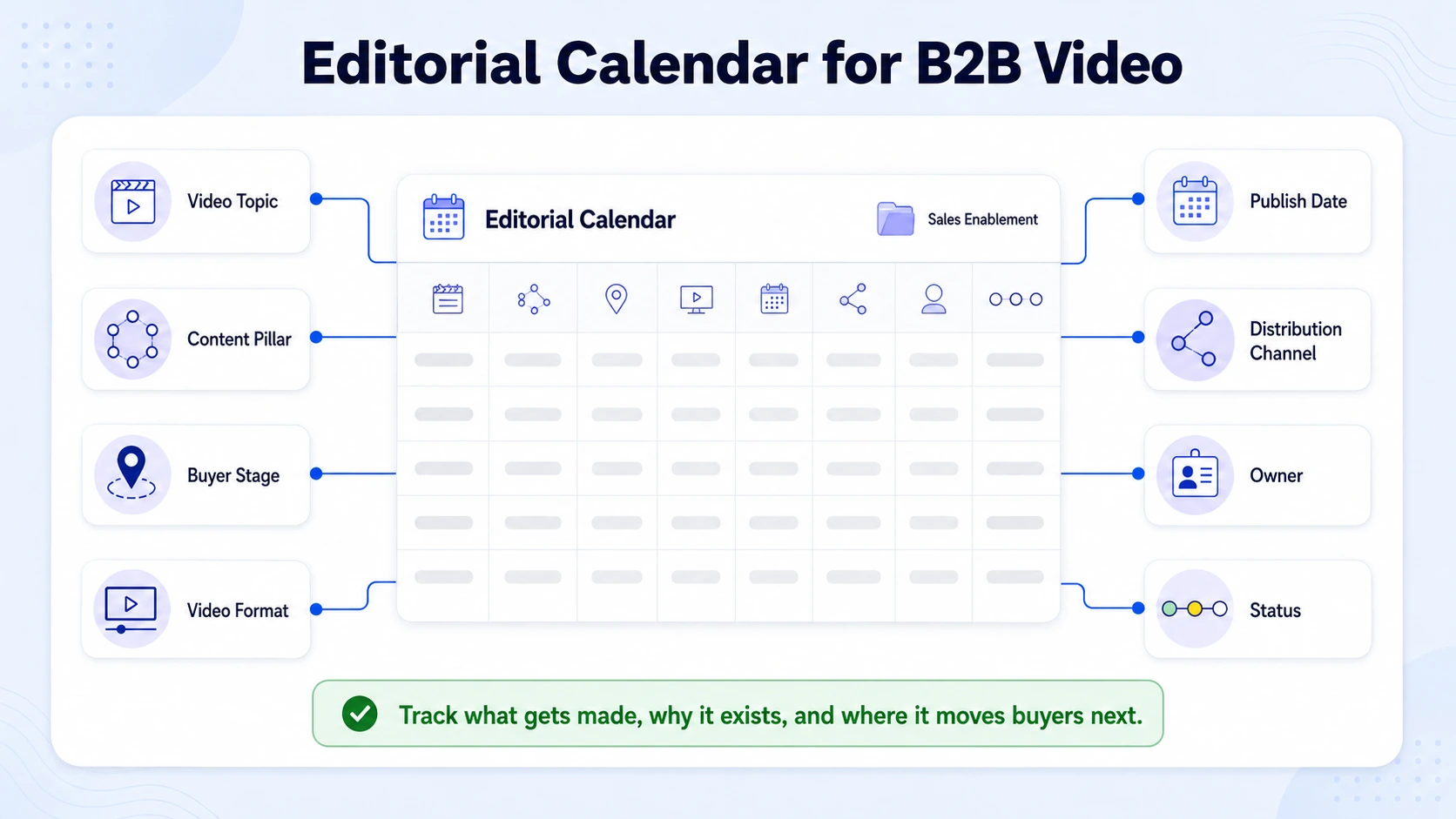
The distinction between a content calendar and an editorial calendar matters here. A content calendar tracks what goes out and when. An editorial calendar also tracks why, which buyer persona it speaks to, and how it connects to the broader demand generation strategy.
B2B video strategy requires comprehensive planning that aligns video content with business objectives, buyer journey stages, and decision-maker requirements, and that planning lives inside the editorial calendar.
For SaaS and funded tech teams, the editorial calendar also functions as a sales enablement asset. When a rep is in a live deal, they need to pull a product demo video, a customer story, or a competitive explainer immediately. If those assets exist but are buried in a Dropbox folder with no tagging or stage mapping, they are useless. The editorial calendar is the connective tissue between what your video production team creates and what your sales team actually deploys. Without a video editorial calendar, even high-quality content fails, because it never reaches the right buyer at the right moment.
How to Build an Editorial Calendar for B2B Video Content
Building a functional editorial calendar for B2B video is a seven-step process. Done right, it takes a weekend to set up and becomes the operational backbone of your content program.
- Define your content pillars: Start with 3–5 core themes that map directly to your product's value propositions and your buyer's biggest pain points. For a SaaS team, this might be product education, implementation speed, ROI proof, competitive differentiation, and founder thought leadership.
- Identify your buyer personas: Each persona consumes content differently. A VP of Marketing cares about pipeline impact. A Head of Product cares about integration depth. Map at least two to three distinct buyer personas to your calendar so content never defaults to a generic audience.
- Audit your existing content library: Webinars, podcasts, long-form demos, customer interviews, and sales call recordings are all raw material. Before creating anything new, identify what can be repurposed into short-form clips, highlight reels, or educational sequences. This is where content repurposing creates the most leverage with the least production overhead.
- Assign video formats to funnel stages: Thought leadership shorts and educational clips serve awareness. Explainers, product walkthroughs, and comparison videos serve consideration. Customer stories, ROI demos, and implementation walkthroughs serve decisions. Map each format to a stage before it hits the calendar.
- Set a realistic publishing cadence: Match cadence to production capacity. A team that can produce two polished videos per week, supplemented by repurposed content, will outperform a team that commits to daily publishing and burns out in six weeks.
- Build the calendar structure: Use a tool your team will actually open. Notion, Airtable, HubSpot, or CoSchedule all work depending on team size and workflow complexity.
- Install a governance layer: Every video needs an owner, a publish date, and an approval stage. Without content governance, the calendar becomes a suggestion board rather than a production system.
The B2B buying journey has fundamentally changed, with decision-makers now consuming an average of 13 pieces of content before engaging with sales, and a growing share of that content is video. Your editorial calendar needs to account for that volume by systematically covering every stage of that journey.
How to Align Video Content with B2B Buyer Journey Stages
Mapping your editorial calendar for B2B video to the buyer journey is what separates demand generation teams from teams that just post content. Every piece needs a job. Assign it one before it goes into production.
The buyer journey typically consists of awareness (buyers recognize a business problem), consideration (multiple decision-makers evaluate options), decision (the buying group selects a vendor), onboarding (teams learn the solution), and advocacy (customers become references).
Each stage requires a different video format.
70% of B2B buyers watch video content during their purchase decision process , which means the consideration and decision stage videos in your calendar carry the highest commercial weight. These are the assets your sales team needs on demand.
For SaaS teams, the decision-stage gap is almost always the most underinvested. Most teams have awareness content because it is the easiest to produce, short clips, LinkedIn posts, founder takes. What moves deals is a crisp 90-second product demo that a rep can send the night before a buying committee review. 73% of B2B decision-makers prefer to watch product demo videos rather than read whitepapers or brochures. That preference needs to be reflected in how you allocate production capacity inside your calendar. If 80% of your calendar is awareness content, you are building a brand but a starving pipeline.
Plug webinar recordings and podcast episodes into the consideration and decision stage columns as well. A 45-minute webinar contains four to six independent clips worth deploying in sales conversations and email nurture sequences.
What Types of Videos Should B2B Companies Create?
The answer changes by team stage, deal complexity, and production capacity. But these are the formats that consistently drive the pipeline for B2B SaaS and tech teams.
Awareness formats:
- Founder POV clips (60–90 seconds): The founder's direct take on a market problem, trend, or product philosophy. Highest trust per minute of any format on LinkedIn.
- Educational shorts: Rapid-fire tips, frameworks, or industry insights stripped from longer content.
- Thought leadership interviews: Clips from podcast episodes or external conversations that demonstrate market authority.
Consideration formats:
- Product explainers: What the product does, who it is for, and why it is built the way it is, without demo polish.
- Feature walkthroughs: Screen-recorded deep dives on specific capabilities, ideal for nurturing leads already in the pipeline.
- Competitor comparison videos: Direct, honest positioning that helps buyers who are evaluating alternatives.
Decision formats:
- Customer testimonials: On-camera clients speaking to specific outcomes and measurable results.
- Use-case demos: Live or pre-recorded product demos tailored to a specific ICP's workflow.
- ROI case studies: Quantified results from a named customer, formatted for sharing inside a buying committee.
Awareness-driven formats such as short social clips and thought-leadership interviews, mid-funnel content such as demos, explainers, and educational webinars, and conversion-oriented formats such as testimonial videos and customer case studies all serve distinct purposes across the buyer journey.
73% of B2B buyers say video is their preferred way to learn about a product or solution, and 65% of executives visit a vendor website after viewing their video. Both of those behaviors point to the same conclusion: your video library needs depth across all formats, not just the ones that are easiest to produce.
How Often Should B2B Companies Publish Video Content?
Publishing frequency is the most common question B2B teams have when building their editorial calendar for B2B video, and the honest answer is: as often as you can sustain quality. The floor for a B2B SaaS team with an active pipeline is two to four video assets per week. That is achievable through content repurposing without requiring a full production team. A single 45-minute webinar, processed through a proper short-form editing workflow, yields four to eight distinct clips suitable for LinkedIn, email, and sales outreach. For LinkedIn specifically, posting 3–5 times per week is recommended for B2B brands, with video content on the platform having surged 34% year over year.
Here is a realistic weekly cadence for a B2B team with moderate production resources:
Prioritizing quality and consistency over quantity, and sticking to a sustainable posting schedule that aligns with your goals and audience preferences, is what builds compounding results. The teams that win are not the ones publishing the most. They are the ones publishing consistently enough that buyers encounter their content at multiple points across the consideration journey.
LinkedIn native video content achieves an average engagement rate of 5.1–6%, compared to 2–3% for static image posts , which means a consistent video presence on LinkedIn compounds faster than any other content format on the platform.
Best Tools for Managing a B2B Video Content Calendar
The right tool depends on team size, workflow complexity, and whether your calendar needs to connect to a CRM or marketing automation system. Here are the options that work for B2B video teams in 2026.
CoSchedule is a purpose-built marketing calendar designed specifically for content marketing teams, combining social scheduling with workflow automation and content organization. HubSpot Marketing Hub is best suited for B2B businesses already using HubSpot's CRM or marketing tools, it is a strong fit for companies that want an all-in-one solution to manage customer relationships, content calendar, and performance tracking.
Airtable is best for relational content calendars, with linked tables for content, channels, and campaigns. For most B2B SaaS teams starting from scratch, Notion plus a LinkedIn scheduling tool (Buffer or Later) is the fastest path to a working editorial system. As the team scales and the calendar needs to connect to pipeline data, migrating to HubSpot or CoSchedule makes sense.
One non-negotiable: your video calendar needs to live somewhere your sales team can access it. If reps cannot find a customer story from six months ago, it does not exist. A shared calendar ensures messaging, visuals, and tone stay aligned across every channel and team, and for B2B teams, that alignment extends from marketing all the way into the sales cycle.
How to Plan a Quarterly B2B Video Content Strategy
The quarterly planning cycle is the unit of strategy for a well-run editorial calendar for B2B video. Monthly planning is too reactive. Annual planning is too rigid. Quarterly is the sweet spot.
Here is the planning sequence I use with B2B teams at Komet Media:
- Review the previous quarter: Pull engagement data from LinkedIn, watch time from YouTube or Wistia, and click-through rates from email campaigns. Identify which video types drove the most pipeline activity, not just views, but demo requests and sales conversations.
- Identify the quarter's business priorities: Is this a quarter focused on a new product launch? A competitive displacement campaign? Expanding into a new ICP segment? The video calendar must reflect those commercial priorities.
- Map content to topic clusters: Each quarter should have two to three active topic clusters, groups of related videos that together cover a subject exhaustively for a target buyer. This is the pillar content model applied to video: one anchor piece (a long webinar or deep-dive demo) surrounded by derivative short-form assets.
- Assign production resources: Identify which assets will be original productions versus repurposed. For most B2B teams, 60–70% of quarterly video content should come from repurposing existing assets, calls, webinars, podcasts, and events.
- Lock key dates: Product launches, industry events, seasonal buying cycles, and competitor announcements all create publishing opportunities. Anchor the calendar around these dates first, then fill in the consistent cadence around them.
- Set measurable goals: Define what success looks like per content cluster, demo requests, pipeline influenced, email click-throughs, or LinkedIn engagement rate. Vague goals produce vague calendars.
The reporting cadence needs to match how the executive team thinks about pipeline, not weekly view counts, but quarterly influence on closed-won.
Common Mistakes When Planning B2B Video Content Calendars
The mistakes that kill B2B video programs are almost always systemic, not creative. Here are the ones I see most often.
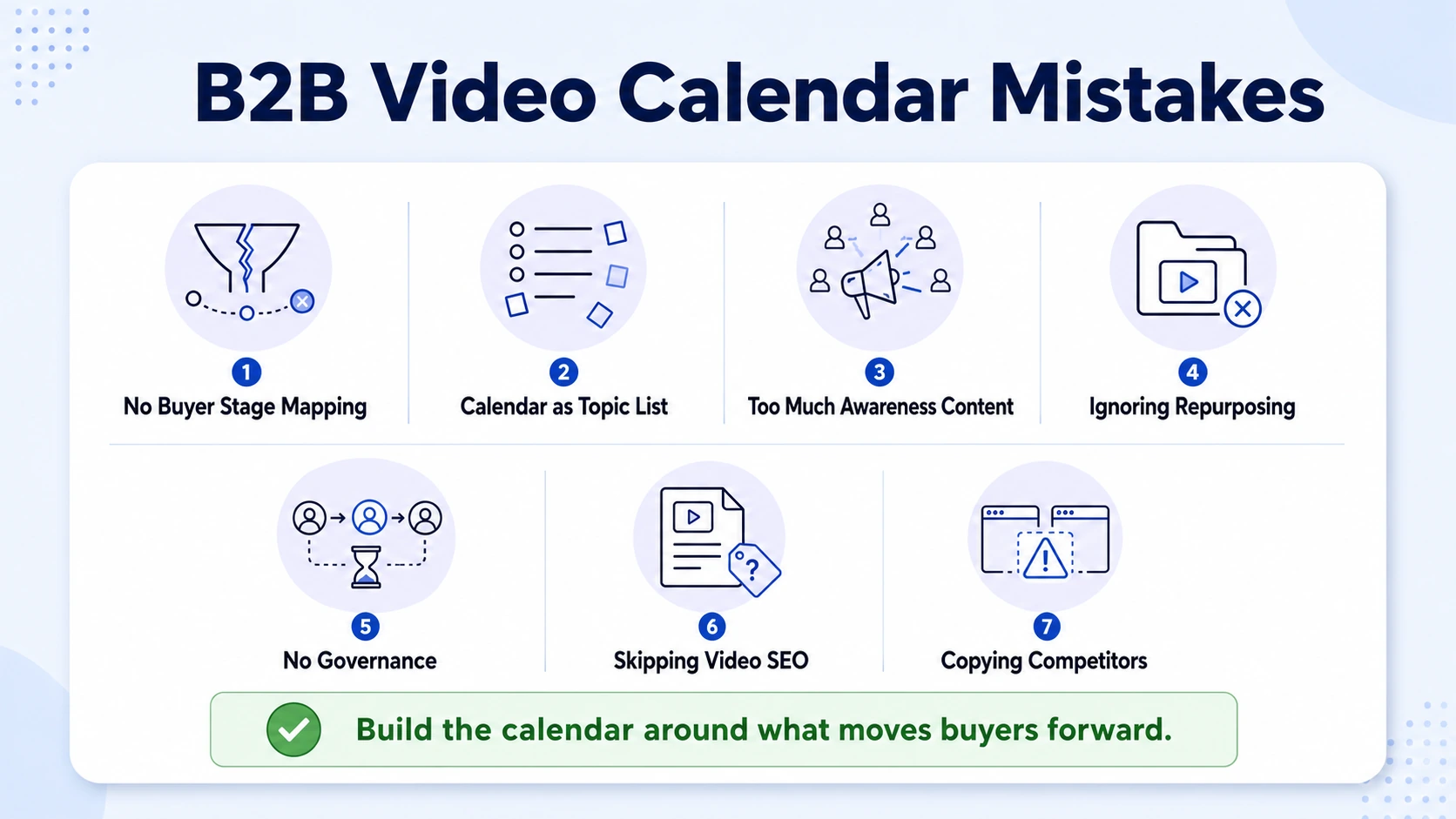
Publishing without buyer stage mapping. Teams produce content, assign a publish date, and distribute it everywhere without defining which buyer it is for or what action it should drive. Every video in your calendar needs a clear job at a specific funnel stage.
Treating the calendar as a list of topics instead of a system. A topic list is not a strategy. A calendar without distribution plans, ownership, and success metrics is just an aspirational document.
Over-indexing on awareness and ignoring pipeline-stage content. Companies without comprehensive video libraries miss critical touchpoints where competitors can capture buyer attention and influence decisions. The consideration and decision-stage gaps are where deals are won and lost.
Producing original content when repurposing would suffice. Short-form formats now dominate ROI rankings , and the fastest way to produce them is by extracting clips from existing long-form content, webinars, podcasts, demos, and sales calls.
No content governance. Without clear ownership and approval workflows, content stalls in production queues, publishing dates slip, and the calendar falls apart within six weeks. Assign an owner to every asset before it enters production.
Ignoring Video SEO. Published videos without titles, descriptions, transcripts, and proper tagging are invisible to search. Every video that goes on your website or YouTube needs basic Video SEO treatment to generate inbound demand alongside the social distribution.
Copying competitors instead of differentiating. Services like Motionvillee, Vidpros, TastyEdits, and ShortVids compete on volume and generic editing. A B2B editorial calendar built around buyer education, sales enablement, and founder-led authority requires a different strategic posture than a subscription video editing service. The calendar should reflect your positioning, not replicate what commodity providers produce.
The #1 mistake in B2B video planning: building a calendar around what is easy to produce instead of what moves buyers forward.
Conclusion
A well-built editorial calendar for B2B video does not just organize your content. It turns your team's knowledge, your founders' thinking, and your customers' results into a compounding asset that educates buyers and supports the pipeline every quarter.
Key takeaways:
- Build the calendar around buyer journey stages first, publishing cadence second.
- Repurposing existing long-form content is the highest-leverage production strategy for most B2B teams.
- Consistency at 2–4 videos per week outperforms sporadic high-production bursts.
- HubSpot, CoSchedule, Notion, and Airtable are the right tools depending on team size and CRM integration needs.
- Measure quarterly impact on pipeline, not monthly view counts.
If you want a video content system built specifically for your pipeline goals, Komet Media works with B2B SaaS and tech teams to build exactly that.
Frequently Asked Questions
Q1: What is an editorial calendar for B2B video?
An editorial calendar for B2B video is a planning system that maps what video content to create, when to publish it, which buyer stage it serves, and where to distribute it. It connects video production directly to pipeline goals rather than treating publishing as a standalone activity.
Q2: How often should B2B companies publish video content?
A sustainable minimum is 2–4 video assets per week for active B2B SaaS teams. Most of that volume can come from repurposing existing long-form content, webinars, podcasts, demos, and recorded calls, rather than original production, which keeps quality high and burnout low.
Q3: What types of videos should B2B companies prioritize?
Prioritize by funnel stage: thought leadership shorts and educational clips for awareness, product explainers and feature walkthroughs for consideration, and customer testimonials and ROI demos for decision. Decision-stage content is the most underinvested and the most commercially impactful for the pipeline.
Q4: What tools are best for managing a B2B video content calendar?
HubSpot is best for teams already using its CRM. CoSchedule suits multi-channel marketing teams. Notion works well for smaller or early-stage teams wanting a flexible, low-cost system. Airtable is ideal for relational planning across multiple channels and campaigns.
Q5: Is there a free B2B video editorial calendar template?
A functional free template can be built in Notion or Google Sheets using six columns: video title, content pillar, buyer stage, publish date, distribution channel, and owner. Notion offers community-built editorial calendar templates at no cost that B2B teams can adapt within an hour.
Q6: How do I align my video content with the B2B buyer journey?
Map each video format to a specific stage before it enters production. Awareness gets short educational clips and founder POV content. Consideration gets explainers, demos, and webinar highlights. Decision gets customer stories and ROI case studies. Every video in your calendar should have a stage assigned before it is scripted.

