
What to Expect When You Outsource Video Editing: Step-by-Step Guide
Most founders and marketing heads who come to me have already tried outsourcing video editing once and got burned. Slow turnaround, off-brand output, a revision cycle that felt like pulling teeth. The problem usually wasn't the editor. It was that nobody set the process up properly before a single file was transferred. This guide walks you through exactly what to expect when you outsource video editing, so your first (or next) engagement actually produces pipeline-ready content instead of headaches.
TL;DR
- Outsourcing video editing works when you front-load the setup: brief, style guide, and file specs before any footage moves.
- Expect a clear post-production pipeline with defined revision rounds, turnaround windows, and a single point of contact.
- Your raw footage handoff quality directly determines output quality, garbage in, garbage out.
- Retain creative control through a strong brand style guide and structured feedback, not constant check-ins.
How Outsourcing Video Editing Actually Works (The Real Process)
When people ask how outsourcing video editing works, they usually picture sending a file and getting a polished video back. The reality is that a reliable video production workflow has five distinct stages, and most problems occur when teams skip stage one.
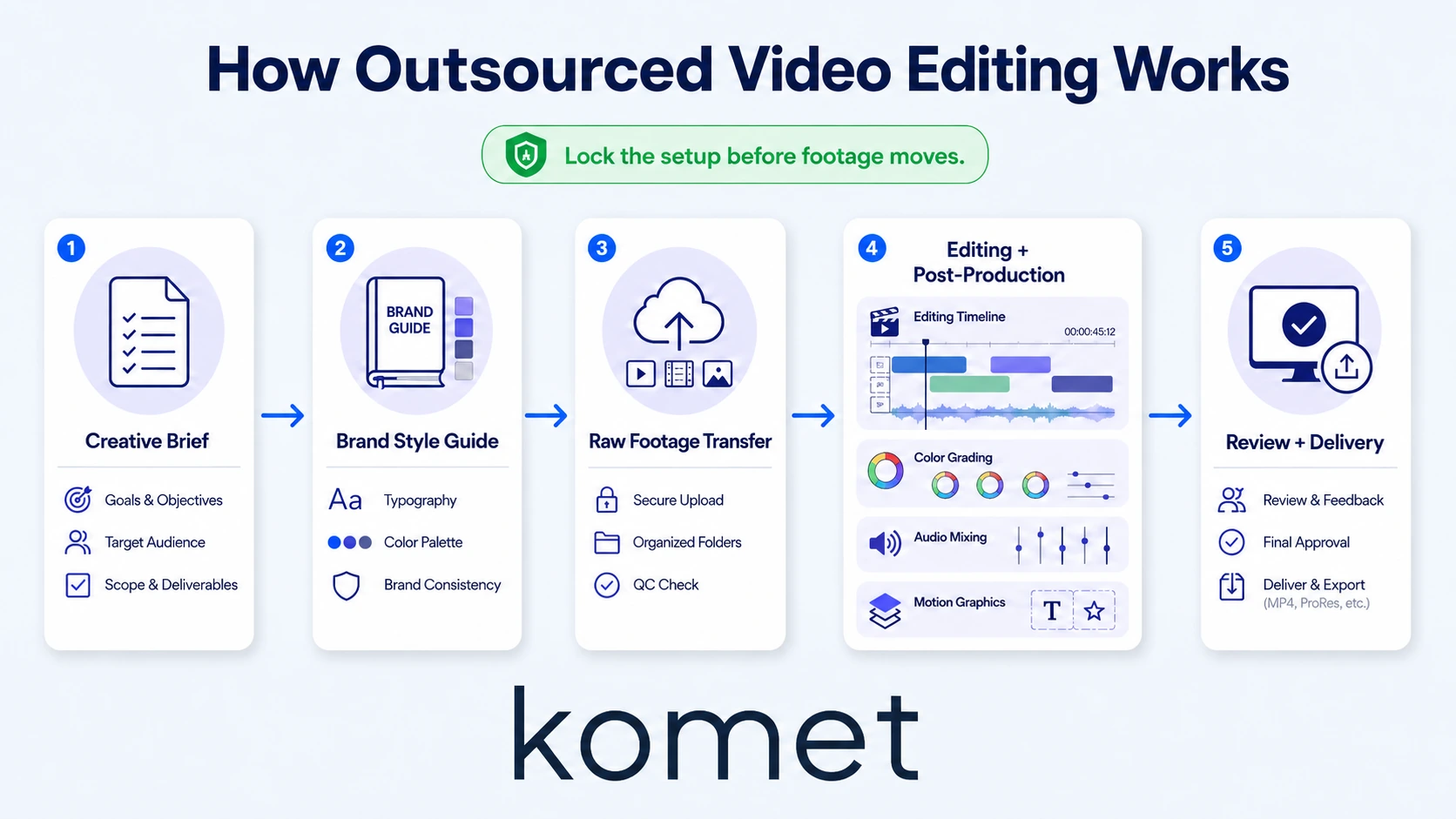
- Onboarding and creative brief: Before any footage moves, you complete a creative brief that captures your audience, tone, platform format (vertical vs. horizontal), frame rate specifications (typically 24fps for cinematic, 30fps for social, 60fps for product demos), and output resolution. This document governs every decision downstream.
- Brand style guide handoff: You share your brand style guide, colour hex codes, font stack, logo files, lower-third templates, and any existing motion graphics assets. Editors working in Adobe Premiere Pro or DaVinci Resolve use this as the visual rulebook for every cut.
- Raw footage transfer: Your raw footage goes up via cloud storage transfer through a tool like Frame.io, Google Drive, or Dropbox. Include proxy files if your originals are large (4K or above) to keep the editor's timeline responsive.
- Editing and post-production pipeline: The editor works through rough cut, colour grading, audio mixing, and motion graphics in sequence. You should not be involved in every micro-decision here, that's the point of outsourcing.
- Review, revision cycle, and delivery: You receive a draft, leave timestamped feedback inside Frame.io or your agreed project management software, and the editor turns around revisions within a defined window. Final export goes to your content calendar in the agreed format.
The entire flow only works when stages one and two are locked before stage three begins. Skip the brief, and you will spend your revision cycle doing the brief's job retroactively.
What Files Do You Need to Send When Outsourcing Video Editing?
This is one of the most practical questions I get, and most guides gloss over it. A clean footage handoff saves days.
Mandatory files for every project:
- Raw footage in the original format (MP4, MOV, R3D, BRAW, whatever your camera shoots)
- A shot list or recording notes indicating which takes are selects
- Brand style guide (PDF or shared Figma link)
- Audio files separated from video where possible (especially for podcast clips or webinar recordings)
- Any licensed music tracks or approved sound assets
Conditional but strongly recommended:
- Proxy files at 1080p or lower if your originals exceed 4K
- Existing templates in Adobe Premiere Pro or DaVinci Resolve format
- Reference clips showing the pacing, caption style, or tone you want to match
Technical specs to confirm with your editor upfront:
Sending incomplete files or unspecified technical requirements is the single fastest way to burn a revision round on something avoidable.
How Long Does Outsourced Video Editing Usually Take?
Turnaround time depends on three variables: content complexity, clip length, and whether the editor has your brand style guide on file before they start. Here is what realistic windows look like across content types common to B2B and SaaS teams:
Rush delivery (sub-24-hour turnaround on short-form) is possible with most professional services but typically carries a premium. Build your content calendar to avoid relying on it.
Where teams consistently underestimate is the revision cycle. If your feedback process is ad hoc (a Slack message here, an email there), every round takes longer. Centralise all feedback inside Frame.io or your project management software with timestamps and frame-specific comments. That single change cuts revision time by a third in most engagements.
Best Practices for Outsourcing Video Editing Without Losing Creative Control
Creative control is the fear underneath most hesitation around outsourcing. The teams who retain it best are not the ones who micromanage, they are the ones who invest in setup. Here is what that looks like in practice:
- Write a detailed creative brief for every content series: Not a one-liner. Include the target buyer persona, the one job this video does in the funnel (awareness, education, conversion), preferred pacing references, and what the call to action is.
- Create a brand style guide that a stranger can use: If your editor has to ask you what font you use, the guide is not done yet. Include hex codes, logo clear space rules, lower-third design specs, and approved transitions.
- Limit revision rounds contractually: Two rounds is standard for short-form video editing. Three for long-form. Define this before work starts, not during disagreement.
- Use asynchronous feedback tools: Frame.io lets you click on a specific frame and leave a comment. This is infinitely more useful than "around the 1-minute mark it feels slow." Precise feedback produces precise revisions.
- Sign an NDA before sharing proprietary footage: Any footage of your product roadmap, internal demos, or unreleased features should be covered by a non-disclosure agreement before it leaves your server. This is non-negotiable for funded tech teams.
- Designate one internal owner: Not the founder, not the whole marketing team. One person owns the footage handoff, the brief, and the feedback. Committees kill turnaround time.
If you are working with Komet Media's video editing services, this structure is built into onboarding, you are not inventing it from scratch.
Common Mistakes Teams Make When Outsourcing Video Editing for the First Time
I have watched smart B2B teams make the same errors repeatedly. Knowing them in advance is worth more than any checklist.
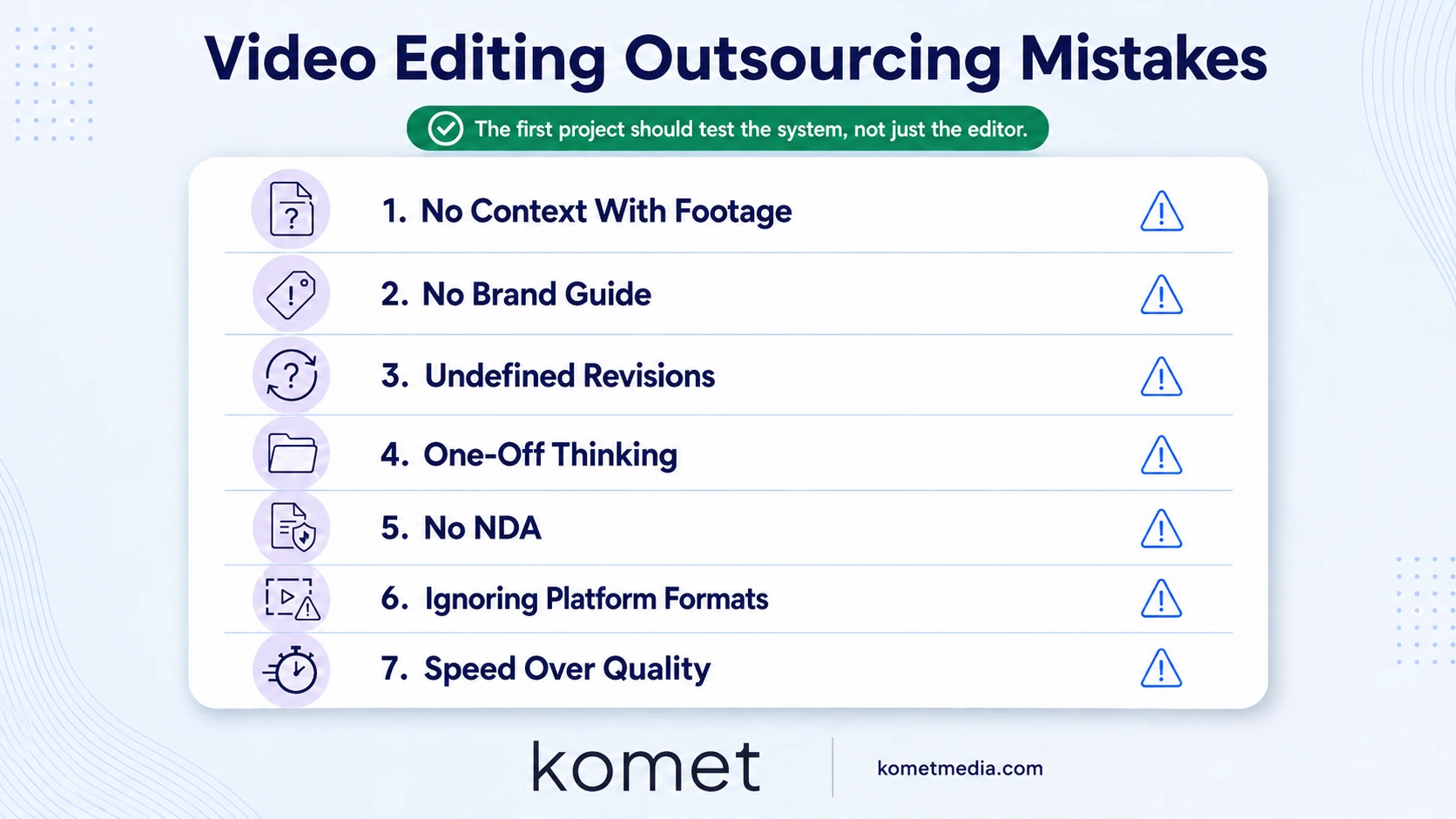
Sending raw footage without context: Your editor does not know which take you preferred, what the key message is, or who the audience is. A two-paragraph brief eliminates 80% of misalignment on the first draft.
Assuming the editor knows your brand: Even experienced editors need your brand style guide. "Make it look like our website" is not a brief. Send the file.
No defined revision scope: Unlimited revisions sounds generous until you realise it removes all accountability for getting the brief right the first time. Cap rounds, define what counts as a revision versus a new request.
Treating outsourcing like a one-off: The editors who produce the best work for Komet Media clients are the ones who have edited at least five pieces for that team. Consistency compounds. Treat your first few projects as an investment in a working relationship, not a transaction.
Skipping the NDA: Particularly critical for SaaS teams sharing product demos, unreleased feature footage, or investor-facing content. A non-disclosure agreement is a one-page document that protects both sides.
Ignoring platform format differences: A 16:9 YouTube edit repurposed to 9:16 Reels without a proper reframe is not a short-form video, it is a cropped version of one. Brief for each platform separately, or work with a team that understands short-form video production natively.
Conflating editing speed with editing quality: A 12-hour turnaround on a complex product demo usually means corners were cut somewhere, colour grading skipped, audio mixing rushed, motion graphics templated without brand alignment. Know what you are trading when you optimise purely for speed.
Outsourcing Video Editing Pros and Cons for B2B and SaaS Teams
This question deserves an honest answer, not a sales pitch. Here is the real trade-off analysis for the teams we work with at Komet Media:
For most B2B SaaS teams producing more than four short-form videos per month, the economics of outsourcing beat in-house hiring decisively once you account for software, hardware, and management overhead. The break-even point shifts when your content volume drops below two videos per month, at that point, a part-time contractor on a per-project basis may serve you better than a retainer.
If founder-led content or webinar repurposing is your primary use case, explore our webinar and podcast editing services as part of a broader content repurposing system.
Conclusion
Knowing what to expect when you outsource video editing is 90% preparation and 10% execution. The teams that get the most from outsourcing are not the ones with the biggest budgets, they are the ones who write the brief, share the style guide, and centralise feedback before the first file moves.
Key takeaways:
- Front-load setup: brief, brand style guide, and file specs first.
- Define revision rounds and turnaround windows contractually.
- Use Frame.io or equivalent for timestamped, frame-specific feedback.
- Sign an NDA before sharing any proprietary product footage.
If you are ready to build a repeatable video production workflow, start with Komet Media's services.
Frequently Asked Questions
Q1: What to expect when you outsource video editing for the first time?
Expect an onboarding process that covers your brand style guide, creative brief, and file specs before editing begins. Your first project is as much about calibrating the working relationship as it is about the final video. Budget for two revision rounds and treat turnaround time estimates as contingent on clean footage handoff.
Q2: What project management software do outsourced video editors typically use?
Most professional editors use Frame.io for client review and feedback, combined with internal tools like Notion, Asana, or ClickUp for task tracking. Frame.io is the industry standard for the revision cycle because it supports timestamped, frame-level comments directly on the video.
Q3: Do I need to send proxy files when outsourcing video editing?
If your raw footage is 4K or above and large in file size, sending proxy files alongside originals allows the editor to cut on a lighter timeline and conform to the original later. For 1080p footage, proxies are optional but still speed up the post-production pipeline.
Q4: How many revision rounds should I expect when outsourcing?
Two rounds is the standard for short-form content; three for long-form or complex projects. Rounds beyond that usually indicate a brief that was not detailed enough upfront. Define revision scope in your contract before work starts to avoid ambiguity.
Q5: Is a non-disclosure agreement necessary when outsourcing video editing?
For any footage involving unreleased product features, internal demos, investor materials, or confidential team recordings, an NDA is essential. It protects your IP and sets clear expectations for the editor around how footage can be stored and used. Never share proprietary content without one.
Q6: How do I find a reliable video editor or agency to outsource to?
Look for teams with documented workflows, clear onboarding processes, and platform-specific expertise (not just generic editing). Review samples that match your content type, a great podcast editor is not automatically a great short-form social editor. For B2B SaaS teams, Komet Media's hire-a-video-editor service is built specifically for founder-led and product-led content at scale.

