
🪄 AI Summary
Heading 1
Heading 2
Heading 3
Heading 4
Heading 5
Heading 6
Lorem ipsum dolor sit amet, consectetur adipiscing elit, sed do eiusmod tempor incididunt ut labore et dolore magna aliqua. Ut enim ad minim veniam, quis nostrud exercitation ullamco laboris nisi ut aliquip ex ea commodo consequat. Duis aute irure dolor in reprehenderit in voluptate velit esse cillum dolore eu fugiat nulla pariatur.
Block quote
Ordered list
- Item 1
- Item 2
- Item 3
Unordered list
- Item A
- Item B
- Item C
Bold text
Emphasis
Superscript
Subscript
Most B2B teams create strong content once and then let it die. A webinar runs, a demo gets recorded, a founder drops a sharp insight, and none of it compounds. Building a weekly repurposing cadence for busy teams fixes that. It turns every piece of long-form content into a steady stream of short-form video, social posts, audiograms, and sales enablement assets, without asking your team to create from scratch every single week.
TL;DR
- A weekly repurposing cadence for busy teams starts with one anchor asset per week, then atomizes it into 5–10 pieces of micro-content.
- Batch on Monday, produce Tuesday–Wednesday, distribute Thursday–Friday.
- Short-form video delivers the highest ROI of any content format, repurposing multiplies that return without multiplying effort.
- Sustainable systems use Notion or Asana for workflow, Buffer or Hootsuite for scheduling, and a clear content pillar map for prioritization.
What Is a Video Content Repurposing Cadence and How Does It Work?
A content repurposing cadence is a scheduled, repeatable system for extracting multiple content formats from a single source asset, then distributing them across channels on a consistent editorial calendar. It is not about copying and pasting. It is about content atomization, breaking a dense anchor asset (a webinar, a podcast episode, a founder interview, a product demo) into format-specific pieces that each stand alone. For B2B SaaS and funded AI teams, the math is obvious.
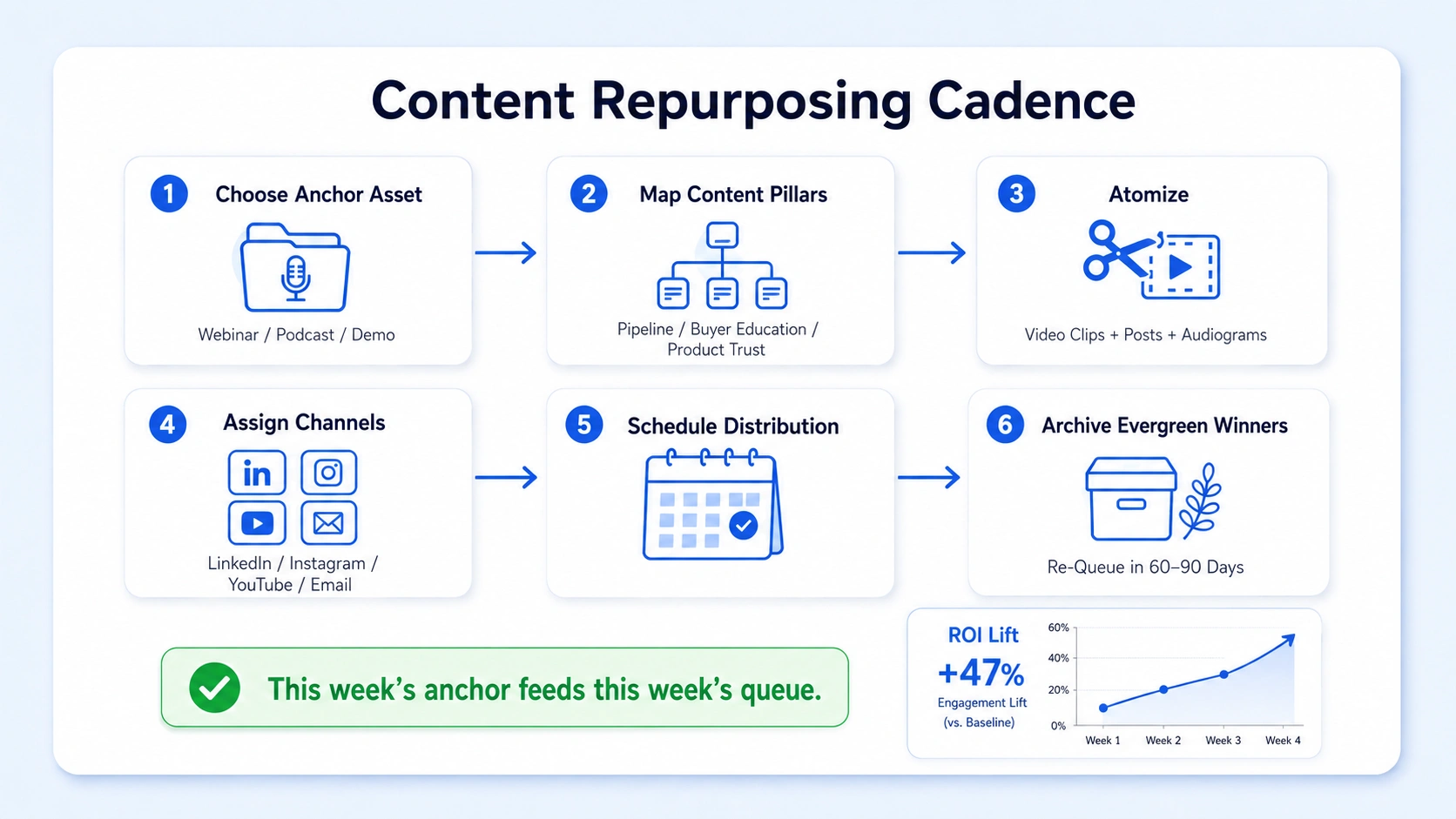
Content repurposing strategies improve ROI by 32% on average when teams systematically turn webinars into clips, blogs, and social assets. The cadence is what makes that improvement repeatable instead of accidental. Here is how the core loop works:
- Choose your anchor asset: A webinar, podcast episode, executive interview, product demo, or recorded panel discussion.
- Map your content pillars: Every piece produced from the anchor should tie back to one of your defined content pillars, pipeline, buyer education, product trust, or founder-led growth.
- Atomize: Break the anchor into short-form video clips, a text post, a LinkedIn carousel concept, an audiogram, and a newsletter section.
- Assign formats to channels: Short-form video to LinkedIn and Instagram, audiograms to X, clips to YouTube Shorts, text to email.
- Schedule via your distribution stack: Buffer or Hootsuite for social, Notion or Asana to track status across the team.
- Archive evergreen assets: Any clip that performs above average gets tagged as evergreen content and re-queued in 60–90 days.
For B2B teams specifically, webinars and events produce content that can be repurposed into qualified lead-driving assets across multiple downstream formats including clips, blog posts, email sequences, and downloadable resources. The cadence also creates predictability for your team. Instead of scrambling every week to decide what to post, the system answers that question automatically: this week's anchor feeds this week's queue. A weekly repurposing cadence for busy teams is not a content hack. It is a production system that compounds your existing intellectual capital across every channel you own.
How to Set Up Your Weekly Repurposing Workflow (Step by Step)
The best workflows are lightweight enough to run with two to three people. Here is the exact structure I recommend for busy B2B teams:
Monday: Audit and select
- Review the content backlog in Notion or Trello, demos recorded, webinars completed, podcasts published.
- Select one anchor asset for the week based on strategic priority (pipeline content first, brand content second).
- Brief the production team or your video editing partner on the clip map: which moments to pull, which soundbites to prioritize.
Tuesday–Wednesday: Produce
- Edit 3–5 short-form video clips from the anchor (60–90 seconds each).
- Write captions and hooks for each clip, the hook is the most important element.
- Create one audiogram from the strongest audio moment.
- Draft one LinkedIn text post expanding on the anchor's key insight.
Thursday: Quality check and schedule
- Review all assets against your content pillar map.
- Upload to Buffer or Hootsuite and schedule across platforms.
- Add any evergreen clips to your re-queue library in Asana.
Friday: Distribute and engage
- Post the first asset manually if reach is a priority (manual posts often outperform scheduled on LinkedIn).
- Engage with comments within the first 60 minutes of posting.
- Log performance notes for the weekly review.
Use this template: FREE WEEKLY REPURPOSING WORKFLOW TEMPLATE
Repurposing content saves 60–80% of content creation time compared to building each piece from scratch, because teams reuse existing research, ideas, frameworks, and narrative structure instead of starting from zero. That time savings is the entire point of the cadence.
What Content Should You Repurpose Each Week and How Often?
Not all content is worth repurposing at the same frequency. Prioritize by strategic value and performance data.
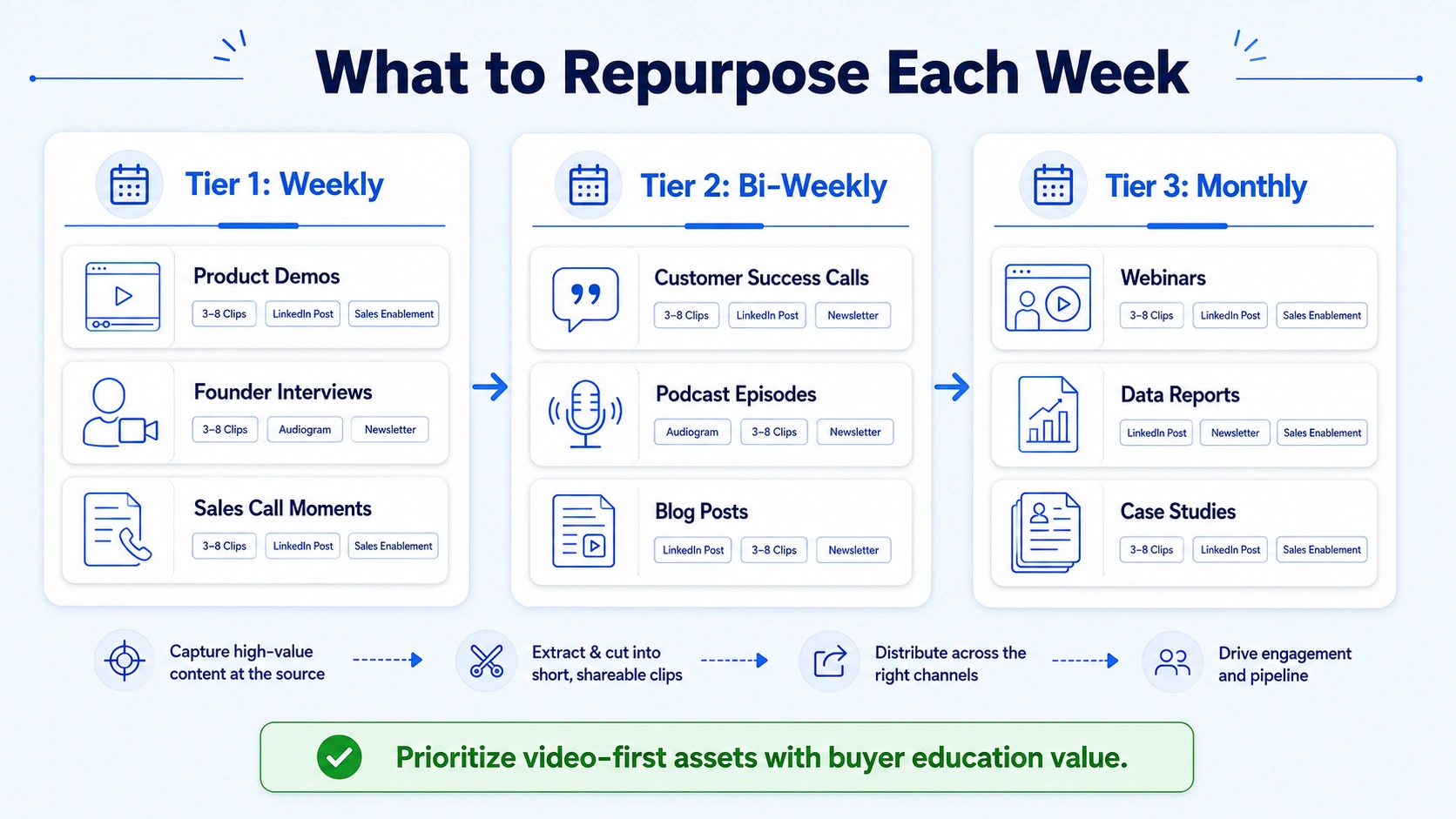
Tier 1, Repurpose every week:
- Product demos and feature walkthroughs (highest buyer education value)
- Founder or executive interviews (drives founder-led growth and pipeline trust)
- Webinar recordings (dense with insight, multiple clip opportunities)
- Customer success conversations (social proof, sales enablement)
Tier 2, Repurpose bi-weekly:
- Podcast episodes, especially strong for podcast content repurposing into clips and audiograms
- Internal team discussions on product positioning
- Sales call moments (anonymized) that reveal buyer objections
Tier 3, Repurpose monthly:
- Blog posts turned into short video scripts
- Data reports and research turned into stat-driven clips
- Case study summaries
Almost half of B2B marketers say short-form social video content delivers the highest ROI, according to the 2025 B2B Marketing Benchmark Report from LinkedIn and research firm Ipsos. That is your prioritization signal: video first, always.
On cadence frequency: most lean B2B teams can sustain 4–6 pieces of repurposed content per week from a single anchor. That is enough to maintain consistent omnichannel distribution without overwhelming a two- to three-person marketing function.
Weekly Repurposing Cadence Examples for Content Marketing Teams
Here are two concrete examples of how a weekly repurposing cadence for busy teams plays out in practice.
Example 1: SaaS team running a weekly product demo
The sales team records a 30-minute live demo on Tuesday. By Thursday, the content team had produced three short-form clips: one showing the product solving a specific pain point (60 seconds), one featuring the founder explaining the "why" behind the feature (45 seconds), and one customer reaction moment (30 seconds). All three go to LinkedIn. The strongest clip goes to short-form video distribution on Instagram Reels. The full demo drops on YouTube. One email goes to the nurture list with a CTA to book a demo. Seven assets. One source. Three hours of production.
Example 2: AI startup repurposing a webinar
A funded AI startup hosts a 60-minute webinar on their approach to data privacy. The repurposing cadence produces: five LinkedIn clips (each under 90 seconds), one audiogram of the most quotable moment, one LinkedIn long-form post summarizing the three key takeaways, and one follow-up email sequence to webinar registrants. The most efficient B2B teams start with a single, insight-dense anchor asset, then break it into smaller, platform-ready pieces that keep the conversation going long after the original launch. Both examples share the same architecture: one anchor, clear content pillars, a defined clip map, and a distribution schedule built in Notion or Asana before production begins. Teams who repurpose content across channels report up to 300% more reach, and repurposing saves 60–80% of creation time.
How to Repurpose Content Weekly Without Burning Out Your Team
Burnout in content teams comes from two sources: ambiguity and volume. The weekly repurposing cadence for busy teams eliminates both, but only if you build the right guardrails.
Prevent ambiguity:
- Every week starts with a single anchor asset selected on Monday. No debates mid-week about what to produce.
- A shared content pillar map (four to six pillars, documented in Notion) means every clip has a predetermined purpose before it is edited.
- Clip briefs go to editors before filming ends, they know what to look for before they open the timeline.
Control volume:
- Cap weekly output at six assets per week for teams of two to three people. More volume does not equal more pipeline.
- Batch content creation sessions: two editing blocks per week, not five scattered sessions.
- Use Buffer or Hootsuite to schedule two weeks ahead during batch weeks, so the team has breathing room.
Protect evergreen inventory:
- Any clip that performs in the top 25% of your average engagement gets archived as evergreen content in Asana.
- Re-queue evergreen clips every 60–90 days. This alone can fill 30–40% of your weekly posting schedule without any new production.
Repurposed content can increase organic traffic by 35% when brands systematically reuse top-performing assets. The evergreen re-queue is how you capture that compounding effect without adding headcount.
One more structural point: assign a single "cadence owner" on the team. Not a committee. One person owns the Monday anchor selection and Thursday quality review. Everyone else executes their lane. The cadence breaks when ownership is diffuse.
Common Mistakes Teams Make When Trying to Repurpose Content Weekly
Most teams attempt a repurposing system and abandon it within four to six weeks. Here is why, and how to avoid each failure mode.
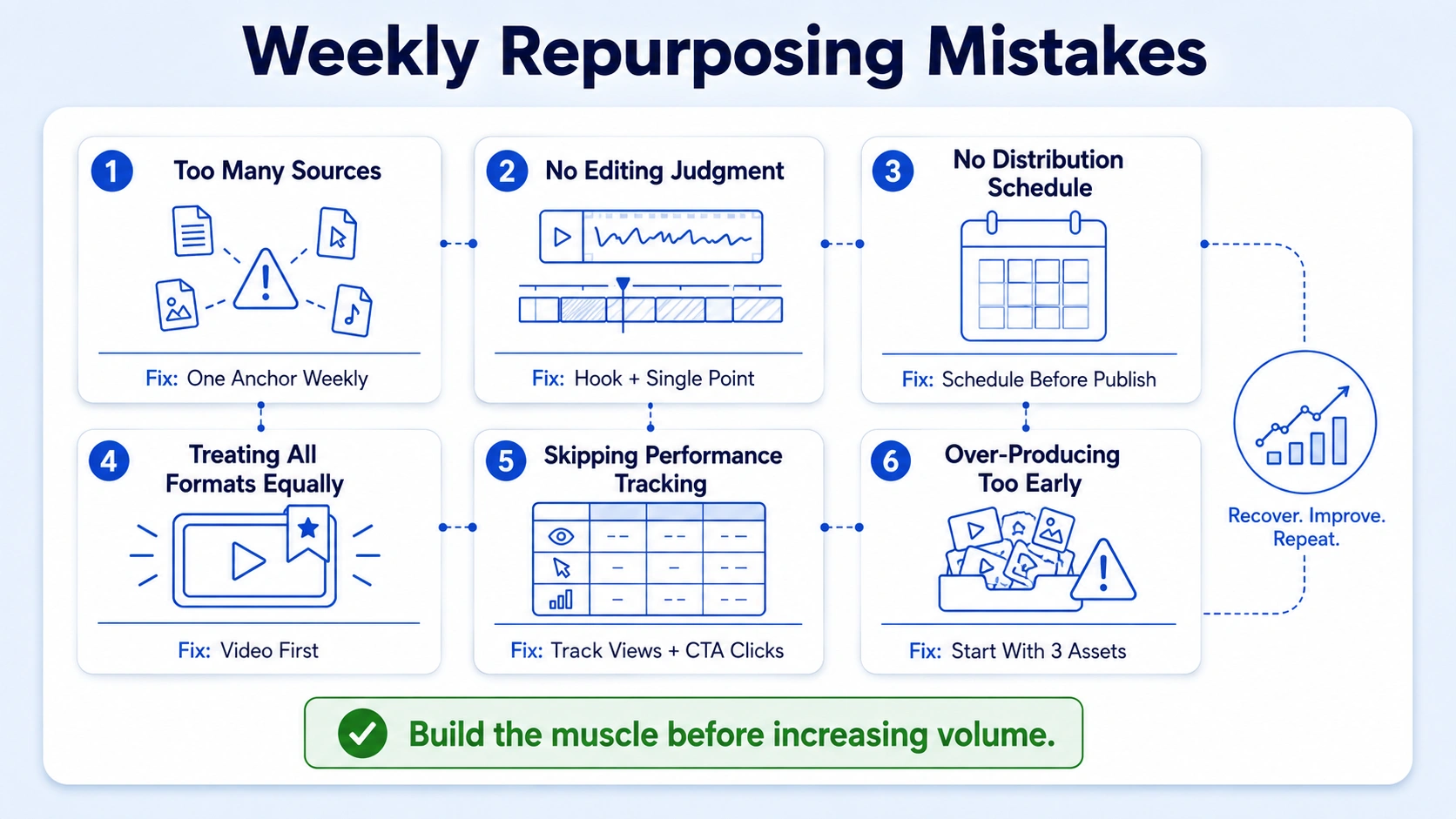
Mistake 1: No anchor, too many sources. Teams pull clips from five different assets in the same week. The result is disconnected content that does not reinforce a single message. Fix: one anchor per week, always.
Mistake 2: Repurposing without editing judgment. Cutting a clip is not repurposing. A strong clip needs a hook in the first three seconds, a clear single point, and a reason for the viewer to care. Raw cuts with no editorial judgment underperform. Invest in proper video editing services or a dedicated editor.
Mistake 3: No distribution schedule. Producing assets is half the system. Consistency signals search engines about site freshness while building audience expectations and engagement habits, which makes editorial calendar discipline critical for content success. If clips sit in a shared drive for three days before someone posts them, the cadence is broken.
Mistake 4: Treating all content equally. 78% of B2B marketers currently use video in their programs, and 56% plan to increase their B2B video marketing investment within the next year. Video is the priority format. If your team is spending equal time on text posts and video clips, realign your effort stack.
Mistake 5: Skipping performance tracking. Teams that do not review clip performance weekly cannot improve their clip selection or hook writing. A simple Notion table tracking views, engagement rate, and CTA clicks per clip is sufficient. No enterprise analytics stack required.
Mistake 6: Over-producing before the system is stable. Start with three assets per week, not ten. Build the muscle, then increase volume once the workflow runs without friction.
Conclusion
A weekly repurposing cadence for busy teams is how lean B2B marketing functions compete with larger, better-funded content operations. The key takeaways:
- One anchor asset per week, atomized into 3–6 platform-ready pieces.
- Batch on Monday, produce Tuesday–Wednesday, schedule Thursday, engage Friday.
- Short-form video is your highest-ROI format, prioritize it at every tier.
- Evergreen content re-queuing fills 30–40% of your weekly schedule with zero new production.
- Ownership, clip briefs, and a defined pillar map prevent team burnout.
If your team is sitting on webinars, demos, and founder interviews that have never been properly edited into clips, talk to us at Komet Media, that is exactly the problem we solve.
Frequently Asked Questions
Q1: How long does it take to set up a weekly repurposing cadence for busy teams?
Most teams can build the core system in one week: define your content pillars, choose your tool stack (Notion, Asana, Buffer or Hootsuite), assign a cadence owner, and run one test week with a single anchor asset. Expect two to three weeks before the workflow runs without friction.
Q2: How many pieces of content should a small team produce from one anchor per week?
For a team of two to three people, three to six pieces per week is the sustainable target. That typically includes two to three short-form video clips, one audiogram or text post, and one email or LinkedIn long-form asset. Volume increases once the system is stable.
Q3: What is the best anchor asset for B2B SaaS repurposing?
Product demos and webinars are the highest priority. They contain the clearest buyer education content and the strongest clip opportunities. Founder or executive interviews are a close second for driving pipeline trust and inbound demand from cold audiences.
Q4: Do I need a dedicated video editor to run a weekly cadence?
Not necessarily from day one, but editorial quality matters significantly. Teams that produce raw, unedited clips see lower engagement than those who invest in proper hook structure and visual formatting. A dedicated video editor or agency partnership typically pays for itself in content ROI within the first quarter.
Q5: Which tools should I use to manage a weekly repurposing workflow?
Use Notion or Asana for editorial calendar and task management, Buffer or Hootsuite for social scheduling, and a shared cloud folder (Google Drive or Frame.io) for asset handoff between editors and marketers. Keep the stack minimal, three to four tools maximum.
Q6: How do I know which repurposed clips to prioritize for re-queuing?
Track engagement rate and CTA click-through for each clip in a simple Notion table. Any clip that performs in the top 25% of your average engagement qualifies as evergreen content worth re-queuing. Review monthly and rotate the top performers every 60–90 days.


