
🪄 AI Summary
Heading 1
Heading 2
Heading 3
Heading 4
Heading 5
Heading 6
Lorem ipsum dolor sit amet, consectetur adipiscing elit, sed do eiusmod tempor incididunt ut labore et dolore magna aliqua. Ut enim ad minim veniam, quis nostrud exercitation ullamco laboris nisi ut aliquip ex ea commodo consequat. Duis aute irure dolor in reprehenderit in voluptate velit esse cillum dolore eu fugiat nulla pariatur.
Block quote
Ordered list
- Item 1
- Item 2
- Item 3
Unordered list
- Item A
- Item B
- Item C
Bold text
Emphasis
Superscript
Subscript
Most SaaS teams create decent video content and then drop it in the wrong place at the wrong time with no context. The result: three views and a dead link. Distributing video in Slack and communities is how serious B2B teams turn product demos, webinar clips, and founder thinking into pipeline-moving assets that buyers actually watch. This guide breaks down exactly how to do that, from channel strategy and format selection to tools, timing, and video analytics that tell you what's working.
TL;DR
- Slack and B2B community platforms are underused video distribution channels with direct buyer access.
- Short-form video (under 60 seconds) consistently outperforms longer formats in async environments.
- Host video on Wistia or Vimeo before sharing in Slack to keep analytics and tracking intact.
- Pair every video share with a hook message, a timestamp, and a clear next action.
How to Share Video in Slack for B2B Teams
Distributing video in Slack and communities starts with one decision: host first, share second. Dropping a raw file into a Slack channel kills your analytics. Instead, upload to a video hosting platform like Wistia or Vimeo, then paste the link with context. Wistia gives you viewer-level data; Vimeo gives you clean embed controls. Both integrate with HubSpot and Salesforce, which matters when a prospect watches your demo clip three times and your CRM never records it.
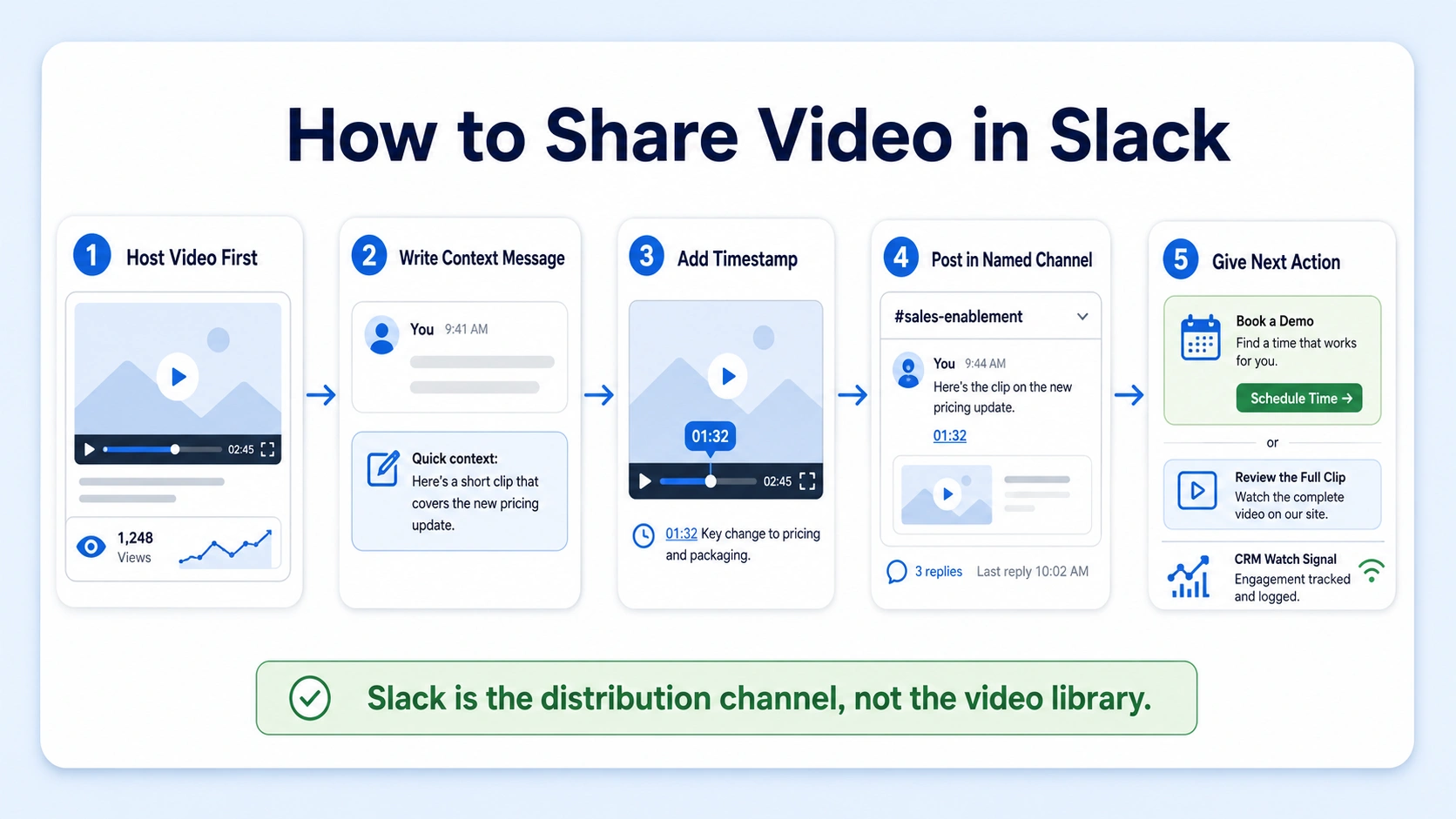
Here is the exact process I use with B2B SaaS, AI, and tech startups & teams at Komet Media:
- Upload the video to your hosting platform: Wistia, Vimeo, or Vidyard. Never share a raw MP4 or a Drive link for tracked content.
- Write a 2–3 sentence context message: Lead with the problem the video solves, not what the video "is."
- Add a timestamp if the key insight is not at the start: "Jump to 1:42 for the feature walkthrough" doubles attention.
- Use a named channel, not a DM: #product-updates, #sales-enablement, or #customer-success keeps content findable.
- Post a clear next action: A Calendly link, a reply CTA, or a question to trigger a thread.
A dedicated Slack channel like #video-for-sales where marketing announces new videos with suggested use cases is one of the most effective internal distribution structures for B2B teams. This keeps video assets organized and ensures your sales team knows exactly when and how to use them. According to Vidyard's 2025 benchmarks, sales emails with video get 16% higher open rates and 26% higher reply rates than text-only emails.
That same principle applies inside Slack: video with context outperforms a wall of text every time. For async communication across distributed teams, Loom is a practical tool for quick explainer clips or product walkthroughs recorded on the fly. However, for any video asset tied to buyer education or pipeline, use a platform with video analytics. You need to know who watched what and for how long, not just that someone clicked. Slack is not a video library. It is a distribution channel. Always host first, then share. Never let a Slack message be the only place your video lives.
Finally, think about format. 73% of B2B decision-makers prefer videos under 60 seconds when viewing on mobile, and sub-30-second clips earn 38% higher completion rates than longer posts according to LinkedIn's feed study. If your video is longer, share a short clip with a link to the full version.
Best Ways to Distribute Video Content in Slack Channels
Not all Slack channels serve the same purpose, and treating them identically is a fast way to train people to ignore your posts. Distributing video in Slack and communities effectively requires a channel-by-channel strategy with different video types mapped to each.
For external Slack Connect channels (shared with customers or partners), video standards shift. Buyers are there. Every video you share is a brand impression. Keep external Slack video assets polished, captioned, and under 90 seconds unless the buyer explicitly asked for depth.
Slack integrates with 2,400+ apps and services, enabling workflow automation , which means you can build Slack notifications that fire automatically when a new video is published in your CMS or video platform. Marketing publishes a customer success story in Wistia, a Slack notification fires in #sales-enablement with the link, use-case context, and suggested talk track. That is distribution without manual effort.
Organizations using Slack report 32% fewer emails and 27% fewer meetings , which means attention is concentrated in Slack. That is exactly why video distribution in these channels reaches people where they already live, rather than competing in an inbox.
For short-form video editing at scale, the channel map above only works if your video assets are pre-cut for each context. A 40-minute webinar does not belong in #sales-enablement. A 45-second clip of the best product insight from that webinar absolutely does.
How B2B SaaS Companies Use Video in Community Platforms
Community platforms like Circle, Slack workspaces, Notion-based wikis, and Discourse forums are where product-led growth and community-led growth intersect. Investing in community-led initiatives creates a sense of ownership and engagement among community members, resulting in increased loyalty, lower customer acquisition costs, and reduced churn. Video accelerates all of that.
The most effective use cases for video in B2B SaaS communities are:
- Product tutorials: Short walkthroughs of specific features pinned to the relevant channel or forum thread.
- Founder or executive video updates: 60–90-second personal updates on roadmap, vision, or customer wins build trust faster than written posts.
- Customer spotlight clips: A 45-second cut of a customer outcome, shared in the community, triggers social proof within the people most likely to become advocates.
- Onboarding workflows: Video-gated onboarding sequences inside community platforms (especially Circle) reduce time-to-first-value.
- Event replays: Webinar or podcast clips distributed in the community keep content alive past the live-event window. Komet Media produces original webinar and podcast content from scratch and manages the systematic repurposing of that work for B2B SaaS, AI, and tech startups & teams.
On-demand webinars keep getting plays for up to 12 months after the live event , which makes community platforms the ideal long-shelf-life distribution home for that content. 65% of B2B organizations include video in their customer onboarding processes , and embedding those videos inside a customer community (rather than a static knowledge base) creates a living, searchable asset that improves with community contributions over time. Knowledge sharing in this format drives product adoption faster than written documentation alone.
Sharing Product Demo Videos in Slack Without Losing Engagement
Product demo videos are the highest-value, highest-risk asset you can distribute in Slack. Done wrong, they get one view and zero replies. Done right, they create deal-advancing conversations. The engagement problem is almost never the video itself. It is the context surrounding the drop. Here is what works:
- Lead with the buyer's pain, not the feature name: "If your reps are manually copying data from [Tool A] to [Tool B], this 60-second clip shows how that disappears" beats "Here's a demo of our integration."
- Thumbnail matters: Slack auto-generates a preview from Wistia or Vimeo links. Make sure your video's first frame is not a black screen or a loading spinner.
- Caption every video: Nearly half of all videos uploaded in 2024 have at least three accessibility features, including closed captions, on-screen transcripts, and subtitles. Captions are table stakes for async environments where sound is off.
- Short clips link to full demos: Share a 45-second teaser. Let curiosity pull people to the full version.
- Ask a question in the post: "Does your team run into this?" turns a video share into a thread.
72% of B2B buyers report that video content from vendors influences their vendor shortlist decisions. A product demo clip shared in the right Slack channel at the right deal stage does not just educate. It moves buyers closer to a shortlist decision.
Wistia's benchmark data shows videos under one minute achieve around 65% average engagement , so prioritize sub-60-second product clips for Slack distribution. For deeper demos, use Loom or Vidyard, which support chapter markers that let buyers jump to the section most relevant to their use case.
Best Practices for Video Distribution in Online Communities
Distributing video in Slack and communities without a governing approach creates noise, not engagement. These are the practices that separate teams generating pipeline from teams generating impressions:
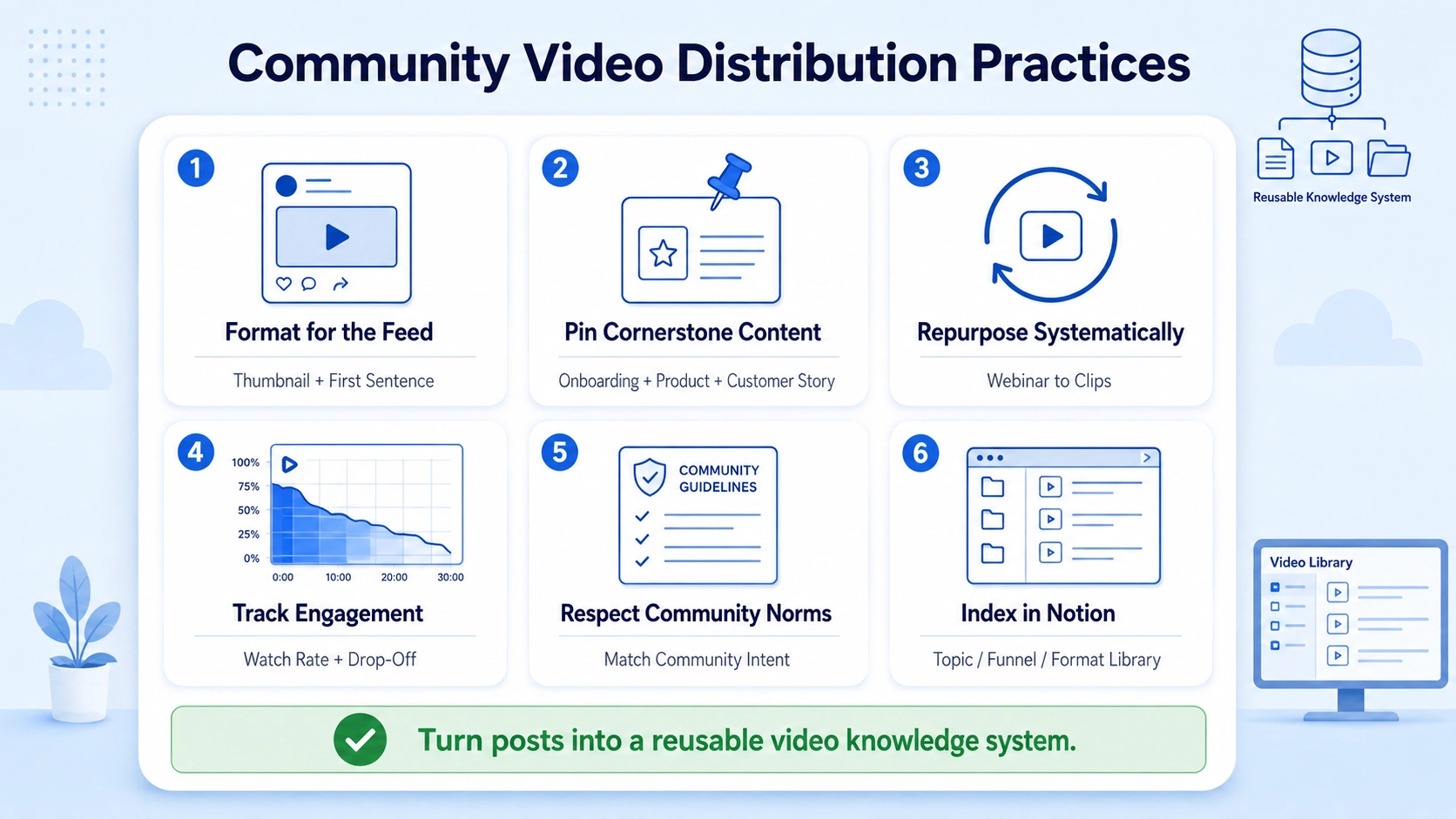
Format for the feed, not the stage. Community feeds are scanned, not read. Your video thumbnail, title, and first sentence need to stop the scroll.
Pin cornerstone content. Every community platform (Circle, Slack, Discord, Discourse) has pinning functionality. Pin your best onboarding video, your product overview, and your most-watched customer story. These three assets do ongoing educational work without additional effort.
Repurpose systematically. Today's B2B decision-makers prefer concise, impactful content, and companies are finding success by repurposing existing long-form content into snackable segments. One webinar becomes five Slack-ready clips, three community posts, and a pinned knowledge-sharing resource.
Track video engagement metrics. Without data, you are guessing. Wistia's channel-level analytics and Vimeo's view tracking give you watch rate, drop-off point, and replay count per viewer. More than 60% of B2B companies now track video engagement metrics as part of their campaign performance evaluation , which means your competitors already know which clips are closing deals.
Respect community norms. A Circle community for paying customers and a public Slack group for prospects have very different tolerances for promotional content. Map video types to community intent before publishing.
Use Notion as your video index. Pair each community platform with a Notion-based video library organized by topic, funnel stage, and format. Link every community post back to the Notion card for context. This turns one-off posts into a reusable knowledge sharing system. Komet Media's services page outlines how we structure these video systems for B2B SaaS, AI, and tech startups & teams.
Does Sharing Video in Slack Increase Team Engagement?
The honest answer is: yes, but only if the video is worth watching and properly framed. Format alone does not create engagement. Context, relevance, and brevity do. Slack users experience up to 47% higher productivity compared to traditional communication tools , and video inside Slack amplifies that productivity gain by replacing lengthy written explanations with a 60-second walkthrough. A new sales rep watching a 90-second video on how to handle a pricing objection learns faster than reading a three-paragraph Notion doc.
For internal teams, the engagement impact of video in Slack is highest in these contexts:
- Onboarding new hires: A video library in Slack or Notion organized by role and week is faster to consume than written handbooks.
- Async standups: Short Loom updates from leads replace synchronous meetings across time zones, supporting the digital-first workplace without sacrificing clarity.
- Product releases: A 60-second founder or PM video explaining the "why" behind a new feature drives internal buy-in faster than a changelog.
- Customer success handoffs: A video summary from the account executive to the CSM reduces context loss at handoff and speeds up the customer relationship.
Organizations using Slack report 27% fewer meetings , and video in Slack is a primary reason those meetings can be replaced. When a team lead can drop a 90-second Loom into a channel and get threaded replies with specific questions, the meeting becomes unnecessary.
For external buyer engagement, distributing video in Slack and communities through Slack Connect channels with prospects is a distinct motion. A personalized 30-second video in a Slack Connect deal channel referencing the prospect's specific use case and linking to a relevant video marketing resource moves deals in a way that email rarely does.
Best Tools for Distributing Video Across Slack and Community Platforms
Distributing video in Slack and communities at scale requires the right tool stack. Here is how the key platforms compare:
LinkedIn is now B2B's number one video channel, with 8 in 10 teams saying LinkedIn is their primary place to share videos , which means your Slack and community distribution should feed into your LinkedIn publishing workflow. Clip from the webinar, share in Slack for internal alignment, then publish the best clip on LinkedIn for external reach.
According to the Wistia 2026 State of Video Report, 22% of marketing teams now name social engagement as their top video success metric , which signals that distribution quality (how many of the right people watched) matters more than raw view counts. Wistia and Vidyard both give you viewer identity when integrated with your CRM, which is the metric that actually connects video to pipeline.
For video editing services that produce Slack-ready assets, the production brief needs to specify: platform (Slack channel vs. community post vs. Slack Connect), aspect ratio (16:9 for previews, 9:16 for mobile-first communities), and caption format. These are not afterthoughts. They are distribution requirements built into the edit.
Conclusion
Video in Slack and community platforms is one of the highest-leverage, lowest-competition distribution channels available to B2B SaaS teams in 2026. The key takeaways:
- Host video on Wistia, Vimeo, or Vidyard before distributing in Slack to preserve analytics and CRM data.
- Match video format and length to the channel: short clips for Slack, pinned cornerstone content for communities.
- Pair every video share with a problem-led hook and a clear next action to drive threaded engagement.
- Repurpose long-form content (webinars, podcasts, demos) into short clips as a systematic distribution practice, not a one-off task.
Frequently Asked Questions
Q1: What is the ideal video length for sharing in Slack?
Keep it under 60 seconds for maximum completion. Wistia's benchmark data shows videos under one minute achieve around 65% average engagement. For deeper demos, share a short teaser with a link to the full version hosted on your video platform.
Q2: Should I upload video directly to Slack or share a hosted link?
Always share a hosted link from Wistia, Vimeo, or Vidyard. Direct uploads strip your analytics entirely. Hosted links give you watch time, viewer identity (with CRM integration), and replay counts so you can tie video performance to pipeline.
Q3: How do B2B SaaS companies use video in community platforms like Circle?
65% of B2B organizations include video in their customer onboarding processes , and community platforms are the most effective place to host those videos. Pin onboarding walkthroughs, share weekly product clips, and use short customer story videos to drive peer-to-peer trust inside the community.
Q4: How do I get people to actually watch the videos I share in Slack?
Lead with the pain the video solves, not the video title. Add a timestamp for the key moment. Keep it under 60 seconds or clip it down. End the Slack message with a question to trigger replies. Context and brevity drive completion, not just posting the link.
Q5: What tools should I use for distributing video across Slack and community platforms?
Wistia for analytics-heavy B2B hosting, Loom for quick async recordings, Vidyard for sales and CRM-connected video, and Vimeo for clean embeds. Use Notion as your video index to keep all assets organized across channels and communities.
Q6: Does distributing video in Slack support founder-led growth?
Yes. Short founder video updates in Slack and community platforms build trust at a pace text cannot match. A 60-second video from the founder explaining a roadmap decision or sharing a customer win creates authenticity that supports pipeline, retention, and brand in one asset.


