
🪄 AI Summary
Heading 1
Heading 2
Heading 3
Heading 4
Heading 5
Heading 6
Lorem ipsum dolor sit amet, consectetur adipiscing elit, sed do eiusmod tempor incididunt ut labore et dolore magna aliqua. Ut enim ad minim veniam, quis nostrud exercitation ullamco laboris nisi ut aliquip ex ea commodo consequat. Duis aute irure dolor in reprehenderit in voluptate velit esse cillum dolore eu fugiat nulla pariatur.
Block quote
Ordered list
- Item 1
- Item 2
- Item 3
Unordered list
- Item A
- Item B
- Item C
Bold text
Emphasis
Superscript
Subscript
Most B2B teams produce a solid webinar, send the replay link, and move on. That's the mistake. Your webinar is a content asset sitting on an hour of buyer education, product insight, and founder thinking, and the majority of teams extract maybe 10% of its value. This guide covers the exact webinar repurposing mistakes to avoid in 2026, why they kill pipeline performance, and the practical fixes that turn one recording into a multi-channel content engine.
TL;DR
- Most teams under-repurpose by uploading the raw replay and calling it done.
- Skipping audience segmentation, platform-native formatting, and a real distribution plan are the top killers.
- Content atomisation and short-form clips are the highest-ROI moves available right now.
- Fix the strategy first, tools like Descript, Riverside.fm, and Wistia only amplify good decisions.
What Are the Biggest Webinar Repurposing Mistakes in 2026?
65% of marketers repurpose webinar content, but repurposing and repurposing well are completely different things. After working with B2B SaaS, AI, and tech startups & teams on content creation from scratch and video content repurposing systems at Komet Media, I've seen the same mistakes repeat across teams at every stage. Here are the ones that hurt the most.
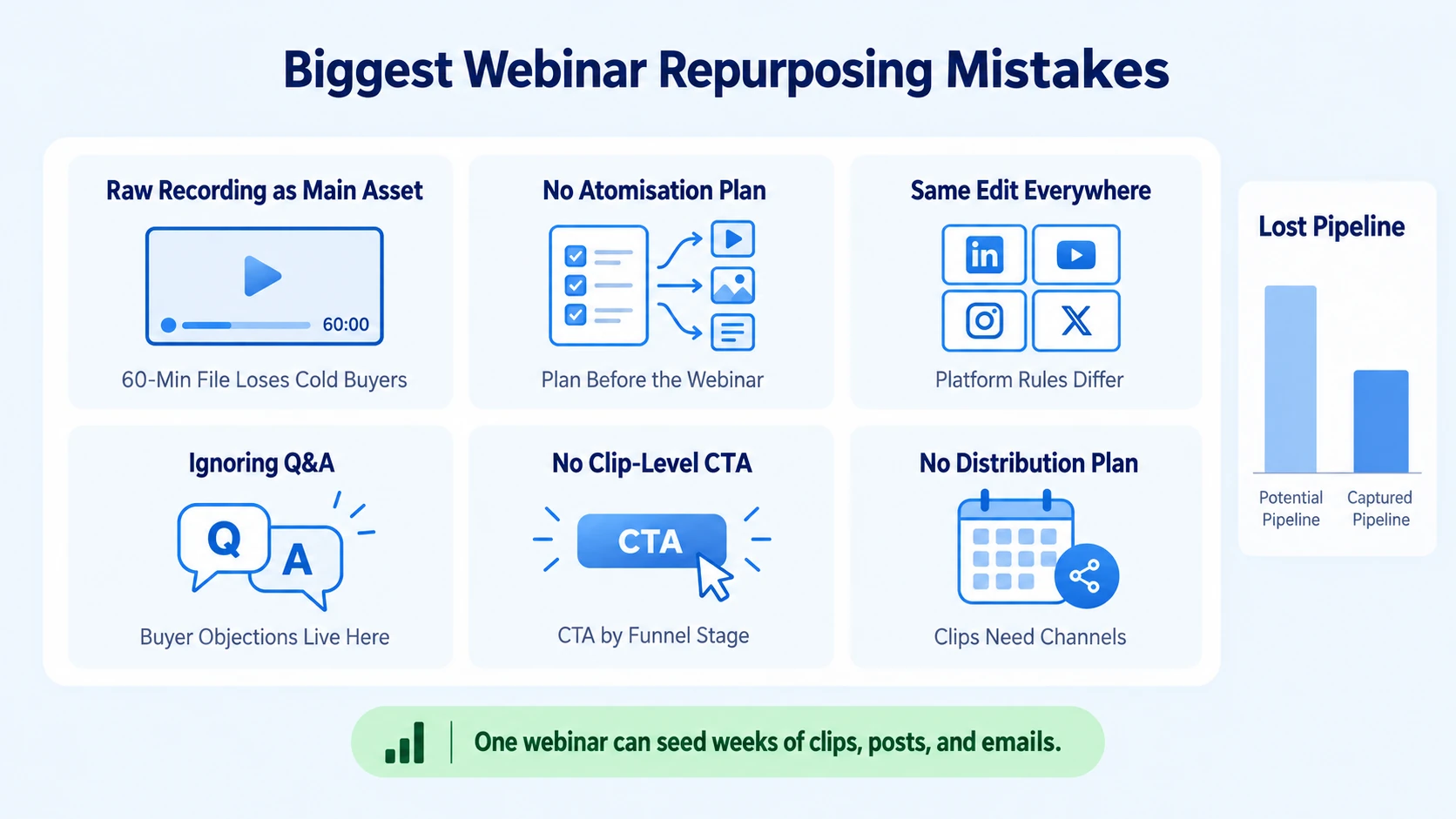
1. Uploading the raw recording as the primary asset. The full replay has value for people who registered. For cold or warm buyers who didn't attend, a 60-minute raw file is a hard no. You lose them in the first 90 seconds.
2. No content atomisation plan before the webinar even runs. Teams should be clipping, quoting, and segmenting during production, not scrambling afterward. Content atomisation (breaking one asset into micro-assets) needs a plan, not an afterthought.
3. Treating every platform the same. A LinkedIn clip, a YouTube Short, and a blog post pulled from the same webinar need completely different formatting, length, and hook structures. Posting the same edit everywhere kills engagement on all channels.
4. Ignoring the Q&A section. The live Q&A is the highest-signal part of a webinar. It's where buyer objections live. Missing it means you're skipping some of the most useful content for sales enablement and thought leadership.
5. No call to action at the clip level. Each repurposed asset needs its own CTA tied to where a buyer is in the funnel. A 60-second LinkedIn clip educating a cold audience needs a different CTA than a replay sent to a demo-ready lead.
6. Repurposing without a distribution plan. Creating assets and not building a distribution plan across content distribution channels means your clips get posted once and disappear.
A single 49-minute webinar holds roughly 10,000 spoken words, that seeds weeks of posts, clips, and emails when you have a system.
Webinar Repurposing Mistakes That Kill Content Performance
The most damaging errors aren't just about format, they're strategic. Here's what breaks the video marketing funnel before distribution even begins.
Mistake: No audience segmentation on the backend. Grouping your audience into segments based on engagement levels and interests allows you to send targeted content and increase conversion chances. Most teams blast the replay to their entire list. The right move is to split by role (founder vs. practitioner), intent (attended live vs. registered only), and funnel stage. That determines which clips and which email marketing sequence each segment receives.
Mistake: Clipping without context. A short-form clip pulled without a proper setup hook and native caption structure performs poorly on LinkedIn Video and YouTube Shorts. The clip isn't the problem, the lack of context is. Total video viewership on LinkedIn surged 36% year-over-year, and video creation on LinkedIn is growing at twice the rate of other post formats. The audience is there. The context has to meet them.
Mistake: Over-polished production as a delay tactic. Teams wait for a "perfect" edit before publishing. By the time they ship, the moment has passed. 93% of marketers say video has helped them gain new customers, and short-form formats generate more than double the engagement of longer ones. Speed with strategic intent beats slow perfection every time.
Mistake: Skipping the blog post entirely. A webinar transcript cleaned up through a tool like Descript becomes a dense, SEO-optimised blog post with minimal effort. Skipping this step means you're leaving evergreen content and organic search traffic on the table permanently.
Mistake: No engagement metrics review. If you're not checking drop-off points in your replay analytics (Wistia and tools like it surface this clearly), you can't identify which segments are worth clipping. High retention = high clip value. Low retention = skip it or reframe it entirely.
Why Your Repurposed Webinar Content Isn't Getting Engagement
If you've been repurposing and still seeing flat numbers, the issue is usually one of three things: wrong format, wrong hook, or wrong channel.
Wrong format: The optimal length for short-form video is between 31 and 60 seconds. Many teams cut 3-to-5 minute clips from webinars and post them on LinkedIn as "short-form." That's not short-form. It's a medium-length clip with a short-form expectation.
Wrong hook: The first three seconds of any clip determine whether someone keeps watching. Most webinar openings are slow ("Thanks for joining, we'll get started in a moment…"). Those intros are dead weight. The hook needs to lead with the insight, the tension, or the result, never with a greeting or agenda overview.
Wrong channel: Not all buyer personas are on the same platform. Founders and VPs tend to engage on LinkedIn Video. Product-led content can work on YouTube Shorts for discoverability. Blog posts with embedded clips serve SEO and mid-funnel buyers well. Mapping content to channel is part of a real content repurposing strategy.
Missing brand storytelling layer: Clips that are purely informational without a perspective lose quickly. Brand storytelling is what makes a clip from your webinar sound distinctly like your company, not just generic advice anyone could have said.
At Komet Media's short-form video editing service, this is where we start with every B2B SaaS, AI, and tech startup team: format-channel fit before volume. Getting that right doubles distribution efficiency before anything else changes.
What You Should Never Do When Repurposing a Webinar
Some mistakes are just inefficiencies. These ones actively damage your brand positioning and pipeline.
Never post the full replay publicly without a gate or at minimum a landing page. 31% of live attendees go back later and watch the content on demand. That on-demand audience deserves a structured experience, not a raw Zoom link sitting in a tweet. Use a Wistia hub or a dedicated webinar page to frame the content and capture intent.
Never repurpose without tailoring the CTA to the funnel stage. A cold LinkedIn viewer needs a "learn more" or value-add CTA. A warm prospect who attended live needs a demo prompt. Sending every repurposed asset to the same CTA (usually the homepage) collapses the funnel and inflates bounce rates.
Never skip captions on video clips. Most LinkedIn and YouTube Shorts content is watched without sound. If your clips rely on audio to carry the message, you're invisible to a significant portion of your audience.
Never use Canva-only graphics to repurpose quote cards as your primary video strategy. Static quote cards are not video repurposing. They're decorations. Lead generation from webinar content comes from video clips, email sequences, and blog posts, not static text overlays.
Never let your repurposing workflow depend on one person. If your entire content repurposing strategy lives in one marketer's head with no documented system, one departure or bottleneck stalls everything. Build the system, not the reliance.
Webinar Repurposing Best Practices for 2026
Here's how the best B2B SaaS, AI, and tech startups & teams approach this in 2026. The goal is a repeatable system that turns every webinar into a full-funnel content engine.
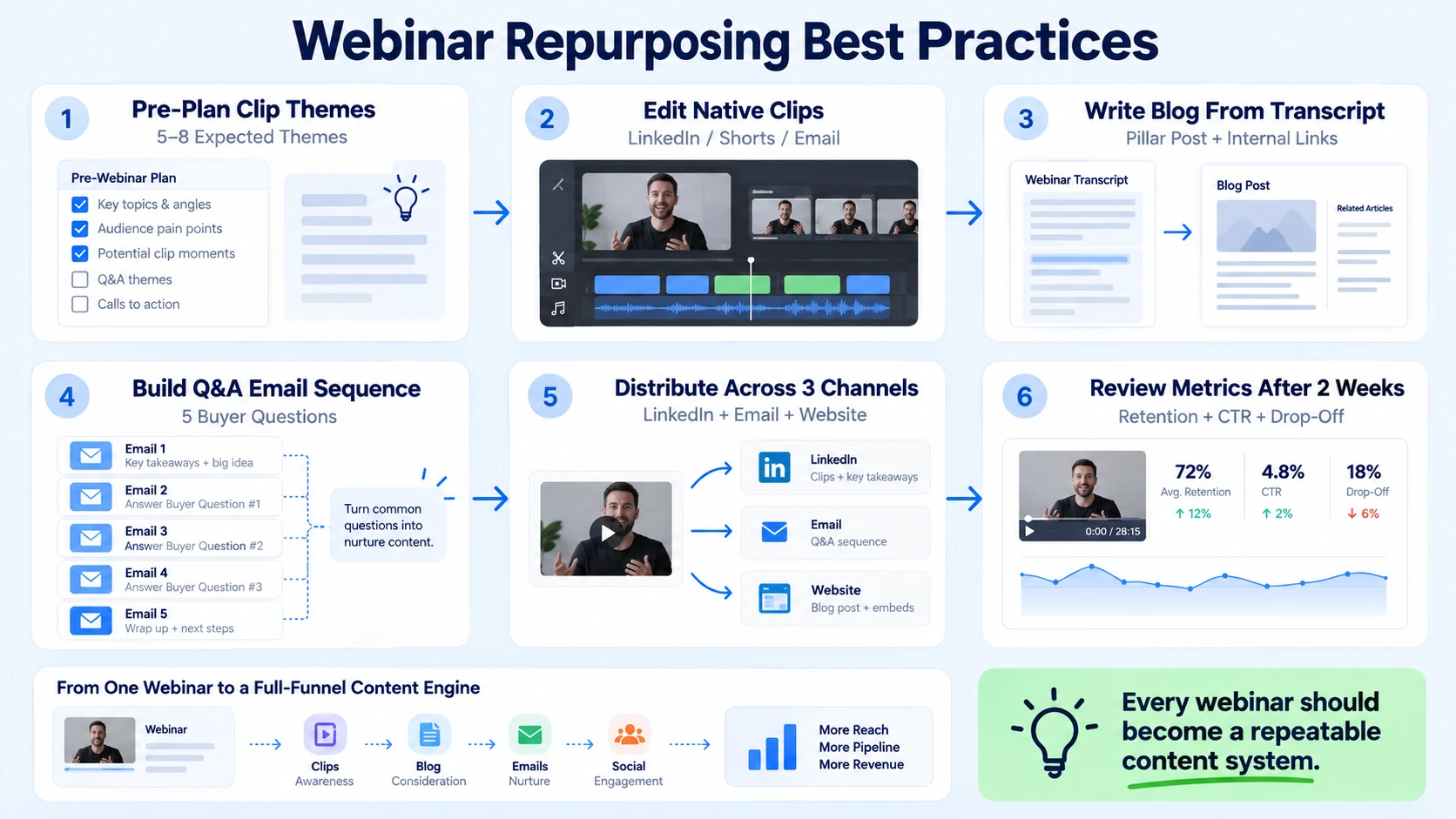
- Pre-produce your clips list: Before the webinar runs, map 5–8 clip themes you're expecting to capture. This primes your editor for what to extract.
- Edit clips natively for each platform: LinkedIn Video clips (60–90 seconds, square or vertical, bold captions), YouTube Shorts (under 60 seconds, vertical, search-optimised title), and email-embedded clips (thumbnail + Wistia or Vidyard link) are each their own format.
- Write the blog post from the transcript: Use Descript or Riverside.fm to generate a clean transcript, then restructure it into a pillar post for your site. Link internally to related service pages or your video marketing services for topical authority.
- Build an email marketing sequence from the Q&A: Turn the 5 best audience questions into a 5-email nurture sequence. Each email answers one question and links to a relevant clip or resource.
- Distribute across at least 3 channels per webinar: LinkedIn, email, and your website/blog is the minimum viable distribution stack.
- Review engagement metrics after 2 weeks: Check Wistia analytics for on-demand drop-off, LinkedIn for clip retention, and HubSpot for email click-through on replay links. Then adjust the format or hook for the next event.
Webinar adoption grew 225% year over year, and teams that have built repurposing systems are pulling significantly more content ROI from each session than those who haven't.
How to Repurpose Webinar Content Without Losing Quality
Quality loss happens when repurposing is rushed without a quality filter. Here's how to hold standards across every format.
Keep the core insight intact. When compressing an hour of content into a 60-second clip, the one insight that clip carries must be fully expressed. A half-stated idea is worse than no clip at all, it creates confusion, not clarity.
Don't strip the speaker's voice. The reason webinar content performs better than agency-produced brand videos for founder-led growth is personality. When you over-edit for polish and remove the natural cadence of the speaker, you lose the trust signal that made the content valuable in the first place.
Use the right tools for the right job:
Build a content atomisation checklist. For every webinar, the output checklist should include: 5–8 short clips, 1 blog post, 1–2 quote graphics, 1 email sequence, 1 LinkedIn carousel or text post, and 1 on-demand landing page. This is the standard content creation and video editing system we run for B2B SaaS, AI, and tech startup clients.
A single well-produced webinar, properly atomised, can generate 30+ individual content assets across your video marketing funnel, without recording anything new. Video is growing 1.6 times faster than all other content types across professional networks. The teams that build a repurposing system now build a compounding content advantage that grows every quarter.
Conclusion
The webinar repurposing mistakes to avoid in 2026 come down to one root cause: treating repurposing as an afterthought rather than a system. Every point in this guide connects back to that.
Key takeaways:
- Atomise intentionally: one webinar, 30+ assets, multiple funnel stages.
- Format every clip for its specific platform, LinkedIn Video, YouTube Shorts, and email each have different rules.
- Audience segmentation and a sequenced email marketing strategy are non-negotiable for pipeline impact.
- Quality is preserved through process, not through spending more time on each asset.
Whether you need content created entirely from scratch or full value extracted from existing webinars, the Komet Media team can help.
Frequently Asked Questions
Q1: How many clips should you pull from a single webinar?
A standard one-hour B2B webinar should yield 5–8 short-form clips for LinkedIn and YouTube Shorts, plus 2–3 longer highlights for on-demand playlists. Map clip themes before the session runs to make editing faster and more strategic.
Q2: What tools work best for webinar repurposing in 2026?
Descript and Riverside.fm handle transcription and rough editing. Wistia and HubSpot manage hosting and engagement analytics. For short-form clip editing with platform-native formatting, a dedicated video editor or agency ensures consistency at scale.
Q3: How long should repurposed webinar clips be for LinkedIn?
60–90 seconds is the practical sweet spot for LinkedIn Video. Lead with the core insight in the first three seconds, use bold captions, and end with a single clear call to action. Avoid anything over two minutes without strong mid-clip retention hooks.
Q4: Should webinar content be gated or publicly accessible?
It depends on the funnel stage. Gate the full replay behind a landing page to capture demand intent. Distribute short clips freely on LinkedIn and YouTube Shorts to drive top-of-funnel awareness. Use the clip as the teaser; use the gate as the conversion point.
Q5: What's the difference between content repurposing and content atomisation?
Content repurposing means transforming a piece into a different format (webinar to blog post). Content atomisation breaks one asset into many smaller, standalone assets, clips, quotes, emails, carousels, each engineered for a specific channel and audience segment. Atomisation is the more complete system.
Q6: How do you repurpose a webinar into an email marketing sequence?
Pull the 5 strongest Q&A questions from the webinar and build one email per question. Each email answers the question concisely, links to the relevant short-form clip, and ends with a CTA matched to the subscriber's funnel stage. This approach consistently outperforms standard replay-link emails on both open rate and click-through.


