
🪄 AI Summary
Heading 1
Heading 2
Heading 3
Heading 4
Heading 5
Heading 6
Lorem ipsum dolor sit amet, consectetur adipiscing elit, sed do eiusmod tempor incididunt ut labore et dolore magna aliqua. Ut enim ad minim veniam, quis nostrud exercitation ullamco laboris nisi ut aliquip ex ea commodo consequat. Duis aute irure dolor in reprehenderit in voluptate velit esse cillum dolore eu fugiat nulla pariatur.
Block quote
Ordered list
- Item 1
- Item 2
- Item 3
Unordered list
- Item A
- Item B
- Item C
Bold text
Emphasis
Superscript
Subscript
Your SaaS team spent weeks preparing that webinar. Forty-five registrants showed up live. The recording is now sitting in a Google Drive folder, doing nothing. That's a content system failure, not a content strategy. Webinar repurposing into short clips is how serious B2B teams multiply the reach of a single recording across LinkedIn, YouTube Shorts, and sales sequences, without running more campaigns or producing more original content. This guide gives you the exact workflow to do it.
TL;DR
- B2B marketers now treat webinars as content engines, not standalone events, with each webinar fueling multi-channel content that drives pipeline well into the future.
- The right clips run 60–90 seconds on LinkedIn and under 60 seconds on YouTube Shorts.
- AI tools like Opus Clip, Descript, and Kapwing handle clip extraction in a fraction of the manual time.
- At Komet Media, we build the full repurposing workflow: transcript, clip selection, editing, captions, and distribution.
Why Webinar Repurposing into Short Clips Is Now a Core SaaS Growth Move
Most SaaS teams treat a webinar like a live event. Run it, send the replay link, move on. That's leaving the majority of the asset's value on the table. Video is now the dominant way to capture attention, and B2B marketers have shifted to seeing webinars as content engines: each one is a source of comprehensive, multi-channel content that can fuel marketing efforts well into the future. LinkedIn video experienced a 36% year-over-year increase in watch time and uploads in 2025, with Q4 2025 alone seeing a 20% jump in uploads. Your buyers are already there, scrolling in a professional mindset. A 60-minute webinar gives you the raw material to feed that feed for weeks.
The other reality: AI-generated written content has flooded professional channels. Buyers and decision-makers have grown skeptical of AI text. Video, especially talking head video with a real person on camera, cuts through that skepticism in a way text simply cannot. 78% of B2B buyers prefer a message delivered via video compared to just 9% via text. When you clip your founder or product expert from a webinar and post it natively on LinkedIn, you're not just distributing content. You're building the kind of trust that moves buyers from consideration to demo request.
Personal profiles generate 8x more engagement than company pages on LinkedIn, and posts from individual profiles receive 8x the engagement of identical content from company pages. This is why founder-led clips extracted from your webinars consistently outperform polished brand video.
The math is simple: one 60-minute webinar can produce 8–12 clips, each targeting a different buyer pain point, each suited to a different stage of your pipeline. That's a month of LinkedIn content from a single recording. This is what webinar repurposing into short clips actually unlocks at scale.
What Parts of a Webinar Should You Actually Clip for Social Media?
Not every moment of a webinar is clip-worthy. Most SaaS webinars have long setup sections, housekeeping announcements, and meandering transitions that should never see a LinkedIn feed. The signal-to-noise ratio is low if you don't know where to look.
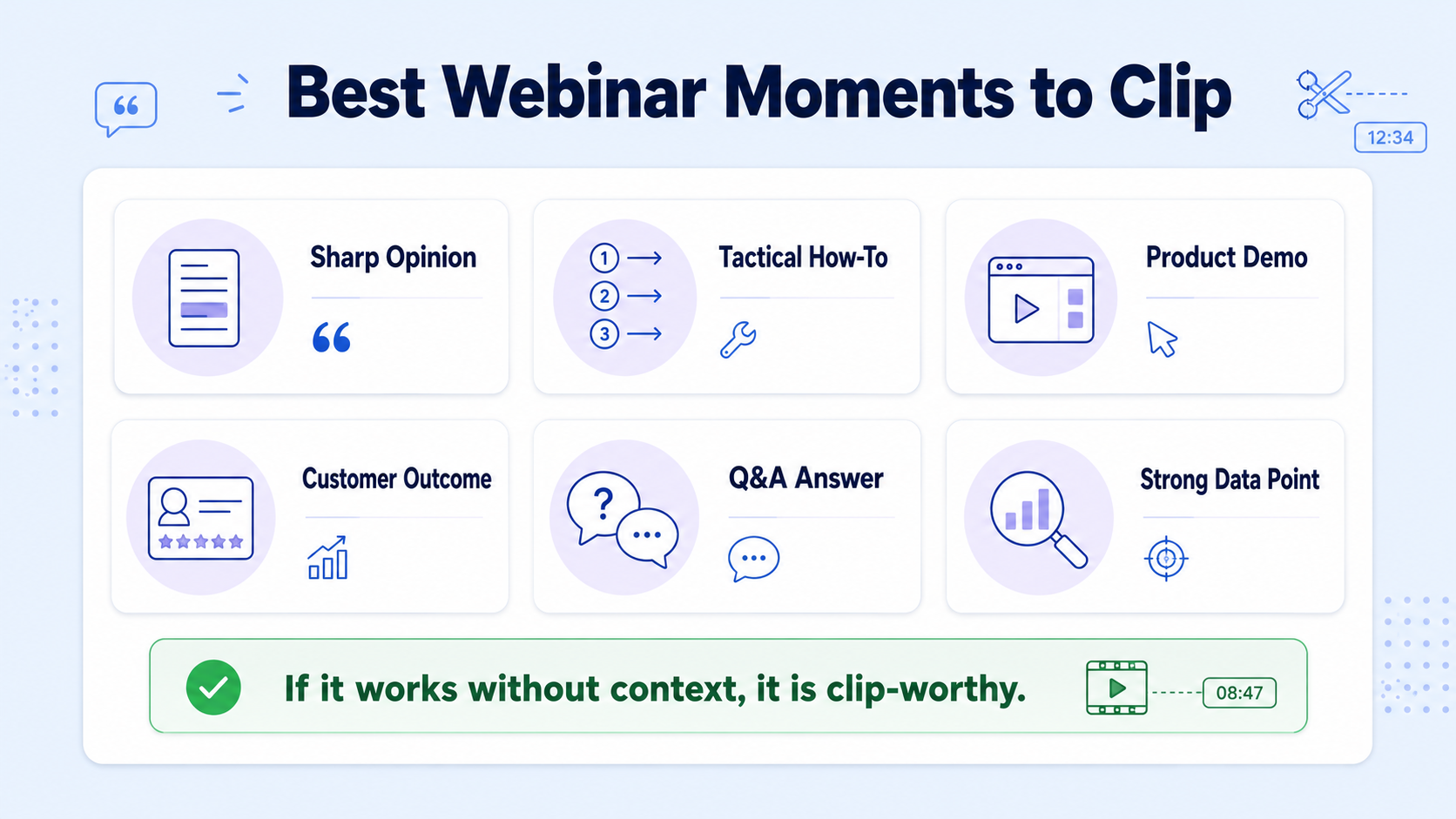
These are the moments that consistently produce high-performing clips:
- Sharp opinion or contrarian take: A founder or expert stating something that challenges a common assumption. These create comment sections.
- Tactical how-to moment: A specific, numbered process that solves a buyer pain point, without needing the full webinar for context.
- Product demo segment: A 60-to-90-second screen share where you show the software doing something impressive. Clip it, add captions, post it. This is buyer education at its most efficient.
- Customer story or outcome: A guest or panelist describing a specific result ("we went from X to Y in 90 days"). Social proof lands harder in 60 seconds than in a case study PDF.
- Reframeable question from the Q&A: The audience asks questions your buyers also have. A crisp answer to a sharp question makes an excellent standalone clip with zero additional setup.
- Stat or research moment: When a speaker drops a data point that makes someone stop scrolling.
When atomizing a podcast or webinar, use timestamps to identify the most impactful 30–60 second clips. These can be turned into audiograms for audio-focused platforms or, more powerfully, short video reels for channels like LinkedIn, YouTube Shorts, and TikTok.
One framework I use at Komet Media: scan the transcript first (not the video), and highlight every sentence that could stand alone as a LinkedIn post hook. Each one is a potential clip. Run the transcript through your AI tool, cross-reference your highlights, and you'll rarely need to watch more than 20 minutes of a 60-minute recording before you have a strong clip list.
A useful test: if you removed all context before the clip, would a cold buyer still understand the point and feel something? If yes, clip it. If not, it needs the full webinar to land.
How to Turn a 60-Minute Webinar into LinkedIn Clips: The Step-by-Step Workflow
This is the exact process we run at Komet Media for B2B SaaS clients doing webinar repurposing into short clips at volume.
- Upload the recording and generate the transcript: Use Descript, Opus Clip, or your video editing tool to create a searchable transcript. Descript is a deep transcription-driven editor with a Shorts workflow, one-click social exports, and rich audio tools , making it a strong starting point for B2B teams who want precise control.
- Scan transcript for clip candidates: Read for strong opinion, tactical advice, product moments, and quotable lines. Mark timestamps for each.
- Set your clip targets by platform: LinkedIn gets your 60–90 second clips; YouTube Shorts gets under 60 seconds. LinkedIn viewers value insight, and you cannot explain a complex B2B strategy in 15 seconds. 60–90 seconds allows you to state a problem, agitate it, and offer a solution.
- Extract and rough-cut each clip: Trim to the natural start and end of the thought. Cut cold opens, filler words, and dead air. Every second that doesn't add value is a second closer to someone scrolling away.
- Add captions: Always add subtitles. Most people watch LinkedIn video without sound, and subtitles directly improve your completion rates.
- Format for vertical (9:16): Vertical video (1080×1920) is currently getting a distribution boost on LinkedIn, while square and horizontal formats are being slightly deprioritized in the feed.
- Write a native caption: Don't just drop the clip. Write a post that could stand alone as text, then let the clip reinforce it. Add a soft CTA: "Full webinar in the comments" or "DM me for the replay."
- Schedule at 3–5 posts per week: According to HubSpot's 2025 State of Marketing report, brands publishing 3 to 5 short-form videos per week see significantly higher engagement growth than those posting daily on all platforms simultaneously.
- Route sales-relevant clips to your SDR team: Clips covering objections, integrations, or competitive comparisons belong in your sales sequences, not just social.
Best AI Tools for Cutting Webinars into Short Clips Without Watching the Whole Recording
In 2025, Goldcast customers generated 365,253 video clips via AI repurposing. 97.8% of them were made by AI. Manual clip creation is now the exception. Here's how the main tools compare for B2B SaaS teams:
The most productive content operations don't choose one tool. They build pipelines that leverage the strengths of each. A practical 2026 workflow uses Descript for initial long-form editing and transcript cleanup, feeds the finished video to Opus Clip for short-form extraction, and routes individual clips through CapCut AI for platform-specific styling. Kapwing serves as an entry-level tool with powerful AI features wrapped in an intuitive interface, perfect for teams testing video clipping workflows.
Opus Clip solves a specific problem better than any other tool: extracting maximum short-form content from long-form source material. Feed it a webinar recording, and it identifies the most engaging segments, extracts them, reformats them for vertical display, adds captions, and outputs ready-to-publish clips.
For B2B SaaS teams that want clips polished for buyer trust, not just volume, the tool layer is the starting point, not the endpoint. The strategic decisions, what to clip, how to frame it, where in the funnel it belongs, still require a human (or an agency) with product knowledge.
How Long Should Short Clips from a Webinar Be for LinkedIn vs. YouTube Shorts?
Length is where most SaaS teams get this wrong. They either cut 3-minute clips because "the point needs context" or they cut 15-second clips that feel incomplete. Both kill performance. Here's the data-backed breakdown by platform:
Short videos under 30 seconds achieve the highest completion rates but may lack depth for complex product explanations. Mid-length videos of 60–90 seconds balance engagement with substantive content, making them ideal for most B2B use cases. Video success depends heavily on the first three seconds. Hook viewers immediately with a bold question, surprising statistic, or direct statement.
The practical rule I apply: if the idea can be fully delivered in under 90 seconds with a clear hook, tight delivery, and a payoff, cut it to that length. Never pad a clip to hit a perceived minimum. Never cut a thought short to hit a ceiling. The idea dictates the length, and your job in editing is to tighten until nothing is left to cut.
For webinar repurposing into short clips on LinkedIn specifically, the clips that consistently drive DMs and demo requests are founder-led takes at 75–90 seconds: one clear problem, one sharp perspective, one CTA. No intro fluff.
Webinar Repurposing Strategy: How to Build It into Your SaaS Content System
One-off clip creation isn't a strategy. The teams generating real pipeline from webinar content have made repurposing a repeatable post-event system, not a post-it note they revisit a week later. Across the B2B industry, there has been a massive transition from singular-event thinking to viewing webinars as content machines. Webinars are now the best route to produce enough material to fuel a lasting, comprehensive content strategy.
Here's how to build the system for a B2B SaaS team:
Map clip types to funnel stage:
- Top-of-funnel (awareness): thought leadership clips, industry takes, contrarian opinions
- Middle-of-funnel (consideration): product feature clips, how-to demos, use case walkthroughs
- Bottom-of-funnel (decision): customer outcome clips, objection-handling moments, comparison takes
Assign distribution by channel:
- LinkedIn: founder and exec talking head clips, always posted natively
- YouTube Shorts: product demo clips and educational clips, optimized for search
- Email sequences: sales-relevant clips embedded with a thumbnail and CTA
- Sales enablement: clips that address common objections, sent 1:1 by SDRs
Set a post-webinar production schedule: Within 48 hours of a webinar: transcript complete, top 5 clip candidates identified. Within 5 business days: all clips edited, captioned, formatted, and queued. Week 2 onward: clips distributed across LinkedIn, email nurture, and sales sequences on a rolling basis. Over half of B2B companies now include webinars in their content marketing stack, and most repurpose them into blog posts, social clips, or eBooks. Webinars are becoming cornerstone assets that feed the entire content funnel.
This is the shift: the webinar is no longer deliverable. The clips are. The webinar is the raw material. Treat your video marketing strategy this way and a single recording becomes 30 days of content.
How Komet Media Builds Webinar Repurposing into Short Clips for SaaS Teams
Most agencies clip and deliver. We build a clip system that connects to your pipeline. The difference matters for SaaS teams where every content decision needs to justify itself against demo demand and buyer trust, not just reach.
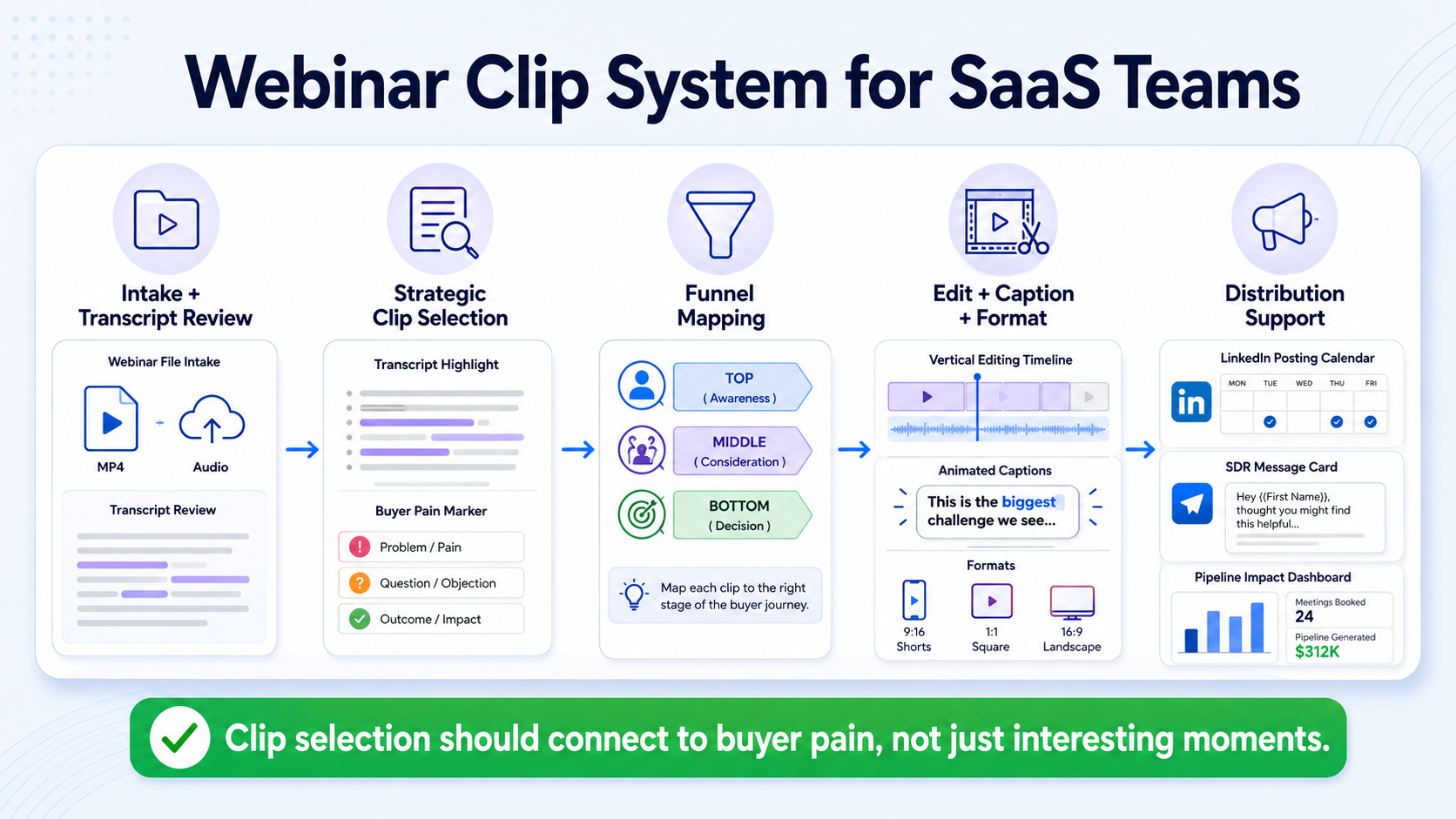
Here's what a Komet Media webinar repurposing engagement looks like:
Intake and transcript review: We receive your webinar recording and run a full video transcription. We scan for moments that match your ICP's pain points, not just moments that are "interesting." If we're working with a product team, we align clips to specific features or objections your sales team is hearing.
Strategic clip selection: We select 8–12 clips per webinar, mapped to top, middle, and bottom of funnel. Each clip gets a brief noting its intended audience, platform, and CTA. Nothing gets cut without a strategic reason.
Editing, captions, and formatting: Every clip gets tight editing (no filler, no dead air), animated captions, and vertical formatting for LinkedIn and YouTube Shorts. Talking head clips get reframed so the speaker is centered on mobile. B-roll and motion graphics are added where needed.
Distribution support: We deliver a LinkedIn posting schedule with native captions written for each clip. Sales-enablement clips come with suggested SDR messaging for 1:1 outreach.
This isn't a subscription video editing service that clips whatever you send. The most efficient strategy involves repurposing one piece of long-form content like a webinar into multiple short video assets for different channels. We do that with the product knowledge and B2B positioning context that makes clips actually convert, not just accumulate views. If your team produces regular webinars, demos, or podcasts and isn't turning them into clip assets, you're leaving a pipeline on the table. Talk to us about building the system.
Conclusion
Webinar repurposing into short clips is the highest-leverage content move available to most B2B SaaS teams in 2026. You've already done the hard work: the thinking, the structure, the expertise on camera. The clips are already in the recording. The system just needs to be built.
Key takeaways:
- Clip the opinion, the tactic, the demo, the outcome, and the Q&A, in that priority order.
- LinkedIn organic clips perform best at 60–90 seconds; YouTube Shorts under 60.
- Opus Clip, Descript, and Kapwing handle AI extraction, but strategy and positioning require human judgment.
- A post-webinar production system is what separates teams generating pipeline from teams generating content.
Frequently Asked Questions
Q1: How many short clips can I get from a single 60-minute webinar?
Most 60-minute B2B SaaS webinars yield 8–12 usable clips when you systematically scan the transcript for opinion moments, tactical advice, product demos, customer outcomes, and strong Q&A answers. Clip quality matters more than volume. Five sharp, well-edited clips outperform 15 mediocre ones.
Q2: Do I need to watch the entire webinar recording to find the best clips?
No. Generate a transcript first using Descript or Opus Clip, then read it as a document. Highlight every sentence that could serve as a LinkedIn post hook or a standalone insight. Then locate those timestamps and preview only those segments. This typically cuts review time to 15–25 minutes for a 60-minute webinar.
Q3: What's the difference between webinar repurposing and just posting the replay?
Posting a replay link asks your audience to commit 60 minutes. Repurposing into short clips delivers value in 60–90 seconds and meets buyers where they already are. Clips also work in email sequences, sales outreach, and demand generation campaigns. The replay is a gate; clips are distribution.
Q4: Should clips come from the founder or the marketing team's account on LinkedIn?
Posts from individual profiles receive 8x the engagement of identical content from company pages. Founder and executive clips posted from personal LinkedIn profiles consistently outperform brand page posts. Build your clip distribution strategy around individual voices, with the company page as a secondary amplifier.
Q5: How quickly should clips be published after a webinar?
Within 5 business days, ideally sooner. The first 48 hours are when webinar attendees are still in the mindset of that conversation. A clip posted within that window can re-engage attendees, capture non-attendees who saw the event promoted, and ride any social conversation from the live event.
Q6: Is webinar repurposing into short clips something we can do in-house or should we hire out?
AI tools make in-house clip extraction faster than ever. AI-powered tools now save content creators up to 200 hours annually. However, in-house teams often lack the time or B2B positioning expertise to select the right moments, write strong native captions, and connect clips to pipeline goals. Agencies like Komet Media handle the full system so your team ships content instead of managing timelines.


