🪄 AI Summary
Heading 1
Heading 2
Heading 3
Heading 4
Heading 5
Heading 6
Lorem ipsum dolor sit amet, consectetur adipiscing elit, sed do eiusmod tempor incididunt ut labore et dolore magna aliqua. Ut enim ad minim veniam, quis nostrud exercitation ullamco laboris nisi ut aliquip ex ea commodo consequat. Duis aute irure dolor in reprehenderit in voluptate velit esse cillum dolore eu fugiat nulla pariatur.
Block quote
Ordered list
- Item 1
- Item 2
- Item 3
Unordered list
- Item A
- Item B
- Item C
Bold text
Emphasis
Superscript
Subscript
Ever watched a YouTube video that felt oddly captivating, where you didn't even notice time passing? Or sat through a corporate video that felt like a lecture? The difference between those two experiences usually comes down to one thing: how well A-Roll and B-Roll footage is used.
Whether you're a content creator, a marketer, a journalist, or a budding filmmaker, understanding A-Roll and B-Roll is the single most important concept that separates average videos from professional ones. And yet, surprisingly, most beginners don't know what these terms even mean.
Let’s deep dive into it.
What Is A-Roll? (The Backbone of Your Video)
A-Roll footage is the primary footage used in video production. It prominently features the main subjects, interviews, or central narrative elements, including dialogue or direct actions that drive the story. It forms the backbone of your video, providing the structure and context that guide the viewer's understanding.
Think of A-Roll as the telling part of your video. It's the content your entire edit is built around. You can technically produce a video using only A-Roll, nothing else is strictly necessary. But it will almost certainly feel flat, repetitive, and hard to watch for more than a minute.
Examples of A-Roll:
A person speaking directly into the camera in a YouTube tutorial
An interview subject answering questions in a documentary
A CEO delivering a company announcement
A news anchor presenting the evening's headlines
An actor delivering dialogue in a scripted film
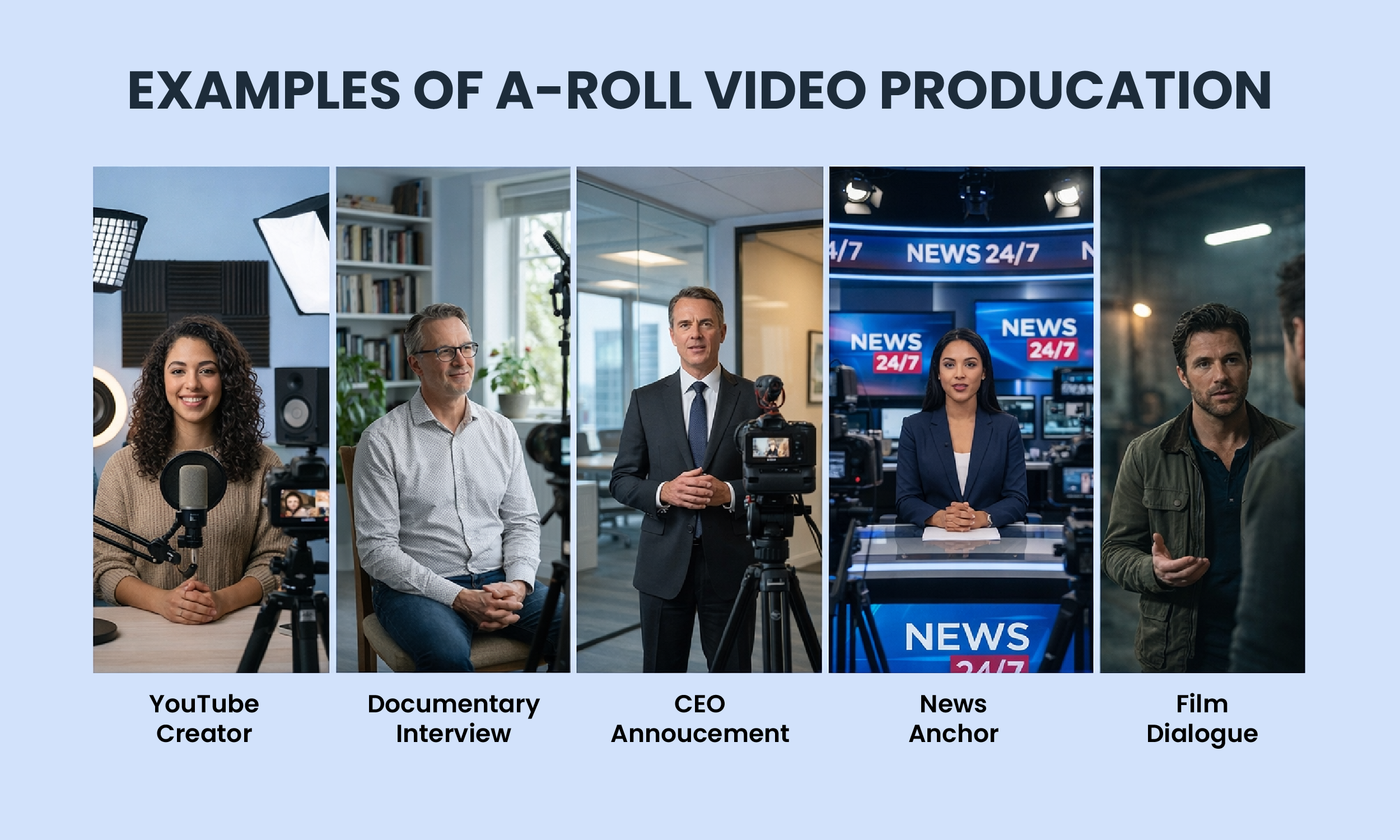
In a documentary, A-Roll might consist of a person sitting down and speaking directly to the camera about their experiences. In a product demo video, A-Roll could be the host explaining the features of the product.
What Is B-Roll? (The Magic That Makes Videos Cinematic)
B-Roll refers to supplemental footage that complements the main footage, the A-Roll, in video production. Typically, A-Roll includes interviews, primary visuals, and dialogue, while B-Roll serves to enrich the narrative by providing additional context, detail, and visual interest. This secondary footage can include establishing shots, cutaways, and action sequences that enhance the story without requiring dialogue. Essentially, B-Roll is the glue that helps create a cohesive and engaging viewing experience.
To further distinguish between the two, think of A-Roll as telling, and B-Roll as showing, or narration and illustration.
Examples of B-Roll:
A shot of city traffic while a narrator talks about urban development
Close-ups of a chef's hands while they talk about cooking technique
Footage of an athlete training while a voiceover plays
Product shots layered over an entrepreneur's interview
Recordings of everyday activities like making coffee, chilling, cooking and writing
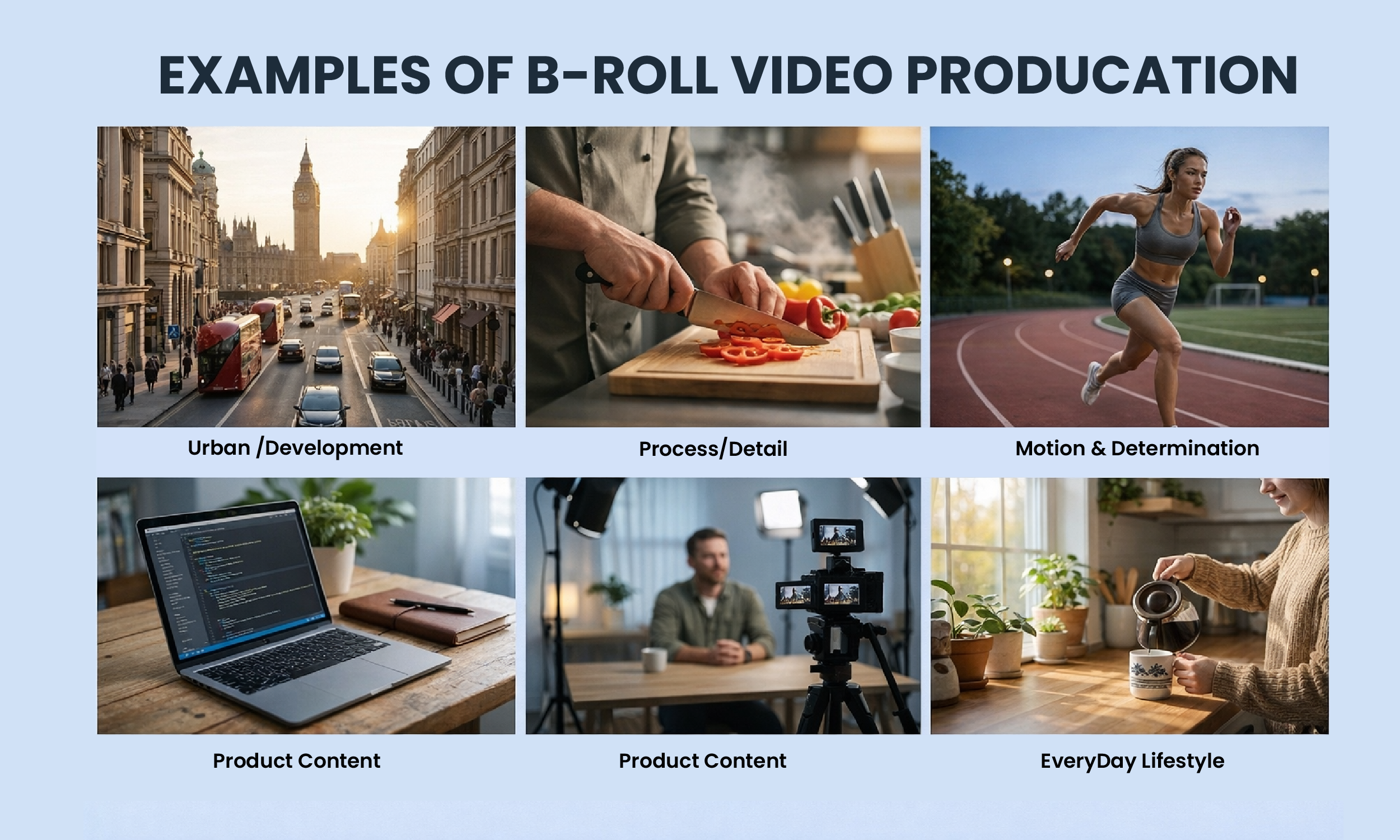
In a video where a speaker is talking about his experiences, the shots of the speaker driving his car and skateboarding on the beach are B-Roll footage. This B-Roll footage is used as cutaway shots to break the monotony and give the audience more to absorb from the story.
The Origin Story of How A-Roll and B-Roll Terms Come From?
The term originated in the early days of filmmaking when editors physically spliced together two reels of film, with the primary footage on the A-Roll and the B-Roll containing extra shots. While the term B-Roll dates back to working with literal film reels, it's still used in modern digital video production.
In the earlier days, when editors would have to manually cut and paste rolls of film together, videos were shot on two identical rolls, an A-Roll film and a B-Roll film. This technique helped filmmakers create smooth transitions from one scene to the next. Today, while you don't need to shoot on two different rolls, filmmakers still use these terms to distinguish between their footage.
A-Roll vs B-Roll Breakdown
How to Shoot Great A-Roll: 5 Pro Tips
1. Frame with the Rule of Thirds
Keep your subject centered or aligned with the rule of thirds, a concept that involves imagining your frame is divided into nine equal parts. Position your subject at one of these intersections, leaving about one-third of the height of the frame above the subject and another third below.
2. Prioritize Audio Quality
Poor audio quality can make A-Roll footage hard to understand and less engaging. Always use quality microphones and test your audio levels before starting your first take.
3. Stabilize Your Shot
Shaky camera movements can detract from your message. Use tripods or stabilizers to capture smooth, steady footage.
4. Nail Your Lighting
Use natural light if possible, or set up key lights to ensure your subject is evenly illuminated. Avoid harsh shadows or uneven lighting, as they can distract viewers.
5. Keep a Logical Flow
Jumping around from one disorganized clip to the next can confuse viewers and weaken your overall narrative. Ensure a logical, sequential flow that makes the story easy to follow.
How to Shoot Great B-Roll: 7 Pro Tips
1. Shoot Way More Than You Think You Need
A good rule of thumb is to capture at least 2–3 times more B-Roll than you think you need. This ensures you have enough variety for smooth editing and creative flexibility. Some pros shoot 5–10x their estimated need.
2. Hold Each Shot for at Least 10 Seconds
Hold each shot for 10+ seconds. Vary shot sizes (wide, medium, close). Use movement purposefully and match lighting. Short clips limit your editing options dramatically.
3. Use Camera Movement Purposefully
Smooth motion is key, and using sliders or gimbals can help achieve stable tracking shots. By experimenting with varied framing and movement styles, creators can instantly elevate the production value of their B-Roll.
4. Use the Right Frame Rate
Shoot at 24fps for a cinematic feel, 30fps for standard output, and 60fps for slow-motion B-Roll.
5. Match the Tone of Your A-Roll
The right B-Roll can help you fine-tune your atmosphere and keep your audience locked in. Dark and moody A-Roll needs matching B-Roll. Bright, energetic content needs dynamic cutaways.
6. Capture Ambient Audio Too
Capture ambient audio with your B-Roll. You can choose whether to use it in your edit, but having the option is valuable. B-Roll ambient sound helps smooth transitions and adds authenticity when mixed subtly under your main audio.
7. Have a Shot List
You shouldn't send out your B-Roll team without a plan. Map your A-Roll script and identify every moment that could benefit from a supporting visual. That becomes your B-Roll shot list.
How to Edit A-Roll and B-Roll Together
Here's the professional workflow used by editors worldwide:
Step 1: Import and organize all footage but separate folders for A-Roll and B-Roll.
Step 2: Edit your A-Roll first. Build the complete story using only your primary footage. Get the audio and narrative flow perfect.
Step 3: Watch your A-Roll timeline and identify moments that feel flat, repetitive, or where cuts are jarring.
Step 4: Drop B-Roll onto a layer above your A-Roll to cover cuts, add context, and introduce visual variety.
Step 5: Adjust clip timing so B-Roll feels natural, not forced. In your timeline, most B-Roll clips should be 3–7 seconds. Fast-paced social content may use 1–3 second clips; slow documentaries may use 8–12 second clips.
Step 6: Color grade your B-Roll to match A-Roll for visual consistency.
Where to Get Free B-Roll Footage (If You Can't Shoot It)
Sometimes budget or logistics make it impossible to shoot custom B-Roll. Here are the best free sources:
Pexels Videos – pexels.com/videos, Huge library, completely free for commercial use
Pixabay – pixabay.com, Free stock video with no attribution required
Coverr – coverr.co , Beautiful curated clips, free to download
Videvo – videvo.net, Mix of free and premium footage
Mixkit – mixkit.co, Clean, high-quality free clips
Stock footage is a great option when shooting custom B-Roll isn't possible. It's useful for scenes like aerial shots, city landscapes, or general industry-related visuals. However, to maintain authenticity, choose stock clips that closely match your original footage in quality, lighting, and style.
Common A-Roll Mistakes to Avoid
1/ Problem: Poor audio quality that makes the speaker hard to understand.
Solution: Always use a dedicated microphone and test your audio levels before recording.
2/ Problem: Talking without structure, leading to rambling or confusing explanations.
Solution: Prepare a short outline or script so your message flows clearly from point to point.
3/ Problem: Bad framing that makes the video feel amateur or distracting.
Solution: Use the rule of thirds and keep proper headroom so the subject looks natural in the frame.
4/ Problem: Harsh or uneven lighting that creates shadows or dull visuals.
Solution: Use soft lighting or natural light to keep the subject evenly illuminated.
5/ Problem: Long, uncut talking shots that feel repetitive and boring.
Solution: Break the footage with B-Roll, jump cuts, or different camera angles to keep the video visually engaging.
Common B-Roll Mistakes to Avoid
1/ Problem: Running out of B-Roll during editing, forcing awkward repetition.
Solution: Shoot 5–10 times more B-Roll than you think you need.
2/ Problem: Using generic stock footage that doesn't match your message.
Solution: Ensure every B-Roll clip directly illustrates or enhances what's being discussed.
3/ Problem: Mixing color grades, aspect ratios, or quality levels creating jarring, unprofessional feel.
Solution: Color grade all footage consistently and match aspect ratios throughout.
4/ Problem: Every B-Roll shot panning, zooming, or tracking creates nausea and distraction.
Solution: Balance movement with static shots and use stabilizers for smooth movement.
The Secret Formula for Engaging Video
If the A-Roll is the heart of your video story, the B-Roll is the supportive tissue that fleshes it out and brings it to life. Skilled use of both types of footage in tandem is key to creating professional, engaging video content that resonates with audiences.
The formula is simple:
A-Roll tells your audience what the story is.
B-Roll shows them why it matters.
Master these two concepts and you'll immediately separate yourself from the 95% of video creators who wonder why their content doesn't hold attention. Great storytelling isn't about expensive cameras or Hollywood budgets, it's about understanding the language of visual narrative. A-Roll and B-Roll are the alphabet of that language.
Start shooting both intentionally. Your audience will feel the difference, even if they don't know why.
Frequently Asked Questions
Q: Can you make a video with only B-Roll and no A-Roll?
Absolutely! B-Roll-only videos with music and text overlays are increasingly popular, especially on social media. These montage-style videos can be highly effective for brand storytelling, product showcases, and atmospheric content.
Q: How much B-Roll should I shoot relative to A-Roll?
As a starting point, shoot at least 3x your A-Roll length in B-Roll. Advanced creators often shoot 5–10x.
Q: Is reaction footage considered B-Roll?
Yes! Reaction shots, crowd shots, and audience responses are classic B-Roll used in news, sports, and documentary production.
Q: Does B-Roll need its own audio?
Not necessarily. It often plays under A-Roll audio (voiceover or interview). But capturing ambient sound during B-Roll shoots gives you options in the edit.
Q: What equipment do I need to shoot B-Roll?
You can shoot excellent B-Roll with just a smartphone and a gimbal. As you progress, a mirrorless camera with a versatile lens (like a 24-70mm) paired with a slider or drone will dramatically elevate your results.