
🪄 AI Summary
Heading 1
Heading 2
Heading 3
Heading 4
Heading 5
Heading 6
Lorem ipsum dolor sit amet, consectetur adipiscing elit, sed do eiusmod tempor incididunt ut labore et dolore magna aliqua. Ut enim ad minim veniam, quis nostrud exercitation ullamco laboris nisi ut aliquip ex ea commodo consequat. Duis aute irure dolor in reprehenderit in voluptate velit esse cillum dolore eu fugiat nulla pariatur.
Block quote
Ordered list
- Item 1
- Item 2
- Item 3
Unordered list
- Item A
- Item B
- Item C
Bold text
Emphasis
Superscript
Subscript
Most podcast clips die in the first scroll. Not because the conversation was bad, but because the edit was wrong. The good news: the gap between a clip that lands and one that disappears is almost entirely technical and structural. I work with B2B SaaS and tech teams at Komet Media, and these tips for editing podcast clips that travel in 2026 are what we use every day to turn recordings into pipeline-moving short-form content. Here is exactly what works.
TL;DR
- Lead with the most compelling moment, never the intro pleasantries.
- Burn-in captions, nail the 9:16 aspect ratio conversion, and keep clips between 30–60 seconds.
- Your hook framework must work in the first 3 seconds or the algorithm ignores the rest.
- Roughly a third of clip viewers reliably go on to watch the full episode or become regular listeners , so every clip is a discovery asset.
Why Some Podcast Clips Travel and Others Don't
Short-form clips are the #1 audience growth driver in podcasting. But growth is not automatic. The clips that travel share a specific structure: they start in the middle of a thought, they resolve something, and they feel complete. The ones that stall open with "Hey, welcome back to the show." That's a death sentence on the TikTok For You Page.
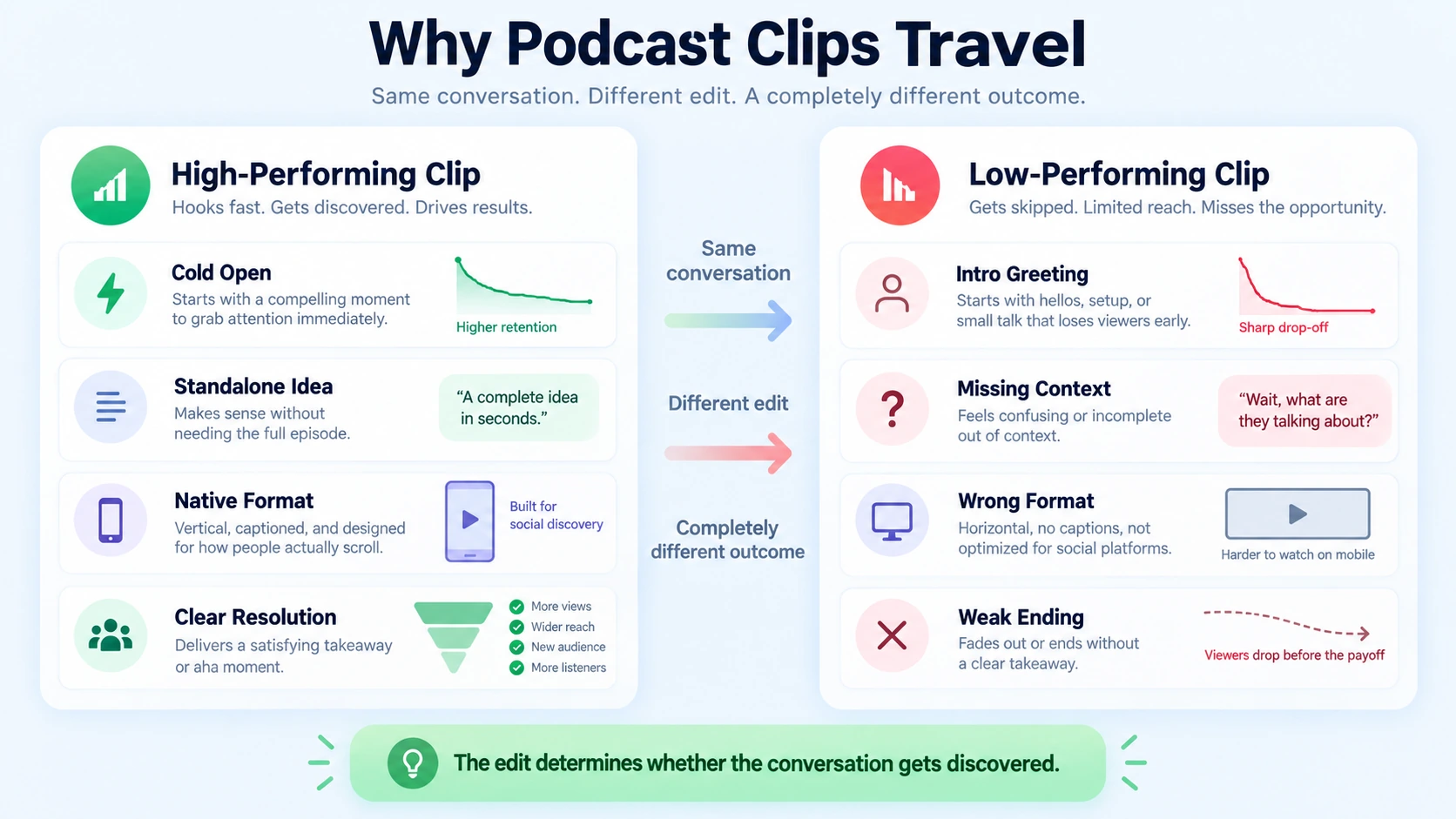
Watching podcast clips is now mainstream, with 89% of listeners watching them at least sometimes and 72% doing so often or always. YouTube leads engagement at 67%, followed by TikTok at 63%. That audience is there. The problem is almost always the edit, not the content.
Three structural differences separate clips that travel from clips that sit:
- Content selection: A clip needs a standalone idea, not a thread of a longer point. The moment someone says "as I mentioned earlier," the clip is already broken.
- Vertical format: Social platforms reward content that feels native to the format, which means adding on-screen captions, tightening pacing, framing speakers clearly, and ensuring the first few seconds create an immediate hook.
- Platform intent: YouTube Shorts behaves differently from TikTok and Reels because it is tied to YouTube search and suggested video, so clips compound over months rather than dying in 48 hours. Matching the clip to the platform's distribution logic is not optional.
Platforms with strong recommendation feeds often capture 30–60% of new show discovery, and short clips can drive first exposure. That makes your clip the front door to your entire content library and, for B2B teams, the first touchpoint in a buyer education sequence.
Your Hook Framework: What to Do in the First 3 Seconds
When it comes to short-form video, the first three seconds are everything. That is when most people decide to stay or swipe. You do not get a warm-up: you are either immediately compelling, or they scroll. There is one thing you learn fast when you start making vertical clips: the content is not what decides whether a video takes off. The hook is. For podcast clips specifically, the edit must open cold, mid-thought, or mid-reaction. Never with a greeting, a host intro, or a guest credential rundown.
Four hook patterns I use consistently for B2B podcast clips:
- Contrarian opener: Challenge an assumption your buyer holds. "Most SaaS onboarding flows are built for the vendor, not the user" triggers instant attention from the right audience.
- Open loop: Start with an outcome and withhold the method. "We cut our sales cycle by 40% and barely changed the product" creates a contract with the viewer.
- Identity call: Address the exact role watching. "If you're a founder running a GTM motion without video..." The algorithm and the viewer both respond.
- Specific curiosity gap: Curiosity gaps still work, but generic ones do not. Broad curiosity feels spammy now. Specific curiosity feels valuable.
TikTok weights early hold heavily: a video keeping 80% of viewers for 3 seconds typically out-distributes one keeping 60% for 30 seconds. The hook patterns that score highest on early retention are identity calls, contrarian statements, open loops, and confessions, all under roughly 12 spoken words. The visual hook matters as much as the audio. A static talking head with no movement or text on screen loses before the speaker finishes the first sentence.
How Long Should a Podcast Clip Be for Maximum Reach?
There is no single right answer, but there are clear platform-specific targets. The mistake is picking one length and applying it everywhere. A discovery-focused Reel, a search-focused Short, and a TikTok story may benefit from different cuts of the same source. Here are the targets I work from in 2026:
80–120 seconds suits clips that genuinely need extended context, with retention dropping sharply above 90 seconds unless the moment is extraordinary.
The practical rule: cut the clip to the length the idea requires, then trim 15% more. Most podcast clips run long because editors are reluctant to cut speaker pauses, filler, and transitional phrases. Every second of filler costs you retention signal, and retention signal is what feeds the social media algorithm.
For B2B SaaS teams using clips for podcast marketing and buyer education, the 45–60 second window gives enough time to establish a point and a clear context-setter for the buyer, without losing them before a CTA or a clear next step.
Best Software for Editing Podcast Clips in 2026
The market has consolidated around three tools with distinct jobs. Choosing wrong costs hours per week. Descript is the document-driven editor with cloud transcription, built for podcasts and long interviews. Opus Clip is the long-to-short viral clipper with autoposting. CapCut handles platform-specific finishing, effects, and templates. Komet Media also creates video content completely from scratch if no existing recordings are available.
A practical 2026 workflow uses Descript for initial long-form editing and transcript cleanup, feeds the finished long-form video to Opus Clip for short-form extraction, and routes individual short-form clips through CapCut for platform-specific finishing. CapCut edits the shorts you plan. Opus Clip discovers the shorts you already recorded.
For teams with existing podcast libraries, Opus Clip's AI scans the full episode, scores moments by hook potential, and surfaces candidates you would have missed manually. Descript's transcript-native editing is particularly valuable for podcast clips because you edit by deleting words in a doc, and the video cut happens automatically. For teams managing high-volume short-form video editing, that speed compounds quickly across a back catalog. For teams with no existing video assets, Komet Media also handles full production from scratch, including research, scripting, and post-production.
Captions, Aspect Ratio, and Format Details That Drive Engagement
These are not cosmetic. They are distribution mechanics.
Subtitle burn-in: Captions increase video podcast engagement by approximately 20%. 85% of viewers watch without sound , which means a clip without burned-in captions is muted content. Captions accessibility also extends reach to deaf and hard-of-hearing audiences, and the major platforms factor accessibility signals into distribution.
Aspect ratio conversion: Every clip needs a true 9:16 vertical video format conversion, not just a letterboxed landscape crop with black bars. Black bars are a scroll trigger. Use dynamic reframe to keep the speaker's face centered. Adobe Premiere Pro's Auto Reframe and CapCut's AI reframe handle this reliably.
Waveform animation and audiogram elements: For clips that feature audio-only segments or B-roll footage overlays, a waveform animation keeps visual engagement alive when nothing else is moving on screen. It also signals to viewers watching on mute that audio exists and is worth turning on.
Text on screen: The first line of on-screen text functions as a second hook. It should not be a caption of what the speaker is saying. It should be the punchline, the claim, or the question that makes the viewer commit to the next 5 seconds.
B-roll footage: Talking-head clips hold better when cut with B-roll every 8–12 seconds. For B2B podcast clips, this can be screen recordings of the product, data visualizations, or simple graphic overlays. It breaks visual monotony and reinforces the spoken point simultaneously.
Content Repurposing Workflow: How to Cut Clips at Scale
A single 45-minute podcast episode is not one asset. It is a content repurposing workflow trigger. Here is the system I run for B2B clients:
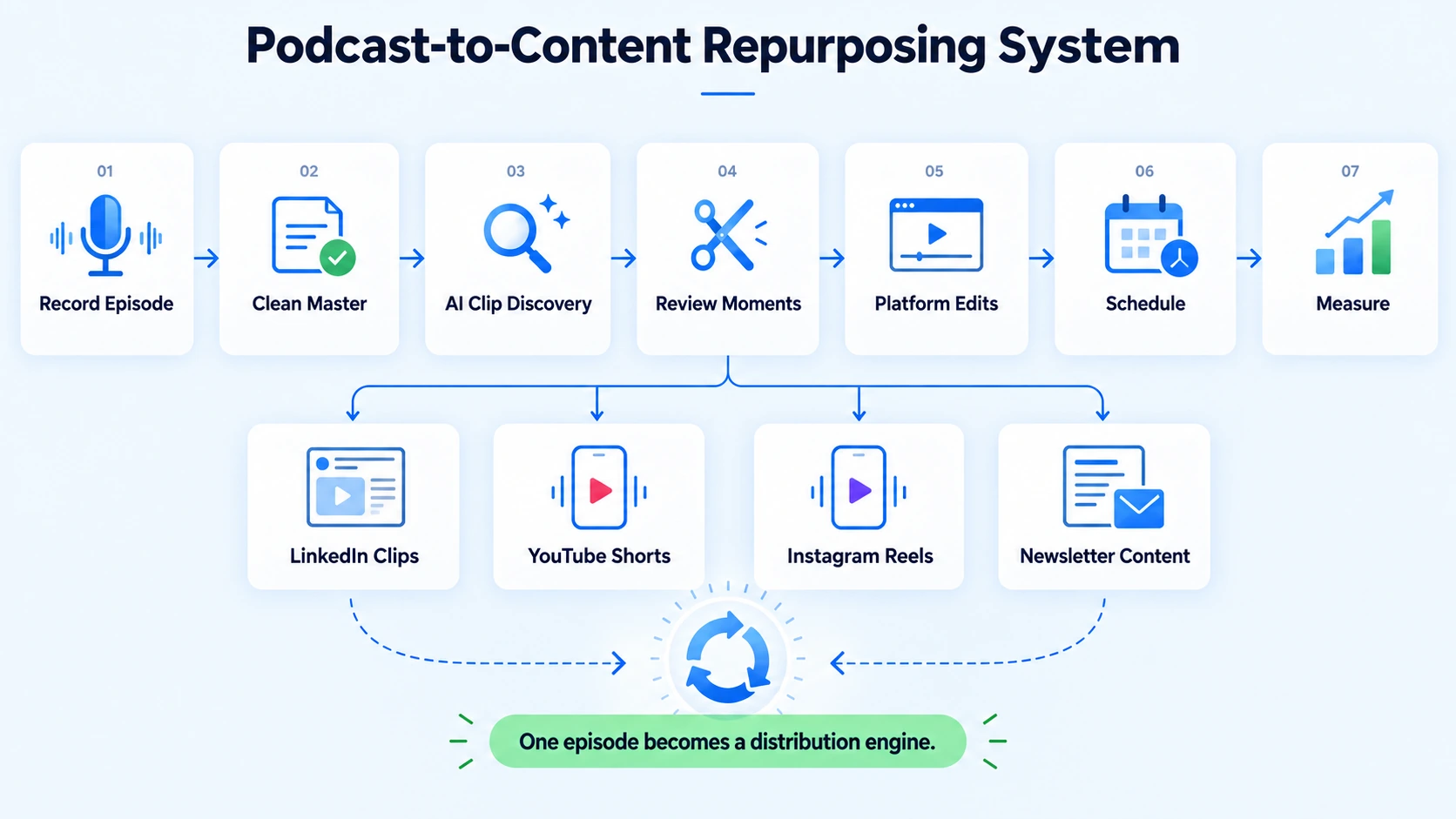
- Record and edit the full episode in Descript: remove filler words, clean silences, and export a clean master.
- Run the master through Opus Clip: let AI identify 8–12 candidate clips, review the viral scores, and shortlist 4–5.
- Review for standalone value: does each clip make sense without any prior context? If it requires "as I mentioned earlier," cut it or restructure it.
- Apply platform-specific edits in CapCut: resize to 9:16, add burned-in captions with high-contrast typography, and overlay a text hook in the first 3 seconds.
- Create platform variants: the TikTok cut, the Instagram Reels distribution cut, and the YouTube Shorts optimization cut are different lengths and sometimes different moment selections from the same episode.
- Schedule with platform-native upload: avoid third-party schedulers that compress metadata. Upload natively to TikTok, Instagram, and YouTube Shorts for full algorithm eligibility.
Clipped highlights drive up to 60% of new listener acquisition on TikTok and Shorts. For B2B SaaS teams, that acquisition maps directly onto buyer education touchpoints. A founder or VP of Marketing who finds your clip on Instagram Reels distribution is entering your funnel the same way a demo request does, just earlier. Teams serious about this workflow at volume should look at dedicated podcast editing services and video editing services rather than managing it in-house with stretched bandwidth. Whether you have existing recordings or need complete production from scratch, Komet Media supports both workflows.
Tips for Editing Podcast Clips Specifically for B2B Distribution
These tips for editing podcast clips that travel in 2026 have a different weight when your audience is a B2B buyer. The TikTok For You Page is a discovery engine. But for a SaaS founder or growth head, discovery on LinkedIn or YouTube Shorts is where the intent is higher and the path to pipeline is shorter.
Three adjustments I make for B2B podcast clips that differ from consumer content:
- Lead with the business problem, not the narrative: B2B buyers respond to clips that name their specific situation within 5 seconds. "If your sales team is doing all the educating and none of it scales" is a better opener than a story about how the guest started their company.
- Frame the value clearly on screen: Text overlays should state the outcome, not just echo the audio. "How [Company] cut onboarding calls by 30%" as a text hook pulls decision-makers through.
- Use the clip as a sales enablement tool: Short-form clips are excellent for discovery, but they should also guide audiences toward deeper engagement. Simple conversion pathways help turn social viewers into full-episode listeners , or in B2B terms, into demo requests.
The content repurposing workflow here connects to webinar and podcast content that already exists inside most B2B teams. The production investment is already made. The clips are just the distribution layer most teams skip. 77% of first-year podcast listeners actively watch video podcasts , which means video-first distribution is now the default expectation, not a bonus for large teams.
Conclusion
The tips for editing podcast clips that travel in 2026 come down to four things every time:
- Start cold, mid-thought, with a hook that earns 3 more seconds.
- Match the length, aspect ratio conversion, and subtitle burn-in to each platform's native behavior.
- Use a repeatable content repurposing workflow: Descript to edit, Opus Clip to extract, CapCut to finish.
- For B2B teams, treat every clip as a buyer education asset, not just a content play.
If your team is sitting on recorded podcasts, webinars, or demos—or if you have no existing content and need to build a video library from scratch—you are leaving the highest-leverage distribution channel on the table. Start here.
Frequently Asked Questions
Q1: What is the best clip length for podcast clips on social media in 2026?
30–60 second clips dominate retention for most podcast genres. Hot takes and comedy clips work best at 25–45 seconds. For LinkedIn, go 60–90 seconds. Match the length to the platform and the idea, not to a fixed rule.
Q2: Do I need to burn in captions on every podcast clip?
Yes. 85% of viewers watch without sound , and captions increase video podcast engagement by approximately 20%. Burned-in subtitles are not optional for any platform in 2026.
Q3: What software is best for cutting podcast clips in 2026?
The strongest workflow is Descript to create, Opus Clip to mine, and CapCut to polish the winners. For high-production clips with B-roll footage and motion graphics, add Adobe Premiere Pro for the final cut. If you don't have existing video content, Komet Media can also create and produce assets completely from scratch.
Q4: How do podcast clips help with the B2B pipeline?
Clips are podcasting's new front door. New research from Podcast Atlas shows they drive real discovery, not just passive scrolling. For B2B teams, each clip is a buyer education touchpoint that moves cold audiences toward demo demand and inbound intent.
Q5: How many clips should I cut from one podcast episode?
Aim for 4–6 standalone clips per 45-minute episode. Each clip should make a single, complete point without requiring prior context. One 12-minute video can become 10–20 assets across platforms when you vary the length, platform framing, and hook for each.
Q6: Why do some podcast clips go viral while others with equal quality don't?
The algorithm sees early drop-off, logs it, and stops distributing the clip. The first 3 seconds are not just good practice: they are the filter that separates a clip that circulates from one that dies on arrival. Hook strength, not content quality, is the primary variable.


