
🪄 AI Summary
Heading 1
Heading 2
Heading 3
Heading 4
Heading 5
Heading 6
Lorem ipsum dolor sit amet, consectetur adipiscing elit, sed do eiusmod tempor incididunt ut labore et dolore magna aliqua. Ut enim ad minim veniam, quis nostrud exercitation ullamco laboris nisi ut aliquip ex ea commodo consequat. Duis aute irure dolor in reprehenderit in voluptate velit esse cillum dolore eu fugiat nulla pariatur.
Block quote
Ordered list
- Item 1
- Item 2
- Item 3
Unordered list
- Item A
- Item B
- Item C
Bold text
Emphasis
Superscript
Subscript
You ran a founder AMA. Real questions, real answers, real expertise. Then it sat in a transcript doc and did nothing. If you know how to repurpose an AMA into a carousel, that same session becomes a high-performing LinkedIn or Instagram asset that builds trust, educates buyers, and keeps working for weeks. And if you don't have an existing recording or content library, Komet Media can guide, script, and produce your AMA campaign from scratch for B2B SaaS, AI, and tech startups & teams. This guide walks through exactly how we do it, from initial concept or raw Q&A transcript to published carousel, with zero filler steps.
TL;DR
- Pull 6–10 high-signal Q&A pairs from an existing transcript, or script them from scratch with your team before opening any design tool.
- Each slide = one question + one sharp answer, built for mobile-first reading.
- 9–12 slides is the sweet spot, long enough to trigger LinkedIn's algorithmic boost, short enough that most readers finish.
- Publish as a PDF document post on LinkedIn for maximum organic reach.
Why You Should Repurpose an AMA into a Carousel Right Now
Most B2B founders treat an AMA session as a one-time event. It fires live, generates buzz, and then disappears. That is a waste of your best-performing content type.
LinkedIn carousel (multi-slide) posts generate 3.4x more reach and 2.1x more engagement than single-image posts, and in 2026 the LinkedIn algorithm prioritizes dwell time above almost every other metric. When a user stops to swipe through a carousel, they signal high-value content to the platform, which then shows it to a wider audience. Carousels are also the most saved post type on LinkedIn, according to Socialinsider. Saves are a high-intent metric that tells the algorithm your content is worth revisiting, and for B2B brands, a save is often a precursor to a lead.
AMA content is perfectly structured for this format. Every Q&A pair is already a discrete, self-contained insight. The question becomes the hook. The answer becomes the value delivery. The audience that watched your AMA live gets a skimmable reference. The audience that missed it gets introduced to your thinking for the first time. The AMA format, where founders and executives candidly answer audience questions, is not just for famous individuals. Businesses can leverage it as a trust-building activity across any social platform. When you turn that raw trust signal into a carousel, you are distributing it where buyers already scroll.
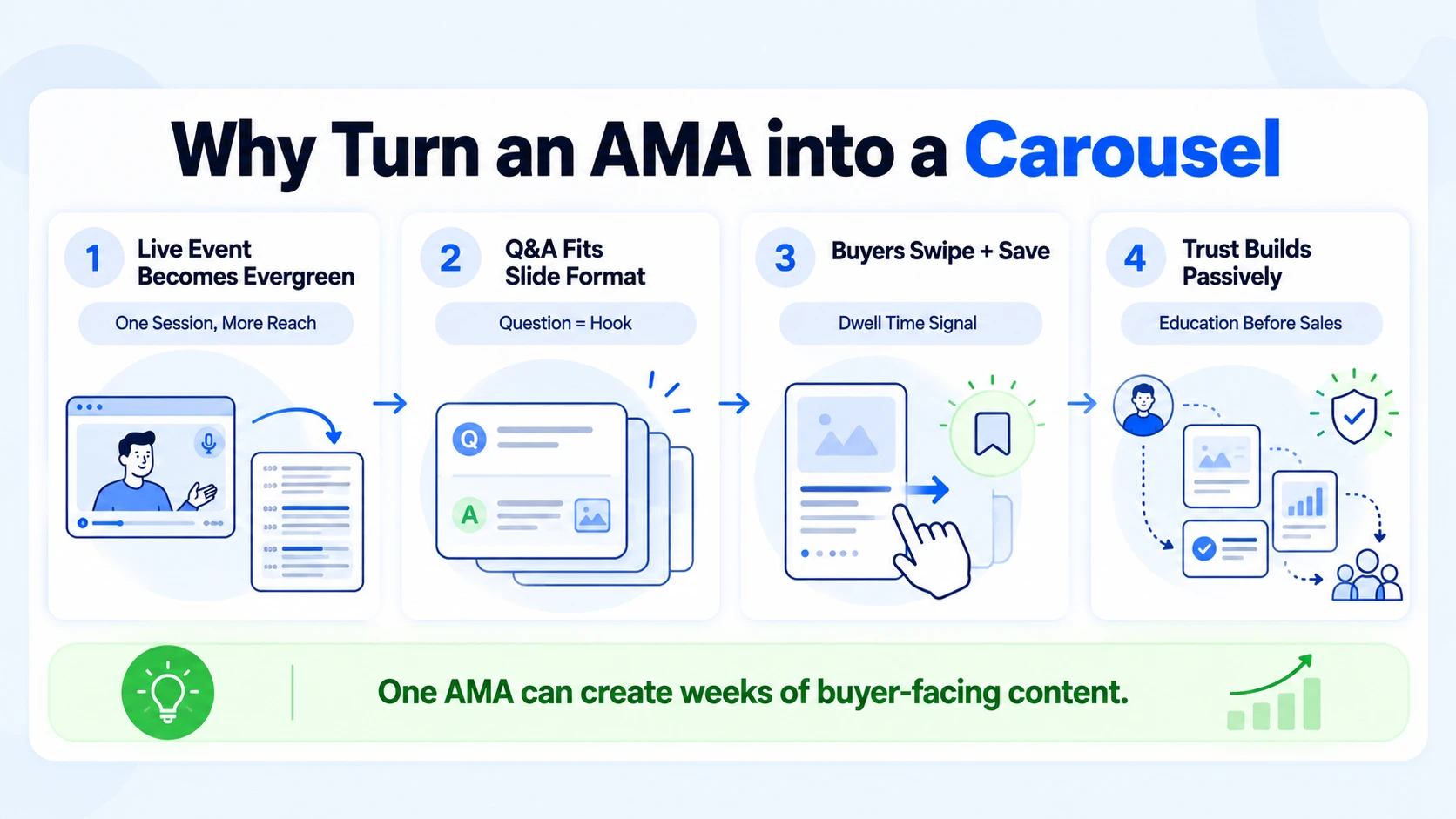
For B2B SaaS, AI, and tech startups & teams specifically, this matters for the pipeline. A prospect who swipes through eight slides of your thinking on pricing, integrations, or product positioning is not just engaged, they are educated. That is buyer-readiness built passively, without a sales call.
At Komet Media, this is one of the highest-ROI moves we make for B2B SaaS, AI, and tech startups & teams—whether they already have an existing content library or need to build an AMA program completely from scratch. An AMA carousel turns a single hour of preparation or recording into weeks of inbound surface area.
How to Pull Key Insights from Your AMA for a Carousel Post
The quality of your carousel lives or dies in this step. Do not skip straight to Canva. Your goal here is insight extraction, not transcription. You want the 6–10 Q&A moments that were the sharpest, most surprising, or most practically useful. Here is how to do it fast:
- Get the full transcript or build from scratch: Use tools like Otter.ai, Descript, or native exports to pull text from existing recordings. If starting from scratch with no prior recordings, conduct buyer research and script core Q&A prompts targeting key decision criteria.
- Read for signal, not length: Scan for moments where the audience reaction spiked, upvotes on Reddit, replies on LinkedIn, emoji reactions on Instagram Stories. High reaction = high resonance.
- Tag by category: Label each Q&A pair as Education, Positioning, Trust-building, or Objection-handling. This gives your carousel a strategic mix rather than a random pile of answers.
- Score for clarity: Every answer you select must be understandable in under 15 seconds without prior context. If it requires setup, rewrite it or cut it.
- Compress the answers: AMA answers tend to be conversational and long. For carousel use, trim each answer to 2–4 punchy sentences. Remove hedges, qualifiers, and filler.
- Write a slide-one hook: Your cover slide is not a Q&A. It is a promise. Write a single declarative statement that tells the viewer what they will learn, e.g., "8 things our CEO said in our AMA that no SaaS vendor will tell you."
Q&A sessions are particularly rich for repurposing because common questions from your audience make perfect standalone social posts. The difference with a carousel is that you are sequencing those posts into a cohesive narrative arc, which increases both dwell time and perceived authority.
Keep a running AMA insights doc. Every time you run a session, drop the best Q&A pairs into it. Over six months, that doc becomes a content repurposing engine that feeds carousels, short-form videos, email sequences, and sales enablement assets.
How Many Slides Should an AMA Carousel Have?
This is the most common structural question, and the answer is more specific than most guides admit. 9–12 slides is the sweet spot: this range balances dwell time (long enough to trigger the algorithmic boost) with completion rate (short enough that most readers finish). Carousels under 6 slides under-perform; carousels over 15 slides lose too many readers mid-way. Here is how to map your AMA Q&A pairs to that slide structure:
For Instagram carousels, 7–10 slides is the practical ceiling. Instagram's swipe-fatigue sets in faster than LinkedIn because the audience intent is different, they are browsing, not researching. Tighten answers to 1–2 sentences and lead with the punchiest Q&A pairs first.
For LinkedIn document posts, lean toward 10–12 slides. If users consistently spend 5–10 seconds per slide, the algorithm interprets that as high-quality content and expands the post's reach to a wider audience. More slides, done well, work in your favor.
Use 1080×1350 pixels (4:5 portrait ratio), this fills the mobile feed vertically and matches LinkedIn's feed behavior. For Instagram, square (1080×1080) or 4:5 portrait are both acceptable. One rule that applies everywhere: never put two Q&A pairs on the same slide. One question. One answer. One slide. The moment you crowd a slide, you kill the visual hierarchy and the reader skims past.
Turn AMA Session into LinkedIn Carousel: Step-by-Step
This is the full production workflow, from extracted insights to published posts.
- Open Canva or Adobe Express: Create a new presentation at 1080×1350px. Both tools have carousel templates; ignore the decorative ones and start from a clean, brand-consistent layout.
- Build your brand template first: Set your font (one heading, one body), brand color, and logo placement before touching content. Changing this after 10 slides wastes 30 minutes.
- Design the cover slide: Large heading, brand color background, your name or company handle in a smaller font. No more than 10 words. Think book cover, not PowerPoint title slide.
- Build each Q&A slide: Place the question in a contrasting color or weight (bold, slightly smaller than cover). Place the answer below in readable body text, minimum 18pt for mobile legibility.
- Add visual hierarchy cues: Use slide numbers (e.g., "3/11") in a corner. Use a colored question prefix like "Q:" to help readers scan. Keep whitespace generous.
- Design the summary slide: Three bullet points. Pull the single most quotable line from each of your three best answers.
- Design the CTA slide: One action only. "Follow for more" or "DM me [keyword]" or "Link in bio." Do not stack three CTAs on one slide.
- Export as PDF: For LinkedIn, export as a single multi-page PDF. This is what LinkedIn renders as a swipeable document post, not an image gallery.
- Write your post caption: 3–5 lines max. Restate the hook from slide one. List 2–3 specific things they will learn. End with a micro-CTA ("save this for later").
- Post natively, no link in caption: LinkedIn suppresses reach on posts with external links. Keep all links in the first comment.
Our short-form video editing service pairs directly with this workflow, the same AMA session that becomes a carousel also becomes 3–5 short video clips, doubling your content output from a single source.
AMA to Carousel Content Repurposing Strategy for B2B SaaS, AI, and Tech Startups & Teams
The tactical steps above get you a carousel. This section is about building the system so every future AMA automatically feeds your content pipeline. The strategic frame is content atomisation: one AMA session = multiple content atoms across multiple formats and channels. Here is the full map:
Two Production Modes for B2B SaaS, AI, and Tech Startups & Teams: For teams with existing AMA or webinar recordings, Komet extracts the top insights directly from your footage. For teams starting from scratch with no content library, Komet handles research, positioning, scripting, recording guidance, and post-production to build your full creative library from the ground up.
For B2B SaaS, AI, and tech startups & teams, the carousel and short-form video are the highest-priority outputs because they serve pipeline directly. A prospect who sees your founder answer a hard pricing question in a carousel is primed for a demo request. That is buyer education at scale, without a sales rep in the loop.
A content repurposing strategy is a structured plan for adapting and redistributing existing content into multiple formats to maximize reach and ROI, instead of creating 10 separate pieces, you design one core asset and repurpose it across platforms.
The brands that win at thought leadership are not creating more content. They are running one AMA per quarter, extracting everything from it, and distributing it systematically. A 60-minute AMA session, handled with this framework, can generate 30+ pieces of content. That is the kind of output that builds brand authority without burning your team.
If you run webinars or live events, the same extraction framework applies. Any live Q&A format, webinar, podcast interview, conference panel, is raw material for a carousel.
Slide Design Principles That Make AMA Carousels Perform
Most AMA carousels fail not because the content is weak, but because the design kills readability before the reader reaches slide three. These are the non-negotiable design rules:
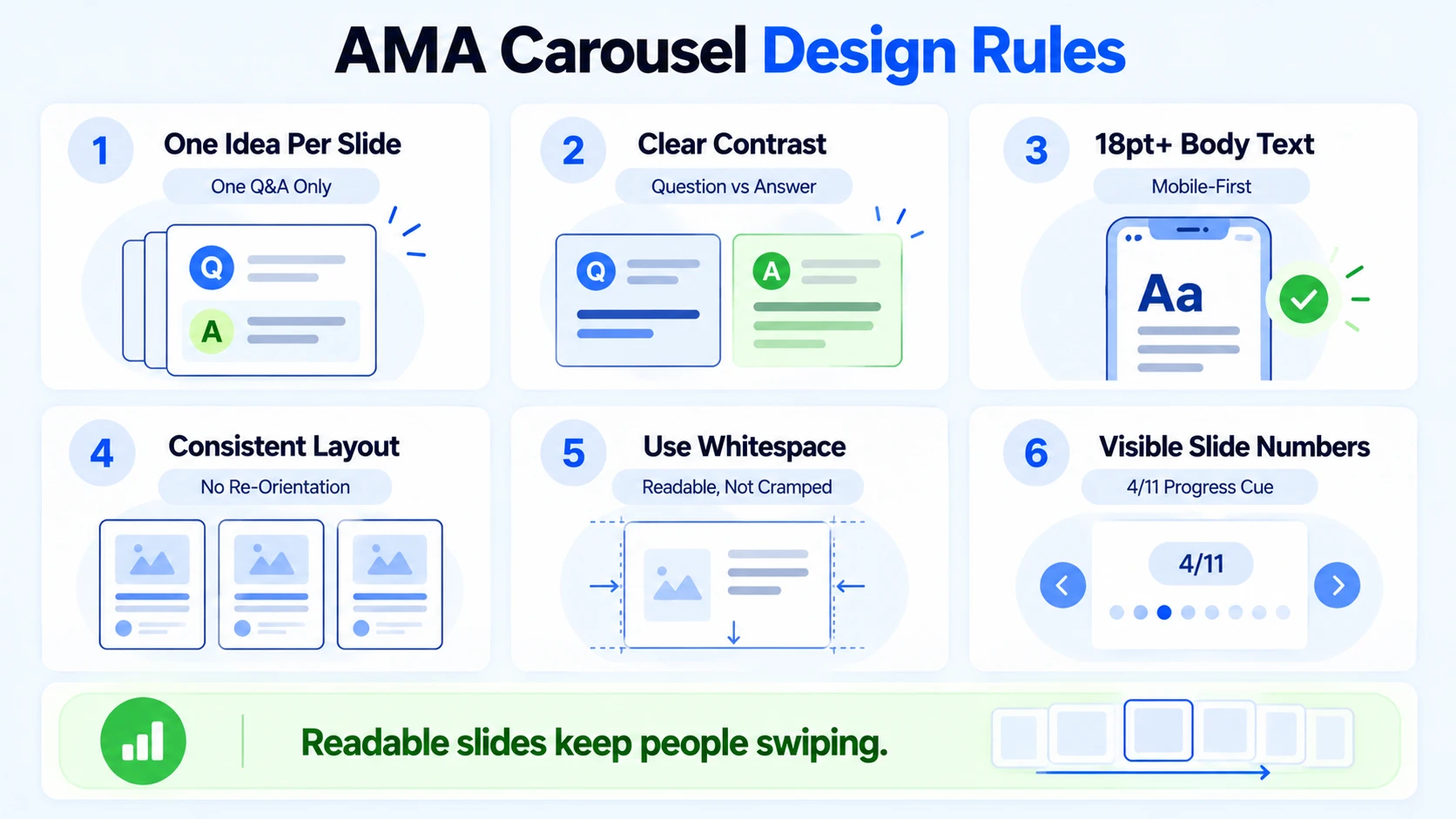
- One idea per slide: Never put two Q&A pairs on one slide. One question, one answer, one slide, always.
- Contrast drives legibility: Your question text and answer text must have clear visual distinction. Use weight (bold vs. regular), size difference, or color contrast, not all three at once.
- Mobile-first sizing: Minimum 18pt body text. Most carousel views happen on a phone. If you cannot read it on a 6-inch screen at arm's length, the font is too small.
- Consistent slide layout: Every Q&A slide should use the same template. Readers should not have to re-orient their eyes on each swipe.
- Strategic use of whitespace: A slide that feels empty performs better than one that feels cramped. Whitespace is a design asset, not wasted space.
- Slide numbering visible on every slide: "4/11" in a corner costs you nothing and dramatically increases completion rate, readers want to know how far they are.
The optimal carousel structure is "cover slide + numbered list" with bold formatting and a clear narrative arc, this gives readers a reason to keep swiping.
For tools: Canva Pro handles 90% of carousel production needs. Adobe Express is a strong alternative with cleaner typography defaults. For teams doing this at volume, Figma with a shared component library scales better, one template update propagates across all slide files.
Color palette: stick to two brand colors maximum per carousel. More than two creates visual noise. Use your accent color for question text and your neutral for answer text. The cover slide can be bolder, that is your one chance to stop the scroll.
Conclusion
Learning to repurpose an AMA into a carousel is one of the highest-leverage content moves B2B SaaS, AI, and tech startups & teams can make in 2026.
- Extract or script 6–10 high-signal Q&A pairs before opening any design tool (whether repurposing existing footage or building from scratch).
- Structure for 9–12 slides: cover, Q&A pairs, summary, CTA.
- Design for mobile-first: one idea per slide, 18pt minimum text, consistent layout.
- Publish as a PDF document post on LinkedIn; distribute clips from the same session across every other channel.
Your AMA already happened. The expertise is already there. The only thing left is extracting it systematically, and this guide gives you the exact process to do that.
Frequently Asked Questions
Q1: What is the best platform to publish an AMA carousel in 2026?
LinkedIn is the primary target for B2B audiences. Publish as a PDF document post (not an image gallery) for maximum algorithmic reach. Document carousels average 7.00% engagement vs. 5.20% across all LinkedIn post types, roughly 35% above the platform baseline, with the gap widening 14% year-over-year. Instagram works well for consumer-facing or founder-brand plays.
Q2: How long should each slide's answer text be in an AMA carousel?
Two to four sentences per slide. Your answer should be fully readable in under 15 seconds on mobile without pinching to zoom. If the original AMA answer is longer, compress it, cut qualifiers, hedges, and any sentence that does not add new information to the slide.
Q3: Can I repurpose an AMA into a carousel without a transcript?
Yes. You can review recordings manually or build the entire campaign from scratch with Komet Media. If you don't have existing content, Komet handles buyer research, scripting, recording guidance, and editing to build a full carousel library from the ground up for B2B SaaS, AI, and tech startups & teams.
Q4: Should the carousel cover slide include a question or a statement?
Use a statement, not a question. A statement makes a promise ("8 things our CEO answered that no SaaS vendor admits"). A question feels uncertain. Your cover slide has one job, stop the scroll, and bold declarative statements outperform open questions for that specific goal.
Q5: How often should B2B SaaS, AI, and tech startups & teams be repurposing AMA content into carousels?
One AMA session per quarter, with a carousel published within 72 hours of the session, is a sustainable baseline. Companies that post at least twice a week see a 40% increase in total brand searches compared to those posting once a month. A quarterly AMA feeding weekly carousel and video posts achieves that cadence efficiently.
Q6: What makes an AMA carousel different from a generic tips carousel?
Authenticity and specificity. Generic tip carousels are produced from scratch and often feel hollow. An AMA carousel is rooted in real questions your real audience asked, answered in your real voice. That directness builds the kind of product trust and thought leadership that moves the pipeline, something no templated "5 tips" post can replicate.


