
🪄 AI Summary
Heading 1
Heading 2
Heading 3
Heading 4
Heading 5
Heading 6
Lorem ipsum dolor sit amet, consectetur adipiscing elit, sed do eiusmod tempor incididunt ut labore et dolore magna aliqua. Ut enim ad minim veniam, quis nostrud exercitation ullamco laboris nisi ut aliquip ex ea commodo consequat. Duis aute irure dolor in reprehenderit in voluptate velit esse cillum dolore eu fugiat nulla pariatur.
Block quote
Ordered list
- Item 1
- Item 2
- Item 3
Unordered list
- Item A
- Item B
- Item C
Bold text
Emphasis
Superscript
Subscript
Your product ships a new feature. Your team posts a changelog. Three people read it. That's the gap. When you repurpose a product update into a launch clip, you take the same information and put it in the format buyers actually consume. Short-form video now takes 58% of all time spent on social media , and your next update deserves more than a bullet point in a release email. This guide gives you the exact workflow, from raw update to scroll-stopping clip, built for B2B SaaS, AI, and tech startups & teams who need pipeline, not pageviews.
TL;DR
- A product update is information; a launch clip is a narrative with a hook, a payoff, and a CTA.
- Pull the single biggest buyer benefit from your update and build the entire clip around it.
- 45–90 seconds, 9:16 aspect ratio, burned-in captions, platform-native edit.
- Distribute on LinkedIn first, then repurpose the same clip for YouTube Shorts and Instagram Reels.
Product Update vs. Launch Clip: Why the Gap Costs You Pipeline
Most SaaS teams announce features the same way: a changelog entry, a release email, maybe a tweet. Silence around a new feature carries a direct cost. Users who never learn a capability exist never use it, and that gap triggers a chain reaction: usage drops, satisfaction erodes, and churn risk climbs.
A product update is raw information, written for existing users who are already logged in and context-aware. A launch clip is a persuasion asset, structured for a buyer who has never seen your product and needs a reason to care in the next five seconds. Here's how they differ:
The best SaaS launch teams plan their distribution before they brief production. In reality, the launch video is a high-leverage, multi-channel asset you can repurpose across sales, paid media, email nurture, and partner programs to amplify reach and accelerate conversions.
When you decide to repurpose a product update into a launch clip, you're not recording something new. You're re-framing existing information through a buyer lens. That distinction drives every decision in the workflow below.
How to Make a Launch Clip from Existing Product Content
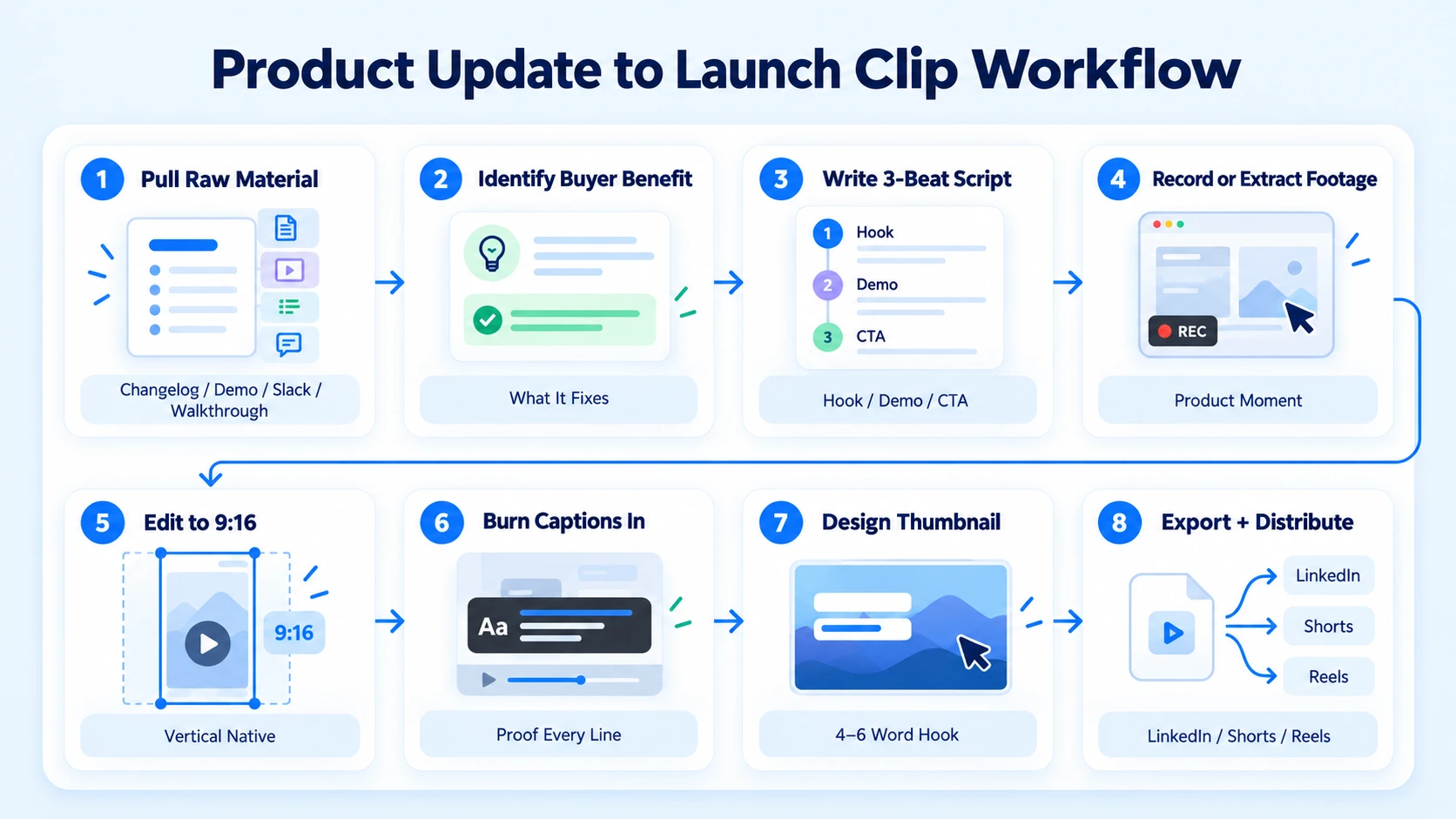
The fastest path from update to clip uses your existing documentation as the script source. You do not need new screen recordings or a studio. Here is the end-to-end workflow to repurpose a product update into a launch clip:
Starting from Scratch? If your team doesn't have existing recordings or a content library, Komet Media offers end-to-end "from scratch" production for B2B SaaS, AI, and tech startups & teams. They handle buyer research, script writing, recording guidance, and post-production to build launch clips and video ad libraries from the ground up.
- Pull the raw material: Gather your changelog entry, internal Slack announcement, demo recording, or product walkthrough video. Any asset where someone explains the feature in natural language works.
- Identify the buyer benefit: Strip everything that describes how the feature works. Isolate the single sentence that explains what it fixes for the buyer. That sentence becomes your hook.
- Write a three-beat script: Hook (problem or provocative statement in under 8 seconds), Demonstration (10–25 seconds of screen or on-camera proof), Payoff + CTA (10 seconds maximum). Total: 45–75 seconds.
- Record or extract footage: If you have a demo video, clip the most visually dynamic product moment. If recording fresh, a phone camera or Loom in good light is sufficient.
- Edit for aspect ratio: Convert to 9:16 for LinkedIn and Instagram Reels. Use Kapwing, DaVinci Resolve, or CapCut for aspect ratio conversion and reframing.
- Add burned-in captions: 92% of people watch mobile video with the sound off, so captions are not optional. Auto-caption in CapCut or Kapwing, then proof every line manually.
- Design the thumbnail: Use a bold text overlay (the hook in 4–6 words) over a clean product screenshot or on-camera frame.
- Export and distribute: LinkedIn native upload, YouTube Shorts, Instagram Reels. Never use the same caption twice.
The Hook Framework That Makes a Product Update Feel Like a Big Launch
The first 5 seconds of a video determine 80% of viewer retention, per Google's video attention research. If your clip opens with your logo animation or "We're excited to announce," it's already dead. The hook framework for a launch clip follows one of three proven structures:
- The Pain Hook: Lead with the exact frustration your feature removes. "You're losing deals because buyers can't see your ROI in real time." Then: "We fixed that."
- The Outcome Hook: Lead with the result, not the feature. "Our customers reduced onboarding time by 60%. Here's the one change that did it."
- The Contrast Hook: Lead with a before/after. "Old way: five manual steps. New way: one click."
Your hook has one job: make the viewer believe the next 60 seconds will solve a problem they recognize right now. The narrative arc matters after the hook. B2B SaaS companies that succeed with feature launches share a pattern: the message travels through several touchpoints. Winning playbooks pair short video clips with in-app prompts and targeted emails, reinforcing the same update from multiple angles until it sticks.
The clip itself should follow a tight three-beat arc: Problem (hook) → Proof (the feature in motion) → Prompt (a single, low-friction CTA like "Watch the full demo" or "See how it works"). Avoid stacking multiple CTAs. One ask per clip. The goal of the clip is not to close the deal; it is to earn the next click and support your sales enablement and pipeline motion.
Video Editing Workflow: Tools, Aspect Ratios, and Captions
Once your script is locked, the editing workflow is where most SaaS teams either bottle-neck or cut corners. Here is what the short-form video production process looks like at each stage:
Tool selection by task:
Aspect ratio rules by platform:
- LinkedIn native video: 9:16 (vertical) or 1:1 (square) for feed; 9:16 for full-screen mobile
- Instagram Reels: 9:16 strictly
- YouTube Shorts: 9:16 strictly
- LinkedIn feed (horizontal): 16:9 only if leading with a talking head for thought leadership
Caption standards: Auto-generate first, then manually correct proper nouns, product names, and numbers. Style: large font, center-screen, high contrast. Never allow captions to block the product UI. Captions are non-negotiable since most B2B viewers watch with sound off. One editing principle that separates average clips from scroll-stopping visuals: every cut should introduce new visual information. If you have three seconds of the same screen with no movement, cut it.
Social Media Distribution: Where and How to Launch Your Clip
Producing the clip is half the work. Distribution strategy determines whether you repurpose a product update into a launch clip that drives pipeline or one that sits at 200 views. 27% of social users are most likely to interact with short-form video on LinkedIn, making it the highest-priority channel for B2B SaaS teams targeting buyers and decision-makers.
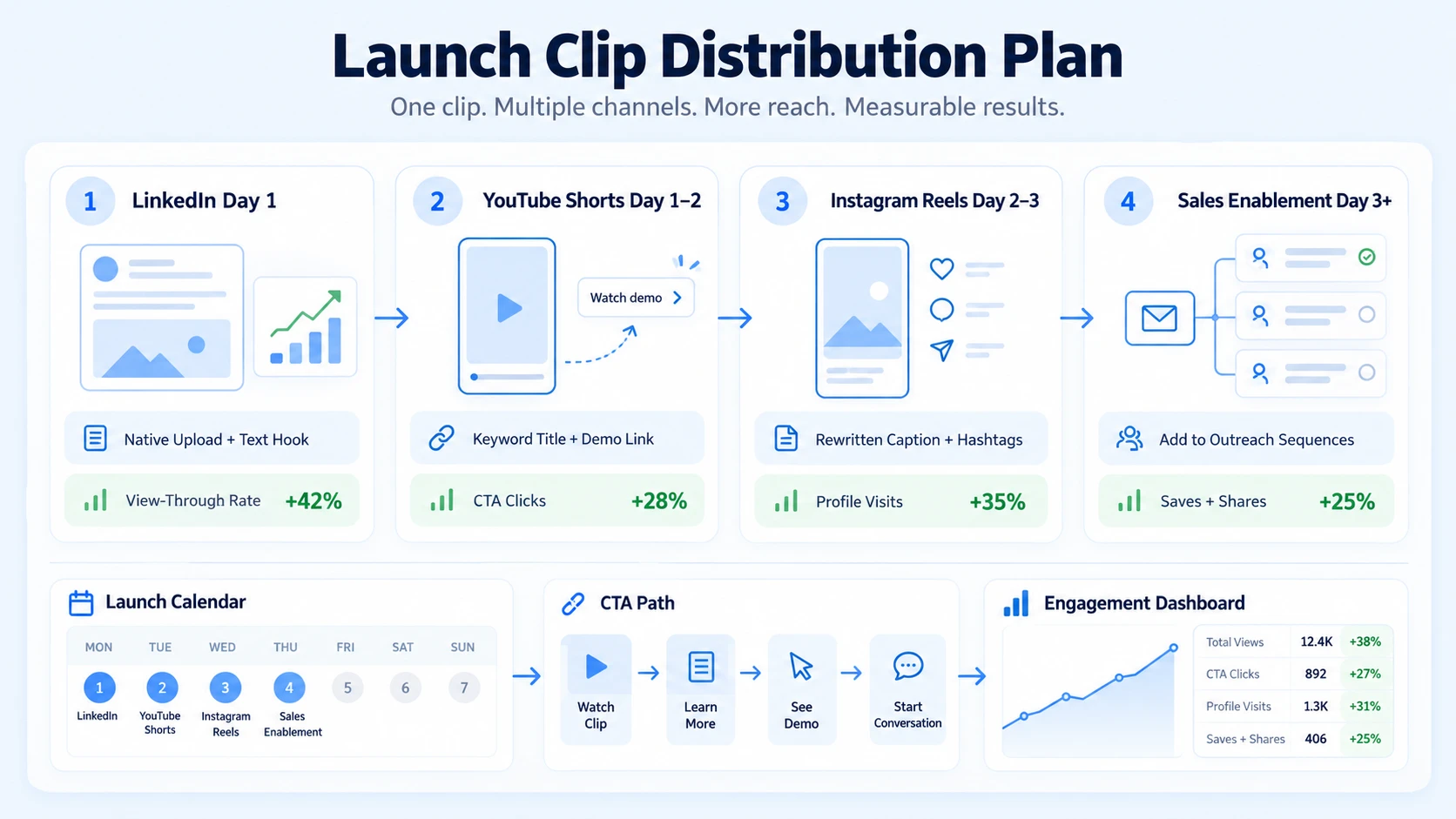
Platform-native distribution plan:
- LinkedIn (Day 1): Upload natively (not as a link). Write a text hook above the video in the first line of the post. Tag relevant teammates. Pin to founder profile.
- YouTube Shorts (Day 1–2): Upload with a keyword-rich title and description. Add a link to your demo or webinar registration page in the description.
- Instagram Reels (Day 2–3): Rewrite the caption for the Instagram audience. Use 3–5 relevant hashtags. Add a CTA to the link in bio.
- Sales enablement (Day 3+): Your sales team should have this clip in their outreach sequences before launch week ends. Share the clip with sales before the launch, and ask reps to open post-launch outreach with it.
For teams running a podcast or recording regular webinars, the same clip workflow applies. One webinar can be repurposed into 8 to 12 short clips for LinkedIn and YouTube Shorts. Every product update you turn into a clip is compounding inbound demand without adding to your recording schedule.
Engagement metrics to track:
- View-through rate (target: above 40% for a 60-second clip)
- Click-through on CTA (demo link, landing page)
- Profile visits within 24 hours of posting
- Saves and shares (strongest signal on LinkedIn)
Can You Turn a Product Changelog into a Launch Video? (And When to Do It)
Yes, and it is often the highest-leverage content repurposing move a SaaS team can make. A changelog is a list of facts. A launch clip is those same facts edited through a buyer's emotional state. Not every changelog entry warrants a launch clip. Use this filter:
- Make a clip: Feature removes a painful manual step, cuts time-to-value, adds a new integration with a widely-used tool, or unlocks a capability competitors lack.
- Skip the clip: Minor bug fixes, back-end infrastructure changes, admin UI tweaks with no buyer-facing impact.
When the feature clears the filter, the changelog entry becomes your script source. Pull the one-line summary. Rewrite it in second-person, present tense: "You can now do X in one click" beats "We have added the ability to perform X." That rewrite alone shifts the clip from product-centric to buyer-centric.
98% of B2B decision-makers have watched explainer videos, and 87% of B2B buyers say video influenced their purchase decisions. A single well-executed launch clip from a meaningful feature update is a direct pipeline asset, not a marketing vanity project.
For teams without an internal video editing workflow, working with a dedicated video editing service that understands B2B SaaS, AI, and tech startup positioning is the fastest way to build this system without pulling engineers or founders into post-production.
Conclusion
- A product update only drives pipeline when it reaches buyers in a format they consume; short-form video is that format in 2026.
- The clip structure is non-negotiable: hook in under 5 seconds, demonstration, single CTA.
- Burned-in captions, 9:16 aspect ratio, and native platform uploads are baseline requirements, not differentiators.
- Distribute on LinkedIn first, arm your sales team immediately, and repurpose the same clip across YouTube Shorts and Reels.
- Every feature your team ships is a clip waiting to be made; the teams that build this system consistently are the ones compounding inbound and founder-led growth quarter over quarter.
Frequently Asked Questions
Q1: How long should a product launch clip be?
45–90 seconds is the target range for B2B SaaS. Under 45 seconds rarely gives enough time to demonstrate value. Over 90 seconds loses the audience before the CTA. Videos under one minute hold a 52% engagement rate, meaning viewers watch just over half the runtime on average, so front-load your most compelling proof.
Q2: Do I need to record new footage to repurpose a product update into a launch clip?
No. While existing footage like a Loom walkthrough, demo recording, or screen capture works great, you can also build clips completely from scratch. Partners like Komet Media provide full production support tailored for B2B SaaS, AI, and tech startups & teams, covering everything from buyer research and scripting to remote recording guidance and editing to generate fresh launch video assets without prior footage.
Q3: Which platform should I prioritize for a B2B SaaS launch clip?
LinkedIn first, always. 70% of video marketers now use LinkedIn for video distribution, making it the most widely-used video platform among video marketers. After LinkedIn, post natively to YouTube Shorts for search discovery, then Instagram Reels for reach.
Q4: How is a launch clip different from a product demo video?
A launch clip is a 45–90-second awareness and demand asset built for a cold or warm social audience. A product demo is a 3–10-minute conversion asset sent to prospects already in your pipeline. They serve different funnel stages and should never be the same video cut shorter.
Q5: How many clips can I get from one product update?
Typically 2–4. One hook-based clip for LinkedIn, one screen-first clip for YouTube Shorts, one founder-facing clip for personal brand distribution, and optionally one testimonial or social proof clip if you have a customer using the new feature already.
Q6: What makes a product launch clip fail on social media?
Three common failure modes: opening with a logo or "We're excited to announce," no captions for silent-scroll viewers, and a vague CTA like "Learn more." Every failure traces back to treating the clip as an internal announcement rather than a buyer persuasion asset built for platform-native consumption.


