
🪄 AI Summary
Heading 1
Heading 2
Heading 3
Heading 4
Heading 5
Heading 6
Lorem ipsum dolor sit amet, consectetur adipiscing elit, sed do eiusmod tempor incididunt ut labore et dolore magna aliqua. Ut enim ad minim veniam, quis nostrud exercitation ullamco laboris nisi ut aliquip ex ea commodo consequat. Duis aute irure dolor in reprehenderit in voluptate velit esse cillum dolore eu fugiat nulla pariatur.
Block quote
Ordered list
- Item 1
- Item 2
- Item 3
Unordered list
- Item A
- Item B
- Item C
Bold text
Emphasis
Superscript
Subscript
Your best sales asset is already written. It's sitting in a PDF case study, a Typeform response, or a Zoom recording from six months ago. When you repurpose a customer story into a reel, you turn that proof into a 30-second piece of social proof that reaches buyers before your sales team ever does. Videos featuring customer testimonials have a 44% higher conversion rate at the decision stage, and 97% of B2B buyers say peer reviews and testimonials are the most reliable content when evaluating a product. This guide walks you through every step.
TL;DR
- Pull the one outcome, one problem, and one moment of change from any customer story.
- Structure it as a 3-part narrative arc: problem, solution, result, under 30 seconds.
- Export at 9:16 aspect ratio with burned-in captions and a strong hook in the first 3 words.
- Distribute across Instagram Reels, LinkedIn, and YouTube Shorts for maximum pipeline coverage.
What Parts of a Customer Story Work Best in a Reel?
Not everything in a case study belongs in a short-form video. A written case study is built for depth. A reel is built for a decision. The job is to find the single moment of tension and outcome that makes a buyer stop scrolling.
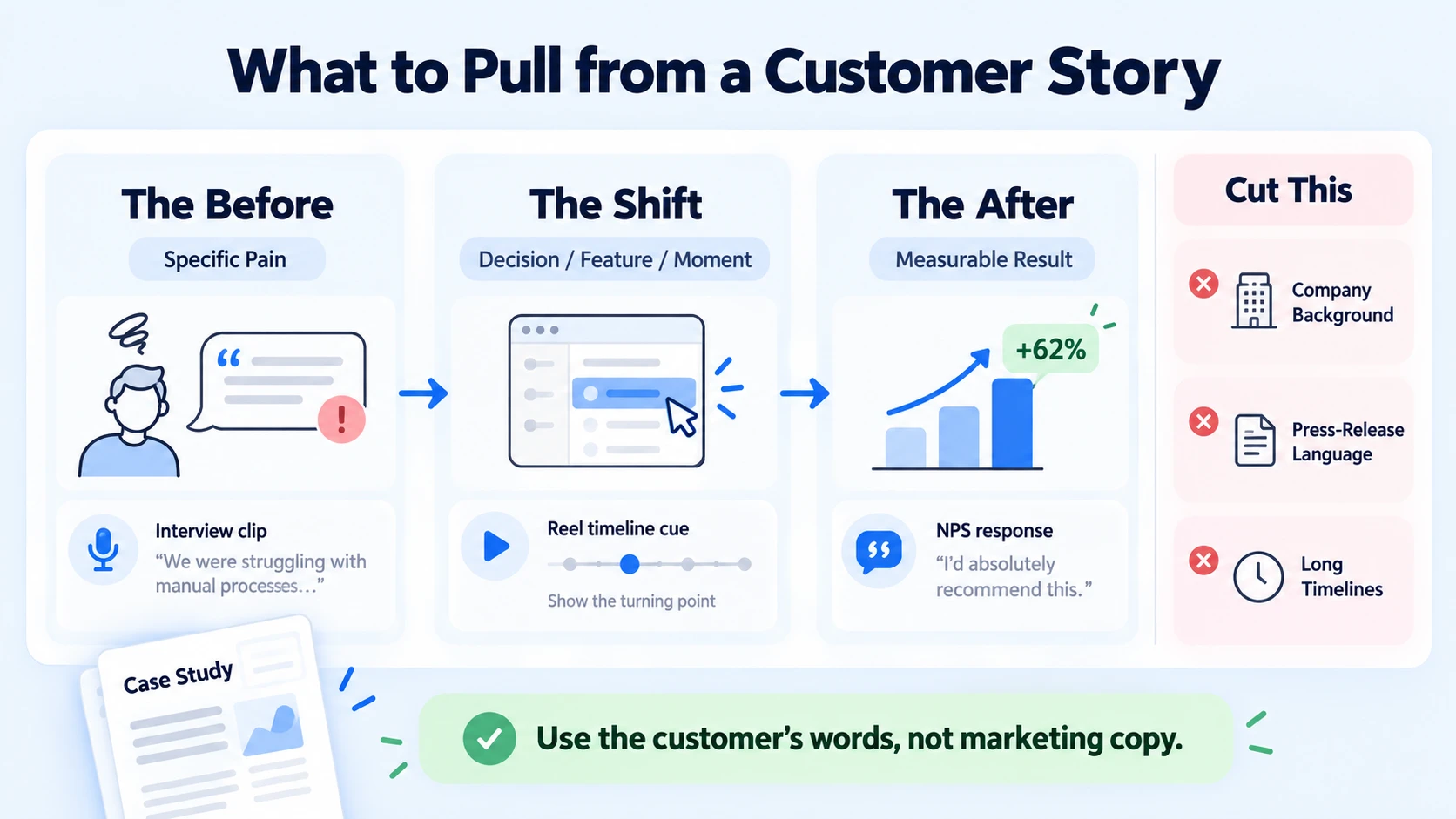
The three elements that actually convert:
- The Before: A specific pain the customer was experiencing, not vague ("we had inefficiencies") but concrete ("our sales team was spending 4 hours a week manually clipping demos for outreach").
- The After: A measurable result tied directly to your product. Numbers are everything here. "We cut that to 20 minutes" beats "we saved time" by a wide margin.
- The Shift: The one decision, feature, or moment that caused the change. This is your product's proof point in disguise.
What to cut: company background, implementation timelines, any language that sounds like a press release. The optimal short-form testimonial follows a three-part structure: problem statement (5–10 seconds), solution discovery (10–15 seconds), and outcome statement (5–10 seconds). The first 10 seconds prove decisive, 91% of viewers who remain past this threshold complete the entire testimonial. That means your reel lives or dies on whether the opening line creates immediate recognition for your buyer.
The closer the language is to how your buyer thinks, the stronger the brand authenticity signal will be. Use their words, not your marketing copy.
How to Script a Customer Story Reel from a Written Case Study
Most B2B case studies are 800–1,200 words written for a PDF download. Your job is to compress that into a 3-sentence script that works on a mobile screen at 1.5x speed with captions only.
The scripting process, step by step:
- Read the full case study and highlight one sentence from each section: problem, solution, and result.
- Rewrite those three sentences in the customer's voice, not the brand's. If the case study says "leveraged our platform," change it to "started using the tool."
- Write the hook as the result, not the intro. Open with the outcome: "We 3x'd our pipeline in 90 days" lands harder than "We were struggling with lead generation."
- Trim to 60–80 words total. Read it aloud. If it takes longer than 25 seconds at a natural pace, cut again.
- Add a one-line CTA tied to the next step: "Watch the full case study [link in bio]" or "Book a demo if this sounds familiar."
For video storytelling to land with B2B buyers, the hook must name the problem before naming the product. A customer is 2.1 times more likely to remember testimonial videos compared to written reviews , but only if the narrative arc is clear enough to follow at speed.
Rule: If a new viewer can't understand the customer's problem, solution, and result in one watch, the script needs another pass.
One pattern that works well at Komet Media for B2B SaaS, AI, and tech startups: lead with a quote pulled verbatim from the case study, then follow with a visual title card showing the outcome metric, then close with the brand name and CTA. No voiceover required. The customer's words do the work.
How to Edit a Long Customer Testimonial into a 30-Second Reel
This is where most teams lose time. The editing workflow matters as much as the footage. Whether you're working in Adobe Premiere Pro, CapCut, or DaVinci Resolve, the core video editing workflow is the same.
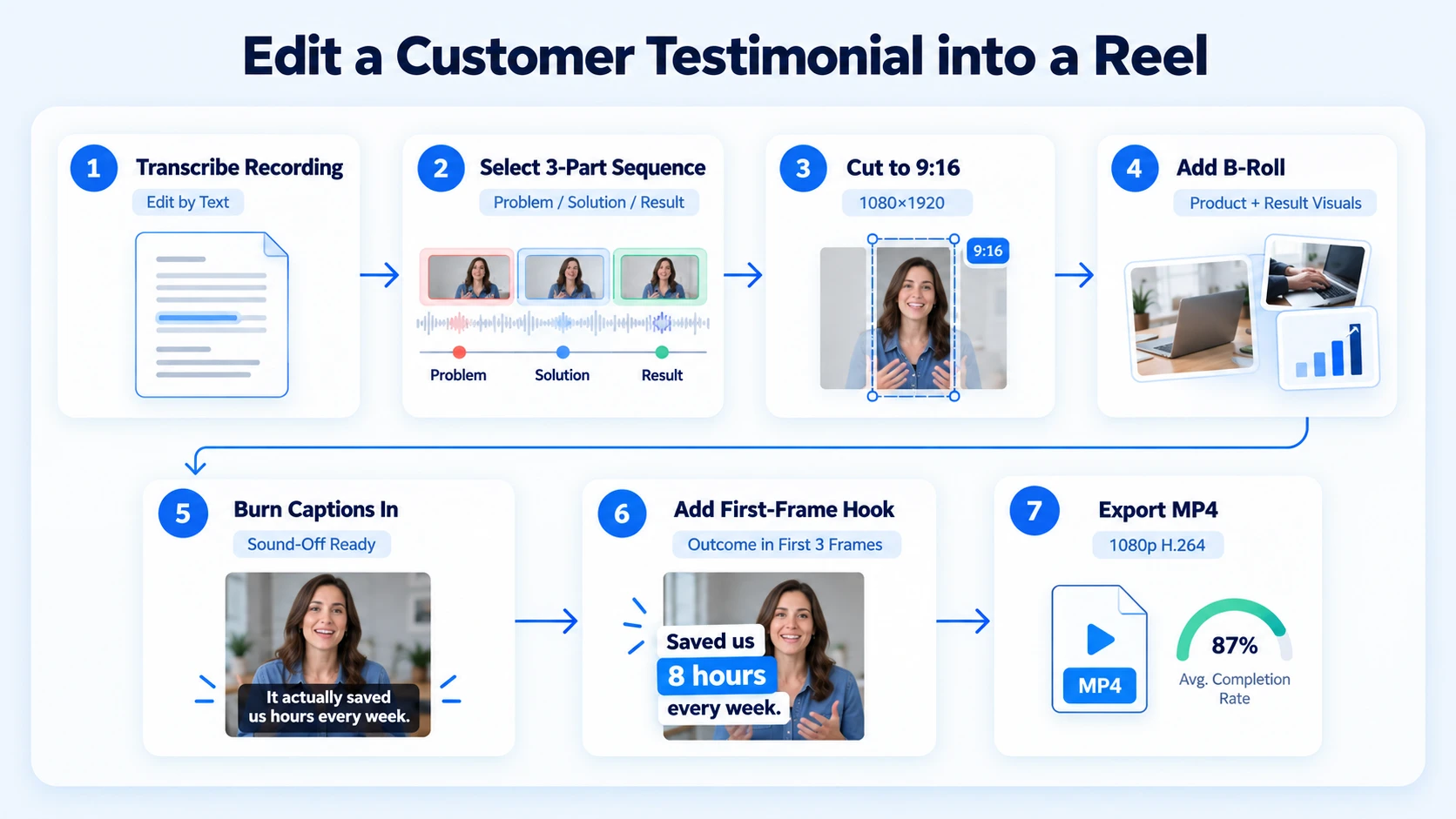
Step-by-step editing process:
- Transcribe the full recording using a tool like Descript, Otter.ai, or Riverside's built-in transcription. This lets you edit by text rather than scrubbing timecodes.
- Select your 3-part clip sequence: find the problem soundbite (5–10 seconds), the solution moment (10–15 seconds), and the result line (5–10 seconds).
- Cut to 9:16 aspect ratio (1080 x 1920 pixels). In Adobe Premiere Pro, use the Auto Reframe tool. In CapCut, set canvas to 9:16 before you begin.
- Add B-roll footage over any jump cuts, screen recordings of the product, motion graphics showing the result stat, or stock footage of the customer's industry.
- Burn in captions and subtitles directly onto the video (not as a platform overlay). 92% of people watch mobile video with the sound off , so captions are non-negotiable, not optional.
- Add a text hook in the first 3 frames, a large, high-contrast title that states the outcome or the problem before the speaker says a word.
- Export at 1080p, MP4, H.264 for Instagram Reels compatibility and optimal mobile-first content delivery.
Instagram Reels in the 20–30 second range achieve 70–80% completion. Keep your final cut inside that window for the highest chance of full views, which the algorithm rewards more than any other signal.
For B2B SaaS, AI, and tech teams without in-house editors or existing footage, Komet Media's short-form video editing service handles the full workflow—from starting completely from scratch to raw footage—to create platform-ready reels.
Tools to Repurpose Written Customer Stories into Video Reels
You don't need an expensive production stack. You need the right tools for each stage of the content atomisation process.
63% of video marketers now use AI tools to create or edit videos, meaning your competitors are already cutting production time. The advantage goes to teams with a repeatable system, not the biggest budget.
One note on CapCut vs. Adobe Premiere Pro: use CapCut for speed and volume (multiple cuts per week), and Adobe Premiere Pro when a testimonial reel is going into paid distribution via video advertising or a high-stakes outbound sequence.
How to Repurpose Customer Story Content Across Platforms After the Reel
Once you have a single reel edit, the content distribution strategy extends its reach without additional production time. This is the content atomisation payoff. A single piece of content, properly repurposed, can yield LinkedIn clips, email snippets, Instagram Reels, YouTube Shorts, and sales enablement assets, all from one recording session.
Distribution map for one customer story reel:
- Instagram Reels: Primary distribution. Reels deliver a 2.7% engagement rate, the highest of any Instagram content format, and reach roughly 30.81% of a business account's followers.
- LinkedIn native video: Upload the same 9:16 file directly, do not share a link. Native LinkedIn videos outperform YouTube links by 312% , so always upload directly to the platform.
- YouTube Shorts: Add a keyword-rich title and description. Shorts expand discovery through search, which Reels do not.
- Sales enablement: Send the reel as a video thumbnail in outbound sequences. Placing "Video" in an email campaign boosts click-through rates by 65% and reduces unsubscribe rates by 26%.
- Website case study page: Embed the reel above the fold so buyers who land on the page see proof before reading a word.
- Podcast show notes or webinar follow-up: If the customer story originated from a live conversation, the reel becomes the highlight clip that drives replays. See how Komet Media approaches this through podcast production and webinar repurposing.
47% of companies planned to create customer testimonial videos in 2026, up from 17% in 2023, which means distribution velocity is becoming a competitive differentiator, not just production quality.
Repurposing Customer Stories for Social Media: UGC and Founder-Led Variations
Not every customer story needs a polished edit. Two formats consistently outperform high-production reels for UGC repurposing and founder-led growth:
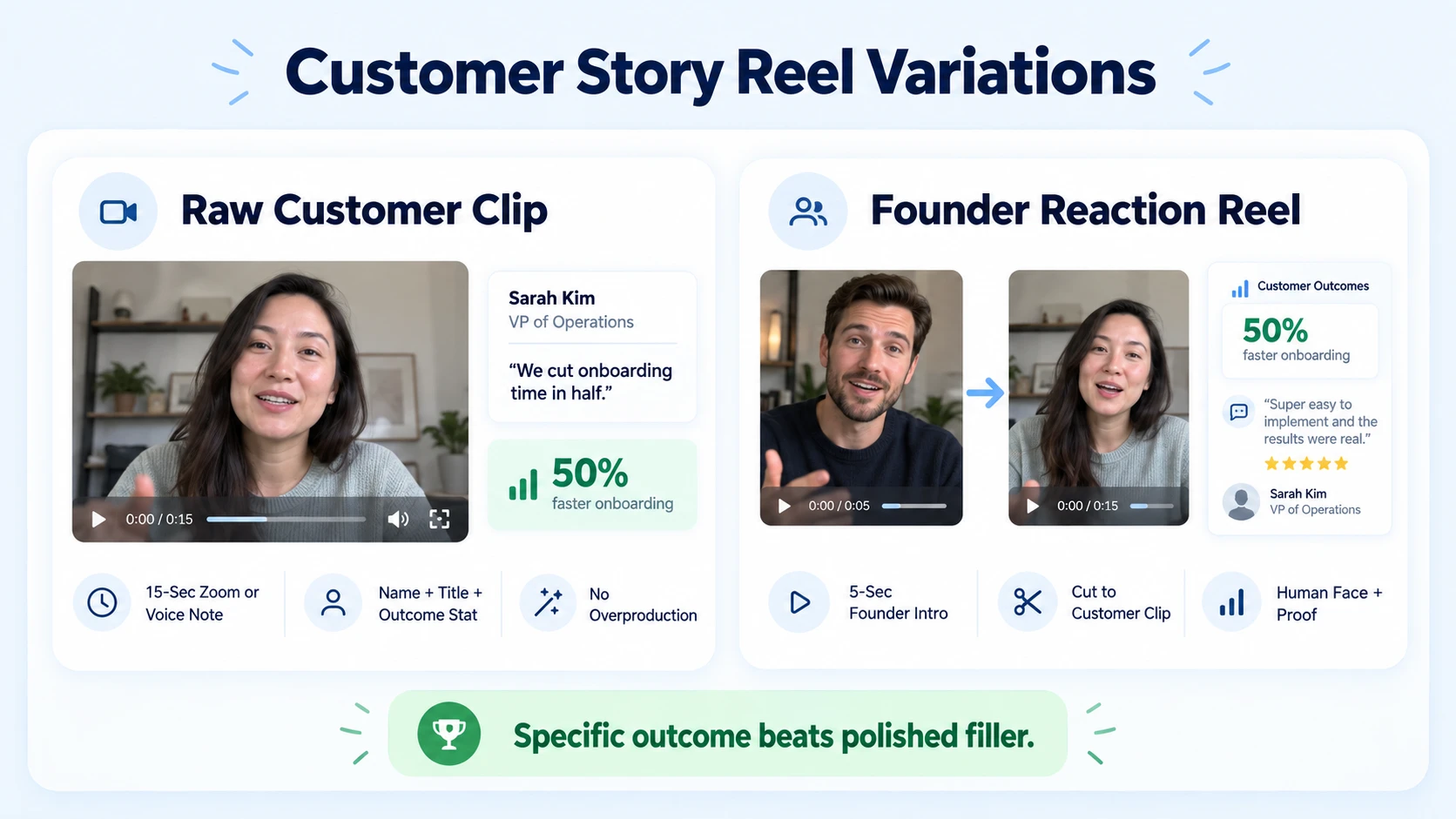
Format 1, Raw customer clip with text overlay: Take a 15-second clip from a customer Zoom call or voice note. Add their name, title, and one outcome stat as a text overlay. No music. No motion graphics. The unpolished format signals authenticity, which is precisely what drives trust with buyers who are skeptical of produced content.
Format 2, Founder reaction reel: The founder (or a sales lead) records a 5-second intro, "Here's what [Company] said after using [Product] for 60 days", then cuts directly into the customer clip. This is a simple video storytelling device that combines social proof with a human face, which the algorithm treats as original content rather than a straight repost. About 92.4% of B2B customers read online reviews and watch testimonials before deciding whether to buy. The format matters less than the specificity of the outcome and the credibility of the voice delivering it.
For Instagram growth and Instagram marketing specifically, rotating between polished edits and raw UGC clips keeps the account feeling like a brand people trust rather than a brand that just runs ads. 41% of B2B marketers say that, of all video formats, short-form drives the highest ROI, and customer story reels are the format that compounds fastest, because every new testimonial is also a new pipeline asset.
Conclusion
When you repurpose a customer story into a reel, you convert a static proof point into active pipeline coverage. The process is repeatable and scalable.
- Extract the problem, shift, and outcome, cut everything else.
- Script to 60–80 words, lead with the result, burn in captions.
- Edit to 9:16, keep it under 30 seconds, export at 1080p.
- Distribute natively to Instagram Reels, LinkedIn, YouTube Shorts, and your outbound sequences.
If your B2B SaaS, AI, or tech startup needs a done-for-you system, whether from scratch or existing content, Komet Media's video editing services build full creative libraries and turn customer stories into platform-ready reels at scale.
Frequently Asked Questions
Q1: How long should a customer story reel be?
Keep it between 20–30 seconds for Instagram Reels. That length hits the 70–80% completion window where the algorithm rewards distribution. If the story requires more context, 45 seconds is the outer limit before completion rates drop significantly.
Q2: Do I need a recorded video from the customer, or can I use a written case study?
A written case study works, or you can start entirely from scratch with research, scripting, and full video production. You can pull the key outcome quote, build a script from it, and use motion graphics or screen recordings as visuals. A talking-head clip is stronger, but a well-edited text-and-graphic reel or from-scratch production outperforms no reel at all.
Q3: What aspect ratio should I use when I repurpose a customer story into a reel?
Always 9:16 (1080 x 1920 pixels) for Instagram Reels and YouTube Shorts. LinkedIn accepts 9:16 natively and now rewards vertical uploads for mobile-first content. Never post 16:9 horizontal video to Reels, it will be cropped automatically and look broken.
Q4: How do I write a strong hook for a customer story reel?
Open with the result or the problem, never with the customer's name or company. "We cut our sales cycle by 40%" is a hook. "Hi, I'm Sarah from Acme Corp" is not. The first 3 words determine whether the viewer stays.
Q5: Can I repurpose the same customer story reel on LinkedIn and Instagram?
Yes. Export the same 9:16 file and upload natively to both platforms. Write different captions tailored to each audience's tone. Avoid sharing a Reels link on LinkedIn, native uploads outperform external links by a wide margin on both platforms.
Q6: How many reels can I create from one customer story?
A single customer story can yield 3–5 distinct reels: one focused on the problem, one on the result, one featuring a raw quote, one with a founder intro, and one built around a specific feature or use case. This is the core logic behind content atomisation.


