
🪄 AI Summary
Heading 1
Heading 2
Heading 3
Heading 4
Heading 5
Heading 6
Lorem ipsum dolor sit amet, consectetur adipiscing elit, sed do eiusmod tempor incididunt ut labore et dolore magna aliqua. Ut enim ad minim veniam, quis nostrud exercitation ullamco laboris nisi ut aliquip ex ea commodo consequat. Duis aute irure dolor in reprehenderit in voluptate velit esse cillum dolore eu fugiat nulla pariatur.
Block quote
Ordered list
- Item 1
- Item 2
- Item 3
Unordered list
- Item A
- Item B
- Item C
Bold text
Emphasis
Superscript
Subscript
Your technical product is genuinely impressive. But if buyers can't understand what it does in under two minutes, you're losing deals before your sales team gets involved. Explainer videos for technical products solve exactly that problem. They compress months of product education into a short, visual narrative that moves buyers from confused to convinced. This guide covers everything SaaS founders, marketing heads, and growth teams need to know: formats, production, length, cost, tools, and the exact mistakes that kill pipelines.
TL;DR
- 58% of B2B decision-makers trust video from brands more than blog posts.
- Explainer videos work at the awareness and consideration stage; product demos close at decision stage. Use both.
- Keep technical explainers under 90 seconds. Length kills completion rates faster than any other variable.
- The right style depends on your audience's technical depth: motion graphics for executives, screen recording for practitioners.
What Are Explainer Videos for Technical Products (and Why Do They Hit Different)?
Explainer videos for technical products are short-form video assets designed to translate complex product functionality into clear, buyer-friendly narratives. They are not product demos. They are not feature walkthroughs. They are the bridge between what your product does and why a buyer should care.
A typical SaaS or enterprise tech product carries a significant comprehension burden. APIs, integrations, workflow automation, data pipelines, none of these sell themselves through bullet points on a pricing page. 93% of marketers say video has increased user understanding of their product, and for B2B products that require customer education, such as SaaS platforms, financial services companies, and enterprise software, video is the most effective format for bridging the gap between technical complexity and buyer comprehension.
The mechanism is cognitive load reduction. A well-structured explainer uses visual communication, motion graphics, screen recording, UX demonstration, and animated storytelling, to offload mental effort from the viewer. Instead of parsing documentation, the buyer watches a 75-second video that shows the problem, introduces the solution, and demonstrates the outcome.
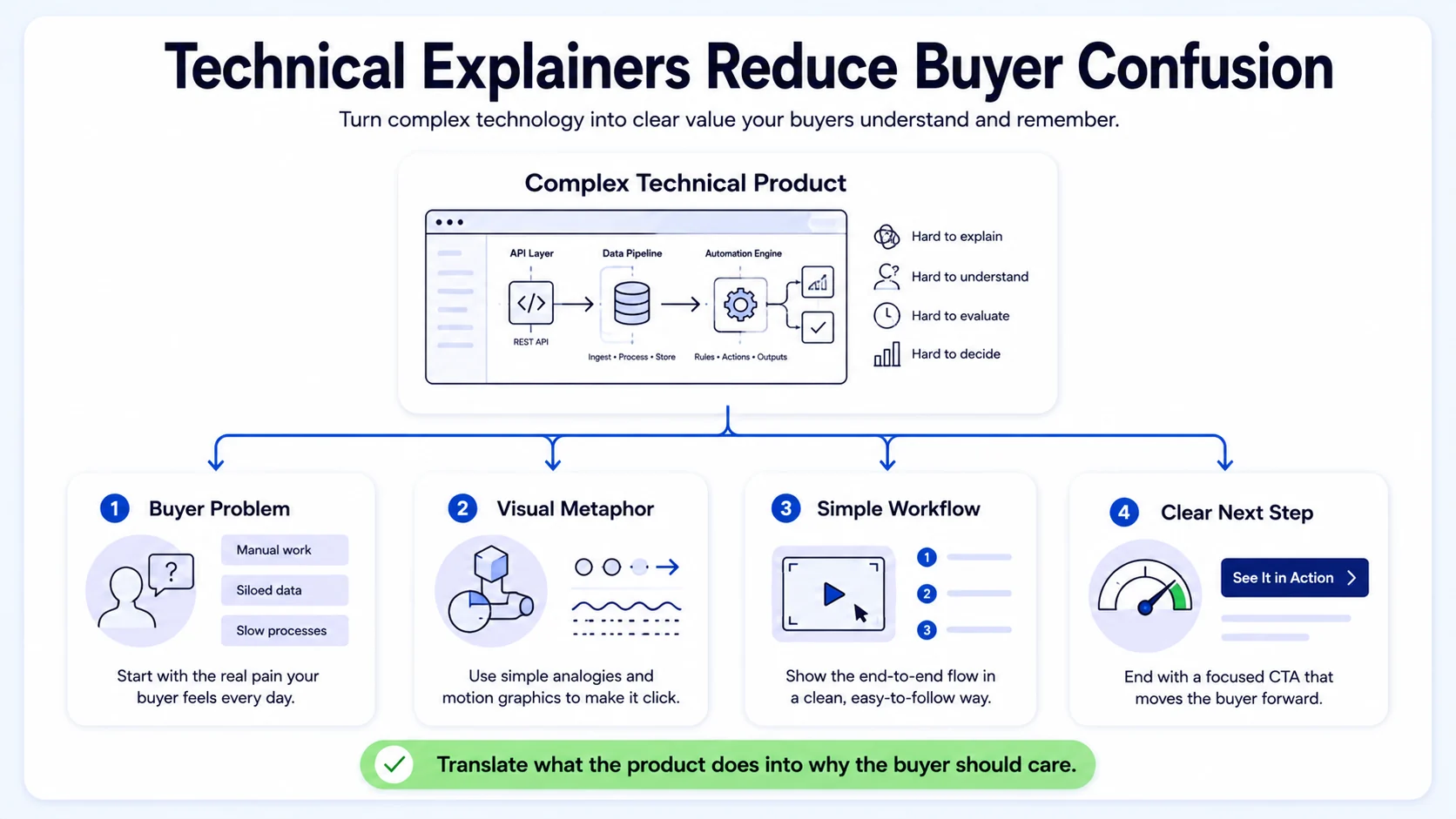
96% of people have watched an explainer video to learn about a product or service. B2B buyers also do extensive research before talking to sales, and according to 6sense's B2B Buyer Experience research, 69% of the purchase process happened before buyers engaged with sellers. That means your videos may influence the deal before your team ever gets a call.
At Komet Media, I build these assets for B2B SaaS and funded tech teams specifically because the gap between "product-led growth" as a concept and actual buyer education as a system is enormous. Most teams have great product knowledge locked inside demos, webinars, and founder decks. Explainer videos for technical products pull that knowledge out and make it work in the wild, on landing pages, in outbound sequences, and across LinkedIn feeds where your buyers actually spend time.
Three things separate a technical explainer from a generic product video:
- It leads with the buyer's problem, not the product's features.
- It uses visual metaphors and UX demonstration to replace jargon.
- It ends with a clear, frictionless CTA tied to a specific next step.
That structure is what supports the pipeline, not just views.
Best Explainer Video Styles for Technical Audiences
Not all explainer formats serve the same audience. Matching the right style to the right viewer is one of the most consequential decisions in production. SaaS explainer videos in 2026 split into five main production styles: animated, screen recording, whiteboard, AI-generated, and mixed media.
For B2B tech teams, the most commonly used formats break down as follows:
Motion graphics and animated storytelling reduce cognitive load fastest. They externalize complex system relationships visually, which is critical when your product solves a problem most buyers haven't fully articulated yet. Use these for homepage hero videos and paid social ads targeting cold audiences.
Screen recording works best when your audience already understands the category and wants to see your specific UX in action. Pair a clean screen recording with tight voiceover narration, callout annotations, and motion graphics overlays for maximum clarity. Tools like Loom and Descript are strong starting points for this format.
Hybrid animation, combining live-action and 2D, can reduce production costs 30–40% while still delivering production quality appropriate for external buyer-facing assets. This is increasingly the format of choice for funded startups who want brand-quality output without a six-figure animation budget.
Videos that address specific buyer pain points see a 41% higher watch-through rate than generic product videos. Format matters less than specificity. A mediocre animated video that addresses your buyer's exact pain point outperforms a polished generic explainer every time.
Explainer Video vs Product Demo: Which Is Better for Technical Products?
This is the wrong question. The right question is: which one does your buyer need right now? The difference between these formats affects everything from script structure to pacing to distribution. A demo tends to reward the attention of warmer prospects; an explainer tends to attract the attention of colder audiences who still need context.
Here is a direct comparison built for SaaS and tech teams:
Explainer videos, because they are conceptual, typically last 1 to 3 years before needing a refresh. When you factor in shelf life, a $5,000 explainer video that lasts 2 years has a lower annual cost than a $2,000 demo video that needs updating twice a year.
Brightcove and Ascend2's B2B buyer research found that 83% of B2B buyers would rather tour a product through video than written content, and 81% prefer video when learning about a complex product or service. The practical answer for most SaaS teams: start with an explainer on the homepage, then build product demos for feature pages and sales enablement.
For SaaS companies looking to build out a full video library, a recommended sequence is starting with an explainer for the homepage, then a product overview demo for the product page, then feature-specific demos for each major feature, giving your marketing and sales teams everything they need to cover the full buying journey.
At Komet Media, I treat these as two distinct assets serving two distinct jobs. Conflating them is one of the most common and most expensive mistakes technical teams make.
How to Create an Explainer Video for a Complex Software Product
This is a process, not a creative exercise. Follow it in sequence and you avoid the most common failure modes.
- Define the single viewer: Who is watching? A VP of Engineering has completely different comprehension needs than a marketing director. Write for one person.
- Identify the one problem: Your product probably solves ten things. Pick the most painful one your target buyer faces today.
- Write the script first: Everything flows from the script. The recommended script arc runs 90 seconds: hook (5 seconds), problem (15 seconds), solution (25 seconds), feature walkthrough (25 seconds), proof (10 seconds), and CTA (10 seconds).
- Build a visual brief: Map each script beat to a visual treatment. Abstract concepts get metaphors. Workflows get screen recordings. Outcomes get data visualizations.
- Record voiceover before animation: Lock the audio track first. Animate to match it, not the other way around. This prevents expensive revision cycles.
- Choose your style: Motion graphics for top-of-funnel buyers, screen recording with overlays for practitioners, mixed media for founder-led trust content.
- Edit for pacing: Every second of dead air is a viewer dropout risk. A tight 75-second video always outperforms a padded 3-minute one.
- Host strategically: Use Wistia for branded landing pages with conversion rate optimisation data. Use Vidyard for sales sequences where CRM tracking matters. Vidyard and Wistia are frequently selected for environments that rely on CRM and marketing automation tools, and both integrate with platforms like HubSpot and Salesforce, allowing video engagement data to flow directly into lead and account workflows.
- Distribute intentionally: Embed on the homepage, use 30-second cuts for LinkedIn, and include full versions in email nurture sequences and sales enablement decks.
The teams at Komet Media's video services who see the best results from explainer videos treat this as a system, not a one-off project. One core video generates clips for LinkedIn, sales sequences, SaaS onboarding emails, and customer success touchpoints.
How Long Should a Technical Product Explainer Video Be?
Shorter than you think. Much shorter than your product team wants. The 90-second rule: Videos under 90 seconds retain 53% of viewers. Videos over two minutes drop to 25% retention. Every additional second after 90 costs you roughly one percentage point in completion rate. HubSpot research shows big differences in viewer retention based on video length. Videos under 90 seconds keep 53% of viewers watching, while videos over two minutes drop to 25% retention.
The optimal length by use case:
Average video length has dropped significantly over recent years, and is projected to reach 39 seconds by the end of 2026 according to Sprout Social. This does not mean your homepage explainer should be 39 seconds. It means your awareness-stage social content should be brutally short, with longer formats reserved for consideration-stage buyers who have self-selected for depth.
The average length of B2B marketing videos consumed has decreased from 6 minutes in 2022 to 4 minutes and 15 seconds in 2025. Attention is compressing. The best technical teams are responding by building multi-length video systems: a 30-second hook for ads, a 90-second overview for the homepage, and a 3-minute deep-dive for late-stage buyers. This is exactly the kind of short-form video editing approach we build at Komet Media.
Common Mistakes to Avoid When Making Technical Explainer Videos
These are the patterns I see consistently across funded SaaS teams that have invested in video production and still aren't seeing pipeline impact.
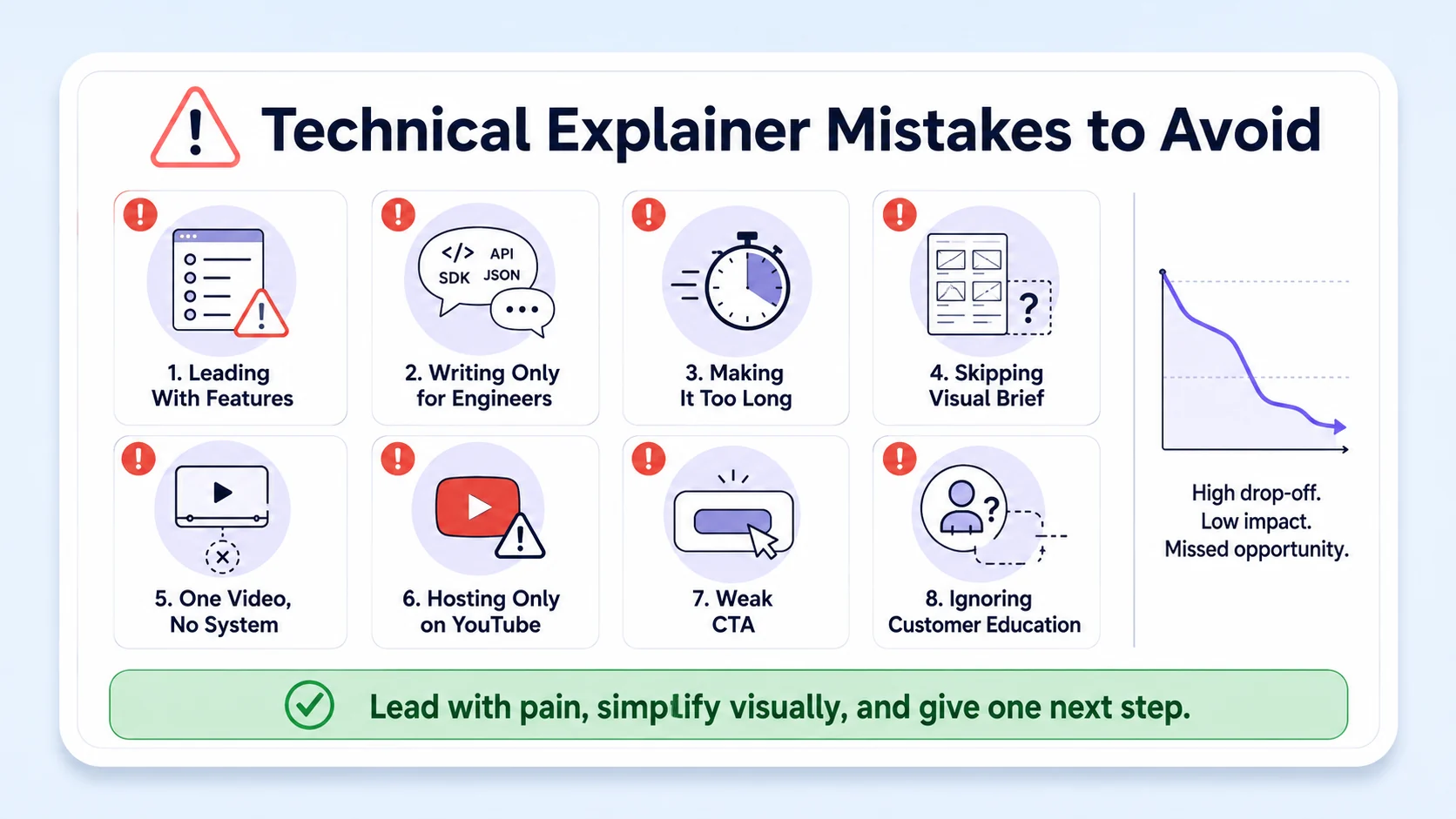
- Leading with features instead of problems: Your buyer does not care that your product has 47 integrations. They care that their team wastes three hours a week on manual data reconciliation. Lead with the pain. Every time.
- Writing for the engineer, not the buyer: The person who evaluates your product may not be the person who uses it. Explainers written in technical jargon exclude economic buyers and procurement stakeholders who control the budget.
- Making it too long: Covered above, but worth repeating. Product teams almost always push for longer videos. Longer videos almost always convert worse.
- Skipping the visual brief: Teams that jump straight from script to animation end up with a narrated slideshow, not a visual story. Motion graphics and animated storytelling require intentional visual design, not just illustrated script lines.
- One video, no system: A single explainer video is not a video strategy. The best B2B video marketing strategies create videos at multiple lengths: a 15-second social hook, a 60-second overview, and a full long-form video for interested prospects.
- Hosting on YouTube only: YouTube is the right channel for SEO-driven discovery and organic reach, but it sends buyers away from your site. For conversion-focused explainer videos, host on Wistia or Vidyard and embed natively. If you are creating video for your website, blog, or as part of a content marketing strategy, Wistia beats Loom for this use case.
- No CTA or a weak CTA: "Learn more" is not a call to action. "Book a 20-minute demo" is. Every explainer video for a technical product should end with a single, specific next step tied to a measurable conversion event.
- Ignoring microlearning for customer success: Explainer videos are not just pre-sale assets. Improved product understanding through video accelerates buying decisions, reduces sales friction, and decreases support tickets while improving customer satisfaction post-purchase.
Your post-sale team needs them as much as marketing does.
Best Tools and Cost for Creating Technical Product Explainer Videos in 2026
Production tools by use case: AI tools like Synthesia, HeyGen, and InVideo AI offer speed and scale. Animation platforms like Vyond and Animaker deliver custom character-based quality. Screen tools like Loom and Descript handle software demos and spoken-word content.
Hosting and analytics tools:
- Wistia: Best for branded landing pages, conversion rate optimisation, and gated video with lead capture.
- Vidyard: Best for sales teams. Vidyard provides stronger analytics than Loom, you can see not just who watched but how many times, integrated into Salesforce and HubSpot CRM records.
- Loom: Best for internal async communication and quick customer-facing screen recordings before investing in full production.
2026 production cost benchmarks: A professional SaaS explainer video in 2026 costs $5,000 to $15,000 for a 60–90 second production with custom animation, voiceover, and sound design. Around 40% of companies spent under $5,000 on video production overall in 2025, per Wistia. Premium 3D productions can exceed $20,000.
38.6% of marketers say video is the single most impactful element on a landing page, and documented landing-page conversion lifts go as high as 86% when video is added. At the $5,000–$15,000 production tier, the ROI math for a well-positioned SaaS product with meaningful deal values is straightforward. If you want to explore how Komet Media builds these systems for B2B SaaS teams, start here.
Conclusion
Explainer videos for technical products are not a nice-to-have. For SaaS teams with a complex product and a buyer who does most of their evaluation before ever talking to sales, they are the highest-leverage video asset you can build.
Key takeaways:
- Lead with the buyer's problem, not your feature list. Every time.
- Keep top-of-funnel explainers under 90 seconds. Build a multi-length system from that core asset.
- Match format to buyer stage: motion graphics for awareness, screen recording for evaluation, demos for decision.
- Host on Wistia or Vidyard for conversion tracking, not YouTube alone.
- One video is not a strategy. A system of interconnected assets is.
If your product knowledge is sitting inside webinars, founder decks, and long demos with no short-form video layer on top of it, let's talk about what that system looks like for your team.
Frequently Asked Questions
Q1: What is the ideal length for explainer videos for technical products?
60 to 90 seconds for homepage and awareness-stage content. Videos under 90 seconds keep 53% of viewers watching, while videos over two minutes drop to 25% retention. Build shorter social cuts (15–45 seconds) and longer consideration-stage versions (up to 3 minutes) from the same core asset.
Q2: Should I use animation or screen recording for my SaaS explainer?
Use motion graphics and animation for cold audiences who need context before seeing your UI. Use screen recording with voiceover and motion graphic overlays for warmer prospects who are already evaluating your category. Most strong technical explainers combine both in a single video.
Q3: How is an explainer video different from a product demo?
A demo video gives viewers a real look at your product's interface and how it works, while an explainer video breaks down big-picture ideas or value propositions, often with the help of animations. Explainers build problem-solution clarity; demos validate product fit. Both are essential in a complete SaaS video strategy.
Q4: How much do explainer videos for technical products cost in 2026?
A professional SaaS explainer video in 2026 costs $5,000 to $15,000 for a 60–90 second production with custom animation, voiceover, and sound design. AI-assisted production can start around $1,500. Premium 3D work exceeds $20,000. Budget scales with animation complexity, not video length.
Q5: Which tools should I use to host and distribute technical explainer videos?
Use Wistia for website and landing page hosting with branded players and engagement analytics. Use Vidyard for sales team distribution where CRM tracking inside HubSpot or Salesforce matters. Use Loom for lightweight async screen recording before committing to full production.
Q6: Can I repurpose existing webinars or podcasts into explainer videos?
Yes, and this is one of the highest-ROI moves a SaaS team can make. Long-form content already contains the product thinking, proof points, and buyer education your team has developed over months. Komet Media's content repurposing approach extracts short-form clips, adds motion graphics, and turns that raw material into explainer videos for technical products without starting from scratch.


