
🪄 AI Summary
Heading 1
Heading 2
Heading 3
Heading 4
Heading 5
Heading 6
Lorem ipsum dolor sit amet, consectetur adipiscing elit, sed do eiusmod tempor incididunt ut labore et dolore magna aliqua. Ut enim ad minim veniam, quis nostrud exercitation ullamco laboris nisi ut aliquip ex ea commodo consequat. Duis aute irure dolor in reprehenderit in voluptate velit esse cillum dolore eu fugiat nulla pariatur.
Block quote
Ordered list
- Item 1
- Item 2
- Item 3
Unordered list
- Item A
- Item B
- Item C
Bold text
Emphasis
Superscript
Subscript
AI is no longer an optional add-on inside your editing suite. It has become the core infrastructure that determines how fast your team moves and how much video you can actually ship. I'm Rajan Soni, Founder and Video Director at Komet Media, and I work inside these workflows every day. This guide breaks down exactly how AI is changing video editing workflows, which tools are worth using, and how B2B and SaaS teams can build a production system that scales—whether starting from scratch or repurposing existing content—without adding headcount.
TL;DR
- The global AI video editing tools market was valued at $1.6 billion in 2025 and is projected to reach $9.3 billion by 2030.
- 63% of video marketers used AI tools to create or edit marketing videos in the past year, up from 51% the year before.
- AI handles the grunt work: captions, rough cuts, scene detection, colour grading, and repurposing.
- Human editors still drive strategy, pacing, and buyer-level messaging.
How AI Is Changing Video Editing Workflows: The Core Shift
The shift isn't subtle. A year ago, AI video tools were mostly conversation starters. In 2026, they're production infrastructure. Three forces are driving this:
Speed compression: AI video tools have compressed a 13-day production timeline for a 60-second marketing video down to 27 minutes, and cut per-minute production costs from $4,500 to roughly $400. That's not incremental improvement. That's a different operating model.
Automation of mechanical tasks: Automated tasks now include scene detection, colour correction, audio levelling, subtitle generation, and smart cropping for different aspect ratios. Every one of those tasks used to eat hours of an editor's time.
Short-form volume demands: The explosion of short-form video across TikTok, Instagram Reels, and YouTube Shorts has created unprecedented demand for fast, efficient editing workflows, while AI capabilities are compressing production timelines from days to hours.
What this means practically for a B2B or SaaS team: your webinar recordings, founder podcasts, product demos, and sales calls are no longer raw footage sitting on a hard drive. With the right AI workflow, that footage becomes a pipeline of short-form assets, each one formatted for YouTube Shorts, Meta Reels, and LinkedIn. The machine handles the extraction. The human handles the message.
AI video tools are growing 3.6x faster than the broader video editing category. Teams that keep running purely traditional workflows will fall behind on volume and cost. The question isn't whether to adopt AI in your editing process. It's how to integrate it without sacrificing quality or strategic positioning.
At Komet Media, we've rebuilt our production stack around this exact reality: AI removes the bottlenecks, and skilled editors make the calls that matter to your buyers—whether creating new videos from scratch or editing existing recordings.
The Best AI Video Editing Tools in 2026: A Practical Comparison
Not every tool labeled an "AI editor" solves the same problem. Here's how the major platforms break down by function:
Adobe Premiere Pro's AI features include Text-Based Editing (which lets you edit by editing the transcript), Enhanced Speech to clean dialogue audio, Object Mask for rotoscoping, Quick Cut (added in early 2026) to assemble a rough draft from footage, and Generative Extend, powered by the Firefly Video Model, which adds up to about 2 seconds of plausible new frames to a clip.
DaVinci Resolve 21 offers unusually deep professional editing, colour, audio, VFX, and AI features with a capable free version. For teams watching the budget, that free tier is significant. Runway Gen-4.5 supports concept visualisation, cinematic B-roll generation, and footage transformation using text prompts. It's the right tool when you need a missing shot but can't schedule a reshoot.
Tools like OpusClip are built around turning podcasts, interviews, webinars, and other long-form videos into short clips for TikTok, Reels, and YouTube Shorts, which makes it a natural fit for content repurposing at scale.
For B2B teams: If you're choosing one tool to start, Descript handles the most painful part of the workflow: cutting talking-head footage fast through transcript editing, then pushing clips out for repurposing.
How AI Automates Video Editing Tasks: Under the Hood
Understanding the underlying technology helps you evaluate tools more accurately and use them more deliberately. The core mechanisms are:
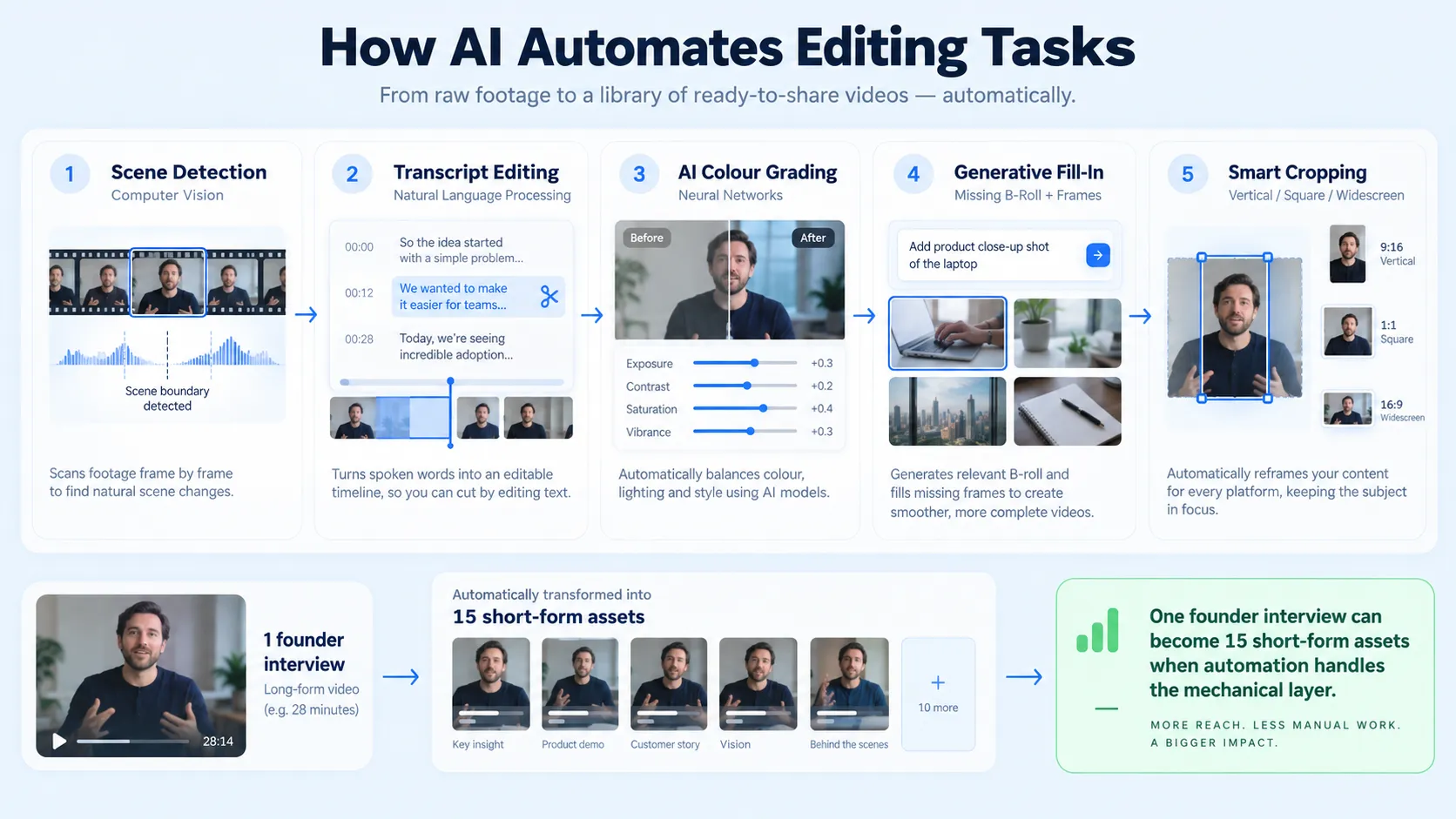
Scene detection via computer vision: Machine learning models scan footage frame by frame, identifying scene changes, shot boundaries, and visual transitions. What used to require a human editor scrubbing a timeline is now flagged automatically in seconds.
Natural language processing for transcription and editing: Descript lets you edit spoken content through text and an AI co-editor. The transcript becomes the edit. Delete a word in the transcript, and the corresponding footage is cut. This is NLP directly inside post-production automation.
Neural networks for colour grading: AI-powered scene detection, smart audio enhancement, and automated colour grading are core value drivers for next-generation editing platforms. DaVinci Resolve's Magic Mask, for example, applies neural network-based object isolation that previously took hours of manual rotoscoping.
Generative AI for missing content: Generative Extend, powered by the Firefly Video Model, adds plausible new frames to the start or end of a clip, and Generative B-roll can produce a missing transition shot from a prompt.
Format-aware smart cropping: Platforms like CapCut and Premiere Pro use computer vision to identify the primary subject in a shot and automatically reframe it for vertical, square, or widescreen aspect ratios, critical for distributing across TikTok, Instagram Reels, Meta Reels, and YouTube Shorts simultaneously.
For a SaaS team, these aren't abstract features. They are the difference between publishing one video a month and publishing 15 short-form assets from a single founder interview. That volume difference compounds directly into the pipeline. Our short-form video production service is built on these exact capabilities.
AI vs. Traditional Video Editing: Which Approach Wins for B2B Teams?
This is the wrong question framed correctly. The real question is: which tasks belong to AI, and which belong to a skilled editor?
The best workflow in 2026 is AI handling the grunt work (captions, rough cuts, format conversion) while humans make the creative decisions. Where traditional editing still wins is in strategic intent. A SaaS product demo isn't just a video. It's a sales tool. The pacing of a key feature reveal, the placement of a customer testimonial, the 3-second hook that keeps a buyer watching rather than scrolling, none of that is automated by machine learning. It requires someone who understands your buyer, your funnel stage, and your product narrative.
The teams seeing the best results aren't choosing between AI and traditional editing. They're running AI through the mechanical layer of their video editing services stack—from initial scripting and creation to post-production—and preserving human judgment for every decision that touches buyer psychology. That combination is what closes pipeline. Neither component alone gets there.
How Professional Video Editors Use AI in Real B2B Workflows
Here's how a production workflow actually looks when AI is integrated at every stage:
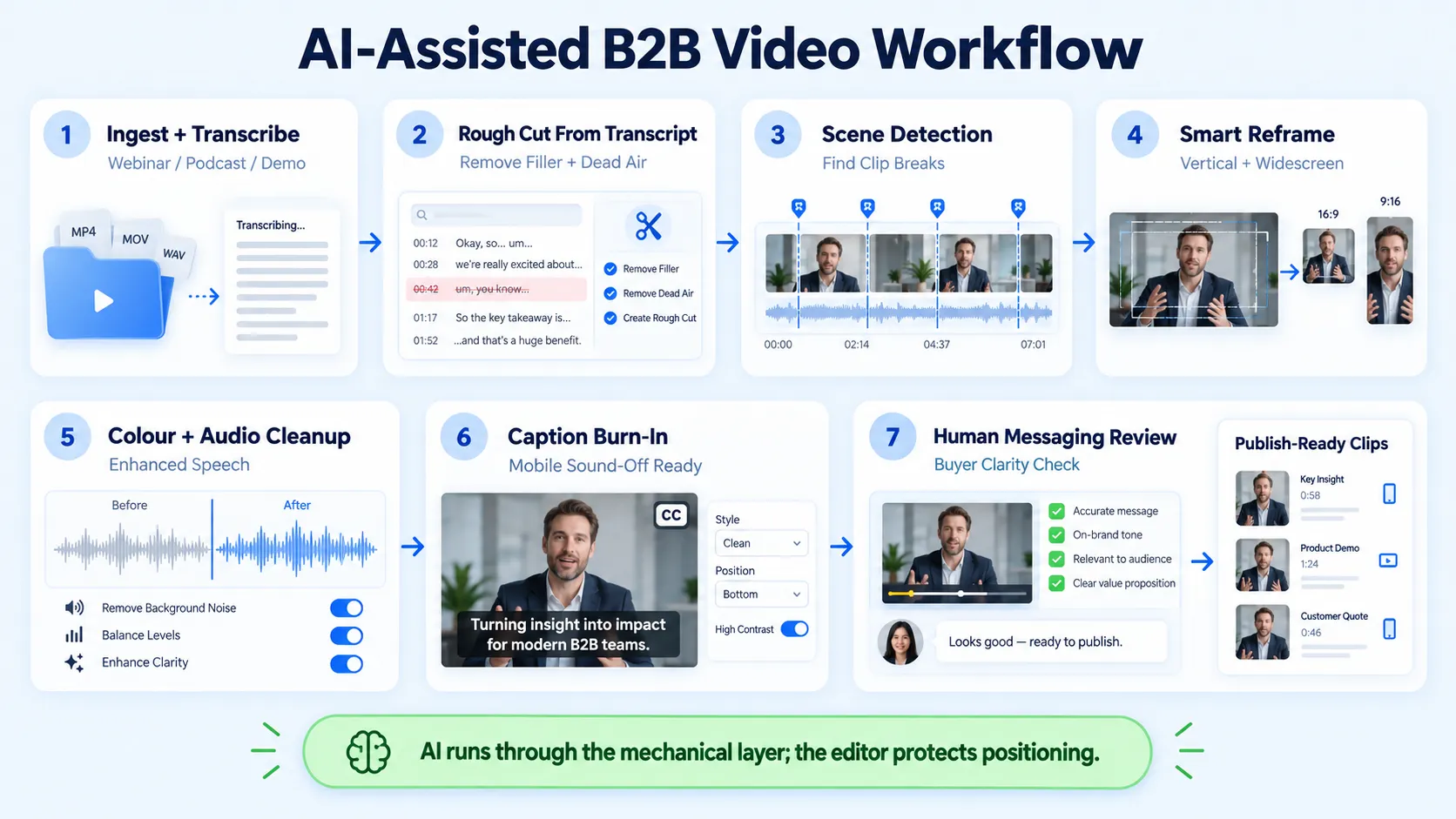
- Ingest and transcribe (or record from scratch): Upload raw footage (webinar, podcast, founder interview, demo) or record new scripted concepts from scratch into Descript or Adobe Premiere's Text-Based Editing. Full transcript generated in minutes via natural language processing.
- Rough cut from transcript: Edit the transcript to remove filler, dead air, and off-message segments. AI updates the timeline in real time.
- Scene detection pass: Computer vision flags natural segment breaks, making it easier to identify clips suitable for short-form video distribution.
- Smart reframe for formats: Apply AI-driven Smart Reframe (Premiere) or auto-crop (CapCut) to produce vertical cuts for TikTok algorithm and YouTube Shorts alongside the primary widescreen version.
- Colour grading and audio: AI-assisted colour matching in DaVinci Resolve and Enhanced Speech in Premiere clean the output without a dedicated colorist or audio engineer.
- Caption burn-in: Auto-captions generated and reviewed, formatted for Meta Reels and YouTube Shorts viewing patterns (mobile, silent autoplay).
- Human review for messaging: A skilled editor reviews every clip for buyer clarity, hook strength, and positioning accuracy before publish.
OpusClip turns founder calls, webinars, and demos into short-form assets at step 3, running parallel to the main edit. For SaaS teams running podcast production or hosting webinars, this step alone can generate a month's worth of social content from a single recording session. The editors getting the most out of AI in 2026 are the ones who've identified exactly where AI removes friction in their specific work and built repeatable systems around those moments.
Can AI Replace Human Video Editors? The Real Answer for SaaS and B2B
For templated social content, AI handles the mechanical work. For narrative editing, pacing decisions, creative timing, and emotional storytelling, it does not. For B2B and SaaS specifically, the stakes are higher than for consumer content. Your video isn't competing for entertainment attention. It's supporting a buying decision. A founder-led video that positions your product correctly against competitors, names the ICP pain clearly, and builds trust across a 6-week sales cycle, that requires editorial judgment that no neural network currently produces.
What AI eliminates is the production tax: the hours spent on transcription, rough cuts, format variants, caption work, and colour passes. The top adoption barrier for AI video tools is in-house skills, not cost, which means teams that invest in learning the workflow get a durable advantage over those waiting for fully automated solutions. The replacement question is also the wrong frame for agencies and growth teams. The right frame: AI increases per-editor output capacity, which means a smaller team can produce more, or the same team can go deeper on strategy and creative quality. At Komet Media, that's exactly how we run it. AI handles volume. Our editors handle value.
Bottom line: AI won't replace the editor who understands why a buyer watches a second video after the first. It replaces the hours spent doing work that doesn't require that understanding.
Conclusion
AI is transforming video production from a resource-constrained bottleneck into a scalable content system.
- AI tools handle transcription, rough cuts, smart cropping, colour grading, captions, and format variants automatically.
- Human editors remain essential for buyer narrative, strategic positioning, and pipeline-supporting content decisions.
- The winning workflow pairs AI's speed with human editorial judgment at the decisions that close deals.
- For B2B and SaaS teams, the compounding advantage is volume: more short-form assets per recording, more touchpoints per campaign, more pipeline per dollar spent on production.
If your team is ready to build this system, start here.
Frequently Asked Questions
Q1: How is AI changing video editing workflows for B2B teams specifically?
AI automates the mechanical layer: transcription, rough cuts, captions, and format variants. For B2B teams, the practical result is turning one webinar or founder interview into 10 to 15 short-form clips for LinkedIn, YouTube Shorts, and Meta Reels without proportionally increasing production time or cost.
Q2: What is the best AI video editing tool in 2026 for SaaS content repurposing?
Descript is the strongest starting point for transcript-based editing of talking-head content. OpusClip handles automated clip extraction from long-form recordings. Adobe Premiere Pro with its Text-Based Editing and Quick Cut features suits teams that need full professional timeline control alongside AI automation.
Q3: How does generative AI differ from AI-assisted editing?
Editing tools like Descript, CapCut, and Premiere Pro's AI features take footage you already have and help you cut, transcribe, repurpose, or polish it. Generation tools like Runway build video from a text prompt or image. B2B teams primarily need editing tools, not generation tools.
Q4: Will AI replace professional video editors?
Not for strategic B2B work. AI eliminates repetitive production tasks, but buyer-focused narrative structure, product positioning, and sales-supporting pacing still require human editorial judgment—whether building a video library from scratch or editing existing recordings. The top barrier to AI video adoption is in-house skills, not cost , which signals that skilled editors who learn these tools increase their own value.
Q5: How do I integrate AI tools into an existing video editing workflow?
Start with one tool that solves your biggest bottleneck. If transcription and rough cuts are the pain point, start with Descript. If format variants for social are the constraint, add CapCut or Premiere's Smart Reframe. Build the AI layer in stages rather than overhauling the entire stack at once.
Q6: What AI features should I look for in video editing software?
Prioritise: automatic transcription and text-based editing, smart reframe for multi-format exports, AI colour grading, enhanced speech/audio cleanup, and scene detection. The convergence of AI automation, cloud collaboration, and mobile-first workflows has fundamentally altered what video editing software looks like in 2026, tools that once required thousands of dollars and years of training are now accessible through AI-assisted interfaces.


