
How to Brief Motion Graphics and Animation: Step-by-Step Guide
Too many B2B teams spend weeks revising animated videos because they started with an unclear brief. When you commission animated content for a product launch, the final asset is only as good as the instructions you provide. If you want a dependable production workflow that generates pipeline rather than frustration, you need a clear system. This guide covers How to Brief Motion Graphics and Animation so you can align your production partners. You will learn how to stop wasting budget on endless revisions and create visual assets that clearly explain your business value.
What Is the Best Way to Brief Motion Graphics?
To brief motion graphics effectively, define your exact business goal, target audience, and distribution channels before production starts. Provide clear branding guidelines, a verified script, visual references, and realistic timelines to ensure your production partner delivers accurate work.
Why Does a Precise Animation Brief Matter for B2B Teams?
I have seen strong products lose their commercial value because the team failed to explain the concept clearly to their editors. Motion graphics can translate abstract software features into compelling visual stories. However, this only works if the animation team understands your core message.
According to Wistia's 2025 State of Video Report, over 40 percent of companies now make at least one video a week. Furthermore, 71 percent produce content in-house. High volume does not equal high impact. Without a documented brief, animators are forced to guess what you want.
This guesswork leads to friction and missed deadlines. It produces assets that look polished but generate zero qualified leads. A structured brief removes ambiguity. It forces your marketing team to agree on the message before spending money on design.
Venture capital firms and private equity groups rely on premium brand positioning. A weak brief results in generic animations that damage institutional authority. SaaS companies need to explain complex APIs or data infrastructure quickly. A precise brief ensures the technical details remain accurate while the visuals stay engaging.
What Is the Difference Between Video Editing and Motion Design?
Many marketing leaders confuse video editing with motion design. This confusion often leads to poorly structured project briefs. You must understand the difference to manage your production workflow effectively.
Video editing involves taking existing footage and cutting it together to tell a story. This includes trimming pauses, adding basic text overlays, and mixing audio. It relies on the raw material you have already recorded.
Motion design involves creating visual elements from scratch. Animators build characters, environments, typography, and interface mockups. They use software to bring static designs to life. This process is highly technical and time-consuming.
When you edit a founder interview, you can easily swap one clip for another. When you animate a product explainer, changing a scene requires redrawing assets and adjusting keyframes. This fundamental difference is why a locked brief is critical for animation projects.
What Are Common Mistakes When Commissioning Animated Video?
In my experience, editing is rarely the only problem. Most motion graphic projects fail during the pre-production phase. Teams rush the planning stage and pay for it during the revision rounds.
The biggest mistake a team can make is changing the voiceover after the animation has started. Animators time their visual movements to specific words and pauses in the audio track. Altering the script breaks this timing.
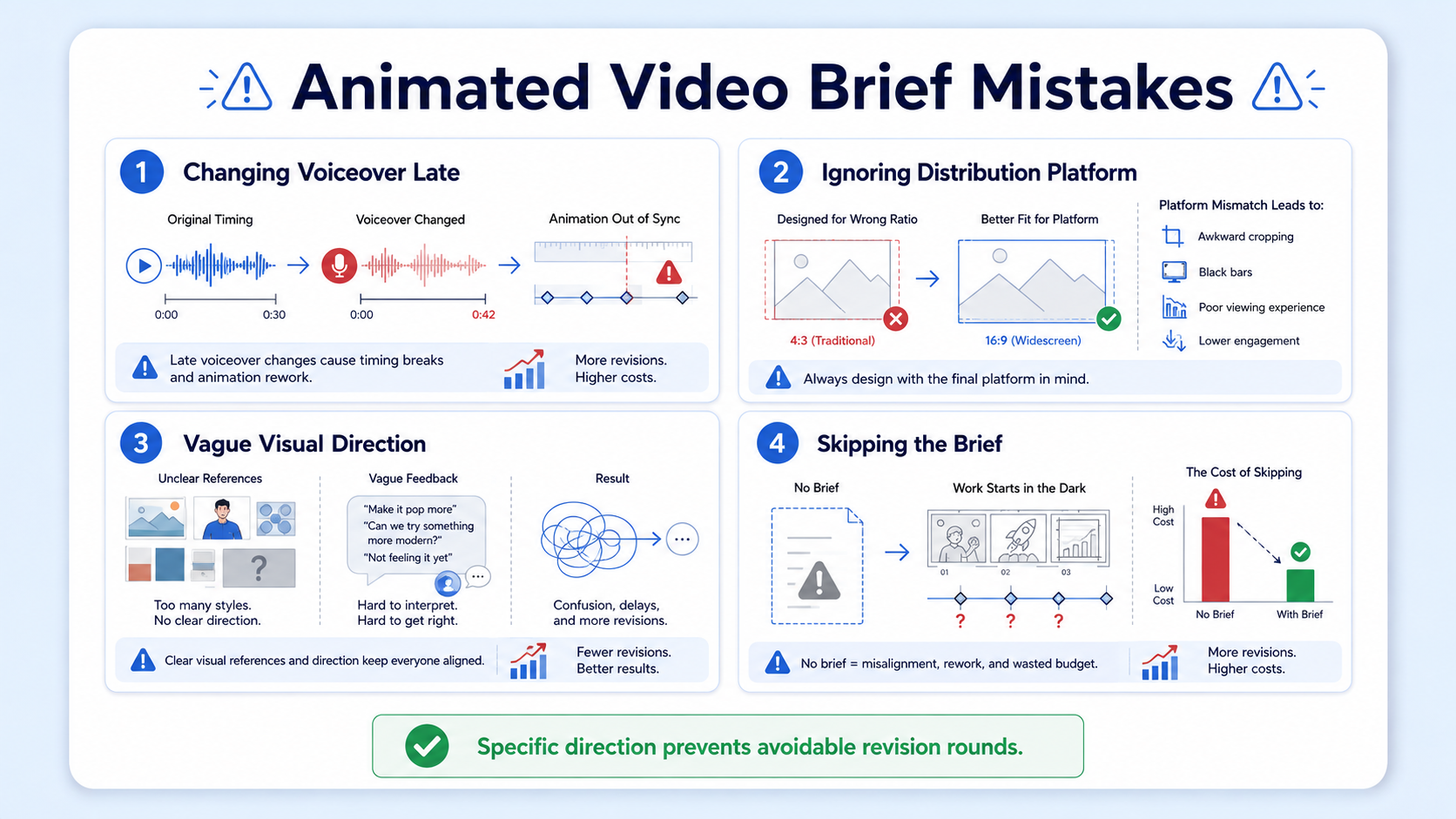
Another frequent error is ignoring the distribution platform. A video built for a website landing page requires different pacing than a LinkedIn video asset. Teams often ask for a single video and expect it to perform well everywhere.
Providing vague visual direction also ruins projects. Telling a partner to make a video look dynamic or professional is not helpful. These terms mean different things to different people. You must provide specific examples.
A common pattern in our work is that marketing teams skip learning How to Brief Motion Graphics and Animation and jump straight into storyboarding. This results in costly and avoidable revisions later in the process.
What Is the Step-by-Step Process for Briefing Motion Graphics?
When we handle production for SaaS and technical businesses, we rely on a structured handover. You cannot build a dependable content engine without standardized instructions. Follow these steps to build your brief.
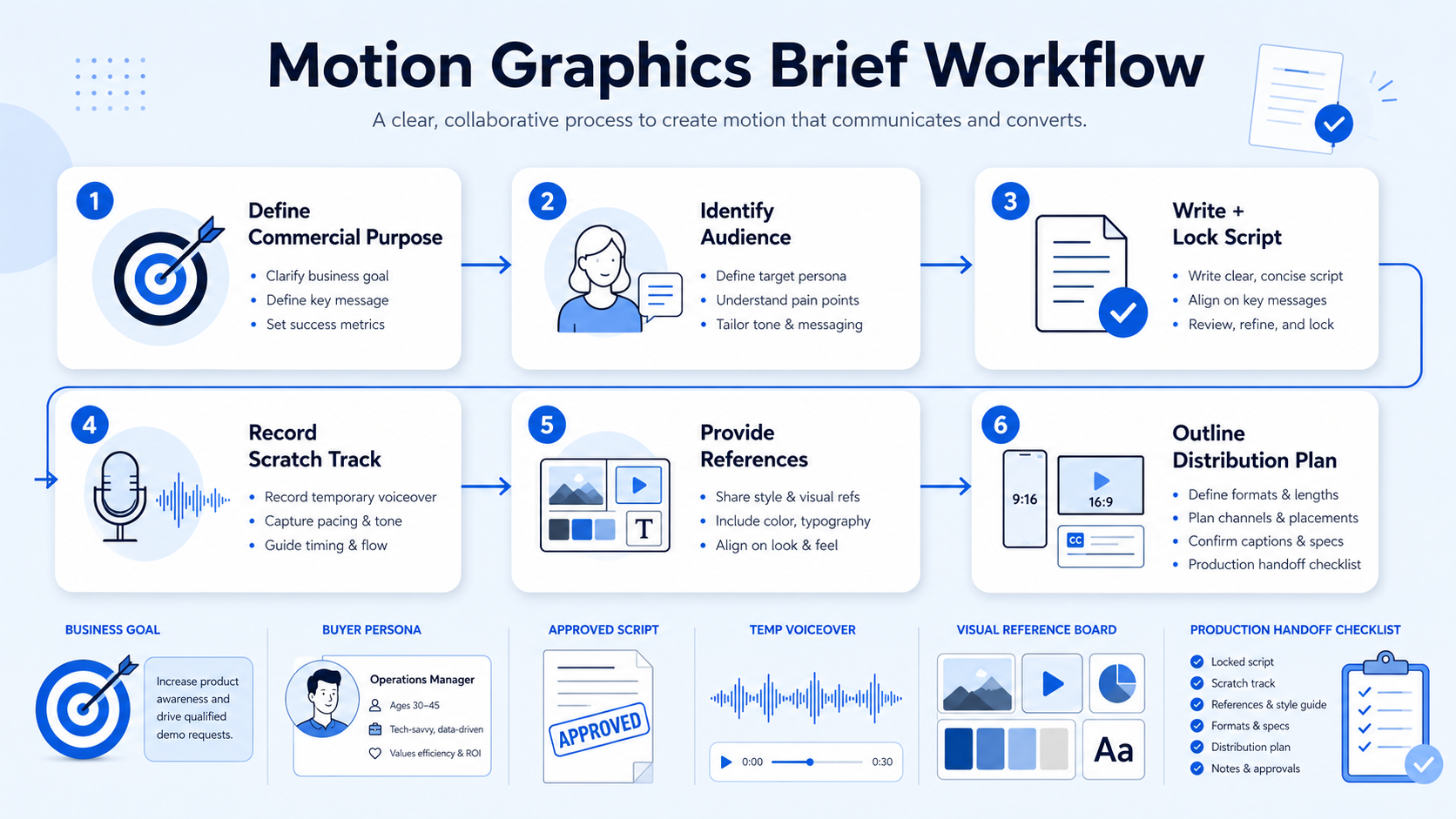
Step 1: Define the commercial purpose State the exact business goal of the video. Are you trying to generate demo requests, explain a new feature, or build brand awareness? Every creative decision should support this goal.
Step 2: Identify the target audience Who is this video for, and what should they do after watching it? A venture capital firm announcing a new fund requires a different tone than a startup explaining an API update. Define your buyer clearly.
Step 3: Write and lock the script Never brief an animator with a draft script. Finalise your text and ensure the messaging is approved by all stakeholders. This is the foundation of your entire project.
Step 4: Record a scratch track A scratch track is a temporary audio recording of your script. It helps the animation team understand the pacing and tone. You will replace this with professional audio later.
Step 5: Provide visual references Link to two or three existing videos that capture the style you want. Explain exactly what you like about them. Point out specific color palettes, movement styles, or typography choices.
Step 6: Outline the distribution plan List every required format, aspect ratio, and caption style before work begins. Mastering How to Brief Motion Graphics and Animation means thinking about the final platform before you create the first frame.
How Does Content Repurposing Change Your Initial Project Brief?
Many teams do not have a content shortage. They have a production and distribution problem. A single animated explainer video should not live exclusively on your homepage. It should fuel your social channels for weeks.
You must plan for content repurposing during the briefing stage. If you wait until the final video is delivered, creating short clips becomes difficult. The narrative structure might not support shorter formats.
Tell your production partner which sections of the script will become standalone social posts. This allows the animator to design modular scenes. They can create visual breakpoints that make editing short clips easier.
You also need to specify aspect ratios early. A widescreen video does not always crop well into a vertical format for YouTube Shorts or Instagram Reels. The animator may need to design key visual elements closer to the center of the frame. You can learn more about this in our guide on what is short-form video editing.
How Do You Set Realistic Timelines and Budgets for Motion Graphics?
Animation requires deep technical work and specialized software. A typical workflow involves concept art, a storyboard, style framing, rough animation, and final rendering. Rushing this process damages the final product.
Most high-quality animated videos take between three and six weeks to complete. If you need a faster turnaround, you must simplify the visual style. Be transparent about your deadlines in the initial brief.
When you evaluate costs, separate project pricing from subscription editing. At Komet Media, we usually work through mid-tier retainers or recurring projects ranging from approximately $2,500 to $5,000. This includes content selection, editing, repurposing, and distribution.
Your budget will depend on the number of short clips, video length, design complexity, and turnaround time. Custom 3D animation costs significantly more than 2D vector graphics. The better you understand How to Brief Motion Graphics and Animation, the easier it is to scope the project accurately.
How Do You Effectively Manage the Feedback and Revision Loop?
Poor feedback slows down production and frustrates everyone involved. Your brief should define exactly who holds final approval authority. Consolidating feedback is critical for a smooth workflow.
Never send an animator a list of conflicting notes from five different stakeholders. The marketing leader must review all internal comments, resolve disagreements, and present a single list of changes to the agency.
Be specific when requesting changes. Do not say that a scene feels off. State exactly which element is incorrect and provide a solution. Reference the timestamp for every comment you make.
Most standard agreements include two rounds of revisions. The first round should address pacing, narrative structure, and overall style. The second round should only cover minor visual tweaks and audio polishing.
How Do You Review and Measure Motion Design Performance?
A polished video with no distribution plan is an underused asset. Once your animation is live, you must track the right data. Do not judge every video only by its view count.
You must match your metrics to the original purpose of the asset. Wyzowl’s 2025 Video Marketing Statistics report indicates that 89 percent of businesses now use video marketing. However, many still track the wrong key performance indicators.
For awareness campaigns, track impressions, view-through rates, and follower growth on social platforms. These metrics show whether your content is reaching the right audience.
For engagement, look at watch time, saves, and shares. HubSpot’s 2025 State of Marketing Report notes that 17 percent of marketers plan to invest more in short-form video, driven by its high engagement potential.
For commercial success, measure website visits, demo requests, and pipeline influence. Ask your sales team if they are using the video assets in their prospect conversations. By reviewing these metrics, you learn How to Brief Motion Graphics and Animation more effectively for your next campaign.
What Are the Key Takeaways for Successful Animation Briefs?
A strong brief is the foundation of any successful video project. When you take the time to define your goals, lock your script, and outline your deliverables, you give your production partner the tools they need to succeed. Skipping these steps leads to weak content and wasted budgets. The process of learning How to Brief Motion Graphics and Animation ultimately protects your time and your budget. Remember that editing creates the asset, but clear communication and proper distribution give that asset a chance to produce business value.
What Are the Frequently Asked Questions About Animation Briefs?
What is the best way to learn How to Brief Motion Graphics and Animation?
Start by downloading a standard video editing brief template. Fill out the core details, such as your target audience, commercial goals, visual references, and specific platform requirements before engaging an animator.
How long does it take to produce a short animated video?
Most high-quality animated clips take between three and six weeks to produce. This timeline depends heavily on the complexity of the design, the length of the script, and the number of internal revision rounds required.
Should I hire a freelancer or an agency for B2B motion graphics?
Freelancers are useful for occasional, one-off projects with simple requirements. An agency is a better fit when you need dependable production integrated with a wider content repurposing and social distribution strategy.
How much does B2B motion graphics production cost?
Costs vary widely based on scope, style, and volume. For comprehensive retainers that include editing, custom animation, repurposing, and distribution support, expect to invest between $2,500 and $5,000 per month.
Should we use an internal team or an external partner for animation?
An internal team is excellent for daily social media updates and rapid filming. An external partner is better equipped to build a scalable content system, handle complex motion graphics, and distribute assets across multiple platforms.
Why is locking the script so important before animation begins?
Changing the voiceover or core messaging after animation starts requires animators to redraw frames and adjust their timing. This breaks the production workflow, causes severe delays, and dramatically increases overall project costs.
Can animated videos be repurposed into shorter clips?
Yes, a core animated explainer can easily be broken down into several shorter assets for LinkedIn, YouTube Shorts, and email newsletters. However, this must be planned during the initial briefing stage to ensure modular design.
Does Komet Media provide motion graphics and animation services?
Yes, we provide motion graphics for SaaS and technical businesses to help explain abstract ideas clearly. This service is typically integrated into our broader editing, content repurposing, and distribution retainers for B2B clients.

