
Building a Video Content Production Workflow: Step-by-Step Guide
Most B2B teams have content scattered everywhere, webinars that nobody watches twice, demos that never reach buyers, podcasts sitting idle on a feed. The problem is rarely the content itself. It's the absence of a repeatable system. Building a video content production workflow is how serious teams fix that. Done right, it turns one long-form asset into a consistent stream of short-form clips that educate buyers, support pipeline, and compound over time. Here's exactly how to build that system.
TL;DR
- A video production workflow has six core stages: strategy, pre-production, filming, post-production, review, and distribution.
- The biggest bottleneck for most B2B teams is the gap between raw footage and published assets, fix that with batch editing and clear approval systems.
- Use Adobe Premiere Pro or DaVinci Resolve for editing, Frame.io for review, and a content calendar to manage distribution.
- Repurposing existing long-form content (webinars, podcasts, demos) is the fastest way to fill your video pipeline without adding filming days.
What Is a Video Content Production Workflow and Why Does It Matter for B2B Teams?
A video content production workflow is the end-to-end system that takes a video from initial idea to published, distributed asset. It covers every stage: what gets made, who makes it, how it gets reviewed, and where it goes live. For B2B SaaS and funded tech teams, this matters more than most people realize. 73% of B2B decision-makers prefer to watch product demo videos rather than read whitepapers or brochures.
Without a workflow, you're making content reactively, burning time on revisions, and shipping inconsistently. With one, you're running a repeatable system that compounds. The core reason building a video content production workflow matters comes down to three business outcomes:
- Pipeline acceleration: B2B video content shortens the sales cycle by 23% on average.
- Buyer education at scale: 73% of B2B buyers say video is their preferred way to learn about a product or solution.
- Inbound demand: Companies using video in their marketing see an average increase of 38% in lead generation.
The workflow is what makes these outcomes repeatable, not accidental. Without a defined video production pipeline, even teams with strong founders and genuine product insight underperform, because the content never ships consistently enough to move buyers. 91% of companies use video as a marketing tool in 2026 , which means the baseline is already set. What differentiates teams now is execution velocity, specifically, how fast and consistently they can move from raw idea to published video. That's a workflow problem, not a creative problem.
At Komet Media, the teams we work with aren't short on knowledge. They're short on systems. A defined workflow is the difference between a founder who records a great webinar once and a founder whose thinking is distributed across 12 short clips every single week.
How to Build a Video Content Production Workflow: The 6 Core Stages
Building a video content production workflow starts with understanding that production is not a single event, it's a pipeline with distinct, sequenced stages. Here's how to structure it.
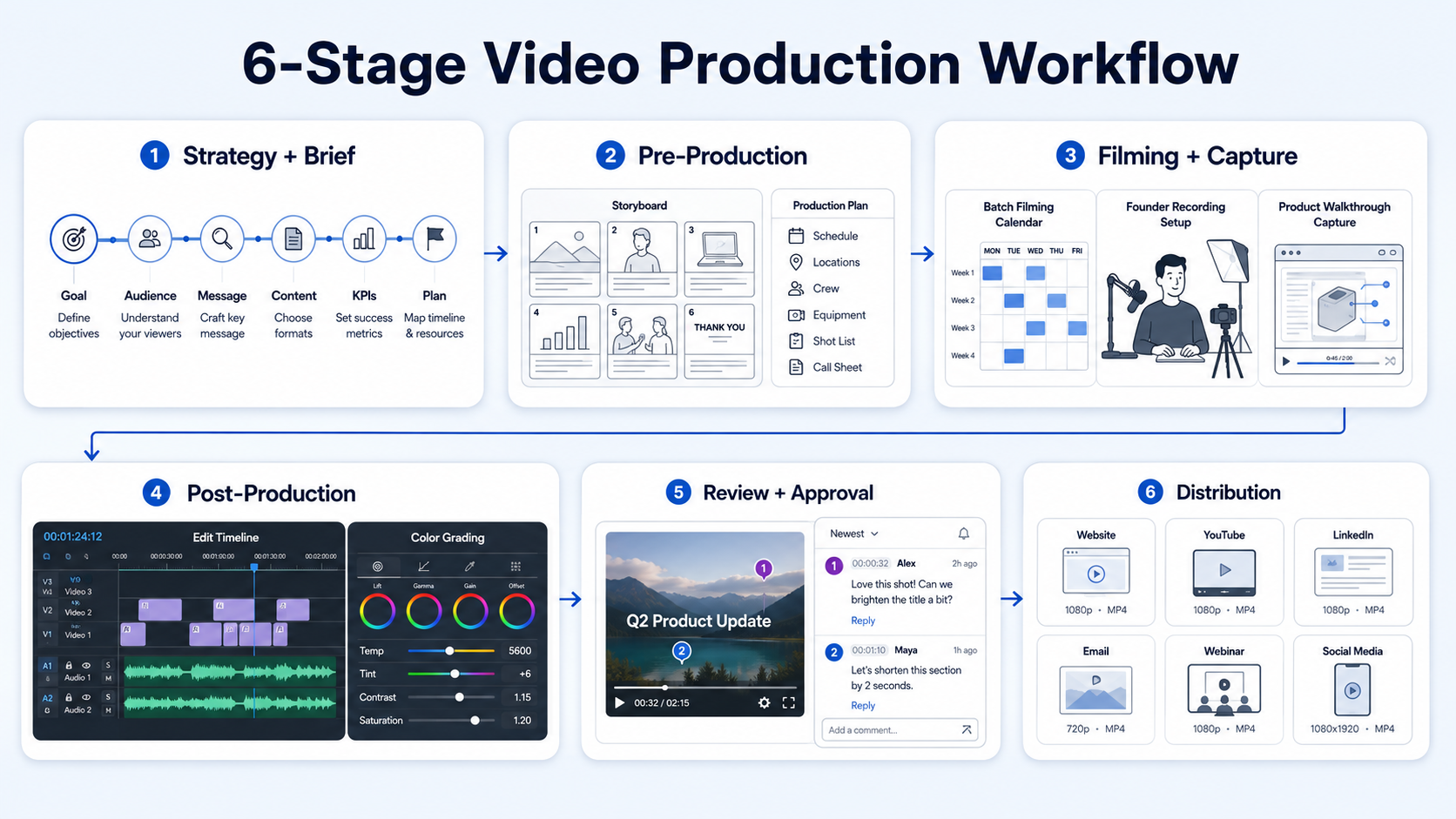
- Strategy and brief: Define the goal, audience, message, and format before any filming happens. For B2B teams, this means mapping each video to a pipeline stage, top of funnel awareness, mid-funnel education, or bottom-funnel conversion.
- Pre-production planning: Write scripts or talking points, create storyboards if needed, confirm talent, and schedule filming blocks. Batch filming (recording multiple videos in a single session) is critical here, it collapses production time dramatically.
- Filming and capture: Record with consistent framing, lighting, and audio. For SaaS teams, this includes product walkthroughs, founder-led commentary, and demo recordings.
- Post-production editing: Cut, add captions, colour grade, and mix audio. Tools like Adobe Premiere Pro and DaVinci Resolve handle professional-grade editing; choose Premiere Pro if deep editing control is non-negotiable in your short-form pipeline.
- Review and approval: Route edits through a structured review cycle. Frame.io is the standard for async video feedback, it lets stakeholders leave time-coded comments without a single email thread.
- Distribution: Publish to the right channels with the right format specs, vertical 9:16 for Instagram Reels and TikTok Creator Tools, horizontal or square for YouTube Studio and LinkedIn.
The companies winning in 2026 are producing consistent, multi-format video content without reinventing the wheel each time. That's the exact outcome a structured six-stage workflow delivers.
What Tools Do You Need to Build a Video Production Workflow?
The right toolstack is what makes building a video content production workflow sustainable at volume. Here's how to think about each layer.
The best tool is not the one with the longest feature list, it is the one that removes your biggest bottleneck. For most B2B SaaS teams, that bottleneck sits in one of two places: pre-production (no scripts, no schedule, no brief) or post-production (editing queue backs up for weeks). Your toolstack should address whichever of those is costing you the most time.
63% of video marketers say they've used AI video tools to help create or edit marketing videos, up from 51% in 2025, with AI being used for scripting, storyboarding, video editing, captioning, and even animation. The best results still come from human creative direction combined with AI efficiency.
One often-overlooked tool layer is asset management. Raw footage, B-roll, motion graphics templates, brand fonts, and approved thumbnails all need a home. Without it, editors waste 30 to 45 minutes per video just hunting files. Set up a structured folder system in Google Drive or Frame.io from day one.
Best Practices for Managing a Video Content Production Pipeline
A functional pipeline does not mean an efficient one. These best practices are what separate teams producing 4 to 6 videos per month from teams producing 20 or more.
Batch filming is non-negotiable. Scheduling your founder or subject matter expert for one two-hour recording session per month, and scripting 8 to 12 videos for that session, eliminates the single biggest scheduling bottleneck in most B2B video workflows.
Build a content calendar with deadlines at every stage, not just publish dates. Each piece needs a brief deadline, a filming date, an edit-delivery date, a review deadline, and a publish date. Without stage-level deadlines, everything compresses into the final 48 hours.
Use templates for post-production. Branded lower thirds, intro/outro sequences, caption styles, and colour grade presets should be built once and reused across every video. This keeps brand storytelling consistent and cuts edit time per video significantly.
Standardise the brief format. Every video that enters your pipeline should have a one-page brief covering: goal, buyer stage, key message, call to action, format, and target platform. This eliminates the back-and-forth that kills timelines. A video production pipeline with no brief at the front is a revision factory at the back. Fix the input, fix the output.
Separate the editing queue from the review queue. Editors should never be waiting on approvals to start the next piece. Use Frame.io to run review cycles asynchronously while editing continues on the next batch. 44% of video marketers say AI significantly reduced production timelines , and the biggest gains come when AI assists with the most repetitive parts: captioning, transcript cleanup, and rough-cut assembly. Build those assists into your standard operating procedure early.
Content Repurposing Strategy: Turning Long-Form Into Short-Form at Scale
This is where B2B teams leave the most value on the table. Most SaaS companies already have a library of high-value long-form content, webinars, podcast episodes, product demos, sales calls, and recorded onboarding sessions. Building a video content production workflow around repurposing that existing content is the highest-leverage move available.
Here's how the repurposing workflow runs in practice:
- Identify source content: Pull your highest-performing webinars, podcast episodes, or demo recordings from the last 12 months.
- Transcribe and audit: Run transcripts through your review process and identify the 5 to 10 strongest insight moments per long-form piece.
- Clip and format: Cut 60 to 90-second clips around each insight. Reformat to 9:16 vertical for Instagram Reels and TikTok, 16:9 or 1:1 for LinkedIn and YouTube Shorts.
- Add context layers: Captions, on-screen text, motion graphics overlays, and a clear call to action make repurposed clips standalone-ready. Videos with subtitles see a 28% higher completion rate among B2B audiences compared to videos without.
- Distribute a content calendar: Map each clip to a platform and a publish date. One webinar should yield 8 to 15 short-form assets with a single repurposing pass.
Short-form video under 60 seconds drives 2.5x more engagement per impression than other formats, with completion rate as the primary algorithmic signal. For SaaS teams specifically, the highest-converting repurposed content tends to be: product walkthroughs trimmed to feature moments, founder commentary on product decisions, and customer outcome stories cut from longer interviews. These formats educate buyers and build product trust simultaneously, two outcomes that directly shorten the sales cycle. Our short-form video editing service is built specifically around this repurposing pipeline.
Common Mistakes to Avoid When Building a Video Production Workflow
Most B2B teams don't fail at video because they lack cameras or editing talent. They fail at the workflow level. These are the mistakes that quietly kill output.
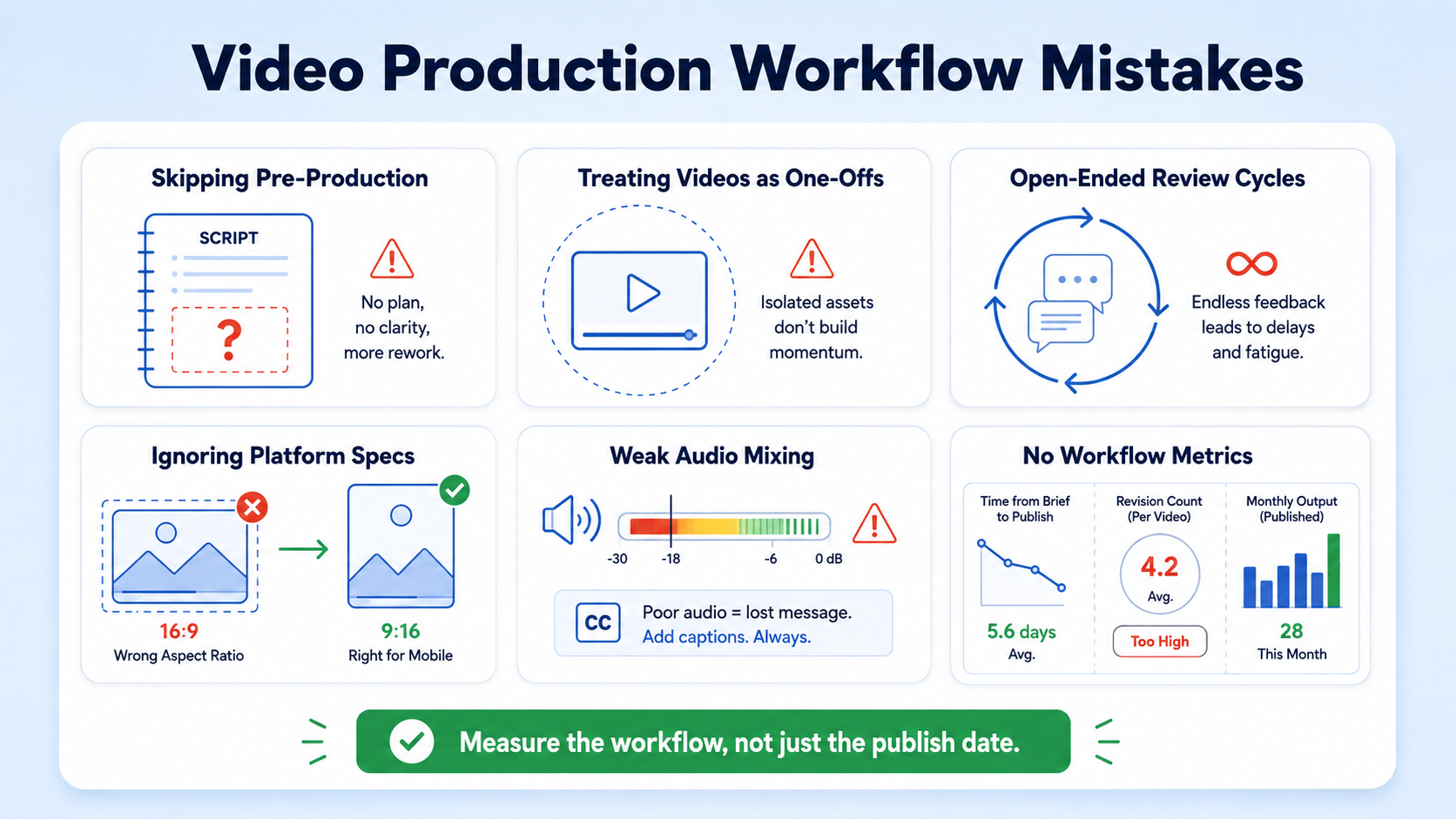
Skipping pre-production planning. Recording without a script or brief is the fastest way to create footage you can't use. Every hour of unscripted recording creates two to three hours of unusable material. Script development and storyboarding are not optional steps, they're the foundation of post-production efficiency.
Treating every video as a one-off. The moment a team decides to "just make a quick video" outside the established workflow, the system breaks. One-off projects don't build libraries, don't support repurposing, and don't generate the consistent output that algorithms and buyers reward.
Letting review cycles run open-ended. Without a defined review deadline and a maximum revision round policy (two rounds is the standard), approval processes will expand to fill whatever time they're given. This is the most common reason video pipelines stall.
Ignoring platform format specs. Delivering a horizontal 16:9 edit for Instagram Reels is a workflow failure, not a creative one. Each platform, TikTok Creator Tools, Instagram Reels, YouTube Studio, has specific aspect ratio, length, and caption requirements. Build these specs into your brief template so editors never have to ask.
Under-investing in audio mixing. Poor audio kills engagement faster than poor video quality. 90% of teams now take active steps to make their videos accessible, with captions being the most common starting point. Captions and clean audio are table-stakes for B2B video in 2026.
Not measuring workflow performance. If you're not tracking time-from-brief-to-publish, revision round count, and output volume per month, you have no data to optimize from. Build those metrics into your project management system from day one.
If you're building a workflow from scratch and want an outside perspective on where to start, the Komet Media services page covers the full range of production and repurposing support we offer B2B teams.
Conclusion
Building a video content production workflow is the foundational investment that separates B2B teams producing consistent buyer-facing content from those constantly scrambling to ship one video at a time. Key takeaways:
- Structure your pipeline around six clear stages: strategy, pre-production, filming, post-production, review, and distribution.
- Batch filming and brief-first pre-production are the two highest-leverage process improvements available to most teams.
- Repurposing existing long-form content (webinars, podcasts, demos) unlocks 8 to 15 short-form assets per source with a fraction of the production effort.
- Measure workflow performance at the stage level, not just the publish level.
The workflow itself is the product. Build it once, then optimize it continuously.
Frequently Asked Questions
Q1: How long does it take to build a video production workflow from scratch?
Most B2B teams can have a functional workflow documented and running within two to three weeks. The first week covers strategy and brief templates; the second covers toolstack setup and process documentation; the third is a test run with one complete video from brief to publish.
Q2: How many videos should a B2B SaaS team publish per month?
A realistic starting target is 8 to 12 short-form clips per month, sourced from one or two long-form pieces. Consistency matters more than volume early on. Once the workflow is running smoothly, scaling to 20 or more clips per month becomes operationally achievable without adding headcount.
Q3: Do I need to film new content, or can I repurpose what I already have?
Most B2B teams have more usable source material than they realize, webinars, product demos, podcast recordings, and sales call recordings. A repurposing-first workflow extracts short-form clips from that existing library before any new filming is scheduled. Start there.
Q4: What is the difference between Adobe Premiere Pro and DaVinci Resolve for B2B video production?
Both are professional-grade tools. Adobe Premiere Pro integrates tightly with the broader Adobe Creative Cloud ecosystem and is the standard choice for teams already using After Effects or Audition. DaVinci Resolve is known for its superior color grading suite and has a robust free tier, making it strong for teams with tighter budgets.
Q5: How does Frame.io improve the review stage of a video workflow?
Frame.io allows reviewers to leave time-coded comments directly on the video timeline, eliminating the "see 00:45 in the edit" email threads that slow down approval cycles. It supports version tracking, so editors always know which cut is the current one. Most teams cut their review cycle by at least one round after adopting it.
Q6: Should B2B teams hire in-house video editors or work with an agency?
59% of video marketers create video in-house, 32% use a mix of in-house and external, and 10% outsource entirely. For most early-to-growth stage SaaS teams, a hybrid model works best: an internal owner manages the content calendar and briefs, while a specialist handles editing and post-production. This preserves quality without the overhead of a full in-house production team. Komet Media's video editing services are built specifically for this model.

