
🪄 AI Summary
Heading 1
Heading 2
Heading 3
Heading 4
Heading 5
Heading 6
Lorem ipsum dolor sit amet, consectetur adipiscing elit, sed do eiusmod tempor incididunt ut labore et dolore magna aliqua. Ut enim ad minim veniam, quis nostrud exercitation ullamco laboris nisi ut aliquip ex ea commodo consequat. Duis aute irure dolor in reprehenderit in voluptate velit esse cillum dolore eu fugiat nulla pariatur.
Block quote
Ordered list
- Item 1
- Item 2
- Item 3
Unordered list
- Item A
- Item B
- Item C
Bold text
Emphasis
Superscript
Subscript
Your best video content isn't in a brainstorm. It's already on tape. Every sales call and discovery call your team records is a library of buyer language, live objections, and real pain points that your marketing team has never touched. This guide shows you exactly how to mine sales calls and discovery calls for video content that educates buyers, builds pipeline, and supports sales before a rep even shows up. If you're a B2B SaaS founder or marketing head, this is the system you've been missing.
TL;DR
- Sales and discovery call recordings hold first-party voice of customer data that keyword tools can't surface.
- Extracting exact buyer language from transcripts gives you video scripts that convert because they sound like your buyers.
- The workflow: record, transcribe, tag, extract, script, produce.
- Done consistently, this turns one call per week into a full short-form video pipeline.
Why Sales Call Recordings Are a Gold Mine for Video Content
Most B2B marketing teams build content calendars from keyword research. The better approach is to root every content idea in real conversations you're having with your audience, because every asset you create should be built on the fact that your audience actually needs that information. The problem is that critical audience data is locked away in sales calls, demos, and CS tickets that could fill your content calendar for months. This is the core argument for how to mine sales calls and discovery calls for video content: the raw material already exists. You're just not using it.
A discovery call is the first conversation you have with a prospect who has shown interest in your product or service, and its aim is to discover whether the prospect has a problem your business can solve. That conversation is dense with content signals. Discovery calls surface buyer priorities, objections, and decision drivers, and when these insights are shared with marketing and enablement teams, go-to-market teams can refine their messaging and positioning.
From a video content standpoint, what gets said on those calls is more valuable than any agency brief. Prospects describe their problems in their own words, without marketing polish. They say things like "we're drowning in content but nothing converts" or "our demos aren't landing with technical buyers." Those phrases are short-form video hooks waiting to happen.
The three categories of content that live inside every call:
- Pain points: What's broken, what's costing them time or money, what's keeping them stuck.
- Objections: Questions and hesitations that reveal what buyers need to believe before they buy.
- Jobs-to-Be-Done: The outcome they're actually hiring your product to achieve, not the feature they mention.
The nuance you pick up from tone, hesitation, and excitement on a real call simply can't be replicated by a transcript or summary alone. That's why listening to actual recordings, not just AI summaries, is the foundation of this entire workflow. We use this exact process at Komet Media to help B2B SaaS teams build short-form video pipelines from their existing sales conversations.
The Right Tools: Call Recording and Transcript Software to Use
You cannot mine what you haven't captured. The starting point for how to mine sales calls and discovery calls for video content is a solid recording and transcription stack.
Both Gong and Chorus offer comprehensive call recording and transcription, with Gong's global search functionality allowing users to quickly find call discussions on key topics, while Chorus's auto-recording feature ensures no important conversation is missed. Gong's conversation intelligence solution goes beyond transcription or surface-level analytics, capturing customer interactions automatically across calls, emails, and meetings while surfacing deal risks and buying signals in real time.
For content mining specifically, Gong's topic search is particularly powerful: you can search across all recorded calls for phrases like "we tried," "the problem is," or "I wish" and immediately pull the most content-rich moments without listening to hours of audio.
If you're on a tighter budget, Otter.ai provides clean speaker-labeled transcripts that are easy to scan for content. Whatever tool you choose, set these defaults:
- Auto-record all discovery and demo calls (with proper consent disclosures).
- Enable speaker identification so you can isolate prospect speech from rep speech.
- Export transcripts as searchable text files to a shared folder your marketing team can access.
- Tag calls by deal stage, company size, and industry vertical for filtering later.
Using sales enablement platforms that offer call recording, transcription, and pattern-detection capabilities helps you review calls, pinpoint areas for improvement, and detect conversation patterns that repeat across dozens of prospects. Repeated patterns are your content pillars.
How to Extract Content Ideas From Customer Conversations
This is the actual extraction step: how to mine sales calls and discovery calls for video content at the transcript level. The goal is customer language mapping. You want to lift exact phrases, not paraphrase them.
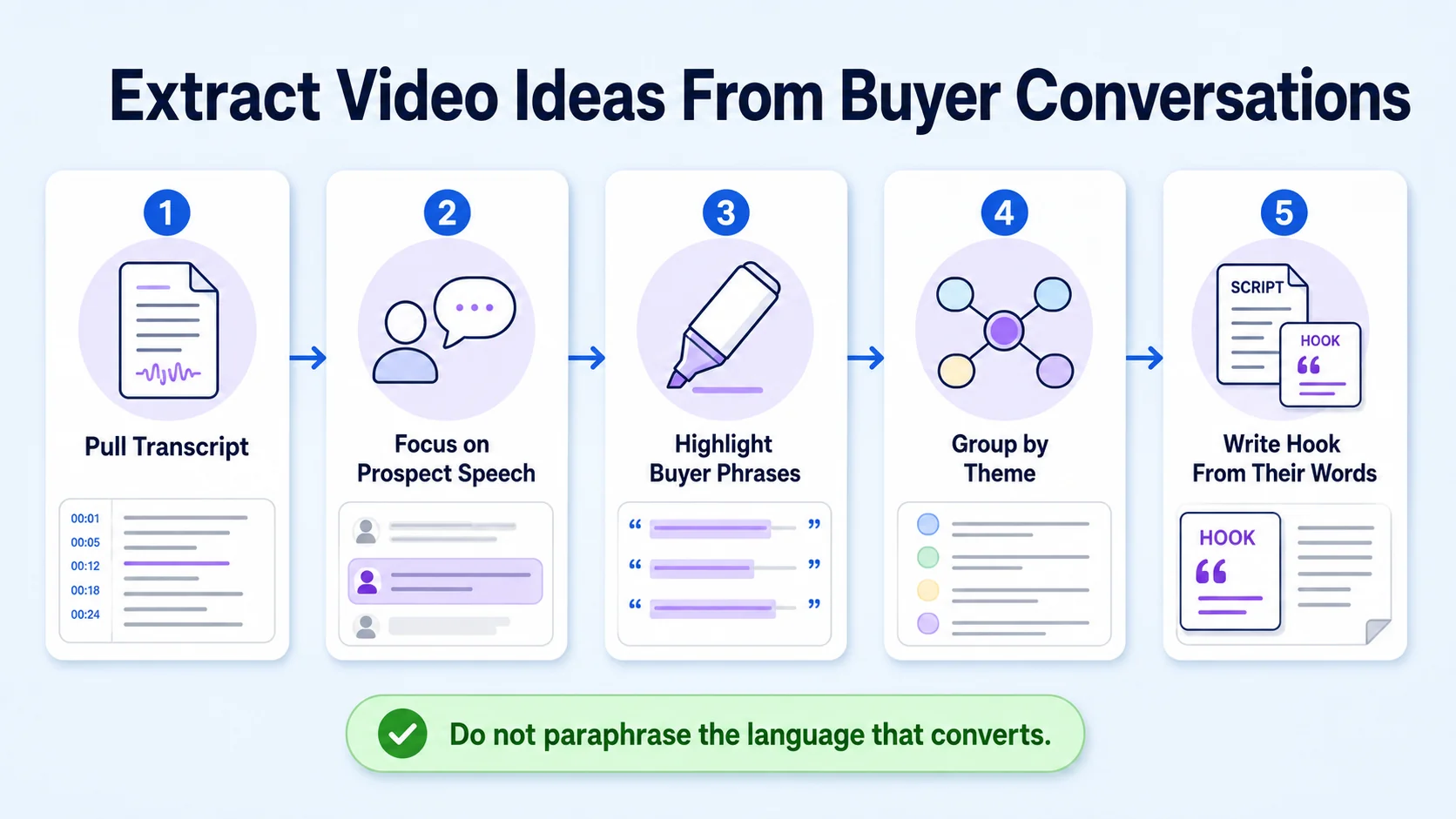
Step 1: Pull the transcript. Focus only on prospect speech, not rep speech.
Step 2: Highlight every instance where the prospect uses language in these three buckets:
- "We're struggling with..." or "The challenge is..."
- "We've tried X but..." or "The reason we haven't done Y is..."
- "What we really need is..." or "Ideally, it would..."
Step 3: Group highlighted phrases by theme. You'll see clusters form around 3–5 recurring pain areas. Those are your content pillars.
Step 4: For each cluster, identify the specific question the prospect was really asking. Apply the Jobs-to-Be-Done framework: what job are they hiring a solution to do?
Step 5: Write the video hook directly from the prospect's language. If a VP of Marketing said "we keep creating content but our sales team never uses it," that's your hook verbatim.
Don't skim call summaries or rely on CRM notes alone. The magic is in the actual conversations, including the pauses and the moments when someone gets genuinely excited about a feature. You miss all of that in a summary.
At Komet Media's video production services, we've seen this process turn a 30-minute discovery call into five short-form scripts in a single sitting. The key is that you're not inventing angles. You're transcribing reality.
Turning Pain Points and Objections Into Short-Form Video Scripts
Once you have clustered pain points, you have content pillars. Now the question is format: how do you turn raw call insight into a short-form video that actually performs? The Jobs-to-Be-Done framework maps directly to three video formats:
Each format targets a different buyer stage, building your content marketing funnel from a single source of truth: your calls. For objection-handling videos specifically, pull the exact language the prospect used when they pushed back. "We don't have the budget for video" or "We tried this before and it didn't work" are gold. A 60-second video that addresses that exact objection with evidence (a case study, a data point, a demo clip) is the most efficient sales enablement content you can create. It answers the question before the sales rep has to.
The right discovery questions uncover pain, quantify impact, and reveal urgency , and that urgency is exactly the emotional fuel that makes short-form video content perform. When a viewer hears their own problem described precisely in the first three seconds of a video, watch time increases and shares follow.
For Komet Media's short-form video editing clients, the most successful clips almost always open with a line pulled directly from a call. No invented hook performs as well as the real thing.
Building a Repeatable Content Repurposing Workflow From Calls
Knowing how to mine sales calls and discovery calls for video content once is useful. Building a workflow that does it every week is what actually moves the pipeline needle.

Here's the repeatable system:
- Record and auto-transcribe: Every discovery call goes into your revenue intelligence platform automatically.
- Weekly transcript review: One person on the marketing or content team reviews five transcripts per week, spending 20–30 minutes tagging pain clusters and notable phrases.
- Monthly theme audit: At the end of each month, review all tagged phrases. Identify the top three themes that appeared most frequently.
- Script sprint: Turn each theme into three short-form video scripts: one pain-awareness, one objection-handler, one outcome/social-proof clip.
- Production and distribution: Clips go to your video editing and production workflow, then get published across LinkedIn, your website, and into sales sequences.
Listen to sales calls regularly, aiming for at least 15 to 20 conversations when building a content library from scratch, or ask to sit in on live conversations with sales and CS teams. This workflow also functions as a demand generation engine. Prospect insights extracted from calls, when turned into public content, attract more of the same buyers. A video that opens with a VP of Sales pain point will get shared by other VPs of Sales.
When discovery call insights are shared systematically with marketing, go-to-market teams can refine messaging and positioning, resulting in more relevant outreach and stronger buyer conversations. Pair this with Komet Media's webinar repurposing system and you have a full inbound content engine running from two sources: your calls and your long-form owned content.
How to Find Content Gaps Using Sales Call Recordings
The most overlooked use of call mining is gap analysis. Beyond extracting ideas you already knew were relevant, call recordings reveal what your existing content is failing to answer.
Run this content gap audit quarterly:
- List every objection raised on calls in the past 90 days.
- Search your existing content library (blog posts, videos, landing pages) for content that directly addresses each objection.
- Flag every objection that has no corresponding content asset. That's your gap list.
- Prioritize gaps by how frequently the objection appeared and how late in the sales cycle it showed up (late-stage objections are the highest priority).
When discovery calls are handled well, they provide deep insights into closing deals faster and at higher values, and are especially critical in competitive markets where reps must make a stronger case to buy and prove ROI. A gap in your content around a late-stage objection means every rep is having to manually address that question in every deal. One short video eliminates that friction permanently.
Conversation analytics tools like Gong allow you to search across all calls for specific competitor names, feature comparisons, or pricing questions. Conversation analytics platforms help sales teams uncover customer motivations and address pain points that are hindering conversions. When you see a competitor's name appearing across 40% of your discovery calls, that's a content gap you can fill with a direct comparison video or a "why us vs. them" explainer.
This is also where podcast content and event recordings become valuable input. Cross-reference the gaps you find in calls with questions your audience asks publicly in those formats, and you'll have a prioritized content roadmap that's impossible to argue with because it came directly from buyers.
Conclusion
The fastest path to how to mine sales calls and discovery calls for video content is already inside your tech stack. You don't need new research, new personas, or a new content strategy. You need to treat your call recordings as a first-party content asset.
Key takeaways:
- Use Gong, Chorus, or Otter.ai to record and transcribe every discovery call.
- Extract exact prospect language, not paraphrased summaries, to fuel short-form video scripts.
- Build a weekly tagging workflow so the insights compound over time.
- Use gap analysis quarterly to prioritize the content your buyers are asking for and aren't finding.
Ready to turn your call library into a short-form video pipeline? Work with Komet Media.
Frequently Asked Questions
Q1: How many sales calls should I review before building a content plan?
Aim for at least 15 to 20 conversations when building a content library from scratch. At that volume, recurring themes become unmistakable. You'll see the same three to five pain points surface repeatedly, and those become your content pillars.
Q2: Do I need Gong or Chorus to start mining calls for content?
No. Otter.ai and Fireflies.ai both produce usable transcripts at a fraction of the cost. Budget-friendly platforms like Fireflies.ai and Fathom offer essential features like meeting transcription without the higher costs of more comprehensive solutions. Start with whatever tool gets calls recorded consistently. You can upgrade as volume grows.
Q3: What's the difference between a sales call and a discovery call for content purposes?
Discovery calls focus on prospect pain points, while sales calls focus on product benefits and features. Discovery calls tend to be conversational and exploratory, while sales calls are more assertive and persuasive. For content mining, discovery calls yield better raw material because prospects are more candid about their actual situation.
Q4: How do I turn a single objection from a call into a video?
Pull the objection verbatim. Write a hook that mirrors the exact phrase. Then script a 60–90 second response that addresses the objection with a specific example, case study, or data point. The goal is for a prospect watching the video to feel like you read their mind.
Q5: How often should I run a content gap audit using call recordings?
Quarterly works well for most teams. Review 90 days of tagged objections, compare them against your existing content library, and flag anything unaddressed. Late-stage objections with no corresponding content asset should be your first production priority every quarter.
Q6: Can I use this process for podcast content or just video?
The extraction process works for any content format. The same pain-point clusters that fuel short-form video scripts also drive strong podcast episode topics, blog posts, and webinar themes. Video is the highest-leverage output because it uses both the language and the visual delivery, but the underlying call data feeds every format.


