
How to Write a Video Editing Brief: Step-by-Step Guide
Bad editors don't cause most revision cycles. They're caused by bad briefs. Most video revision cycles are caused by bad briefs, not bad editors. If you're a SaaS founder, marketing head, or growth team scaling short-form video, knowing how to write a video editing brief is the single highest-leverage skill in your post-production workflow. It saves time, kills confusion, and gets your editor to a great first cut without three rounds of back-and-forth. This guide gives you everything in one place.
TL;DR
- A strong video editing brief covers platform specs, creative style, deliverables, revision rounds, and brand guidelines in one document.
- Specific, structured briefs replace guesswork and compress turnaround time significantly.
- B2B SaaS teams repurposing webinars, demos, and podcasts need briefs built for content repurposing, not just one-off edits.
- Use the step-by-step framework below as your starting template.
What Should Be Included in a Video Editing Brief?
Video assets are only as effective as the creative briefs behind them. You need a clear creative brief to define each video project and keep everyone, from team members to stakeholders, in alignment throughout production. At Komet Media, I've seen teams burn days on revision loops that a ten-minute brief would have prevented entirely.
A complete video editing brief covers these core elements:
- Project overview: Working title, campaign name, requester name, and any project management tool link (Asana, Notion, Monday). This is your header, the quick-reference information that helps the editor identify and organize the project.
- Audience and platform: Who the video is for and exactly where it will live. Each video creative brief should include a short overview of the intended audience's demographics and psychographics, as well as any preferences that might shape the content.
- Goal and call to action: What the viewer should think, feel, or do after watching. A demo request, a link click, a product insight.
- Raw footage inventory: What B-roll footage, screen recordings, talking head clips, and supporting assets the editor is working with.
- Style and tone: Pacing, energy, colour grading direction, motion graphics requirements, and 2–3 reference videos.
- Deliverables: Final formats, aspect ratios, file types, and platform specifications.
- Revision rounds and turnaround time: How many rounds are included and when the first cut is due.
The brief should explain the audience, the platform, the offer, the tone, the references, the footage structure, and the approval process. Without those details, even a skilled editor wastes time guessing.
How to Write a Video Editing Brief Step by Step
Here is the exact process I use at Komet Media when briefing editors on short-form video editing projects for B2B SaaS clients:
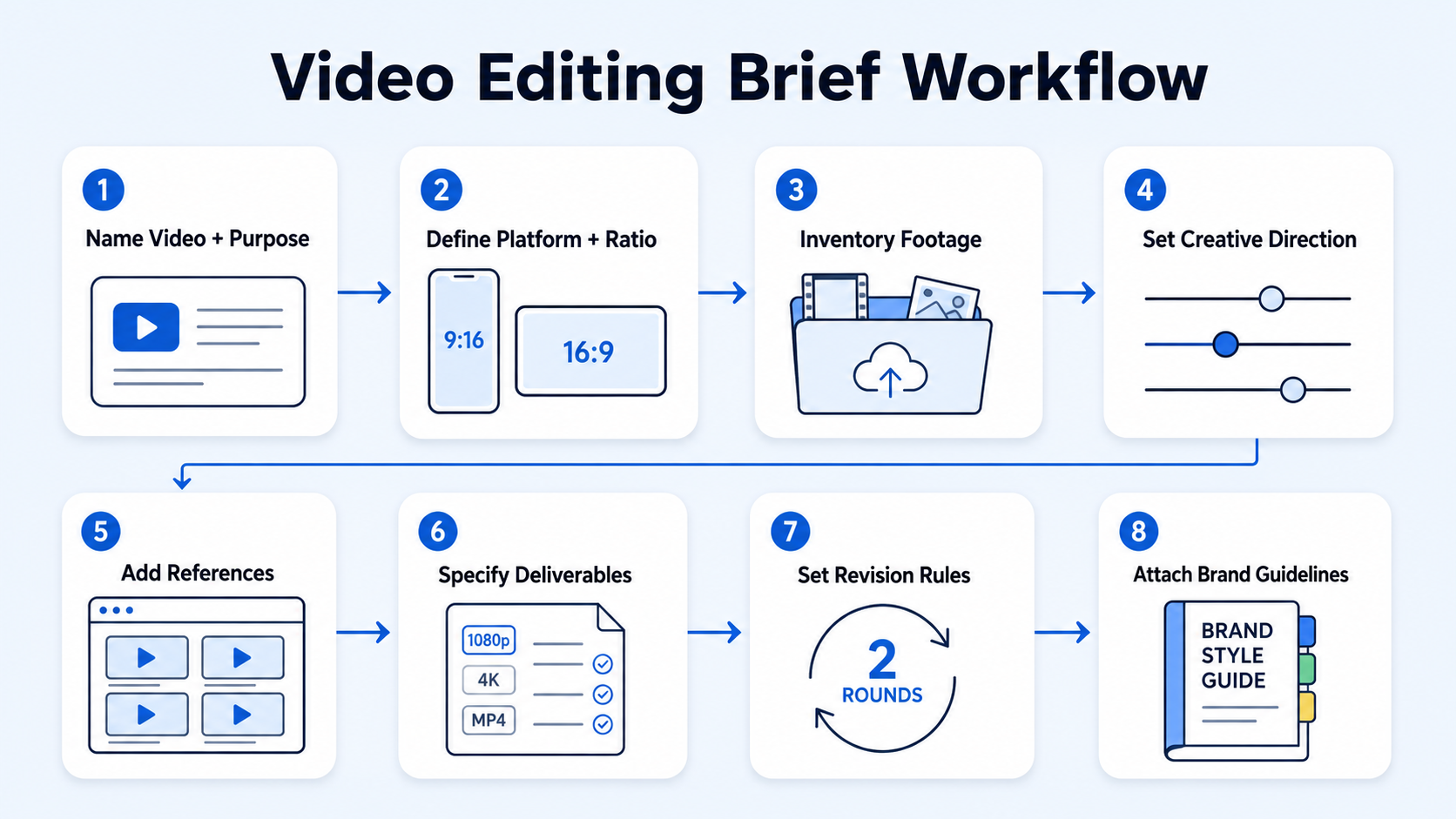
- Name the video and its purpose: Write one sentence describing what this video is, who it's for, and what action it should drive. Example: "60-second LinkedIn clip from Q1 product demo, hook SaaS ops buyers into booking a call."
- Define the platform and aspect ratio: State the target platform, each one has different trends, tone, and video length limits. TikTok: vertical (9:16), up to 10 minutes, but 15–60 seconds performs best. Instagram Reels: vertical (9:16), up to 90 seconds. LinkedIn native video runs 16:9 or 1:1 for feed placement.
- Inventory your raw footage: List every file the editor has access to, talking head recordings, screen captures, b-roll footage, and any existing motion graphics assets.
- Set the creative direction: Describe pacing (fast-cut vs. measured), colour grading mood (clean and corporate vs. warm and approachable), and whether you need animated lower thirds, captions, or a branded outro.
- Provide reference videos: Link 2–3 examples of editing styles you want to emulate. This replaces 500 words of description.
- Specify deliverables exactly: Format, resolution, codec (H.264, ProRes), and platform specifications. State whether you need a 16:9 master plus a 9:16 cut.
- Set revision rounds and turnaround time: Be explicit. Two rounds of revisions within five business days. Anything outside scope goes into a new brief cycle.
- Add brand guidelines: Logo placement, brand fonts, hex codes, approved music, and any content restrictions.
Teams that invest 15 minutes in writing a clear, structured brief save 5–10 hours of revision cycles downstream.
How to Explain Your Vision to a Video Editor (Communicating Style)
This is where most B2B clients fall down. They know what they want but can't translate it into edit-ready language. Here's how to close that gap.
Use reference videos, not adjectives. "Punchy," "clean," and "professional" mean different things to every editor. A link to a 60-second SaaS demo clip edited by your benchmark competitor says more than any adjective.
Describe the emotional arc. What should the viewer feel in the first three seconds? What by the midpoint? What is the call to action? This one question will shape everything from tone and pacing to editing choices and calls to action.
Specify the hook format. For short-form video on Instagram Reels or TikTok, the first 1–3 seconds decide retention. Brief your editor on whether the hook is a text overlay, a bold visual cut, a talking-head quote, or a product screen.
Be explicit about motion graphics. If you want animated text callouts, kinetic titles, or lower-thirds name cards, write that in. Adobe Premiere Pro, DaVinci Resolve, and CapCut all handle these differently. Your editor needs to know upfront, not at revision round two.
Describe what NOT to include. Overly salesy language, competitor logos in B-roll footage, specific colour palettes that clash with brand guidelines. Exclusions save as much time as inclusions.
A brief that shows three reference videos and describes the emotional arc of the video will get you a better first cut than one that runs to 1,000 words of adjectives. For teams repurposing webinars and podcasts into clips, I recommend building a standing style brief that doesn't change between batches. The per-video brief then only covers footage, duration, and platform specifications. This is the system we run at Komet Media for video editing services clients.
Video Editing Brief Template for B2B SaaS and Social Media Content
Use this as your working template. Copy it into Notion, Google Docs, or your project management tool.
Your brief will be the blueprint for multi-channel storytelling, and it should always include the key moments you're hoping to capture and repurpose later. For SaaS teams doing content repurposing at scale, turning one webinar into eight clips across LinkedIn, Instagram Reels, and TikTok, this table becomes a repeatable system.
Video Editing Brief vs. Video Production Brief: What's the Difference?
These two documents serve different stages of the pipeline and confusing them is a common mistake.
For B2B SaaS teams doing content repurposing, you often skip the production brief entirely because the raw footage already exists, webinar recordings, podcast clips, product demos, founder interviews. Companies are finding success by repurposing their existing long-form content into snackable segments. In that case, the video editing brief is your entire creative document. It needs to carry more weight than a brief written alongside a full production.
Short-form video is the #1 ROI-driving format, with 49% of marketers reporting the highest returns. HubSpot's 2025 State of Marketing Report found that short-form video outperforms every other content type on ROI. That ROI is only realised when your editor has a brief that removes ambiguity from every decision.
What Makes a Good Video Editing Brief for Founder-Led and Pipeline-Driven Content?
73% of B2B decision-makers now prefer to watch product demo videos over reading whitepapers. That means the brief you hand your editor isn't just a workflow document, it's a strategic asset. A good brief for founder-led and pipeline-driven short-form content has three properties that generic briefs miss.
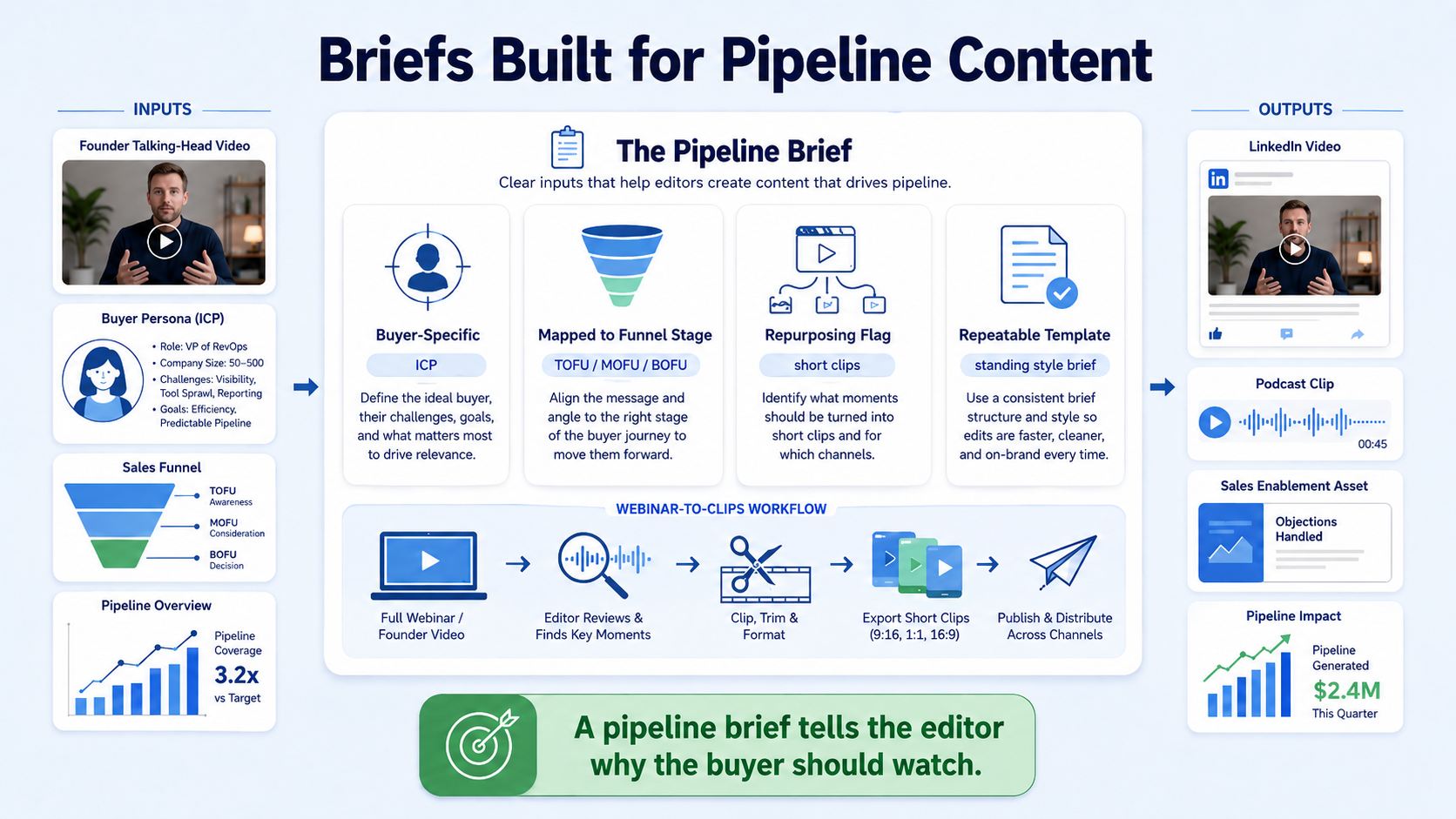
It's buyer-specific, not just platform-specific. State the ICP in the brief. If this clip is targeting a VP of Sales evaluating your CRM integration, the editor needs to know that. It affects pacing, text overlay language, and which part of the demo footage gets front-loaded.
It maps the video to a pipeline stage. Is this a top-of-funnel awareness clip? A mid-funnel product education video? A late-stage objection-handling asset? Your editor should know. The call to action, the hook, and the information density all change based on where this video sits in your sales motion. At Komet Media, we build this into every brief for video marketing engagements.
It includes a repurposing flag. Your brief should always include the key moments you're hoping to capture and repurpose later. Think about different stages in the buyer journey, and call out clips that can speak to each. If your editor knows a 45-minute webinar needs to yield a 90-second LinkedIn summary clip, a 30-second Instagram Reels hook, and a 15-second TikTok teaser, they'll edit the master cut differently from the start.
It's repeatable. When a video editing brief is handled properly, it improves output volume, delivery predictability, and creative quality at the same time. A one-off document is a workflow. A locked, templatised brief is a system. SaaS teams publishing consistently, weekly clips, sales enablement assets, podcast editing repurposing, need the latter.
A brief that's built for pipeline, not just production, is the difference between a video that gets watched and a video that generates demand.
Conclusion
Writing a strong video editing brief is a repeatable skill, not a one-time effort. Key takeaways:
- A complete brief covers platform specs, aspect ratio, audience, style references, deliverables, revision rounds, and brand guidelines, every time.
- Translate creative vision through reference videos and emotional arc descriptions, not adjectives.
- Distinguish a video editing brief (post-production) from a video production brief (pre-shoot), for content repurposing teams, the editing brief carries the full creative weight.
- Build one standing style brief per content series, then use per-video briefs for footage, duration, and platform specs only.
If you're a SaaS team ready to build this system with expert support, see how Komet Media works.
Frequently Asked Questions
Q1: How long should a video editing brief be?
One to two pages is the target. Long enough to cover platform specs, style references, deliverables, and revision terms, short enough that your editor reads the whole thing before opening a single file. A brief nobody reads is the same as no brief at all.
Q2: Do I need a new brief for every video, or can I reuse one?
Build a standing style brief that locks in brand guidelines, colour grading preferences, and motion graphics rules. Then write a short per-video addendum covering footage location, duration, platform, and call to action. This is the most efficient system for teams publishing consistently.
Q3: What's the most common mistake teams make in a video editing brief?
Describing style with adjectives instead of references. Every editor interprets words like "punchy," "clean," and "high-energy" differently. Two or three reference video links remove that ambiguity entirely and give your editor a concrete target to hit on the first cut.
Q4: Should I include platform specifications like aspect ratio in the brief?
Always. Aspect ratio, resolution, codec, and maximum file size should be non-negotiable fields in every brief. A 9:16 vertical cut for Instagram Reels and a 16:9 LinkedIn cut are edited and framed differently, your editor needs to know upfront, not during export.
Q5: How many revision rounds should I budget for in a video editing brief?
Two rounds is the standard for a well-written brief. If you consistently need three or more rounds, the brief is missing critical information, typically style direction, audience specifics, or call to action placement. Fix the brief before adding revision rounds.
Q6: How is a video editing brief different for content repurposing versus original production?
When repurposing existing footage (webinars, podcasts, demos), the editing brief replaces the production brief entirely. It needs to do more work: specifying which timestamps to pull from, how many derivative clips to produce, which platform each clip targets, and how the hook differs per platform. For B2B firms, this is one of the most powerful content repurposing strategies because it systematically extends the reach of your core expertise, turning one major effort into dozens of engagement opportunities.

