
Onboarding a Video Editing Partner: Step by Step: Step-by-Step Guide
I'm Rajan Soni, Founder and Video Director at Komet Media. I've onboarded video editors and agency partners for B2B SaaS teams dozens of times. The process breaks every time for the same reason: teams skip structure. This guide covers exactly how onboarding a video editing partner should work, from the first conversation to your first approved deliverable, so you stop wasting revision rounds and start shipping content that moves the pipeline.
TL;DR
- Send your brand style guide, raw footage handoff protocol, and a creative brief before day one.
- Define turnaround time, revision rounds, and deliverables checklist in a written scope of work.
- Use Frame.io for video feedback and ClickUp or Notion for project management.
- Run a paid test project before committing to a full engagement.
What to Include in a Video Editor Onboarding Process
Most teams treat onboarding a video editing partner like hiring a contractor: sign a contract, share a Dropbox link, wait for edits. That approach produces average work and endless back-and-forth. A real onboarding process transfers context, brand, tone, audience, workflow, before a single frame is cut. Here is what every onboarding package needs:
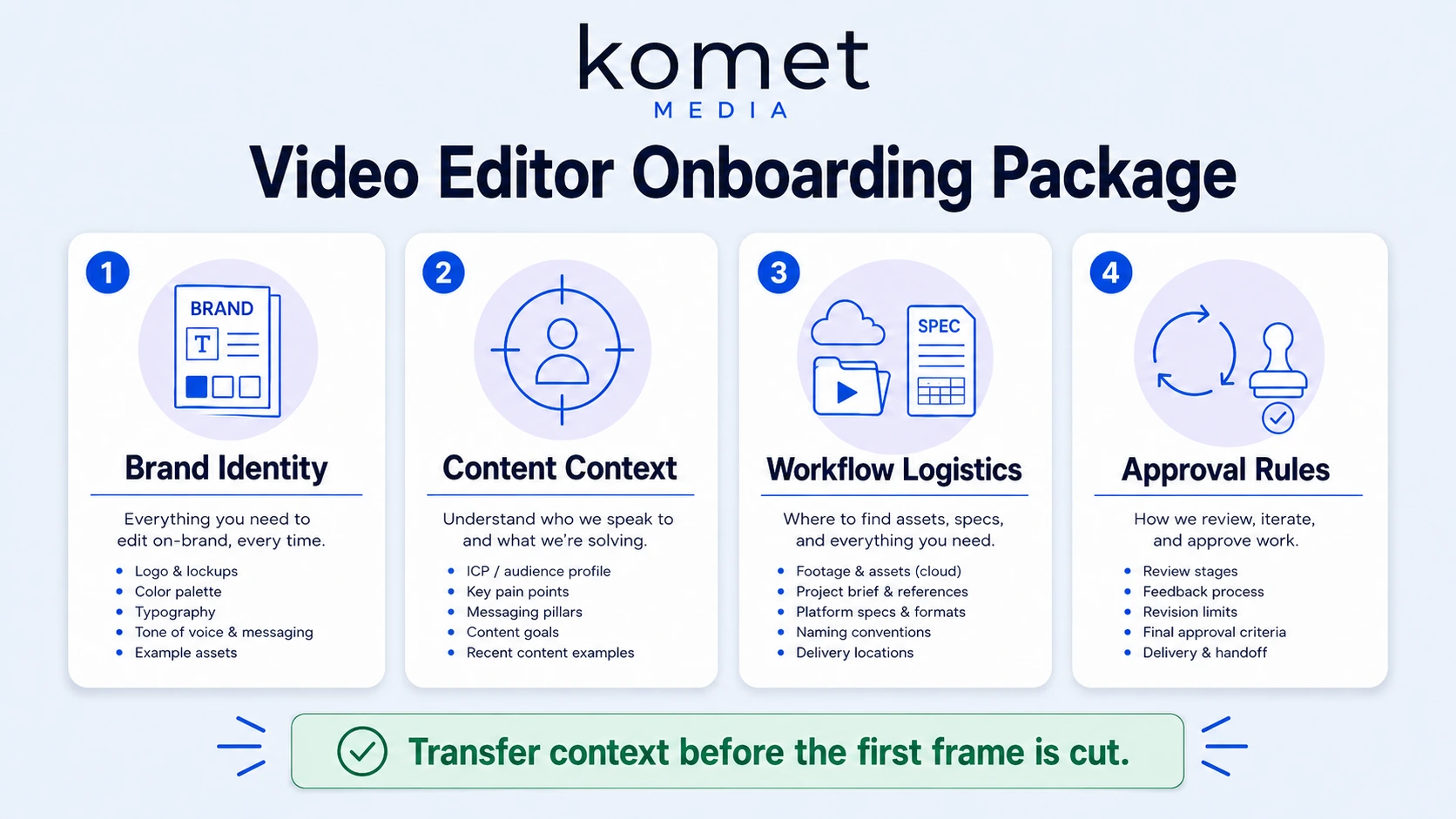
Brand and visual identity:
- Brand style guide (fonts, colours, logo usage rules)
- Existing video examples the editor should match
- Examples of videos you hate (equally important)
- Motion graphics templates and lower-third assets
Content context:
- Who you're talking to (ICP, not just "B2B buyers")
- What a conversion looks like for each video type (demo request, follow, click)
- Product positioning and messaging hierarchy
- Any terminology the editor must get right, product names, feature labels, competitor references to avoid
Workflow and logistics:
- Raw footage handoff process (Google Drive, Frame.io, or shared cloud storage)
- Preferred editing software (Adobe Premiere Pro or DaVinci Resolve)
- Aspect ratio and format specs per platform (LinkedIn, YouTube, Instagram)
- Your social media content calendar so the editor understands publishing cadence
Approval and revision rules:
- Who has final sign-off
- How many revision rounds are included
- What counts as a revision vs. a scope change
LinkedIn short-form videos achieve 3x the average engagement rate of text posts, and 71% of B2B marketers now use video marketing as part of their strategy, with 73% reporting positive ROI. Your editor needs to understand those distribution channels before they touch your footage. Document this in a single onboarding doc inside Notion or ClickUp and share it on day one. Teams that skip this step spend the first three weeks doing what should take three days.
What Files and Assets to Share When Onboarding a Video Editor
Raw footage handoff is where onboarding breaks down most often. Editors receive unorganised, unlabelled clips and spend billable time guessing what to use. Fix this with a consistent folder structure before you share a single file.
Recommended folder structure:
/[Project Name]
/RAW_FOOTAGE
/[Date][Speaker][Topic]
/BRAND_ASSETS
/Logos
/Motion_Templates
/MusicandSFX
/REFERENCES
/Approved_examples
/Style_notes
/DELIVERABLES
/Drafts
/Finals
Beyond folder structure, share these assets on day one:
- All raw footage files at original resolution (do not compress before sending)
- Licensed music library access or approved royalty-free tracks
- Existing captions or transcripts if available (saves edit time)
- Brand colour hex codes and font files, not just a PDF style guide
- Intro/outro templates and any branded lower thirds
- Platform spec sheet: dimensions, max file size, frame rate requirements per channel
For file transfer, Frame.io integrates directly with Adobe Premiere Pro and supports time-coded comments, making it the most efficient tool for the raw footage handoff stage. Large files over 10GB transfer more reliably through Frame.io or Google Drive than email or WeTransfer. The most common onboarding failure: sharing footage with no naming convention, no transcript, and no context for what was recorded. Your editor's first job becomes archaeology, not editing.
A clear majority, 73% of B2B decision-makers now prefer to watch product demo videos over reading whitepapers. Your footage is the raw material for those demos. Treat it like a production asset from the moment it's recorded. If you're working from webinars, podcasts, or founder recordings, check out Komet Media's content repurposing services to see how we structure source content for maximum edit efficiency.
How to Communicate Brand Guidelines to a New Video Editing Partner
Brand guidelines break down in video because most style guides are built for static design. A PDF showing your logo and hex codes does not tell an editor how a cut should feel, how fast the pacing should move, or what the opening three seconds of every video should do.
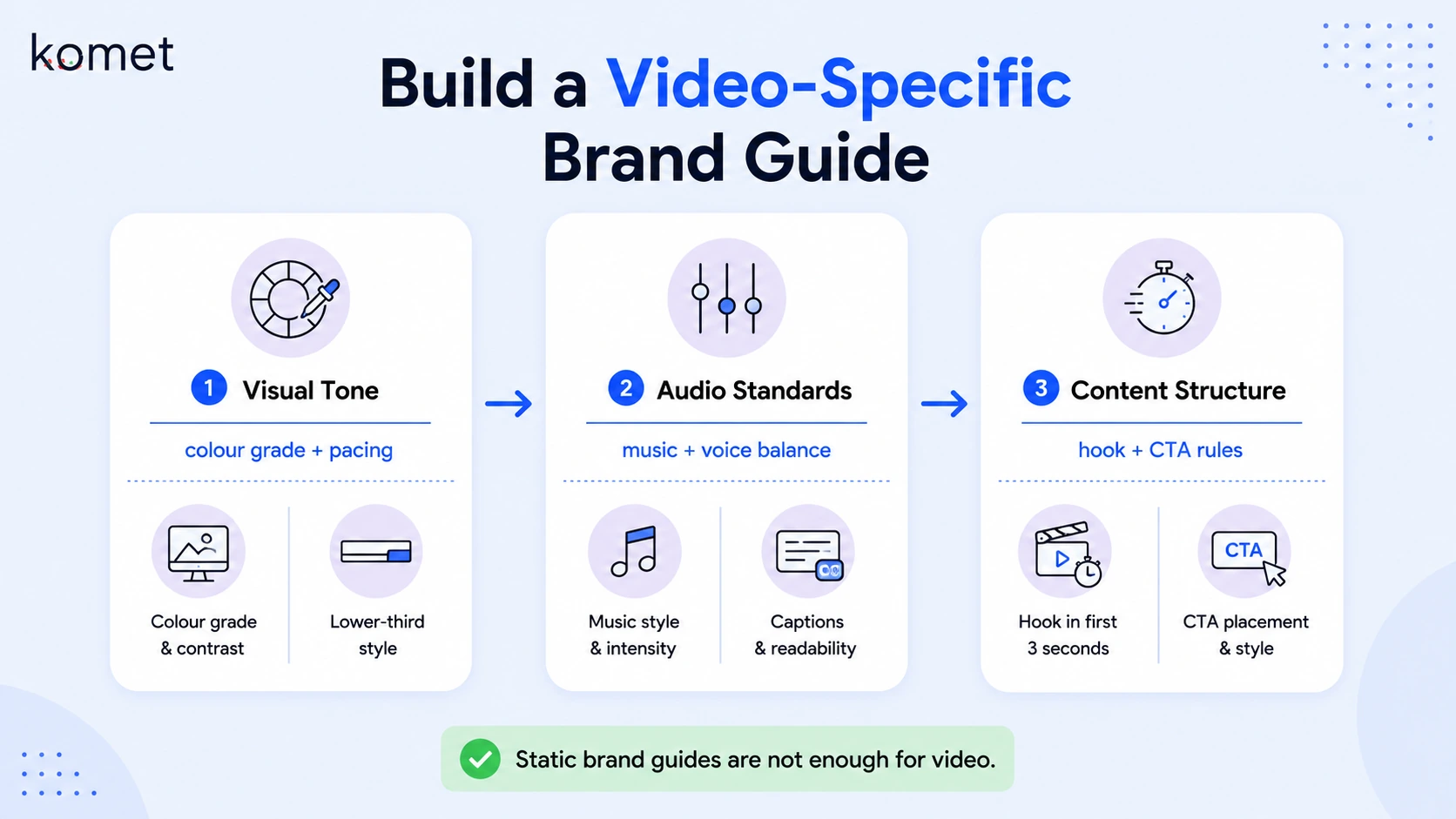
Build a video-specific brand layer on top of your existing guide. It needs to cover:
Visual tone:
- Colour grade reference (warm, cool, neutral, high contrast)
- Text animation speed (fast and punchy vs. slow and premium)
- Lower third style and timing
- Transition style (cuts only, subtle dissolves, motion graphics transitions)
Audio standards:
- Music genre and energy level with reference tracks
- Voiceover volume balance relative to music
- Preferred sound design approach (minimal, punchy, cinematic)
Content structure:
- Hook format (talking head, text-on-screen, b-roll montage)
- Where the CTA appears and what it says
- Approved and banned graphic elements
The most effective format is a video brand document that includes written specs alongside annotated examples. Pull three to five approved videos, timestamp the specific moments the editor should replicate, and add notes directly in Frame.io or as a shared Loom.
Onboarding is where new partners form their first impressions of your brand. Inconsistent video styles, fonts, or colours create confusion and diminish trust. Establishing brand guidelines and applying them to every video is non-negotiable.
For SaaS teams at Komet Media, we build a video brand guide as part of every engagement kickoff. It becomes the reference document the editor checks before every deliverable, and it dramatically reduces the number of revision rounds caused by brand drift.
How to Onboard a Video Editing Partner: The Step-by-Step Process
Here is the exact sequence I use when onboarding a video editing partner for a B2B client:
- Kick-off call (60 min): Walk through the brand, ICP, and content goals. Do not skip this. Email alone never transfers enough context.
- Share the onboarding package: Brand style guide, video brand doc, folder structure, platform specs, and social media content calendar, all in one Notion or ClickUp workspace.
- Define the scope of work in writing: Turnaround time per deliverable, number of revision rounds, file delivery format, and what triggers an out-of-scope request.
- Set up the post-production pipeline: Frame.io for video review, Slack for async communication, and your project management software (ClickUp or Notion) for task tracking and deadline visibility.
- Assign a paid test project: One short-form video, ideally 60–90 seconds, from existing footage. This is the fastest way to calibrate style expectations before committing to volume.
- Review the first draft together: Walk through feedback live on a call. Written feedback alone creates ambiguity. A 20-minute call saves three revision rounds.
- Document the feedback as a style note: Add what you changed and why to the video brand doc. This creates a living reference that improves every subsequent deliverable.
- Approve and systemise: Once the test project is approved, the deliverables checklist and workflow are confirmed. Volume production begins.
B2B companies are increasingly incorporating short-form video into sales processes, with customer-facing teams using bite-sized content to engage prospects throughout the sales cycle. This trend bridges traditional marketing-sales divides by creating content explicitly designed for sales team deployment. That system only works if your editor understands the pipeline context from day one.
Onboarding a Video Editing Agency vs. Freelancer: What's the difference?
The onboarding process changes depending on whether you're bringing on a solo editor or a full agency. Both require the same core materials, but the workflow, communication structure, and accountability differ significantly.
When onboarding a freelance editor, invest more time in the kick-off call and style documentation, they have no institutional knowledge to fall back on. When onboarding an agency, the investment shifts to scope of work clarity and establishing who owns the feedback loop on your side.
At Komet Media, we function as the agency layer, but we onboard like a partner, not a vendor. That means we build your video brand doc, establish your post-production pipeline, and own the system so your team only needs to supply raw content and approvals. The biggest mistake B2B teams make when hiring a freelancer: treating the first project as a test with no brief. The first project is a test, but it has to be a structured one or you learn nothing useful.
What Questions to Ask a Video Editor During Onboarding
The kick-off conversation is your best quality filter. What an editor asks you reveals as much as what they answer. Here are the questions you should ask them, and the ones a strong editor will ask you:
Questions to ask your editor:
- What editing software do you primarily use, Adobe Premiere Pro or DaVinci Resolve, and what do you need from us to work efficiently?
- How do you prefer to receive feedback: written notes, recorded Loom, or live calls?
- What is your standard turnaround time for a 60-second short-form video after receiving raw footage?
- How many revision rounds are included, and what is your process when scope expands?
- Can you share three to five examples of B2B or SaaS video work you have edited?
- Have you worked with Frame.io, ClickUp, or Notion before?
Questions a strong editor will ask you:
- Who is the final approver and how many stakeholders are in the feedback loop?
- What platforms are these videos published on, and do you need platform-specific aspect ratios?
- What does success look like for each video type, views, demo requests, shares?
- Do you have existing approved examples to match, or are we establishing style from scratch?
72% of B2B buyers report that video content from vendors influences their vendor shortlist decisions. That means the videos your editor produces are directly affecting the pipeline, so the kick-off conversation is a sales conversation in disguise. If your editor asks none of these questions, treat that as a signal. The best editors are strategic collaborators, not button-pushers.
Best Practices for Onboarding a Video Editing Partner Without Wasting Time
Most onboarding delays come from the same three sources: unclear feedback, missing assets, and undefined revision rules. These best practices eliminate all three.
Set a feedback deadline, not just a draft deadline. A draft delivered on Tuesday with feedback due Friday and approval due Monday creates a five-day cycle. Define the full loop, not just the delivery date.
Use asynchronous feedback tools from day one. Frame.io's time-coded comments mean your editor gets exact, actionable feedback tied to specific moments in the video. This eliminates the "around the 0:30 mark" ambiguity of Slack notes and cuts revision rounds in half.
Establish a deliverables checklist for every video. Before any file is marked "final," it passes through a checklist:
- Correct aspect ratio for target platform
- Captions added and proofread
- Music volume balanced to spec
- CTA present and correctly timed
- Brand colours and fonts match style guide
- File exported in approved format and resolution
Run a weekly async sync. A five-minute Loom from your editor at the start of each week covering what is in progress, what is pending your feedback, and what is scheduled to be delivered keeps the post-production pipeline visible without requiring a standing meeting.
Document every style decision. Every time feedback changes how a video looks, that note goes into the brand doc. After three months, your editor, and any future editor, has a living reference that captures every preference without relying on memory.
Viewers retain 95% of a message when they see it in a video, compared to only 10% when reading text, a 9.5x improvement in message retention that makes video indispensable for brands trying to communicate complex ideas or build lasting brand recall. Your onboarding process determines whether those videos actually communicate your brand or just fill a content calendar.
For SaaS teams serious about turning product knowledge, webinars, and demos into a consistent short-form video system, explore Komet Media's video marketing services or learn how we approach podcast and webinar repurposing.
Conclusion
Onboarding a video editing partner is a system problem, not a talent problem. The right editor with a broken onboarding process produces inconsistent, slow, expensive output. The same editor inside a clear system, shared assets, defined workflow, structured feedback, ships consistent content that supports the pipeline.
Key takeaways:
- Send brand assets, footage structure, and a scope of work before day one.
- Use Frame.io for feedback, ClickUp or Notion for task management, and Slack for async communication.
- Run a paid test project with a full brief before committing to volume.
- Document every style decision to build a living brand reference that scales beyond any single editor.
Ready to build a video system for your B2B team? Talk to Komet Media.
Frequently Asked Questions
Q1: How long should onboarding a video editing partner take?
A structured onboarding takes three to five business days: one day for the kick-off call and asset sharing, one to two days for the editor to review materials, and two days for the test project. Teams that rush this window spend weeks fixing preventable problems later.
Q2: What should I send a video editor before they start working with me?
Send your brand style guide, a video-specific brand doc with approved examples, a folder of raw footage in a clearly labelled structure, platform spec requirements, and a written scope of work covering turnaround time and revision rounds. That package eliminates the most common first-week delays.
Q3: How many revision rounds should I include in my scope of work?
Two revision rounds is the standard for short-form video. The first draft addresses structure and pacing; the second addresses polish and brand alignment. Any changes after approval that alter the original brief should be scoped separately to protect both your budget and the editor's time.
Q4: What is the best tool for giving feedback to a video editor?
Frame.io is the strongest option for B2B teams. It supports time-coded comments directly on the video timeline, integrates with Adobe Premiere Pro, and keeps all feedback in one place, replacing email chains and scattered Slack threads that create confusion and missed notes.
Q5: What is the difference between onboarding a freelance video editor and a video editing agency?
A freelance editor requires more upfront context-setting from you because they have no team infrastructure to fall back on. An agency brings its own workflow and project management but requires clearer scope documentation on your side. Both need the same brand assets, the difference is who owns the production system.
Q6: How does onboarding a video editing partner support B2B pipeline goals?
A properly onboarded editor produces videos consistently aligned to your buyer's journey, product demos, founder content, and repurposed webinars that educate prospects and support sales conversations. On average, B2B video content shortens the sales cycle by 23% , but only when the content is strategically produced from the start, which begins at onboarding.

