
A Repurposing Checklist for Every Webinar: Step-by-Step Guide
I've watched SaaS marketing teams spend weeks producing a webinar, host it live, send one follow-up email, and then move on. That's tens of thousands of dollars in pipeline education left on the table. 47% of all webinar views happen on-demand, long after the live event concludes, meaning your audience is still out there, waiting for the content in a format they can actually consume. This repurposing checklist for every webinar fixes that. It turns one recording into a full-quarter content engine that educates buyers, supports pipeline, and builds the kind of trust that closes deals.
TL;DR
- Repurposing existing content improves ROI by an average of 32%, your webinar is the highest-leverage asset to start with.
- One webinar can produce 15+ content assets across video, text, email, and sales enablement.
- Run this checklist within 48 hours of the live event to capture maximum momentum.
- The goal is a "record once, publish everywhere" system, not a one-off event.
Why Webinar ROI Lives in the Repurposing, Not the Live Event
Most SaaS teams measure webinar success by registrant count. That's the wrong metric. The real value compounds after the session ends. Webinars deliver an average ROI of 213%, with SaaS companies seeing peaks of 430% ROI. But that ceiling is only reachable when the recording becomes a content system.
B2B marketers increasingly see webinars as content engines, not standalone events, each webinar is seen as a source of comprehensive, multi-channel content that can fuel marketing efforts well into the future. On average, 20% to 40% of webinar attendees end up entering the sales pipeline as qualified leads when followed up properly. That follow-up window is where repurposed assets do the real work: a clipped insight on LinkedIn re-engages the attendee who missed the live Q&A; a blog post based on the transcript captures buyers who never registered in the first place.
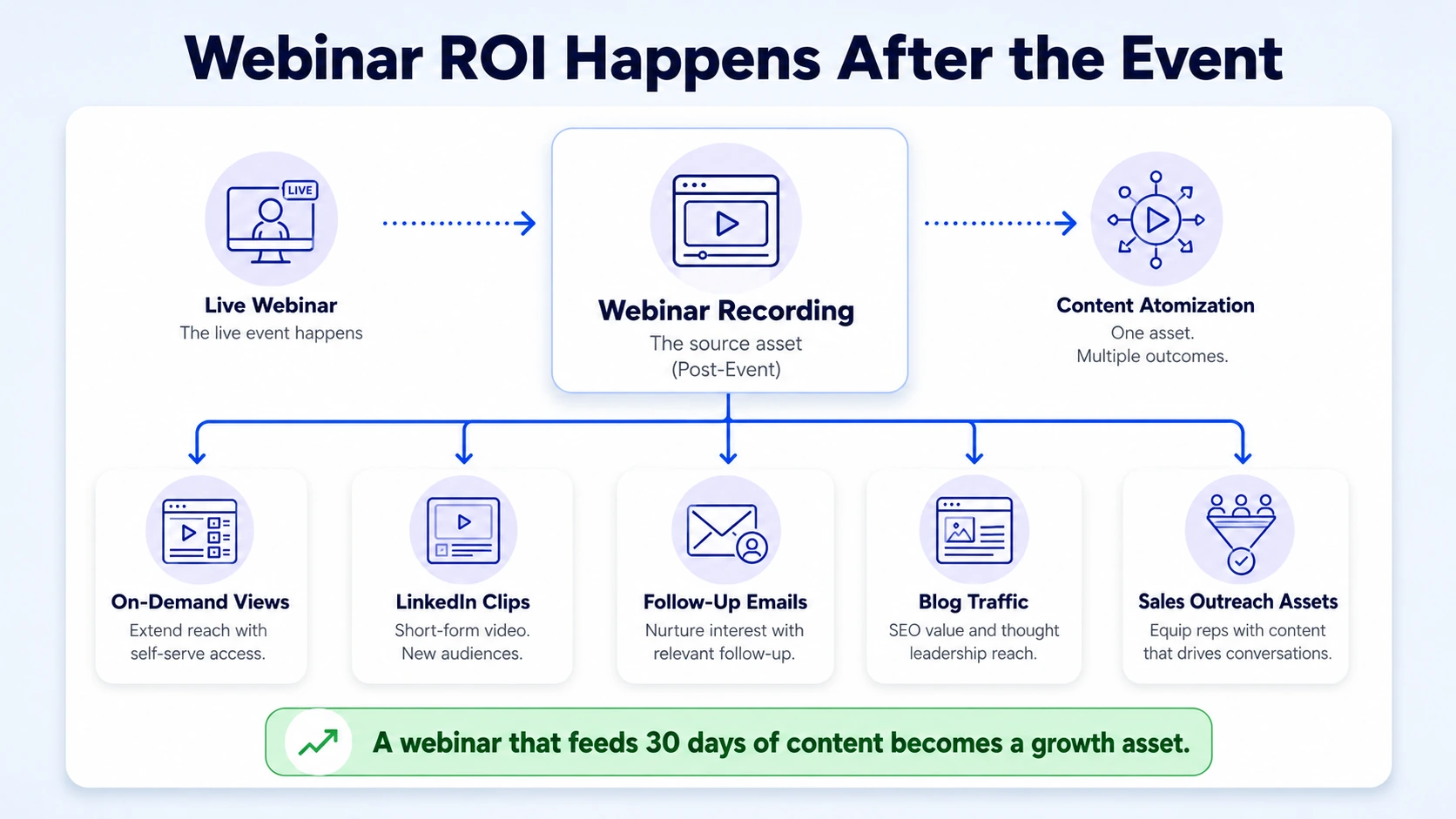
With the right repurposing strategy, a webinar that 200 people attended live could reach 20,000 across LinkedIn, email, podcast feeds, and your sales team's outreach sequences. That is not an accident. It is the result of a pre-built repurposing workflow that activates the moment the session ends. The content atomisation mindset matters here.
The long-form to micro-content atomisation strategy involves breaking down a substantial piece of content into numerous smaller, highly focused assets. These micro-content pieces are individually optimised for social media platforms, email newsletters, and other fast-paced channels. The goal is to capture attention quickly and drive traffic back to the original, comprehensive content asset.
For B2B SaaS teams, your webinar is rarely just a webinar. It's your product positioning, your founder's thinking, your customer use cases, and your competitive differentiation, all packaged inside one 45-minute recording. Running this repurposing checklist for every webinar is how you extract every dollar of value from it.
A webinar that ends at the live session is a campaign. A webinar that feeds 30 days of content is a growth asset.
The Pre-Repurposing Setup (Do This Before You Hit Record)
The best time to plan repurposing is before the webinar runs. Teams that set this up in advance extract 3x more usable assets from the same session.
Here's what to configure before you go live:
- Choose the right recording platform: Tools like Riverside.fm and Zoom Webinars record separate video and audio tracks. Riverside is the all-in-one platform for recording, live streaming, editing, repurposing, and publishing studio-quality videos and podcasts, allowing creators and businesses to produce broadcast-quality content without the production maze of multiple tools. Separate tracks mean clean post-production.
- Set up timestamped chapters: Brief every speaker to signal chapter transitions clearly ("Now we'll move into the demo section"). These become your clip cut points.
- Designate a chat monitor: Have someone screen-capture the best audience questions during the live event. These become FAQ content, poll data, and follow-up email hooks.
- Map your asset list in advance: Before the session, list the formats you want to produce, so your editor has a brief ready the moment the recording lands.
- Record your intro and outro separately: A clean standalone intro and outro gives you a reusable bumper for future clips without reshoots.
The tools that power this workflow efficiently: Riverside's built-in tools like Magic Clips, captions, and branding presets make it easier to repurpose long recordings into short-form content for social media without switching platforms.
For transcript-based editing, Descript's biggest strength is text-based editing, where you edit audio and video by editing the transcript. Descript also offers voice cloning and overdub features, which are useful for fixing mistakes without re-recording.
Vidyard is ideal for hosting gated on-demand replays and tracking buyer engagement with each asset. Gong.io handles call intelligence if your webinar includes a live sales demo component.
The pre-repurposing setup is not optional infrastructure. It is what separates a marketing team that gets 3 assets from a webinar from one that gets 30.
The 48-Hour Checklist: Immediate Post-Webinar Assets
The first 48 hours after a webinar are critical. The content is fresh. The audience is still engaged.
These are the tasks that must ship before the momentum fades.
- Pull the full transcript: Run the recording through Descript or Riverside's AI transcription immediately. The timestamped transcript is the raw material for everything that follows.
- Generate a key takeaways summary: Extract the 5–7 sharpest insights from the session. This becomes your follow-up email and LinkedIn text post.
- Send the attendee follow-up email: Include the on-demand replay link (hosted on Vidyard for tracking), the key takeaways summary, and a single CTA, demo, trial, or next webinar registration.
- Send the no-show follow-up email: Different email, different angle. Lead with the hook they missed, not the replay link. One sentence of FOMO, then the value.
- Publish the on-demand replay page: A standalone landing page with a short-form description optimised for your product's primary search terms. This page becomes an evergreen lead capture asset.
- Cut 1–3 short-form clips for LinkedIn: Pull the sharpest 60–90 second moments. Add captions. Post from the founder or a senior subject-matter expert profile, not the company page. Personal profiles generate 8x more engagement than company pages, posts from individual profiles receive 8x the engagement of identical content from company pages.
Nail these six steps within 48 hours and you've already multiplied your webinar's reach by 4x before any long-form content goes live.
The Full Repurposing Checklist for Every Webinar: All 15 Assets
This is the complete asset map. Not every webinar generates all 15, but this is the menu your team should choose from based on session length and audience intent.
When compared to starting from scratch, repurposed content saves 60–80% of content creation time. That time saving compounds across every quarter you run this checklist consistently.
How to Repurpose Webinar Recordings Into Blog Posts and Social Media
The blog post and the short-form video clips are the two highest-leverage assets in the checklist. Here's exactly how to execute both.
The SEO blog post:
- Use the full transcript as your source document. Do not start from a blank page.
- Identify the primary search query your webinar topic answers (e.g. "how to reduce SaaS churn" or "B2B demand generation strategy").
- Structure the post around the webinar's chapter timestamps. Each chapter becomes an H2.
- Embed the on-demand replay inside the post. This increases dwell time and qualifies the reader for sales follow-up via Vidyard tracking.
- Add a CTA at the bottom that matches where the reader is in your funnel (demo request, related guide, or free trial).
The LinkedIn short-form video clips: The goal is to pull moments where your speaker states a sharp opinion, surprising stat, or concrete framework. Short-form video under 30 seconds achieves the highest completion rates on LinkedIn. Short-form video under 60 seconds achieves 1.4x more reach than longer formats, and LinkedIn video uploads grew +36% year-over-year.
For LinkedIn content strategy, publish clips natively (not as YouTube links). Add burnt-in captions because most LinkedIn videos are watched without sound. Hook in the first 3 seconds with the sharpest line from the clip, not an intro or a logo. Post from the founder or subject-matter expert's personal profile, and drop the replay link in the first comment to protect reach. For short-form video editing support, Komet Media handles the full clip production workflow.
This approach creates "content multiplication", transforming one strategic webinar into a comprehensive content ecosystem. Companies like HubSpot exemplify this by systematically repurposing their webinars into blog series, social media content, and downloadable resources that continue generating leads months after live events end.
Webinar Repurposing Workflow for Content Teams and Sales Enablement
Repurposing is not just a marketing function. Sales teams are the most underserved consumers of webinar content, and fixing that is where demand generation actually converts.
Here's the team workflow that makes this happen without creating extra overhead:
- Marketing produces the asset library: All 15 asset types from the checklist above, organised in a shared drive by format and topic.
- Sales gets a dedicated one-pager: A single-page PDF summarising the webinar's top 3 insights, the speaker's key quote, and 2–3 objection-handling lines drawn from the live Q&A. This goes into the sales team's outreach cadences within 5 business days of the webinar.
- Gong.io integration for demo teams: If your webinar covered product functionality, surface the most-watched replay segments in Gong.io. Reps can reference specific timestamps in follow-up calls ("You watched the integration demo, want me to walk through that live?").
- Content team tags assets by buyer stage: Every asset gets tagged as Awareness, Consideration, or Decision. This lets the nurture team drop the right asset into the right HubSpot sequence automatically.
- Sales sends clips as direct outreach: A 60-second video clip pulled from the webinar makes a highly effective cold outreach asset. It positions the rep as an educator, not a pitcher.
60% of B2B marketers plan to increase their investment in short-form video for content marketing. The teams winning in 2026 are treating webinar clips as a sales tool, not just a social media play. The video marketing services that move the pipeline are the ones integrated into the sales workflow, not siloed in the marketing queue.
Maximising Webinar ROI: The Evergreen Content Strategy
Most repurposing stops at the 30-day mark. The teams that compound their webinar ROI treat certain assets as evergreen content and keep them working for 12+ months.
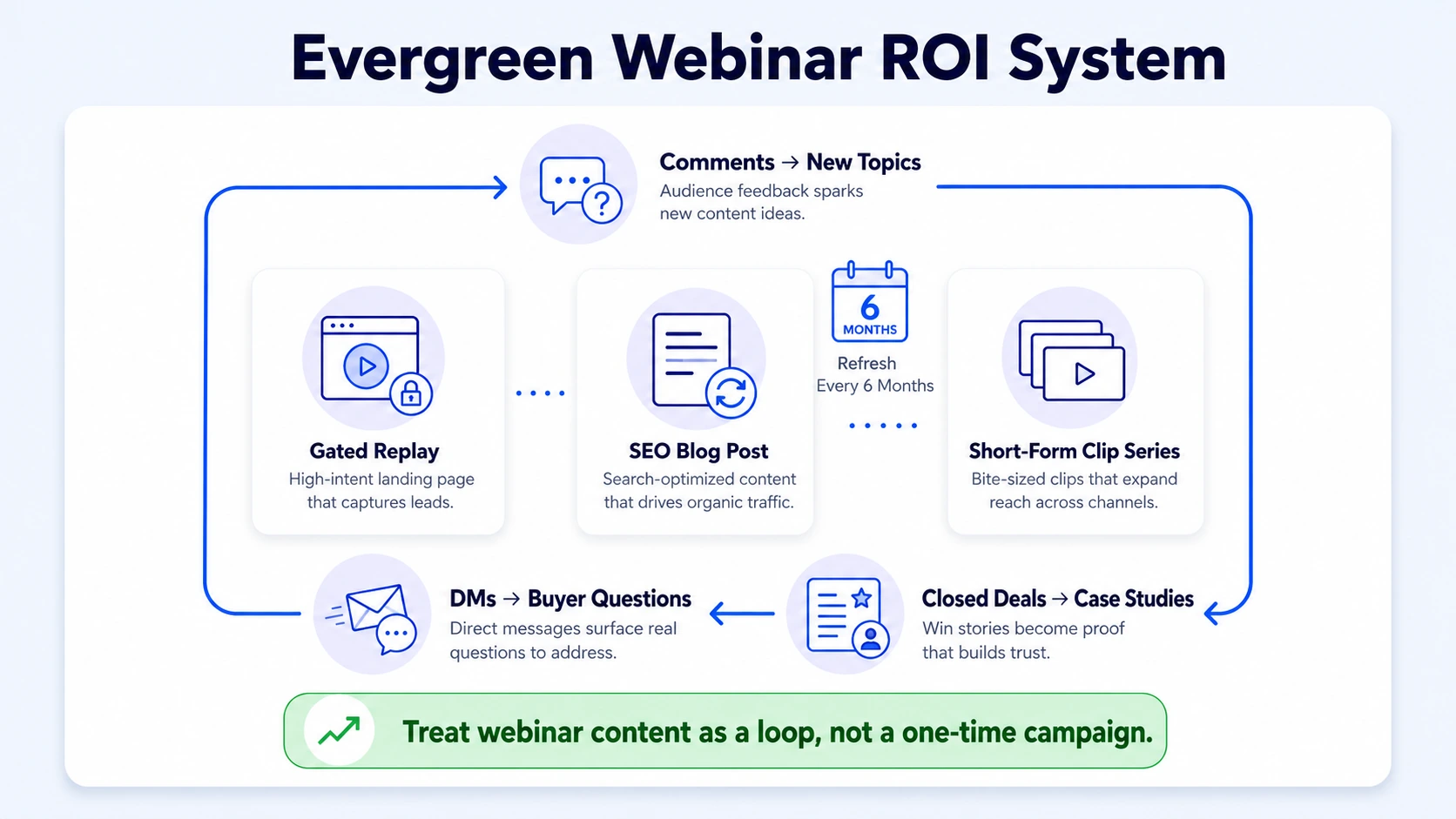
Three evergreen asset types to prioritise:
- The gated on-demand replay: Keep this live, optimise its landing page for organic search, and route new registrants into your nurture sequence. Every webinar is evergreen content that can be repurposed into various formats, such as clips, shorts, reels, blogs, and on-demand content.
- The SEO blog post: Update it every 6 months with fresh data or new speaker insights. Lifecycle optimization by extending the usefulness of existing content increases organic traffic by 28%.
- The short-form clip series: Repackage high-performing clips into LinkedIn carousels, email content, or paid social ads 90 days after initial posting. Strong clips rarely go stale if the underlying insight is foundational.
The content atomisation loop: The repurposing checklist for every webinar is not a linear process. It's a loop. Once your blog post generates comments or questions, those become prompts for the next webinar topic. When your LinkedIn clips drive DMs, those become testimonial angles. When your sales one-pager closes a deal, that story becomes a case study. 94% of content marketers repurpose their content for different channels and mediums, and repurposing existing content improves ROI by an average of 32%. But the gap between average and top-performing teams is that top performers build the repurposing loop into their editorial calendar before the webinar happens, not after.
For founder-led SaaS brands, the short-form clips are your thought leadership engine. Buyers are not watching full-length webinar recordings before they take a demo call. They are watching a 60-second clip from a founder, forming a trust judgment, and then booking. The repurposing checklist for every webinar is, at its core, a trust-building system. Every asset extends the reach of your original expertise to more buyers across more moments in their decision journey. Explore Komet Media's webinar content services to see how this workflow runs in practice.
Conclusion
Run this repurposing checklist for every webinar and your team stops treating sessions as events and starts treating them as content infrastructure.
Key takeaways:
- Plan your asset map before the session, not after.
- Prioritise the 48-hour window: transcript, follow-up email, on-demand replay, and 3 LinkedIn clips.
- Integrate sales enablement into the workflow so reps use clips in outreach, not just marketers in feeds.
- Treat your blog post and on-demand replay as evergreen assets and update them on a 6-month cycle.
The best video editing services for B2B SaaS teams are the ones built around this system, not just a subscription to an editing tool. If you want this workflow built and managed for your team, Komet Media is where to start.
Frequently Asked Questions
Q1: How many content assets can I realistically get from one webinar?
Most B2B SaaS teams extract 10–15 assets per webinar with a structured workflow. With AI transcription tools like Descript or Riverside, the same session can yield short-form clips, a blog post, an email sequence, a sales one-pager, and a LinkedIn carousel, all from one recording and without starting from scratch.
Q2: When should I send the follow-up email after a webinar?
Send attendee and no-show emails within 24 hours of the live session. Engagement drops sharply after the 48-hour mark. Keep the subject line specific to a key insight from the session, not generic ("Thanks for attending"). Send a second email 5–7 days later with the blog post or a standalone clip.
Q3: Should clips be posted from the company page or a personal LinkedIn profile?
Always post from the founder or subject-matter expert's personal profile when possible. Personal profiles generate 8x more engagement than company pages on LinkedIn. The company page can reshare after the fact, but the primary post should come from a person, not a brand handle.
Q4: What's the best tool for transcribing and clipping webinar recordings?
Descript is the strongest option for text-based editing, where trimming the transcript trims the video. Riverside handles recording with separate tracks and has built-in Magic Clips for social. For teams that need end-to-end production without managing the toolstack themselves, partnering with a video production agency is the faster path.
Q5: How do I repurpose a webinar for sales enablement, not just marketing?
Pull the live Q&A section and build a 1-page objection handler for the sales team. Extract 2–3 clips that address the most common buyer concerns. Load these into your CRM or Gong.io call prep library so reps can share them in follow-up sequences. A 60-second clip from a founder answering a pricing objection is more effective than any cold email.
Q6: How long should LinkedIn short-form clips from webinars be?
Aim for 30–90 seconds. Clips under 30 seconds achieve the highest completion rates on LinkedIn. Clips up to 90 seconds work well when the hook is strong in the first 3 seconds and the insight is self-contained. Avoid clipping the speaker mid-thought, every clip should open and close with a complete idea.

