
Repurpose a Keynote into a Clip Series: Step-by-Step Guide
You just delivered a 45-minute keynote. It lives on a hard drive. That's a waste. When you repurpose a keynote into a clip series, that single presentation becomes 8 to 15 pieces of content that educate buyers, build thought leadership, and move the pipeline, without you stepping back on stage. This guide gives you the exact workflow I use at Komet Media to turn recorded keynotes into a short-form video engine for B2B founders, marketing teams, and sales-led growth.
TL;DR
- Export your keynote recording, then map every strong argument, stat, or story beat to a standalone clip.
- Clip runtime: 45 to 90 seconds for LinkedIn, 30 to 60 seconds for Reels and Shorts.
- Use Descript for precision editing, OpusClip for fast AI extraction, CapCut for polish.
- Burn in captions, reframe to 9:16, and add a single call-to-action per clip before publishing.
Why B2B Teams Should Repurpose a Keynote into a Clip Series Right Now
Most B2B teams spend weeks preparing a keynote. The irony: the 20-minute keynote is an engaging educational experience, but it's a time investment many audiences simply will not make unless they're deeply interested in the topic. Short clips solve that. They meet buyers where attention actually lives.
The data backs this up hard. Short-form video is the number-one ROI-driving content format, with 49% of marketers reporting the highest returns, according to HubSpot's 2025 State of Marketing Report. For SaaS and funded tech teams specifically, 73% of B2B decision-makers now prefer to watch product demo videos over reading whitepapers. That preference extends to keynote content: the same thinking, the same expertise, packaged as short clips that fit a scrolling feed.
Short-form video, typically under 90 seconds, has moved from a nice-to-have to a must-have in B2B video trends, allowing marketers to distill complex information into digestible content that captures busy executives in just a few seconds. The LinkedIn signal is especially relevant for B2B founders. LinkedIn reports video viewership surged 36% in 2024, reaching 154 billion views, and video posts are shared 20 times more than other content types. LinkedIn video content receives 5x more engagement than text posts.
If your keynote ideas are sitting in a file instead of a clip series, you're leaving that distribution on the table. For sales-led teams, the pipeline argument is direct. B2B video content shortens the sales cycle by 23% on average, and video increases landing page conversions by an average of 34%. When your AEs can share a 60-second clip that answers a buyer's exact question, that's sales enablement that actually scales. A keynote clip series is the most efficient way to build that asset library from content you already have.
How to Extract the Best Clips from a Long Keynote Presentation
Before you open any editing tool, you need a clip map. Every strong moment in a keynote falls into one of three categories: a contrarian argument, a tangible framework, or a story with a lesson. Those are your clips. Everything else is connective tissue.
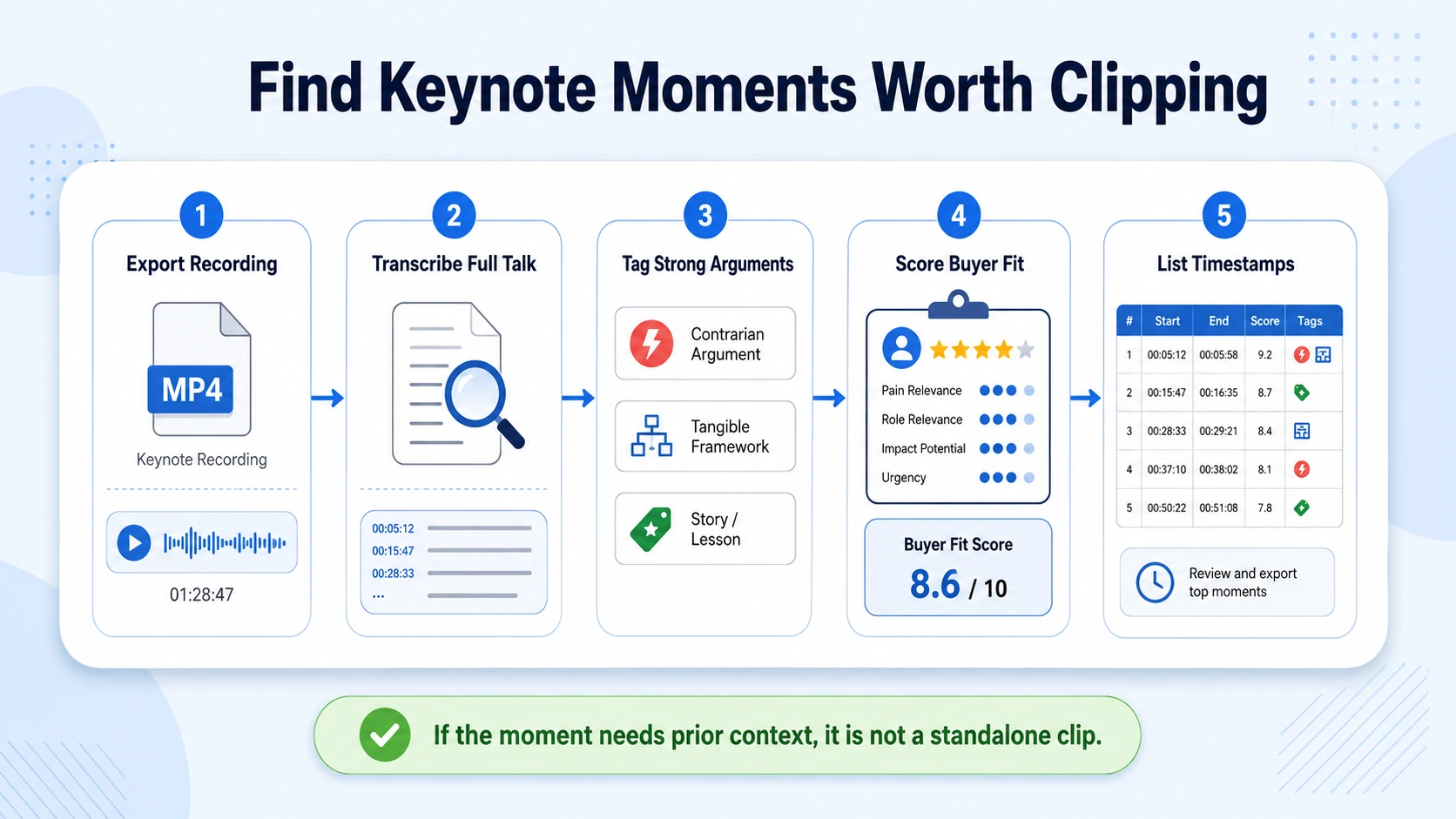
Here is how to identify and extract the right moments:
- Export the recording: If your keynote was recorded with screen capture, export a clean MP4. Apple Keynote's built-in export function outputs to .mov, which most editing tools accept directly.
- Transcribe the full recording: Drop the file into Descript. Descript transcribes your video and lets you edit by editing the text. Delete a sentence from the transcript and the corresponding audio and video disappear, cutting a 45-minute recording down in minutes instead of hours.
- Tag clip-worthy moments: While reviewing the transcript, mark every moment where the speaker makes a single, complete argument in under two minutes. Add a comment in the transcript: "CLIP: [topic]."
- Score each moment on three criteria: Does it work without context? Does it create curiosity? Does it connect to a buyer problem?
- Discard context-dependent moments: Anything that requires the audience to have seen the previous 20 minutes will not work as a standalone clip.
- List your clips with timestamps: Build a simple table with clip number, start time, end time, core topic, and target platform.
A 45-minute keynote typically yields 8 to 12 usable standalone clips. Do not force more. Quality over volume every time. The clip map is your brief for the editing phase. Pass it to your editor or use it to guide your own tool workflow. Nothing gets cut without a reason from the map. For teams that need this done at scale, our short-form video editing service handles the full extraction-to-publish workflow.
The Best Tools to Chop a Keynote into Clips (2026 Comparison)
The leading video clipping platforms in 2026 include OpusClip, VEED.io, Descript, Pictory, Kapwing, and InVideo, each offering AI-powered features for transforming long-form content into short clips. For keynote repurposing specifically, three tools cover the full workflow:
The most effective workflow uses Descript for the main edit and OpusClip for chopping it into Reels and Shorts. The two tools complement each other because they barely overlap. OpusClip is the tool to choose when you already have long content and your bottleneck is finding moments and formatting for platforms. The real value is volume: upload one hour and the output can be many clips. For B2B-specific content with slides, speaker transitions, and Q&A segments, Chopcast is purpose-built for B2B content repurposing, while Munch and Vizard suit social media use cases.
One practical note: always review AI-generated clips before publishing, since even the best tools make mistakes, and verifying caption accuracy ensures professional results. If you want a done-for-you approach rather than managing a three-tool stack, that is exactly what Komet Media's video editing services are built for.
Keynote to Clip Series: The Full Video Editing Workflow
Once you have your clip map and your tools, execution follows a repeatable sequence. This is the exact video editing workflow we run for event recordings and keynotes:
- Rough cut in Descript: Pull each tagged timestamp into a separate composition. Cut filler words, long pauses, and any sentence that requires prior context. Target 90 seconds maximum per clip.
- Auto-extract with OpusClip (optional): If the keynote is purely talking-head footage, run the full recording through OpusClip in parallel to surface any moments you may have missed during manual tagging.
- Reframe to 9:16: Keynote recordings are typically 16:9. Use CapCut or Descript's reframe tool to crop to vertical. Keep the speaker's face in the upper two-thirds of the frame so captions sit cleanly at the bottom.
- Burn in captions: 80% of LinkedIn videos are watched with no sound, which is why 70% of videos are designed for silent viewing with captions. Auto-generate captions, then manually correct proper nouns, acronyms, and product names.
- Add B-roll or slide overlays: Where the speaker references a stat or framework, cut to the relevant slide at full screen for 2 to 3 seconds. This reinforces the point and breaks visual monotony.
- Place a single CTA: End each clip with one action. "Follow for more," "Link in bio," or "DM me [topic]" work consistently. B2B videos with clear calls-to-action generate 42% higher conversion rates than those without.
- Export and QA: Watch every clip at full volume and then on mute. If the mute version still tells the story, the clip is ready.
Each finished clip should stand entirely on its own. A viewer who has never seen the original keynote should leave with a complete idea.
Platform Distribution: Where and How to Publish Your Clip Series
Repurposing a keynote into a clip series only pays off if you distribute intentionally. Each platform has different context, compression behavior, and audience expectations.
LinkedIn is the primary channel for B2B SaaS and funded tech teams. Engagement is 29% higher on LinkedIn videos with subtitles, especially when autoplay is enabled. Post natively. Never share a YouTube link in the main post body. LinkedIn's algorithm suppresses external links hard.
For Instagram Reels strategy, the hook must land in the first two seconds. Open with the most provocative sentence from the clip, not a title card or logo. The same principle applies to YouTube Shorts optimization: videos under 60 seconds have the highest completion rates across all platforms, and short-form videos in the 15-to-30-second range saw a 48% lift in click-through rate year over year.
Stagger your publishing. Do not drop all clips in one day. Publish one clip every two to three days across a four-week window. This stretches the content atomisation framework of one keynote into a month of consistent social presence, reinforces buyer familiarity with the speaker's ideas, and gives you performance data to inform which clips to repurpose further into blog posts, podcast clips, or paid ads.
How Many Clips Should You Make from a Single Keynote?
This is the question I get most often. The honest answer: it depends on keynote length and quality, not on hitting an arbitrary number.
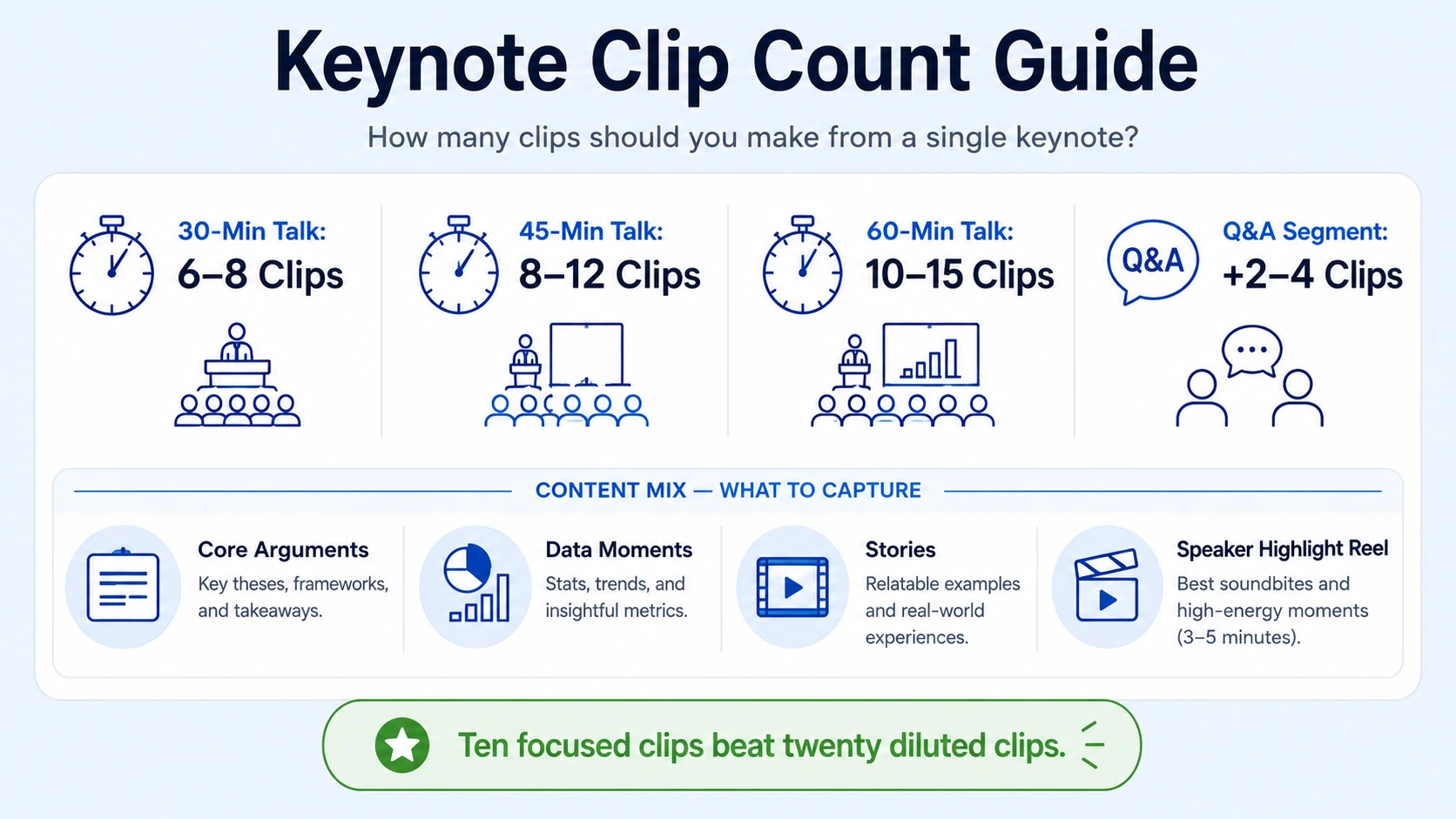
A practical formula:
- 30-minute keynote: Target 6 to 8 clips
- 45-minute keynote: Target 8 to 12 clips
- 60-minute keynote: Target 10 to 15 clips
- Conference keynote with Q&A: Add 2 to 4 clips from the Q&A segment alone
The Q&A is chronically underused. The most honest, specific moments of any keynote happen when a speaker answers a direct question without slides. Those clips often outperform the prepared material because they feel less rehearsed. Today's decision-makers prefer concise, impactful content, and companies are finding success by repurposing their existing long-form content into snackable segments.
What that means in practice: ten focused clips built around one strong argument each will outperform twenty diluted clips every time. A content atomisation framework to maximize one keynote:
- 5 to 6 clips: Core arguments, one per clip, targeting LinkedIn
- 2 to 3 clips: Stats or data moments, reformatted for Reels and Shorts
- 1 to 2 clips: Story or personal example, best for TikTok and Instagram
- 1 clip: Full speaker highlight reel (3 to 5 minutes), native upload to YouTube
The highlight reel serves a different purpose: it's the asset you send to event organizers, prospects, and press. It's the evergreen content strategy play that lives on your website and in the sales process. Komet Media builds this as part of every webinar and event repurposing engagement.
One final rule: measure performance after the first two weeks. Identify the top two clips by watch time and shares. Those tell you what your audience actually values from that keynote, and that insight shapes the next one.
Conclusion
- To repurpose a keynote into a clip series effectively, start with a clip map before touching any editing tool.
- Use Descript for precision cuts, OpusClip for AI extraction, and CapCut for vertical formatting and captions.
- A 45-minute keynote should yield 8 to 12 clips distributed over four weeks, not dropped all at once.
- LinkedIn, Reels, and YouTube Shorts each require different lengths and hooks, but the same rule applies everywhere: every clip must work without context from the original.
- Measure watch time and shares in week two. Double down on what your buyer responds to.
Frequently Asked Questions
Q1: How long should clips from a keynote be?
Aim for 45 to 90 seconds for LinkedIn and 30 to 60 seconds for Instagram Reels, YouTube Shorts, and TikTok. Videos under 60 seconds have the highest completion rates across all platforms. Anything over 90 seconds on a short-form feed needs an exceptionally strong hook to hold attention.
Q2: Do I need professional video equipment to start repurposing a keynote?
No. The recording quality of the original keynote determines the output quality more than anything you do in post. If the keynote was recorded at 1080p with decent room audio, that is sufficient. Tools like Descript handle noise reduction and audio cleanup in the editing phase.
Q3: Should I add captions to every clip?
Yes, without exception. 80% of LinkedIn videos are watched with no sound, and 70% of videos on the platform are designed for silent viewing. Captions also improve accessibility and increase average watch time. Auto-generate them, then proofread manually for accuracy.
Q4: What makes a keynote moment worth clipping?
Three filters: it makes a complete point in under two minutes, it requires no prior context to understand, and it connects to a specific buyer problem or belief. If a moment fails any one of those, cut it from the clip list.
Q5: How often should I post clips from one keynote?
One clip every two to three days is the sustainable cadence for most teams. This stretches a single keynote into three to four weeks of consistent presence without exhausting your audience on one topic before they absorb the ideas.
Q6: Can I repurpose keynote clips into other content formats?
Absolutely. Clips are the start, not the end. Transcribe each clip to get a LinkedIn text post. Combine three to five related clips into a podcast episode. Pull the audio for a short podcast segment. Use the highest-performing clip as creative for a paid ad via video advertising. One keynote, done right, supports an entire quarter of content.

