
Repurpose Webinar Q&A into Short Answers: Step-by-Step Guide
Every webinar you host ends the same way: a live Q&A session packed with real buyer questions, unscripted founder thinking, and genuine product insights, then it disappears into a recording folder. If you want to repurpose webinar Q&A into short answers that actually move the pipeline, that content is already there. You just need a system to extract it. This guide gives you that system: the exact workflow I use at Komet Media to help B2B SaaS, AI, and tech startups turn one Q&A session into weeks of snackable content for LinkedIn, YouTube Shorts, and Instagram Reels.
TL;DR
- Webinar Q&As are pre-packaged buyer education, treat each answer as a standalone short video.
- Pull the transcript first, identify the sharpest 6–10 answers, then edit each down to 60–90 seconds.
- Publish natively on LinkedIn, YouTube Shorts, and Instagram Reels for maximum distribution.
- Build the system once; run it after every webinar, demo, and podcast recording — or partner to create video strategy, scripts, and content from scratch.
Why Webinar Q&As Are Your Most Underused Content Asset
Most B2B SaaS, AI, and tech teams spend weeks preparing a webinar deck, run a 60-minute session, then post the full recording link and call it done. That's leaving an enormous amount of buyer-education value on the table. B2B marketers increasingly see webinars as content engines, not standalone events, each session is a source of multi-channel content that can fuel marketing efforts well into the future.
The Q&A segment is the most valuable part: it is unscripted, specific, and driven entirely by what your real buyers actually want to know. 65% of marketers repurpose webinar content , yet most repurposing stops at blog posts and email recaps. Almost no one extracts the Q&A segment specifically, which means when you do, you differentiate immediately.
Here is why the Q&A specifically outperforms any other segment for short-form video:
- The questions come from real people with real objections, they map directly to buyer friction.
- Answers are conversational, not scripted, which means they perform better on social than rehearsed talking-head clips.
- Each answer is already self-contained, it has a question, an answer, and a point. That is the structure of a great short-form video.
- Each webinar can yield an average of 6.3 new content assets , and the Q&A alone can account for the majority of those when treated systematically.
53% of B2B buyers watch short-form video before requesting demos. That means a well-edited Q&A clip answering "How does your integration work?" or "How long does onboarding take?" is not just content, it is a pre-demo sales asset. At Komet Media, we position these clips as top-of-funnel trust builders and mid-funnel enablement tools simultaneously.
A single webinar Q&A session, properly extracted and edited, can generate 8–12 short-form videos that educate buyers, answer objections, and reduce sales cycle friction, without you recording a single new piece of content. For B2B SaaS, AI, and tech startups starting with zero or minimal existing footage, Komet Media also builds video content libraries from scratch — covering strategy, scripting, recording guidance, and full production.
Step-by-Step: How to Repurpose Webinar Q&A into Short Answers
This is the exact process I run for B2B SaaS, AI, and tech clients. It is repeatable, scalable, and tool-agnostic.
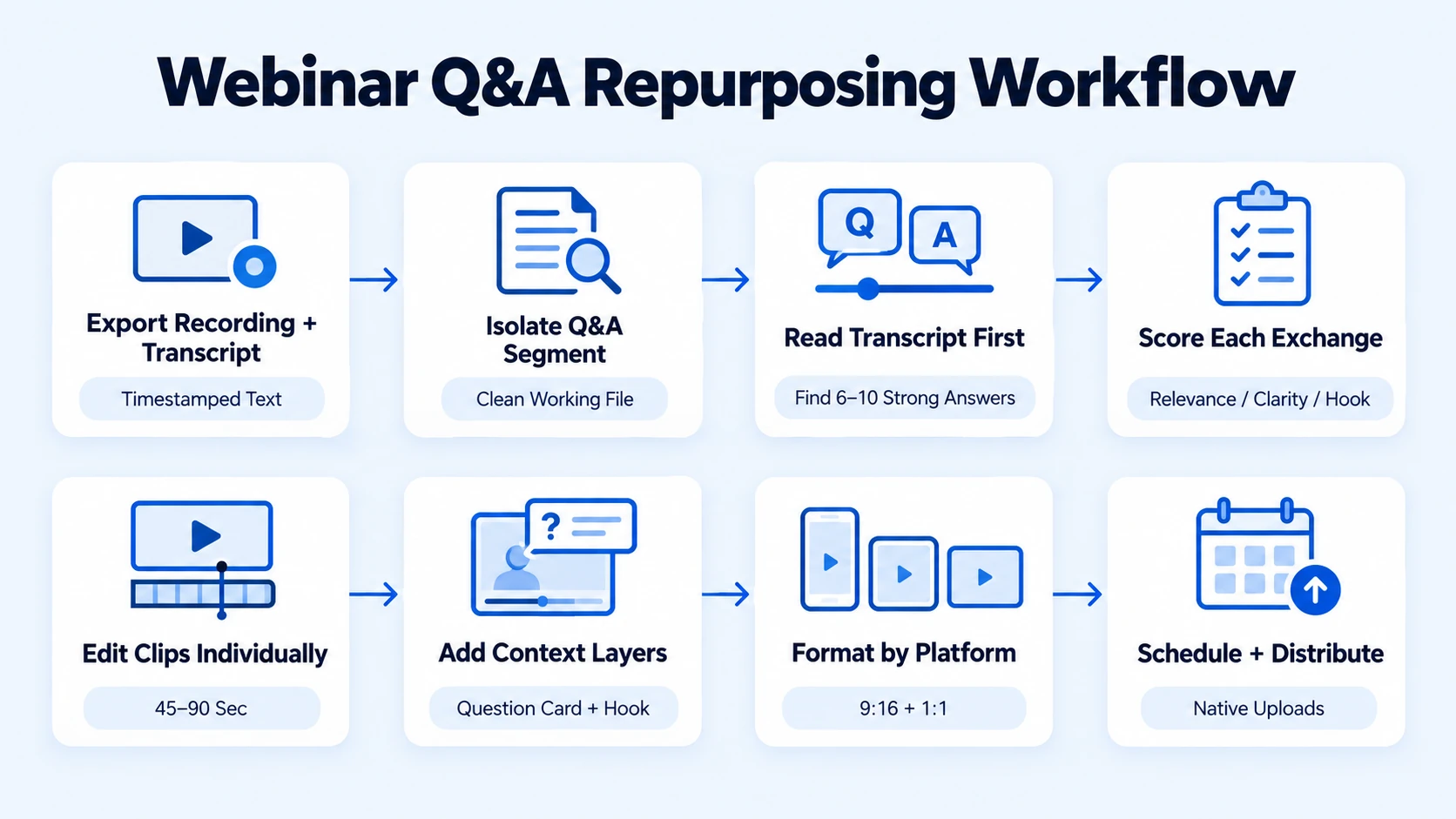
- Export the recording and transcript: Pull the full webinar recording and generate a timestamped transcript using Descript or Opus Clip's transcript feature. If your webinar platform (Zoom, Riverside, Livestorm) has built-in transcription, use that as your starting point.
- Isolate the Q&A segment: Identify the exact timestamp where Q&A begins. Export that segment as a separate clip before doing any editing. This keeps your working files clean.
- Read the transcript first, not the video: Scan the full Q&A transcript and highlight the 6–10 exchanges where the answer is sharp, specific, and standalone. Skip vague answers, technical exceptions, or anything that requires prior context to make sense.
- Score each exchange: Rate each Q&A on three criteria, buyer relevance (does this address a real objection?), clarity (is the answer self-contained in under 90 seconds?), and hook strength (does the question itself make someone want to hear the answer?). Prioritise the top 6–8.
- Edit each clip individually: For each selected exchange, cut from 2–3 seconds before the question to 2–3 seconds after the answer ends. Add open-captions (burned in), a lower-third with the speaker's name and title, and a brief on-screen question card at the start. Target length: 45–90 seconds per clip.
- Add context layers: Insert a brief on-screen hook at the start ("The #1 question we get about onboarding") to replace the live moderator framing. This is critical, without it, the clip starts cold and loses the audience in the first three seconds.
- Format for each platform: Export a vertical 9:16 cut for LinkedIn, YouTube Shorts, and Instagram Reels, and a square 1:1 cut for LinkedIn feed posts and email embeds.
- Schedule and distribute: Publish natively on each platform. Do not share YouTube links on LinkedIn, native video always outperforms external links in algorithmic reach. LinkedIn's algorithm favours native uploads and visible engagement over external links, meaning a short video posted directly to the feed will almost always travel farther than a link to your blog or YouTube page.
Best Format for Repurposed Webinar Q&A Content
Not all formats work equally well for repurposed Q&A. Here is how the main output types compare:
The best-performing format is vertical, 30 seconds to 2 minutes, structured as hook, key learning, then call to action. For Q&A clips specifically, the question itself acts as the hook, which is why the on-screen question card at the start of each clip is non-negotiable. Short-form videos under 60 seconds have the highest completion rates across all platforms, and 52% of B2B buyers say they prefer concise videos that "get to the point quickly."
Where a Q&A answer runs longer than 90 seconds, cut it to the single sharpest point. If the full answer is genuinely valuable, use the short clip to tease it and link to the full recording. 92% of people watch mobile video with the sound off , which makes burned-in captions essential, not optional, on every clip you publish.
AI Tools That Make Q&A Repurposing Faster
The manual approach works, but the right tools compress your editing timeline significantly. AI-assisted clip extraction tools such as Descript and Opus Clip reduce average repurposing time from 6.2 hours per webinar to just 47 minutes.
Here is how to use each tool in the workflow:
- Descript: Upload your webinar recording and it generates a full transcript synced to the video timeline. You edit by editing the text, delete a sentence in the transcript and it cuts that moment from the video. Ideal for precision Q&A trimming.
- Opus Clip: Automatically detects high-value moments in long-form video and scores them by predicted engagement. Strong for identifying which Q&A exchanges to prioritise when you are short on time.
- Riverside.fm: Best used at the recording stage. Records each speaker on a separate track, which gives your editor far more control over audio balancing in the final clip.
- CapCut for Business / Descript captions: Auto-caption generation with style control. Use these to add burned-in captions with brand fonts and colours consistently across every clip.
Marketers save 13,000 hours and $650,000 yearly using AI to repurpose webinars, one platform reported AI repurposing was used over 5,300 times across 3,600+ webinars to automatically create content from transcripts.
Even with AI tools, a human editor reviewing each clip for pacing, tone, and on-brand presentation is what separates clips that get scrolled past from clips that generate demo requests. Whether you are repurposing existing webinars or starting from scratch with no prior recordings, that is precisely what our video editing services and full-service video creation workflows for B2B SaaS, AI, and tech startups are built to deliver.
Distribution Strategy: Where to Publish Your Short Q&A Clips
Editing the clips is half the job. Distribution determines whether the investment compounds. When you repurpose webinar Q&A into short answers, the goal is to make each clip discoverable independently, not just shared once to your existing audience.
LinkedIn: The primary channel for B2B Q&A clips. Publish natively as a video post. Write the caption as a standalone insight (do not just describe the video, add a POV). Tag the speaker and any relevant attendees. Engagement is higher when executives and experts share direct, face-to-camera insights. Encourage your founder or exec speaker to repost from their personal profile, founder-led distribution consistently outperforms brand page posts.
YouTube Shorts: Indexable, searchable, and increasingly important for B2B discovery. Title each Short with the exact question it answers (e.g., "How long does onboarding take for enterprise clients?"). This maps directly to search queries your buyers are already typing.
Instagram Reels: Strongest for brand awareness and top-of-funnel reach. Works particularly well for AI and SaaS brands targeting marketing and growth personas. Connect your Instagram marketing efforts to your webinar content calendar for a consistent cadence.
Email nurture: Embed the square-format clip in post-webinar follow-up emails and deal-stage nurture sequences. A video answering a prospect's likely objection placed at the right moment in a sequence is a measurable pipeline lever.
Sales enablement: Share individual clips in Slack, via email, or in LinkedIn DMs as part of outbound follow-up. A 60-second clip that answers exactly what a prospect asked on a discovery call is dramatically more effective than a PDF one-pager.
Publish one clip per day for the first two weeks after a webinar. That is a 10–14 piece distribution window from a single 60-minute session.
Common Mistakes When Repurposing Webinar Q&A Content
Even B2B SaaS, AI, and tech teams with good intentions make these errors consistently:
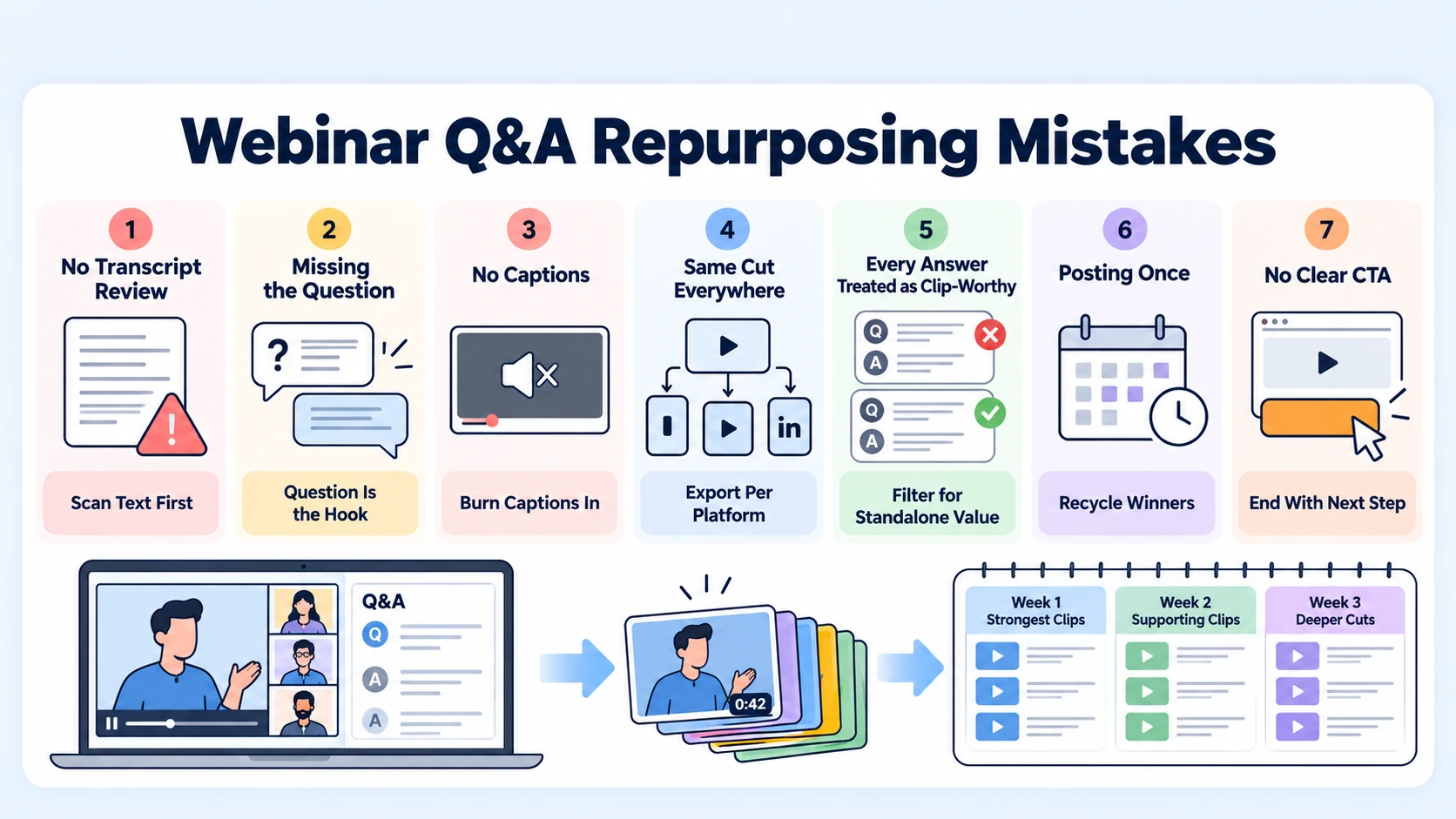
- Clipping from the recording without transcript review first: Watching the video linearly to find moments is inefficient and leads to skipping over valuable answers that read better than they play.
- Starting the clip mid-answer without the question: The question is the hook. Without it, the clip has no context and no reason to keep watching. Always include it.
- Skipping captions: 92% of people watch mobile video with the sound off, a clip without captions is invisible to most of your audience.
- Publishing the same cut everywhere: Vertical 9:16 for Reels and Shorts, square 1:1 for LinkedIn feed, horizontal for YouTube watch page. One cut for all platforms is a reach killer.
- Treating every Q&A answer as clip-worthy: Not every exchange is snackable. Answers that rely on slides, require prior context, or run longer than two minutes without a clear resolution belong in the full recording link, not in a clip.
- Posting once and abandoning: A clip published once gets one chance. Republish high-performing clips every 90 days with updated captions. Evergreen content atomisation only works if you actually recycle it.
- No clear CTA: Every clip should end with a direction, visit a page, book a demo, read the full transcript. At Komet Media, we connect Q&A clip CTAs directly to webinar landing pages to close the content loop.
Conclusion
When you systematically repurpose webinar Q&A into short answers, you stop treating one of your best content assets as an afterthought. The core takeaways:
- Every Q&A session is a library of pre-answered buyer objections, extract, edit, and distribute each one individually.
- Transcript-first review, AI-assisted clipping, and native publishing on LinkedIn, YouTube Shorts, and Instagram Reels is the non-negotiable workflow.
- Burned-in captions, on-screen question cards, and a clear CTA are what separate high-performing clips from forgettable ones.
- One webinar Q&A, run through this system, can generate 10–14 distribution-ready short-form assets that keep working for your pipeline long after the live event ends.
If your team needs this built as a repeatable system, Komet Media's short-form video services handle the full workflow — from transcript extraction and repurposing to complete from-scratch strategy, scripting, and video creation for B2B SaaS, AI, and tech startups with no prior recordings.
Frequently Asked Questions
Q1: How long should a repurposed webinar Q&A clip be?
Target 45–90 seconds for most platforms. Under 60 seconds gets the highest completion rates, and if the answer genuinely requires more time, use the clip as a teaser and link to the full recording. Never exceed 2 minutes for a standalone social clip.
Q2: How many clips can I realistically get from one webinar Q&A session?
A typical 20–30 minute Q&A session yields 6–12 usable clips once you filter out answers that need prior context or are too technical to stand alone. A 60-minute webinar with a strong Q&A segment can produce 10–14 clips across formats.
Q3: Do I need professional video editing tools to repurpose Q&A into short clips?
No, but they help significantly. Descript and Opus Clip handle transcript extraction and rough cutting. For polished, on-brand clips with captions, motion graphics, and proper formatting across platforms — or for building a complete video content library from scratch with strategy and scripting for B2B tech teams — a dedicated editor or partner agency produces consistently better results and a faster turnaround.
Q4: Which platform should I prioritise for B2B webinar Q&A clips?
LinkedIn first, always. It reaches buyers and decision-makers in a professional context where product and thought leadership content performs. Add YouTube Shorts for search discoverability and Instagram Reels for broader brand reach. Run all three simultaneously if capacity allows.
Q5: Should the speaker's name appear in each clip?
Yes. A lower-third with the speaker's name, title, and company name should appear within the first five seconds of every clip. In founder-led and executive-led content, the person is part of the credibility signal. Anonymous clips perform measurably worse in B2B contexts.
Q6: How often should I repurpose webinar Q&A content?
Run this process after every webinar, podcast episode, and recorded demo. Build it into your post-event workflow as a standard step, not an optional one. With the right system, the editorial review, editing, and scheduling can be completed within 48 hours of the live event going live.

