
Repurpose a Newsletter into a Talking-Head Video: Step-by-Step Guide
Your newsletter already contains the insight. Your audience just isn't watching it yet. If you want to repurpose a newsletter into a talking-head video, the process is more systematic than creative, and once you build the workflow, each issue becomes a short-form asset in under two hours. This guide walks through every step: extracting the idea, scripting for camera, recording with confidence, editing for retention, and distributing across the channels where your B2B buyers actually spend time.
TL;DR
- Pull one core idea per newsletter and script it as a spoken monologue, not a read-aloud
- Aim for 60 to 90 seconds, videos under 60 seconds earn the highest completion rates
- Record once, distribute to LinkedIn, YouTube Shorts, and Instagram Reels
- Use captions, tight editing, and a hard hook in the first three seconds to hold attention
Why Repurposing a Newsletter into a Talking-Head Video Pays Off for B2B Teams
Most SaaS founders and marketing teams send newsletters consistently. That's a content library most teams never monetize. When you repurpose a newsletter into a talking-head video, you convert a passive email into a video asset that works in feeds, search, and social discovery simultaneously, channels your subscribers don't even use. The data backs the bet. 78% of B2B marketers now use video, and 41% say short-form video drives the highest ROI of any video format. Meanwhile, 98% of B2B decision makers have watched explainer videos, and 87% of B2B buyers say video influenced a purchase decision.
The talking-head format specifically earns trust in ways static text cannot. A founder or executive on camera signals conviction, you're not hiding behind a blog post, you're standing behind the idea. That's the foundation of founder-led growth: putting a real voice and face to a point of view. Over half of companies now repurpose their video content into social clips. LinkedIn leads distribution at 67% of teams, followed by Instagram at 49% and YouTube at 41%. Those three channels are exactly where your B2B buyers are researching vendors right now.
Content atomization through this method also solves a persistent B2B problem: omnipresence without proportional production cost. One newsletter issue can produce one 60-second talking-head clip, three quote graphics, a LinkedIn text post, and a short email, all from the same 500 words you already wrote. That's content repurposing at scale, not just cross-posting.
The core shift: Your newsletter earns a click if the subject line lands. Your talking-head video earns attention in a feed whether or not someone was looking for you. That's a distribution upgrade, not just a format change.
How to Extract the Right Idea from Your Newsletter
Not every newsletter maps cleanly to video. Long-form analysis, multi-part frameworks, and data-heavy deep dives don't compress well into a 60-second talking-head format. The goal isn't to summarize the issue, it's to isolate the sharpest single idea and make it hold up on its own.
Here's how to identify the right idea:
- Read the newsletter and highlight the sentence that made you write the whole thing. That's usually your hook. It's the core provocation, the counterintuitive claim, or the "most people get this wrong" moment.
- Check if that idea can be stated in one clear sentence. If it requires two qualifiers and a footnote, it's still too complex for a standalone video.
- Ask: would a cold prospect understand this without having read the issue? Talking-head videos surface to people who've never seen your newsletter. The idea must be self-contained.
- Rank ideas by audience tension. The best video ideas create immediate recognition, your buyer watches and thinks "that's exactly the problem I have."
For SaaS teams, newsletters covering product positioning, buyer objections, onboarding friction, or category education tend to produce the highest-performing video scripts. These map directly to buyer education and product trust, two goals that short-form video accelerates better than any other format. Avoid newsletter sections that are list-heavy or reference-heavy. Those formats require scanning, not watching. Pick the narrative thread, not the bullet list.
How to Script a Talking-Head Video from a Newsletter
Scripting is where most people slow down or skip ahead entirely. Both are mistakes. A bad script creates awkward on-camera presence. No script creates meandering content that loses viewers in the first ten seconds. Videos under 60 seconds have the highest completion rates across all platforms, and engagement drops sharply after the two-minute mark for most B2B audiences.
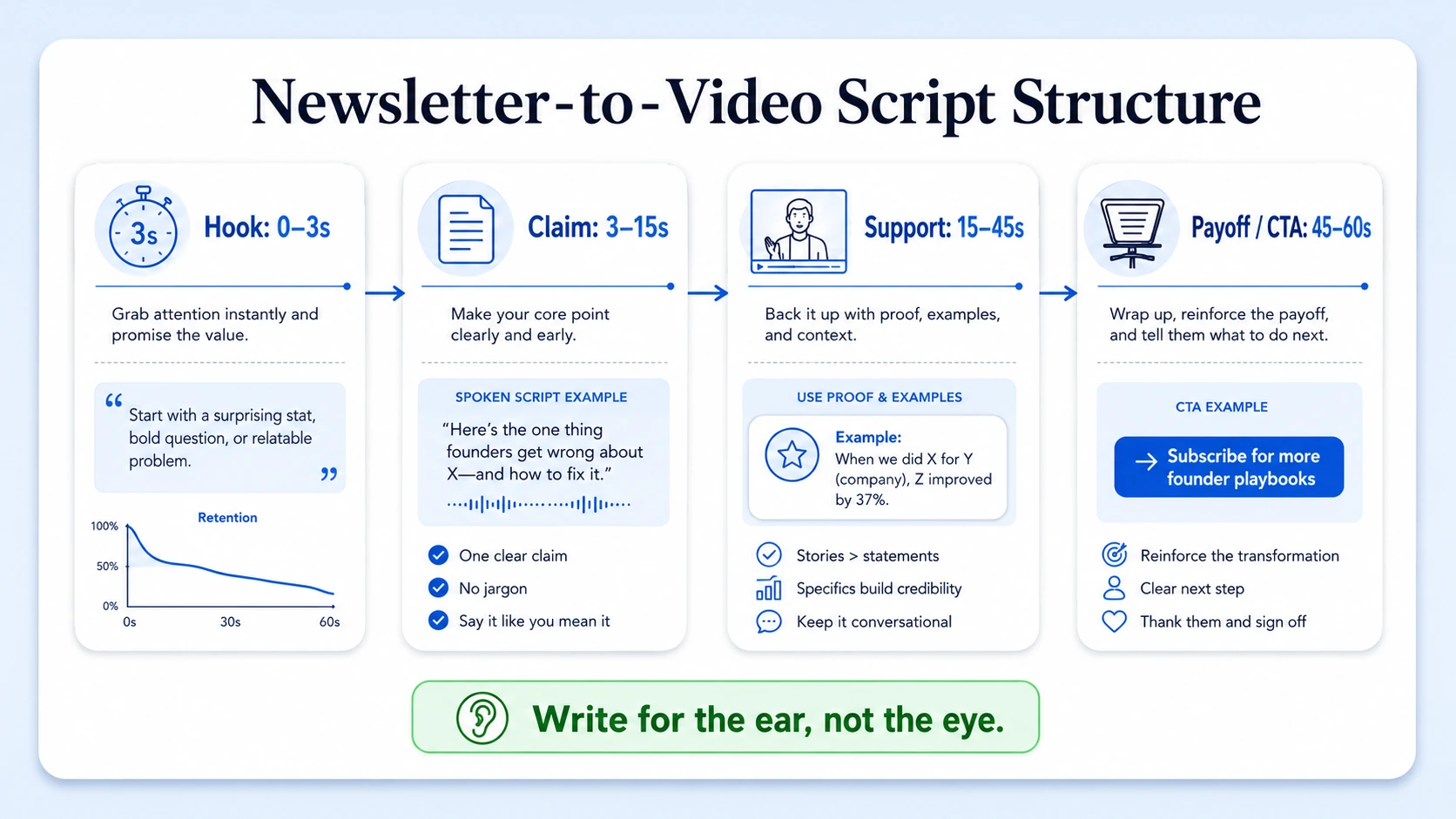
Your script needs to respect that ceiling from the first word. Use this structure for every talking-head script:
- Hook (0–3 seconds): Open with the core tension, not a greeting. "Most SaaS teams write great newsletters and get zero pipeline from them, here's why" beats "Hi, I'm Rajan and today I want to talk about content."
- Problem or claim (3–15 seconds): State the insight from your newsletter in one to two sentences. Spoken, not written.
- Support or proof (15–45 seconds): Add one example, one data point, or one specific scenario. This is where you pull the best paragraph from the newsletter and rewrite it for speech.
- Payoff or CTA (45–60 seconds): Land the takeaway. What should the viewer do, think, or feel differently? Optional: tell them where to read the full breakdown.
Script-writing rules:
- Write for the ear, not the eye, short sentences, contractions, natural rhythm
- One idea per video, no exceptions
- Never start with your name or company
- Use teleprompter software (PromptSmart, Teleprompter Premium, or BIGVU) to maintain eye contact while reading
This is the same video script writing process we use at Komet Media when turning founder newsletters into LinkedIn and YouTube Shorts assets for B2B SaaS teams.
What's the Easiest Way to Record a Talking-Head Video Without Being Awkward on Camera?
On-camera presence is the most common objection I hear from founders and executives. The answer isn't "just practice more." It's a system that removes friction and forces good mechanics by default.
Setup checklist:
- Camera: iPhone 13 or later in 4K/1080p beats most webcams. Eye-level is non-negotiable, prop it up or use a tripod.
- Lighting: One ring light or a window in front of you. Backlit shots kill authority.
- Background: Solid wall, branded background, or a clean shelf. Nothing competing for attention.
- Audio: A $50–$80 lapel mic (Rode Wireless GO II or Hollyland Lark) eliminates the single biggest quality drop, hollow room audio.
On-camera mechanics:
- Look into the lens, not the screen
- Use teleprompter software so your eyes don't dart
- Record a 10-second "throwaway" take first to kill nerves
- Speak at 80% of your normal pace, on-screen delivery always sounds faster than it feels
The drop-off point for B2B video is in the first 15 to 30 seconds, when the audience doesn't clearly see value, not at a later runtime milestone. That means your energy and clarity in the opening seconds matters more than production quality throughout the rest. Keep takes short. Record sentence by sentence if needed, short-form video editing can cut jump cuts cleanly. You're building a video, not performing a speech.
Tools and Editing Workflow for Newsletter-to-Video Repurposing
Once you have footage, the editing workflow determines whether this scales or stays a one-time experiment. The right video editing software stack makes the difference between a content system and a content chore.
Core tools by function:
Editing steps:
- Cut dead air at the start and end, first word in, last word out
- Remove filler words and long pauses using Descript's text-based editing or CapCut's auto-cut
- Add captions, 85% of social video is watched without sound, so captions are not optional
- Insert B-roll footage over any section where you reference a concept, product, or data point (2–3 cuts per minute is enough)
- Add a lower-third text graphic with your name and title for cold audiences
- Export in 9:16 for YouTube Shorts, Instagram Reels, and TikTok; export in 1:1 or 4:5 for LinkedIn feed
Keep final edit length between 60 and 90 seconds for LinkedIn and Instagram Reels. YouTube Shorts allows up to 3 minutes, use the extra time for educational depth if the topic warrants it. If editing is the bottleneck, our video editing services at Komet Media handle the full post-production side for B2B teams who'd rather spend their time on strategy.
Newsletter-to-Video Distribution Strategy for Maximum Reach
Producing the video is half the work. Your content distribution strategy determines whether it reaches new buyers or just echoes to existing followers. LinkedIn video experienced a 36% year-over-year increase in watch time and uploads in 2025, and 70% of B2B buyers watch video before purchasing.
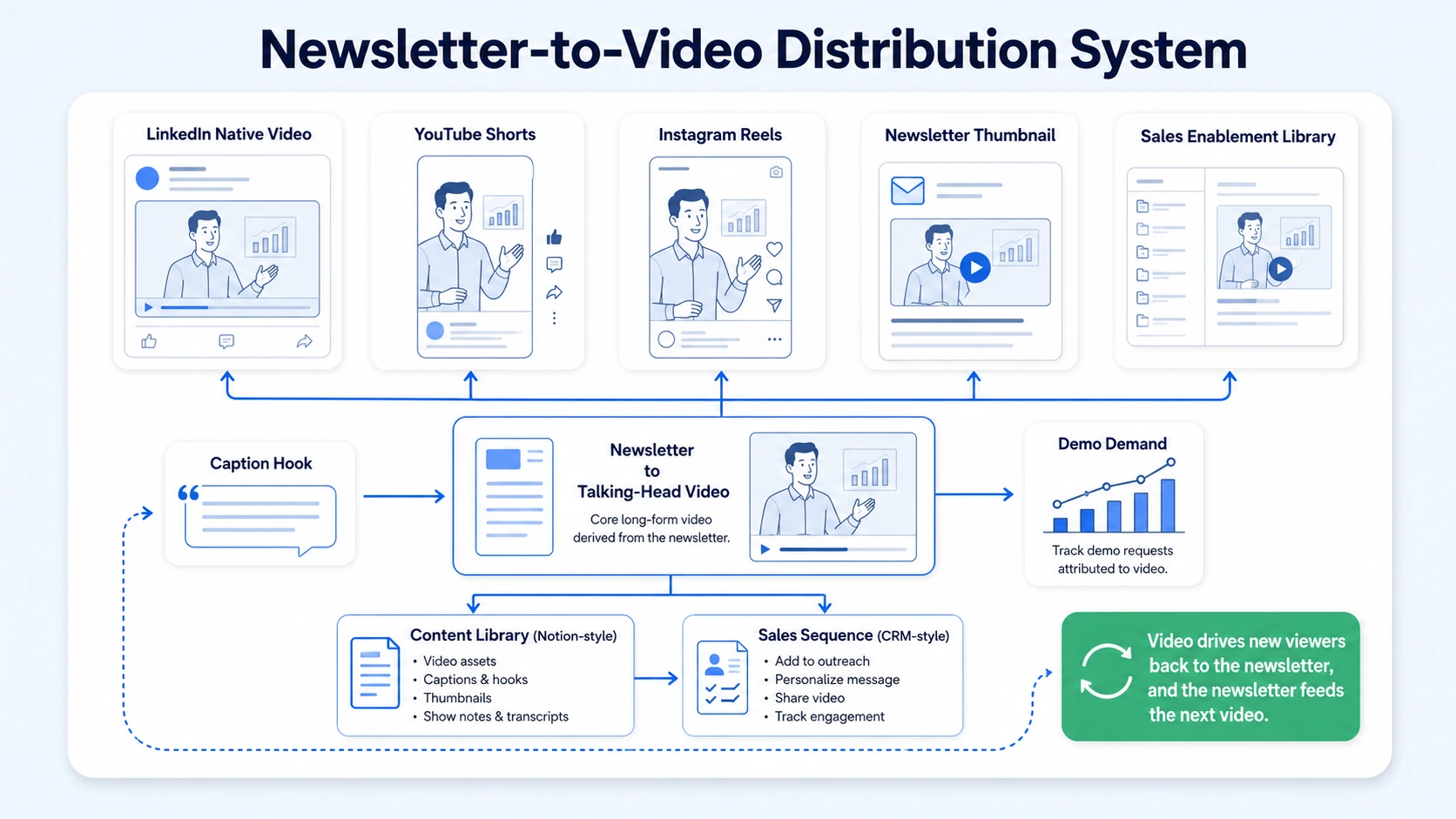
LinkedIn is your primary channel. Publish natively, not as a link, with the first two lines of your caption as a standalone hook that works even without the video.
Distribution checklist per video:
- LinkedIn: Native upload, 60–90 seconds, caption with three to four lines and a question or CTA
- YouTube Shorts: Upload with keyword-optimized title and description for Video SEO (talking-head topic + B2B niche)
- Instagram Reels: Same file, modified caption for awareness-stage audiences; tag the newsletter issue in bio link
- Email newsletter: Embed a thumbnail that links to the YouTube version, drives cross-channel subscribers
- Sales enablement: Drop relevant videos into Notion, Salesforce, or Outreach sequences where they match a buyer objection
53% of B2B buyers watch short-form video before requesting demos, which means your newsletter-derived video can directly influence demo demand if it addresses the right pre-sales question. Repurposing the newsletter itself into a video also creates a natural closed loop: video drives new subscribers back to the newsletter, and the newsletter feeds the next video. That's omnipresence marketing working as a system, not a sprint.
For teams running podcasts or webinars, the same talking-head workflow applies, and the distribution system above stacks directly.
Conclusion
When you repurpose a newsletter into a talking-head video, you turn one distribution channel into five without writing anything new. The approach is repeatable, the tools are accessible, and the ROI compounds with every issue you convert.
Core takeaways:
- Extract one sharp idea per newsletter, not a summary, a single insight
- Script for the ear, record to a teleprompter, keep it under 90 seconds
- Captions, tight editing, and a three-second hook are non-negotiable
- Distribute natively to LinkedIn first, then YouTube Shorts and Instagram Reels
If you want to build this as a consistent system rather than a one-off experiment, Komet Media works with B2B SaaS teams to turn newsletter content into weekly short-form video pipelines.
Frequently Asked Questions
Q1: How long should a talking-head video be when repurposed from a newsletter?
Aim for 60 to 90 seconds. Videos under 60 seconds earn 50% engagement, while longer formats see steep drop-offs. For newsletter-derived content, a single insight at 60 to 90 seconds hits the sweet spot for LinkedIn and Shorts without losing mid-video audience retention.
Q2: Do I need professional video equipment to repurpose a newsletter into a talking-head video?
No. An iPhone 13 or newer in 1080p, a ring light, and a $50 lapel mic are enough to produce professional-looking results. The biggest quality gains come from audio and lighting, not camera hardware. Most B2B founders ship great content from a phone and a desk lamp.
Q3: How many videos can I get from a single newsletter issue?
Typically one to three. One main talking-head video covering the core idea, and optionally a 15-second hook teaser and a follow-up video expanding on audience questions. Every long-form content asset contains five to ten key insights that can stand alone, multiplying distribution lifespan across weeks of content.
Q4: Which platform should I prioritize for newsletter-to-video distribution?
LinkedIn first for B2B teams. LinkedIn video experienced a 36% year-over-year increase in 2025 and reaches users twenty times more frequently than image-based posts. Follow with YouTube Shorts for search-driven discovery, then Instagram Reels for broader awareness reach.
Q5: Should I read my newsletter directly on camera or rewrite it?
Always rewrite for speech. Newsletter copy is written for scanning, it uses bullet points, headers, and dense phrasing. Talking-head scripts need short sentences, natural contractions, and a single narrative thread. Read your newsletter to extract the idea, then put it down and speak it fresh.
Q6: How often should I convert newsletters into talking-head videos?
Every issue, ideally. If your newsletter ships weekly, one video per week is achievable once the workflow is set. Start with a bi-weekly cadence to build the habit, then scale up. Consistency matters more than volume, repurposed content can increase organic traffic by 35% when brands systematically reuse top-performing assets.

