
Repurposing Long-Form Content Into X (Twitter) Video Posts: Step-by-Step Guide
Most B2B teams sit on a goldmine, recording webinars, founder interviews, podcast episodes, product demos, and publish none of it to X. That's a pipeline problem disguised as a content problem. Repurposing long-form video content into X (Twitter) video posts is how serious teams stretch one hour of recorded thinking into weeks of buyer-facing content. At Komet Media, this is one of the highest-leverage moves we build for B2B SaaS, AI, and tech startups & teams. Here's exactly how to do it.
TL;DR
- Pull 3–5 clips per long-form asset; aim for 30–60 seconds each on X.
- Hook within 3 seconds, burned-in captions always, native upload only.
- X's algorithm rewards completion rate and early engagement velocity.
- Tools like Opus Clip and Descript cut editing time from hours to minutes.
Why X Is the Right Platform for B2B Video Repurposing in 2026
Most SaaS founders treat X as a text platform. That's a mistake in 2026. Video tweets receive 10 times more engagement than text-only posts. Meanwhile, video views on X are growing at an average rate of 35% year over year, according to X Business. The platform's audience matches B2B buyer demographics precisely.
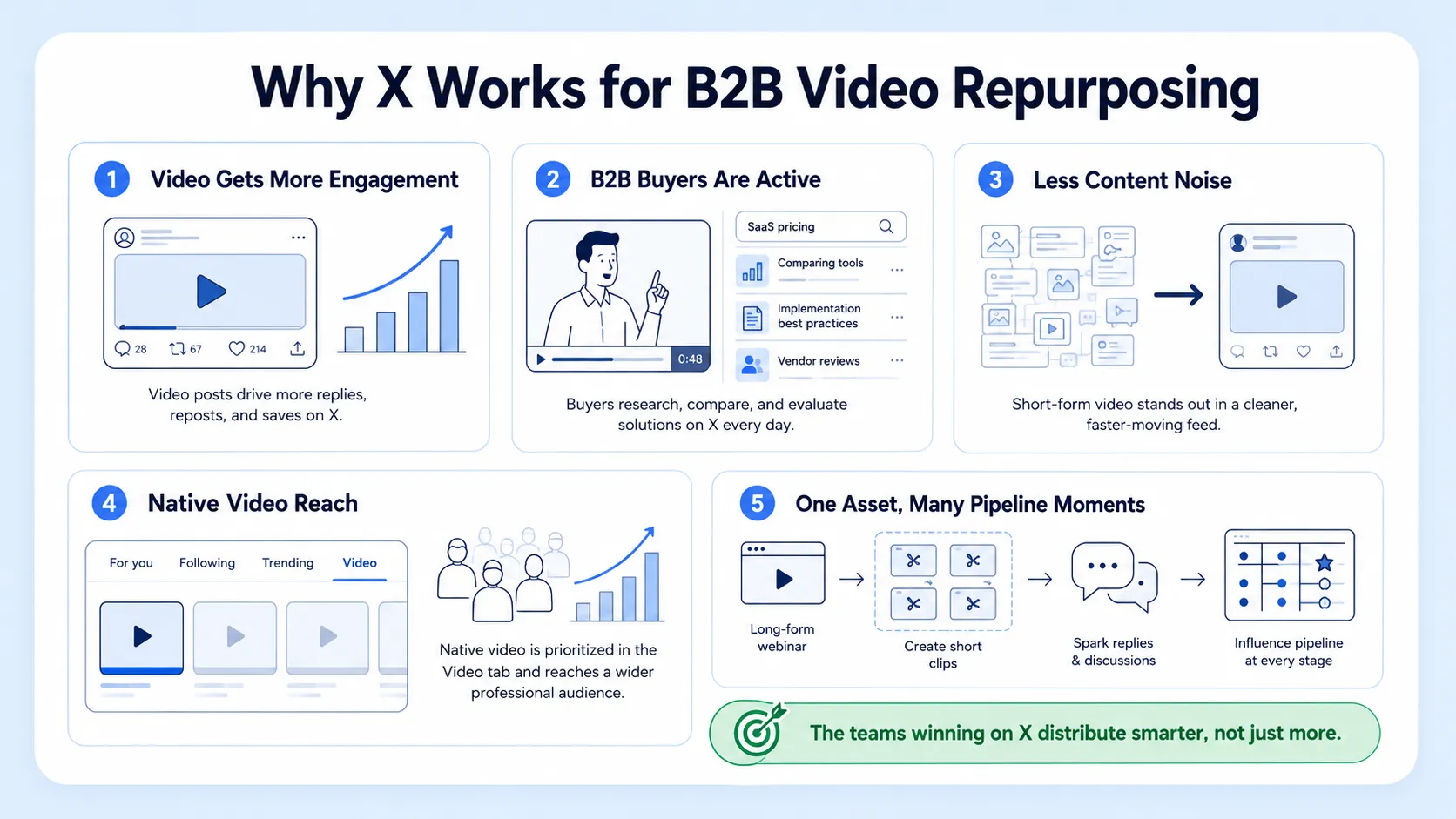
Based on X's ad audience data, the largest share of users is 25–34 (about 37.5% in January 2025), which makes X a strong fit for brands targeting millennials and working professionals. The opportunity gap is real. Only 5.5% of marketers use X for influencer campaigns, far behind TikTok (58.9%) and Instagram (35.2%). For B2B SaaS, AI, and tech startups & teams repurposing product and founder content, that undersaturation means less noise and a cleaner path to reach buyers who are already on X researching solutions.
What makes this particularly powerful for our clients at Komet Media is the content atomization model: one 45-minute webinar or demo recording becomes 8–12 standalone clips, each addressing a distinct buyer question. Every clip earns its own reach, its own reply thread, its own pipeline moment. That's not content recycling. That's a content repurposing strategy that multiplies ROI without multiplying production costs.
71% of companies repurpose long-form video content into short-form clips, making it the most common content repurposing tactic across all formats. The teams winning on X aren't producing more, they're distributing smarter. The platform's video tab update and Grok-powered algorithm have made native video distribution significantly more accessible for accounts that weren't previously video-first. This is the window.
Repurposing long-form video content into X (Twitter) video posts now costs a fraction of what original short-form production used to require, and the reach potential has never been higher for B2B teams willing to show up consistently.
X (Twitter) Video Specs You Must Get Right in 2026
Getting specs wrong kills the clip before anyone sees it. Here's what matters in 2026: The three main supported video dimensions are 1920×1080 (16:9 landscape), 1080×1920 (9:16 vertical), and 1080×1080 (1:1 square). MP4 or MOV with H.264 video and AAC audio at up to 60 fps is the recommended format in 2026.
Export at 1080p yourself for a cleaner result, videos shot in 4K will be downscaled server-side, meaning you lose control over the compression. To minimize quality loss, export at a bitrate of at least 8,000 kbps for 1080p content. For repurposed B2B content specifically, vertical (9:16) wins on mobile reach. Vertical (9:16) takes up more screen real estate on mobile, which is where most X users are. Square (1:1) is the safe middle ground if your source footage is landscape and you don't want to reframe.
Critical: X auto-plays videos silently in the feed. Burned-in captions are not optional, they are the difference between a scroll-past and a watch-through.
One more non-negotiable: native uploads tend to perform better than links that push people off-platform. Never post a YouTube link where a native upload can go.
How to Select the Best Clips From Any Long-Form Video
This is where most teams get it wrong. They pull random highlights instead of using a clip selection framework built around buyer intent. When I review a long-form asset, a webinar, a podcast episode, a founder Q&A, I'm scanning for five clip types:
- Sharp claims: A single declarative sentence that challenges a common assumption your buyer holds. These perform because they provoke replies.
- How-to moments: Tactical, specific advice that solves one problem in under 60 seconds. High completion rate, high save rate.
- Before/after framings: The speaker contrasts what most teams do versus what actually works. Instant relevance for problem-aware buyers.
- Data-backed takes: A specific number or research point that reframes how the viewer thinks about a problem.
- Founder/executive POV: Unfiltered thinking from someone with credibility. Builds trust faster than any polished ad.
Each clip needs to pass a three-question test before it gets cut:
- Does it open with a statement or visual that stops a scroll inside 3 seconds?
- Does it make complete sense without any context from the original video?
- Does it end before the point is over-explained?
Short-form video under 60 seconds gets the biggest algorithm boost; videos that hit 50%+ completion rate get extended reach. Thumb stop ratio and hold rate are the two metrics that correlate most with algorithmic amplification. Repurposing long-form video content into X (Twitter) video posts only pays off when the clips are self-contained. A clip that requires the original context to land is a clip that won't be watched to the end.
The Editing Workflow: From Raw Footage to Ready-to-Post Clip
Here's the production workflow I recommend for B2B teams with a regular cadence of recorded content:
- Transcribe first: Upload the full recording to Descript. Descript delivers some of the most accurate AI transcriptions, especially for talking-head and podcast-style videos. Read the transcript to spot clip candidates faster than scrubbing video.
- Run AI clip detection: Opus Clip is an AI-powered tool that repurposes long-form videos into short, viral clips. It takes a long video and automatically finds the most engaging moments, then packages them into ready-to-post shorts.
- Human review and selection: AI clippers are a starting point, not a final filter. Auto-selection still needs a human pass because the "best" moment by engagement heuristics is not always the one that's on-brand.
- Reframe for vertical or square: Crop and reframe to 9:16 or 1:1 inside your editor. Most NLEs and tools like Opus Clip support auto-reframes.
- Burn in captions: Use Submagic or VEED for animated, on-brand subtitles. Keep lines under 32 characters for readability post-compression.
- Export correctly: MP4, H.264, AAC audio, 1080p, at least 8,000 kbps.
- Write the post copy: The caption is not a title. It's the hook that makes someone decide to watch. Start with a statement, not a question.
For our short-form video editing clients, we typically run this workflow across 3–5 source assets per month and produce 15–25 clips per client. That is a full content calendar from content that already exists.
Tools for Automatically Cutting Long Videos Into Short Clips for X
You don't need a full production stack. You need the right tool for the right job.
Opus Clip pulls 10+ short-form clips from a single long video and scores each one for viral potential. It's the highest-volume AI clipper in the category and earns 4.6/5 across 118 G2 reviews by being fast and actually decent at picking quotable moments. The virality score helps you triage 10 clips down to the 2 worth posting. The right stack for most founders is Opus Clip for bulk clip generation plus Descript for manual fine-tuning.
For teams repurposing webinar content or podcast episodes specifically, Vidyo adds multi-speaker detection and speaker-specific reframing, which saves significant manual work when you have two or more on-screen guests.
A note on automation limits: these tools accelerate the workflow, they don't replace editorial judgment. Repurposing long-form video content into X (Twitter) video posts at a quality level that builds brand trust still requires a human deciding which clips represent the brand accurately and which to leave on the cutting room floor.
How the X Algorithm Ranks Your Repurposed Video in 2026
Understanding the X algorithm is not optional for B2B teams, it determines whether your clips get seen by 40 people or 4,000. In January 2026, X replaced its legacy recommendation system with a Grok-powered transformer model that reads every post and watches every video to match users with content. The new system prioritizes conversation quality over raw engagement numbers. A tweet with 50 thoughtful replies outperforms a tweet with 500 likes and no discussion.
Key signals that directly affect video distribution:
- Completion rate: Short-form video under 60 seconds gets the biggest boost; videos that hit 50%+ completion rate get extended reach.
- Early velocity: Fresh content receives higher baseline scores than older content. The first thirty minutes after posting represent a critical window where early engagement signals quality to the algorithm.
- Native uploads: Native video now receives a larger distribution bonus than in prior years.
- Reply depth: The algorithm rewards replies, native video, and consistent posting in one niche.
The Following feed change means your followers' engagement now affects your distribution, even to people outside your network. If your followers don't engage with your posts, the algorithm concludes the content isn't worth pushing further. Focus on audience quality, not just size.
One practical implication: post repurposed clips with a companion text question in the caption. A short, specific question at the end of your copy drives the reply signal that extends reach. Repurposing long-form video content into X (Twitter) video posts wins when it's paired with a copy that starts a conversation, not just delivers information.
Hook Writing and Caption Copywriting for X Video Posts
The clip gets attention. The caption earns the watch. Both need work.
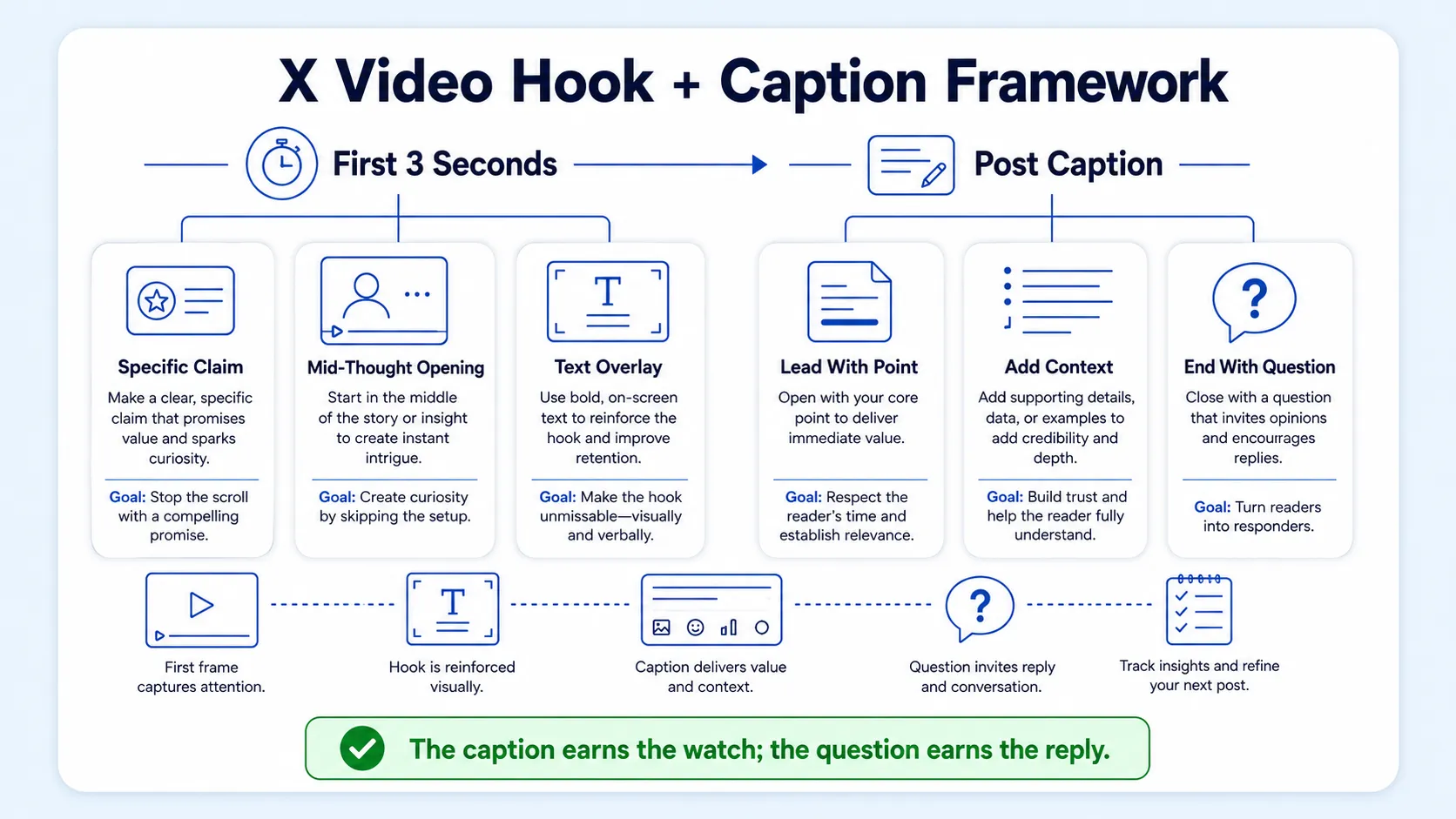
Hook principles for the first 3 seconds of video:
- Open with the most specific or counterintuitive sentence in the clip, not an intro or a greeting.
- Show the speaker mid-thought, not mid-pause.
- Use text overlays in the first 2 seconds to communicate the topic before the viewer decides whether to unmute.
X auto-plays videos silently in the feed, so the opening frame must grab attention without sound. Your first frame is a thumbnail and a hook simultaneously.
Caption structure for B2B video posts:
- Lead with the specific claim or counterintuitive point from the clip.
- Give one line of context that makes the claim relevant to the reader's situation.
- End with a short, open-ended question that invites a reply.
Avoid these caption failures common in B2B content: leading with company name, opening with "We're excited to share," or writing a sentence that could apply to any video on any topic. Every word in the caption should do specific work.
For SaaS teams, the caption is also sales enablement. If a clip covers a product differentiator or a buyer objection, the caption copy should frame it the way a strong sales rep would in discovery, direct, outcome-led, no fluff. This is where repurposing long-form video content into X (Twitter) video posts becomes a genuine pipeline asset, not just a social media vanity metric.
Posting window: Post Tuesdays through Thursdays between 9 AM and 3 PM for strongest organic reach, based on engagement pattern data across the platform.
At Komet Media, caption copywriting is part of every video editing services engagement we run, because a great clip with a generic caption is a missed conversion.
Conclusion
Repurposing long-form video content into X (Twitter) video posts is one of the highest-ROI content moves available to B2B SaaS teams in 2026. Key takeaways:
- Pull 3–5 clips per asset, targeting 30–60 seconds each with a hard hook in the first 3 seconds.
- Export at 1080p, H.264, AAC, minimum 8,000 kbps, native upload always.
- Use Opus Clip plus Descript as your core repurposing stack; add human review before publishing.
- Write captions that start conversations, not just describe what's in the clip.
If your team is sitting on recorded content that isn't working for the pipeline, reach out to Komet Media, that's exactly what we build systems to fix.
Frequently Asked Questions
Q1: What video length performs best on X in 2026?
Between 30 and 60 seconds is the current sweet spot for organic reach. Mobile-first vertical clips (9:16) and shorter videos (15–60 seconds) typically deliver better engagement and are easiest to reuse across other platforms. The algorithm gives completion rate extra weight, and shorter clips are far easier to watch all the way through.
Q2: Can I just share a YouTube link instead of uploading natively to X?
No, link posts are penalized. External links carry a 30–50% reach reduction, with zero median engagement for free accounts since March 2025. Always download and re-upload your clip directly to X. Native uploads receive a distribution bonus that linked content does not.
Q3: How many clips should I pull from a single webinar or podcast episode?
Aim for 3–5 clips per hour of recorded content. Each clip should address a single, standalone point. One solid source asset can become clips, threads, quote posts, carousels, follow-up takes, and platform-specific variations. Spread them across multiple days rather than posting all at once.
Q4: Do captions really make a difference on X video?
Yes, significantly. Captions are strongly recommended because many users watch videos with sound off. Burned-in captions (not platform-generated subtitles) survive X's compression better and display consistently across all devices. They also keep viewers watching longer, which directly boosts completion rate and algorithmic reach.
Q5: Is Opus Clip good enough on its own, or do I need a full editing stack?
Opus Clip handles bulk clip generation well but needs human review. Opus Clip only reshapes footage you already have, and its auto-selection still needs a human pass because the "best" moment by engagement heuristics is not always the one that's on-brand. Pair it with Descript for transcript-level fine-tuning and Submagic or VEED for captions.
Q6: How quickly should I respond to replies on my video posts?
Within the first 30 minutes. Early engagement is the primary quality signal the algorithm uses to decide how widely to distribute your post. Replying to every comment in that first window generates additional reply depth, which the algorithm weights heavily. Set a reminder to engage immediately after posting each clip.

