
Repurpose a Demo into Feature Clips: Step-by-Step Guide
Your 45-minute sales demo is not one video. It's 12 videos waiting to be cut. When you repurpose a demo into feature clips, you stop relying on one monolithic recording to do all the heavy lifting, and start building a video system that educates buyers, accelerates pipeline, and supports your sales team at every stage. This guide gives you the exact framework, tools, and distribution logic to make it happen, whether you're a founder, a marketing head, or a growth team running lean.
TL;DR
- Most SaaS demos contain 8–15 distinct feature moments, each worth a standalone clip.
- The right clip length changes by funnel stage: awareness needs under 60 seconds, evaluation needs 90 seconds to 3 minutes.
- Tools like Loom, Descript, Vidyard, and Wistia each serve a different stage of the clip workflow.
- Distribution without intent is wasted effort. Map each clip to a buyer persona and channel before you publish.
Why B2B SaaS Teams Need to Repurpose a Demo into Feature Clips Right Now
The buying process has moved well ahead of most teams' video strategies. According to Gartner's 2025 survey, 61% of B2B buyers now prefer a rep-free buying experience, and the G2 2024 Buyer Behavior Report found that 83% prefer to self-serve during the discovery phase alone. That's not a future trend. That's the current default.
The problem is that most SaaS teams respond to this by uploading one long demo recording to a Wistia or Vidyard page and calling it "video-enabled selling." It isn't. 73% of B2B decision-makers prefer videos under 60 seconds when viewing on mobile, and Wistia's 34-million-video dataset finds retention falls off a cliff after the one-minute mark.
When your only demo asset is a 30-minute product walkthrough, you're asking a buyer at the awareness stage to sit through material meant for someone already in evaluation. That mismatch kills watch time and shortens attention before you've had the chance to build trust.
A clear majority, 73%, of B2B decision-makers now prefer to watch product demo videos over reading whitepapers. They want video. They just don't want your entire sales call delivered as one unedited file. When you repurpose a demo into feature clips, you meet buyers where they are:
- A CFO at the top of the funnel gets a 45-second ROI-focused clip, not a feature tour.
- A technical evaluator mid-funnel gets a 2-minute integration walkthrough.
- A champion in a committee sale gets a short, shareable clip they can forward to their VP without context.
Bottom-funnel buyers respond best to modular clips under 1 minute per feature, customised by persona. That's the model. One demo recording, mapped into a buyer-stage clip library. That's the whole play.
How to Break Down a SaaS Demo Recording into Distinct Feature Moments
Before you open any editing software, you need a structured audit of your demo. This is where most teams skip ahead and wonder why their clips feel disjointed.
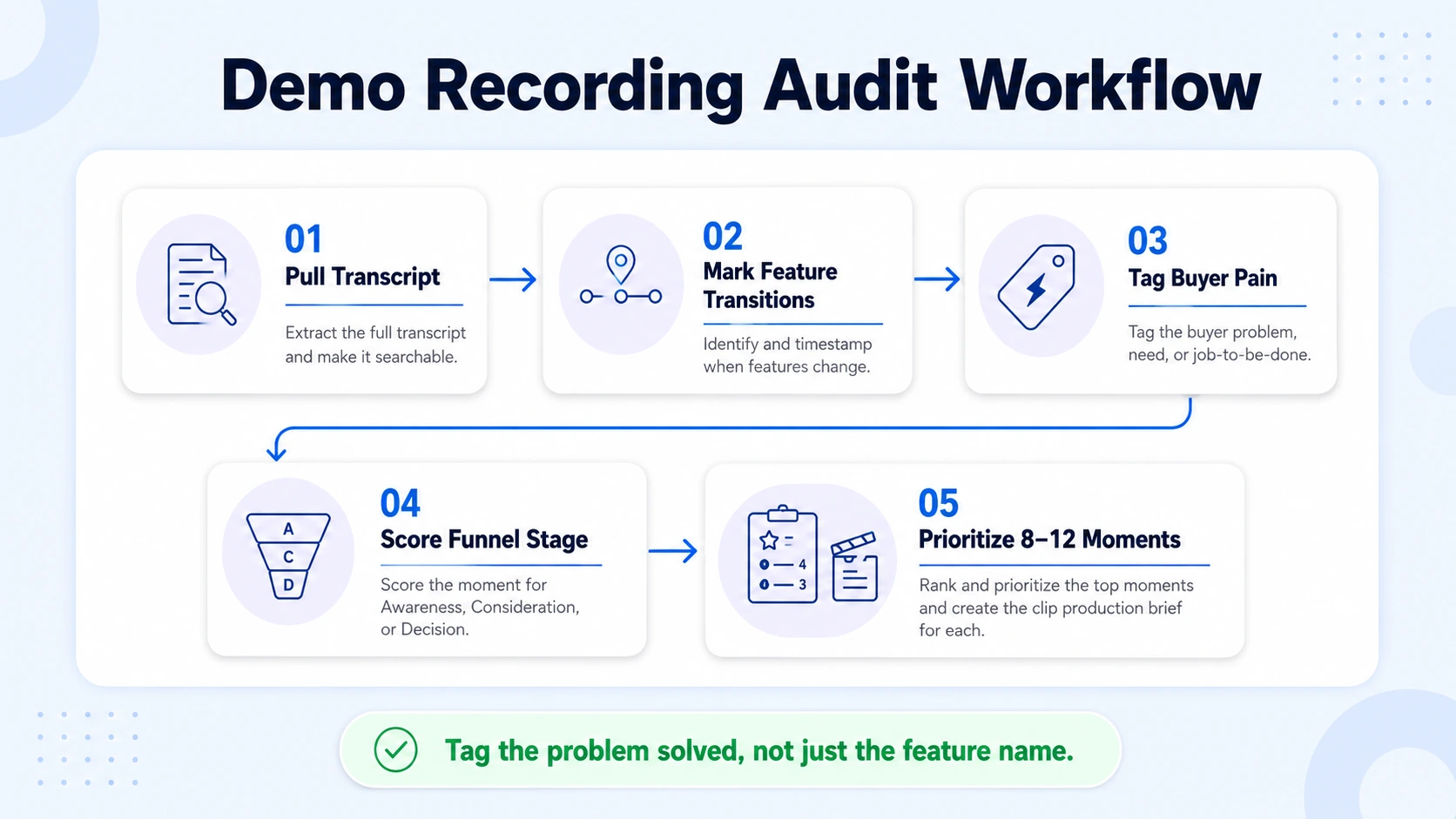
Step 1: Pull the full transcript. Upload your demo recording to Descript or use Vidyard's built-in transcription. A clean transcript lets you scan the entire demo in minutes without scrubbing through video.
Step 2: Identify the feature transitions. Read through the transcript and mark every moment your presenter shifts from one feature or workflow to another. These are your natural cut points.
Step 3: Tag each segment by buyer pain. Label each feature moment with the specific problem it solves, not the feature name. "Automated reporting" becomes "saves RevOps 4 hours per week." This reframe shapes your clip titles, captions, and hooks.
Step 4: Score each segment by funnel stage. Ask: is this moment for someone who doesn't know us yet (awareness), someone evaluating options (consideration), or someone comparing vendors (decision)?
Step 5: Prioritise the top 8–12 moments. Not every feature deserves a standalone clip. Prioritise moments that are visually clear, solve a named pain, and can stand alone without heavy context from the rest of the demo.
Proactive upstream planning involves consciously designing long-form video for easy deconstruction, and the key is adopting a modular content strategy, scripting long-form content not as a monolithic narrative but as a series of interconnected, self-contained modules.
If your demos aren't structured this way yet, this audit process retrofits that structure after the fact. The output of this step is a simple spreadsheet: feature moment, timestamp, buyer pain label, funnel stage, and priority score. That spreadsheet becomes your clip production brief.
What Tools to Use When You Repurpose a Demo into Feature Clips
The tool stack matters because different stages of the workflow demand different capabilities. Here's how the main options map to the task:
Descript pioneered text-based video editing and is a strong choice for demos that need careful editing. Record your screen, and Descript transcribes everything. Then edit the video by editing the text: delete a sentence from the transcript, and the corresponding video clip disappears. This approach is efficient for demo videos where you need to cut mistakes, rearrange steps, or tighten pacing.
Vidyard shines with deep integrations across CRMs and marketing automation platforms like Salesforce, HubSpot, Marketo, and Salesloft, making it a workflow powerhouse for GTM teams needing data-driven video campaigns. For a lean team, the practical stack is: Descript for editing and transcript-based cuts, Wistia for marketing site hosting with analytics, and Vidyard for sales team distribution and pipeline attribution. Loom handles quick async follow-ups. You don't need all four on day one. Start with Descript and one hosting platform.
One production rule that applies regardless of tool: 48% of B2B video views happen on mobile devices, and a significant portion are watched without sound. If your demo relies entirely on voiceover to communicate value, you're invisible to nearly half your audience. Add high-contrast captions, on-screen text callouts, and visual storytelling that makes sense without audio.
What Makes a Good Feature Clip Cut from a Product Demo
A feature clip is not a trimmed-down demo. It's a standalone asset with a specific job. These are the elements that separate clips that drive demo requests from clips that get three views and die.
A hook in the first 3 seconds: An on-screen hook is critical for interrupting the scroll and giving viewers a reason to stay. Research shows the first 5 seconds determine 80% of viewer retention. Open with the outcome or the problem, never with a logo intro or feature name.
A single, named pain: Each clip should solve exactly one problem for one buyer type. The moment you try to cover two features in one clip, you've built another mini-demo, not a clip.
The right length for the channel: Vidyard's Video in Business Benchmark Report found that videos under one minute retain 65% of viewers all the way to the end. For LinkedIn, keep clips under 60 seconds. For email sequences, under 90 seconds. For product pages, 90 seconds to 3 minutes is acceptable when the buyer is already in evaluation mode.
Captions burned in: Not optional. Captions improve accessibility, reinforce key points, and ensure your message lands with sound off.
A clear next step: End with a strong call to action that guides viewers to the next step: demo, download, or trial. Make it direct and easy to follow. For a feature clip, that CTA is usually "see it in a full demo" or "try this in your own account."
Visual clarity: Zoom in on the UI element being demonstrated. Remove clutter from the screen. If the viewer has to squint to understand what's happening in the product, the clip fails.
How to Map Feature Clips to Buyer Stages and Personas
Clips without a distribution map are just files. The goal is to build a clip inventory that covers every stage of your go-to-market strategy.
Awareness stage (TOFU): Clips under 60 seconds. Focus on the problem, not the product. Show the before state, then the product solving it in the last 10 seconds. Distribute on LinkedIn as native video posts. These clips feed demand generation and founder-led growth. A founder posting one of these weekly on LinkedIn Video builds recognisability before a buyer ever visits your site.
Consideration stage (MOFU): Clips of 90 seconds to 3 minutes. Go deeper on a specific workflow. A CFO-focused clip on cost reporting runs differently from a RevOps-focused clip on dashboard automation, even if they demo the same feature. Persona-specific framing drives mid-funnel engagement.
Decision stage (BOFU): Modular clips under 1 minute per feature, customised by persona, are most effective at the bottom of the funnel. These live in sales email sequences, CRM follow-ups via Vidyard, and on your pricing and comparison pages. Sales teams use these clips to answer the specific objections that surface in late-stage deals.
The distribution matrix looks like this:
LinkedIn video watch time grew 36% year over year in 2025, making it the highest-leverage channel for distributing awareness-stage clips right now. Native uploads, no external links, posted directly from a founder or team member's profile with a text hook above the video.
How to Turn a Sales Demo Recording into a Clip Library Step by Step
This is the repeatable system I use at Komet Media when we repurpose a demo into feature clips for SaaS clients. It produces 8–14 clips from a single recording within a standard production sprint.
- Receive the raw recording: Zoom, Loom, Riverside, or any screen capture. No re-recording required.
- Run transcription: Upload to Descript. Full transcript in minutes.
- Colour-code the transcript: Mark feature moments, transition points, filler segments, and strong one-liners using highlights.
- Build the clip brief: One row per clip. Columns: working title, timestamp range, buyer pain, funnel stage, target persona, proposed hook line.
- Edit in Descript: Cut each feature moment from the main timeline. Clean filler words. Trim to target length.
- Apply a format template: Add captions, logo watermark, feature title card, and end-frame CTA. Export in 16:9 for Wistia and YouTube, 9:16 for LinkedIn and Instagram Reels.
- Quality check each clip: Watch muted. Can you follow the story without audio? If not, add on-screen text.
- Distribute according to the stage map: Upload natively to each channel. Tag with UTM parameters for attribution.
By repurposing one video, you get multiple touchpoints, more eyes on your brand, and a much bigger impact for the same effort. Done consistently, this system means one demo recording per month generates a full month of video content across LinkedIn, email, and your website, all from a single short-form video editing workflow.
How to Distribute Feature Clips for Pipeline Impact
Production without distribution is just storage. Here's how to make sure the clips you build from your demo actually move the pipeline.
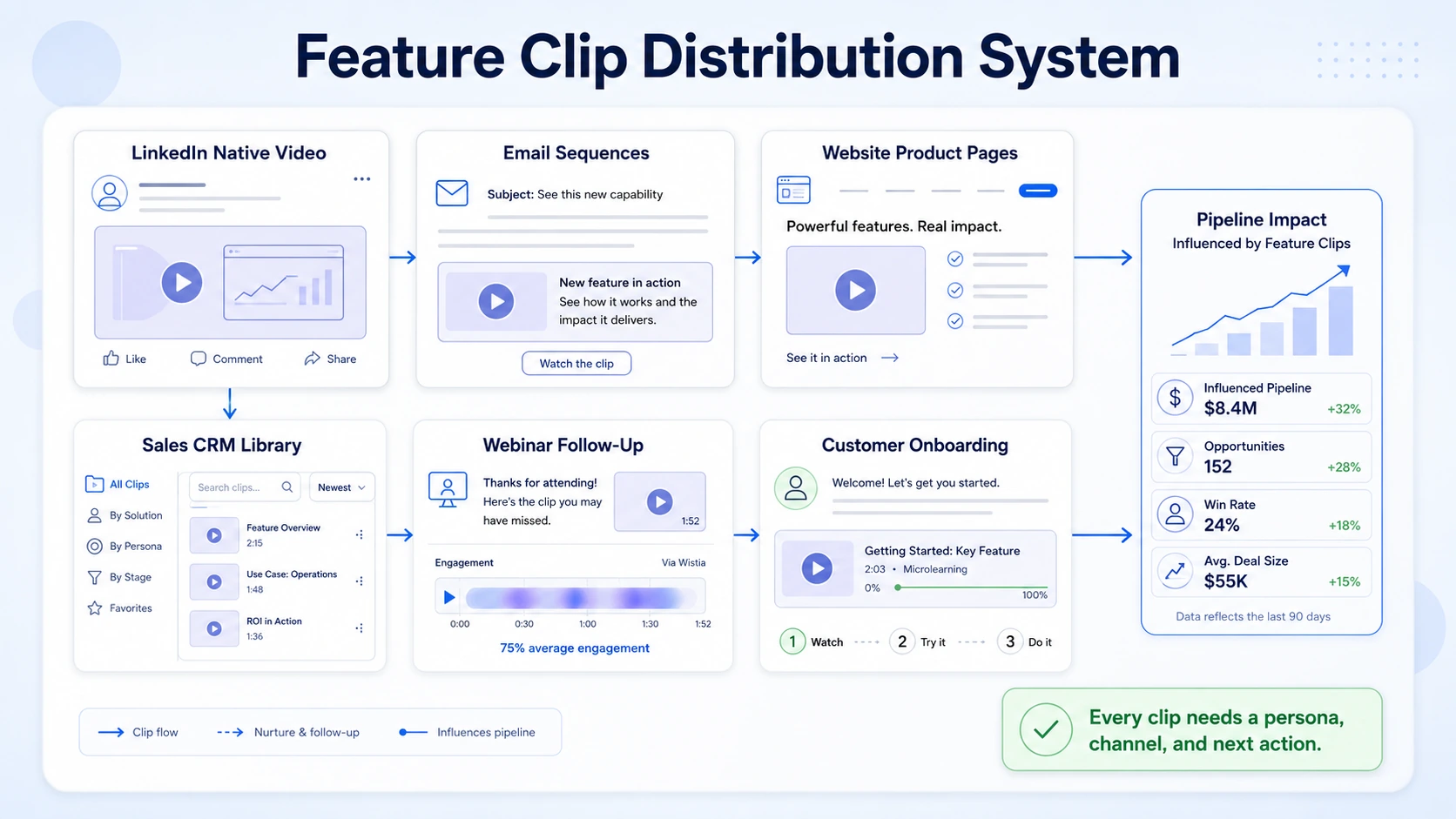
LinkedIn Video (native): Post feature clips as native video directly from founder or team profiles. Platform algorithms reward native video content. LinkedIn's algorithm favours native uploads and visible engagement over external links, meaning a short video posted directly to the feed will almost always travel farther than a link to your blog or YouTube page. Pair the clip with a 2–3 sentence text hook that names the buyer pain before the video even plays.
Email sequences: Drop a clip thumbnail with a play button image linked to Wistia or Vidyard into your outbound sequences. Keep the clip under 90 seconds. A short, specific follow-up video signals that you listened. A long one signals that you did not.
Website product pages: Embed feature clips above the fold on each product feature page. Landing page videos increase conversions by 86%. Each clip is hosted in Wistia, which gives you per-viewer drop-off data and heatmaps.
Sales enablement via CRM: Give your sales team a Vidyard clip library organised by persona and objection. When a prospect asks "how does your reporting work?", the AE sends the exact reporting feature clip, not a link to the full demo.
Webinar and event follow-up: A webinar is a content goldmine. A single 60-minute session can fuel a multi-channel strategy for weeks. Apply the same clip logic to your webinar recordings and podcast content: every recording is a clip library waiting to be cut.
Customer onboarding: Feature clips double as microlearning assets. Drop specific feature clips into onboarding email sequences so new users discover capabilities at the right moment, not all at once. This supports product adoption without requiring additional CS resources.
Track performance by clip: watch rate, completion rate, and downstream action (demo booked, page visited, reply sent). Cut what doesn't work. Duplicate the format of what does.
Conclusion
- One demo, many assets: A single 30–45 minute demo recording contains 8–14 standalone feature clips when approached with a structured audit and clip brief.
- Length is a strategic decision: Match clip length to funnel stage. Awareness wants under 60 seconds. Evaluation wants 90 seconds to 3 minutes. Decision-stage clips should be under 60 seconds per feature.
- Tools are a means, not a strategy: Descript edits it, Wistia hosts it, Vidyard tracks it, LinkedIn distributes it. Pick two tools and build the habit before scaling the stack.
- Distribution closes the loop: Every clip needs a target persona, a channel, and a measurable next action. Without that, it's content theatre.
Repurpose a demo into feature clips consistently, and your product knowledge becomes a buyer education system that runs without you in every room. That's the shift from random video content to a real video marketing engine.
Frequently Asked Questions
Q1: How many feature clips can I realistically get from one demo recording?
Most 30–45 minute SaaS demos contain 8–14 distinct feature moments worth clipping. The actual number depends on how many distinct pain points your product addresses and how cleanly your presenter transitions between them. A structured audit of the transcript (not the video) is the fastest way to find them all.
Q2: What is the ideal length for a feature clip posted on LinkedIn?
73% of B2B decision-makers prefer videos under 60 seconds when viewing on mobile, and sub-30-second clips earn 38% higher completion rates than longer posts. For LinkedIn specifically, aim for 30–60 seconds for awareness clips and up to 90 seconds for consideration-stage content targeting buyers already familiar with your product.
Q3: Do I need a professional video editor to repurpose a demo into feature clips?
Not always. Tools like Descript make transcript-based editing accessible to non-editors. That said, if your clips need captions, motion graphics, or brand-consistent formatting for public-facing use (LinkedIn, your website), a professional editor saves significant time and ensures the output actually reflects your brand quality, especially for founder-led content.
Q4: Should feature clips include my product's actual UI, or just narration?
Always show the UI. B2B buyers are exhausted by hype reels that promise the world but fail to show the actual UI. They want a technical proof point that validates their specific workflow in under two minutes. Narration alone is a pitch. The UI on screen is proof. Zoom in, move slowly, and caption what the viewer is looking at.
Q5: How do I use feature clips for sales enablement specifically?
Build a Vidyard or Wistia clip library organised by persona and common objection. Train your sales team to send specific clips in follow-up sequences instead of linking to the full demo. Vidyard's deep integrations with Salesforce, HubSpot, Marketo, and Salesloft let reps track exactly who watched, for how long, and when, which turns video into a qualified signal, not just a content asset.
Q6: Can I repurpose feature clips for customer onboarding, not just pipeline?
Yes, and it's one of the highest-leverage uses. Feature clips function as microlearning assets inside onboarding sequences. Drop the right clip at the right moment in a customer's first 30 days and you accelerate activation without additional CS resources. The same clip that converts a prospect can teach a new user how to use the feature they just paid for.

