
Repurpose a Blog Post into an Instagram Carousel: Step-by-Step Guide
You already wrote the blog post. The research is done, the argument is structured, the value is proven. Now it's sitting on your website, quietly aging. When you repurpose a blog post into an Instagram carousel, you extend the life of that asset, reach a completely different audience segment, and generate pipeline-ready touchpoints without writing anything from scratch. This guide walks you through the exact process I use at Komet Media, from picking the right post to hitting publish on a carousel that actually performs.
TL;DR
- Carousels consistently outperform single-image posts and Reels for engagement on Instagram in 2026.
- The best blog posts to repurpose are list-based, framework-driven, or tip-heavy posts with clear subheadings.
- One blog post can yield 7–10 carousel slides with minimal new writing.
- Hook copy and slide design determine your swipe-through rate more than any other variable.
Why Carousels Are the Highest-ROI Format to Repurpose Blog Content For
Before the how, the why needs to be airtight, especially if you're convincing a growth team or founder to allocate time here. Carousels deliver an average engagement rate of 10%, beating single-image posts at 7% and Reels at 6%, because they encourage people to pause, swipe, and interact, all behaviors the algorithm rewards. That swipe mechanic is the key. Instagram counts each swipe as engagement, which boosts distribution and pushes the post to more of your followers and beyond.
From a B2B SaaS perspective, this format does something even more important: it mirrors how buyers consume information. 41% of B2B buyers consume 3–5 content pieces before contacting sales, with some journeys reaching 13 assets pre-purchase. A carousel is a mini-education session delivered inside the feed. It builds product trust and buyer familiarity before your sales team ever enters the picture.
Repurposing content across formats delivers a 32% ROI improvement on average, because it extends reach without proportional cost increases. For a founder-led growth team with limited bandwidth, that math is hard to argue with. You already paid for the thinking once, in the blog post. The carousel is just that thinking, reformatted for a different room.
Gary Vaynerchuk popularised this model as "content atomisation": one long-form piece of content broken down into dozens of smaller, platform-native assets. When you repurpose a blog post into an Instagram carousel, you're running that exact playbook. One blog post, properly broken down, can produce a 7–10 slide carousel, a caption with hook copy, a Story teaser, and a short-form video script, all from the same source material.
The key content strategy principle here: the blog post already proved the idea has value (it ranked, it got clicks, it answered a real question). The carousel's job is to introduce that value to people who will never visit your blog.
What Parts of a Blog Post Work Best as Carousel Content
Not every blog post converts cleanly into a carousel. The ones that do share a specific structure: they are built around discrete, parallel ideas that can each stand alone on a single slide.
Posts that work best:
- Listicles: "7 ways to...", "5 mistakes that...", "10 tools for...", each list item becomes a slide.
- Step-by-step tutorials: numbered processes translate directly into a sequenced carousel.
- Framework or model posts: "The 3-part system for...", "Our 4-stage process...", each component gets a slide.
- Myth-busting or comparison posts: "X vs. Y" structures work well as paired slides with strong visual contrast.
- "What most people get wrong" angles: these create natural tension that drives swipe-through.
Posts that do not translate well:
- Opinion or thought leadership essays with no clear structure.
- Long narrative case studies without distinct takeaways.
- Deep-dive technical posts where context is required to understand each point.
- Posts built entirely around one central argument with no sub-points.
The test is simple: can you summarise each H2 or subheading of your blog post in a single sentence? If yes, that's a carousel. If not, you need to extract a sub-section that does have that structure. When I assess a client's content library at Komet Media's content repurposing service, I look at three signals: does the post have 5+ subheadings, does each subheading deliver a standalone insight, and does the topic map to a buyer pain point? All three means immediate carousel priority.
How to Repurpose a Blog Post into an Instagram Carousel: The Step-by-Step Process
This is the core conversion workflow. Follow it in order.
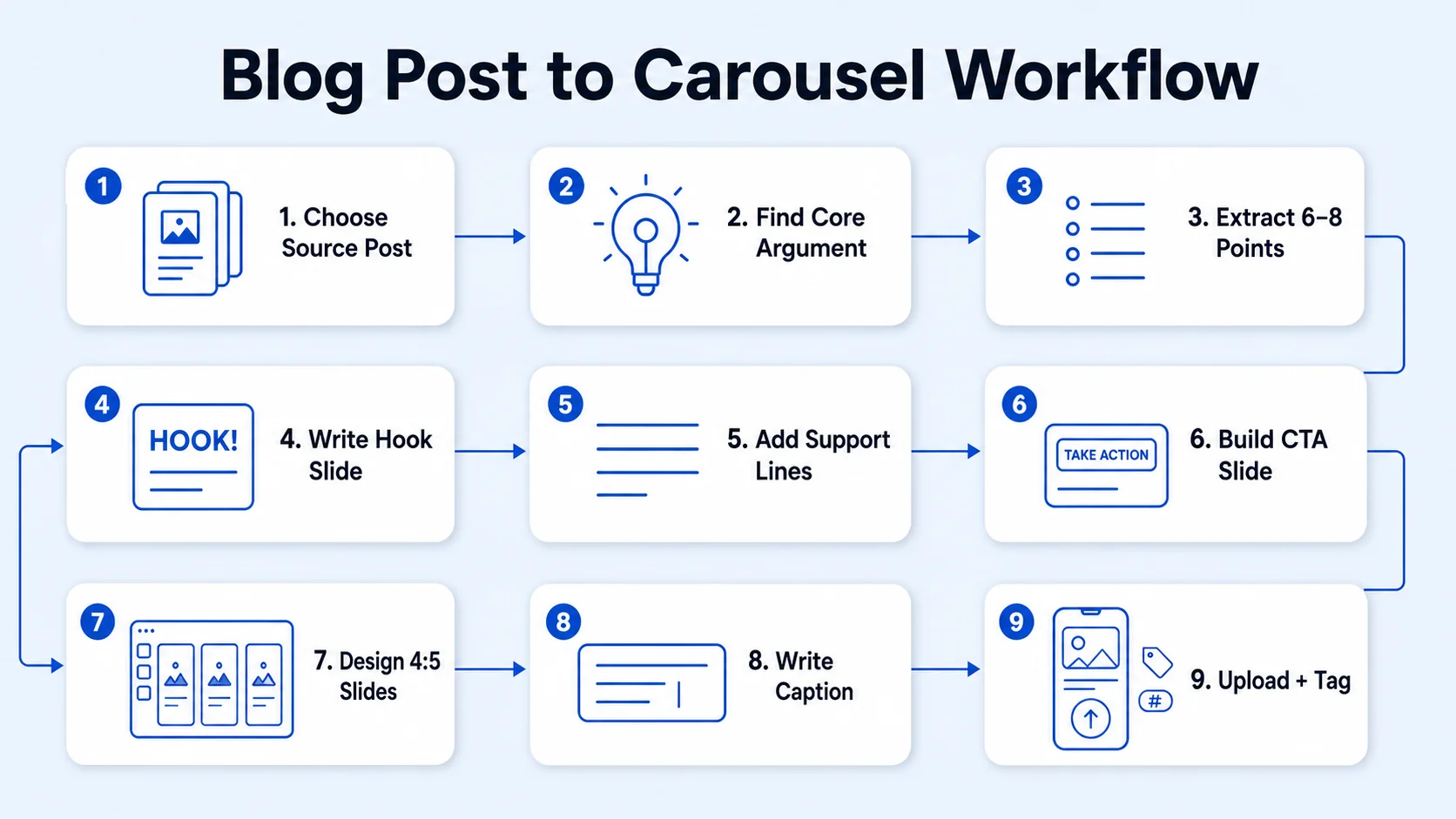
- Choose your source post: Select a blog post with 5–10 distinct subheadings, clear takeaways, and proven audience interest (traffic, shares, comments).
- Identify the core argument: Write one sentence that captures the post's main promise. This becomes your cover slide headline.
- Extract 6–8 key points: Pull one insight from each subheading. Write each as a standalone sentence or short phrase, maximum 15–20 words per slide. Do not copy paragraphs verbatim.
- Write the hook slide: Your first slide is your entire carousel's engagement. Lead with tension, a bold claim, a counterintuitive stat, or a direct question. Your first image is the hook, a captivating first slide gets people curious, and nail it and the engagement follows.
- Write a supporting sentence per slide: One headline + one supporting line per slide. No more. Dense text kills swipe-through rate.
- Build the CTA slide: Your final slide must direct action. Options: "Save this for later", "DM us the word [X]", "Link in bio for the full guide."
- Design in Canva or Adobe Express: Use 1080×1350 px (4:5 portrait). Portrait carousels take up more vertical space in the scroll, making them harder to skip past. Maintain brand consistency across all slides.
- Write the caption: Open with the hook slide's core tension rewritten as a question or provocative statement. Add 3–5 hashtags from your content pillars. Include a call to action.
- Upload and tag: Post natively to Instagram, add a location if relevant, and pin the post to the top of your profile if it's a cornerstone content piece.
How Many Slides an Instagram Carousel Should Have
This is one of the most common questions when people first try to repurpose a blog post into an Instagram carousel, and the answer is more specific than "it depends." Instagram now supports up to 20 images or videos in a carousel, giving you extra real estate to tell a story over multiple slides. That does not mean you should use 20. The optimal range for educational, B2B-style carousels derived from blog posts is 7–10 slides. Here's why that range works:
Instagram tracks what percentage of users swipe to slide 2 and beyond, with a target swipe-through rate of 65%+. Every slide you add past slide 10 increases the risk of drop-off before the CTA slide. If your blog post has 12 subheadings, condense rather than expand, group related points into a single slide rather than adding more slides.
Structure your carousel using this slide architecture: Cover (1) + Problem/Tension (1) + Key Points (5–7) + Summary (1) + CTA (1). That gives you 9–11 slides with a clear narrative arc that supports audience retention. If users cannot read a slide in 3–4 seconds, they will scroll past, aim for a maximum of 20 words per slide with 60pt+ font size.
Tools to Convert Blog Posts into Instagram Carousels
The right tool depends on your design experience, team size, and how much brand consistency you need to maintain across posts. Here are the primary options:
For most B2B SaaS founders and growth teams I work with, Canva is the right starting point. Build one master carousel template with your brand colours, fonts, and logo placement, then duplicate it for every new post. This preserves brand consistency without rebuilding from scratch each time. Adobe Express is worth the upgrade if your brand has strict visual identity guidelines, it supports locked brand kits that prevent off-brand design decisions. For teams doing 10+ carousels per month, the time saved on brand QA justifies the cost.
One workflow I recommend: use AI to strip the blog post down to its key sentences (paste the post, prompt for "7 carousel slides, max 15 words each"), then paste those into your Canva template, adjust for visual storytelling, and you have a production-ready carousel in under 45 minutes. If you want this done as a managed service rather than DIY, Komet Media's Instagram growth service handles the full content repurposing workflow for B2B teams, from source content to published carousel.
Common Mistakes When Turning Blog Posts into Instagram Carousels
These are the patterns that kill performance. Every mistake below maps directly to a drop in swipe-through rate, saves, or reach.
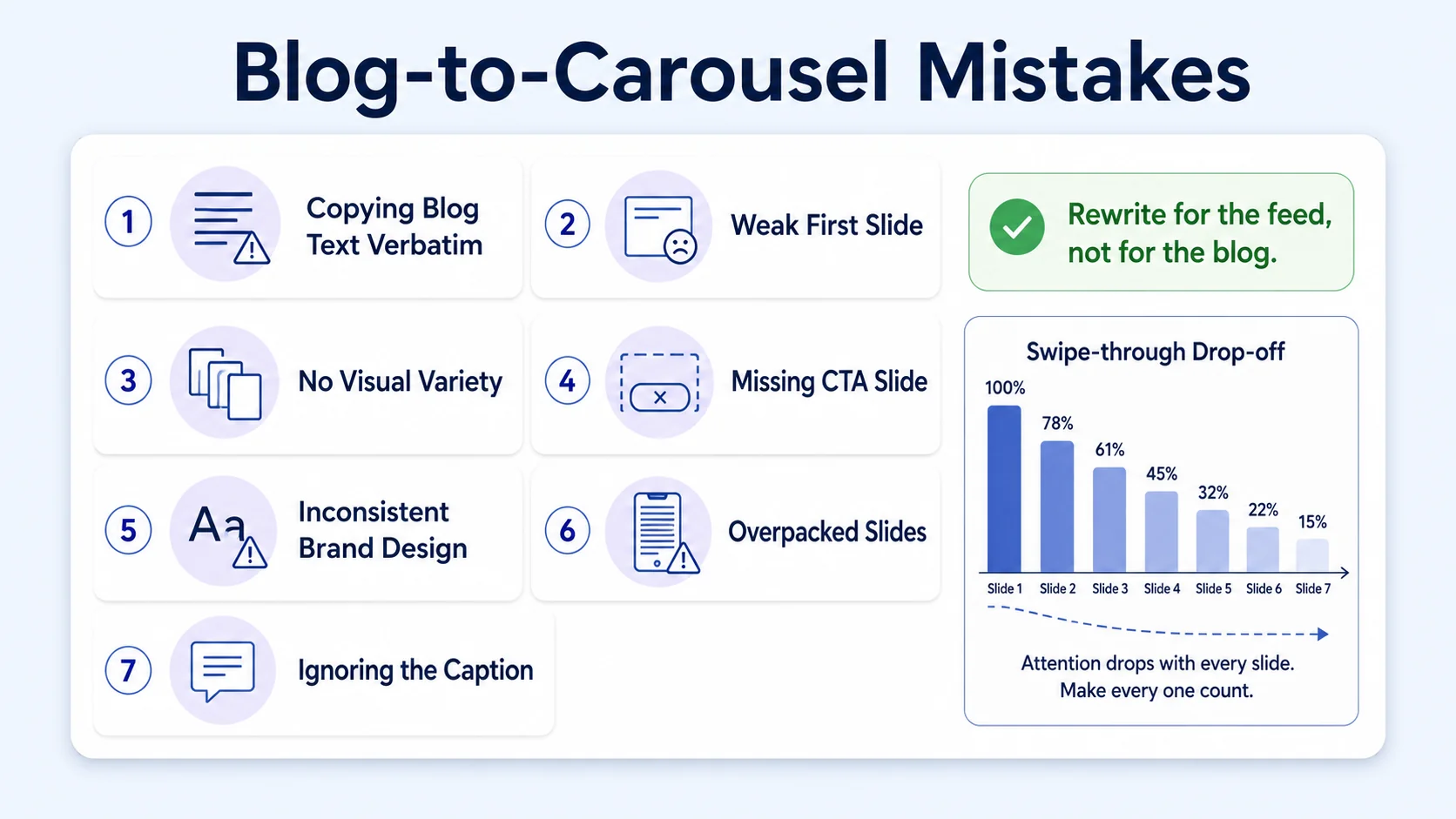
- Copying text verbatim from the blog: Blog paragraphs are not slide copy. They are too dense, too long, and written for a different reading mode. Extract the insight, rewrite it as a punchy sentence.
- Weak hook copy on slide 1: If the first slide does not immediately answer "why should I swipe?", no one does. A vague title like "Content Strategy Tips" gets scrolled past. "The content strategy mistake costing you 40% of your pipeline" gets swipes.
- No visual variety between slides: If there is no visual variety, users assume the content is repetitive and will not swipe, vary colours, images, or layouts between slides.
- Missing a CTA slide: Every carousel must end with a clear call to action. Save, follow, DM, or link in bio, pick one, make it visible, make it specific.
- Inconsistent brand design: Mismatched fonts, colours, or logo placement across slides signals unprofessionalism to buyers who are evaluating whether to trust your brand.
- Over-packing slides: More than 3 lines of text per slide, or font sizes below 30pt, collapse the infographic design and destroy readability on mobile.
- Ignoring the caption: The caption is part of the content, not an afterthought. It should reinforce the hook, add context the slides cannot hold, and contain the primary call to action.
Track carousel performance regularly using built-in analytics or third-party tools, monitoring metrics like swipe-through rates, saves, and comments to understand what resonates with your audience. Then apply those lessons to the next repurpose cycle. The digital marketing funnel only compounds if you iterate. For teams that also run podcasts or webinars, the same repurposing logic applies, those long-form formats are equally rich sources for carousel content.
Conclusion
Key takeaways from this guide:
- Carousels are the highest-engagement feed format on Instagram in 2026, making them the best vessel for repurposed blog content.
- The best source posts have 5–10 parallel subheadings, each delivering a standalone insight.
- The step-by-step process is: extract, rewrite short, hook hard, design on-brand, end with a CTA.
- 7–10 slides is the optimal range, enough to deliver value, short enough to retain attention through the final slide.
When you consistently repurpose a blog post into an Instagram carousel, you stop treating your content library as a publishing record and start treating it as a growth asset. That shift is the whole game. Explore Komet Media's Instagram marketing services or reach out directly if you want a team to run this for you.
Frequently Asked Questions
Q1: How do I know if my blog post is ready to repurpose into an Instagram carousel?
Check for three things: at least 5 distinct subheadings, each subheading summarisable in one sentence, and a topic that maps to a specific buyer pain point or question. If all three are true, that post is carousel-ready.
Q2: How long does it take to repurpose a blog post into an Instagram carousel?
With a template already built in Canva or Adobe Express, the process takes 45–90 minutes: 20 minutes extracting and rewriting slide copy, 30–45 minutes designing and customising, 10 minutes writing the caption and setting up the post.
Q3: Should every carousel slide have its own unique design, or can I use a repeating template?
Use a consistent base template for brand consistency, but vary the accent colour, background image, or layout on every 2–3 slides. Visual variety sustains swipe-through rate. Rigid uniformity signals repetition and stops swipes.
Q4: What is the ideal image size when I repurpose a blog post into an Instagram carousel?
Use 1080×1350 px (4:5 portrait ratio). Portrait carousels occupy more vertical feed space than square (1:1), making them harder to scroll past and giving each slide more visual weight on mobile screens.
Q5: How many times should I repurpose the same blog post?
One blog post can produce at minimum: one full carousel, one shorter 3-slide teaser carousel, one Story sequence, and one short-form video script. That's four distinct assets from one source. Revisit high-performing posts every 6–9 months with updated data or a new angle.
Q6: Can I repurpose a blog post into an Instagram carousel without any design skills?
Yes. Canva's free carousel templates remove the need for design experience. Build your brand colours and fonts into a template once, then duplicate and update the text for each new post. Focus your energy on the copy, specifically the hook slide and CTA, since those drive the majority of performance.

