
Building a 90-Day B2B Video Content Calendar: Step-by-Step Guide
Most B2B teams post videos when inspiration strikes, then wonder why the pipeline stays flat. Building a 90-Day B2B Video Content Calendar fixes that. It replaces reactive posting with a system: the right video type, for the right buyer stage, published on a repeatable cadence. 70% of B2B buyers watch video content during their purchase decision process , and the teams winning deals are the ones who show up in that window intentionally, not accidentally. This guide shows you exactly how to build that system.
TL;DR
- Map videos to three buyer stages across 13 weeks, not just "awareness" content.
- Mix four video types per month: thought leadership, product education, social proof, and founder perspective.
- Use pillar content (webinars, podcasts, demos) as raw material for short-form clips via content repurposing.
- Audit, adjust, and reload every 30 days using engagement and pipeline signals.
Why Most B2B Teams Need a 90-Day Video Content Calendar
Random posting is the silent pipeline killer. Without a structured plan, video output drifts toward whatever's easiest to produce, which usually means zero strategic alignment with the buyer journey. The result: content that gets views but generates no demos, no MQL to SQL conversion, and no measurable demand. 91% of businesses use video as a marketing tool in 2026 , so volume alone is no longer a differentiator. What separates teams generating inbound demand from those spinning their wheels is intentional structure. Building a 90-Day B2B Video Content Calendar forces four disciplines simultaneously:
- Buyer journey mapping: every video serves a stage (awareness, consideration, decision).
- Sales funnel alignment: marketing and sales agree on what content accelerates MQL to SQL handoffs.
- Pillar content strategy: long-form assets (webinars, podcasts, demos) become a production engine, not a one-time event.
- Editorial calendar discipline: publishing cadence becomes predictable for your audience and your team.
The 90-day window is deliberate. It's long enough to see compounding distribution effects from LinkedIn Video and YouTube SEO, and short enough to stay responsive to what buyers are actually asking. LinkedIn video engagement is up 44% year over year, and the platform is now used by 70% of B2B video marketers , which means your buyers are watching video on the platform where they make purchase decisions. A calendar structures your presence there before a competitor does.
For founder-led SaaS teams specifically, this also solves an organizational problem: without a calendar, founders become a content bottleneck. With one, their thinking gets extracted once and distributed in 8–12 clips per month without requiring 8–12 separate recording sessions. The biggest mistake B2B teams make is treating video as a campaign asset rather than a system. A 90-day calendar turns video into infrastructure.
How to Create a B2B Video Content Calendar: The Foundation
Before you build the calendar, you need three inputs locked: your buyer segments, your content inventory, and your sales funnel stages. Skip any of these and the calendar collapses into a posting schedule with no strategic backbone.
Step 1: Define your buyer segments. Use audience segmentation to identify 2–3 primary roles your content will serve. For a B2B SaaS team, this is typically: (a) the economic buyer (VP, C-suite), (b) the product evaluator (growth lead, marketing head), and (c) the champion (person selling the tool internally). Each segment has different questions at different stages.
Step 2: Audit your existing content library. Pull every long-form asset you've produced in the last 12 months: webinars, podcast episodes, sales demo recordings, founder presentations, customer success calls. This becomes your content repurposing bank. The StoryBrand framework is useful here: identify which assets answer "what problem do you solve," "what does success look like," and "how do I get started" for each segment.
Step 3: Map content to sales funnel stages. Three stages, three distinct video jobs:
Step 4: Decide your publishing cadence. For most B2B SaaS teams, 3–4 videos per week across LinkedIn Video and YouTube is sustainable when content repurposing is in play. New production without a repurposing system typically maxes out at 1–2 per week before quality drops.
Step 5: Choose your primary distribution channel. LinkedIn Video for direct buyer engagement, YouTube for video SEO and long-tail demand generation, and your website for Wistia or Vidyard-embedded video that powers sales enablement sequences.
What to Include in a B2B Video Content Plan: The Four Pillars
A complete B2B video content plan is built on four video types published in rotation. Teams that lean too hard on one type (usually product content) hit diminishing returns fast. Buyers need different signals at different moments, and your calendar needs to deliver all four.
Pillar 1: Thought Leadership Videos. These are the trust-builders. Founder perspective, POV clips on industry shifts, short takes on problems your buyers are navigating. Personal profiles generate 8x more engagement than company pages , which is why thought leadership works best when it comes from a named founder or executive, not a brand account. Think Gary Vaynerchuk's approach but applied to your ICP: raw, opinionated, and specific to your buyer's world.
Pillar 2: Product Education Videos. These explain what your product does, how it works, and why it's built the way it is. Explainer clips, feature walkthroughs, use-case breakdowns. 65% of B2B companies use product demo videos , and for SaaS teams, these are the clips that turn curious visitors into demo requests.
Pillar 3: Social Proof Videos. Customer stories, results-in-30-seconds clips, testimonial snippets. Testimonials make up 52% of top-performing B2B videos. These do the heavy lifting at the bottom of the funnel, converting buyers who already understand the category but need confidence to commit.
Pillar 4: Content Repurposing Clips. Excerpts from webinars, podcast moments, event keynotes, and sales call insights reformatted as short-form video. These are your highest-ROI assets because the intellectual work is already done. A 45-minute webinar contains 8–12 distinct clips without recording anything new. Our short-form video editing service is built specifically to extract this value at scale.
Rotate these four pillars across your 13-week calendar so every week contains at least two video types. This keeps your feed educating buyers at all stages simultaneously.
Step-by-Step Guide to Planning B2B Video Content for 3 Months
This is the full 13-week framework. Each month has a strategic priority that cascades into specific video types and topics.
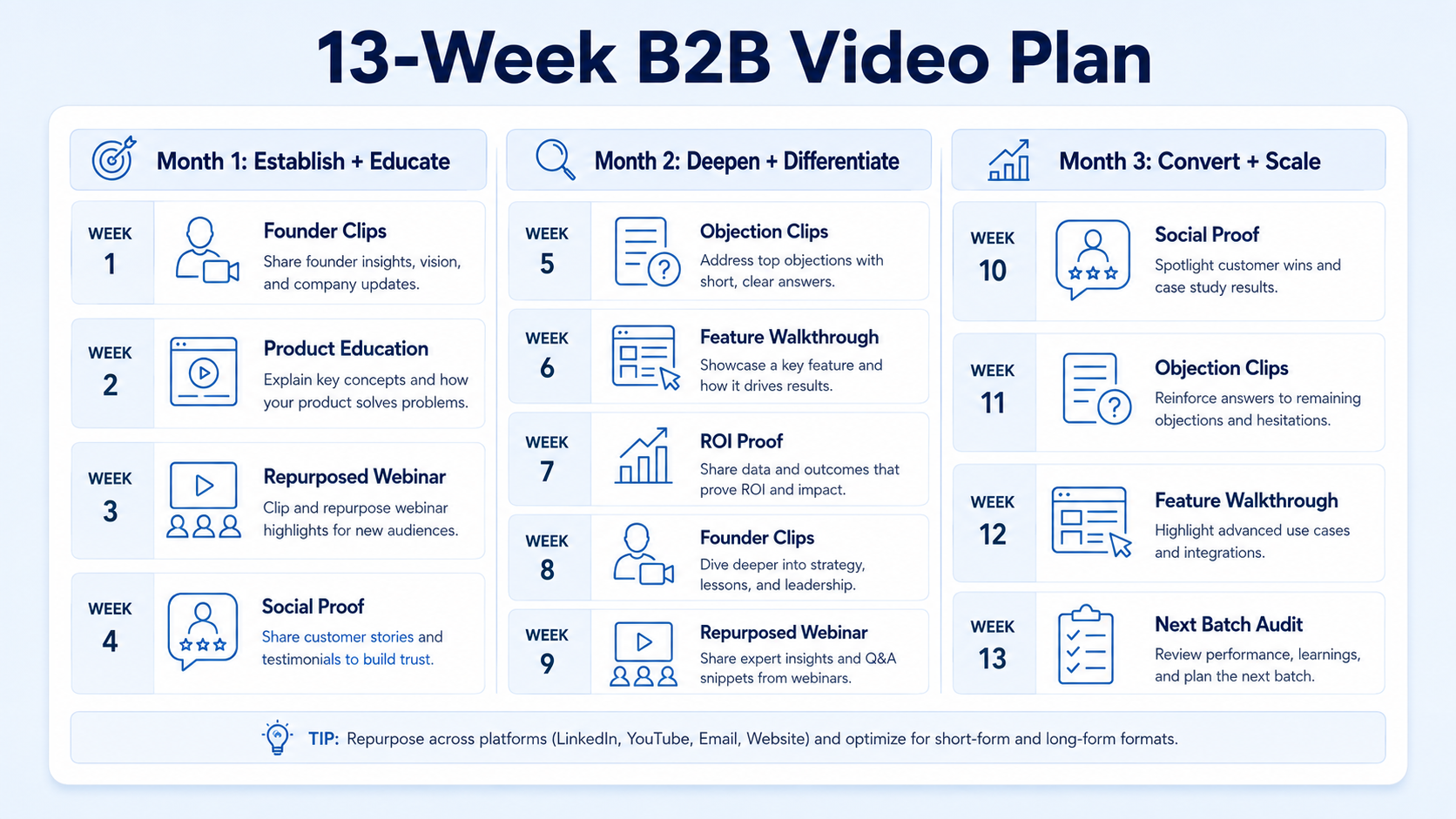
Month 1 (Weeks 1–4): Establish and Educate
Priority: build trust, surface your point of view, educate on the problem space.
- Week 1: Publish 2 thought leadership clips from the founder (use a 60-minute recording session to source all 8 clips for the month).
- Week 2: Publish 1 product education clip (explainer format) and 1 repurposed webinar or podcast clip via your podcast production or webinar content library.
- Week 3: Publish 2 thought leadership clips and 1 product education clip.
- Week 4: Publish 1 social proof clip and 1 repurposed content clip. Conduct a 30-minute pipeline review with sales to see which topics surfaced the most conversations.
Month 2 (Weeks 5–8): Deepen and Differentiate
Priority: show product depth, separate from alternatives, generate demo demand.
- Week 5: Publish 2 product education clips focused on a specific ICP use case.
- Week 6: Publish 2 thought leadership clips addressing a specific objection your sales team hears.
- Week 7: Publish 1 customer social proof clip and 1 feature walkthrough.
- Week 8: Publish 2 content repurposing clips and begin seeding comparison or "why us" angles informed by sales call notes.
Month 3 (Weeks 9–13): Convert and Scale
Priority: drive demo requests, support sales-led pipeline, and replenish your content bank.
- Weeks 9–10: Prioritize bottom-of-funnel content: testimonials, ROI proof clips, "how to get started" walkthroughs.
- Weeks 11–12: Publish founder clips addressing decision-stage objections directly.
- Week 13: Audit what worked, extract high-performing hooks and formats, and record the next 90-day batch using the same pillar structure.
Grab the ready-to-use template
Reading a 13-week plan is one thing. Filling in your own topics, hooks, and CTAs against real dates is another. I put together a downloadable 90-day B2B video content calendar template with the same week-by-week structure above, built so you can drop your own topics straight into it and track what is scripted, filmed, edited, and published.
Download the 90-day B2B video content calendar template
If you would rather have someone build and run this calendar for you, from strategy through scripting, production, and distribution, that is exactly what my team and I do. Book a call and we can map this plan to your actual buyer stages and existing content library.
How to Align Video Content with B2B Sales Funnel Stages
Building a 90-Day B2B Video Content Calendar without sales alignment is just a content schedule. The calendar only becomes a pipeline tool when each video has a defined handoff role. 72% of B2B buyers report that video content from vendors influences their vendor shortlist decisions , which means video is already inside your sales process whether or not sales knows it. The goal is to formalize that influence.
Three alignment actions to take before week one:
- Run a "video + sales" kickoff with your SDR or AE team. Ask: what objections kill deals at discovery? What questions come up every demo? These become your Month 2 video topics.
- Assign video to deal stages. Map specific videos to your CRM stages. Example: when a prospect moves from MQL to SQL, your AE sends a 2-minute product education clip before the call. Vidyard and Wistia both support this with video tracking and viewer analytics.
- Use Sprout Social or a similar tool to track which video content drives profile visits and inbound connection requests. This connects top-of-funnel video activity to pipeline entry points.
For Ahrefs or SEMrush users, cross-reference your video topics with search demand data. If a topic generates inbound search traffic and appears repeatedly in sales conversations, prioritize it in the calendar.
B2B video content shortens the sales cycle by 23% on average , and that compression happens precisely because pre-educated buyers arrive at demos with context, not questions from scratch.
Tools for Managing a 90-Day Video Content Calendar
The calendar is only as good as the system that keeps it moving. These are the tools that matter, organized by function.
Planning and editorial management:
- Notion or Airtable for your editorial calendar (track title, format, funnel stage, distribution channel, publish date, and status).
- Ahrefs or SEMrush for keyword research to validate that your video topics map to actual search demand, which feeds your video SEO strategy on YouTube.
Production:
- Video editing services for consistent short-form output without the internal bottleneck. This is where most B2B teams break down: planning is easy, consistent production is not.
- Podcast editing and podcast transcription to turn audio content into video-ready clips. Transcripts also feed captions, which are non-negotiable for LinkedIn (85%+ of LinkedIn video is watched without sound).
Distribution and tracking:
- Vidyard for sales-specific video delivery with open tracking and viewer analytics.
- Wistia for website-embedded video with engagement heatmaps that identify which parts of your product explainers buyers actually watch.
- Sprout Social for LinkedIn scheduling, publishing analytics, and competitive benchmarking.
- LinkedIn Video native uploads (not YouTube links) for maximum organic reach. On LinkedIn, video is shared 20x more than any other format.
Workflow:
- Frame.io or Loom for async video review and approval.
- A shared Google Sheet or Notion board visible to both marketing and sales so reps know what's publishing and can use it in outreach.
The Content Marketing Institute consistently identifies editorial calendar discipline as a top differentiator between high-performing and average B2B content programs. The tool stack matters less than the habit of updating it weekly.
Common Mistakes When Planning B2B Video Content
Most content planning failures are predictable and preventable. These are the patterns I see most often when teams come to us after a quarter of inconsistent video output.
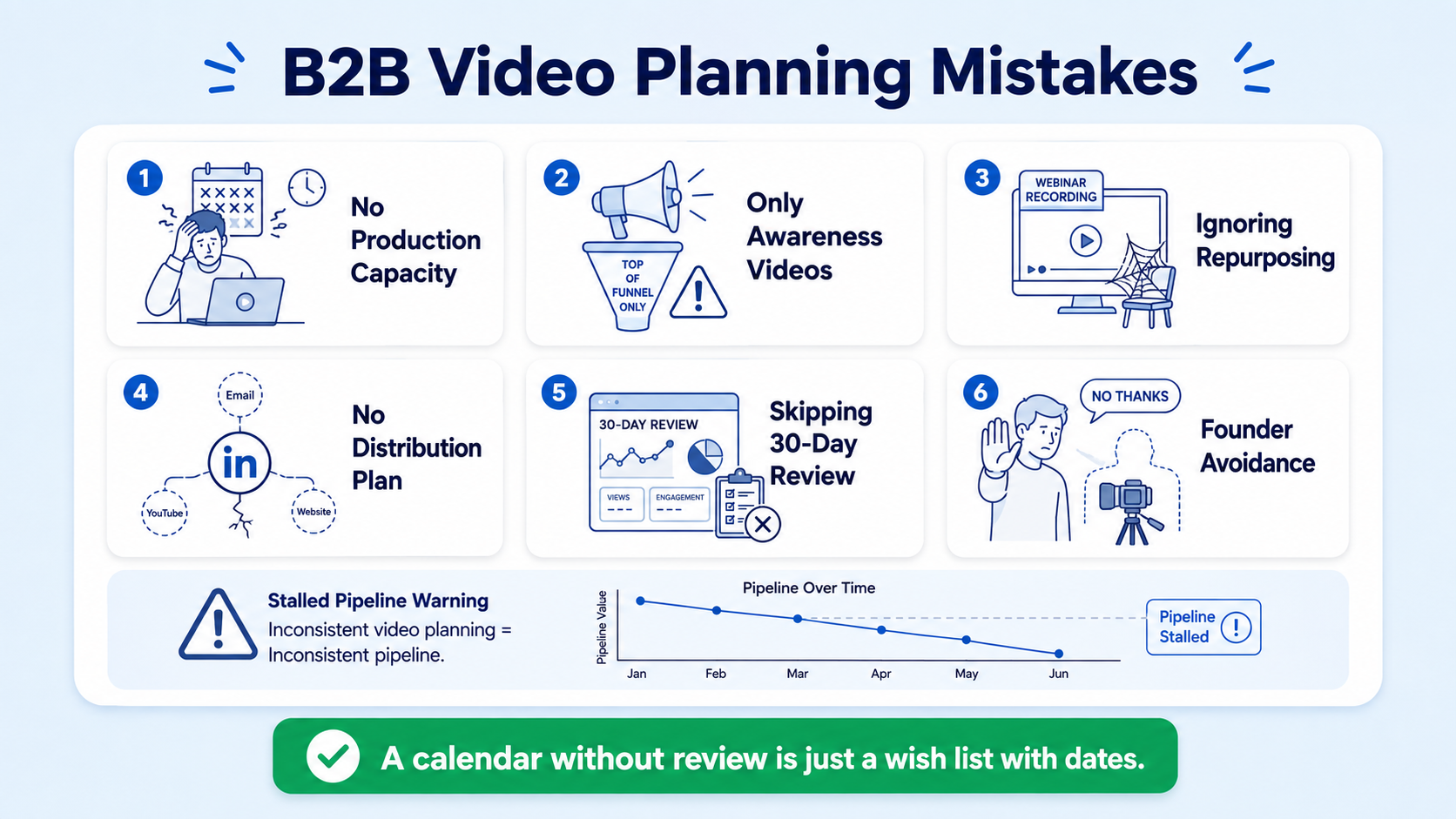
Mistake 1: Planning content types without planning production capacity. You plan 4 videos per week but have no production partner and one overloaded designer. Volume collapses in week 3. Solution: set your publishing cadence to what you can sustain with current resources, then scale up.
Mistake 2: Treating every video as a top-of-funnel awareness play. 70% of B2B buyers engage with video during purchasing decisions , not just at awareness. If all your videos are "here's our industry POV," you're missing the buyers who are actively evaluating.
Mistake 3: Ignoring content repurposing. Teams that record fresh content for every post burn out by week six. A single webinar or podcast episode contains enough raw material for 8–12 short-form clips. Not repurposing it is leaving most of your content budget on the table.
Mistake 4: No distribution plan for each video. Publishing to LinkedIn and hoping for organic reach is a strategy, but a fragile one. Every video needs a secondary distribution action: email sequence, sales outreach, paid amplification via video advertising, or community seeding.
Mistake 5: Skipping the 30-day review. Building a 90-Day B2B Video Content Calendar and never checking performance data means repeating what doesn't work for 90 days straight. Pull engagement data at day 30. Kill what's flat, double down on what's generating profile visits, DMs, and demo requests.
Mistake 6: Founder avoidance. Founders resist being on camera. But posts from individual profiles receive 8x the engagement of identical content from company pages , and the gap is widening. Batch-record 60 minutes of founder content once a month and let your production team do the rest.
If your calendar has no mechanism for a 30-day review, it's not a strategy. It's a wish list with dates attached.
Conclusion
Building a 90-Day B2B Video Content Calendar is how serious SaaS and funded tech teams convert video effort into pipeline. It's not a creative exercise. It's a demand generation system.
Key takeaways:
- Structure the calendar around four pillars: thought leadership, product education, social proof, and content repurposing.
- Align every video to a sales funnel stage before it's produced, not after.
- Use existing long-form assets (webinars, podcasts, demos) as the production engine to sustain consistent output.
- Review at day 30 and reload with data, not instinct.
If you're ready to build the system, our team at Komet Media works with B2B SaaS and funded tech teams to build and run exactly this. See our services to find out where we can help.
Frequently Asked Questions
Q1: How many videos should a B2B company post per month?
For most B2B SaaS teams, 12–16 short-form videos per month is the sustainable target when content repurposing is in place. That's roughly 3–4 per week. Without a repurposing system, 4–6 per month is more realistic before quality degrades. Consistency beats volume every time.
Q2: What is the best video length for B2B LinkedIn content?
For LinkedIn Video, 60–90 seconds performs best for thought leadership and product clips. Under 60 seconds for social proof and hook-driven clips. Save longer formats (5–10 minutes) for YouTube, where buyers actively search for product education and demos.
Q3: How do I get buy-in from founders or executives to appear on video?
Batch-record one 60-minute session per month. Extract 8–12 clips from that single session so the time commitment stays minimal. Show executives the engagement data after the first batch, specifically profile visits and direct inbound messages. Results convert skeptics faster than arguments.
Q4: Can I build a 90-day video calendar without a large production team?
Yes. The model is: one founder recording session per month, one long-form asset (webinar or podcast) as the repurposing engine, and a production partner handling editing, captioning, and formatting. That infrastructure produces 12–16 videos per month without a full in-house team.
Q5: How do I measure whether my B2B video calendar is working?
Track four signals at 30 days: LinkedIn profile visits after video posts, video view-through rate (how much buyers watch), inbound demo requests citing content as a touchpoint, and sales team usage (are AEs sharing the videos in outreach?). Pipeline influence is the north star.
Q6: Should I use the same video for LinkedIn and YouTube?
Not without reformatting. LinkedIn favors native square or vertical uploads with captions; YouTube favors horizontal 16:9 with keyword-optimized titles and descriptions for video SEO. Repurpose the same core content, but adapt the format, caption style, and CTA for each platform's algorithm and viewer intent.

