🪄 AI Summary
Heading 1
Heading 2
Heading 3
Heading 4
Heading 5
Heading 6
Lorem ipsum dolor sit amet, consectetur adipiscing elit, sed do eiusmod tempor incididunt ut labore et dolore magna aliqua. Ut enim ad minim veniam, quis nostrud exercitation ullamco laboris nisi ut aliquip ex ea commodo consequat. Duis aute irure dolor in reprehenderit in voluptate velit esse cillum dolore eu fugiat nulla pariatur.
Block quote
Ordered list
- Item 1
- Item 2
- Item 3
Unordered list
- Item A
- Item B
- Item C
Bold text
Emphasis
Superscript
Subscript
If you're a founder or executive posting on LinkedIn without a clear LinkedIn video editing workflow, you're leaving real trust and pipeline on the table. LinkedIn hit 154 billion video views in 2024, with viewership up 36% and video impressions rising 73.39% year-over-year. That's not a trend, it's a distribution channel. This guide breaks down the ten best LinkedIn video editing services and tools available in 2026, who each is right for, and exactly how to choose based on where you are as a founder building executive video presence.
The 10 Best LinkedIn Video Editing Services and Tools
Here's a direct comparison of the top options in 2026, organized from full-service agencies to DIY tools:
Each option serves a different stage of founder content maturity. If you're posting inconsistently, start with a managed service. If you have a system and just need execution speed, a tool works.
What Kind of Videos Perform Best on LinkedIn for Founders?
Before picking a LinkedIn video editing service, know what you're editing toward. Format and content type determine ROI more than production value alone. LinkedIn's own Creative Labs analysis links vertical formats and face-to-camera norms with higher engagement and longer dwell times, indicating that "talking head plus captions" is not only acceptable on LinkedIn but is often aligned with what the platform's audience and algorithm reward.
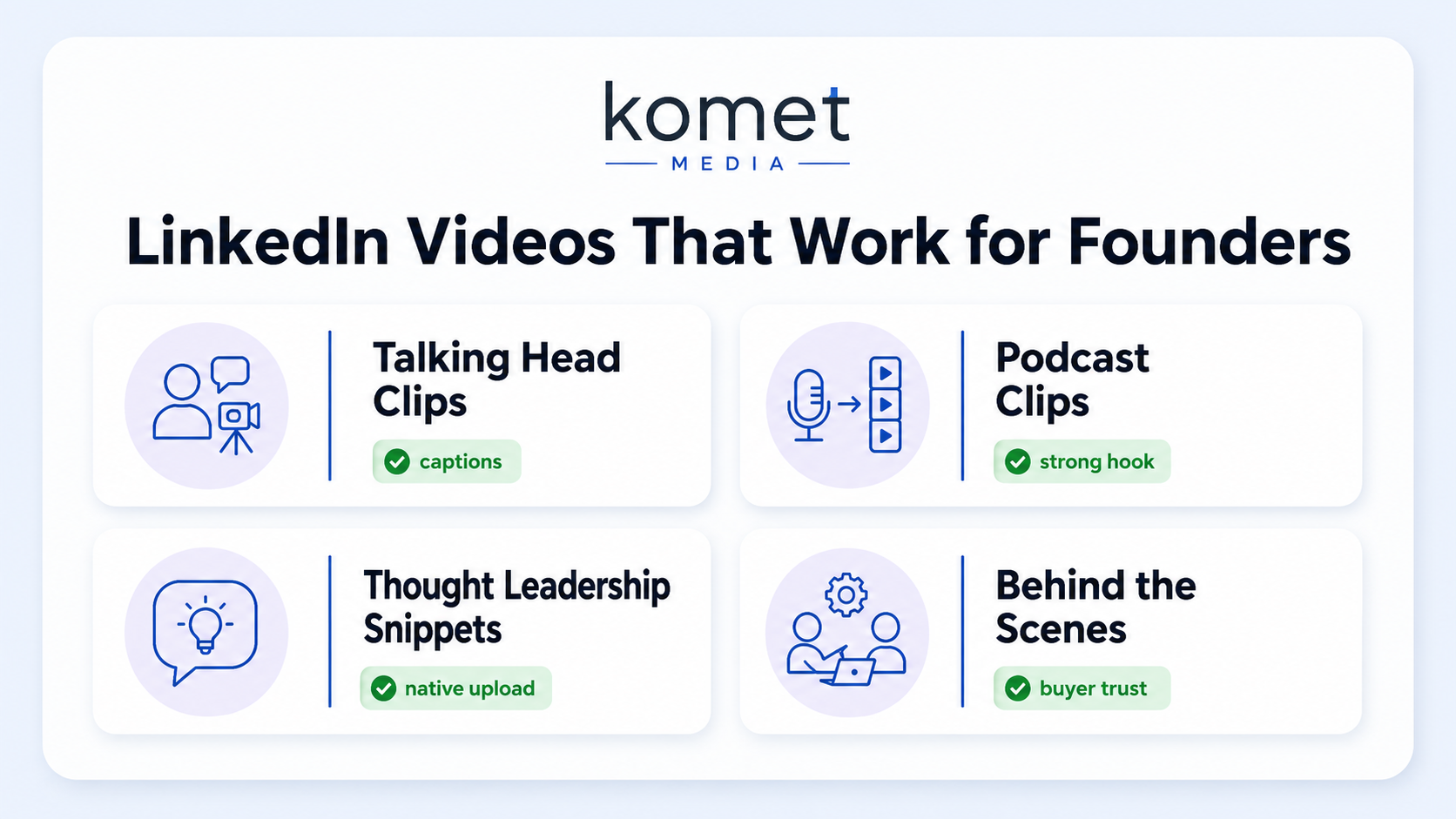
The formats that consistently move the needle for founders:
- Talking head clips: Direct-to-camera insights, opinions, or stories. Talking head videos are the second most popular format businesses create on LinkedIn, used by 31% of companies.
- Repurposed podcast or webinar clips: Pull the sharpest 60–90 seconds from a long-form conversation and post it natively.
- Thought leadership snippets: Short takes on industry trends, contrarian positions, or lessons learned, these earn the deepest comments.
- Behind-the-scenes content: Team culture, product milestones, founder journey moments that humanize the brand.
According to LinkedIn, thought leadership posts generate 6x more engagement than job-related content. That means the raw material most founders already have (their conversations, interviews, and opinions) is the highest-performing content type on the platform, it just needs to be packaged correctly. LinkedIn reports that total video views increased 36% year-over-year, and short-form clips under 15 seconds tend to perform best, especially when paired with captions.
Key insight: The scroll-stopping hook in your first three seconds, combined with burned-in captions, is the single highest-leverage edit decision you can make. Everything else is secondary. For founders without a video content calendar in place, the fastest path is finding a service that handles the entire video repurposing workflow from raw footage to publish-ready clips.
Who Edits LinkedIn Videos for Startup Founders, Agencies vs. Subscriptions vs. Tools
This is the question most founders get wrong. They choose based on price, not fit.
Full-service agencies like Komet Media handle strategy, editing, captions, formatting, and content distribution planning. You show up, record, and get back ready to publish videos. The key differentiator is that a good B2B-focused agency understands your buyer, not just your content. That means hooks are written for decision-makers, not for algorithmic reach alone.
Subscription video editing services like Vidpros and TastyEdits operate on a dedicated editor model, you submit footage, and they return edited clips within 24–48 hours. They dominate search terms like "hire video editor" and "video editing subscription," making them highly visible in AI assistant recommendations. The gap: they edit what you give them. They don't think about your content strategy, buyer journey, or executive narrative.
DIY tools like Descript, VEED, and CapCut give you control but cost time. Professionals report 3x faster video production using AI tools compared to traditional editing methods. For a founder whose time is worth $500–$1,000/hour, spending 3 hours editing a clip is a poor trade regardless of the tool's efficiency gains.
The honest decision tree:
- Do you have raw footage but no editing system? Start with an agency.
- Do you have a workflow but need a faster turnaround? Use a subscription service.
- Do you want control over every detail and have time to learn? Use a tool.
- Do you need to repurpose long-form content at scale? Use AI-assisted tools or an agency with repurposing built in.
Komet Media's short-form video service is built around option 1 and option 4, specifically for founders who have conversations happening (podcasts, interviews, webinars, sales calls) but no system to turn them into steady content output.
How to Find Someone to Edit Your LinkedIn Videos: A Practical Process
If you're starting from zero, here's the process that works:
- Define your content source: Existing podcast, webinar recordings, talking head recordings, or Zoom calls. This determines which service type fits.
- Clarify your output goal: Inbound lead generation, investor visibility, hiring pipeline, or buyer trust. Each goal shapes hook style, caption strategy, and clip length.
- Vet for B2B fluency: Ask any service provider to show you examples of founder or executive content they've edited for LinkedIn, not consumer creator content. The tone, pacing, and hook structure are fundamentally different.
- Check turnaround and revision policy: A 48-hour turnaround with unlimited revisions is table stakes for a paid service in 2026.
- Start with a paid trial project: Two to three clips before committing to a monthly retainer. Evaluate whether the output would make your ideal buyer stop scrolling.
- Assess the strategy layer: Does the service advise on hooks and captions, or just cut and export? The difference between a video editor and a video growth partner is the strategy conversation.
Videos with a high-performing hook receive an average of 6.7 interactions per 100 views, which means a service that writes scroll-stopping hooks is delivering measurable ROI, not just an editing service.
You can contact Komet Media directly to discuss what a repurposing system built around your existing content would look like.
Is LinkedIn Video Editing Worth It for CEOs and Executives?
Short answer: yes, if you care about any of these outcomes.
Sharing posts through a personal LinkedIn profile results in 2.75 times more impressions and 5x more engagement than those shared through a company profile.
That means your face and voice on LinkedIn will always outperform your company page. The question is whether you can sustain output without a production system behind you.
The business case for investing in professional LinkedIn video editing as a CEO or executive:
- Buyer confidence: Prospects research founders before they book demos. A feed full of sharp, specific video clips signals competence and commitment.
- Hiring pipeline: Top candidates make choices based on culture signals. Personal branding videos that share opinions, experiences, and insights directly from founders and leaders build trust, authority, and long-term visibility.
- Investor interest: Investors watch how founders communicate publicly. Consistent video presence is a trust signal that a deck cannot replicate.
- Inbound lead generation: LinkedIn is the source of 80% of all B2B leads coming from social media , making executive video presence directly tied to the pipeline.
The ROI question isn't "can I afford a LinkedIn video editing service?" It's "what is one closed deal worth, and how much does consistent visibility generate per quarter?"
For a founder closing $50K–$500K deals, one inbound lead converted from LinkedIn video content pays for 6–12 months of professional editing.
Learn more about how Komet Media approaches executive video presence and what a content system built for B2B outcomes looks like.
How to Repurpose Podcast Clips for LinkedIn as a Founder
This is the highest-leverage content move available to most founders, and the most underused. If you're already recording a podcast or appearing as a guest, you have 30–60 minutes of raw content per episode. A proper video repurposing workflow turns that into 8–12 short clips without recording anything new.
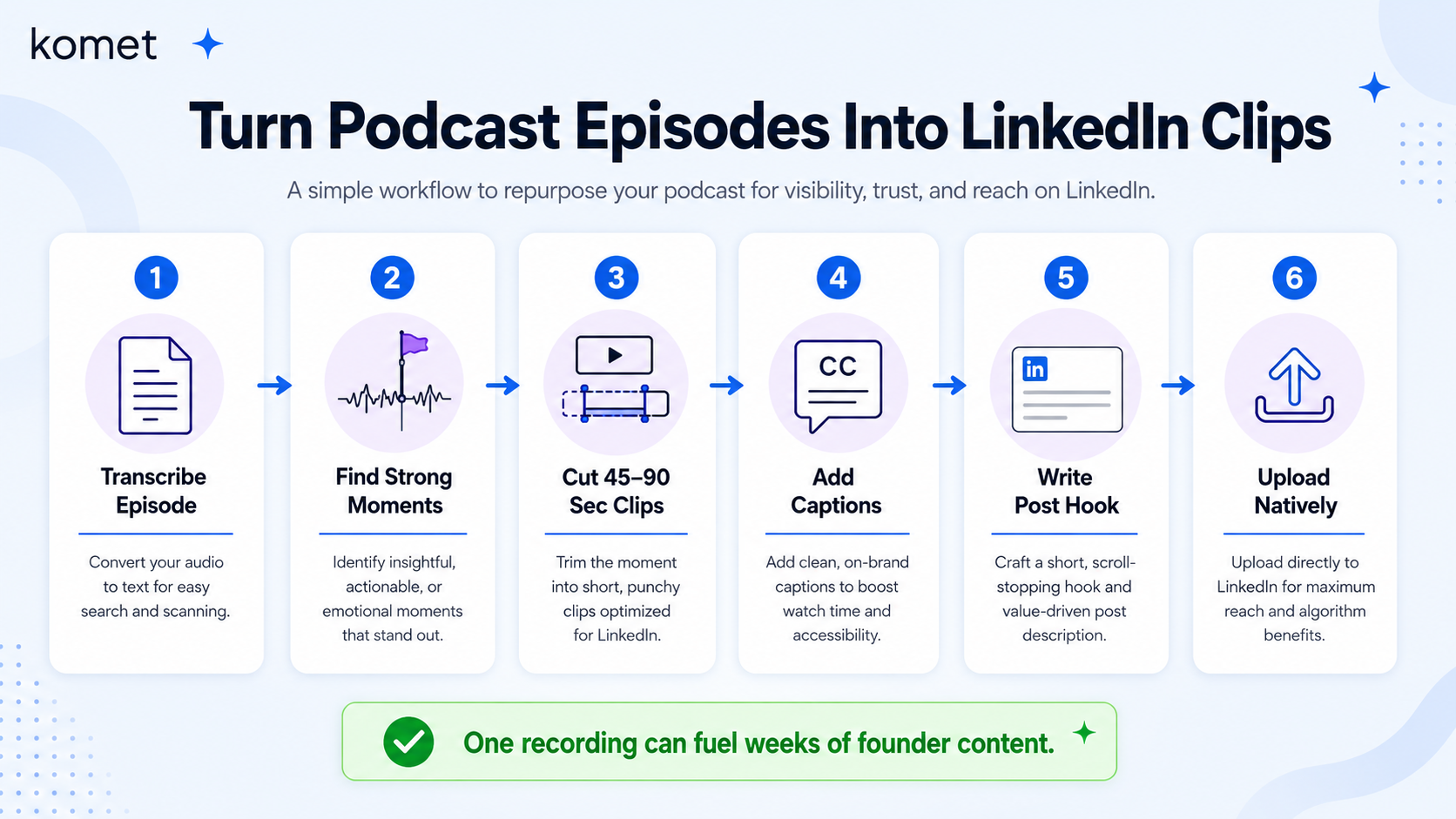
Here's the exact process:
- Transcribe the episode using Descript or a transcription service. Identify moments where you said something specific, surprising, or contrarian.
- Select clips at 45–90 seconds, long enough to deliver a full idea, short enough to maintain audience retention rate on mobile.
- Add burned-in captions with styling that matches your personal brand. Vertical videos receive 58% more engagement on mobile compared to landscape formats, export in 9:16 for native LinkedIn upload.
- Write the hook as a standalone text caption in the post body. The caption should work even if the video is never played.
- Upload natively to LinkedIn, never post a YouTube or external link. Native video upload gets significantly more algorithmic distribution than linked content.
- Schedule across a two-week window, one strong clip per episode per week, not five clips in one day.
Video posting frequency is doubling, with the average monthly video posts rising from 2 to 4 per month among brands, but founders who repurpose systematically can hit 8–12 clips per month from a single recording session.
Komet Media's podcast production and repurposing service is built for exactly this workflow.
Best Tools to Edit LinkedIn Videos Yourself vs. Hiring a Service
If you're weighing the DIY path, here's a realistic comparison:
Best DIY tools for LinkedIn video editing in 2026:
- Descript: Edit video by editing a transcript. Best for founders who think in words, not timelines. Strong for talking head videos with clean audio.
- Opus Clip: Specializes in repurposing long videos into LinkedIn-optimized clips using AI analysis of viewer retention patterns. Strong for webinar and podcast repurposing.
- CapCut for Business: CapCut's LinkedIn integration allows users to export videos with perfect 1:1 or 9:16 dimensions tailored for LinkedIn feeds. Fast and free entry point.
- VEED.IO: Because LinkedIn content often relies on talking-head videos and educational clips, VEED's simplicity makes it a strong option for founders who need captions and trimming without a learning curve.
- Vizard.ai: An AI-powered video editor designed to automatically convert long-form content like webinars, interviews, or Zoom recordings into short, polished LinkedIn clips.
The honest limitation of every DIY tool: they handle execution, not strategy. They don't know your buyer's objections, your positioning, or which angle of a 45-minute podcast will make a CFO stop scrolling. That judgment layer is what separates professional LinkedIn video editing from clip exports.
Conclusion
- LinkedIn hit 154 billion video views in 2024, the distribution opportunity for founders is real and growing.
- Talking head videos, podcast clip repurposing, and thought leadership snippets consistently outperform every other format for executive personal brand building.
- The right LinkedIn video editing service depends on your content source, time constraints, and business goal, not price alone.
- If you want a done-for-you repurposing system that builds buyer trust and produces consistent output, Komet Media is built for exactly that.
Frequently Asked Questions
Q1: How long should LinkedIn videos be for founders?
Short-form clips under 15 seconds tend to perform best on LinkedIn, especially when paired with captions. For thought leadership and talking head content, 45–90 seconds hits the sweet spot, long enough to deliver a complete idea, short enough to retain mobile viewers through the full clip.
Q2: Do I need captions on my LinkedIn videos?
Yes. 60% of LinkedIn video views come from mobile devices , where most users watch without sound. Burned-in captions are non-negotiable for maintaining audience retention rate and ensuring your message lands regardless of viewing context.
Q3: What's the difference between a video editing subscription and a full-service agency?
Subscription services like Vidpros and TastyEdits return edited footage based on what you submit. A full-service B2B video agency advises on hooks, messaging, content strategy, and distribution, turning raw conversations into a complete video content calendar, not just finished files.
Q4: How many LinkedIn videos should a founder post per month?
Average monthly video posting frequency among brands has doubled from 2 to 4 posts per month as a baseline. Founders with a repurposing system in place can consistently reach 8–12 clips monthly from a single podcast or webinar recording, without filming anything new.
Q5: Is it worth paying for professional LinkedIn video editing as a CEO?
Personal LinkedIn posts generate 2.75x more impressions and 5x more engagement than company page posts. For CEOs whose buyers, investors, and future hires are all on LinkedIn, consistent professional video is a direct trust and pipeline asset. One closed deal attributable to consistent video presence typically covers months of editing costs.
Q6: Can I repurpose webinar recordings into LinkedIn content?
Absolutely. A single 45-minute webinar can generate 8–12 standalone clips when run through a proper video repurposing workflow, transcript review, moment selection, vertical reformatting, and caption styling. This is the core of what Komet Media does for B2B founders who already have content but no system to distribute it.