
🪄 AI Summary
Heading 1
Heading 2
Heading 3
Heading 4
Heading 5
Heading 6
Lorem ipsum dolor sit amet, consectetur adipiscing elit, sed do eiusmod tempor incididunt ut labore et dolore magna aliqua. Ut enim ad minim veniam, quis nostrud exercitation ullamco laboris nisi ut aliquip ex ea commodo consequat. Duis aute irure dolor in reprehenderit in voluptate velit esse cillum dolore eu fugiat nulla pariatur.
Block quote
Ordered list
- Item 1
- Item 2
- Item 3
Unordered list
- Item A
- Item B
- Item C
Bold text
Emphasis
Superscript
Subscript
You already have the content. Your team wrote the thought leadership piece, shipped the product explainer, and published the how-to guide. The problem isn't a lack of ideas, it's that those ideas are sitting in text form while your buyers are watching video. Turning blog posts into video is the highest-ROI content move available to B2B teams right now, and this guide walks through exactly how to do it: which posts to pick, how to script them, which tools actually work, and how to distribute across every channel that matters.
TL;DR
- Short-form video delivers the highest ROI of any content format, beating long-form and live streaming.
- Turning blog posts into video works best on evergreen posts, listicles, and high-traffic, low-engagement content.
- AI tools (Descript, Pictory, Synthesia, InVideo) cut production time dramatically, but human editing keeps brand quality intact.
- Distribution across YouTube, LinkedIn, and Instagram Reels multiplies reach without creating new content from scratch.
What Makes a Blog Post Worth Converting to Video?
Not every post deserves the treatment. Turning blog posts into video is a resource decision, and the posts you choose determine your return. The strongest candidates share three traits. First, they have proven search demand, if Google already sends traffic to a post, a YouTube version compounds that visibility through video SEO. Second, they contain teachable structure: a numbered process, a comparison, a framework. Structure becomes scenes. Third, they address a persistent buyer question your sales team answers repeatedly. That overlap between content marketing and sales enablement is where video does its best work.
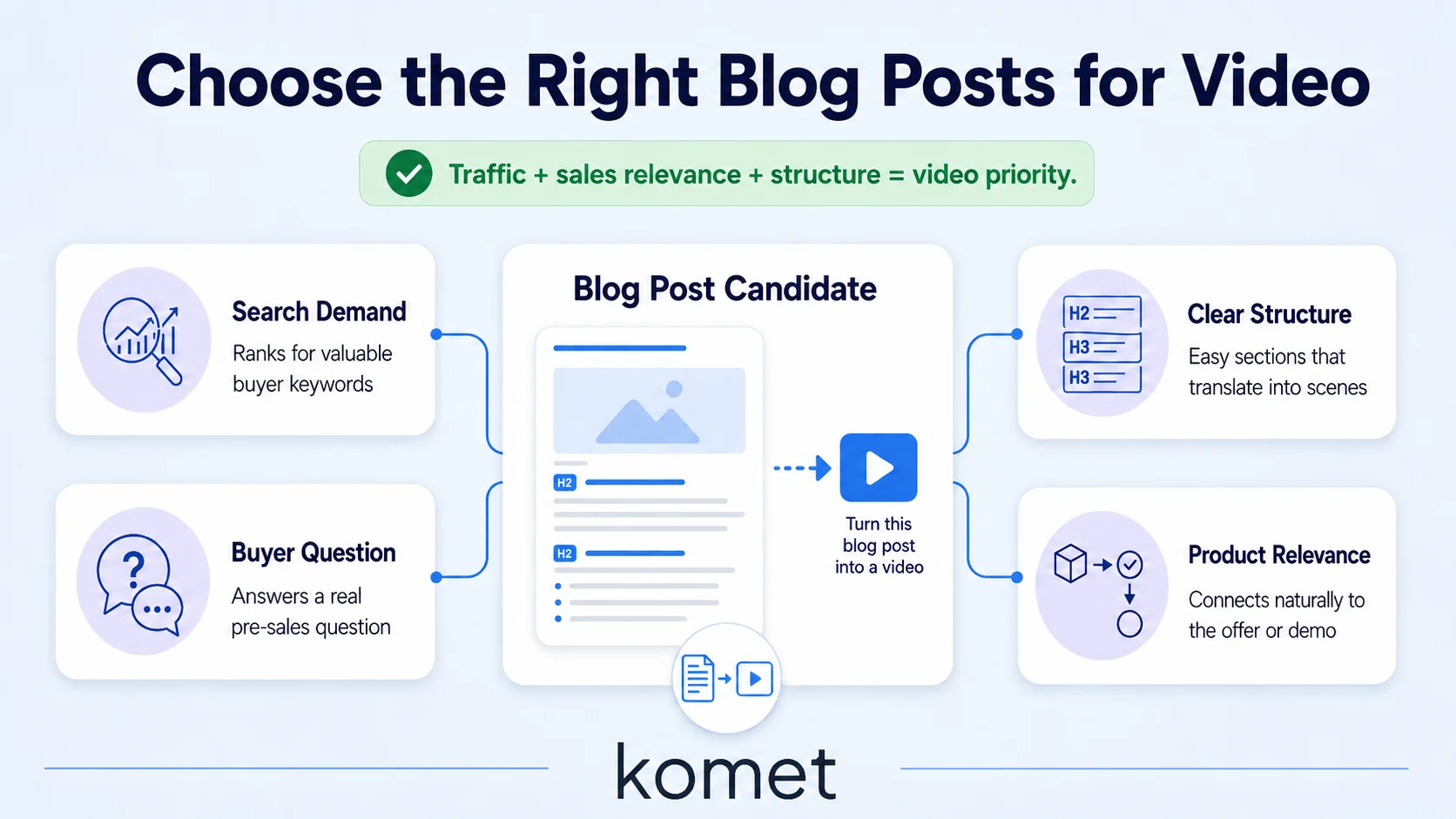
The best types to convert include evergreen topics, how-to guides, listicles, and posts that get strong traffic but weak engagement. Weak engagement on a high-traffic post typically means readers arrived with one intent and your text didn't hold them, video often fixes that. For B2B SaaS specifically, I'd add a fourth criterion: product-adjacent content. Posts that explain a problem your product solves, walk through a workflow your product accelerates, or compare approaches your product takes a position on, these convert into videos that educate buyers and support the pipeline simultaneously. That's not just content marketing. That's sales enablement running through your distribution channels. From an audience engagement metrics perspective, people spend 2.6x more time on pages with video than those without , which means embedding the repurposed video back into the original blog post compounds the SEO benefit through improved watch time retention and dwell time.
One practical filter: score your blog archive on three axes (organic traffic, sales relevance, structural clarity) and prioritize the posts that rank in the top third on all three. That shortlist is your video production queue.
The rule I follow at Komet Media: if a founder has explained the concept in a sales call more than three times, the blog post covering it becomes a video. That's the signal that buyers need it in a more digestible format.
How to Turn Blog Posts into Videos: Step by Step
This is the process we run for B2B clients. It works for both in-house teams and agency-supported production.
- Strip the post to its skeleton: Pull the headline, each H2, and the key sentence under each section. That's your video script outline. A 1,500-word post becomes a 250-word script this way.
- Rewrite for ears, not eyes: Text that reads well sounds robotic on camera. Shorten sentences. Convert passive voice to active. Drop every parenthetical that would make a viewer lose the thread.
- Record or generate the voiceover: Founders and executives recording direct-to-camera or voiceover-only builds E-E-A-T and trust faster than any AI avatar. If speed is the priority, tools like Descript let you record, transcribe, and edit the video transcript as text, cut words from the transcript and the video edits itself.
- Match visuals to the script: For each major point, decide whether you need a screen recording, a text overlay, b-roll, or a talking head. B2B SaaS content often benefits from screen recordings via Loom for product sections, and text overlays for data points.
- Add captions: Over 80% of social media videos are watched on mute. Captions are non-negotiable, not optional.
- Edit for platform: A 6-minute YouTube explainer needs a different cut than a 60-second Instagram Reel. The script is the same; the pacing, aspect ratio, and hook placement change.
- Embed back into the source post: Place the video at the top of the original article. It improves click-through rate from search results featuring video thumbnails and pushes dwell time, both of which support video SEO optimization.
This workflow consistently takes a high-performing blog post from text to a distributable video asset in under a day once the production system is established.
What Tools Convert Blog Posts to Video, and How Do They Compare?
Several popular AI content repurposing tools exist for creating videos from blog content, and each provides different levels of customization, including aspect ratio, tone, audience type, AI voiceover, and b-roll theme.
Here's a direct comparison of the most relevant options for B2B teams:
Pictory quickly assembles videos using stock footage, but results can feel generic. Synthesia creates presentation-style videos with AI avatars, which works better for thought leadership content, and offers significant options for including a talking head.
For B2B SaaS, I lean toward a hybrid: Descript or Loom for founder-driven content where authenticity builds trust, and Synthesia or VEED for evergreen explainers where consistency and scale matter more. Screen recordings with voiceover using tools like Loom take 15–20 minutes per video , making them the lowest-friction entry point for product-adjacent content.
The honest take: one-click AI tools aren't fully there yet for brand-quality output, simple AI wrappers are fast, but they don't always produce content you'd feel confident publishing.
AI accelerates the right parts. Human judgment still controls quality.
Can I Use AI to Turn My Blog Into a Video, and Should I?
Yes. With clear limits. Teams are using AI in every stage of the video workflow, from planning to repurposing, and adoption is growing, more than a third of teams already use AI in their workflow, with nearly a quarter more planning to start soon.
The workflow that actually works for B2B: use AI to accelerate production, not replace judgment. Specifically:
- Script generation: Feed the blog post into ChatGPT with a prompt specifying audience (e.g., "SaaS marketing director"), tone (direct, educational), and format (60-second LinkedIn video). Edit the output rather than starting from scratch.
- Transcription and editing: Descript's AI transcription turns your recorded voiceover into an editable video transcript instantly. Edit the text, the video follows.
- Caption generation: Every major tool auto-generates captions now. Always review them, product names and technical terms frequently get mangled.
- Visual matching: Tools like Pictory and InVideo use AI to match blog sections to stock footage. Works for generic b-roll. Fails for product-specific visuals, which you still need to supply manually.
Content repurposing saves 60–80% of creation time, boosts overall content output by 40%, and cuts production costs by up to 65% when AI-driven. Those numbers reflect the ceiling of what's possible with a tight system. Most teams, in practice, see the largest gains in scripting and caption generation, the parts that previously ate hours.
The strategic risk of full AI automation for B2B content is brand dilution. Your buyers are evaluating your team's expertise and point of view. A generic AI-voiced explainer over stock footage of people in meetings signals commodity. A founder speaking directly to a real buyer problem, even over a simple screen recording, signals expertise. For B2B SaaS companies, the tactical shift is clear: less polished brand films, more authentic product walkthroughs.
How to Repurpose Blog Content as Short-Form Video for Social Media
Turning blog posts into video for social media means accepting that each platform has its own content grammar. The same underlying insight needs to be packaged differently for YouTube Shorts, TikTok, LinkedIn, and Instagram Reels. Over half of companies now repurpose video content into social clips, with LinkedIn as the top platform, 67% of teams post clips there, followed by Instagram at 49%, YouTube at 41%, and Facebook at 34%.

Platform-specific packaging:
- LinkedIn (1–3 minutes, 16:9 or 1:1): Lead with the insight, not the build-up. Your audience is on a feed between meetings. State the counterintuitive point in the first 5 seconds.
- YouTube Shorts (under 60 seconds, 9:16): Use the blog's single strongest takeaway. Frame it as a standalone lesson, not a teaser for the long-form post.
- Instagram Reels (15–60 seconds, 9:16): Hook in the first 3 seconds. Captions carry the content because most viewers are on mute. Text overlays reinforce key points.
- TikTok algorithm (15–60 seconds, 9:16): Prioritizes completion rate and rewatch. Keep the pacing tight. End on something that rewards watching again.
60% of teams use social video clips to link back to their website, making social video a traffic driver as much as an awareness play. For B2B, that means every short-form clip should carry a clear CTA that moves the viewer toward a demo, a deeper resource, or a newsletter signup.
Build a social media content calendar that maps each blog-to-video asset across platforms with at least a 48-hour offset between posts. One blog post can realistically generate a 6–8 minute YouTube explainer, two 60-second LinkedIn clips, and three 30-second Reels/Shorts, all from the same source material. That's your short-form video production system operating at capacity.
Blog-to-Video Distribution Strategy: Getting the Right Eyes on Each Asset
Production is only half the equation. Distribution determines whether turning blog posts into video generates pipeline or just views. 78% of businesses plan to increase their video production in 2026. Most of them will underinvest in distribution and wonder why the views don't come. The teams that win treat distribution as a system, not an afterthought.
Here's the distribution stack I recommend for B2B SaaS teams:
- Embed in the source blog post: Place the full YouTube version at the top of the original article. This improves time-on-page (a ranking signal), gives the post a video-rich snippet in search, and serves both reading and watching audiences simultaneously.
- Email newsletter: A blog-derived video clip performs better in email than a plain text summary. Thumbnail + play button drives higher click-through rates than a text link.
- LinkedIn organic: Post the LinkedIn-formatted clip natively (not as a YouTube link, native video gets significantly more organic reach on LinkedIn). Tag any customers, partners, or co-authors mentioned in the original post.
- YouTube (with SEO optimisation): Upload the full explainer. Optimize the title, description, and tags around the same semantic search terms your blog targets. Include a video transcript in the description for knowledge graph optimisation.
- Sales enablement: This is where B2B teams leave the most value on the table. Add the video to your CRM as a resource reps can send after discovery calls. A 3-minute explainer video that answers the most common objection is more effective than a follow-up email with a blog link.
Once your video is live, go back to the original source content and link to the new asset to drive your audience to your owned platforms. The compounding effect of this distribution model is what makes a content repurposing strategy genuinely scalable. One well-executed blog-to-video conversion generates touchpoints across organic search, social, email, and direct sales, from a single production investment.
Conclusion
Turning blog posts into video is the most efficient content move available to B2B teams that already have a content library. The core principles:
- Select strategically: Prioritize posts with proven traffic, strong buyer relevance, and clear structure.
- Script for ears: Strip the post to its skeleton, rewrite conversationally, then record or generate voiceover.
- Use AI to accelerate, not replace: AI handles transcription, scripting, and captions, human judgment controls brand voice and product accuracy.
- Distribute with intent: Embed in the blog, clip for social, use in email, and route into sales enablement.
If your team needs a production partner to run this system at scale, Komet Media's short-form video and content repurposing services are built exactly for this. Talk to us here.
Frequently Asked Questions
Q1: How long should a blog-to-video conversion take?
With an established workflow, a 1,500-word blog post becomes a publish-ready video in 4–8 hours. AI scripting and transcription tools compress the heaviest parts. The bottleneck is usually recording or voiceover, not editing.
Q2: Do I need to rewrite the blog post entirely to make a video script?
No. Strip the post to its H2 headings and the strongest sentence under each one. Rewrite those sentences for spoken delivery, shorter, more direct. That 200–300 word script becomes your video without rebuilding from zero.
Q3: Which blog posts perform best when turned into video?
Evergreen topics, how-to guides, listicles, and posts that get high traffic but low engagement convert best. For B2B SaaS specifically, posts that address a common buyer objection or explain a product workflow are especially high-value.
Q4: Should I use AI-generated avatars or record myself?
For B2B audiences, recorded founder or executive video consistently outperforms AI avatars on trust and engagement metrics. Use AI avatars for volume production of evergreen explainers where speed and scale matter more than founder-led credibility.
Q5: How does turning blog posts into video help SEO?
It helps in two ways. Embedding a YouTube video in the post increases dwell time and reduces bounce rate, both of which are positive signals. Publishing the video on YouTube with an optimized title and transcript also targets video SEO, giving the same topic a second chance to rank in search results.
Q6: How many social clips can I realistically get from one blog post?
One strong blog post typically yields a 5–8 minute YouTube explainer, two 60-second LinkedIn clips highlighting different points, and two to three 30-second Reels or Shorts. That's six to seven assets from a single piece of source content, which is exactly how a content repurposing strategy scales output without scaling the content creation budget.


