
YouTube Shorts Video Format and Spec Guide foe B2B SaaS: Step-by-Step Guide
If your SaaS team is posting vertical videos and not getting traction, the problem is often the foundation, wrong specs, wrong structure, wrong framing for a B2B buyer. This YouTube Shorts video format and spec guide for B2B SaaS gives you every technical requirement, the right content architecture, and the workflow to turn webinars, demos, and founder thinking into pipeline-generating Shorts. No fluff, no guesswork.
TL;DR
- The standard YouTube Shorts dimensions are 1080×1920 pixels, the same resolution as Full HD (1080p) in portrait orientation.
- YouTube Shorts can be up to 3 minutes (180 seconds) long as of 2026, expanded from 60 seconds in October 2024.
- YouTube recommends uploading Shorts as MP4 files using the H.264 video codec and AAC audio codec.
- Short-form demos on YouTube Shorts now drive 38% of demo requests for SaaS brands.
YouTube Shorts Technical Specifications: The Complete Spec Table for B2B SaaS
Before you export a single frame, lock these settings in your editor. Wrong specs mean the YouTube algorithm either misclassifies your video or suppresses its reach entirely. If your video is incorrectly formatted, it may not perform as expected or may appear as a regular video instead of a Short. Here is every spec your team needs:
For quality that survives YouTube's compression, use MP4, H.264, constant bitrate at 1080×1920, targeting 10–15 Mbps, a higher bitrate gives YouTube's encoder more data to sample from during re-encoding.
One spec that most B2B teams miss: YouTube normalizes audio to -14 LUFS. If your audio is louder than that, YouTube will reduce the level, which can introduce distortion if you've hard-clipped the source. Master your audio to -14 LUFS before upload to control exactly what you're submitting.
Keep all text and logos in the center 1080×1350 area to avoid the heavy UI overlay at the bottom and right of the screen. For SaaS screen recordings and demos, this is non-negotiable, your CTA disappears behind the Like button if you place it too low.
Safe zone rule: Keep critical content, product UI, speaker face, captions, CTAs, in the center 80% of the frame. YouTube's UI overlays the bottom ~390px and top ~180px.
MP4 vs MOV for YouTube Shorts: Which File Format Should B2B Teams Use?
This question comes up on every SaaS team that edits on a Mac. The short answer: export MP4 every time. YouTube recommends uploading Shorts as MP4 files using the H.264 video codec and AAC audio codec. This combination offers the best compatibility and compression for mobile playback. While other formats like MOV and WebM are accepted, MP4 is the safest choice to avoid processing issues. Here is how the formats compare directly:
MOV files, which are common if you edit on a Mac, work fine, but they often result in larger file sizes without providing any real quality advantage on YouTube's end. For SaaS teams running a short-form video editing workflow, the operational cost of MOV adds up at volume. A single 60-second MOV can run 3–4x the size of an equivalent MP4, which slows batch upload schedules and makes asset storage unwieldy. H.264, also called AVC, is YouTube's recommended video codec.
VP9 is what YouTube uses to stream videos to viewers after re-encoding your upload, you do not need to upload in VP9. Upload in H.264, and YouTube handles the conversion to VP9 and AV1 for playback automatically. The codec decision is settled. The container decision is settled. Lock in MP4 + H.264 + AAC and never revisit it.
What Length Should YouTube Shorts Be for B2B SaaS Brands?
YouTube Shorts can be up to 3 minutes (180 seconds) long as of 2026, a limit expanded from 60 seconds in October 2024. That expansion changes strategy for B2B teams more than for consumer creators, because SaaS content, product walkthroughs, feature explainers, use-case breakdowns, has always needed more than 60 seconds to be genuinely useful. The sweet spot is typically 15–30 seconds for maximum retention, balancing replays and algorithmic promotion.
But for B2B, that framing is too consumer-oriented. Here is how to map duration to content type:
The 2026 Shorts algorithm leans on average watch time and completion rate. Click-through rate matters less than it did in earlier years. Cinematic 60–90 second narrative Shorts now outperform fast-cut 15-second clips on RPM.
For B2B SaaS, this is your unlock. A 90-second Short that walks a VP of Marketing through a specific workflow problem, ending with a clear next step, will outperform a punchy 20-second brand awareness clip every time. Completion rate is the signal the algorithm rewards, and buyers who care about your product will watch to the end.
How to Create YouTube Shorts for B2B SaaS: Content Types and Repurposing Workflow
Most SaaS teams think creating Shorts means more production work. It doesn't. A sustainable YouTube Shorts content strategy for SaaS companies relies entirely on repurposing. The raw material already exists inside your existing long-form content.
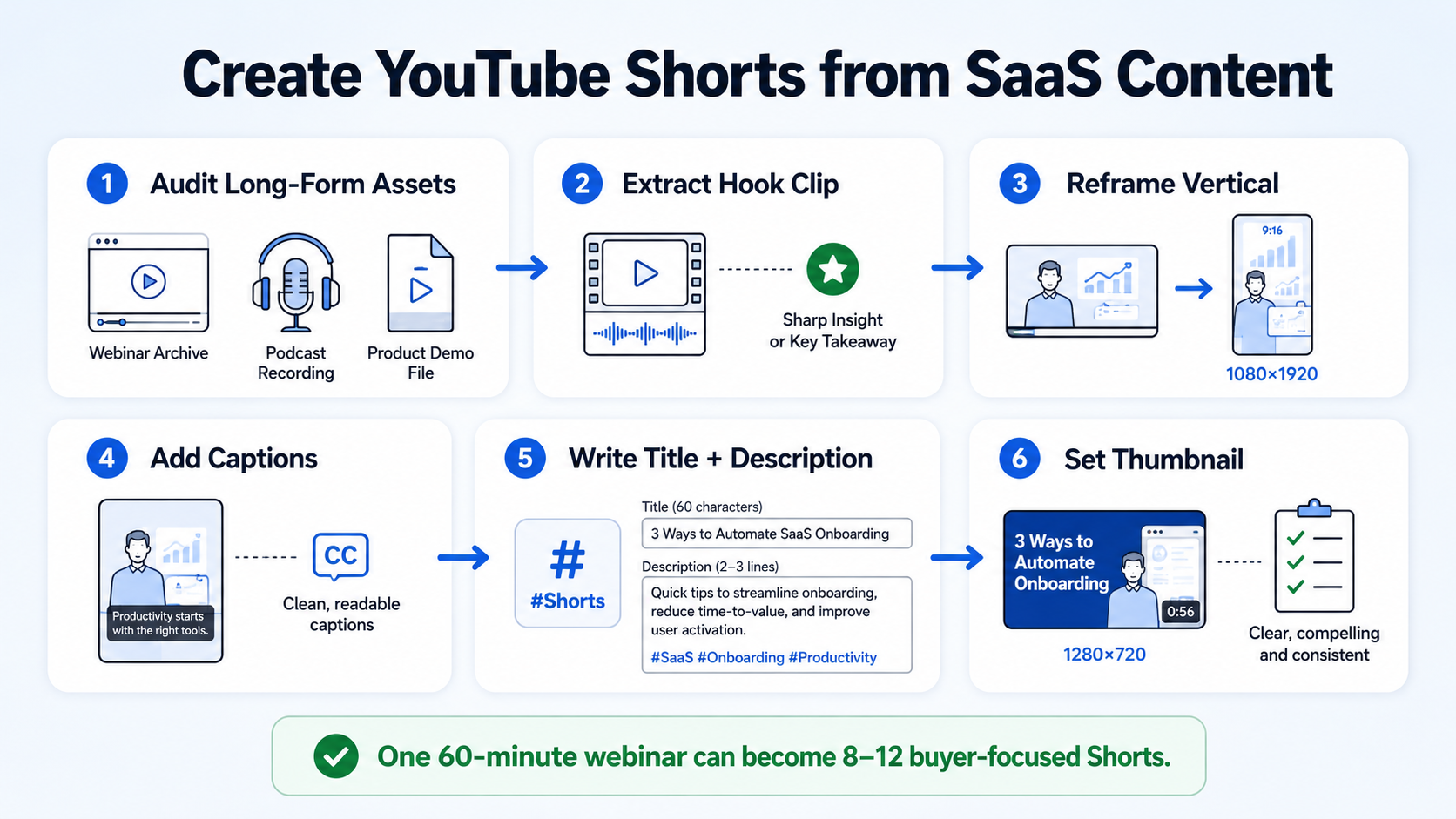
Here is the content repurposing workflow I recommend to every B2B team at Komet Media:
- Audit your long-form inventory: Pull your last 10 webinars, podcasts, and recorded demos. Identify moments where a speaker answers a specific buyer question, demonstrates a clear feature benefit, or makes a strong insight claim.
- Extract the hook clip: Isolate the sharpest 15–30 second moment. This becomes the Short's open, the moment that makes a buyer stop swiping.
- Reframe for vertical format: Crop or reframe to 1080×1920 using your editing software. For screen recordings, use a Picture-in-Picture layout with the speaker's talking head inset over the product UI.
- Add captions: Approximately 85% of mobile YouTube views occur without sound. Captions are not optional for B2B SaaS, they are how your message actually lands.
- Write the title and description: Include your primary keyword phrase and a clear benefit statement. Adding #Shorts to your title or description helps YouTube identify and properly categorize your Short, especially when uploading from desktop.
- Set the thumbnail: The recommended Short thumbnail size is 1280×720 pixels (16:9 aspect ratio). Thumbnails appear when your Short is viewed outside the Shorts feed, in search results, channel pages, and suggested videos.
By feeding a 60-minute webinar into an AI slicing platform, you can instantly generate a month of content. That is the compounding advantage of a proper content repurposing workflow. One event recording becomes 8–12 Shorts, each targeting a different buyer question at a different funnel stage.
Best Practices for YouTube Shorts in B2B Marketing: What Actually Drives Pipeline
Getting the YouTube Shorts video format and spec guide for B2B SaaS right is the floor. What separates teams that generate pipeline from those that just post is the strategic layer on top of it. 80% of B2B buyers prefer video demos over text in 2026. The buyer behaviour is there. The question is whether your Shorts are structured to meet buyers at their decision stage.
These are the practices that move the needle for B2B SaaS teams:
- Lead with the buyer's problem, not your product name. For B2B SaaS, the hook must be ICP-specific. Strong creative execution starts with role-specific pain points rather than generic brand messaging.
- One Short, one idea. A 90-second clip that answers "How do I reduce churn in the first 30 days?" outperforms a product overview that tries to cover five features.
- Use captions and subtitles every time. The key is adapting your content for mobile-first viewing. Focus on single concepts that can be explained under 60 seconds, and making sure those concepts are readable without audio.
- Build a Shorts series. The strategy of building authority works because when viewers learn valuable skills from your content, they associate your brand with expertise, and that increases the chances they'll choose your product when they're ready to purchase.
- Link your Shorts to a conversion path. Pin a comment linking to a demo, a video editing services page, or a relevant resource. The Short earns the attention. The link captures the intent.
YouTube Shorts now generate over 70 billion daily views. The distribution is already there. B2B teams that show up with well-formatted, buyer-specific content win attention that their competitors are leaving on the table.
Biggest Mistakes B2B SaaS Companies Make on YouTube Shorts
Most B2B teams that fail on Shorts make the same set of errors. Here is what to avoid: Wrong specs kill reach before the content gets a chance. A well-optimized Short can instantly grab attention and rank better in recommendations, but if your video is incorrectly formatted, it may not perform as expected or may even appear as a regular video instead of a Short.
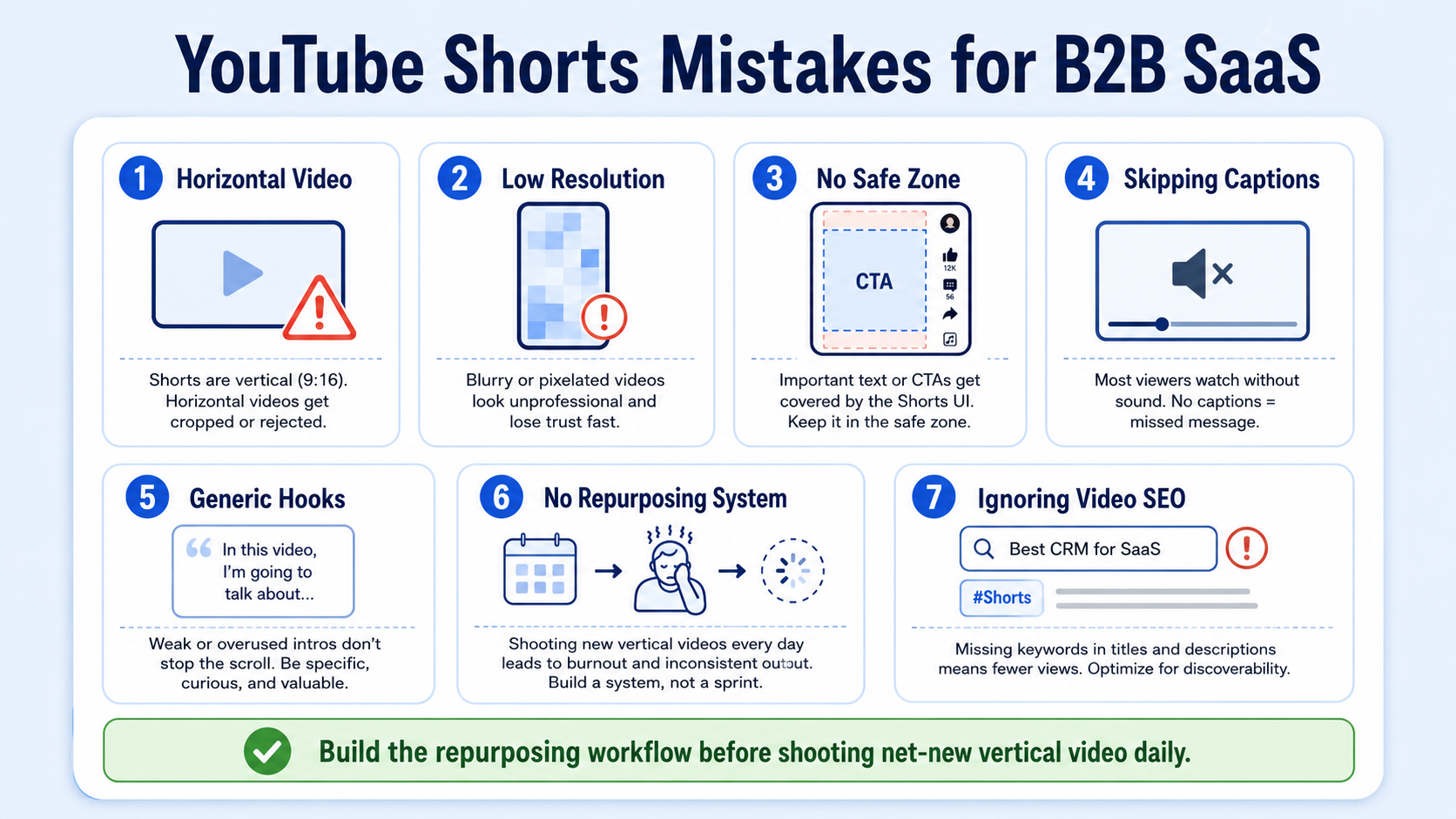
The most common mistakes, in order of frequency:
- Horizontal video: Uploading a 16:9 recording from a Loom or Zoom without reformatting it to 9:16. Neither 16:9 nor 4:3 is suitable for YouTube Shorts. It will not qualify for the Shorts shelf.
- Low resolution at correct ratio: Some creators use 9:16 aspect ratio but with a resolution like 720×1280 or lower. While this technically works, it looks pixelated and unprofessional on modern phones.
- No safe zone awareness: Perfectly good creative is failing simply because the Call-to-Action is hidden behind the Like button. Place all key text and CTAs in the center 80% of the frame.
- Skipping captions: For a B2B buyer watching a demo on mute in an open-plan office, no captions means no message received.
- Generic hooks: Opening a Short with "Hi, I'm [name] from [company]" is the fastest way to get swiped. Open with the buyer's pain point or a provocative insight.
- No content repurposing system: Teams that try to shoot net-new vertical video daily burn out fast. Shooting net-new vertical video every day exhausts marketing teams. Build the repurposing workflow first.
- Ignoring video SEO: Keyword-rich titles, descriptions, and the #Shorts tag are how buyers in-search find your content outside the feed.
Conclusion
The YouTube Shorts video format and spec guide for B2B SaaS comes down to three layers: get the technical specs right, build a repurposing workflow that scales, and structure every Short around a specific buyer problem. Miss any layer and your content underperforms regardless of quality.
Key takeaways:
- Resolution: 1080×1920 px, 9:16 aspect ratio, always.
- Format: MP4 + H.264 + AAC, exported at 10–15 Mbps.
- Length: Up to 3 minutes; 60–90 seconds is the B2B SaaS sweet spot for demos and explainers.
- Workflow: Repurpose webinars, podcasts, and demos first, build new content second.
- Structure: Hook with the buyer's problem, deliver one clear insight, end with a next step.
Ready to build a Shorts pipeline that actually generates demand? See how Komet Media builds short-form video systems for B2B teams.
Frequently Asked Questions
Q1: What is the correct aspect ratio for YouTube Shorts in 2026?
The 9:16 YouTube Shorts aspect ratio is the gold standard for vertical video content, it offers the best viewing experience on mobile, delivering a full-screen display without any black bars. Any other ratio risks misclassification or poor display on the Shorts feed.
Q2: Does YouTube Shorts require a specific file format?
The best video format for YouTube Shorts remains MP4, primarily due to its superior compression efficiency and broad compatibility. MP4 using the H.264 video codec and AAC audio codec strikes an optimal balance between high-quality output and manageable file sizes.
Q3: How long can a YouTube Short be in 2026?
YouTube Shorts can be up to 3 minutes (180 seconds) long as of 2026, expanded from 60 seconds in October 2024. Any vertical video uploaded to YouTube that is 3 minutes or shorter automatically qualifies as a Short.
Q4: What resolution should B2B SaaS teams use for YouTube Shorts?
The standard YouTube Shorts dimensions are 1080 pixels wide by 1920 pixels tall, Full HD in portrait orientation. While YouTube technically supports resolutions up to 4K, 1080×1920 is the sweet spot that balances quality and file size for mobile viewers.
Q5: How do SaaS companies repurpose existing content for YouTube Shorts?
A sustainable YouTube Shorts content strategy for SaaS relies entirely on repurposing. Using AI tools to slice webinar clips is the core method for scaling short-form video content, feeding a 60-minute webinar into a platform can instantly generate a month of content. Demos, podcasts, and founder interviews all work the same way.
Q6: Why do B2B Shorts need captions?
Approximately 85% of mobile YouTube views occur without sound. For B2B SaaS buyers watching in offices, commuting, or in meetings, captions are the primary way your message is received. Without them, your product's value proposition never registers, regardless of how good the visuals are.

