
How Video Editing Turnaround Times Work: Step-by-Step Guide
If you're a founder, marketing lead, or growth team trying to build a consistent video pipeline, understanding video editing turnaround time isn't optional, it's operational. Miss it, and your content calendar breaks, your social media scheduling slips, and your buyers don't hear from you. This guide cuts through the vague promises and gives you real benchmarks, the production stages that drive delays, and the practical systems that keep delivery predictable. Whether you're repurposing a webinar or shipping weekly YouTube Shorts, this is what you need to know.
TL;DR
- Video editing turnaround time ranges from 24–48 hours for simple social edits to 5–10+ days for complex productions.
- The revision cycle is the single biggest unplanned delay, budget for it explicitly.
- Provider type (freelancer vs. agency) matters more than editor skill for consistency.
- Short-form B2B content (Instagram Reels, TikTok, YouTube Shorts) should target a 1–3 business day turnaround.
What Is a Typical Video Editing Turnaround Time?
There are two distinct timeframes to understand: editing time (what the editor actually spends working) and turnaround time (how soon you get your result back). Editing time covers everything from reviewing raw footage to rendering the final product. Turnaround time depends on factors like editor availability, file transfer times, and your own accessibility. If you're outsourcing, turnaround time starts when you submit footage and ends when you receive the first draft.
In practice, video editing turnaround time is generally 12 hours to one week, agreed upon during initial client discussion. But that wide range is actually the problem, without a clear reference point, you can't plan a content calendar or set buyer expectations.
Here's a realistic benchmark by format:
Note the disconnect between video length and editing time: a 2-minute commercial can take longer to edit than a 60-minute podcast because of the density of work per second. Commercials require frame-perfect cuts, color grading, VFX, sound design, and multiple format deliverables. The question to ask your agency or editor isn't "how fast can you deliver once?" It's "how consistently do you hit deadlines over six months?"
How Long Does Video Editing Actually Take by Format?
The honest answer is: on average, expect 30–60 minutes of editing work for each finished minute of video content.
That ratio shifts significantly by format:
- YouTube videos take 45–60 minutes per finished minute to edit , making a 10-minute video a 7–10 hour project.
- A 5-minute video takes about 3–5 hours to edit, and many services deliver a first draft within 48 hours for this length.
- A 3–5 minute wedding highlight video takes 15–20 hours to edit on average.
- A typical product or explainer video takes 4–8 hours, depending on whether you need basic cuts or extras like text overlays and background music.
For B2B teams specifically, the content types that matter most, founder clips, webinar snippets, demo highlights, podcast audiograms, fall in the 1–5 hour editing time range. The challenge isn't the editing itself. It's the post-production workflow around it: footage ingestion, asset management, revision cycles, and export specifications for each platform. Those are the invisible hours that bloat your video editing turnaround time.
Editor experience also plays a direct role. A seasoned editor masters workflows, shortcuts, and problem-solving; a beginner might take twice as long for the same result. Skill level doesn't just affect quality, it directly impacts turnaround time. For short-form YouTube Shorts, TikTok content strategy, and Instagram Reels, the edit itself is fast. The real variable is how organized your input is.
What Actually Affects Video Editing Turnaround Time?
Seven factors consistently determine whether a video ships on time or sits in a queue:
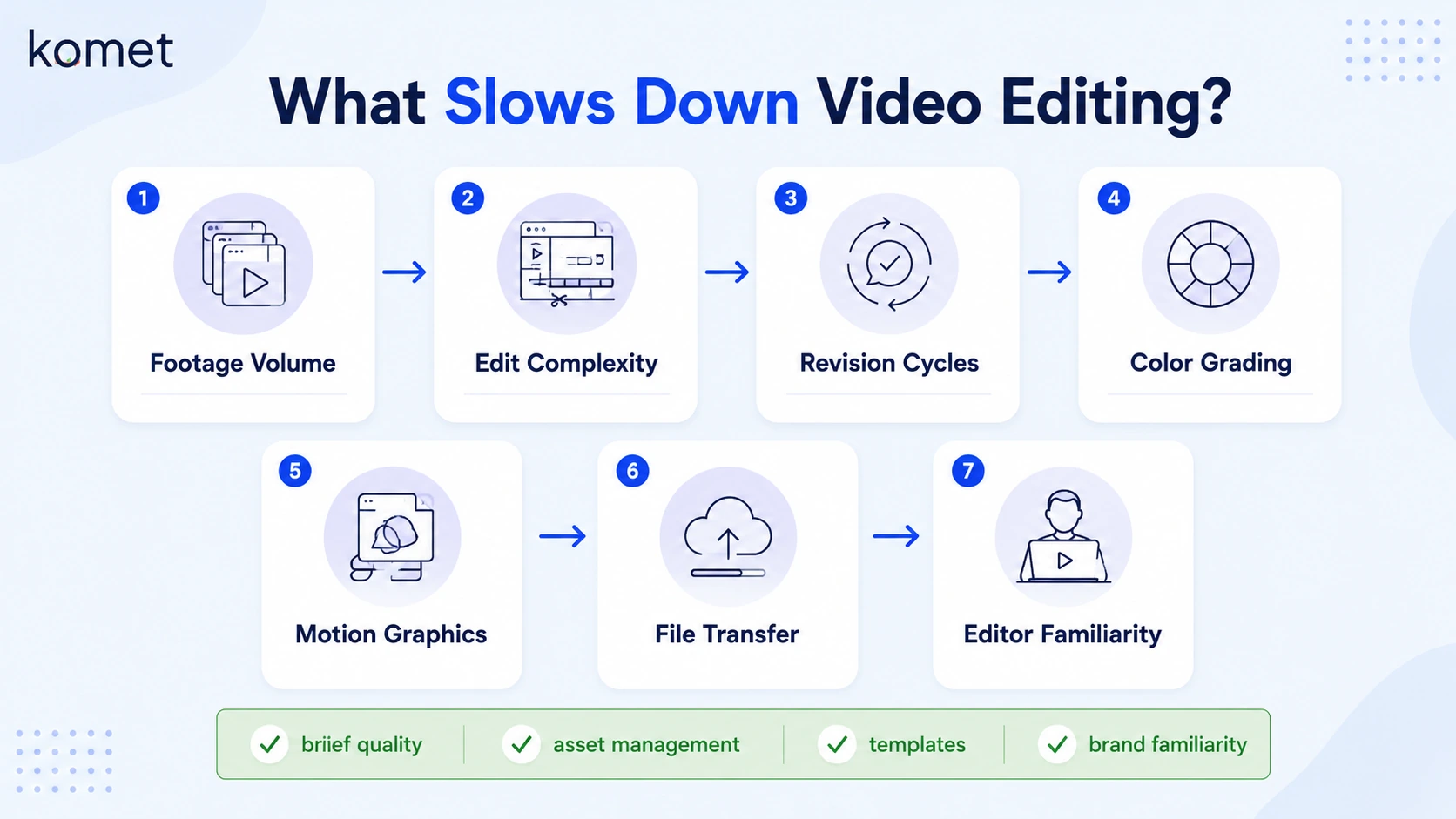
- Footage volume: Turnaround time extends significantly when footage for a request is 5 or more times longer than the final edit, or when footage consists of many different files and unselected shots.
- Edit complexity: Requests that need custom animations, extensive post-production from log-format cameras, advanced VFX, heavy SFX, or 3D animation all extend delivery time significantly.
- Revision cycles: Revisions are one of the most underestimated time factors. A project with zero revision rounds might be delivered in a week, while one with endless back-and-forth could drag on for months.
- Color grading requirements: Color profiles can look stunning in the end, but require additional color grading steps, and in tools like DaVinci Resolve, color grading is always performed after picture lock, never before.
- Motion graphics rendering: Complex motion graphics rendering in Adobe Premiere Pro or After Effects adds render time on top of editing time, sometimes hours for heavily layered timelines.
- File transfer protocol: High-end camera files are larger, and larger files take much longer to transfer and render. Even high-performance file transfer services slow down when file sizes are extreme.
- Editor familiarity: An editor who doesn't need to re-learn your brand style each time translates directly to speed. When your editor has cut 50 of your videos, they can produce a first draft in half the time a new editor would need.
Brands that implement comprehensive pre-production processes, content briefs, storyboarding, shot lists, and style guides, report a 42% improvement in turnaround times, while organized footage management can reduce editing time by 30–50%.
Why Is Your Video Editor Taking So Long to Deliver?
The most common complaint from B2B marketing teams and founders: the editor promised three days and it's been eight. Here's what's actually happening:
The gap between "promised" and "actual" turnaround time is a systemic problem. Budget providers frequently miss deadlines because they're juggling too many clients with too few editors. A freelancer promising a 3-day turnaround who's also working on five other projects is structurally set up for failure.
The freelancer reliability problem is real. Freelancers get sick, take vacations, have personal emergencies, and take on too many projects when business is good. When any of that happens, your project gets delayed with zero backup plan.
Beyond provider reliability, delays are usually caused by:
- Incomplete footage briefs: When the editor has to guess what you want, they either ask for clarification (adding days) or guess wrong (triggering revision rounds).
- Late client feedback: Projects stall when editors are waiting for missing information, broken links, missing files, or incomplete branding guides.
- Scope creep mid-edit: Adding a new end card, requesting a format change for Instagram Reels, or asking for a TikTok cut after the YouTube version is finished resets part of the editorial timeline.
- Render and export specifications mismatches: The export stage is often rushed or treated as an afterthought, but getting delivery wrong can undermine all the creative work that came before it.
The client feedback loop is where most B2B teams lose the most time. Async feedback with no timestamps, conflicting notes from multiple stakeholders, or feedback arriving in separate emails across three days, all of this collapses into a content delivery pipeline that's slower than it needs to be.
Video Editing Turnaround Time for YouTube, Reels, and Short-Form Content
Platform matters. Your video editing turnaround time should be calibrated to each channel's content velocity: TikTok and Instagram Reels emphasize quick, trend-based content, with average turnaround rates of 24–48 hours for professionally edited videos that remain culturally relevant. YouTube requires more detailed editing with complex graphics, typically extending turnaround to 3–7 days for 10–15 minute videos. LinkedIn professional content with thoughtful graphical elements averages 2–4 day turnarounds.
For a B2B content repurposing strategy, a single long-form asset, a 45-minute webinar or podcast episode, can feed multiple clips across channels with very different turnaround requirements:
Short-form video under 60 seconds drives 2.5x more engagement per impression than other formats, with completion rate as the primary algorithmic signal. That means your video editing turnaround time for short clips is effectively a pipeline metric, slow delivery means missed algorithm windows, not just delayed content.
At Komet Media, we build repurposing systems specifically for B2B teams who need to hit this kind of cadence without building an in-house post-production team.
How to Set Realistic Video Editing Deadlines with Clients
Every missed deadline was preventable. Most of them trace back to one root cause: the deadline was set before anyone understood the scope. Here's how to structure it properly:
- Define the deliverable in writing before quoting a timeline. Format, length, platform, number of clips, motion graphics requirements, and revision rounds, all of these must be specified before a video editing turnaround time is promised.
- Build the revision cycle into the original timeline. After the client reviews the first cut and provides feedback, there are typically 1–2 revisions before the final cut is completed. Each revision should have its own agreed deadline.
- Set a footage submission deadline. Editing should begin only after all assets are submitted. Clients who submit footage in batches across three days don't get to count turnaround time from the first batch.
- Agree on a single feedback channel. Cloud-based collaboration tools with timestamped comments (Frame.io, Vimeo Review) eliminate the async chaos of email feedback.
- Specify export specifications upfront. Each platform has distinct technical requirements: YouTube needs H.264/H.265 at 1920×1080 or 4K; Instagram Reels and TikTok require H.264 in 9:16 vertical at 1080×1920. Discovering this after delivery adds a full export round.
- Document rush fees in writing. Premium-tier freelancers can bring turnaround down to 1–3 business days, and 68% offer expedited services at a 25–50% premium for 24–48 hour delivery.
For teams that need to run a content delivery pipeline at scale, weekly clips from podcasts, webinars, or founder recordings, the answer isn't faster editors. It's a documented system with standard asset management, pre-approved templates, and a clear client feedback loop so each project doesn't restart from zero.
How to Speed Up Video Editing Turnaround Without Losing Quality
Speed and quality aren't in conflict, disorganization is. These are the highest-leverage moves:
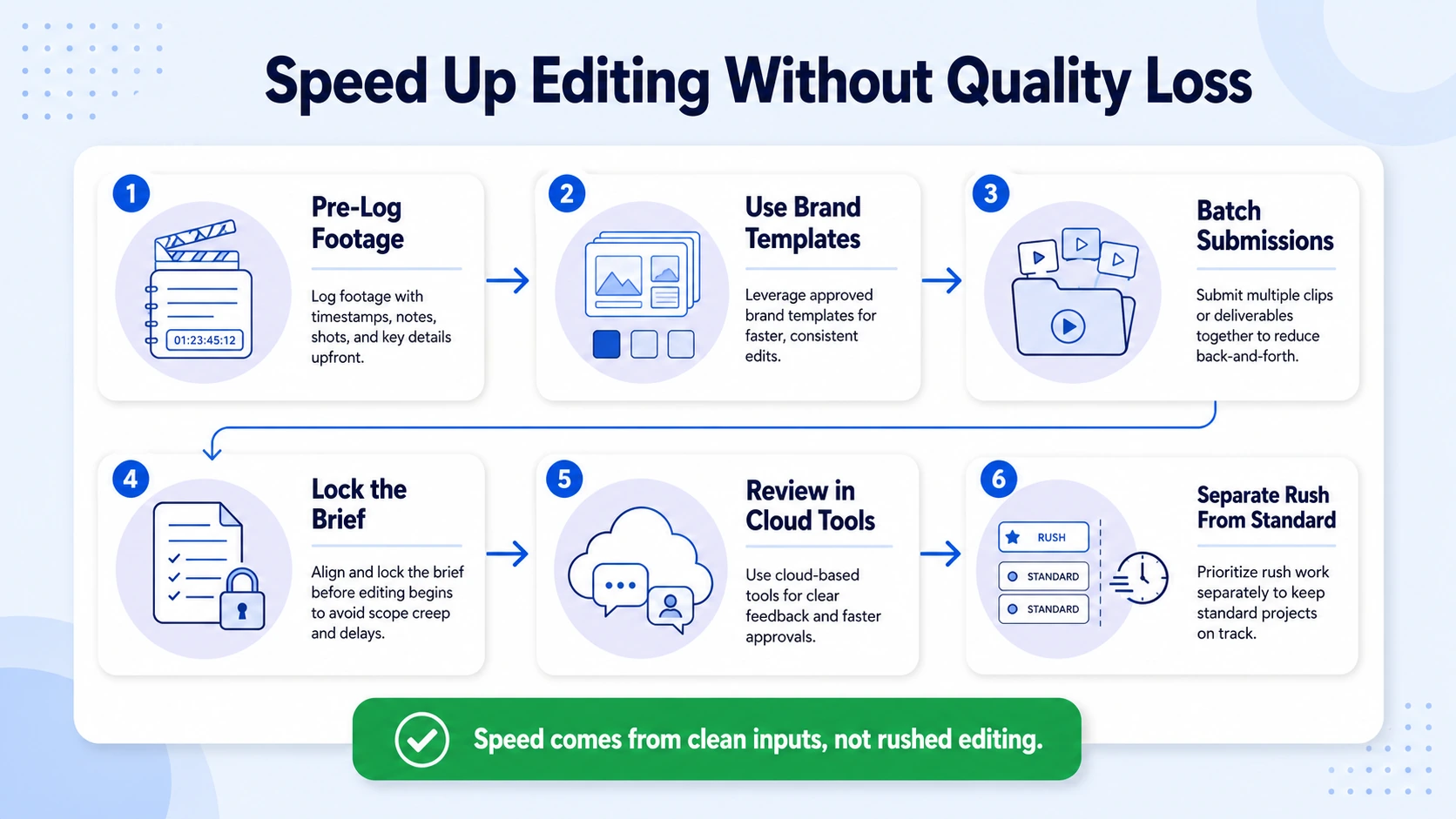
- Submit pre-logged footage. Adding timestamps to longer footage that needs to be cut accordingly is one of the fastest ways to reduce editing time. A 30-minute podcast with timestamp notes like "2:14 – key insight on pricing" cuts footage ingestion time in half.
- Use brand templates. Templates for intros, transitions, or lower-thirds drastically reduce editing time. Instead of designing from scratch, editors tweak pre-built assets to match the brand. In Adobe Premiere Pro or DaVinci Resolve, shared project templates with pre-built motion graphics and color grades are a force multiplier.
- Batch your content submissions. Sending five clips at once with a shared brief is more efficient than sending one clip at a time. The editor context-switches once, not five times.
- Lock your brief before submission. As a client, you have the power to make edits less time-consuming for the editor, thereby achieving quicker turnaround times and increasing the chances of getting multiple edits per day.
- Use cloud-based collaboration for review. Async video review platforms eliminate the round-trip of email, download, watch, reply. Frame rate optimization and export specifications can also be verified in the cloud before final download.
- Separate urgent from standard content. Trend-sensitive content requires faster turnarounds (24–48 hours), while cornerstone brand content justifies longer cycles (5–7 days). Running them through the same queue is a false economy.
At Komet Media, our short-form video editing system for B2B SaaS and funded tech teams is built around these exact inputs: pre-logged footage, brand-locked templates, and a structured brief that removes ambiguity before editing starts. The result is a content repurposing strategy that ships consistently without the back-and-forth that kills most teams' pipelines.
Conclusion
Video editing turnaround time is a systems problem, not a speed problem. The teams that ship consistently aren't the ones with the fastest editors, they're the ones with the clearest inputs, documented revision cycles, and a production workflow built for repeatability.
Key takeaways:
- Short-form clips (30–60s) should target 24–48 hours; YouTube and long-form content should target 3–7 business days.
- Revision cycles and incomplete briefs are the two biggest turnaround killers, solve them before production starts.
- Agency depth beats freelancer speed for teams that need consistent weekly video output.
- Pre-logged footage, brand templates, and cloud-based collaboration remove the most common bottlenecks.
If your team needs a reliable video editing and content repurposing system, Komet Media builds exactly that for B2B SaaS teams. Learn more about our services or get in touch.
Frequently Asked Questions
Q1: What is a good video editing turnaround time for B2B social media content?
For short-form B2B clips (30–60 seconds) targeting Instagram Reels, TikTok, and YouTube Shorts, a good target is 24–48 hours per clip from footage submission. For batches of 5–10 clips repurposed from a single webinar or podcast, budget 5–7 business days.
Q2: How long does it take to edit a 10-minute YouTube video?
At 45–60 minutes of editing per finished minute, a 10-minute YouTube video typically requires 7–10 hours of editing time. Add file transfer, review, and one revision round, and a realistic turnaround time from a professional editor is 3–5 business days.
Q3: Why does my video editor keep missing deadlines?
Budget providers frequently miss deadlines because they're juggling too many clients with too few editors. A freelancer promising 3-day turnaround who's also working on five other projects is set up for failure. The fix is working with an agency that has team depth and a project manager tracking every deadline.
Q4: Does adding motion graphics significantly increase turnaround time?
Yes. Basic text overlays add minimal time. Custom motion graphics rendering, animated lower-thirds, logo reveals, or branded transitions built in After Effects, can add 2–6 hours per video depending on complexity. Pre-built brand templates eliminate most of this overhead on recurring projects.
Q5: What's the average turnaround time for wedding video editing?
A 3–5 minute wedding highlight video takes 15–20 hours to edit, and a complete package including ceremony and reception footage can take 25–30 hours. Most wedding videographers deliver finals within 2–8 weeks, depending on their queue depth and revision process.
Q6: How do I speed up video editing turnaround without sacrificing quality?
Submit pre-logged footage with timestamps, use a single cloud-based feedback tool with timestamped comments, and agree on export specifications before editing begins. Brands that implement structured pre-production processes report a 42% improvement in turnaround times, while organized footage management can reduce editing time by 30–50%.

