
A Repurposing Workflow for Podcasts and Webinars: Step-by-Step Guide
Most B2B teams record a podcast or webinar, publish it once, and move on. That's a pipeline problem. A structured repurposing workflow for podcasts and webinars turns a single 45-minute session into weeks of buyer-facing content: short videos, blog posts, email sequences, audiograms, and sales assets. This guide shows you exactly how to build that system, which tools to use, and how to get consistent output without burning out your team or starting from scratch every week.
TL;DR
- Every podcast or webinar contains 10+ distinct content assets waiting to be extracted.
- Transcription is the foundation, everything else builds from it.
- Descript, Repurpose.io, and Riverside.fm are the core tools for a lean B2B repurposing stack.
- Distribute across channels using a scheduled system, not ad hoc publishing.
What Content Can You Actually Create from a Single Podcast Episode?
Before building the workflow, you need to see the full content lifecycle of one episode. Most teams only capture 10% of what's available. A single 30-minute episode contains enough content for 15 LinkedIn posts, 3 blog articles, 5 email sequences, and 10 sales enablement assets. Yet most teams publish once and move on, leaving 90% of the content value untapped.
Here's the full asset inventory from one episode or webinar recording:
- Short-form video clips (60–90 sec): Pull 5–8 punchy moments with captions for LinkedIn, YouTube Shorts, and Instagram Reels
- Audiogram: A waveform-animated quote card with audio, ideal for Twitter/X and LinkedIn
- Full transcript: The raw text that feeds every written asset downstream
- Blog post or article: Not a transcript dump, a rewritten, standalone piece with SEO intent
- Show notes: A structured summary with timestamps, guest bios, and links for your RSS feed and podcast page
- Email newsletter segment: A "best of" summary with a call to action to the full episode
- LinkedIn carousel: 6–10 slides pulling key frameworks or data points from the conversation
- Sales one-pager: A formatted brief for your reps to reference during active deals
- Social quote graphics: Static Canva cards featuring one strong line per post
- Webinar replay page: SEO-optimised landing page with the recording embedded, transcript below, and a CTA
Studies show that smart repurposing can boost your audience reach by up to 75%, which for a B2B SaaS team means more eyeballs on your product thinking without producing a single net-new piece of content. The output above isn't aspirational, it's a checklist. Run every recording through this list and you'll never leave value on the table.
Step-by-Step: A Repurposing Workflow for Podcasts and Webinars (Recording to Distribution)
This is the core of a repurposing workflow for podcasts and webinars, a repeatable production sequence your team can run in parallel.
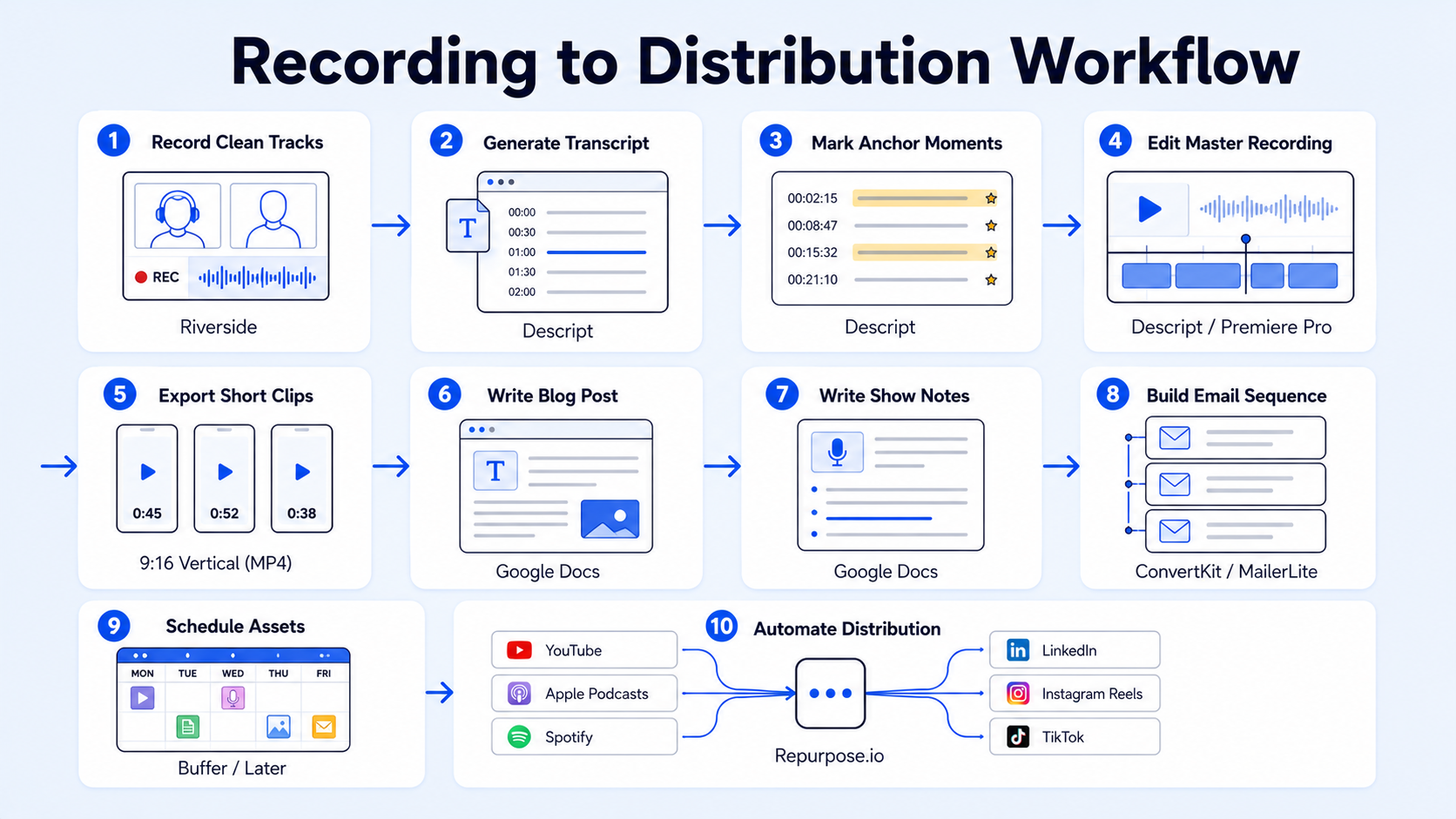
- Record with repurposing in mind: Use Riverside.fm or a similar platform that records separate audio/video tracks per speaker at high resolution. Riverside also generates a raw transcript automatically at the point of recording, which cuts a step later.
- Generate the master transcript: Import the recording into Descript. If your raw material is podcasts, webinars, or interviews, text-based editing is a major advantage, you edit by editing the transcript, which makes it significantly faster to identify the best moments for clipping.
- Identify your anchor moments: Read through the transcript and mark 5–8 segments that stand alone as insights, strong opinions, or clear explanations. These become your short-form video clips and social quotes.
- Edit the master recording: Clean the full episode in Descript, remove filler words, tighten pacing, export a polished version for the podcast feed and webinar replay page.
- Export short clips: From the marked segments, export vertical (9:16) clips with burnt-in captions for LinkedIn, Reels, and YouTube Shorts. Use your brand template in Descript or your short-form video editing workflow to keep captions and branding consistent.
- Write the blog post: Pull the transcript into your writing tool. Reframe the conversation as a standalone article, add an intro and conclusion, and target a keyword your buyers are actively searching.
- Write show notes: Use the transcript to generate timestamped show notes. These go on your podcast page and RSS feed via Anchor FM or your hosting platform.
- Build the email sequence: Clip 2–3 strong takeaways from the transcript and write a 3-email nurture sequence: Episode summary → Key insight deep dive → CTA to book a demo or download a resource.
- Schedule and distribute: Load all assets into Buffer or Hootsuite on a content calendar spread across 3–4 weeks. One recording should fill an entire month of social content.
- Automate recurring distribution: Connect Repurpose.io to your podcast RSS feed so new episodes automatically push clips to YouTube Shorts, Instagram Reels, and other channels without manual intervention.
Best Tools for a Repurposing Workflow for Podcasts and Webinars
The right tool stack removes friction from each stage. Here's how the core tools map to specific jobs:
Choose Repurpose.io if your content is already finished and you mainly need automated publishing. Choose Descript if your team wants editing control first and repurposing second. Repurpose.io is especially strong for recurring content like weekly webinars or podcast episodes where you can reuse the same clip length and caption style. Set it up once and it runs automatically for every episode that hits your RSS feed.
The mistake teams make most often is stacking tools before the workflow exists, buying a clipper, a scheduler, a transcript tool, and a writing assistant, then still posting inconsistently because the system isn't clear. Build the workflow first. Add tools only to remove a specific bottleneck.
Rule of thumb: If distribution is the bottleneck, Repurpose.io. If editing is the bottleneck, Descript. If design is the bottleneck, Canva. One problem, one tool. For teams that want this fully managed, Komet Media's podcast production and repurposing services handle the entire stack from recording to distribution-ready assets.
How to Turn a Webinar Recording into Blog Posts, Email, and Short Videos
Webinars carry extra weight in B2B because they're already buyer-intent content. The average cost per lead from webinars is around $72, versus more than $800 per lead at trade shows, and 51% of content marketers say webinars produced the best marketing results in the last year. That ROI compounds further when you repurpose the recording aggressively. Here's how to run a repurposing workflow for podcasts and webinars that's specific to the webinar format:
Blog post from webinar: Treat the webinar as a primary source. Pull the three strongest frameworks or arguments from the transcript. Structure them as H2 sections in a 1,200–1,500 word post. Add an intro, a conclusion, and internal links. Don't summarise the webinar, create a standalone resource that earns search traffic independently.
Email sequence from webinar:
- Email 1 (Day 1): "Here's the recording + one idea we didn't have time to expand on"
- Email 2 (Day 3): One actionable framework from the session, explained in 200 words
- Email 3 (Day 7): Soft CTA, link to a related resource, a demo booking page, or a relevant webinar
Short-form video from webinar: Identify moments where the presenter gave a sharp, self-contained answer to a question. These need no external context to land. Clip them at 60–90 seconds, add captions, export vertically for Reels and YouTube Shorts. After you record the full conversation, turn it into distribution-ready assets like short vertical videos and audiograms for YouTube Shorts, LinkedIn, Instagram Reels, TikTok, and other channels where your audience scrolls.
Webinar replay page: Host the recording on a dedicated page with an SEO-optimised title, full transcript below the embed, chapter timestamps, and a CTA. This page builds organic traffic long after the live event ends and becomes a permanent evergreen content asset in your library.
How to Build a Content Repurposing System That Runs Every Week
A one-off repurpose is a tactic. A system is what creates compounding visibility and supports founder-led growth at scale. Here's how to operationalise a repurposing workflow for podcasts and webinars as a weekly engine:
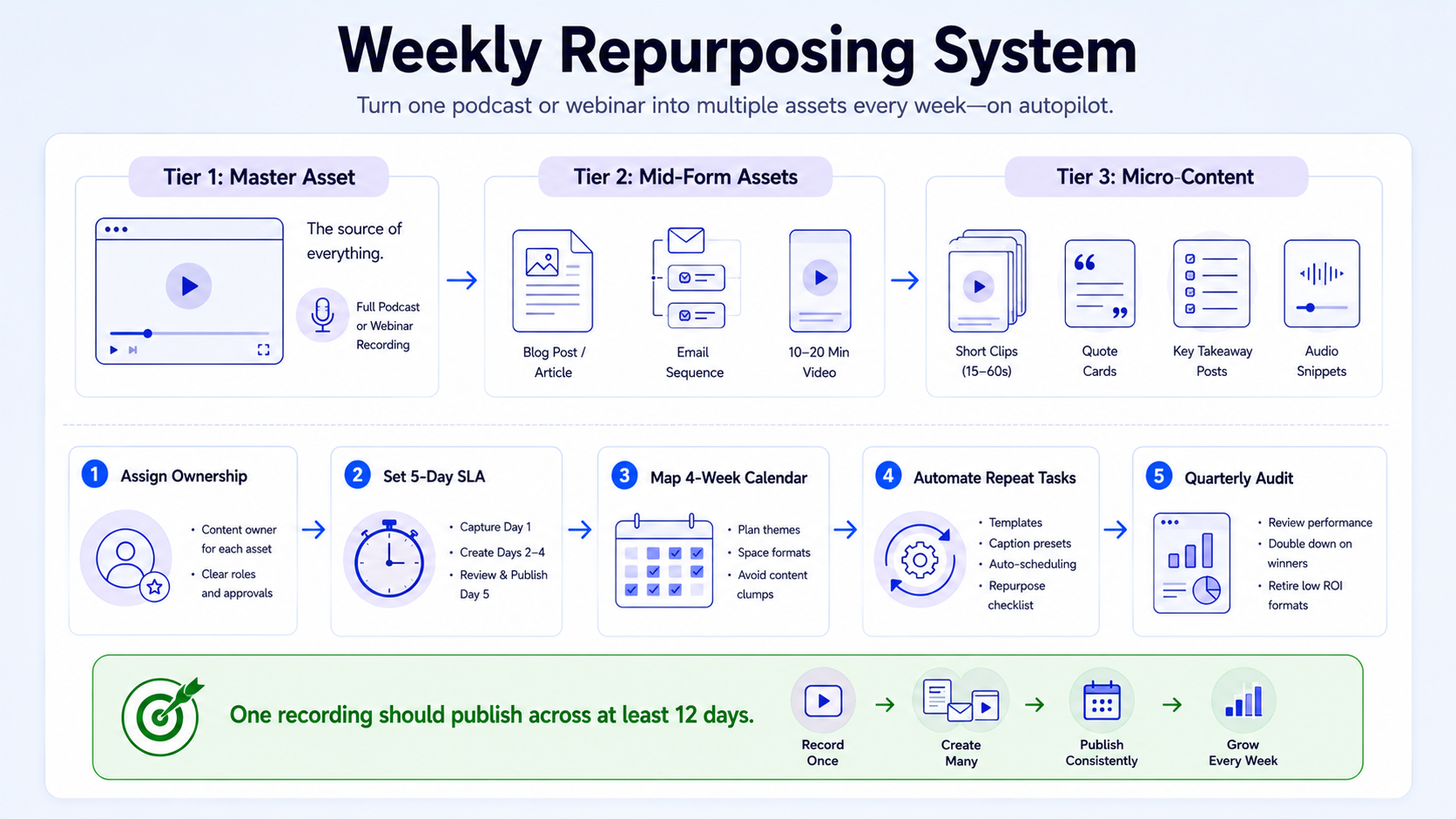
Define your content tiers:
- Tier 1 (Master asset): The full podcast episode or webinar recording
- Tier 2 (Mid-form): Blog post, show notes, email sequence
- Tier 3 (Micro-content): Short-form clips, audiograms, quote cards, carousel slides
Assign ownership: One person owns the transcript and written assets. One person (or an agency) owns the video editing and clip production. Distribution is scheduled, not spontaneous.
Set a production SLA: Aim for all Tier 2 and Tier 3 assets to be ready within 5 business days of recording. This keeps the content pipeline full even when recording cadence slows.
Use a content calendar template: Map every asset type to a publish date across 4 weeks. One episode should generate content published on at least 12 separate days across LinkedIn, email, YouTube Shorts, and your blog.
Automate the repeatable parts: Connect Repurpose.io to your RSS feed. Set up Buffer queues for each channel. Repurpose.io is popular because it helps you auto-clip, auto-caption, and publish to multiple channels, if you want a "hands-off" workflow, it's often the go-to.
Audit quarterly: Every three months, check which repurposed assets drove the most traffic, demo requests, or pipeline. Double down on the formats that work, cut the ones that don't.
Teams that run this system consistently see their content lifecycle extend from a single publish day to 4–6 weeks of active distribution per recording, without recording anything new.
Distributing Repurposed Assets: Channels, Cadence, and Social Media Automation
Production without distribution is invisible. The final stage of a repurposing workflow for podcasts and webinars is a channel-specific distribution plan with social media automation baked in.
Channel breakdown by asset type:
Cadence by channel:
- LinkedIn: 3–4 posts per week drawing from one recording
- Email: 1 per week (alternating between episode summary and deep-dive format)
- YouTube Shorts: 2–3 clips per week, spaced 2 days apart
- Blog: 1 post per episode, published within 7 days of recording
Automation setup: Use Buffer or Hootsuite to pre-schedule everything at the start of each week. Connect Repurpose.io to push clips automatically as each new episode publishes to your RSS feed via Anchor FM. This removes the manual step that kills most repurposing systems. Repurposing turns audience attention into a compounding multi-channel content advantage, every episode generates SEO assets that build over time, social content that drives discovery, and email material that nurtures the existing pipeline.
For B2B SaaS teams specifically, the distribution layer is where the pipeline gets built. Short clips from a product demo webinar posted to LinkedIn educate buyers passively. Clips from a founder podcast interview build trust before a discovery call even happens. The content does the selling while your team focuses on closing.
If your team needs the video editing services and clip production handled end-to-end, that's exactly the type of system we build at Komet Media.
Conclusion
A repurposing workflow for podcasts and webinars is the highest-leverage content operation a B2B SaaS team can run in 2026.
- One recording equals 10+ assets, treating every session as a content production event, not a single publish.
- Transcription is the foundation; short-form video and blog posts build from it.
- Tools like Descript, Repurpose.io, and Buffer reduce manual work when the workflow is clear first.
- Consistent distribution across LinkedIn, email, and YouTube Shorts is what converts content into pipeline.
Build the system once, run it every week, and your content works while your sales team sleeps.
Frequently Asked Questions
Q1: How many pieces of content can I realistically get from one podcast episode?
A structured repurposing workflow for podcasts and webinars typically yields 10–15 distinct assets per episode: 5–8 short-form video clips, 1 blog post, 1 email sequence, show notes, 2–3 audiograms, and multiple social quote graphics. The transcript is the source for all of them.
Q2: What's the difference between repurposing a podcast versus a webinar?
Podcasts are usually conversation-led, so the best assets are short clips and quote-driven content. Webinars are more structured and often demo-heavy, making them better for blog posts, email sequences, and replay pages with SEO value. Both benefit from the same core workflow.
Q3: Do I need all the tools mentioned, or can I start with just one?
Start with Descript for editing and transcription. Once your workflow is repeatable, add Repurpose.io to automate distribution. Canva handles any visual assets. Three tools cover 90% of a production-ready repurposing workflow for podcasts and webinars.
Q4: How long does it take to repurpose one episode end-to-end?
With a clear system and dedicated roles, a 45-minute episode should yield all assets within 3–5 business days. Most of that time is editing and writing. Automation handles distribution scheduling. Outsourcing clip production cuts internal time significantly.
Q5: What's the best repurposed format for B2B SaaS pipeline specifically?
Short-form video clips from product demos and founder interviews drive the most pipeline-relevant engagement on LinkedIn. Pair them with an email sequence from the same recording to nurture leads who engage with the content but haven't booked a demo yet.
Q6: How do I know which moments to clip from a long recording?
Look for moments where the speaker gives a single, confident answer to a question that your buyer would Google. If the clip makes sense without watching the rest of the episode, it's a strong candidate. Descript's transcript view makes it easy to scan and mark these segments before you ever touch the timeline.

