
A Podcast-to-Clips Framework for B2B: Step-by-Step Guide
Most B2B teams record a podcast episode, upload it to Spotify, and call it a day. That's leaving a pipeline on the table. A podcast-to-clips framework for B2B turns one recorded conversation into a week of LinkedIn content, sales enablement assets, and demand generation fuel. I've built this system for SaaS founders and growth teams who already have product knowledge on tape, they just don't have a process to extract it. This guide gives you that process, from transcript to published clip, in six repeatable steps.
TL;DR
- One podcast episode can yield 4–7 short clips, an email newsletter, social posts, and sales assets
- The best B2B clips run 45–90 seconds in vertical format with burned-in captions
- LinkedIn is the primary distribution channel, prioritize it first, then layer in YouTube Shorts
- A Podcast-to-Clips Framework for B2B only works when it runs on a repeatable system, not one-off editing
Why B2B Teams Are Turning Podcasts Into Clips (And Why Now)
The business case for this shift is no longer debatable. 53% of weekly podcast listeners are decision-makers in their workplace , and B2B podcasting is booming because decision-makers increasingly use podcasts to research vendors and form opinions before they ever take a sales call. The problem is reach, most episodes never find those decision-makers because they live behind a subscription feed. Short-form clips solve this. Marketers rank short-form video as the number one ROI format for the third consecutive year, and 57% of marketing budgets now include a dedicated short-form line item.
LinkedIn is now B2B's number one video channel, with 8 in 10 teams saying LinkedIn is their primary place to share videos. The math behind a podcast-to-clips framework for B2B is also compelling. Each 30-minute episode contains enough content for 15 LinkedIn posts, 3 blog articles, 5 email sequences, and 10 sales enablement assets.
Yet without strategic syndication across LinkedIn, email sequences, and sales enablement channels, your episodes reach maybe 5% of their potential audience. The average B2B podcast gets 127 downloads per episode, that's the reality when distribution is an afterthought. Clips don't require a bigger production budget. They require a smarter system applied to what you're already recording.
Which Parts of a B2B Podcast Should You Turn Into Clips?
Not every moment in a podcast is clip-worthy. The key is identifying the segments that compress well, create a reaction, and work without the surrounding context. Here's how to spot them.
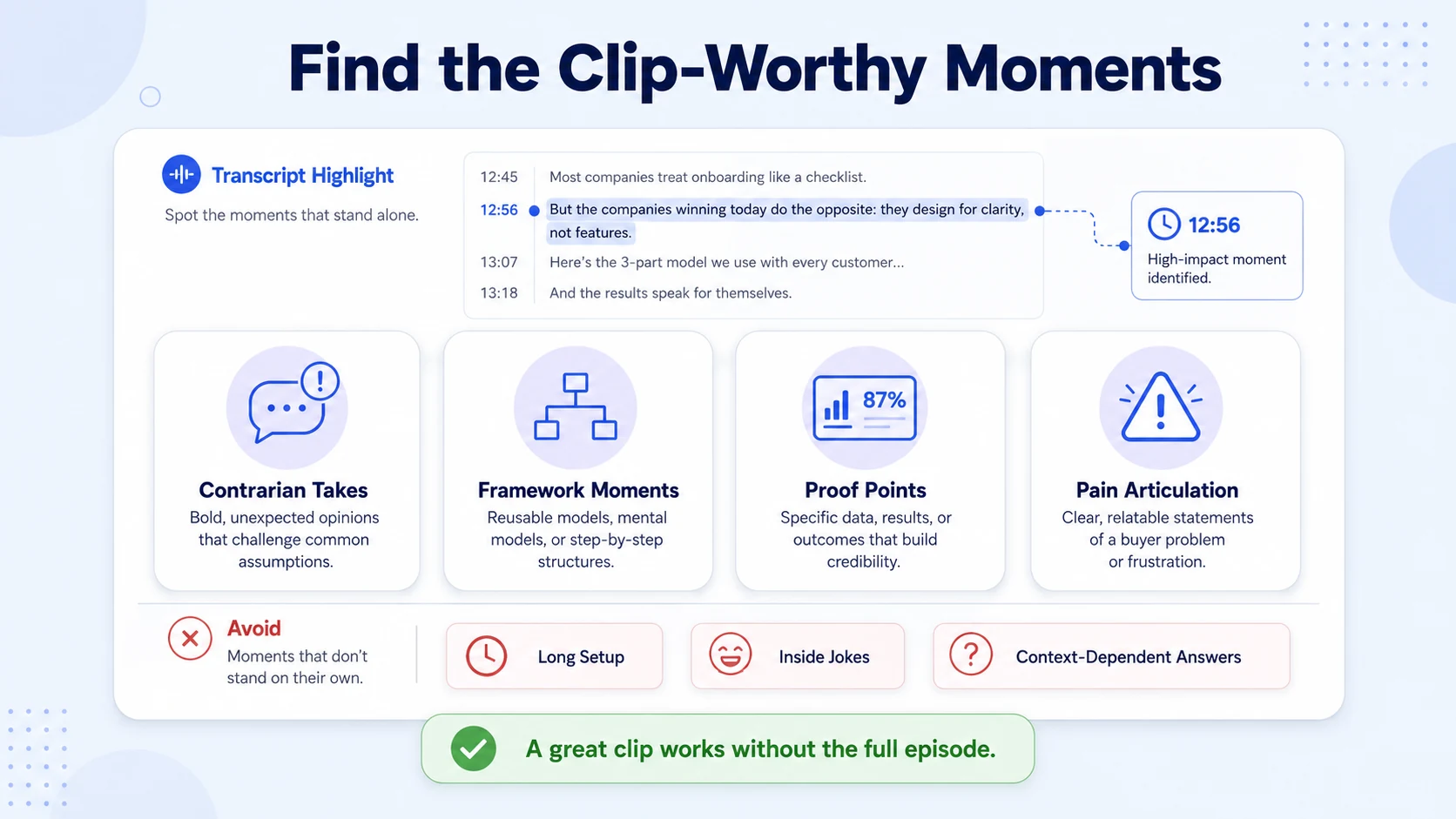
Four clip types that consistently perform in B2B:
- Contrarian takes: A founder or guest challenges a common assumption ("Cold outbound is dead"). These stop the scroll.
- Framework moments: Any time someone names a process or model ("We use a three-step qualification system..."). Buyers save and share these.
- Proof points: Revenue numbers, percentage improvements, or specific deal outcomes, not vague claims. Pull the most buyer-relevant frameworks, statistics, and guest quotes from the transcript and package them for sales.
- Pain articulation: Moments where the speaker names a specific buyer pain so accurately that the ideal prospect thinks "that's exactly my problem."
What to avoid:
- Long setup sequences that take 20+ seconds before the actual insight
- Inside jokes or references only existing customers understand
- Answers that are only meaningful if you heard the question first
Build the episode so it already contains moments designed for the feed, that means structuring your interview questions around insights that stand alone. Ask guests to answer as if someone who never heard of the company is watching. The transcript will tell you where those moments land.
Rule of thumb: If someone can watch a clip with zero prior context and still gain one clear, specific insight, it's a clip. If they need context, it's not. Once you've spotted the moments, tag the timestamps directly in the transcript before editing begins. That timestamped list becomes your production queue for every asset downstream.
The Podcast-to-Clips Framework for B2B: Step-by-Step Workflow
This is the exact process I run for B2B clients at Komet Media. It turns a single recording into a week of content without re-recording anything.
- Transcribe immediately: Run the raw audio through Descript or a similar tool the moment the recording ends. Once you have the transcript, timestamp the moments that stand out, strong claims, data points, guest reactions, and process explanations. These timestamps become your production queue for every downstream asset.
- Tag clip candidates: Mark 8–12 candidate moments in the transcript. You won't use all of them, but a larger pool lets you select by quality rather than quantity.
- Score by funnel stage: Label each candidate as awareness (education, opinion, bold take), consideration (framework, case study, proof point), or sales enablement (objection handling, competitive comparison, product use case).
- Cut the clips: Cut 4–7 short clips (45–90 seconds each). Each clip should make one specific point or share one specific quote. Export in vertical 9:16 format for LinkedIn and Instagram Reels.
- Add captions: Add captions to every clip. 85% of viewers watch videos without sound on social platforms, making captions non-optional for B2B audiences.
- Write the hook text: The caption copy accompanying each LinkedIn post needs its own hook, one sentence that would make a VP of Marketing stop scrolling. This is not a summary of the clip. It is a provocation or a bold claim.
- Schedule the release: Post one clip per day for 4–7 days. This stretches one recording into a week of LinkedIn content without producing anything new.
What Tools Do B2B Marketers Use to Clip Podcasts for LinkedIn?
The right tool stack keeps your cost per clip low and your production speed high. Here's what the workflow looks like in practice:
The minimum tool stack runs on Riverside or Squadcast for recording, Descript for transcription and clip cutting, Canva or Figma for branded templates, and Buffer or Hootsuite for scheduling. Total cost: $50–150/month. For teams that want speed over control, OpusClip handles the initial clip selection automatically. The tool produces 25+ clips per hour of footage with an AI-powered virality score that ranks them by predicted performance. Use AI tools to generate the first pass, then have a human editor refine the top picks for brand voice and B2B context.
Our short-form video editing service at Komet Media runs this exact stack, Riverside in, branded vertical clips out, with a 48-hour turnaround from raw file to publish-ready assets.
How Long Should B2B Podcast Clips Be for LinkedIn and Instagram?
Clip length is one of the most common points of confusion for B2B teams. The answer depends on what the clip is trying to do and where it lives. Videos under 90 seconds retain approximately 50% of viewers on average. 71% of viewers decide within the first few seconds whether a video is worth continuing, which means your hook is more important than your length.
Recommended lengths by platform and purpose:
Videos under 60 seconds have the highest completion rates across all platforms, and 52% of B2B buyers say they prefer concise videos that "get to the point quickly." For LinkedIn specifically, the vertical video format (9:16) is now the standard. 97% of LinkedIn videos are vertical, and 78% are shot with a smartphone rather than professional equipment.
Authentic, talking-head clips from founders and executives consistently outperform polished brand videos on the platform. The one exception: clips being used for sales enablement (shared directly in deal conversations or follow-up emails) can run slightly longer, up to 2 minutes, because the buyer is already warm and the context is pre-established.
How to Build a Podcast Clipping System for Your B2B Brand
A podcast-to-clips framework for B2B fails when it runs as a one-off project instead of a system. Here's how to build repeatable infrastructure around it.
The four components of a sustainable clip system:
- A production SOP: A written, step-by-step document that any team member or agency can execute the same way every episode. It covers recording specs, transcript format, tagging criteria, clip length targets, caption style, and posting cadence.
- A clip selection rubric: A scoring sheet that rates each clip candidate on clarity (does it make one clear point?), relevance (does it match a buyer's pain?), and context-independence (does it work without setup?).
- A content calendar tied to the funnel: Map each clip to a buyer journey stage, awareness, consideration, decision. Each asset reaches a different audience at a different moment in the buying journey, from first discovery to active evaluation.
- A sales feedback loop: After each episode, ask sales a simple question: "Did anyone mention this topic, guest, or clip in the last set of calls?" That one loop often reveals more than the dashboard alone.
The system also needs to connect directly to your podcast production and podcast marketing workflows. Clip production that runs separately from recording scheduling creates bottlenecks and inconsistent cadence. Inconsistent cadence, weekly episodes for 3 months then a 6-week gap, kills algorithmic momentum on every platform.
Once the SOP is in place, a podcast-to-clips framework for B2B runs on roughly 8–12 hours of DIY time per episode, or 1–2 hours of your time per episode with an agency or editor handling production. The latter is the model that scales, your time goes to recording and reviewing, not editing.
Turning Clips Into Pipeline: Distribution and Sales Enablement
Clips distributed to LinkedIn are an awareness play. Clips sent directly into deal conversations are a pipeline play. A mature podcast-to-clips framework for B2B does both.
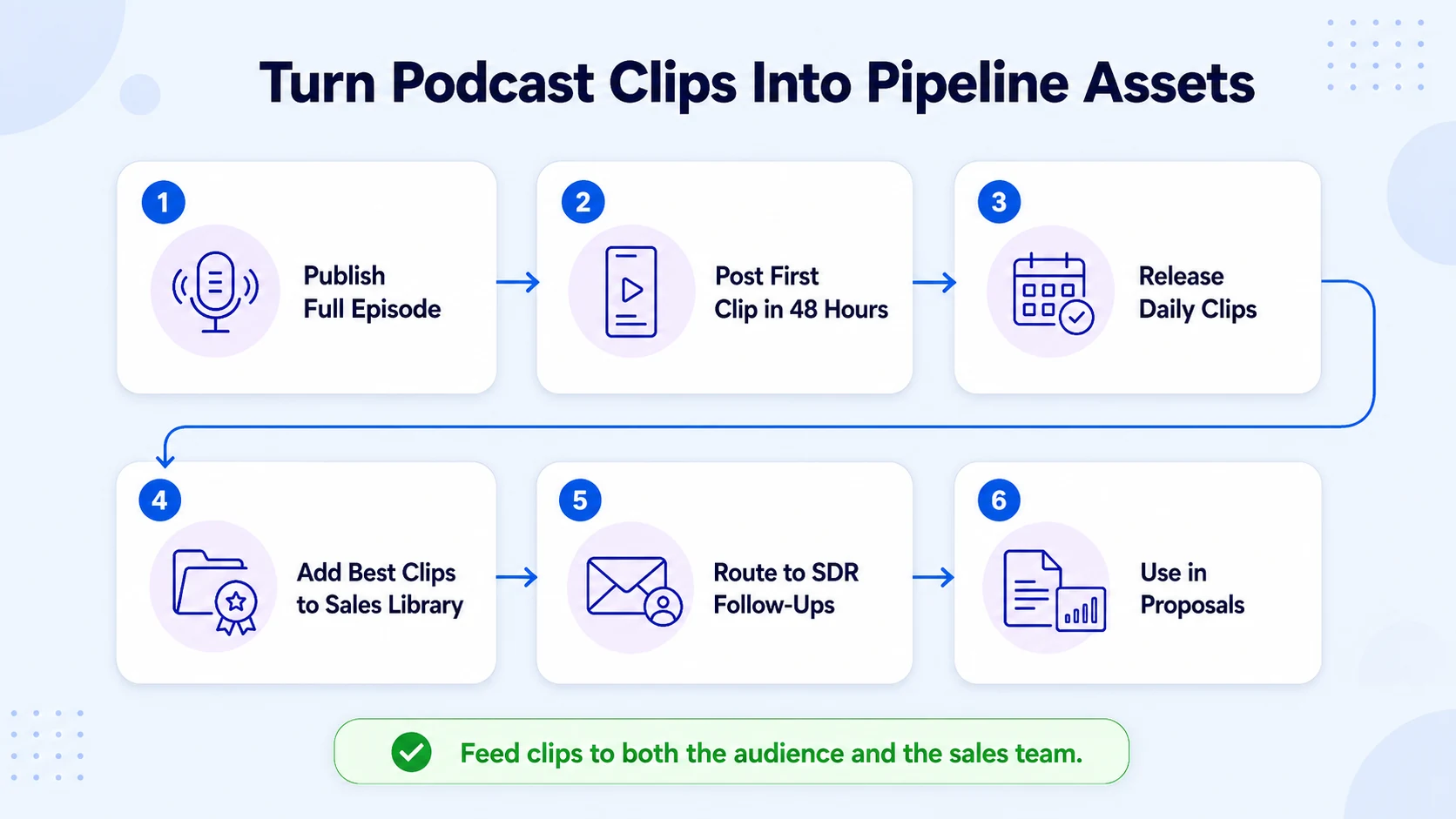
Distribution sequence per episode:
- Publish the full episode to your podcast and YouTube
- Post the highest-impact clip on LinkedIn within 48 hours of launch, post the top-performing clip within 48 hours of the episode going live to capture initial audience momentum
- Release 1 clip per day for the next 4–6 days
- Add the best 2–3 clips to your sales enablement library, tagged by topic and buyer stage
- Route relevant clips to your SDR team for follow-up sequences, add episode links, short clips, and relevant pull-quotes into proposals and follow-ups to increase trust and differentiation
For SaaS teams, the highest-value clips for sales enablement are objection-handling moments and product-adjacent education. When a prospect raises a concern on a discovery call, a 60-second clip from your founder addressing that exact concern, recorded naturally in a podcast context, lands with more credibility than a polished sales one-pager.
After hearing podcast episodes, 61% of podcast listeners feel more favorable toward a brand. Companies with branded podcasts achieve 89% higher brand awareness and 57% higher brand consideration. Clips extend that trust-building effect to buyers who would never seek out a full episode, meeting them in the feed instead of expecting them to subscribe. This is the full output of the framework applied systematically: content repurposing that builds brand, educates buyers, and supports pipeline without requiring any additional recording time.
Conclusion
A podcast-to-clips framework for B2B is the highest-leverage move available to SaaS and funded tech teams with an existing recording habit. Key takeaways:
- Identify clips at the transcript stage, not after listening back to the full episode, save time, increase precision
- Cut 4–7 clips per episode in vertical format (9:16), 45–90 seconds each, with burned-in captions always
- Distribute on LinkedIn first, sequence clips across 5–7 days, and route the best ones directly into sales workflows
- Build a repeatable SOP, a podcast-to-clips framework for B2B only compounds when it runs every episode, not just occasionally
Frequently Asked Questions
Q1: How many clips should I produce from one B2B podcast episode?
For most B2B shows, three to eight clips per episode is the right range. Start with 4–5 to build the habit, then scale once your team has a consistent SOP in place. Quality over volume, each clip must make one standalone point.
Q2: Do I need video recording, or can I clip an audio-only podcast?
You can produce audiograms from audio-only recordings, but video clips significantly outperform them on LinkedIn. Even for audio-first shows, recording video in every session preserves all downstream repurposing options. You do not need a multi-camera setup to start. A single camera with basic lighting produces footage you can clip for YouTube, LinkedIn, and Instagram.
Q3: What aspect ratio should B2B podcast clips be in?
Vertical 9:16 is the standard for LinkedIn, Instagram Reels, and YouTube Shorts. 76% of teams adjust aspect ratio depending on where they're posting, and more than half resize specifically for LinkedIn and Instagram. Square (1:1) works as a fallback for older feed placements.
Q4: How soon after publishing should I post the first clip?
Post the top-performing clip within 48 hours of the episode going live to capture initial audience momentum, then spread the remaining clips across the following week. This pacing builds sustained visibility rather than a single spike.
Q5: Can I use AI tools to automate the clipping process?
Yes, tools like OpusClip or Descript significantly speed up the first-pass selection. The AI identifies high-engagement moments and adds captions automatically. Human review is still essential to ensure clips align with your brand voice and address the right buyer pain points.
Q6: How does a podcast clipping system support B2B sales teams?
Short clips serve as lightweight trust-builders in the sales process. Reps can share relevant clips in follow-up emails, proposals, or LinkedIn DMs. Adding episode links, short clips, and relevant pull-quotes into proposals and follow-ups increases trust and differentiation, particularly effective when the clip directly addresses a prospect's stated concern.

